What Is an AI Image Detector, and What Can It Tell You?

An AI image detector is software that analyzes a still image for visual, statistical, provenance, or watermark signals associated with AI generation or editing. It returns a probability, label, or evidence report, but it does not prove that the image is factually true or false, identify its creator, or explain why it was shared.
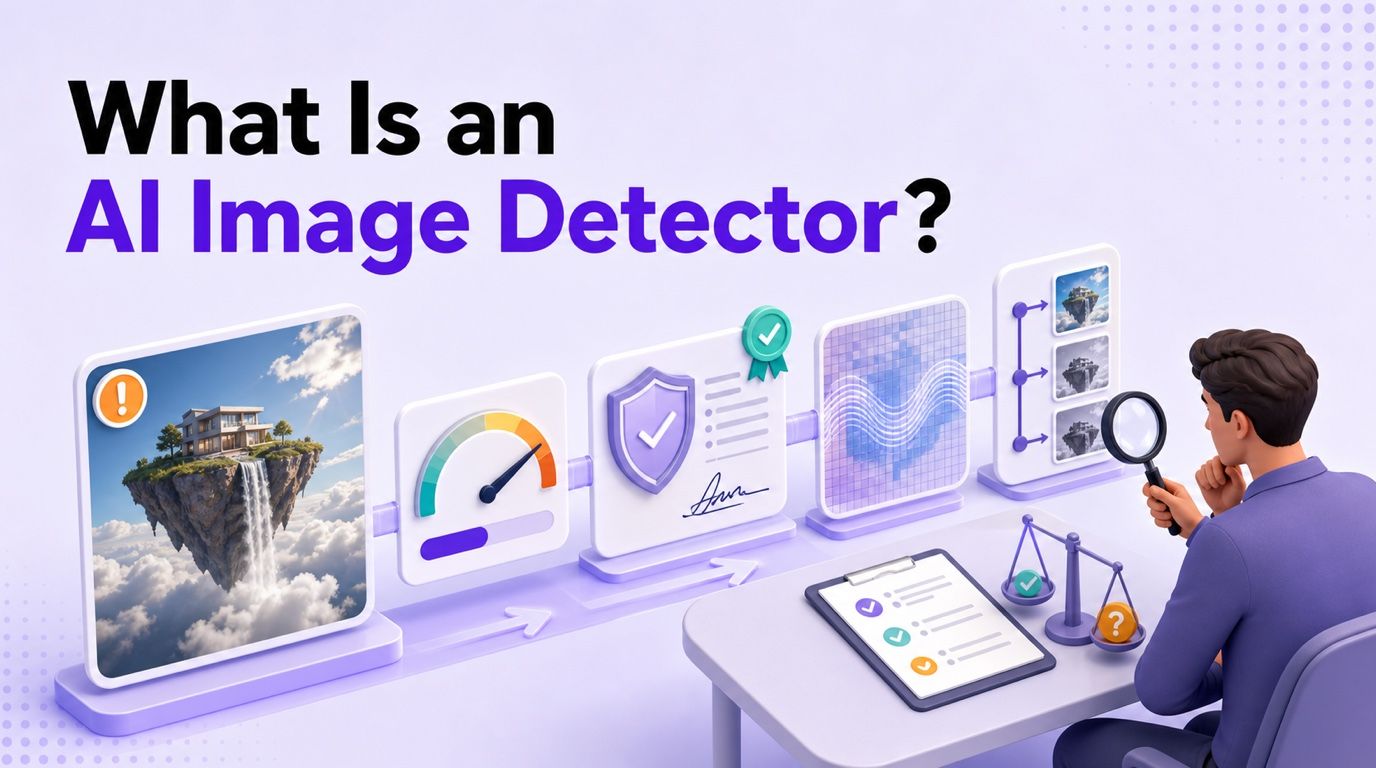
That distinction matters because "AI-generated," "edited," "fake," and "misleading" describe different things. A detector can help you investigate the first two; verifying the source and claim is still necessary for the last two.
The Most Important Distinction: AI-Generated Is Not the Same as Fake
An image's production method does not automatically tell you whether its message is honest. A clearly labeled AI illustration in a presentation is synthetic, but it may not be deceptive. A genuine photograph paired with the wrong date or location is not AI-generated, yet it can still spread a false claim.
Consider four common cases:
- An openly labeled AI illustration: The image is synthetic, but the creator and purpose are disclosed.
- A real photo with a false caption: The pixels may come from a camera, while the surrounding claim is misleading.
- A real photo edited with AI: Most of the scene may be authentic even though an object, face, or background was altered.
- A fabricated photorealistic event: The entire scene may have been generated to depict something that never happened.
An AI image detector is most directly relevant to the third and fourth cases. It may also identify the first case, but it cannot decide whether the use is ethical, satirical, artistic, fraudulent, or newsworthy.
This gives you four separate questions to ask:
- Origin: Was the image captured, generated, or assembled?
- Editing: Was AI used to change part of it?
- Accuracy: Does the image support the claim attached to it?
- Intent: Is the person sharing it trying to inform, entertain, advertise, or deceive?
A detector mainly contributes evidence about origin and editing. The other questions require source history and context.
What Can an AI Image Detector Actually Tell You?
Most AI image detectors evaluate patterns in the uploaded file and compare them with patterns learned from real and synthetic images. Some tools also inspect metadata, provenance credentials, or embedded watermarks, which can add more concrete evidence when those signals are available.
The output may include a label such as "likely AI-generated," an AI probability, a human probability, a heat map, a possible generator family, or file-level evidence. The exact report depends on the tool, so similar percentages from two services are not necessarily calculated in the same way.
| An AI image detector may help indicate | It cannot establish by itself |
|---|---|
| Whether the file resembles images produced by known AI generators | Whether the scene or claim is factually true |
| Whether signs of AI editing may be present | Who created or uploaded the image |
| Whether supported provenance credentials or watermarks are present | Why the image was created or shared |
| Whether the file deserves a closer review | Whether an image is lawful, ethical, or properly licensed |
| Which areas or signal types affected the result, when the report explains them | Whether a depicted event happened exactly as shown |
| Whether the file matches a detector's known generator patterns | Whether every low-scoring image is an authentic camera photo |
The safest way to read the result is: "This file contains enough signals to justify this level of follow-up." That wording is less dramatic than calling an image real or fake, but it is much closer to what the software can support.
AI Image Detector vs Deepfake Detector, Reverse Image Search, and Image Forensics
People often use several image-verification terms interchangeably. The tools overlap, but each one begins with a different question.
| Tool | Main question | Evidence it uses | Best use |
|---|---|---|---|
| AI image detector | Does this still image contain signals associated with AI generation or editing? | Learned visual patterns, statistical artifacts, and sometimes metadata or watermarks | Initial AI-origin screening |
| Deepfake detector | Has a person, identity, object, or scene likely been synthetically created or manipulated? | Face and image artifacts, model classifiers, provenance, and sometimes temporal or audio signals | Identity impersonation and synthetic-media review |
| Reverse image search | Where else has this image or a similar version appeared online? | Visual similarity, perceptual fingerprints, and indexed web copies | Finding earlier versions, sources, and reused context |
| Provenance checker | Does the file carry signed information about how it was created or edited? | C2PA Content Credentials and related manifest data | Reviewing documented creation and edit history |
| Digital image forensics | Has the file been manipulated, and what technical traces remain? | Metadata, compression history, noise, edges, splicing clues, and expert analysis | Detailed or high-stakes investigation |
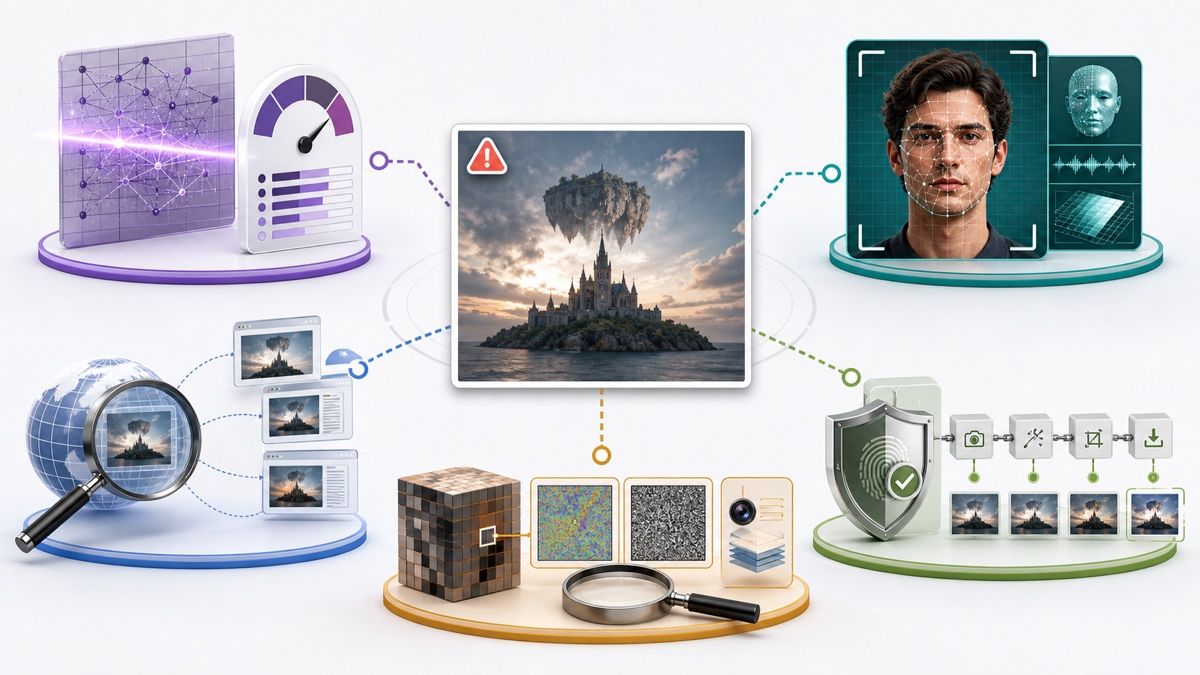
A reverse image search can reveal that a supposedly current news photo appeared years earlier. That finding may disprove the caption even if an AI detector considers the image human-made.
The opposite can also happen. A newly generated image may have no earlier web matches, so reverse search returns little information while an AI detector finds synthetic patterns. Neither result makes the other tool unnecessary.
Deepfake detection is narrower in some contexts and broader in others. It often focuses on deceptive manipulation, especially faces or identities, while a general AI image detector may also classify harmless generated artwork, product mockups, landscapes, or diagrams. Some deepfake platforms extend into video and audio, but a still-image detector does not automatically gain those capabilities.
What Evidence Does an AI Image Detector Use?
AI image detection can draw on three broad evidence families. A tool may use one, two, or all three.
Passive visual and statistical signals
Passive detectors look for patterns already present in the pixels. These can include texture statistics, noise relationships, repeated details, frequency patterns, inconsistencies, or model-specific fingerprints learned from training examples.
This approach can examine images that were never watermarked. Its weakness is generalization: a detector trained on older or familiar generators may struggle with a new model, an unusual image category, or a heavily processed file.
Provenance and metadata
Metadata can contain camera details, editing software names, dates, and export information. C2PA Content Credentials go further by providing signed provenance records that can describe creation and editing actions when compatible tools preserve them.
Present credentials can be useful evidence. Missing credentials are not a verdict because a platform may remove them, an export workflow may not support them, or the file may never have included them.
Embedded AI watermarks
Some generation systems add an imperceptible signal when content is created. Google SynthID is one example: compatible verification technology can check for its watermark even though viewers cannot see it.
A detected supported watermark can be strong origin evidence. An absent watermark only means that the checker did not find that supported signal; it does not rule out another generator, an older workflow, signal degradation, or removal.
The deeper technical pipeline includes preprocessing, feature extraction, thresholds, model fingerprints, and frequency analysis. Those mechanisms are covered separately in our guide to how AI image detectors work.
How to Read an AI Image Detector Score
An AI probability is usually the detector's confidence that the uploaded file belongs to its AI-generated or AI-edited category. A result of 90% does not mean that 90% of the image's pixels were created by AI, nor does it mean the detector has measured 90% of the editing history.
The score is model-dependent. It reflects the tool's training data, chosen signals, preprocessing, and decision threshold. Another detector can analyze the same image with a different model and return a different number without either service performing a simple arithmetic error.
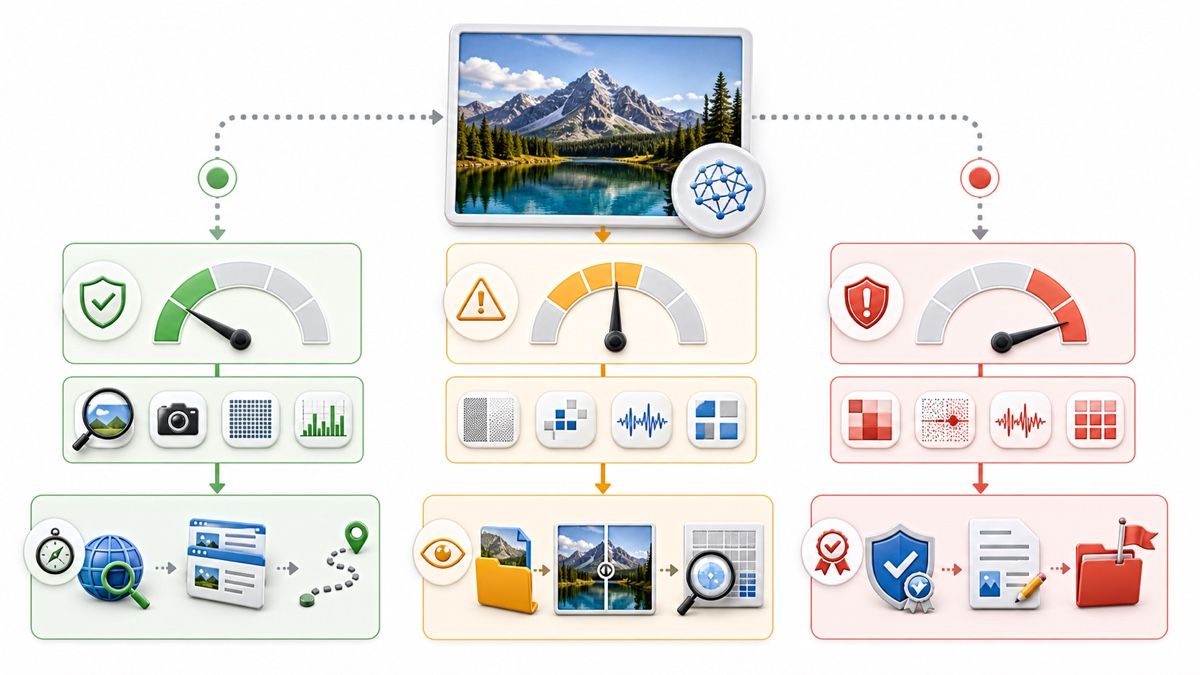
Use the score as a prompt for proportionate action:
| Result pattern | Reasonable interpretation | Appropriate next step |
|---|---|---|
| Low AI likelihood with intact camera provenance and a credible source | Several signals support a non-AI origin, but context still matters | Confirm the claim if the image supports an important decision |
| Low AI likelihood with no metadata and no known source | The detector found little, but the evidence is incomplete | Run reverse search and look for the original |
| Uncertain or mixed result | The file does not fit the detector's categories cleanly | Try the original file, inspect provenance, and use a second method |
| High AI likelihood with no supporting evidence | The classifier is suspicious, but the origin is not confirmed | Seek another detector, source history, or creator disclosure |
| High AI likelihood plus a supported watermark or provenance record | Multiple signals point toward AI generation or editing | Document the evidence and evaluate the attached claim |
| Conflicting detector results | The models disagree or the file has been altered | Avoid a binary conclusion and escalate based on stakes |
Why screenshots and compression matter
A screenshot creates a new file around the visible image. It usually discards the original metadata and can alter dimensions, sharpness, color, and compression patterns. Social platforms and messaging apps can make similar changes during upload and download.
The detector is then evaluating the transformed copy, not the original evidence. You can still check it, but a weak or uncertain result should lead you to seek a cleaner version rather than assume the image is authentic.
Why detector disagreement is normal
One model may focus heavily on pixel patterns, another on generator fingerprints, and another on provenance or watermarks. Their training sets may include different versions of Midjourney, Stable Diffusion, Gemini, ChatGPT, or other systems.
Disagreement is useful information: it tells you the conclusion is sensitive to the method. For a detailed discussion of performance, false positives, and false negatives, see how accurate AI image detectors are.
How to Check a Suspicious Image With Lynote
Lynote AI Image Detector provides an image-level starting point for checking AI-generation and AI-assisted editing signals. It supports JPG, JPEG, PNG, and WebP images up to 10 MB and separates a quick Basic Scan from a deeper Advanced Scan.
Step 1: Upload the clearest available image
Open Lynote AI Image Detector and drag the image into the upload area, or click Choose Image. Use the original file when possible because it may preserve provenance and file information that a screenshot or social-media copy has lost.
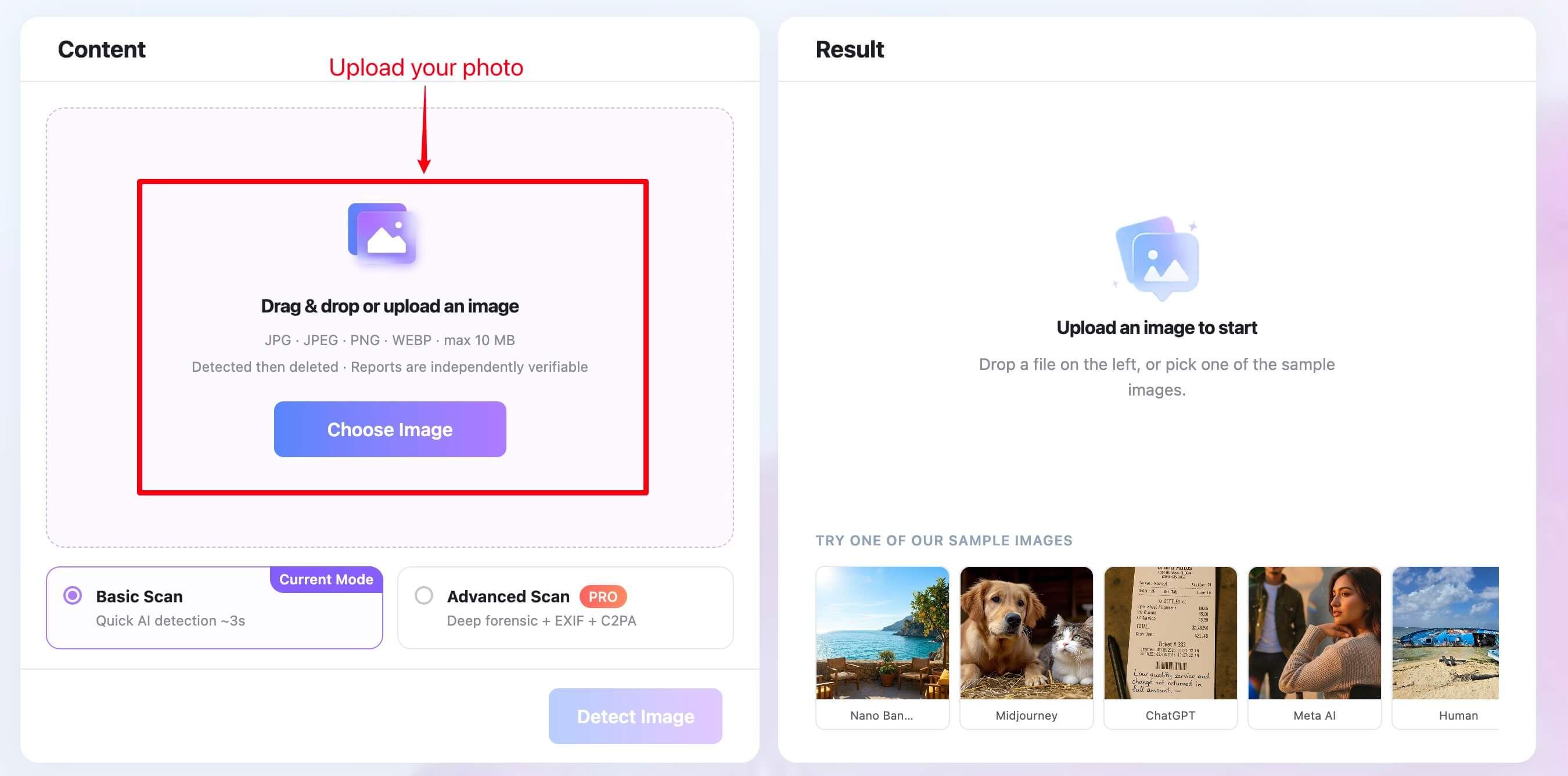
If the only evidence is a video, you can upload a clear extracted frame for image-level review. That result applies to the frame, not the video's motion, lip-sync, or audio.
Step 2: Choose Basic or Advanced Scan
Choose Basic Scan for a quick initial AI probability, or select Advanced Scan when deeper EXIF, C2PA, watermark, edit-history, and report evidence would help. Then click Detect Image.
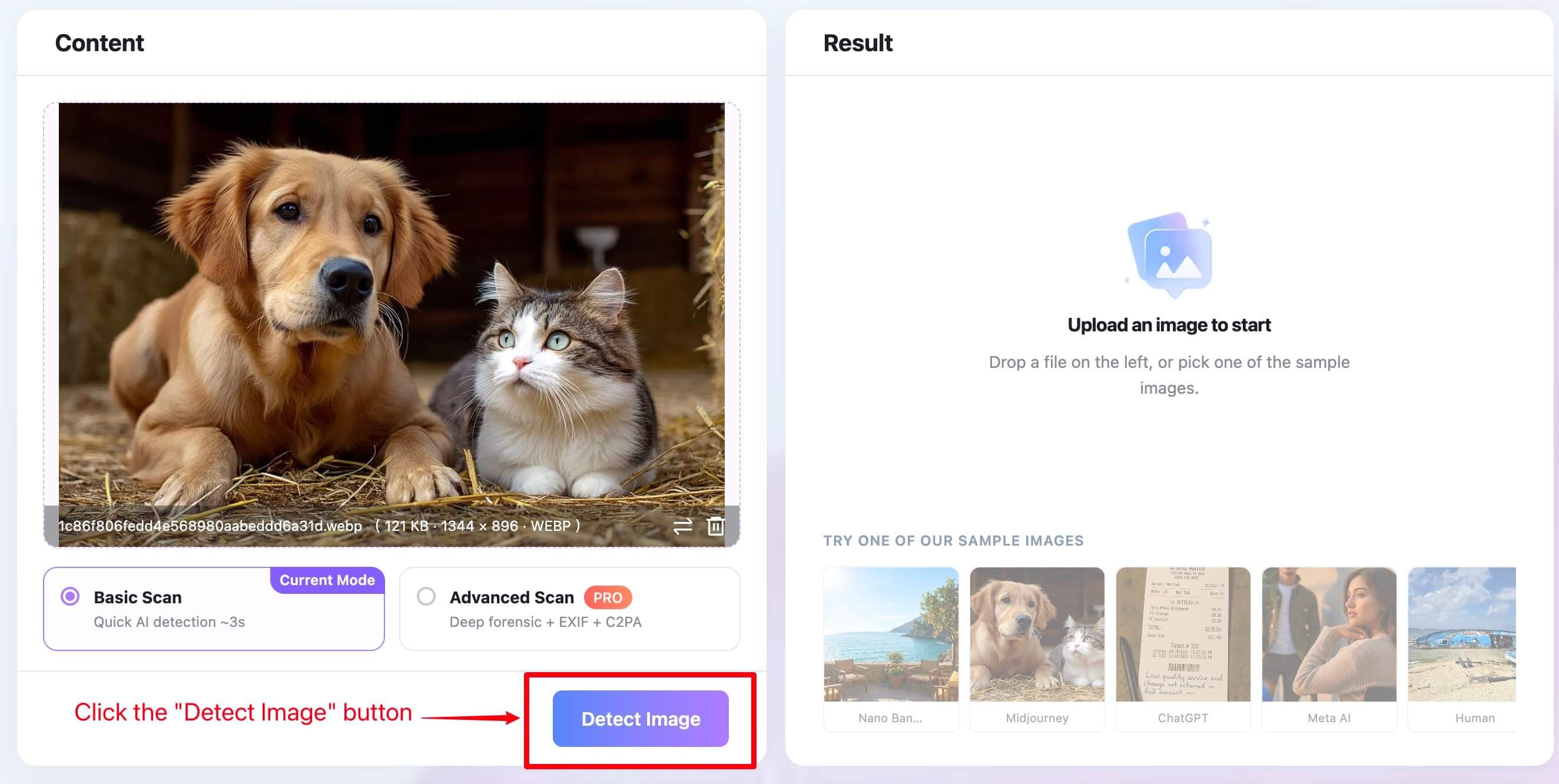
Advanced evidence does not guarantee a conclusive answer. A file can lack EXIF or C2PA data for ordinary reasons, including screenshots, exports, and platform processing.
Step 3: Review the result in context
Read the probability and verdict together with any available provenance and file evidence. Ask whether the signals agree, whether you have the original, and whether the source makes a verifiable claim.
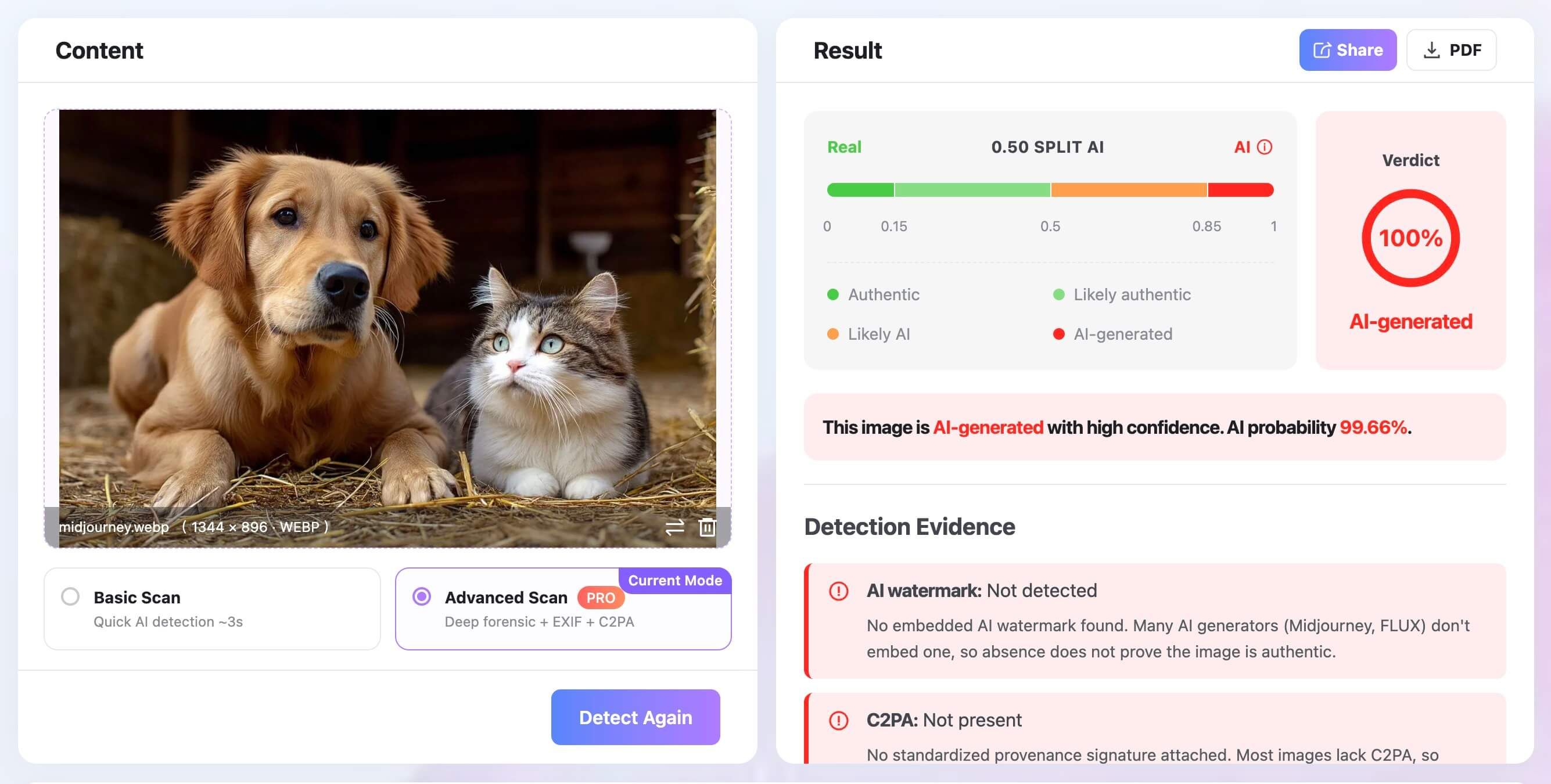
Treat the output as a reason to investigate, not as proof of who created or edited the image. The more serious the decision, the more independent evidence you should require.
When Should You Use an AI Image Detector?
The tool is most useful when the production method matters and you need a fast first signal. It can help narrow the next step before you invest time in a fuller investigation.
Before sharing a viral image
A dramatic image may be designed to trigger an immediate reaction. Run a check, then look for the earliest source, credible reporting, and other photographs or video from the event before sharing it.
When a profile or marketplace identity looks suspicious
Synthetic portraits can support fake accounts, romance scams, impersonation, and payment fraud. A detector can add one signal, but identity decisions should also consider account history, reverse image results, live verification, and platform procedures.
When reviewing creative or marketing assets
Publishers, educators, clients, and creative teams may need to understand whether an asset was generated, edited, or captured. Detection can help start a disclosure or licensing conversation, but it cannot determine copyright ownership from the pixels alone.
When screening submitted images
Teachers, competitions, marketplaces, and communities may have rules about generated content. Use detector results to identify work that needs clarification, not as an automatic penalty. Ask for drafts, source files, process notes, or creator disclosure when the decision affects a person.
When triaging news or research material
Journalists and researchers can use an image detector before spending more time on source tracing and corroboration. The result should never substitute for confirming who supplied the image, when it was created, and what the image is claimed to show.
When an AI Image Detector Is Not Enough
An AI image detector is not a legal authentication service, identity check, fact-check, or complete forensic examination. It should not carry a decision alone when the consequences include discipline, financial loss, public accusation, account removal, legal evidence, or personal safety.
In those situations, seek the original file and document its chain of custody. Review signed provenance where available, compare earlier versions, verify the person or organization supplying it, and consult a qualified forensic specialist when necessary.
The modality also matters. Checking one frame from a video does not reveal temporal inconsistencies, cloned voices, lip-sync manipulation, or edits elsewhere in the clip. Video and audio require tools and expertise designed for those signals.
A Five-Step Image Verification Workflow
A layered process produces a more defensible conclusion than repeatedly uploading the same file to similar classifiers.
1. Find the best available original
Save the highest-resolution version and ask for the source file when possible. Record where you found it, who shared it, and what claim accompanied it.
2. Run an image-level detector
Use the result to estimate whether AI-origin signals are present. Note the tool, date, file version, score, and any areas or signal types highlighted in the report.
3. Inspect provenance and watermark evidence
Check C2PA credentials, EXIF, software tags, and supported AI watermarks. Separate "not found" from "evidence that it is absent"; those statements are not equivalent.
4. Trace the source and context
Run a reverse image search, look for earlier copies, and verify the publisher or creator. Compare the image with reliable reporting, official records, other camera angles, or known originals.
5. Match the conclusion to the stakes
For casual curiosity, an inconclusive result may be enough reason not to share. For professional, disciplinary, financial, or legal decisions, require independent corroboration and preserve the evidence used.
You can think of these checks as an evidence ladder:
- Classifier signal: useful for triage.
- Watermark or provenance signal: stronger evidence about supported origin.
- Source history: evidence about where the file came from and how it circulated.
- Independent corroboration: evidence about the depicted event or claim.
- Expert forensic review: appropriate for disputed, technical, or high-stakes cases.

Moving upward adds context that an isolated probability score cannot provide.
Common Myths About AI Image Detectors
Myth 1: Strange hands prove an image is AI-generated
Malformed hands, text, reflections, and background objects can raise suspicion, but they are not proof. Real images can contain blur, stitching errors, aggressive retouching, or unusual perspectives, while newer generators often render classic problem areas convincingly.
Myth 2: Missing metadata proves AI generation
Many ordinary workflows remove metadata. Screenshots, social platforms, messaging apps, exports, and privacy settings can all produce a file with little or no EXIF information.
Myth 3: A 90% score means 90% of the image was made by AI
The percentage generally expresses classifier confidence, not a measurement of synthetic area. A tool needs a separate localization feature to claim that specific regions were likely edited.
Myth 4: One detector can verify whether a claim is true
A detector assesses the file, not the full story around it. It does not know whether a real photo has been paired with a false caption or whether an AI image has been clearly disclosed.
Myth 5: A low AI score proves the image is authentic
A low score may mean the tool found few familiar signals. It can also reflect a new generator, heavy processing, a screenshot, subtle editing, or a detector that was not trained for that image type.
How to Choose an AI Image Detector
Start with practical fit rather than the largest advertised accuracy number. Confirm that the tool supports your file format and lets you upload a sufficiently clear original without forcing unnecessary conversion or compression.
Look for reports that explain what the score means and disclose the tool's scope. Provenance, watermark, and file evidence can make a report more useful than a single unexplained percentage, especially when the service labels unavailable evidence honestly.
Privacy matters because images can contain faces, identity documents, private locations, or unpublished work. Review how uploads are processed, stored, deleted, and reused before submitting sensitive material.
Finally, choose based on the decision you need to make. A simple classifier may be enough for casual triage, while a journalist, fraud analyst, or investigator may need provenance support, exports, audit records, and specialist review. Our comparison of the best AI image detectors covers tool selection in more detail.
FAQs About AI Image Detectors
Can an AI image detector prove that a picture is fake?
No. It can estimate whether an image contains AI-generation or editing signals, but it cannot prove that the scene or attached claim is false. A real image can be misleading, and an AI image can be accurately disclosed.
Can an AI image detector detect AI-edited photos?
Some detectors can flag signs of partial AI editing, but localized or subtle changes are harder to identify than fully generated images. Check whether the tool specifically supports manipulation localization before interpreting a general score that way.
What does a 90% AI score mean?
It usually means the detector has high confidence, under its own model and threshold, that the image resembles its AI-generated category. It does not mean that 90% of the pixels were generated or that the result is 90% legally certain.
Why do AI image detectors give different results?
Detectors use different training images, model architectures, signals, preprocessing, and thresholds. They may also cover different generators, so disagreement is expected when a file is edited, compressed, unfamiliar, or close to a decision boundary.
Can I check a screenshot with an AI image detector?
Yes, but a screenshot usually removes original metadata and changes the pixels. The result can still support triage, although the original file would provide stronger evidence.
Does missing EXIF or C2PA mean an image is AI-generated?
No. Missing metadata is common after screenshots, exports, and social sharing. Treat absence as unavailable evidence, not evidence of fakery.
Is an AI image detector the same as reverse image search?
No. A detector estimates AI-related signals inside the file, while reverse image search looks for similar copies and source history across an index. Important checks often use both.
Can an AI image detector analyze a video?
A still-image detector may analyze an extracted frame, but it does not examine motion, lip-sync, temporal consistency, or audio across the full video. Use a video-focused system when those signals matter.
Final Verdict: Use the Detector to Decide What to Verify Next
An AI image detector is best understood as a triage and evidence tool. It can estimate whether a still image resembles AI-generated content and, in stronger workflows, place that probability beside provenance, watermark, metadata, or file evidence.
Its most useful output is not a final accusation. It is a better next question: should you find the original, trace the source, seek corroboration, run a different type of check, or escalate the image for expert review?

Written by Danny
Product Marketing Manager
Danny explains how Lynote features fit real workflows, from everyday productivity to product-led writing use cases. View all articles →