Are AI Image Detectors Accurate?

When evaluating the authenticity of digital media, one of the most common questions professionals and everyday users ask is, are ai image detectors accurate? As generative artificial intelligence models become increasingly sophisticated, the line separating synthetic visuals from traditional photography continues to blur.
This rapid advancement has created a pressing need for reliable detection tools across journalism, education, e-commerce, and social media. However, understanding the true reliability of these tools requires looking beyond a single percentage score. Accuracy is not a fixed, universal number; rather, it is a dynamic metric that depends heavily on the quality of the image, the specific generative model used to create it, the presence of digital editing, and the underlying technology of the detection tool itself.
In this comprehensive guide, we will explore the nuances of AI image detection performance. We will break down what accuracy actually means in a machine learning context, why scores can vary so wildly from one image to the next, and how to interpret false positives and false negatives. By understanding the underlying mechanics, limitations, and best practices for evaluating synthetic media, you can make informed decisions about which tools to use and how much weight to give their results.
Quick Verdict: Do AI Image Detectors Work?
If you are simply wondering, do AI image detectors work, the short answer is yes—they can be highly useful as part of a broader verification process. When provided with high-quality, unaltered original files, modern detection systems can often identify the subtle pixel-level anomalies, frequency patterns, and structural inconsistencies that characterize synthetic generation. Many tools also scan for cryptographic provenance data and digital watermarks, adding layers of technical evidence to their analysis.
However, it is crucial to understand that these tools operate on probabilities, not absolute certainties. They function best as a strong review signal rather than definitive, standalone proof. The performance of any detection model can degrade when analyzing images that have been heavily compressed, screenshotted, resized, or manually edited.
As new generative AI models are released, detection tools must continually update their training data to recognize novel synthetic patterns. Therefore, while AI image detectors are valuable instruments for flagging suspicious content, their results should typically be combined with human judgment and contextual investigation.
What Accuracy Means for an AI Image Detector
When users ask how accurate are AI image detectors, they are often looking for a straightforward success rate, such as "95% accurate." In the realm of machine learning and forensic analysis, however, accuracy is a complex, multi-faceted concept. A single percentage can be misleading if you do not understand the specific metrics used to calculate it and the dataset upon which it was tested.

To truly evaluate the reliability of a detection tool, data scientists and researchers look at several distinct performance metrics. Each metric answers a slightly different question about the model's behavior.
The Core Metrics of Detection Performance
-
Overall Accuracy: This is the most commonly cited metric, representing the total number of correct predictions divided by the total number of images analyzed. While easy to understand, overall accuracy can be skewed if the test dataset is unbalanced, such as a set containing mostly real images.
-
Precision: Precision answers the question: Of all the images the detector flagged as AI, how many were actually AI? High precision means the tool is cautious and rarely falsely accuses a real image of being synthetic. This is a critical metric in scenarios where false accusations carry heavy consequences.
-
Recall (Sensitivity): Recall answers the question: Of all the actual AI images in the dataset, how many did the detector successfully find? High recall means the tool is aggressive and catches most synthetic images, even if it occasionally flags a real image by mistake.
-
AUC (Area Under the Curve): AUC is a more advanced and often more reliable metric than raw accuracy. It measures the model's ability to distinguish between classes across all possible decision thresholds, giving researchers a holistic view of performance regardless of where the probability threshold is set.
-
Decision Threshold: Most detectors output a probability score, such as "85% likelihood of being AI." The threshold is the cutoff point at which the tool labels the image as "AI" or "Human." Adjusting this threshold changes the balance between precision and recall.
| Metric | What It Measures | Why It Matters for Users |
|---|---|---|
| Overall Accuracy | The total percentage of correct classifications across all images. | Provides a baseline, but can be misleading if the test dataset does not reflect real-world conditions. |
| Precision | The percentage of true AI images among all images flagged as AI. | Crucial when false accusations (false positives) are damaging, such as in academic or journalistic settings. |
| Recall | The percentage of actual AI images successfully detected by the tool. | Important when missing a synthetic image (false negative) is dangerous, such as in fraud detection. |
| AUC (Area Under Curve) | The model's overall ability to distinguish between AI and real images. | Offers a robust, threshold-independent view of the detector's underlying analytical strength. |
| F1 Score | The harmonic mean of precision and recall. | Provides a balanced view of performance when you need both high precision and high recall. |
Why AI Image Detector Scores Vary So Much
It is a common experience to upload the same image to three different detection tools and receive three entirely different probability scores. This variability can be frustrating, but it makes sense when you understand the factors that influence machine learning models.

Training Data Alignment
Machine learning models learn by analyzing vast datasets of known real and known synthetic images. If a detector was trained primarily on images generated by older models (like early versions of Stable Diffusion or DALL-E 2), it may struggle to identify the refined outputs of newer models (like Midjourney V6 or DALL-E 3). The accuracy of a detector is inherently tied to how closely its training data aligns with the specific image it is currently analyzing.
Dataset Difficulty and Image Categories
Not all images are equally easy to classify. A detector might achieve high accuracy on portraits of human faces because AI generators historically struggle with fine details like pupils, teeth, and skin texture. However, that same detector might perform poorly on abstract art, landscape photography, or digital illustrations, where the visual rules are less rigid and synthetic anomalies are harder to spot.
The Impact of Compression and Format Changes
Many AI image detectors rely on analyzing high-frequency signals—subtle, pixel-level patterns and noise distributions left behind by the generation process. These patterns are often invisible to the naked eye.
When an image is uploaded to a social media platform, sent through a messaging app, or saved in a highly compressed format, the file undergoes compression algorithms that discard fine pixel data to reduce file size. This compression can destroy the very high-frequency signals the detector needs to make an accurate assessment, leading to lower confidence scores or incorrect classifications.
Screenshots and Metadata Loss
Taking a screenshot of an AI-generated image is one of the fastest ways to degrade detection accuracy. A screenshot creates a brand-new image file of your screen, flattening the original pixel structure and stripping away any hidden metadata, cryptographic signatures, or digital watermarks that might have been embedded in the original file. Without these crucial clues, the detector is forced to rely solely on the degraded visual data.
False Positives vs False Negatives
To fully grasp the reliability of these tools, you must understand the two primary ways they can fail: false positives and false negatives. The impact of these errors varies drastically depending on your specific use case.

Understanding False Positives
A false positive occurs when an AI image detector incorrectly flags a genuine, human-created photograph or artwork as being AI-generated. This often happens when a real image exhibits characteristics that the model associates with synthetic media.
For example, a photograph that has been heavily retouched, aggressively smoothed, or subjected to intense HDR processing might trigger a false positive. Similarly, digital art created manually by a human artist using software like Photoshop can sometimes share stylistic similarities with AI outputs, confusing the detector.
In certain contexts, false positives can be highly damaging. In educational settings, falsely accusing a student of using AI for an art project can lead to unwarranted academic penalties. In journalism or professional photography competitions, a false positive can damage a creator's reputation.
Therefore, when evaluating an accurate AI image detector for these sensitive use cases, prioritizing high precision is essential.
Understanding False Negatives
A false negative occurs when a detector analyzes an AI-generated image but incorrectly classifies it as human-made or real. This typically happens when the generative model used to create the image is newer or more advanced than the detector's training data, or when the image has been intentionally altered (e.g., compressed, cropped, or printed and scanned) to mask its synthetic origins.
False negatives pose significant risks in environments where authenticity is critical for safety or trust. For marketplace review teams, a false negative might allow a fraudulent product listing to go live. For identity verification systems, missing a synthetic document or face could lead to security breaches.
In these scenarios, teams may prioritize high recall, preferring a tool that flags anything suspicious, even if it occasionally requires manual review of a real image.
When AI Image Detectors Are Usually More Reliable
While accuracy fluctuates, there are specific conditions under which AI image detectors are typically much more reliable. Providing the detector with the best possible evidence significantly increases the likelihood of a correct classification.
Original, High-Resolution Files
Detectors perform best when analyzing the original, unaltered file exported directly from the generative AI platform or the original digital camera. High-resolution files preserve the intricate pixel structures, noise patterns, and subtle artifacts that forensic algorithms are trained to identify.
Intact Metadata and C2PA Credentials
Many modern detection tools do not rely on pixel analysis alone; they also examine the file's underlying data. If an image retains its original EXIF data or includes C2PA (Coalition for Content Provenance and Authenticity) Content Credentials, the detector can read this information.
C2PA acts as a tamper-evident digital manifest, providing cryptographically verifiable provenance about how the image was created and edited. When these signals are present and intact, they can raise the detector's confidence significantly.
Presence of Digital Watermarks
Some AI generators, such as Google's SynthID, embed invisible digital watermarks directly into the pixels of the image. These watermarks are designed to be robust against cropping, resizing, and mild compression. If a detector is equipped to read these specific watermarks, it can identify the image's synthetic origin with higher confidence, even if the visual content is ambiguous.
| Scenario | Impact on Detector Reliability | Reason |
|---|---|---|
| Original, uncompressed download | High Reliability | Preserves pixel-level high-frequency noise and subtle structural artifacts. |
| Intact C2PA Content Credentials | High Reliability | Provides cryptographically verifiable proof of the file's origin and editing history. |
| Embedded digital watermarks | High Reliability | Offers a hidden, algorithmic signature that specific detectors can definitively read. |
| Known, older generative models | Moderate to High Reliability | Detectors have extensive training data on these specific synthetic patterns. |
When AI Image Detectors Are Less Reliable
Conversely, there are common scenarios where you should view detector results with a higher degree of skepticism. In these situations, the tool may lack the necessary data to make an accurate assessment.
Social Media Downloads and Heavy Compression
As mentioned earlier, platforms like Instagram, Facebook, and WhatsApp automatically compress images to save bandwidth. This process smooths out the image, destroying the microscopic forensic clues that detectors rely on. An image that scores a 98% AI probability in its original state might drop to a 40% probability after being uploaded and downloaded from a social media feed.
Screenshots and Formatting Changes
Screenshots are notorious for defeating AI image detectors. By capturing the image displayed on a monitor, a screenshot creates a new file with a different resolution, altered pixel grid, and zero original metadata. This forces the detector to guess based on degraded visual information, often leading to inconsistent results.
Mixed Workflows and Human Editing
The boundary between "real" and "AI" is not always clear-cut. Many creators use mixed workflows, where they might start with a real photograph and use AI generative fill to alter the background, or they might generate an AI base image and spend hours manually repainting details in Photoshop. These hybrid images can confuse detectors, leading to middle-of-the-road probability scores that are difficult to interpret.
Brand New Generative Models
The generative AI landscape evolves rapidly. When a new, highly advanced model is released, it may produce images with entirely new structural patterns that existing detectors have not yet learned to recognize. Until detection tools update their training datasets to include outputs from the new model, their accuracy on those specific images may temporarily drop.
What Is the Most Accurate AI Image Detector?
Given the complexities of machine learning, users frequently search for the most accurate AI image detector on the market. However, it is important to understand that there is no single, universally reliable tool. Because accuracy depends so heavily on the specific use case, the type of image being analyzed, and the generative model used, the "best" tool is often the one that provides the most transparent, multi-layered analysis.

Instead of looking for a tool that claims flawless accuracy, you should look for a detector that evaluates multiple signals simultaneously. The most reliable systems combine traditional pixel-level machine learning analysis with deep forensic checks for metadata, C2PA credentials, and digital watermarks. Furthermore, an accurate AI image detector should provide detailed reporting—explaining why it reached a certain conclusion—rather than just outputting a vague percentage.
Criteria for Choosing a Reliable Detector
-
Multi-Signal Analysis: Does the tool look at both the visual pixels and the underlying file data, such as EXIF and C2PA?
-
Format Support: Can it handle standard web formats like JPG, PNG, and WEBP at high resolutions without forcing you to compress the file first?
-
Transparent Reporting: Does the tool break down its findings, showing you separate probabilities or flagging specific forensic anomalies?
-
Regular Updates: Is the tool actively maintained to recognize outputs from the latest generative models?
| Feature to Look For | Why It Matters for Accuracy |
|---|---|
| Pixel-Level ML Analysis | Detects the visual artifacts and frequency noise unique to AI generation. |
| C2PA & EXIF Scanning | Reads hidden metadata and cryptographically verifiable provenance trails. |
| High File Size Limits | Allows you to upload original, uncompressed files for the most accurate reading. |
| Clear Probability Breakdown | Helps you understand the nuance of the result rather than relying on a binary "Yes/No." |
How to Test an AI Image Detector Before You Trust It
Before integrating any AI image detector into your professional workflow, it is wise to run your own internal testing protocol. This helps you understand the tool's baseline behavior, how it handles the specific types of images you encounter, and where its blind spots might be.
To build a simple testing protocol, gather a diverse dataset of images. Include known real photographs straight from a digital camera, real images that have been heavily edited or color-graded, and known AI images generated by various models (e.g., Midjourney, DALL-E, Stable Diffusion).
Next, create variations of your test images. Compress some of them using online tools, take screenshots of others, and strip the metadata from a few. Run all these variations through the detector and compare the score stability.
If a tool correctly identifies an original AI image but fails when given a screenshot of that same image, you now know a critical limitation of that tool. By testing the detector under real-world conditions, you can better calibrate your trust in its daily outputs.
Use Lynote AI Image Detector as a Multi-Signal Review Tool
When evaluating synthetic media, relying on a single data point can lead to misinterpretation. The Lynote AI Image Detector is designed to function as a comprehensive, multi-signal review tool, helping you gather the evidence needed to make an informed decision.
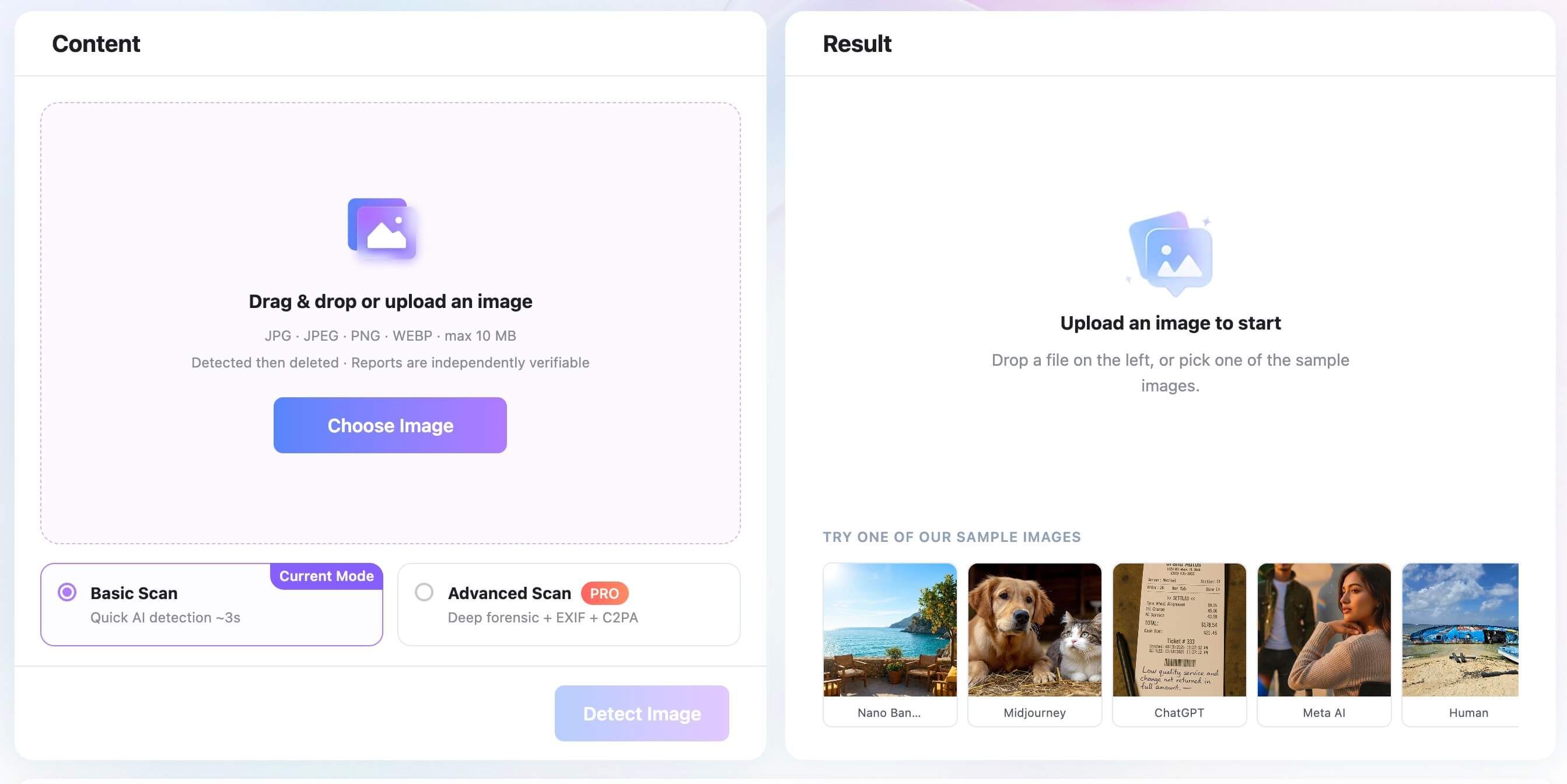
Lynote supports standard image formats, including JPG, JPEG, PNG, and WEBP, with file sizes up to 10 MB. This generous file size limit allows you to upload high-resolution, uncompressed originals, which is critical for preserving the high-frequency signals and metadata necessary for accurate detection.
The workflow is straightforward and designed for both quick checks and deep forensic review. Users simply upload their image and click "Detect Image." From there, you can utilize the Basic Scan for a rapid AI probability assessment, or engage the Advanced Scan for a deeper forensic review that examines EXIF data and C2PA Content Credentials.
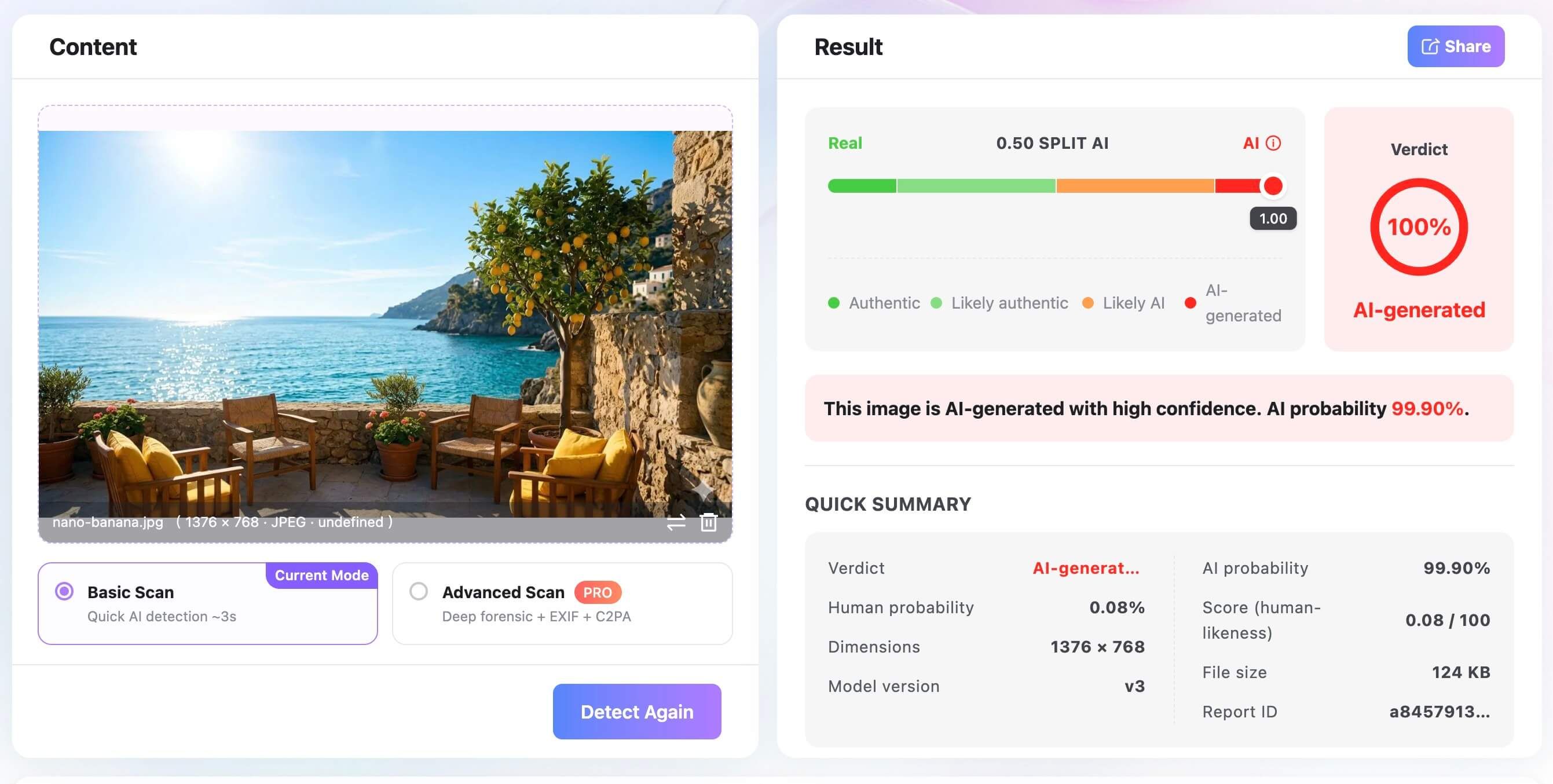
Rather than providing a simple binary answer, the Lynote AI Image Detector presents a nuanced report. You can review the AI probability score alongside the human probability score, examine detailed file characteristics, and check for underlying provenance signals.
Because accuracy can vary based on image quality, compression, editing, and the source context, Lynote encourages users to view these results as strong, layered review signals rather than absolute proof. By combining pixel analysis with metadata review, you gain a much clearer picture of the image's likely origin.
A Practical Accuracy Checklist
To maximize the reliability of your detection efforts, follow this practical checklist whenever you need to evaluate a suspicious image:
- Seek the Original Source: Always try to obtain the highest resolution, original version of the file. Avoid analyzing thumbnails, social media downloads, or screenshots if possible.
- Check the File Format: Ensure the file is in a standard format (JPG, PNG, WEBP) and hasn't been aggressively compressed or converted multiple times.
- Review the Metadata: Look beyond the visual content. Check for EXIF data, software tags, or C2PA credentials that might indicate the software used to create or edit the file.
- Understand the Context: Ask yourself where the image came from. Does the visual content align with the claimed context? Are there logical inconsistencies in the scene?
- Use Layered Tools: Utilize detectors that offer multi-signal analysis, combining pixel-level machine learning with metadata and provenance checks.
- Interpret with Caution: Treat probability scores as evidence, not as a final verdict. If a score is borderline, require additional verification before making a decision.
FAQs About AI Image Detector Accuracy
Do AI image detectors work? Yes, they often work well as useful investigative signals, particularly when analyzing original, uncompressed files and utilizing multi-signal checks (like pixel analysis combined with metadata review). However, they should not be treated as flawless, standalone proof, as their performance can be impacted by image degradation.
How accurate are AI image detectors? Accuracy is highly variable and depends on several factors, including the training dataset of the detector, the specific generative model used to create the image, the presence of heavy compression or editing, and the decision thresholds configured in the tool.
What is the most accurate AI image detector? There is no single, universal winner that is accurate in every scenario. The most reliable tools are those that support original-file uploads, conduct metadata and C2PA provenance checks, look for digital watermarks, provide transparent report details, and align with your specific tested use case.
Can a real image be flagged as AI? Yes, this is known as a false positive. Real images can sometimes be flagged as AI if they feature unusual, synthetic-looking subjects, or if they have been subjected to heavy digital editing, aggressive noise reduction, skin smoothing, or HDR processing that mimics the pristine look of AI generation.
Can an AI image pass as real? Yes, this is known as a false negative. An AI-generated image might pass as real if it was created by a brand-new generative model the detector hasn't learned yet, or if the image has been heavily compressed, screenshotted, or intentionally degraded to hide synthetic artifacts and strip away metadata.
Final Verdict: Accuracy Depends on the Evidence You Give the Detector
Ultimately, the answer to the question of whether AI image detectors are accurate is nuanced. These tools are powerful applications of machine learning, capable of identifying subtle digital fingerprints that escape the human eye. However, their accuracy is fundamentally tied to the quality of the evidence they are given.
An original, high-resolution file with intact metadata will usually yield a more reliable result, while a heavily compressed screenshot may leave the detector with too little evidence for a confident conclusion.
To navigate the evolving landscape of synthetic media effectively, it is best to adopt a layered approach to verification. Use robust tools that offer multi-signal analysis, but also take the time to understand how AI image detectors work under the hood. Combine automated detection with manual visual review by learning the common visual anomalies found in AI vs real images.
By understanding the metrics, acknowledging the limitations, and carefully selecting the best AI image detectors for your specific needs, you can evaluate digital content with more confidence and make informed, evidence-based decisions.

Written by Janet L. Harris
AI Writing Specialist
Janet reviews AI detectors and humanization tools, with a focus on accuracy, limitations, and responsible use. View all articles →