






Free AI Detector Tool Online: Check If Text Is AI-Written

Why Choose Lynote's Free AI Detector Tool?
99% Benchmark Accuracy
Built for high-confidence AI detection across human-written, AI-generated and mixed text, with sentence highlights that make results easier to review.
AI Content Detector for Major Models
Check writing from ChatGPT, GPT-5, Gemini, Claude, LLaMA, Mistral and other leading AI tools in one detector.
Paraphrase Detection
Spot text that has been rewritten, polished or humanized by AI instead of relying only on exact wording matches.
50+ Language Support
Use one free online AI detector for English, Spanish, French, German, Portuguese, Chinese, Arabic and more.
Secure and Private
Your drafts, essays and client documents stay private. Lynote does not use submitted text to train detection models.
AI Writing Detector with Sentence Highlights
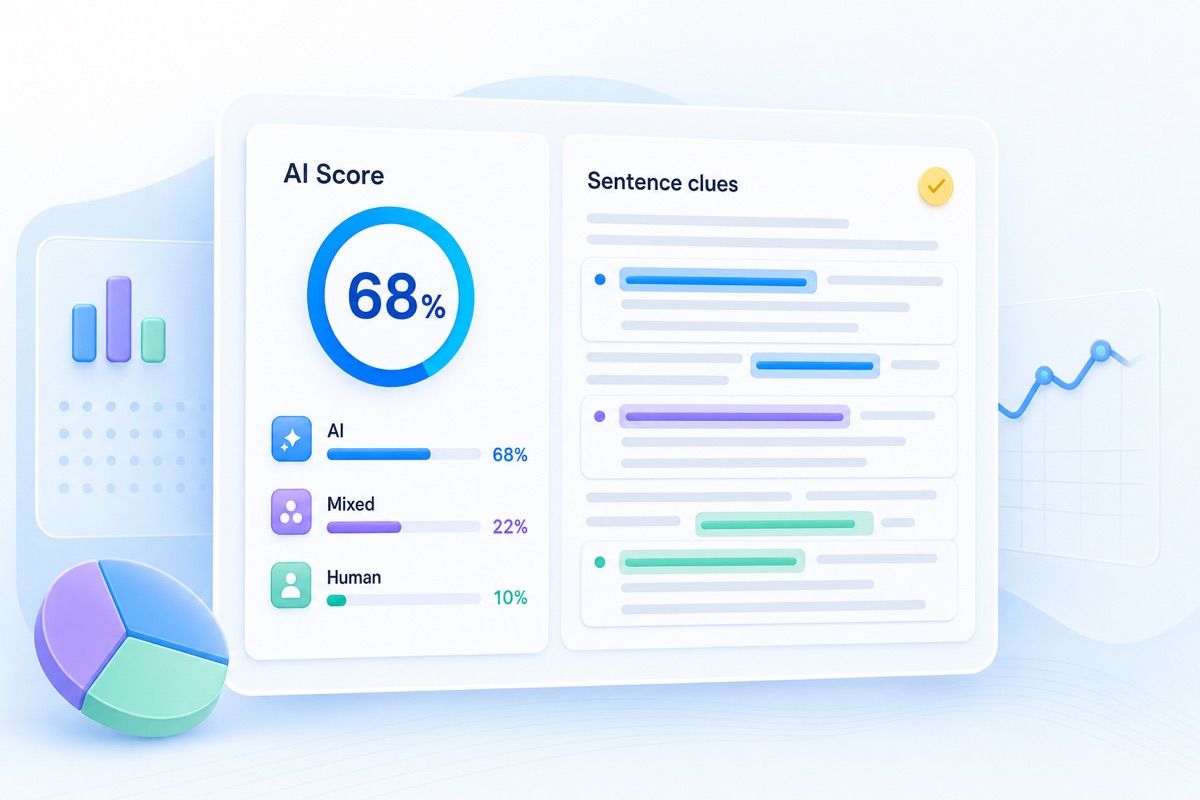
Get AI, human and mixed scores with highlighted sentences, so you know exactly what to review next.

AI Detection You Can Explain
Lynote's AI detector is designed to do more than return a single percentage. It gives an overall score, highlights likely AI-written lines and helps you understand where the text needs closer human review.

Free AI Content Detector for Global Writing
AI-generated writing appears in every language and every workflow. Lynote supports 50+ languages, so students, teachers, publishers and SEO teams can check essays, articles, reports and applications without switching tools.

Sentence-Level AI Text Highlights
Instead of guessing what caused a high AI score, review the exact sentences Lynote flags as AI-generated, AI-edited or mixed. This makes the report easier to use for rewriting, feedback, editorial checks and content quality review.
How to Use the Free AI Detector

Paste Text or Upload a File
Add your text directly or upload a PDF, DOCX or TXT file to prepare it for AI detection.

Click Detect AI
Click Detect AI. Lynote checks sentence patterns, word choice, predictability and signals linked to AI writing tools.

Review the Results
See AI-generated, human-written and mixed scores, then review highlighted sentences before making a decision.
Paste Text or Upload a File
Add your text directly or upload a PDF, DOCX or TXT file to prepare it for AI detection.
Click Detect AI
Click Detect AI. Lynote checks sentence patterns, word choice, predictability and signals linked to AI writing tools.
Review the Results
See AI-generated, human-written and mixed scores, then review highlighted sentences before making a decision.
AI Detector Use Cases

For Blog Posts & SEO
Use an online AI detector before publishing blog posts, landing pages or product copy, so your pages sound useful, original and ready for readers.

For Essays & Academia
Review essays, assignments and research drafts with an AI text detector that shows exactly which lines need attention.

For Research Papers
Screen formal writing with an AI writing detector while still using author drafts, citations and human review for context.

For Professional Writing
Check reports, applications, client work and marketing copy before sharing them with an editor, teacher or team.
Who Uses This AI Detector

Students
Use Lynote as a final check before submitting essays or assignments, especially after using AI for brainstorming or editing.

Educators
Review student writing with sentence-level AI highlights, then combine the result with drafts, context and classroom judgment.

Content Creators
Keep articles, newsletters and scripts sounding original by checking where AI wording may still be too obvious.

SEO Specialists & Marketers
Use an AI content detector to review blogs, landing pages and briefs before they go live.

HR Professionals & Recruiters
Screen cover letters, written assessments and candidate responses while keeping a human reviewer in the hiring process.

Writers & Freelancers
Check your work before delivery and use highlighted sentences to polish anything that sounds too automated.
What Users Say About Lynote
AI Detector FAQ
Answers to common questions about AI detector accuracy, AI checker results, false positives and privacy.
Yes. Lynote offers a free AI detector for checking text online. You can paste text or upload a document and run your first AI check without creating an account. Higher usage limits are available on paid plans.
AI detectors can be useful, but no detector is perfect. Lynote is built for high-confidence AI detection and gives sentence-level highlights so you can review the result instead of relying on one score alone.
AI detectors analyze writing patterns such as word choice, sentence rhythm, predictability and structure. AI-generated text often has smoother, more repeated patterns than human writing. Lynote checks those signals and returns AI-generated, human-written and mixed scores.
The best AI detector is accurate, transparent and easy to interpret. Look for sentence-level highlights, support for major AI models, privacy protections and clear guidance about false positives. Lynote is built for users who need fast results they can actually review.
Yes. Lynote is an AI detector free online for quick text checks. Paste your text, upload a supported file, or try an example to see AI-generated, human-written and mixed results in seconds.
An AI text detector, AI checker, AI content detector or AI writing detector analyzes writing and estimates whether it is AI-generated, human-written or mixed. Lynote also highlights the sentences that need closer review.
Yes. Lynote is designed to check writing from ChatGPT, GPT-5, Gemini, Claude, LLaMA, Mistral and other major AI tools. It also helps review text that has been edited or paraphrased after AI generation.
An AI detector checks whether text appears to be written or edited by AI. A plagiarism checker looks for copied or closely matched source text. They solve different review problems, so many teams use both.
False positives can happen, especially with short, formal, technical or highly structured writing. Review the highlighted sentences, compare earlier drafts and add specific examples or natural phrasing where needed. Do not rely on one AI score alone.
Yes. Lynote supports AI detection in 50+ languages, including English, Spanish, French, German, Portuguese, Chinese, Arabic and more.
Lynote processes text securely and does not use your submitted content to train detection models. This is important for essays, client drafts, unpublished articles, applications and internal documents.
Yes. If Lynote flags AI-heavy sentences, you can use the AI Humanizer to humanize AI text and rewrite it in a clearer, more natural voice. Always review the final text yourself before publishing or submitting it.
Humanize AI Text in Your Own Voice
If Lynote flags AI-heavy sentences, use the AI Humanizer to humanize AI text into clearer, more natural writing before you publish or submit.