What Are Cornell Notes? Format, Examples & Study Tips

Taking notes is easy, but turning those notes into information you can actually remember is often much harder. If you've ever struggled with messy lecture notes or forgotten important details before an exam, you may have wondered: what are Cornell notes, and can they help you study more effectively?
The Cornell note-taking method offers a simple way to organize information, identify important ideas, and review what you've learned. Instead of filling pages with unstructured text, you divide your notes into sections designed for understanding and active recall.
In this guide, you'll learn how Cornell notes work, how to create them step by step, and how tools like Lynote can make preparing study notes easier.
TL;DR: Key Takeaways
- Cornell notes are a structured note-taking method that divides a page into a cue column, a main note-taking area, and a summary section.
- The method encourages you to identify essential information, ask questions, summarize concepts, and test your understanding instead of simply rereading notes.
- Cornell notes can be created on paper or digitally. AI tools like Lynote can help prepare structured notes from PDFs, lectures, videos, and other study materials before you organize them into Cornell format.
What Are Cornell Notes?
The simplest Cornell notes definition is a structured note-taking system that organizes information into separate areas for main notes, review questions, and summaries. It was developed by Walter Pauk, an education professor at Cornell University, to help students record information and study more effectively.
Unlike traditional note-taking, where everything appears in one continuous block, Cornell notes separate supporting details from the questions and concepts that matter most. This structure encourages students to process information after a lecture rather than simply store it.
So, what are Cornell style notes in everyday practice? They are notes designed not only to capture information but also to make reviewing and testing yourself easier.
What Are Cornell Notes Used For?
Cornell notes are widely used for classroom lectures, textbook reading, online courses, and exam preparation. Their structure works especially well when students need to understand definitions, explanations, cause-and-effect relationships, or processes.
For example, a biology student can record an explanation of photosynthesis in the main notes column and write "What is the purpose of photosynthesis?" in the cue column. During revision, the student can cover the detailed notes and use that question to test their understanding.
The method is also useful for organizing research articles, training sessions, and professional learning materials. Any situation that involves understanding and reviewing information can benefit from a structured note-taking approach.
What Are the Main Parts of Cornell Notes?
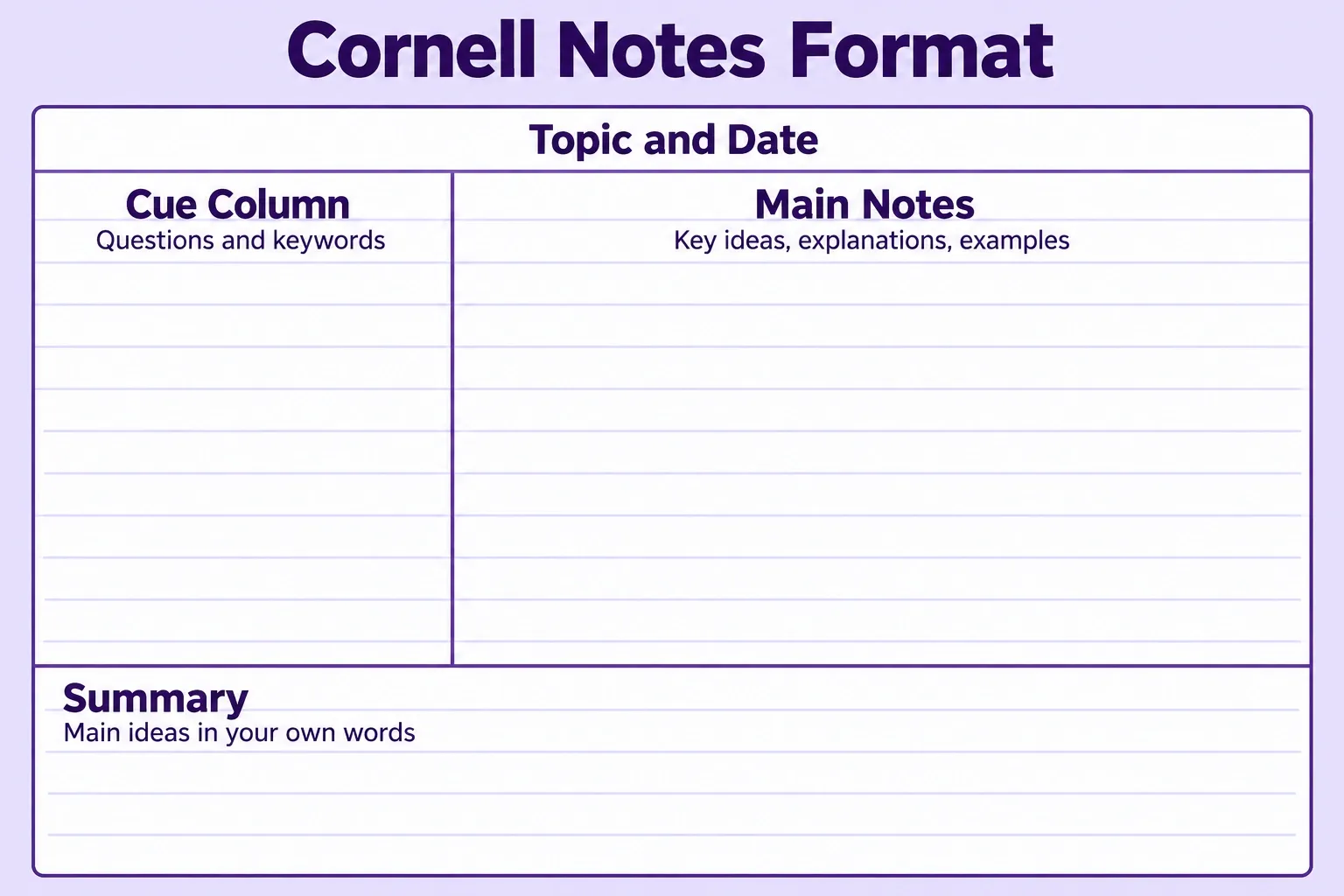
Understanding the layout is the first step toward using this method effectively. A standard Cornell notes page has three main sections, with an optional heading at the top for the topic and date.
1. Cue Column: Questions and Keywords
The cue column sits on the left side of the page and usually takes up about one-third of the writing width. It contains keywords, short phrases, and questions related to the information recorded in the main notes section.
What are cues in Cornell notes? Cues are short prompts that help you remember and retrieve information without immediately looking at your full notes.
For example, if your notes explain Newton's laws of motion, a cue might simply say "Newton's First Law." A more useful cue question might be "What happens to an object when no net external force acts on it?"
2. Main Notes Column: Important Information
The main notes column occupies the larger area on the right side of the page. This is where you record essential explanations, definitions, formulas, examples, and supporting details during a lecture or reading session.
Instead of copying every sentence, focus on information that helps explain the topic. Use short phrases, bullet points, diagrams, and abbreviations to make the notes easier to scan.
The goal is to capture enough detail to understand the material later without turning note-taking into a word-for-word transcription exercise.
3. Summary Section: Main Ideas in Your Own Words
The summary section sits at the bottom of the page. After completing your notes, use this space to explain the most important concepts in two or three sentences.
A useful summary should answer the question, "What did I learn from this topic?" It should connect the main ideas rather than repeat every detail from the notes column.
Writing the summary in your own words also helps you notice gaps in your understanding. If you struggle to explain a concept clearly, you may need to revisit the original material.
Cornell Notes Format at a Glance
| Section | Purpose | Example |
|---|---|---|
| Heading | Identify the topic and date | Biology: Photosynthesis |
| Cue Column | Add keywords and review questions | What is chlorophyll? |
| Main Notes | Record explanations and supporting details | Chlorophyll absorbs light energy |
| Summary | Explain the lesson's main ideas | Plants convert light energy into chemical energy |
What Are the Steps of the Cornell Note-Taking Method?
Learning how to create Cornell notes does not require special equipment or complicated software. You can use a notebook, a printable template, or a digital note-taking application.
The following five steps show how to turn an ordinary lecture or reading assignment into structured notes that are easier to review.
Step 1. Set Up Your Cornell Notes Layout
Start with a blank page and divide it into two columns. Make the left column approximately 2.5 inches wide and leave the larger right-hand area for your main notes.
Reserve about 2 inches at the bottom for a summary. You can also add the lesson title and date at the top to keep your notes organized.
If you prefer digital note-taking, create a table or use a preformatted Cornell notes template. The important thing is to maintain a clear separation between questions, supporting information, and the final summary.
Step 2. Record Important Information
During the lecture or reading session, write your notes in the larger right-hand column. Capture definitions, explanations, formulas, processes, and examples that are central to the topic.
Try not to transcribe everything word for word. Instead, identify the main ideas and record enough supporting information to explain them later.
For complex topics, use bullets, arrows, and small diagrams to show relationships. This makes it easier to understand the material when you return to your notes.
Step 3. Write Keywords and Cue Questions
Once the lesson is complete, review your notes and identify the important ideas. Then create short prompts or questions in the left-hand cue column.
What are cue questions in Cornell notes? They are questions designed to help you retrieve and explain information recorded in the main notes column.
For example, rather than writing only "Cell Division," you could ask "What are the main stages of mitosis?" Questions that require explanations are often more useful for revision than prompts that only ask you to recognize a term.
Step 4. Summarize the Main Concepts
Next, write a short summary in the bottom section of the page. Focus on the central message of the lesson and explain how the most important ideas connect.
A strong summary should be understandable even without reading every detail above it. Avoid copying sentences directly from the original material whenever possible.
For example, after a lesson about ecosystems, your summary might explain how producers, consumers, and decomposers interact to transfer energy and recycle nutrients.
Step 5. Review and Test Your Knowledge
Cornell notes become especially useful when you actively review them. Cover the main notes column and look only at the cue questions on the left.
Try answering each question from memory before revealing your notes. If your answer is incomplete, check the relevant explanation and try again later.
Repeat this process across multiple study sessions rather than waiting until the night before an exam. You can also turn important questions into flashcards for additional practice.
Cornell Notes Example: Biology Lesson on Photosynthesis
A concrete example makes the Cornell note-taking method easier to understand. Imagine that you're attending a biology lecture about photosynthesis and want to prepare notes for an upcoming exam.
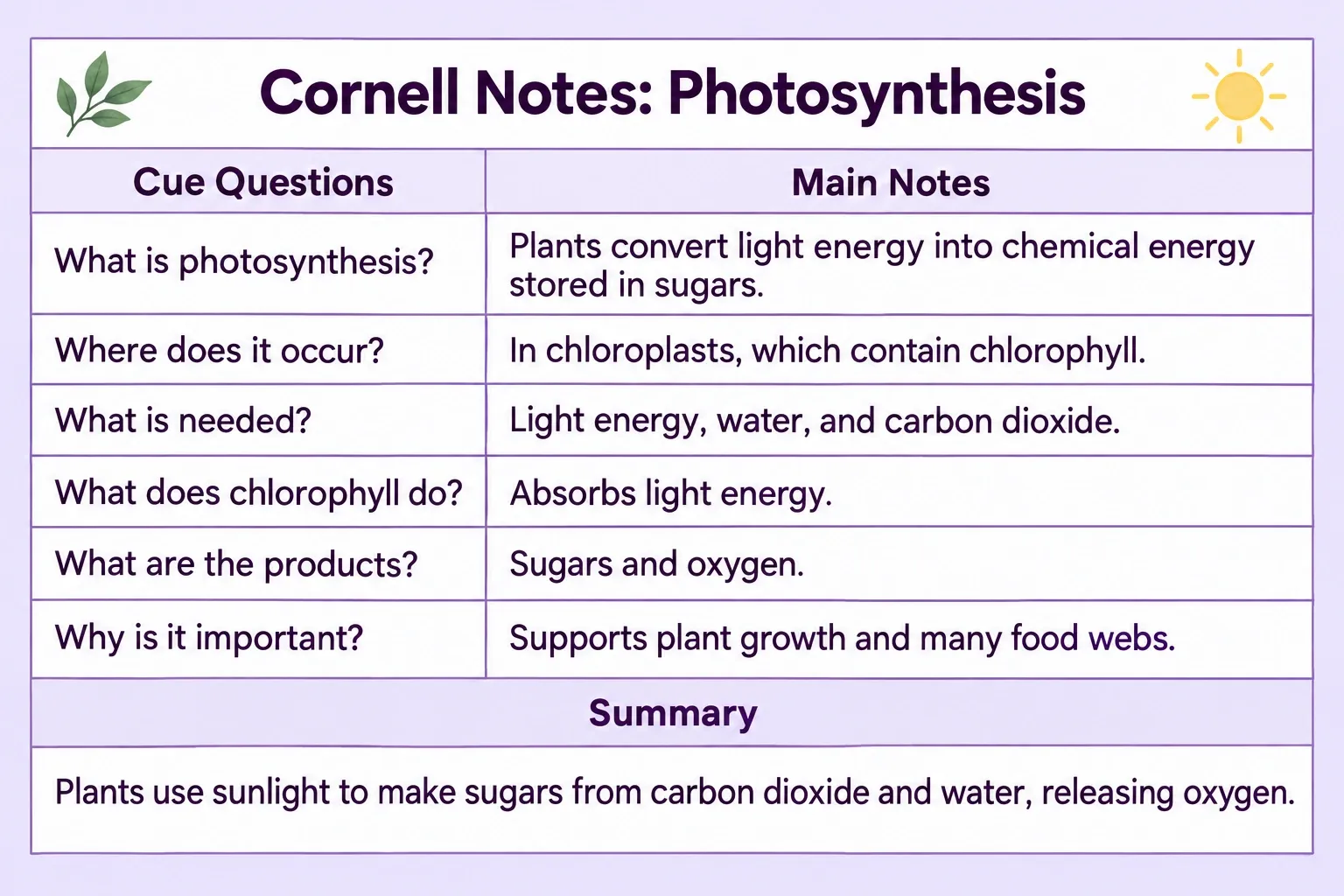
Instead of writing everything in one long paragraph, you could organize the lesson using the following Cornell notes example.
Example Cornell Notes Template
Topic: Photosynthesis
Subject: Biology
| Cue Questions / Keywords | Main Notes |
|---|---|
| What is photosynthesis? | The process by which plants convert light energy into chemical energy stored in sugars. |
| Where does photosynthesis occur? | Photosynthesis primarily occurs in chloroplasts, which contain chlorophyll. |
| What materials are needed? | Light energy, water, and carbon dioxide. |
| What does chlorophyll do? | Chlorophyll absorbs light energy used in the photosynthetic process. |
| What are the main products? | Sugars and oxygen. |
| Why is photosynthesis important? | It supports plant growth and provides the foundation for many food webs. |
Summary:
Photosynthesis allows plants to use sunlight to produce sugars from carbon dioxide and water, releasing oxygen in the process. This conversion of light energy into chemical energy helps support plant growth and ecosystems.
How to Review This Example
First, cover the main notes column and read the questions on the left. Try explaining each answer without checking the detailed information.
Next, compare your answers with the notes and identify anything you missed. Finally, read the summary and see whether you can explain the entire process in your own words.
This approach turns a page of biology notes into a practical review resource. It also helps you determine which concepts need additional study.
What Are Cornell Notes and Why Are They Important?
Cornell notes are important because they provide a practical connection between recording information and actively studying it. Their layout encourages students to revisit important concepts and transform passive notes into questions and summaries.
While the format itself does not guarantee stronger memory, the activities it supports can make study sessions more purposeful.
1. They Keep Information Organized
Traditional notes can become difficult to navigate when they contain long paragraphs and unrelated details. Cornell notes separate key questions from supporting explanations, making it easier to find important information.
The format is especially useful when reviewing several lessons from the same course. Consistent organization means you spend less time searching through pages.
2. They Encourage Active Recall
Active recall involves retrieving information from memory rather than simply recognizing it while reading. The cue column provides a convenient way to practice this technique.
By covering the main notes and answering your questions, you can test what you actually remember. This makes it easier to identify topics that need more attention.
3. They Promote Better Understanding
Creating a summary requires you to distinguish essential ideas from supporting details. This can reveal whether you understand the topic well enough to explain it independently.
The process also encourages reflection on how different concepts relate to one another. Instead of treating information as isolated facts, you begin to build connections.
4. They Make Exam Preparation More Focused
When exams approach, students often need to review large amounts of information quickly. Cornell notes provide ready-made questions and concise summaries that can guide revision.
Instead of repeatedly reading an entire notebook, students can focus on cue questions and revisit explanations when necessary. This creates a more targeted review process.
How to Use AI to Make Cornell Note-Taking Easier
Cornell notes are useful, but preparing them manually can take time, especially when your learning materials come from different sources. A student might need to review PDF chapters, lecture recordings, and YouTube tutorials before organizing the information into one consistent set of notes.
This is where an AI note-taking tool can help. Instead of manually extracting every important point, you can use AI to prepare structured source-based notes and then adapt the results to the Cornell format.
Step 1. Turn Study Materials into Structured Notes with Lynote
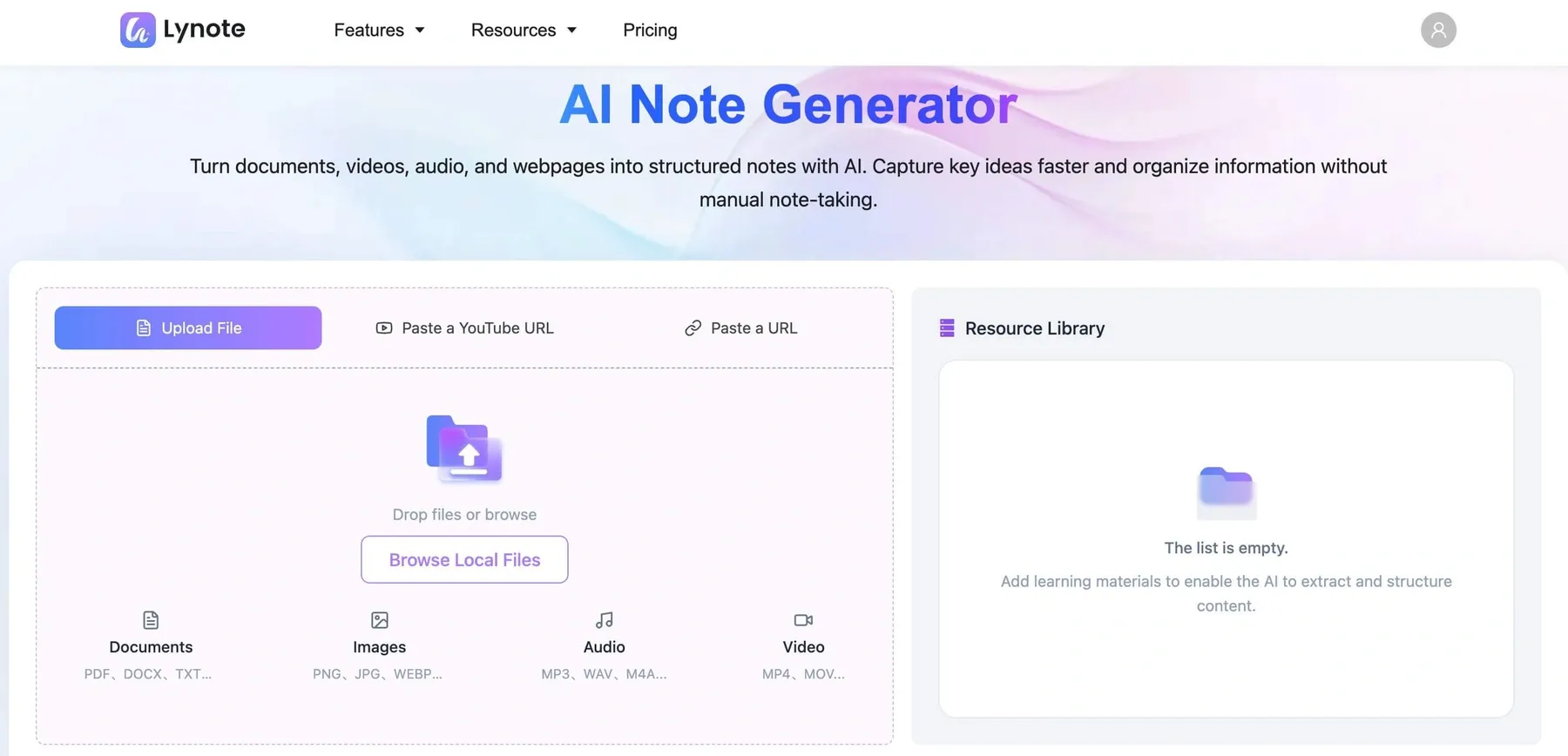
Lynote AI Note Generator helps students turn existing learning materials into organized notes. It supports PDFs, documents, audio recordings, videos, YouTube links, and webpages.
For example, imagine you have a 45-minute biology lecture recording and a PDF textbook chapter. You can add the supported materials to Lynote and generate structured notes based on their content.
The generated notes provide a starting point for identifying important definitions, explanations, and examples. You should still check the information against the original materials, particularly when studying detailed or technical subjects.
Step 2. Organize the Generated Notes into Cornell Format
Once Lynote generates the notes, review the content and identify the main topics. Use these explanations as the foundation for the larger right-hand column of your Cornell notes.
Next, create questions and keywords for the cue column based on the important concepts. Write a short summary of the material in your own words and organize everything in a Cornell-style layout.
Lynote allows users to edit generated AI notes, so you can refine the information before transferring or arranging it into your preferred template. This workflow does not require Lynote to offer a dedicated one-click Cornell notes template.
Step 3. Turn Notes into Flashcards for Review
Cornell notes already encourage active recall through cue questions. You can extend this process by turning important study material into question-and-answer flashcards.
Lynote includes an AI Flashcards feature that helps generate flashcards from your notes. This is useful when you want to review key terms, definitions, and concepts across multiple study sessions.
For example, a Cornell cue question such as "What is the function of chlorophyll?" can become a flashcard prompt. You can then practice answering the question without looking at the explanation.
Step 4. Use AI Chat to Explore Your Source Materials
Sometimes, reviewing your notes reveals a concept that you do not fully understand. Instead of searching through multiple files, you can use Lynote AI Chat to ask questions about the materials you've uploaded.
For example, if your biology notes describe light-dependent reactions but the explanation is unclear, you could ask Lynote to explain the process using information available in your source materials.
Remember that AI Chat depends on the content provided to it. If the original materials do not contain a particular explanation, you may need to consult your textbook, instructor, or another reliable resource.
Why Combine Cornell Notes with Lynote?
The Cornell method provides a structure for understanding and reviewing information. Lynote helps with the earlier stages of collecting and organizing content from different learning materials.
Together, they support a practical study workflow:
Study Materials → AI-Generated Notes → Cornell Organization → Cue Questions → Flashcard Review
This combination can be especially useful for students taking online courses, watching recorded lectures, or studying from multiple PDF documents.
Try Lynote AI Note Generator to turn your study materials into structured notes and prepare them for more effective review.
What Are the Five R's of Cornell Note Taking?
The five R's are commonly used to describe the learning activities associated with the Cornell note-taking method. They encourage students to move beyond recording information and use their notes for understanding, recall, and ongoing review.
The traditional five R's are Record, Reduce, Recite, Reflect, and Review. Cornell University's current Learning Strategies Center guide presents a closely related sequence using "Questions" as the second stage.
1. Record
During a lecture or reading session, write important information in the main notes column. Focus on central ideas, definitions, examples, and explanations rather than copying every sentence.
Your notes should provide enough detail to understand the subject later.
2. Reduce
After the learning session, identify the most important ideas and condense them into keywords or cue questions. This process helps you distinguish essential concepts from supporting information.
Use the left-hand column to create prompts that will be useful during review.
3. Recite
Cover the main notes column and use the cue questions to retrieve information from memory. Explain the answers aloud or write them down without immediately checking your notes.
After responding, compare your answer with the original material to identify missing details.
4. Reflect
Think about how the information connects to other concepts you already know. Ask yourself why the topic matters, how it works, and where you might apply it.
Reflection encourages deeper engagement with the lesson rather than simple memorization.
5. Review
Revisit your notes regularly and use the cue questions to test your understanding. Focus additional attention on concepts that you find difficult to explain.
Repeated review helps you maintain familiarity with the information and prepare for future assessments.
Common Cornell Note-Taking Mistakes and How to Avoid Them
Even a well-designed system can become less useful when students skip important steps. Understanding common mistakes can help you get more value from your notes.
Writing Too Much in the Main Column
Trying to record every word from a lecture can make notes overwhelming. Long paragraphs are harder to scan, and unnecessary details can hide the main ideas.
How to fix it: Use short sentences, bullet points, abbreviations, and diagrams. Focus on recording information that explains the topic rather than reproducing the entire lecture.
Leaving the Cue Column Empty
Some students complete the main notes column but never return to write questions. Without cues, the page becomes a conventional notebook divided into sections.
How to fix it: Spend a few minutes after each learning session turning the important concepts into questions. Prioritize prompts that require you to explain an idea from memory.
Copying Summaries Instead of Writing Them
A summary is less useful when it simply repeats the original material. The purpose is to identify and explain the central ideas using your own understanding.
How to fix it: Close or cover the main notes while drafting your summary. Then compare it with the original content to check for missing or inaccurate information.
Reviewing Notes Only Before Exams
Cornell notes are designed for repeated review, not just last-minute preparation. If you wait until an exam approaches, you may discover that you have forgotten important concepts.
How to fix it: Set aside short review sessions throughout the week. Use cue questions or flashcards to identify the topics that need more practice.
Conclusion: Are Cornell Notes Worth Using?
So, what are Cornell notes, and why should you consider using them? They are a structured method for recording information, creating review questions, summarizing important ideas, and practicing active recall.
Whether you're studying from lectures, textbooks, or online courses, Cornell notes can help you build a more organized review process. You can also use Lynote AI Note Generator to prepare structured notes from your study materials before adapting them into Cornell format.
Start with one lesson, create your cue questions, and make regular review part of your study routine.
Frequently Asked Questions
What Are Cornell Notes Template Formats?
A Cornell notes template is a preformatted page divided into a cue column, a main notes area, and a summary section. Some templates also include a heading for the subject, topic, and date.
You can create the layout in a notebook, word processor, or digital note-taking application. The most important feature is the separation between recording information and preparing it for review.
What Are the Main Parts of Cornell Notes?
Cornell notes contain three main parts: the cue column, the main notes column, and the summary section. The cue column holds keywords and questions, the main notes column contains explanations, and the summary section captures the central ideas.
Some versions include a fourth area at the top for the lesson title and date. This heading helps organize notes across different subjects.
What Are Cues in Cornell Notes?
Cues are short prompts that help you remember information from the main notes column. They may be keywords, topic headings, definitions to recall, or questions that test understanding.
For example, "Causes of World War I" is a keyword cue, while "What were the major causes of World War I?" is a cue question. Both can guide revision, but questions often encourage more detailed answers.
What Are the Five R's of Cornell Note Taking?
The traditional five R's are Record, Reduce, Recite, Reflect, and Review. They describe a process of capturing information, identifying key ideas, retrieving knowledge, thinking critically, and revisiting the material.
Together, these activities turn a notebook into a study resource. The modern Cornell University guide uses "Questions" in place of "Reduce" when explaining its five-stage process.
Can Cornell Notes Be Used for Online Classes?
Yes. Cornell notes work for live online lessons, recorded lectures, PDF textbooks, and educational videos.
You can take notes directly during a lesson or organize them after reviewing the materials. If you're working with recorded content, a tool like Lynote can help prepare structured notes that you can later adapt into the Cornell format.
Is Cornell Note-Taking Better Than Regular Notes?
Cornell note-taking offers specific advantages for learners who benefit from structured questions, summaries, and self-testing. However, it is not necessarily the best method for every subject or learning preference.
For highly visual subjects, diagrams, mind maps, or handwritten sketches may be more useful. Many students benefit from combining Cornell notes with other approaches depending on the material.

Written by Kristen I.
Content Strategist
Kristen focuses on content structure, editorial planning, readability, and creating useful experiences for readers. View all articles →