

Best AI Detector Handbook 2026
A user-oriented field guide for choosing free and best AI text detectors, comparing pricing and limits, interpreting risk, and building a responsible review workflow.
Introduction
Why should we detect AI writing?
AI writing is widely used in academic writing, marketing, publishing, hiring, and internal business work. The question is no longer only whether a document was touched by AI, but whether AI was used in a way that violates policies, conceals authorship, weakens quality, or creates risks.
Good AI detectors can help us to resolve this question. For instance, they can flag suspicious patterns, highlight likely AI-written passages, support plagiarism or authorship checks, and give editors or teachers a reason to ask better follow-up questions. However, they cannot read intent, prove cheating, replace the writing process, verify sources, examine document histories, or substitute for human judgment.
Core principle: treat every AI detector score as a probability signal, not a verdict.
What does this handbook do?
✅ Quickly choose AI detector tools by user scenario.
✅ Compare free tool's limits, pricing signals, strengths, integrations, and risk.
✅ Show how each mainstream detector feels from a real user.
✅ Reduce blind purchases and prevent over-reliance on a single AI score.
What this handbook does NOT do.
❌ It can not promise any detector is 100% accurate.
❌ It does not treat AI detection as the same thing as plagiarism detection.
❌ It does not rank tools by marketing claims alone.
Part I: Understanding AI Detector
Chapter 1 | What Is an AI Detector?
1.1 From yes/no judgment to probability evidence
An AI detector analyzes text and estimates whether it resembles writing produced by a large language model (LLM). Most AI tools output a probability, a human score, an AI score, sentence highlights, or a report to help us judge whether the text was generated by AI. A detailed result can be useful, but its meaning is limited. It only detects AI-like patterns, not how the text was actually created.
1.2 Why AI detectors disagree
- Different detectors use different training data, model families, thresholds, and feature sets.
- Short text is much harder to classify than long-form prose.
- Edited AI text, paraphrased AI text, templated human writing, and non-native English writing can blur the signal.
- AI detectors may see AI-style polish from writing tools, even when the content is human-authored.
1.3 What AI detectors can help with
- Screening long drafts before publication or submission.
- Finding passages that need a human review.
- Combining AI probability with plagiarism checks, source checks, and authorship history.
- Creating consistent review workflows for editorial, academic, or compliance teams.
Chapter 2 | Common Problems and Solutions of AI Detector
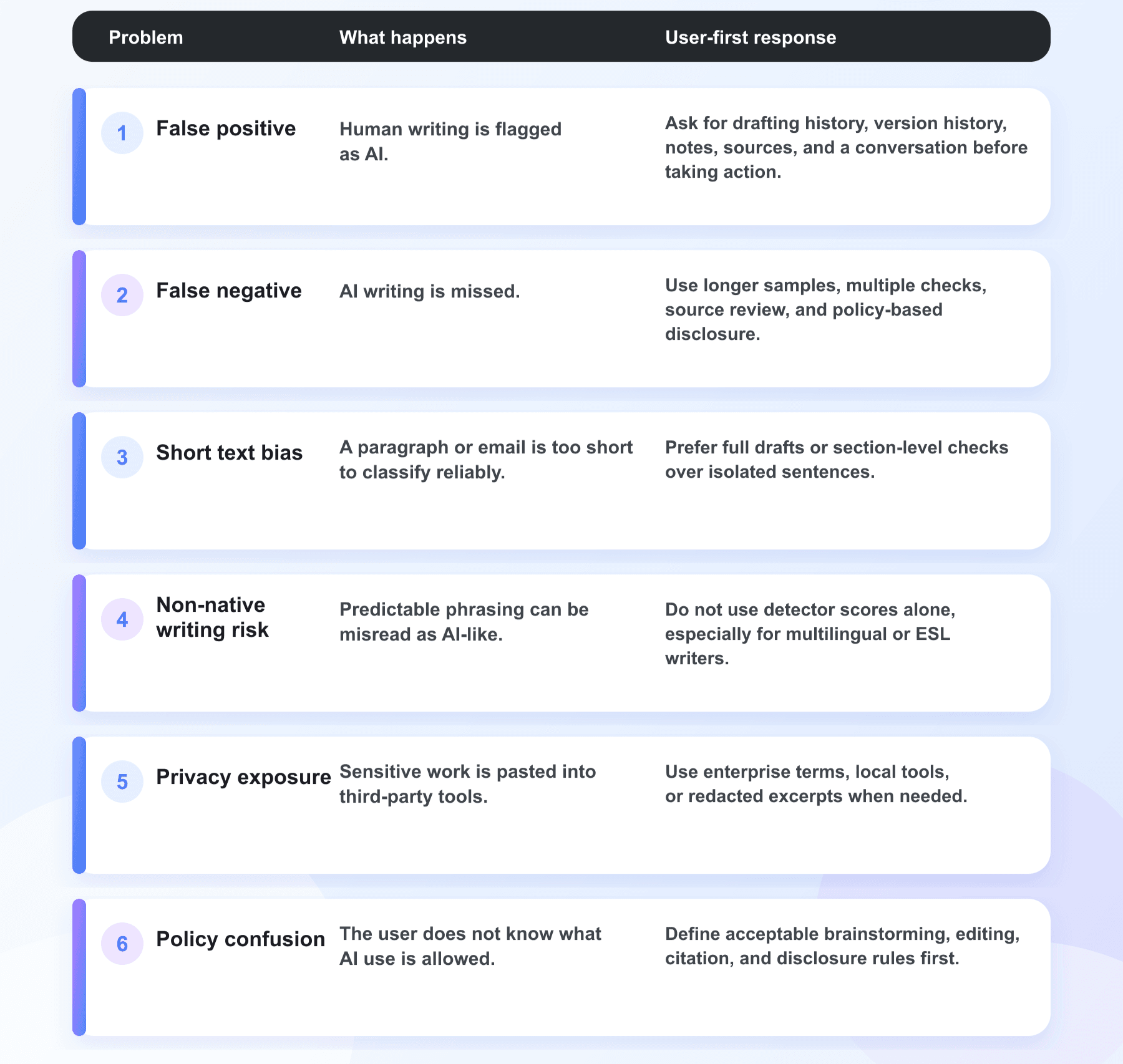
2.1 Six common problems of AI Detector
AI detection in 2026 is harder than before. Models now have longer contexts, better multilingual support, and agentic workflows, all increasingly available via low‑cost or open‑weight models. Users shouldn't trust "99% accuracy" claims—they should check if detectors can handle new models, mixed writing, paraphrasing, translation, and long documents.
2.2 User Rule of Thumb for 2026
- For low-risk self-checks, prioritize starting with Lynote, as it distinguishes between AI, human, and mixed signals and provides sentence-level highlighting.
- Academic reviews must combine policies, draft history, source notes, and human communication; penalties should not be imposed directly.
- Content teams should integrate AI detection with plagiarism checks, fact‑checking, readability assessments, SEO audits, and contract disclosures.
- Before procuring an API, build an internal test set using 50–100 real samples.
- In multilingual contexts, test each language separately; do not assume that English benchmarks transfer.
- For long documents, scan both individual sections and the full text, since analyzing only a single paragraph may overestimate or underestimate the extent of AI involvement.
Part II: Best AI Detector Practices Guide
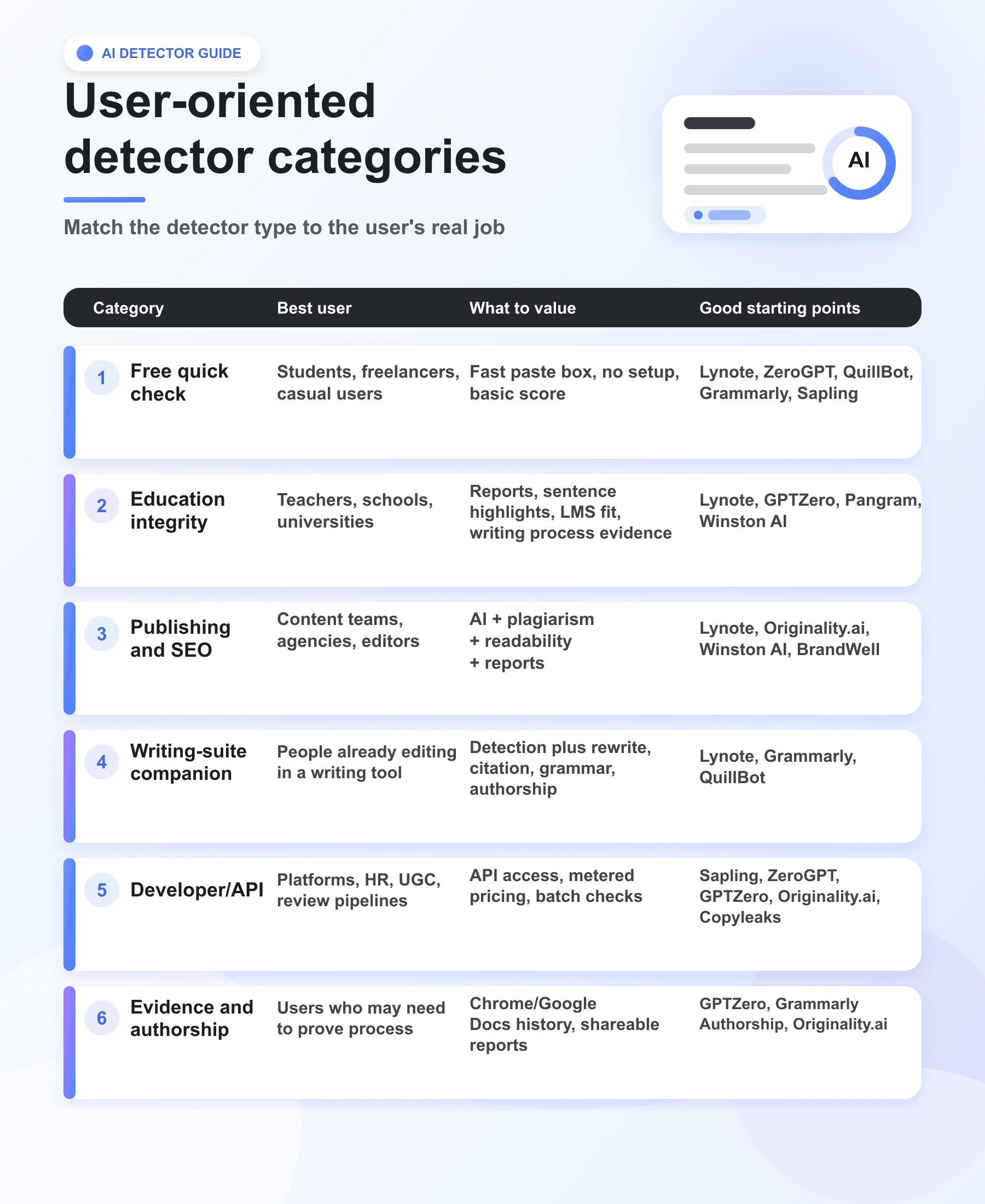
The right AI detector depends on what you are trying to protect. A teacher needs explainability and student due process. A publisher needs scale, plagiarism checks, and writer accountability. A student needs a quick way to understand why a draft may look AI-like. A developer needs an API with predictable limits. The best tool is the one whose failure modes you understand.
While writing this chapter, we find an ironic fact: the same piece of text (50% human‑written + 50% AI‑generated) produced quite different detection results across various tools. Relatively more accurate ones were Lynote, GPTZero, and QuillBot. In contrast, many products with large user bases perform not good instead. Therefore, we advise users to interpret detection results with caution throughout this chapter.
Chapter 3 | What AI Detector Products Are Free?
3.1 User-oriented detector categories
3.2 Top 10 Best AI Detector Products
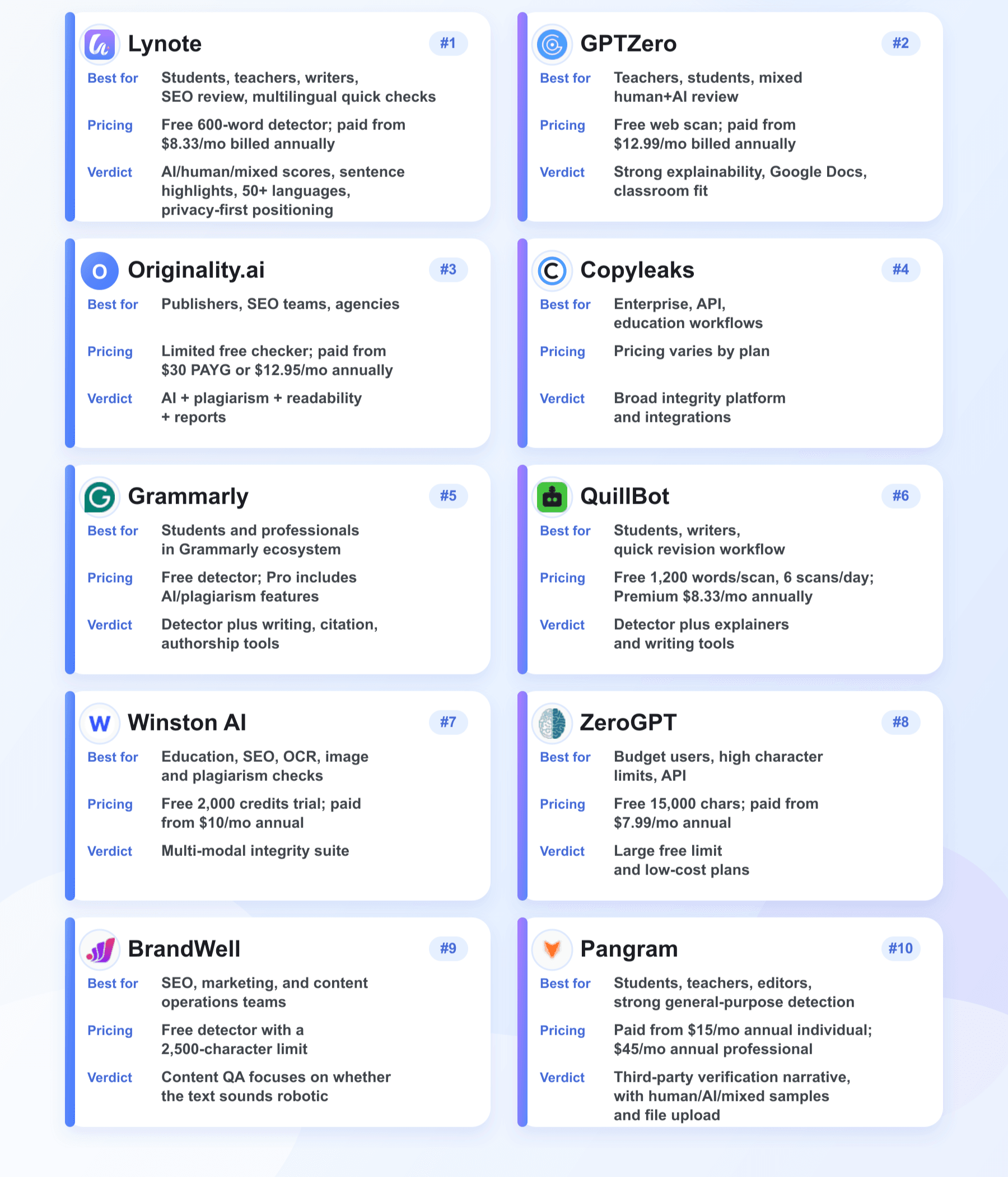
The following are in no particular order. They are grouped by practical user fit, verified public information, workflow quality, and the risk of misuse.
1.Lynote AI
Lynote AI Detector is a free online AI detector, positioned for students, teachers, writers, SEO teams, freelancers, and reviewers. From a user's perspective, Lynote is strongest when the real question is not 'Can I punish someone from this score?' but 'Where should I look more closely?'. The 600-word free detector, document upload support, 50+ language coverage, and built-in path to AI Humanizer make it a practical first stop for draft review, editorial cleanup, classroom conversations, and multilingual content checks.
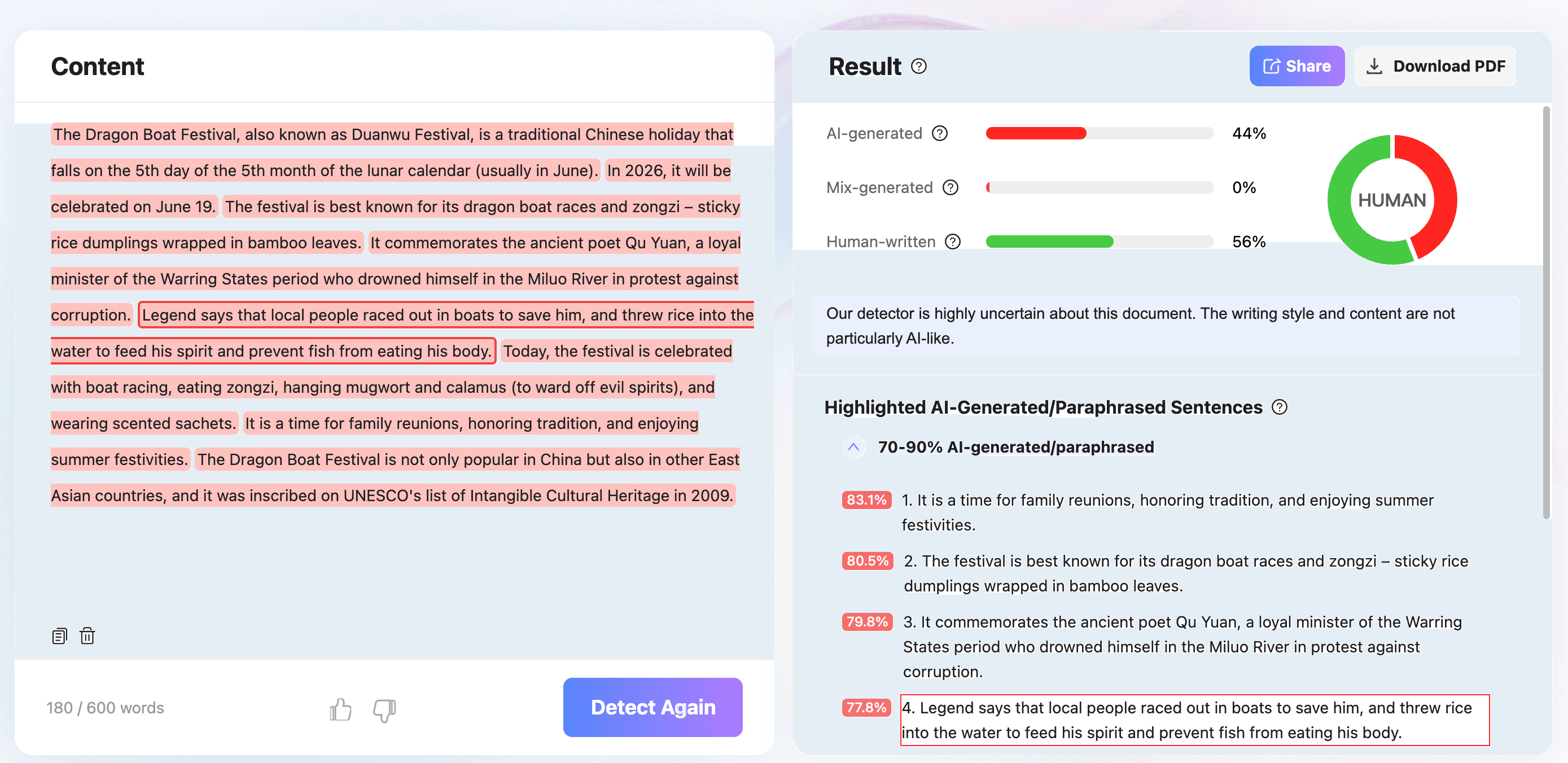
How to use
- Paste text or upload a PDF, DOCX, or TXT file.
- Run Detect AI after using at least the minimum text length; longer passages usually produce more reliable results.
- Review AI-generated, human-written, and mixed scores, then inspect highlighted sentences before making a decision.
- If the goal is quality improvement rather than enforcement, use the highlighted passages as a revision checklist.
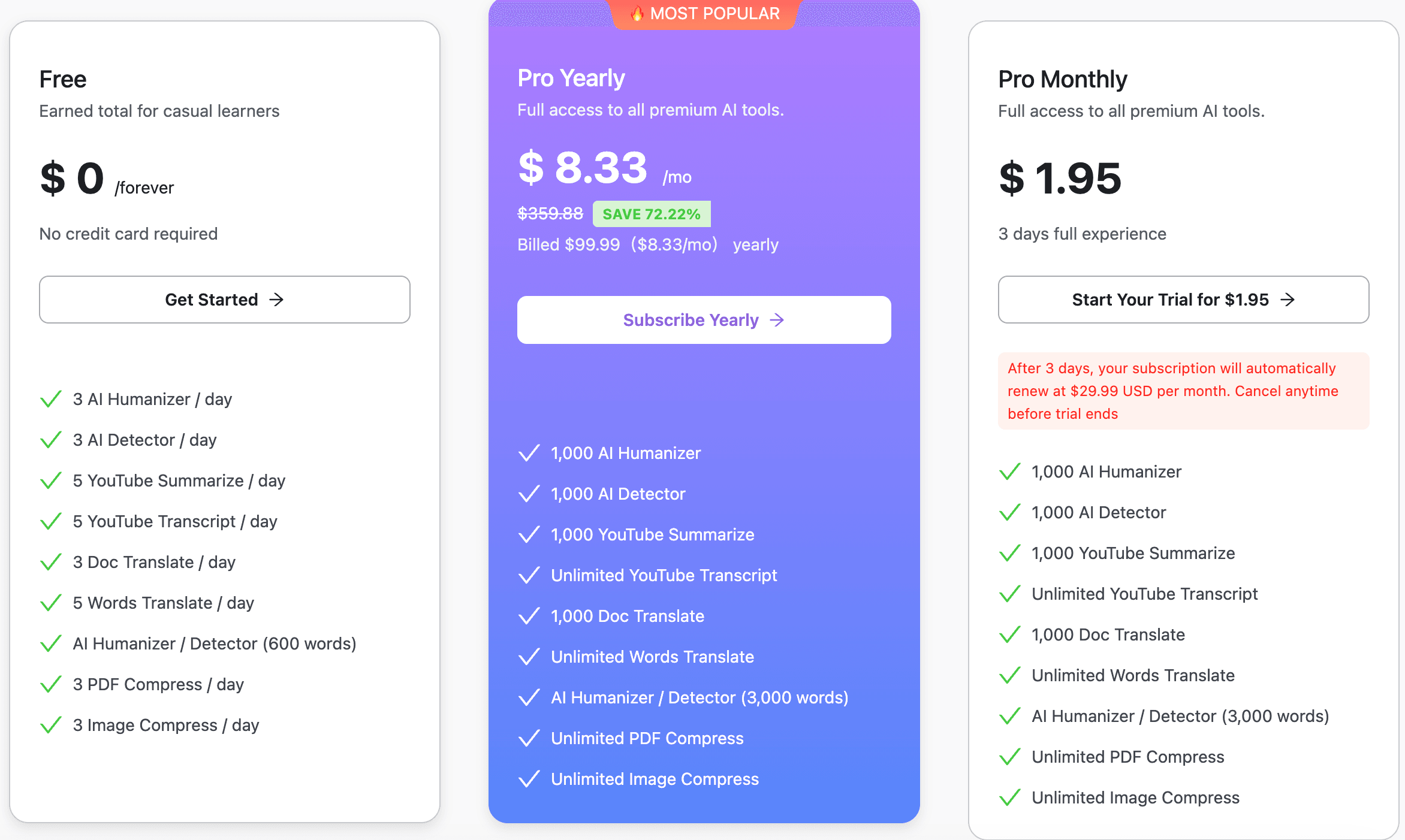
Pricing and limits
- Free detector box supports up to 600 words per check on the public page.
- The product page says users can run a first AI check without creating an account.
Key selling points
- 99% benchmark accuracy for suitable text length and supported inputs.
- Detects content from ChatGPT, GPT-5, Gemini, Claude, LLaMA, Mistral, and other major AI tools.
- Supports 50+ languages including English, Spanish, French, German, Portuguese, Chinese, and Arabic.
- Reports AI, human, and mixed results with sentence-level highlights.
- States that submitted text is processed securely and not used to train detection models.
- Connects naturally with Lynote AI Humanizer for users who want to improve flagged passages after review.
User verdict: Best first stop for users who want a fast, explainable, multilingual detector with mixed-text handling and sentence-level review. Use it as the opening review layer, then add process evidence for high-stakes decisions.
2.GPTZero
GPTZero is one of the most recognizable AI detector brands and is especially strong for education, mixed AI/human review, and writing process verification. From a user perspective, GPTZero feels less like a single score box and more like a review workspace. The most useful angle is not just the AI percentage, but the supporting evidence: highlighted passages, downloadable reports, advanced scan options, and writing replay for Google Docs.
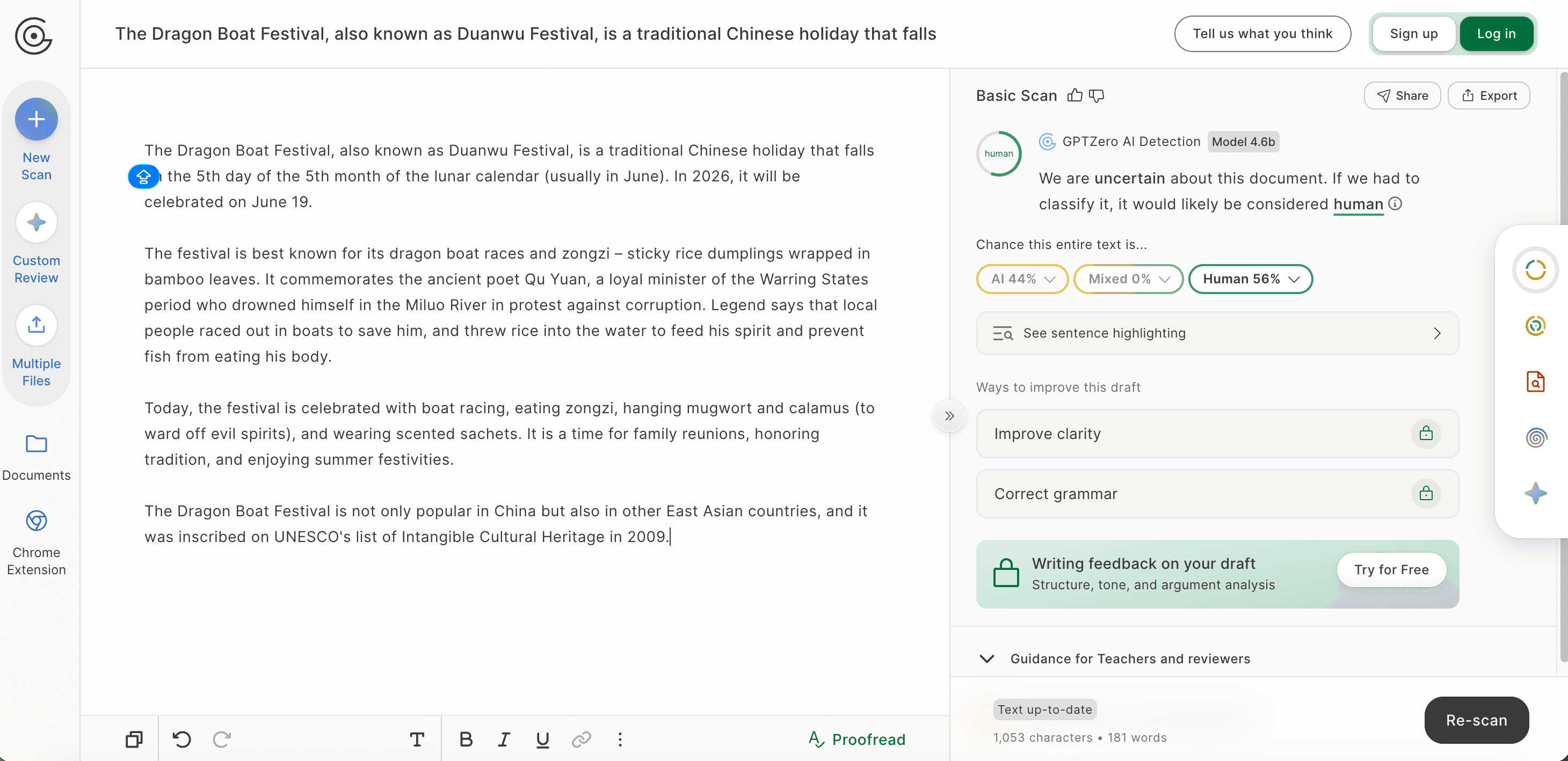
How to use
- Paste text or upload a document and run Scan.
- Review the AI probability and highlighted passages.
- For sensitive decisions, pair the result with writing history, source review, and a conversation with the author.
Pricing and limits
- Free web entry point shows a 10,000-character scan box.
- Premium: $12.99/month billed annually, 300,000 words per month.
- Professional: $24.99/month billed annually, 500,000 words per month and larger batch uploads.
- API and institutional/team options are available.
Key selling points
- Claims 99% accuracy for English on the homepage.
- Supports multiple models including ChatGPT, GPT-5, Claude, Gemini, Llama, and DeepSeek.
- Useful integrations for classrooms and writing verification.
- Publicly states that no detector is 100% accurate and results should not be used as a final verdict.
User verdict: Best for teachers or students who need classroom explainability and process evidence, not just a red/green score.
3.Originality.ai
Originality.ai is built for serious content publishers, agencies, and SEO teams. It combines AI detection with plagiarism checking, readability, grammar, fact-checking aids, site scanning, Chrome extension support, WordPress plugin support, and reporting. It's useful for publishers with strict human-authorship policies but too strict for environments where AI editing is allowed.
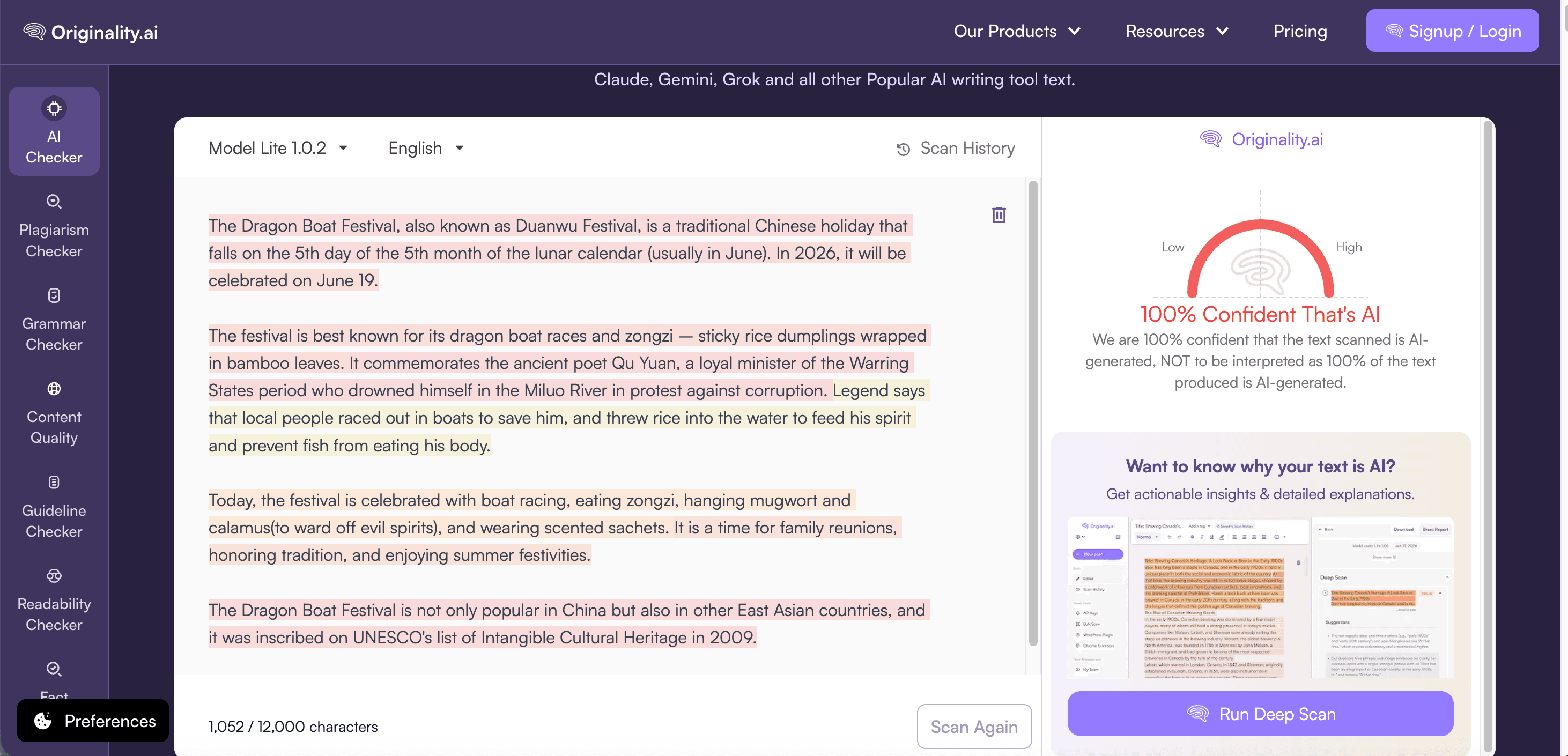
How to use
- Paste text, upload a document, or use the dashboard/extension.
- Choose the appropriate detector model where available.
- Read the AI score as probability, then inspect scan history, writer process, and plagiarism results.
Pricing and limits
- Limited free AI checker is available on the product page.
- Pay as you go: $30 one-time payment for 3,000 credits; 1 credit equals 100 words for AI checks.
- Pro: $12.95/month billed annually with 2,000 monthly credits.
- Enterprise: $136.58/month billed annually with API access and larger credit allowance.
Key selling points
- Claims 99% accuracy for Lite and 99%+ for Turbo on recent models.
- Mentions 30-language multilingual detection with 97.8% overall accuracy for its multilingual model.
- Strong reporting, Chrome extension, scan history, and content-operations features.
- Provides explicit guidance that AI detection scores are probabilities, not guilt.
User verdict: Best for publishers and agencies that need an editorial integrity system, especially when plagiarism and AI checks must sit in one workflow.
4.Copyleaks
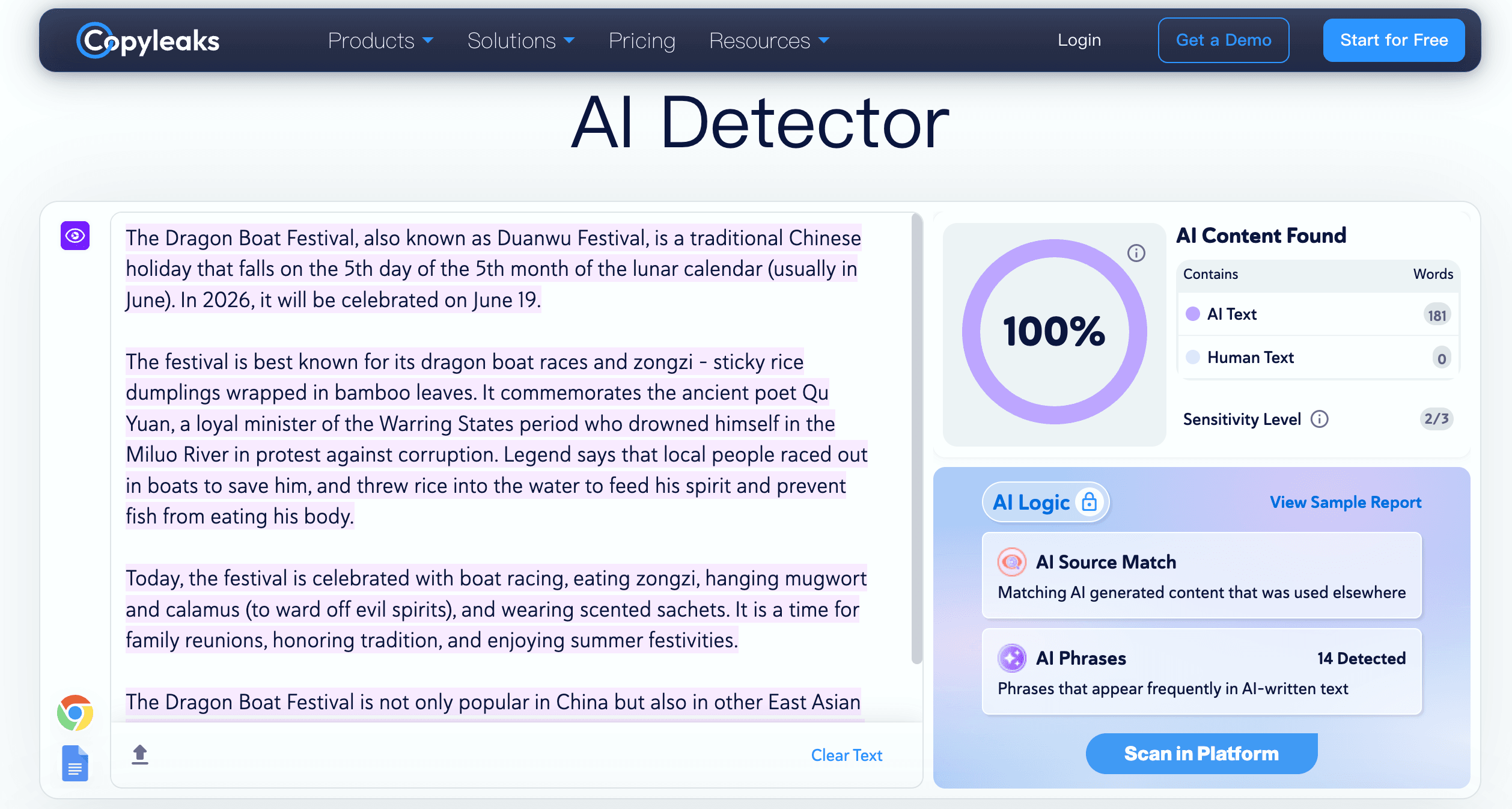
Copyleaks positions its AI Detector as part of a broader enterprise integrity platform. It is commonly considered by organizations that need AI detection, plagiarism detection, source-code related checks, LMS or workflow integration, and API access.
How to use
- Paste content or choose a sample/model tab if available.
- Run the scan and review the confidence signal.
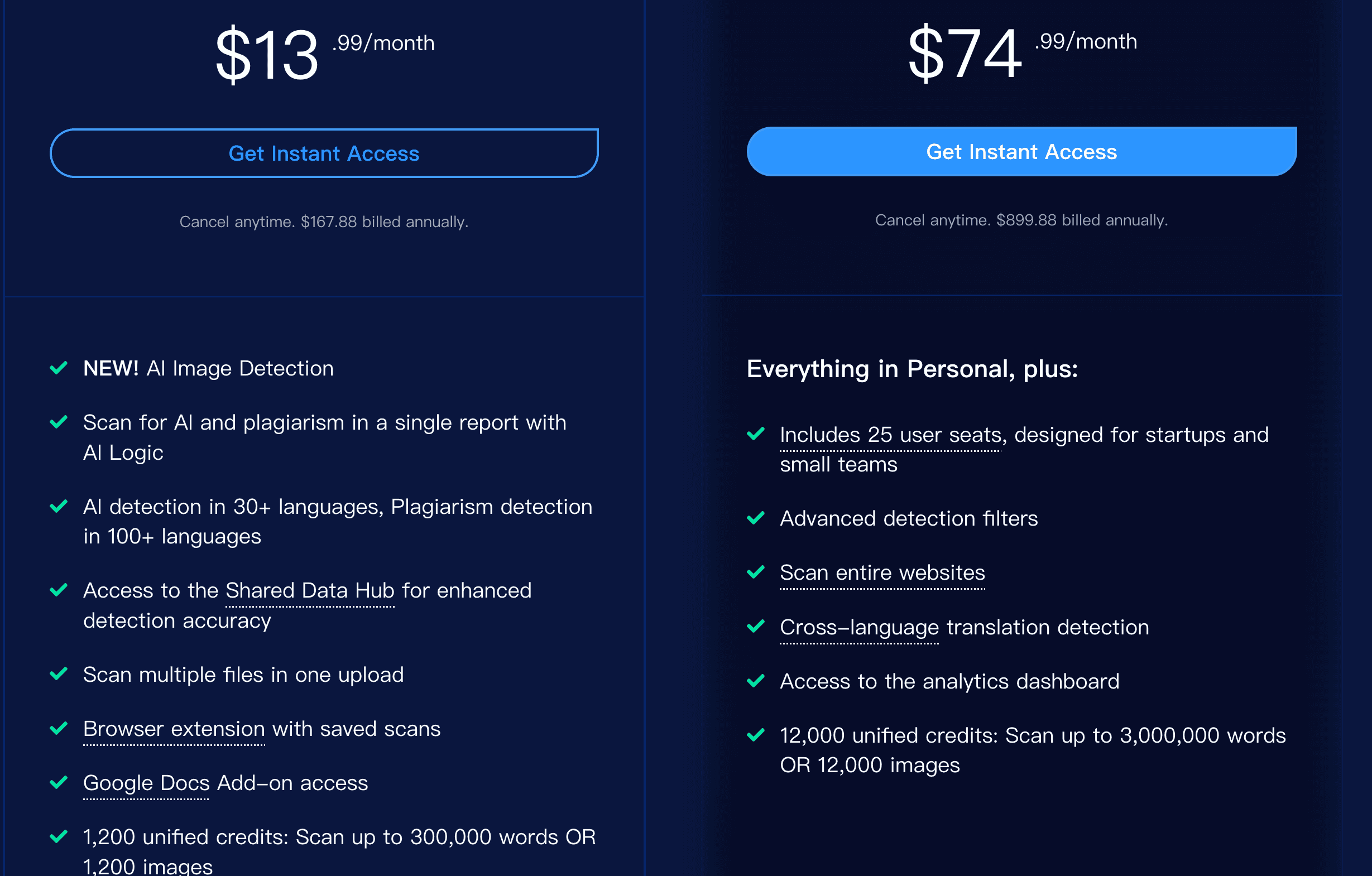
- For teams, evaluate API, LMS, SSO, and reporting requirements before choosing a plan.
Pricing and limits
Key selling points
- Broad platform rather than only a detector box.
- Useful candidate for education, enterprise compliance, and developer integration.
- Pairs naturally with plagiarism and originality review.
User verdict: Best for organizations that need AI detection inside a larger integrity workflow, especially where procurement, API, or LMS integration matters.
5.Grammarly
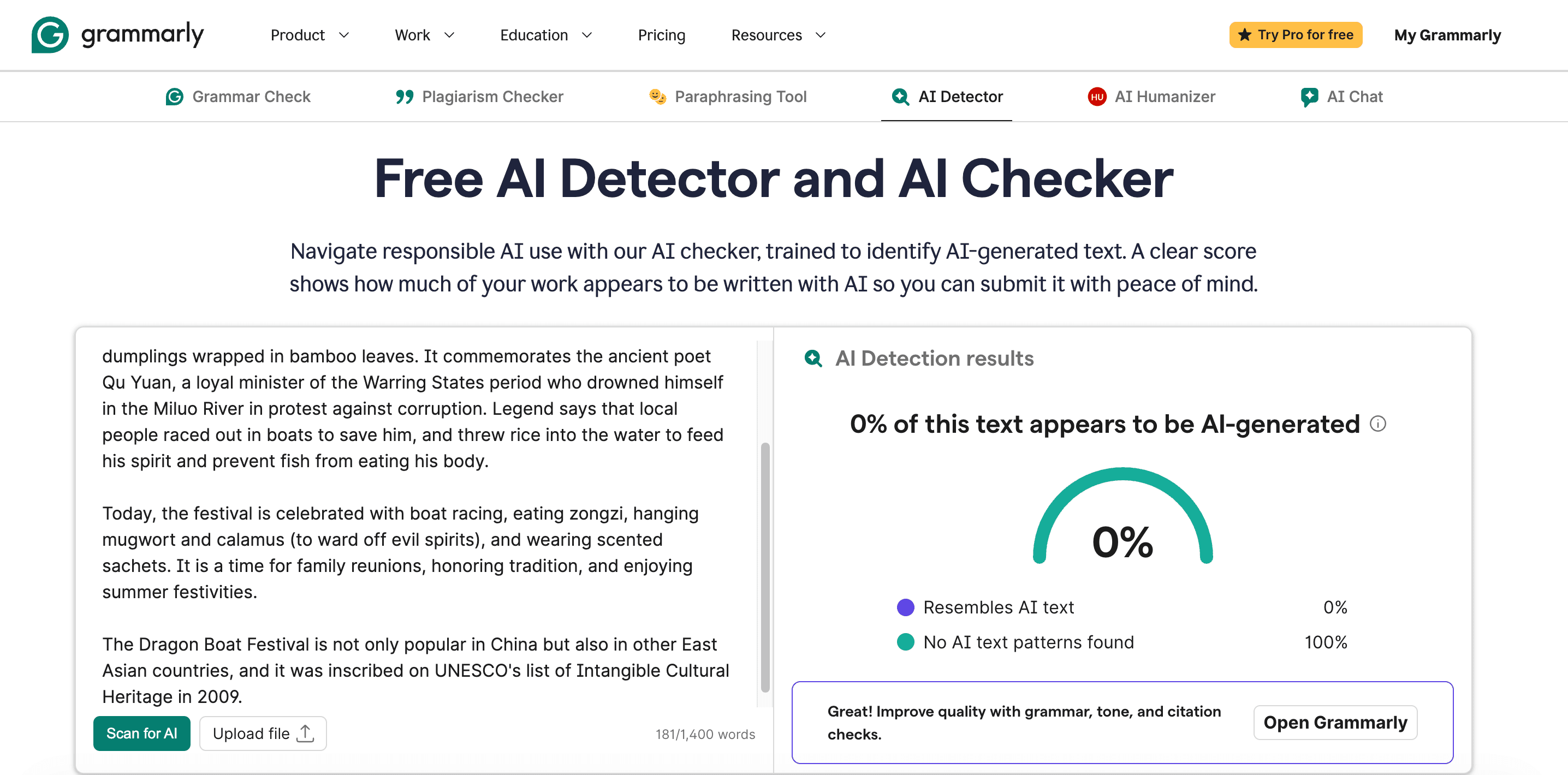
Grammarly's AI Detector is designed for users already writing inside the Grammarly ecosystem. It is less about enforcement and more about responsible writing: detect likely AI-generated text, cite sources, check plagiarism, preserve voice, and use Authorship features to show where text came from.
How to use
- Paste text, upload a file, or try sample text.
- Review the percentage that resembles AI text.
- Use Grammarly's broader writing, citation, plagiarism, and Authorship features to fix the underlying transparency issue.
Pricing and limits
- Free AI detector is available.
- Grammarly Pro includes detection of plagiarism and AI-generated text.
- Free plan includes 100 AI prompts per month; Pro lists 2,000 prompts per member per month.
Key selling points
- Claims 99% detection accuracy and top performance on RAID's benchmark.
- Works in a trusted writing ecosystem used by more than 40 million people.
- Pairs AI detection with rewriting, citation, grammar, plagiarism, and Authorship transparency.
User verdict: Best for everyday writers who want to submit more transparently, not for teams that need only an API detector.
6.QuillBot
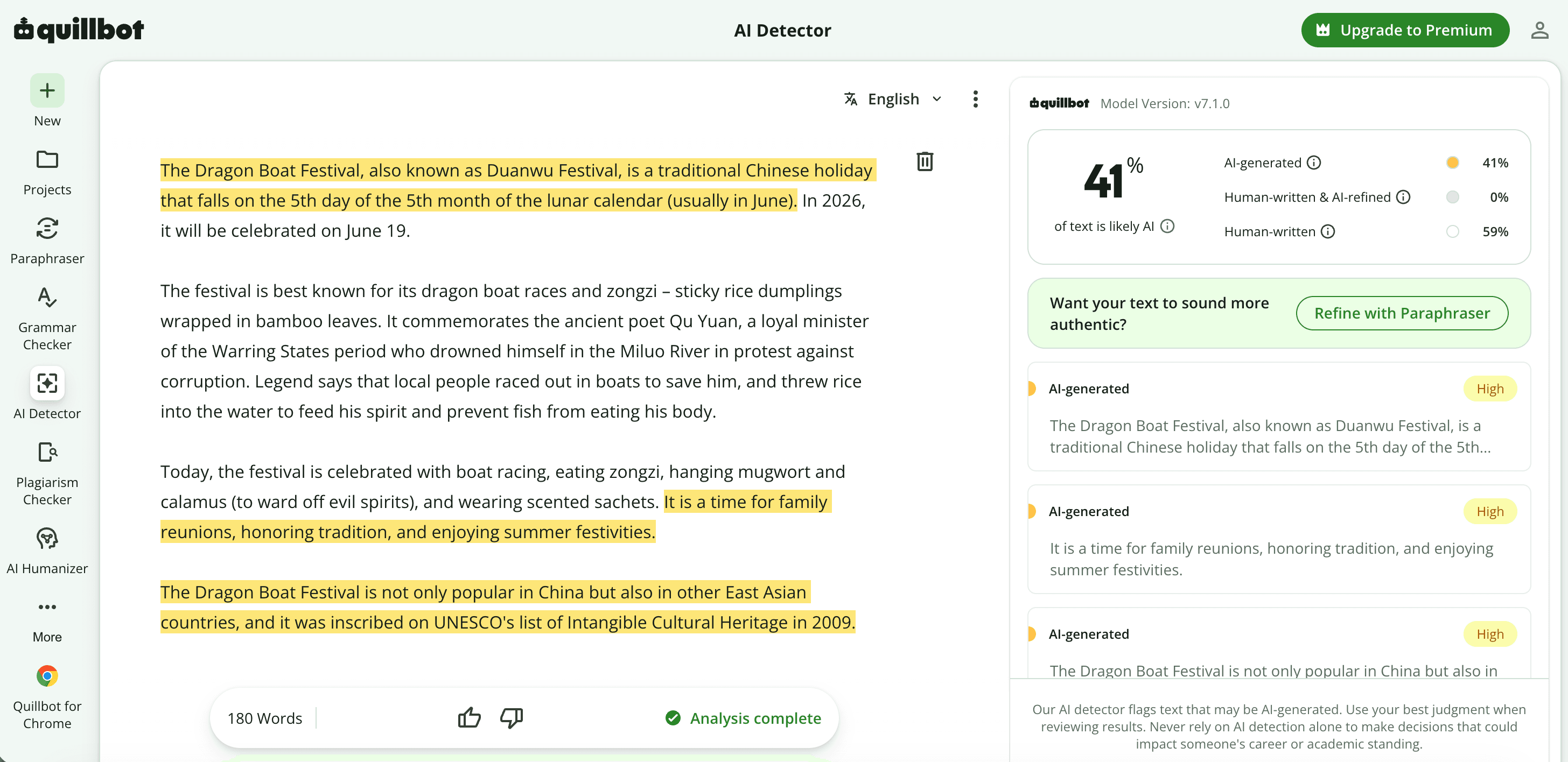
QuillBot's AI Detector is a practical choice for students, writers, and editors who already use QuillBot for paraphrasing, grammar checking, summarizing, citations, or humanizing. The detector supports a simple paste/upload flow and provides explainers why text may be flagged.
How to use
- Paste or upload text.
- Run Detect AI after using at least 80 words for better reliability.
- Review the 0-100% score and explainer cards.
Pricing and limits
- Free: up to 1,200 words per scan and up to 6 scans per day.
- Premium: $8.33/month billed annually, with unlimited detection scans.
- Premium also includes broader QuillBot writing tools.
Key selling points
- Trained to detect content from GPT-5, Gemini, Claude, Llama, and more.
- Multilingual support and fast results.
- Downloadable reports and richer explainers for paid users.
User verdict: Best quick-check tool for writers who want detection plus revision guidance in the same environment.
7.Winston AI
Winston AI is a full integrity suite for education, SEO, writers, and publishers. It combines AI text detection, plagiarism checking, writing feedback, OCR for scanned documents or images, AI image/deepfake detection, reports, and API paths.
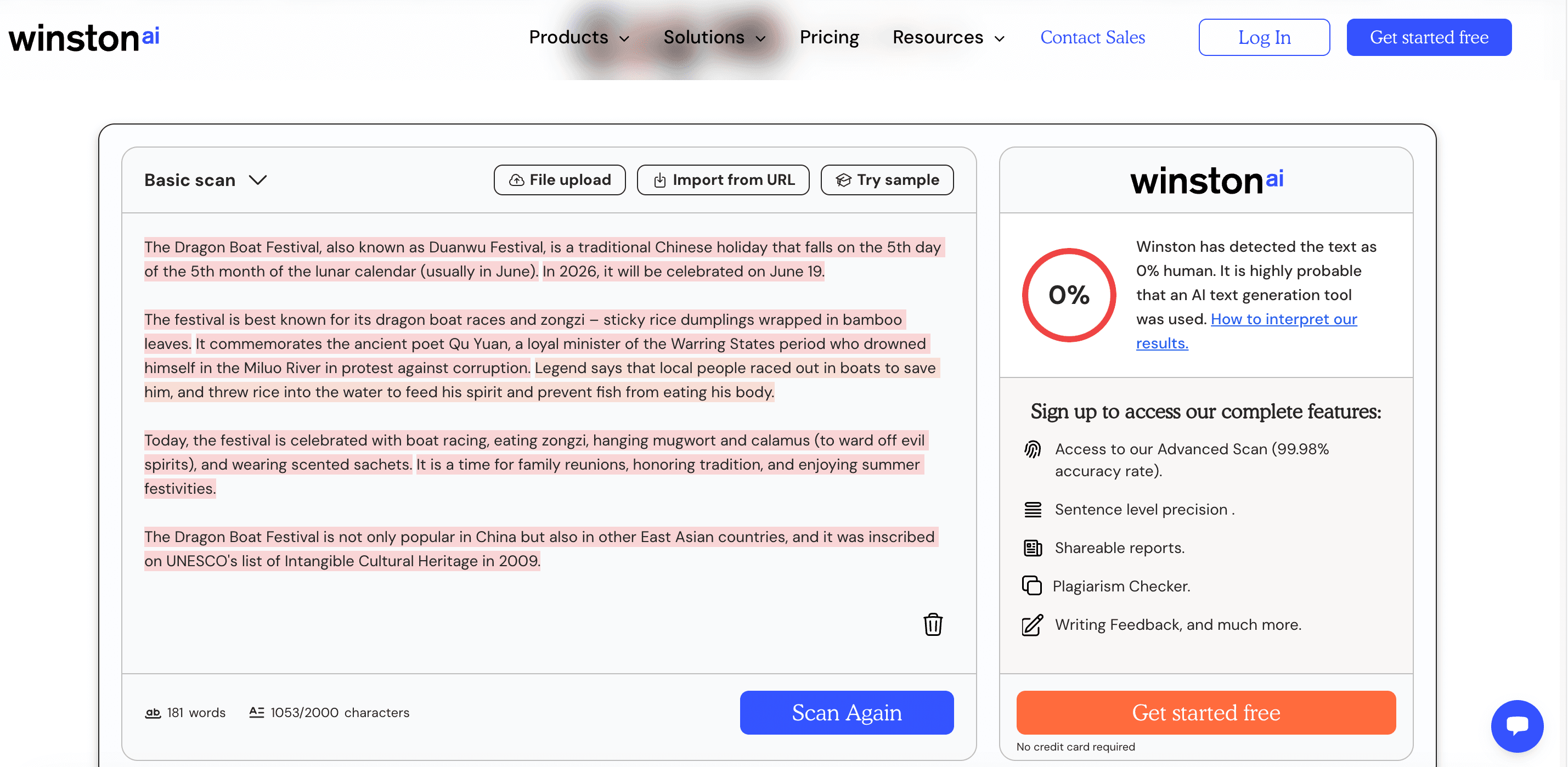
How to use
- Paste text, upload a file, import from URL, or try a sample.
- Run Scan for AI and review the human score and prediction map.
- When needed, add plagiarism checking, OCR, image detection, and shareable reporting.
Pricing and limits
- Free: 2,000 credits for a 14-day trial.
- Essential: $10/month billed annually, 80,000 credits/month.
- Advanced: $16/month billed annually, 200,000 credits/month.
- Elite: $26/month billed annually, 500,000 credits/month.
- AI detection uses 1 credit per word; plagiarism uses 2 credits per word.
Key selling points
- Claims 99.98% accuracy.
- Supports many languages, including English, French, Spanish, German, Portuguese, Dutch, Polish, Italian, Romanian, Indonesian, Tagalog, Russian, Bulgarian, and Simplified Chinese.
- Includes Chrome, Google Classroom, WordPress, Zapier, and API integration paths.
User verdict: Best for teams that want AI detection plus OCR, plagiarism, image checks, and reports in one place.
8.ZeroGPT
ZeroGPT is a popular free-first AI detector with a large character box, batch-file options on paid plans, PDF reports, plagiarism tools, paraphrasing, summarizing, grammar, translation, and API pricing. It is designed as a broad AI toolkit rather than a narrow integrity platform.The caution is that users should be careful with sensitive content and verify the privacy terms before using any free public detector.
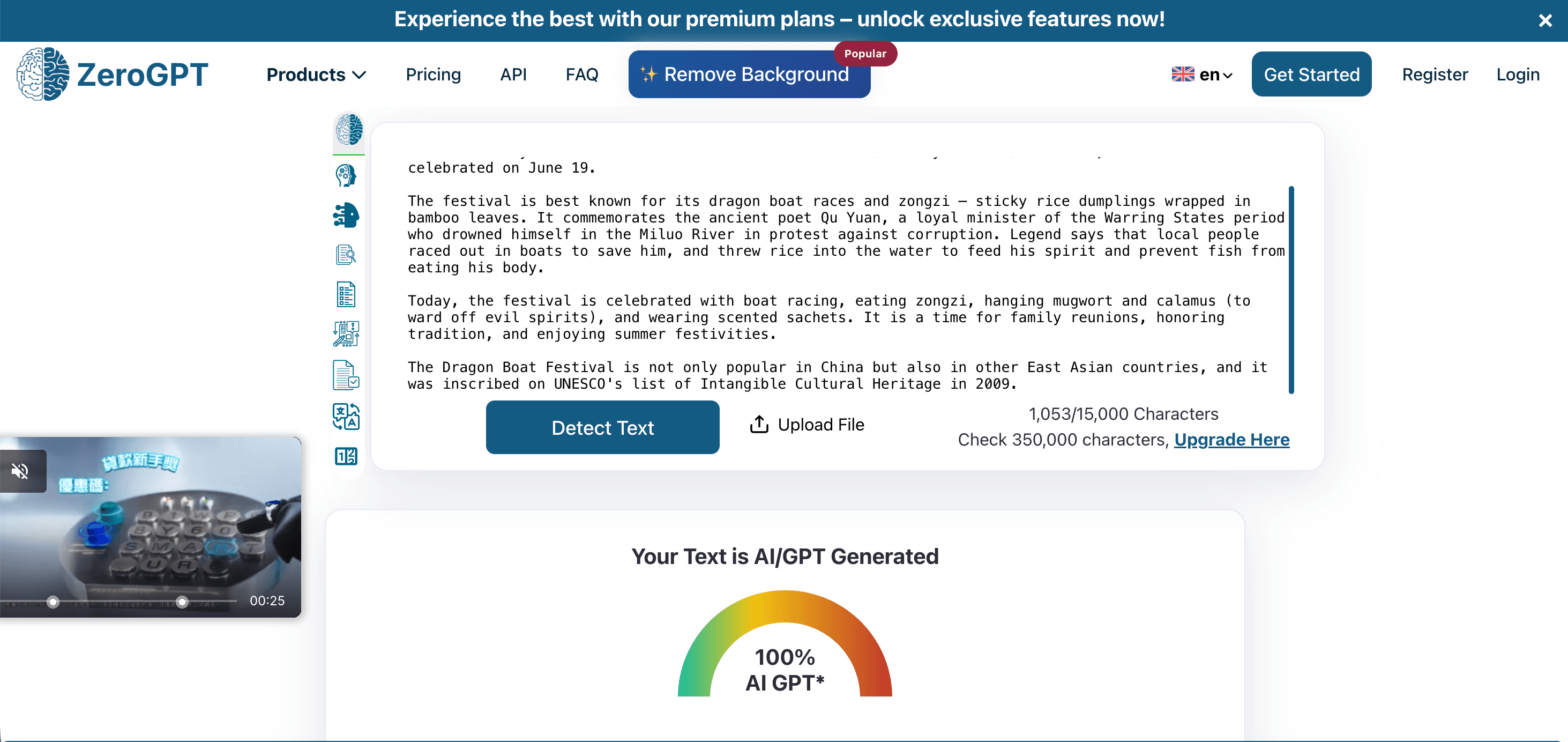
How to use
- Paste text or upload a file.
- Run the detector and inspect highlighted sentences and percentages.
- Use paid plans or API only if you need batch files, larger per-scan limits, or integration.
Pricing and limits
- Free: 15,000 characters per AI detection.
- Pro: $7.99/month billed annually, 100,000 characters per detection.
- Plus: $14.99/month billed annually; Max: $18.99/month billed annually.
- API pay-as-you-go starts at $0.034 per 1,000 words for AI detection.
Key selling points
- Large free limit and many bundled writing tools.
- Supports batch checking and PDF reports on paid plans.
- API options for business workflows.
User verdict: Best for budget users and large quick checks, as long as privacy and score interpretation are handled carefully.
9.BrandWell
It's built from the perspective of marketing, SEO, and content operations – helping you determine whether a piece reads like "robot text" generated by models such as ChatGPT, Gemini, or Claude.
From a user perspective, its value lies in its clear use case: content teams typically don't just ask "Is this AI-written?" but also "Does this content feel inauthentic, templated, or likely to damage brand trust?" The BrandWell detector supports pasting, URL input, and file uploads, making it better suited for blogs, landing pages, SEO articles, and brand content QA.
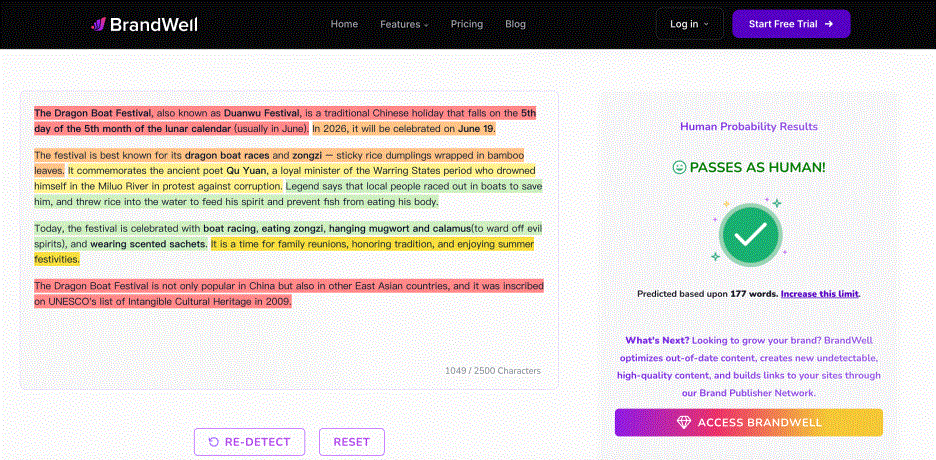
How to use
- Paste text, enter a URL, or upload a file.
- Click "Detect AI Content" and first assess whether the content sounds robotic or inauthentic.
- Pass the results to editors for review of tone, facts, brand style, and author disclosures – rather than simply aiming to "pass the detection".
Pricing and limits
- The public detector shows a limit of 2,500 characters. Pricing varies by plan.
- It is positioned as an entry point to the content platform and is not a substitute for formal academic integrity systems in schools or institutions.
Key selling points
- Real-time AI Checker targeting text generated by ChatGPT, Gemini, Claude, and other models.
- Supports pasting from URLs, file uploads, and sample text.
- Focuses on robotic-sounding content, making it suitable for natural QA in marketing content.
- Integrates with BrandWell's content, pSEO, brand tone, and marketing tool ecosystem.
User verdict: Best suited for SEO, marketing, and content operations teams – use it to spot mechanical phrasing and brand-tone risks, then let editors make substantive revisions.
10.Pangram
It‘s designed for schools, universities, businesses, and content teams. Its public homepage directly offers sample texts (Human, AI, AI+Human) and an upload detection entry. It is easy for users to perform a quick assessment before moving into a more formal review process.
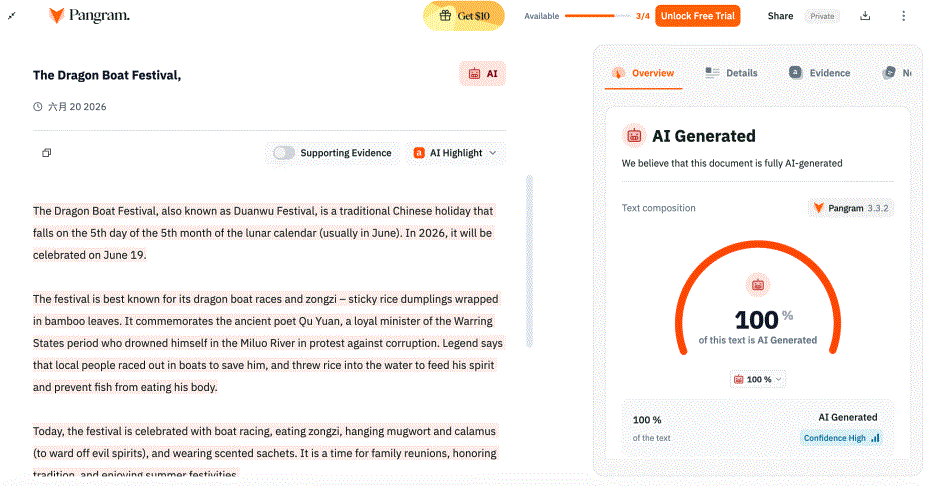
How to use
- Open the Pangram website, choose a sample text, paste your own text, or upload a file.
- Click "Scan for AI" and first look at the mixed signals for AI assistance and AI+Human content.
- If used for teaching or editorial review, save Pangram results alongside draft history, cited sources, and human communication.
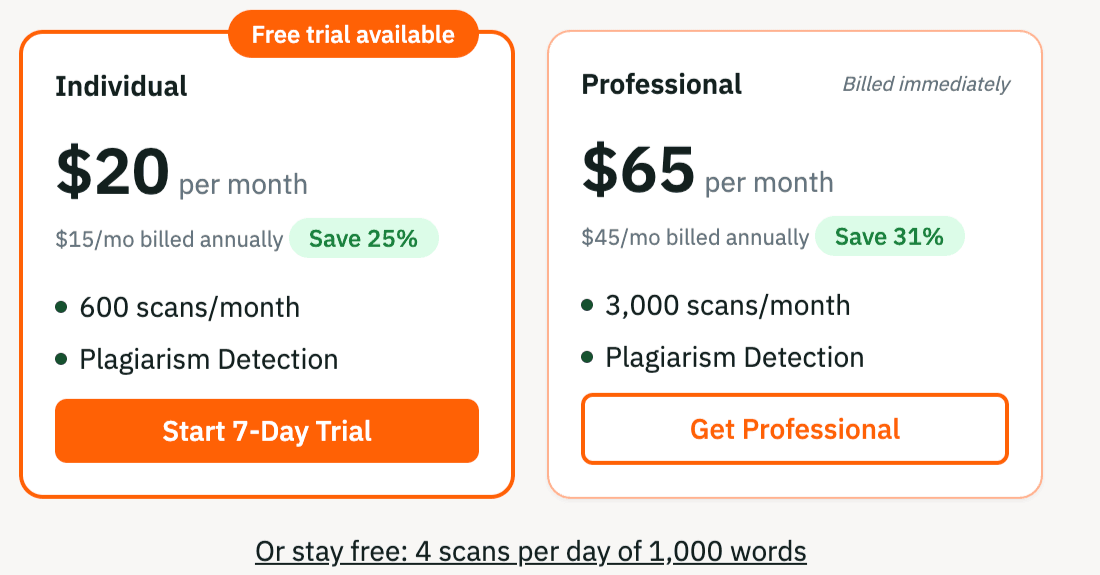
Pricing and limits
Key selling points
- The website claims 99.98%+ accuracy and states that results are third‑party verified.
- Covers mainstream models including ChatGPT, Gemini, Grok, Llama, and Claude.
- Supports Human / ChatGPT / AI+Human sample texts and upload detection.
- Offers a Chrome extension, suitable for everyday web and document review.
User verdict: Best suited for users who want something more trustworthy than typical free tools, yet lighter than institutional platforms – teachers, editors, students, and content teams can use it as a secondary detector.
Part III: Clever AI Detector Practical Examples
Chapter 4 | Best AI Detector Tools by Use Case Segment
Also, this chapter continues to provide readers with practical, hands‑on case studies from a user‘s perspective. We compare two types of content in both academic writing contexts: one is 100% AI‑generated, and the other is 100% human‑written.
Best detector tools for academic
Text to be detected: Abstract section on the theme of AI educational equity and personalisation.
- Prepared 100% AI‑generated copy:
The rapid integration of artificial intelligence into education has revived a centuries‑old aspiration: that every learner can receive instruction tailored to their unique needs. Adaptive tutors, automated essay feedback, and intelligent content recommendation systems now promise to deliver what no single teacher can – simultaneous, personalised attention for an entire classroom. Yet this technological optimism collides with a stubborn reality: education systems are deeply unequal, and new tools often amplify old disparities. This essay argues that AI’s impact on educational equity is inherently paradoxical. While personalisation offers genuine opportunities to narrow achievement gaps, it also introduces new risks – from algorithmic bias to digital divides and even the distorting effects of AI detection software – that can undo its benefits unless carefully managed.
- Prepared 100% human‑written copy:
For centuries, traditional education has always pursued good teachers, good schools, and good educational opportunities. The emergence of AI has fundamentally solved these problems. As long as there is electricity, internet access, and devices, every child can receive the same quality education. It can be said that AI has brought an unprecedented disruptive impact to education. However, this essay argues that although AI has greatly promoted fairness in educational resources, it is still difficult for AI to influence a child's future. The differences in family awareness and understanding still matters a lot. Education is deeply influenced by family education in essence. Many rural families may not even know what AI is, and many parents have no idea how to use AI appropriately for educating their children. At the current stage, AI mainly lowers the difficulty of acquiring quality knowledge and provides more convenience for education at both the school and societal levels.
**Comparison Summary:**Overall, almost all products are very accurate at detecting human‑written text, but the accuracy varies significantly for AI‑written content. Based on the provided text, Lynote, GPTZero, and Pangram performed the best.
4.1、Lynote
Accuracy of detection:🌟🌟🌟🌟🌟
The free AI detector function achieves 100% accuracy on both machine‑generated and human‑written topic texts.
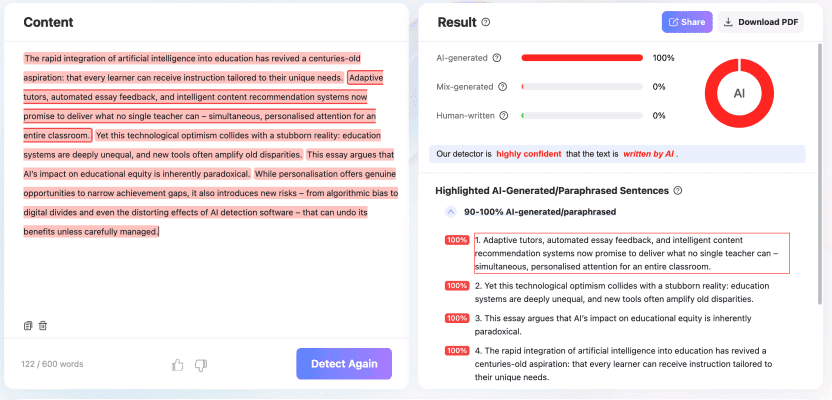
- Using machine-generated topic texts, the free detector function achieves a correct execution rate of up to 100%
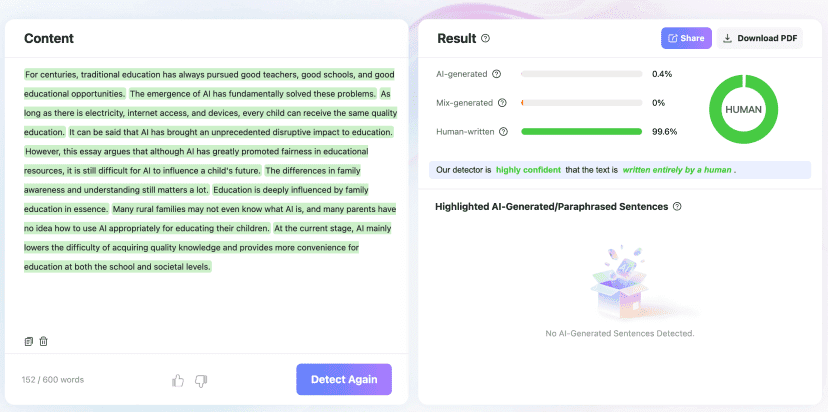
- Using human-written topic texts, the free detector function also achieves a correct execution rate of up to 100%
4.2、GPTZero
Accuracy of detection:🌟🌟🌟🌟🌟
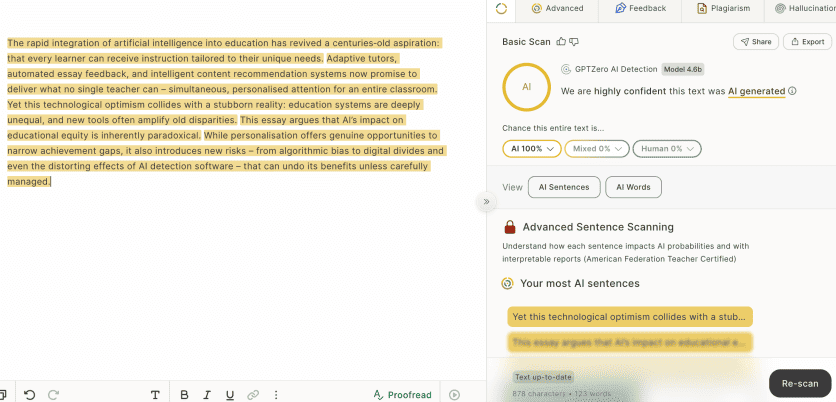 ![]![]
- Using machine-generated topic texts, the free detector function achieves a correct execution rate of up to 100%
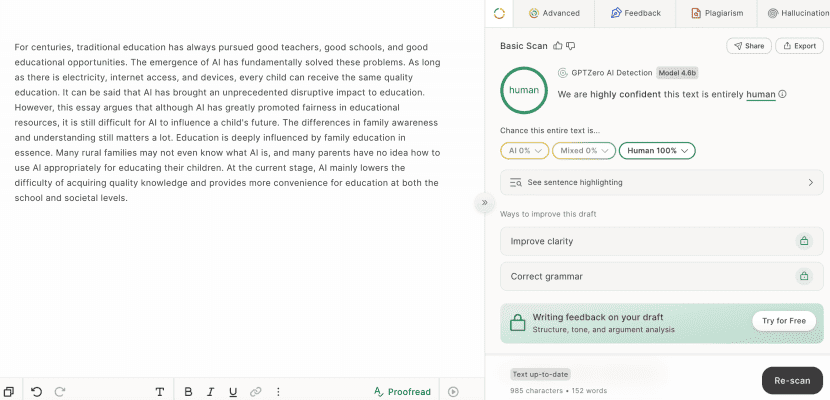
- Using human-written topic texts, the free detector function also achieves a correct execution rate of up to 100%
4.3、Pangram
Accuracy of detection:🌟🌟🌟🌟🌟
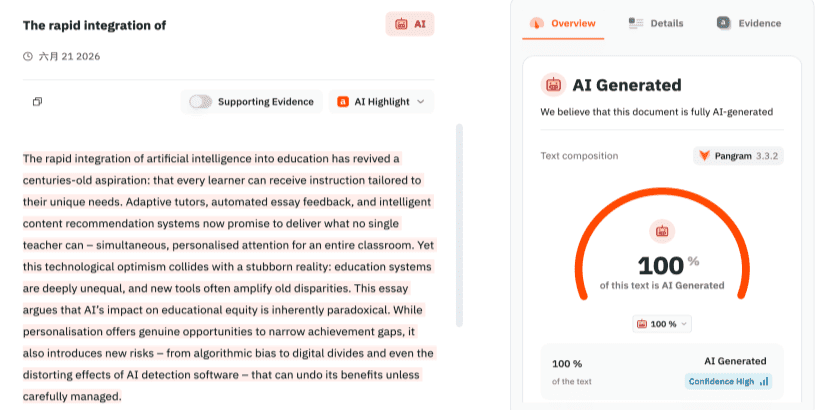 ![]![]
- Using machine-generated topic texts, the free detector function achieves a correct execution rate of up to 100%
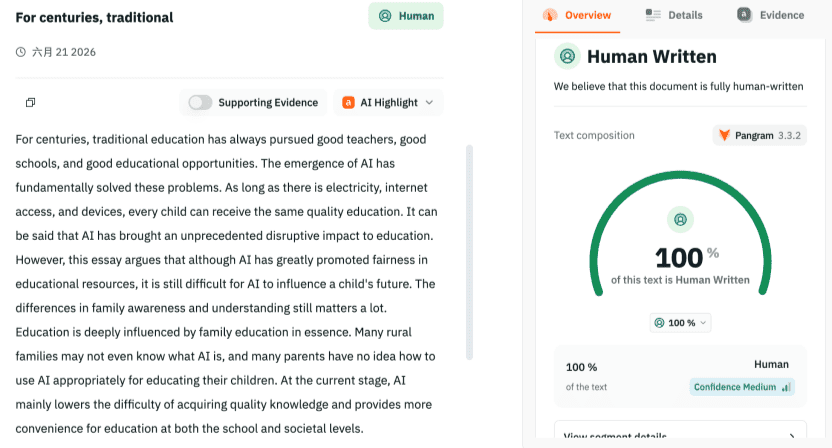
- Using human-written topic texts, the free detector function also achieves a correct execution rate of up to 100%
4.4、Grammarly
Accuracy of detection:🌟🌟🌟🌟
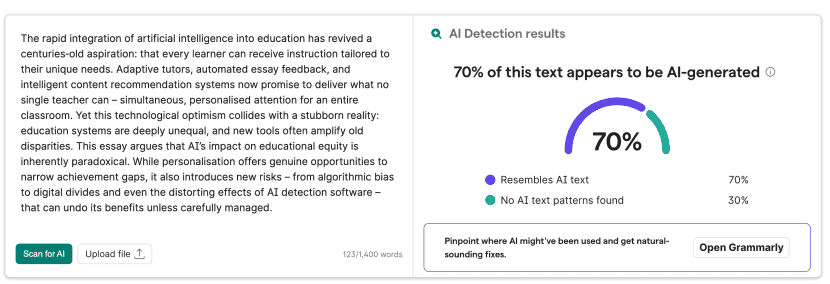 ![]![]
- Using machine-generated topic texts, the free detector function achieves a correct execution rate of up to 70%
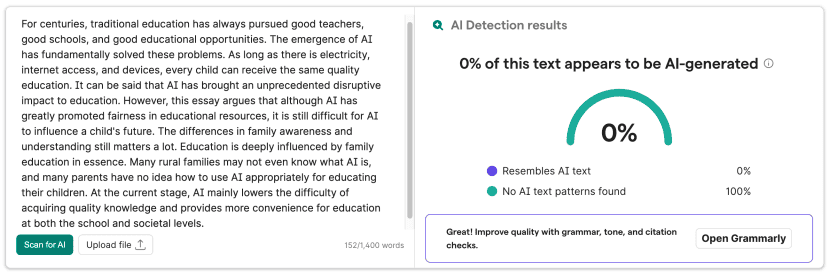
- Using human-written topic texts, the free detector function also achieves a correct execution rate of up to 100%
4.5、QuillBot
Accuracy of detection:🌟🌟🌟
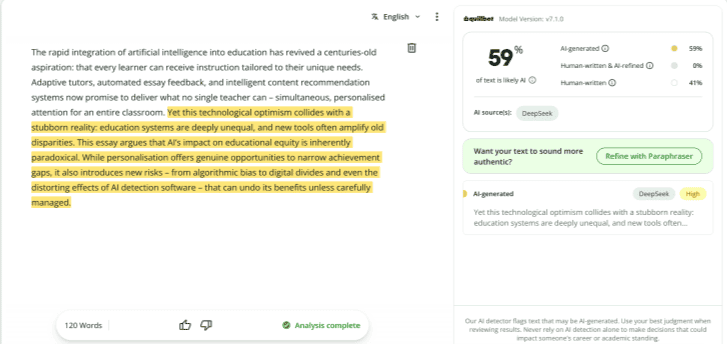 ![]![]
- Using machine-generated topic texts, the free detector function achieves a correct execution rate of up to 60%
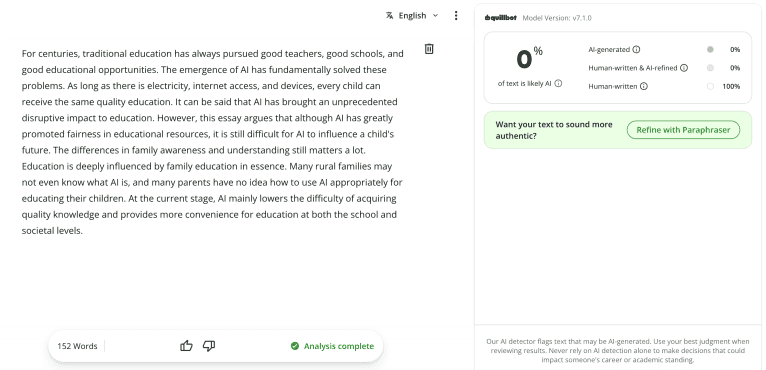
- Using human-written topic texts, the free detector function also achieves a correct execution rate of up to 100%
Part IV: AI Detector Skill Best Practice Guide
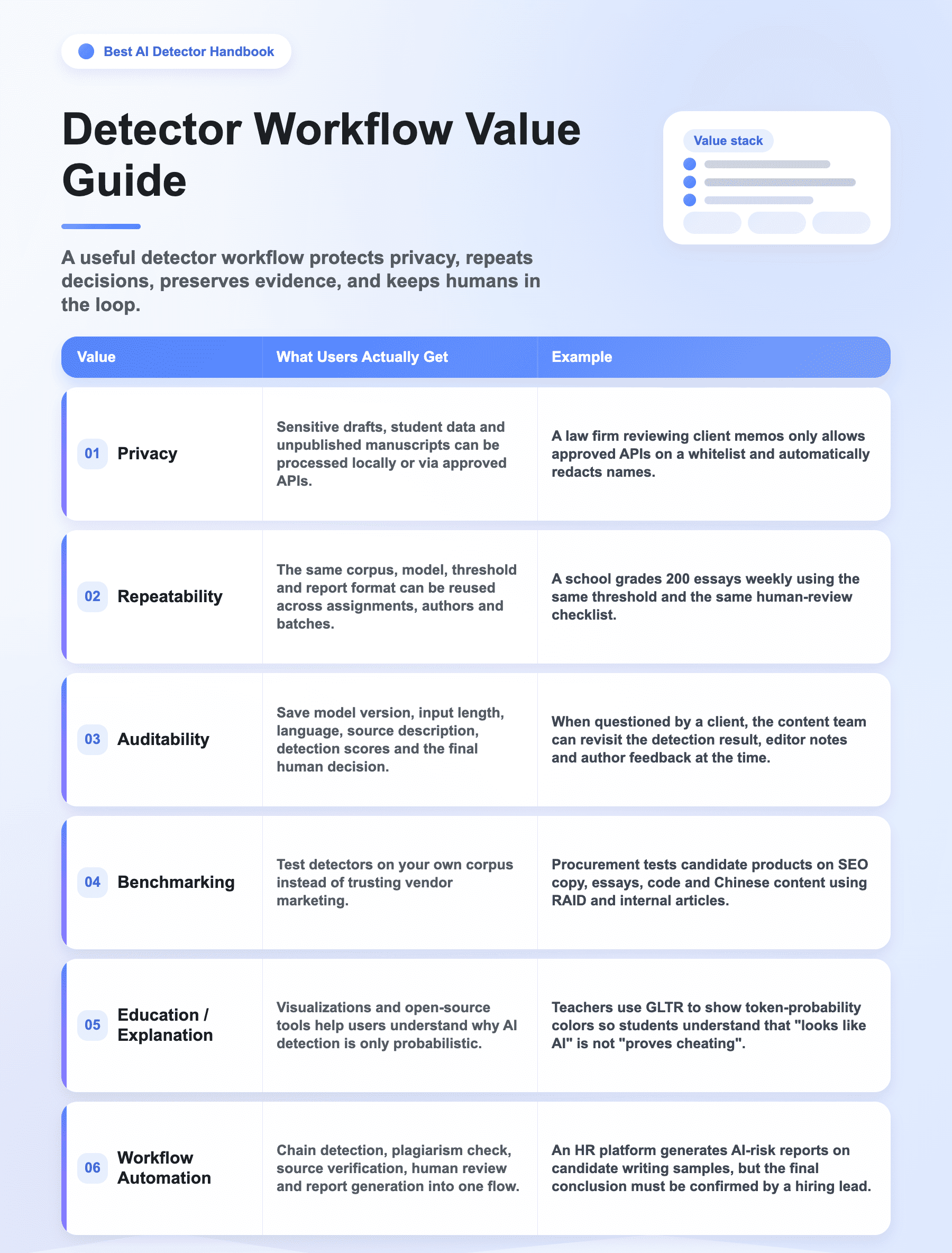
A product answers "What score does this article get today?" A Skill answers "How does my team use the same method, evidence, and thresholds to review AI risk repeatedly?"
- For everyday students and editors: start with SaaS products such as Lynote, GPTZero, and Originality.ai is enough.
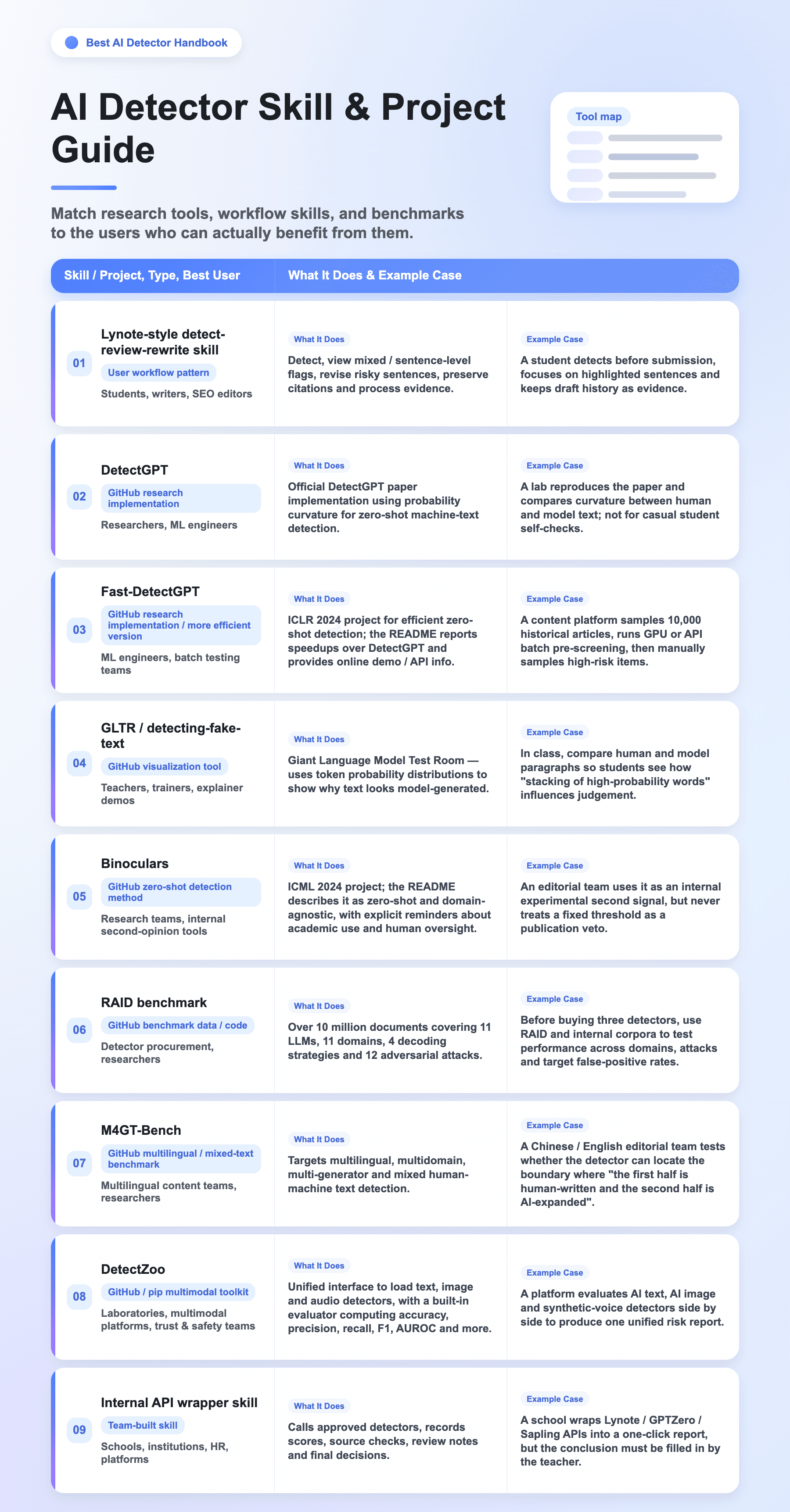
- For privacy, reproducibility, custom thresholds, audit trails, or batch evaluation: move on to GitHub projects and local Skills.
⚠️ No GitHub detector should ever replace human judgment, policy context, or evidence of writing process.
Best AI detector skills should not be understood as "which open-source repo has the highest accuracy", but rather as: in your scenario, which skill fits you best?
Chapter 5 | Best AI detector skills
5.1 Why do we use AI detector skills?
5.2 GitHub and open-source detector projects
5.3 User Cases — How Do Best AI Detector Skills Land in Practice?
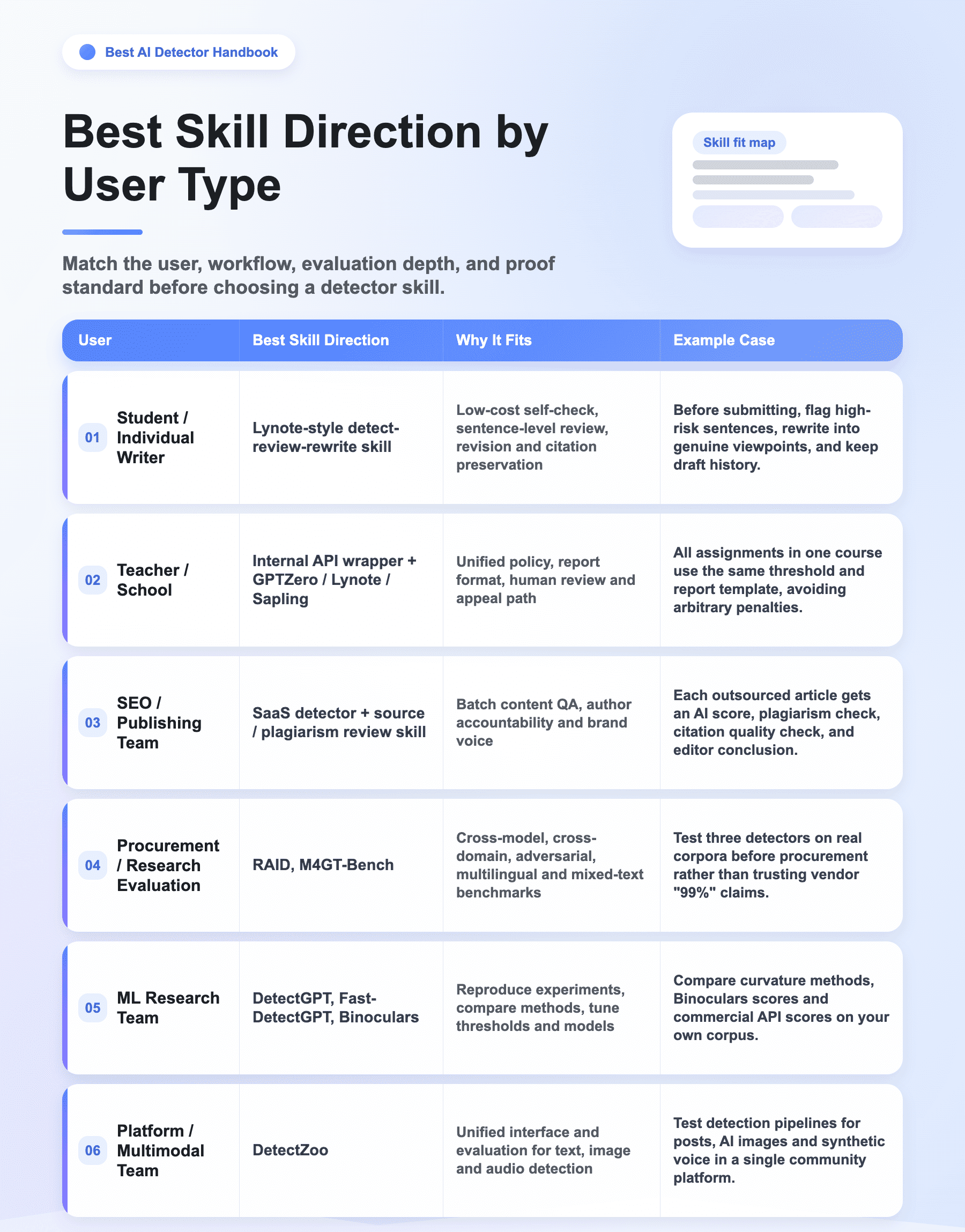
Case A — Student Self-Check Before Submission
A student uploads a DOCX to a Lynote-style skill. The system returns an AI / human / mixed score and sentence-level risk flags. The student does not aim to "trick the detector" but instead checks which sentences look too templated and which citations are missing, then rewrites them into their own arguments and saves draft history.
User verdict: Recommended — Lynote-style workflow. Not recommended — running DetectGPT research scripts directly.
Case B — Teacher Reviewing a Suspicious Assignment
A teacher feeds all class assignments into an internal wrapper skill. The skill records filename, length, language, detector version, threshold and score; only high-risk samples are escalated to human review. The teacher then examines the draft, references, classroom performance and the student's explanation.
User verdict: Recommended — Internal API wrapper + SaaS detector. The key is having an appeal process.
Case C — SEO Editor Reviewing Outsourced Articles
A content team runs an AI detector, plagiarism check and source verification on every article. When the detector flags a high-risk sentence, the editor requires the author to add real cases, data sources and personal experience — not a flat rejection.
User verdict: Recommended — Lynote / Originality-class products + an in-house reporting skill. GLTR can be used for author training.
Case D — Procurement Team Choosing a Detector
An institution is preparing to buy a detector. The team first collects real samples, then uses RAID's different domains, models, decoding strategies and adversarial attacks to test candidate tools, while also adding the institution's own Chinese-language, short-text and mixed-writing samples.
User verdict: Recommended — RAID + an internal benchmark. Do not rely only on vendor home-page accuracy claims.
Case E — Multilingual Content Team
The team handles English, Chinese and German content, as well as AI-translated and human-polished material. The mixed human-machine detection ideas in M4GT-Bench help the team test whether the detector can spot human-AI mixing boundaries.
User verdict: Recommended — M4GT-Bench + the team's own multilingual sample set.
Case F — Platform Trust & Safety
A community platform must identify not only AI text but also AI images and synthetic voice. DetectZoo's unified interface lets the team manage scores and metrics for multimodal detectors with a single evaluator.
User verdict: Recommended — Use DetectZoo for experimental evaluation; still require security, privacy and stability review before going live.
5.4 A practical local detector skill design
- Input gate: accept plain text, DOCX, PDF, URL text, or a folder of drafts; record language and text length.
- Pre-check: remove boilerplate, quotes, citations, code blocks, and assignment prompts when those would distort the score.
- Detector pass: run Lynote/GPTZero/Originality/Sapling API or a local model, and save raw scores plus sentence flags.
- Cross-check: run plagiarism/source review where relevant, especially for academic or publishing workflows.
- Human review: require the reviewer to add process evidence, policy context, and final interpretation.
- Output: generate a compact report with score, model/version, date, limitations, and recommended next step.
5.5 When GitHub tools are the wrong choice
- You need a fast student self-check and do not have ML setup time.
- Your team cannot maintain dependencies, GPUs, datasets, or model versions.
- You need legally defensible institutional reporting, SSO, data processing terms, and support.
- You are tempted to treat a research script as more authoritative than a reviewed human process.
User verdict: for everyday users, start with Lynote or another clear SaaS detector. Move to GitHub projects only when you need reproducibility, local privacy, benchmarking, or a custom review pipeline.
Q&A About AI Detector
A. Are AI detectors accurate?
Sometimes, but never perfectly. Accuracy depends on text length, language, genre, model, editing history, and the detector's training data. Treat results as evidence to investigate, not proof.
B. Can an AI detector prove plagiarism?
No. AI detection and plagiarism detection answer different questions. A text can be AI-generated but original, copied but human-written, or both.
C. Why did my own writing get flagged?
Your writing may be short, formulaic, highly polished, repetitive, non-native, templated, or heavily edited by a writing assistant. Keep drafts and version history.
D. Should I use more than one detector?
For high-stakes review, yes. But multiple detectors are not a courtroom. Use them to find where to inspect, then check writing process and sources.
E. What is the safest student workflow?
Write in a document that preserves version history, keep notes and sources, disclose allowed AI use, run a self-check only on non-sensitive drafts, and revise for genuine argument quality rather than detector evasion.
F. What is the safest teacher workflow?
Publish an AI policy, avoid surprise enforcement, scan only long enough samples, compare with assignment context, ask the student to explain their process, and provide an appeal path.
G. What is the safest publisher workflow?
Define allowed AI assistance in contracts, check plagiarism and sources, audit repeated writer patterns, use detector scores as trend signals, and keep human editorial standards above detector scores.
H. Is a screenshot enough evidence?
No. A screenshot is easy to misinterpret and can age quickly. Save the full report, date, text sample, detector version if available, policy context, and follow-up notes.
I. Should I paste confidential text into a free detector?
Usually no. Redact sensitive content, use enterprise terms, or select a private/API workflow with clear data handling and security commitments.
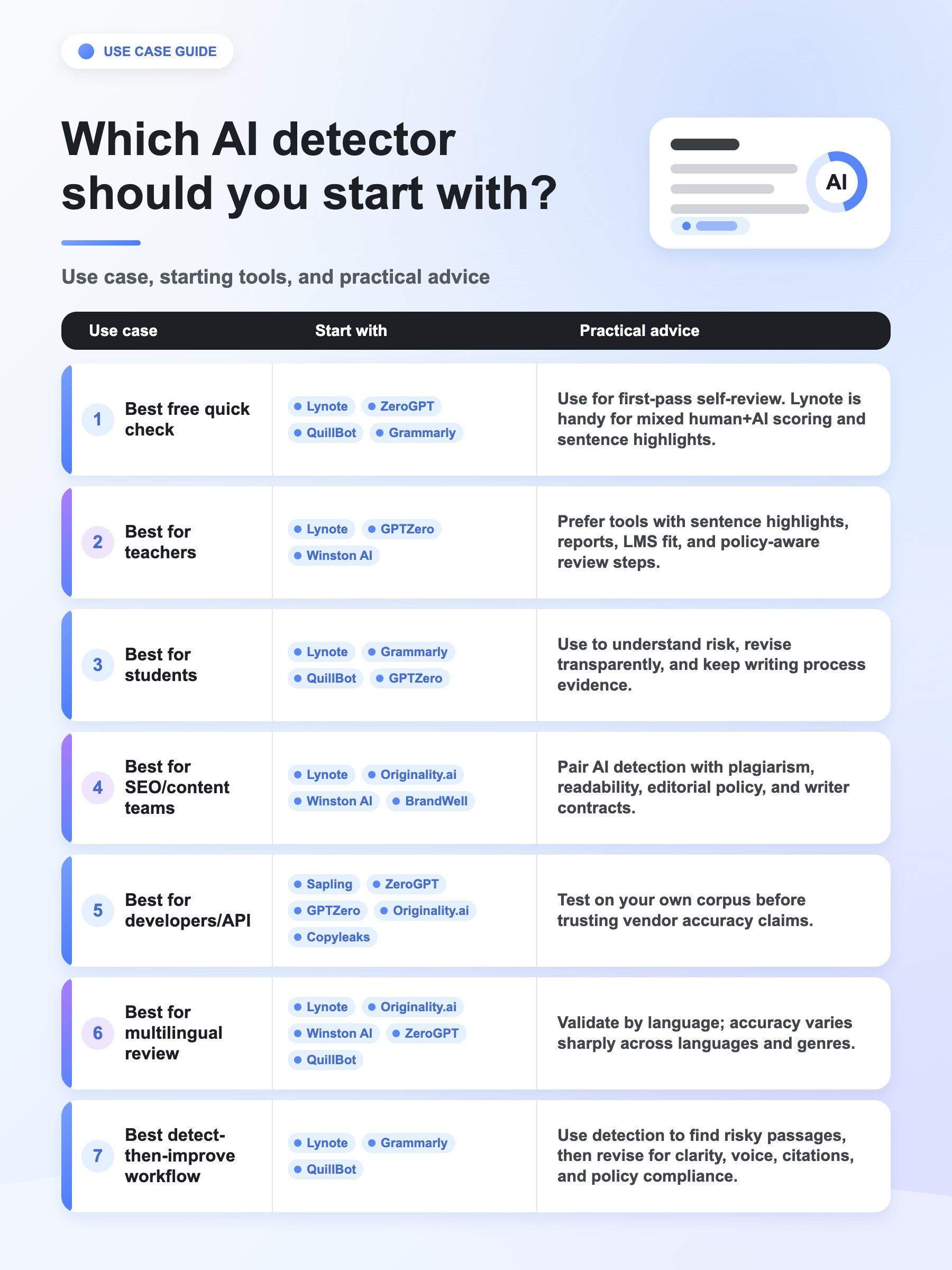
J. Which detector should I start with?
If you are a student, start with Lynote, Grammarly, QuillBot, Scribbr, or GPTZero. If you are a teacher, start with Lynote, GPTZero, Turnitin, or Winston. If you publish at scale, start with Lynote, Originality.ai, or Winston. If you need an API, start with Sapling, ZeroGPT, GPTZero, Originality.ai, or Copyleaks.
K. Should I use GitHub detector projects?
Use GitHub projects when you need research reproducibility, local privacy, custom thresholds, or benchmarking. For ordinary draft review, a clear product like Lynote is usually faster and safer.