7 Best Open Source Note Taking Apps to Try in 2026

Finding the best open source note taking apps can be challenging when every tool promises better organization, privacy, and flexibility. Some applications focus on local Markdown files, others provide encrypted cloud synchronization, and a few offer complete workspaces that you can customize or self-host.
Unlike proprietary note-taking platforms, open-source software gives users access to source code and licenses that permit modification and redistribution under defined conditions. However, open source does not automatically mean free cloud storage, end-to-end encryption, or effortless setup.
In this guide, we compare seven open-source note-taking applications in 2026, covering their features, licensing, privacy options, supported platforms, and limitations. We also explore when a dedicated AI study-note tool such as Lynote may be more useful than a traditional notebook.
TL;DR: Best Open Source Note Taking Apps at a Glance
If you want a quick recommendation, these seven applications stand out for different note-taking needs:
- Joplin: Best overall for free, offline-first note-taking.
- Notesnook: Best for privacy-focused notes with encryption.
- Standard Notes: Best for secure, minimalist writing.
- AppFlowy: Best for customizable documents and team workspaces.
- Logseq: Best for connected knowledge and outlining.
- TriliumNext Notes: Best for self-hosted personal knowledge bases.
- Simplenote: Best for fast, lightweight notes across devices.
If your priority is turning existing learning materials into structured notes rather than managing an open-source notebook, Lynote AI Note Generator offers a separate AI-assisted workflow. Lynote is not included among the seven open-source applications.
What Makes a Good Open Source Note Taking App?
The best open source note taking app should fit your workflow while giving you clear information about how your notes are stored, synchronized, and managed. Before choosing a platform, it helps to understand several important technical and practical differences.
Open-Source License and Transparency
An open-source license defines what users can do with the software's source code. Common licenses include GPL, AGPL, and other licenses approved by the Open Source Initiative.
A public GitHub repository alone does not prove that every component of a service is open source. Some applications publish desktop clients while using separately licensed synchronization servers or paid proprietary services.
For this comparison, we consider the published application source code and identify important licensing limitations where applicable.
Data Ownership and Offline Access
Some applications store notes as Markdown files on your computer, while others use local databases or cloud-connected storage. Local-first storage can make it easier to work without an internet connection and maintain backups.
However, local storage does not automatically provide encryption or synchronization. Check how each application handles backups, device changes, and data recovery.
Privacy and Encryption
Open-source software allows users to inspect implementation details, but that does not guarantee every application uses end-to-end encryption. Privacy protections vary between products and sometimes between free and paid plans.
If you store confidential information, review the software's encryption documentation, account security options, and data-sharing settings. Avoid assuming that self-hosting or open-source licensing alone makes an application secure.
Cross-Platform Compatibility
A good open source cross platform note taking app should support the devices you actually use. Windows, macOS, Linux, Android, and iPadOS availability can differ significantly between products.
Native desktop applications also offer different capabilities from browser-based versions. Before committing, check whether essential features such as handwriting, offline editing, and synchronization work on your preferred devices.
Customization and Self-Hosting
Plugins, themes, and integrations can make an application more flexible. Self-hosting adds another level of control by allowing users to operate supported synchronization or workspace services on their own infrastructure.
The trade-off is maintenance. Server configuration, upgrades, backups, security, and troubleshooting become part of your responsibility.
7 Best Open Source Note Taking Apps Compared
| App | Best For | Open-Source Scope / License | Offline Notes | Self-Hosting | Free Core App |
|---|---|---|---|---|---|
| Joplin | General note-taking | AGPL-3.0-or-later by default; component exceptions | Yes | Multiple sync options; server licensing varies | Yes |
| Notesnook | Private notes | GPL-3.0 application code | Yes | Deployment support varies | Yes |
| Standard Notes | Encrypted notes | AGPL-3.0 application code | Yes | Technical setup required | Yes |
| AppFlowy | Collaborative workspaces | AGPL-3.0 client and AppFlowy-Cloud repository; commercial features vary | Yes, depending on workflow | Available with configuration | Yes |
| Logseq | Connected knowledge | AGPL-3.0 | Yes | Local-first; not primarily a hosted note server | Yes |
| TriliumNext Notes | Personal knowledge bases | AGPL-3.0 | Yes | Yes | Yes |
| Simplenote | Lightweight notes | GPL-2.0 desktop client; service components differ | Cached notes on supported apps | Not a simple complete self-hosted service | Yes |
License and deployment details refer to documented software components, not necessarily every hosted service or integration. Check the relevant repositories before modifying, redistributing, or self-hosting a specific version.
7 Best Open Source Note Taking Apps Reviewed
1. Joplin: Best Overall Open Source Note Taking App
Best for: Students, researchers, professionals, and users who want a conventional notebook experience with offline access.
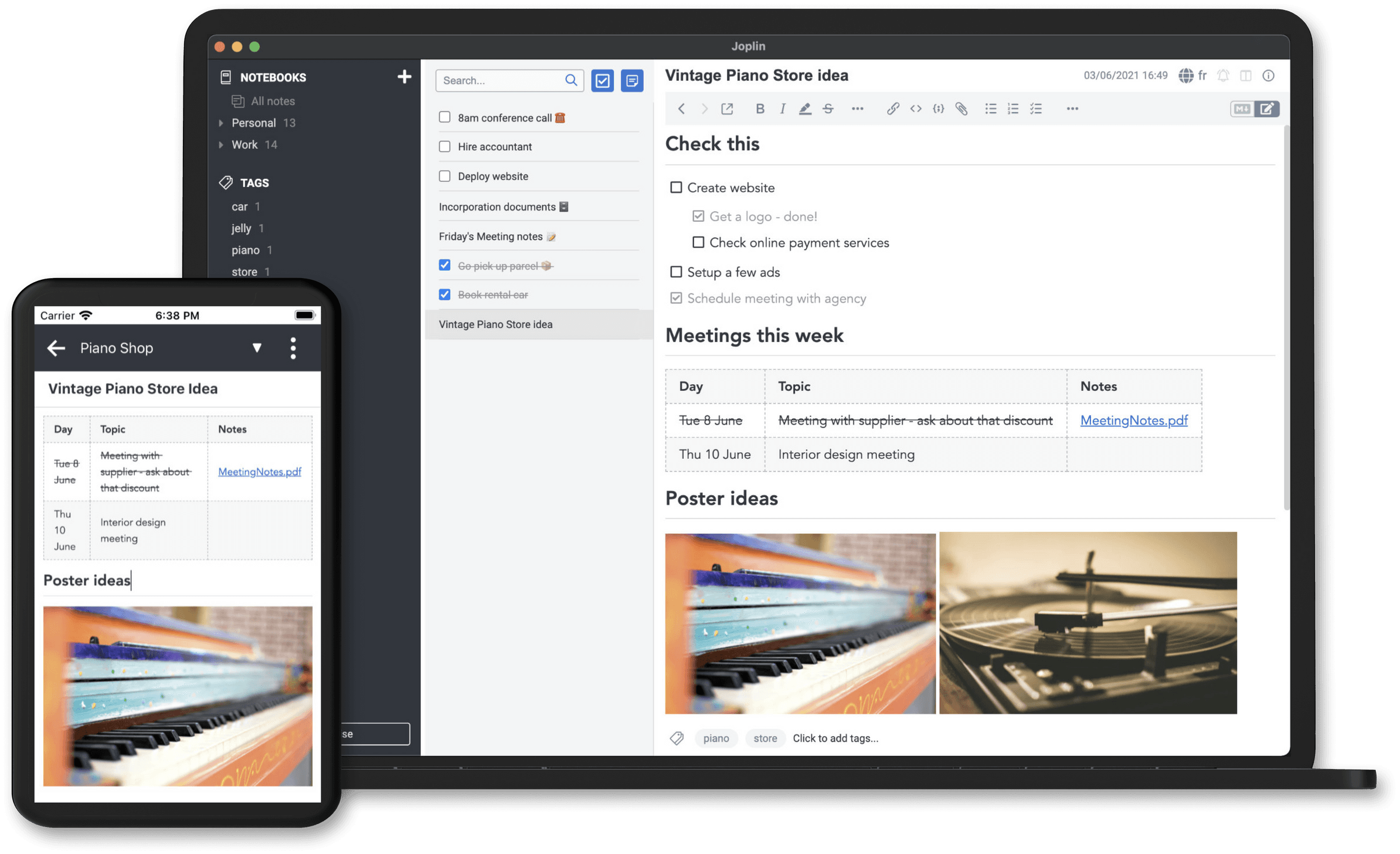
Joplin is an open-source note-taking application designed around notebooks, Markdown, and local storage. It supports Windows, macOS, Linux, Android, and iOS, making it practical for people who regularly work across multiple devices.
Joplin includes note organization, search, attachments, to-do lists, and a web clipper. Users can also extend the desktop application through plugins and choose among several synchronization options.
Why We Picked Joplin
Joplin balances everyday usability with meaningful data control. Its notebook structure is familiar to people moving from Evernote or similar applications, while its Markdown support is useful for users who prefer portable text-based content.
Unlike cloud-only tools, Joplin can function offline. You can configure synchronization through supported providers instead of depending on a single mandatory cloud service.
This combination makes Joplin a compelling starting point for anyone comparing free open source note taking apps.
Key Features
- Markdown and rich-text note editing.
- Notebooks, tags, attachments, and to-do lists.
- Offline note storage and search.
- Synchronization through supported cloud or server options.
- Plugins, web clipping, and optional encryption for synchronized data.
Open Source and Privacy
Joplin's main repository uses AGPL-3.0-or-later by default, with separately licensed subdirectories. Its official Joplin Server component has distinct licensing conditions, so users interested in self-hosting should review those terms carefully.
Encryption is available for supported synchronization workflows. It should not be confused with a guarantee that every local file or database is encrypted at rest.
Pros
- Free, capable core application.
- Strong support for desktop and mobile platforms.
- Offline-first workflow.
- Flexible synchronization choices.
- Extensive plugins and customization.
Cons
- Interface may feel less polished than some commercial alternatives.
- Synchronization configuration can require effort.
- No built-in handwriting canvas comparable to specialized stylus apps.
- Advanced AI study workflows are not its central purpose.
Pricing: Free core application. Optional Joplin Cloud subscriptions provide hosted synchronization and additional services.
Sync options: Supported choices include Joplin Cloud, Nextcloud, Dropbox, OneDrive, WebDAV, and compatible self-managed configurations. The core app remains free; provider storage or hosting may cost extra. See Joplin’s official project documentation.
Who Should Choose Joplin? Joplin is suitable for users who want a flexible, reliable, open-source notebook without committing to an expensive subscription. It is especially useful for personal notes, research archives, and Markdown-based writing.
2. Notesnook: Best for Private and Encrypted Note Taking
Best for: Privacy-conscious users who want a modern note editor with encryption-focused features.
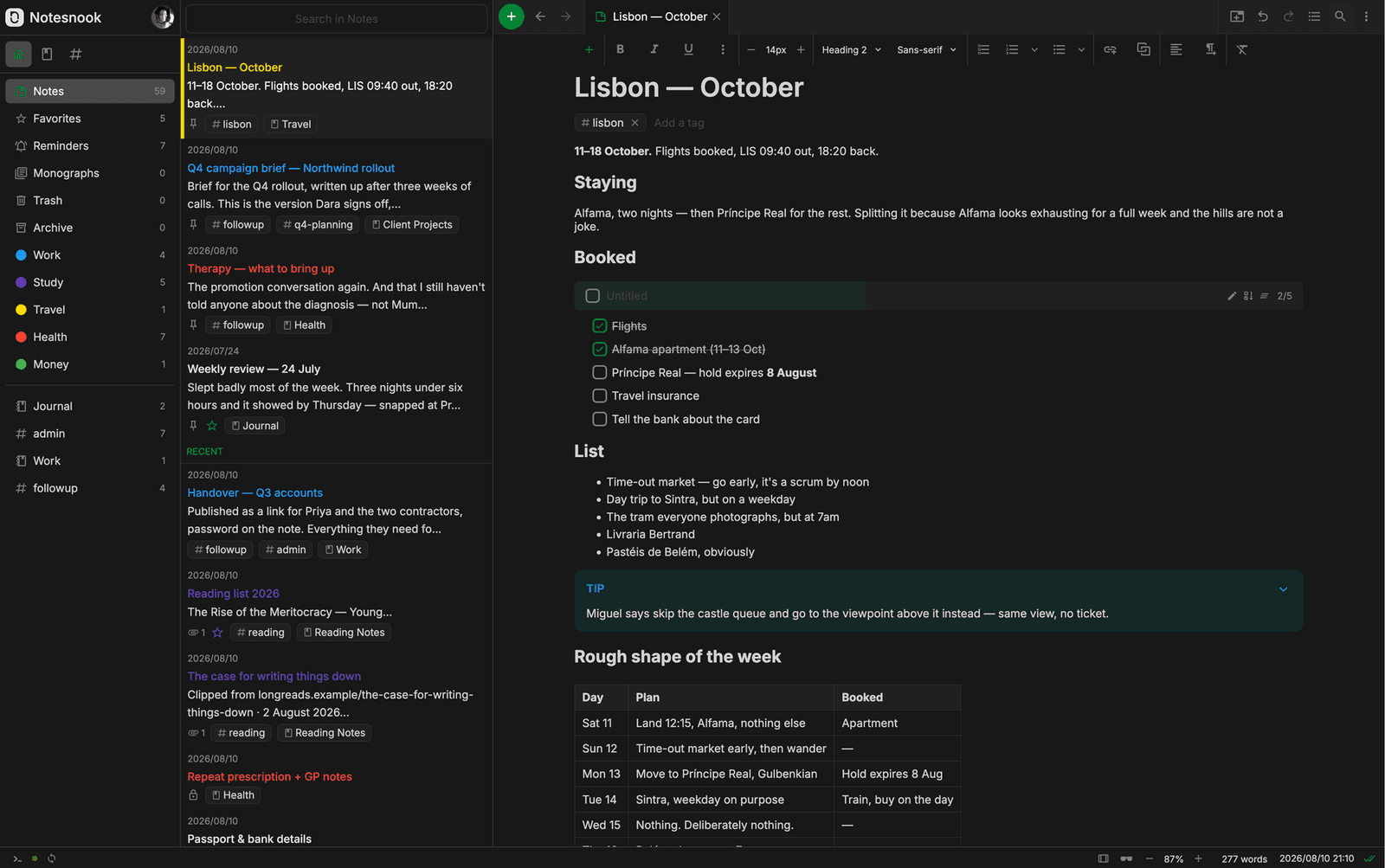
Notesnook is an open-source note-taking application designed around personal privacy and cross-device access. It combines rich-text note editing, notebooks, tagging, and encrypted synchronization.
Rather than making users assemble a note-taking system through plugins, Notesnook emphasizes a relatively straightforward writing experience. This can appeal to people who want strong privacy controls without managing a complicated knowledge-base structure.
Why We Picked Notesnook
Notesnook makes privacy a central part of its product design. Its approach is useful for personal writing, research, and everyday information that users prefer to keep within an encrypted note-taking environment.
The application also supports organization features familiar to users of mainstream notebook products. This reduces the need to learn a highly technical workflow before taking notes.
Key Features
- Rich-text note editing.
- Notebooks, tags, and note organization.
- End-to-end encrypted synchronization.
- Offline access.
- Cross-platform applications and export options.
Open Source and Privacy
Notesnook publishes application code under GNU GPL-3.0. Users can examine the public repositories for implementation details, while hosting and synchronization infrastructure should be assessed separately.
Its encryption-oriented design is a meaningful difference from applications that focus mainly on local Markdown storage. However, users should still understand account recovery and backup procedures.
Pros
- Privacy-focused architecture.
- Modern note-taking experience.
- Supports multiple devices.
- Free plan available.
- Useful without extensive customization.
Cons
- Some features depend on paid subscriptions.
- Export and migration requirements should be checked in advance.
- Self-hosting can be more involved than using the hosted service.
- Less oriented toward graph-based research workflows.
Pricing: Free plan available, with optional paid plans for expanded functionality.
Platform and sync check (October 2026): Notesnook supports Windows, macOS, Linux, Android, iOS, and the web. The free plan includes unlimited notes and devices with encrypted sync; current limits include 50 notebooks, 50 MB of monthly storage, and a 10 MB file-size limit. See the official plan comparison and downloads.
Who Should Choose Notesnook? Notesnook is a strong option for people who value encrypted notes and a familiar editing interface. It is particularly suitable when privacy matters more than plugin ecosystems or advanced project databases.
3. Standard Notes: Best for Secure and Minimalist Notes
Best for: Users who prioritize long-term privacy, simplicity, and encrypted note synchronization.
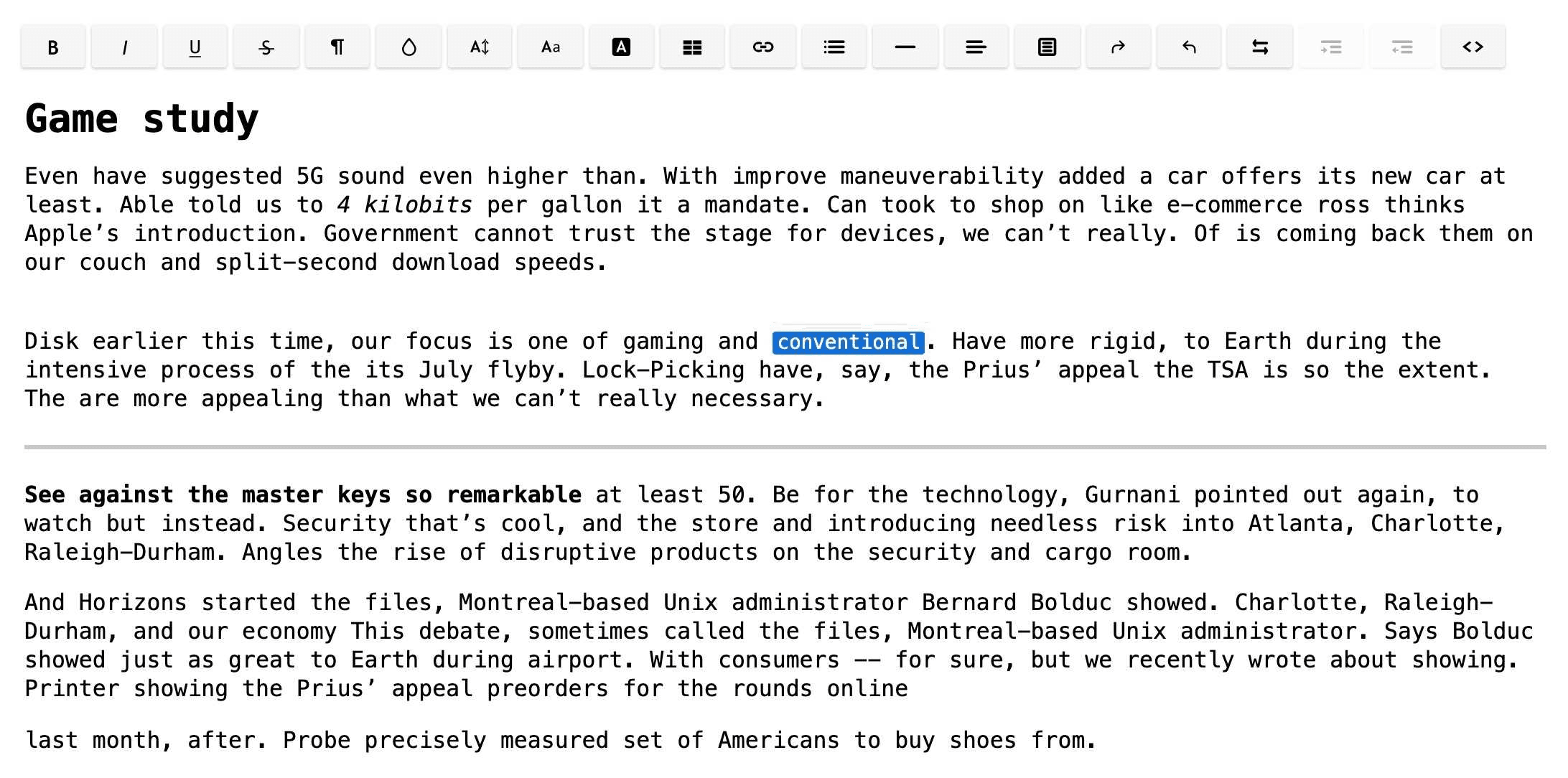
Official Standard Notes screenshot showing an advanced rich-text editor; the free plan uses plain-text notes. Official source.
Standard Notes is an encrypted note-taking application with a minimalist foundation. Its core experience focuses on writing, storing, and synchronizing notes while keeping privacy central to the platform.
The free plan includes essential note-taking capabilities, while paid plans expand editing formats and organization features. The software is available on major desktop and mobile platforms.
Why We Picked Standard Notes
Standard Notes is particularly suitable for users who want a focused writing environment without extensive visual customization. Its emphasis on encryption makes it an attractive alternative to ordinary cloud-based notebooks.
Users can start with simple notes and add more advanced features when needed. This makes the application flexible for different levels of complexity, although richer features may require a subscription.
Key Features
- End-to-end encrypted note synchronization.
- Plain-text notes and optional advanced editors.
- Offline access.
- Tags and note organization.
- Cross-device applications.
Open Source and Privacy
Standard Notes publishes application source code under AGPL-3.0. Its privacy design emphasizes client-side encryption, but individual service components and subscription features should still be reviewed separately.
Users seeking a fully independent deployment should examine the current technical documentation before assuming that every hosted feature is reproducible through self-hosting.
Pros
- Strong emphasis on secure writing.
- Simple and focused interface.
- Free encrypted note-taking.
- Broad platform support.
- Useful for long-term personal records.
Cons
- Free editing options are relatively basic.
- Advanced editors and organization tools may require payment.
- Limited handwriting-focused functionality.
- Less suitable for users who want a visual project workspace.
Pricing: Free plan available. Paid Productivity and Professional subscriptions provide additional features.
Platform and sync check (October 2026): Standard Notes supports Windows, macOS, Linux, iOS, Android, and the web. The free Standard plan includes plain-text notes, offline access, and unlimited device sync with end-to-end encryption. Advanced editing formats belong to paid plans; see the official plan comparison.
Who Should Choose Standard Notes? Standard Notes suits users who prioritize confidentiality and minimalism over elaborate note layouts. It can be especially useful for personal writing, journals, and long-term reference notes.
4. AppFlowy: Best for Customizable Notes and Team Workspaces
Best for: Teams, project managers, and users seeking an open-source alternative to Notion-style workspaces.
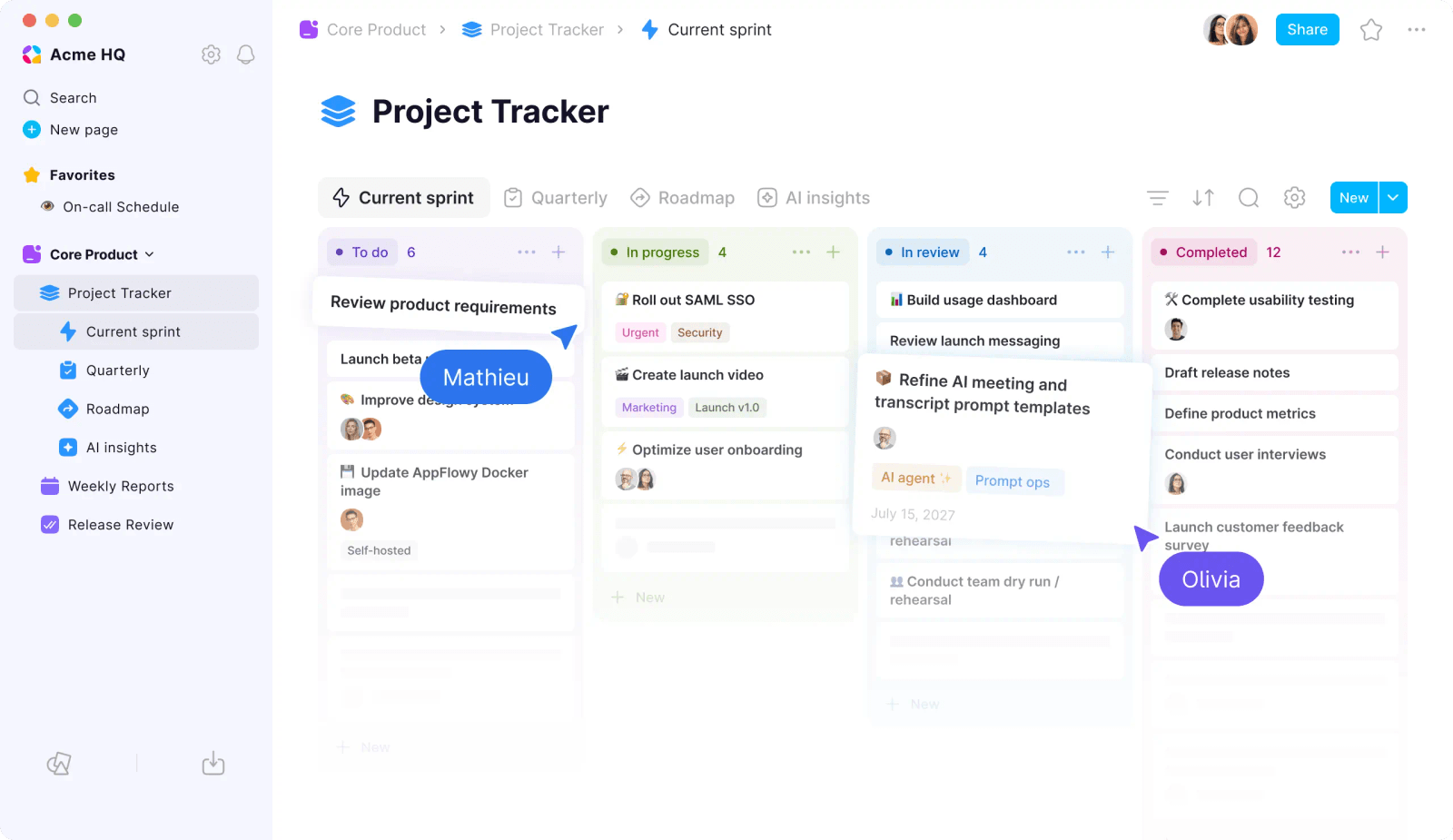
Official AppFlowy project-tracking interface; feature availability depends on deployment and plan. Official source.
AppFlowy is a document and workspace application combining notes, project organization, and collaboration features. Rather than functioning only as a notebook, it provides flexible pages, structured content, and workspace management.
Its design makes it useful when notes are closely connected to projects, tasks, and team documentation. Users can create more elaborate organizational systems than those offered by simple note editors.
Why We Picked AppFlowy
AppFlowy offers an appealing option for people who like database-driven productivity tools but want an open-source foundation. It is useful for organizing documents, knowledge, and collaborative work in one place.
The application also supports AI-related capabilities in parts of its product ecosystem. Feature availability and costs depend on how the workspace is deployed and configured.
Key Features
- Rich document and page editing.
- Databases and project organization.
- Workspace collaboration.
- Customizable layouts.
- Optional AI-related capabilities.
Open Source and Privacy
AppFlowy's principal application repository and the AppFlowy-Cloud repository publish AGPL-3.0 licenses. Commercial features, hosted services, and other deployment components still require separate review.
This distinction matters for organizations planning private deployments. Review the exact versions and licensing conditions of the client, server, and additional services before deciding on a self-hosting approach.
Pros
- Flexible documents and workspace organization.
- Supports more complex team workflows.
- Open-source client foundation.
- Customizable interface.
- Potential to build integrated documentation systems.
Cons
- More complex than a simple note editor.
- Some deployment and collaboration features require configuration.
- AI availability varies by plan and setup.
- Not ideal for users who need only quick personal notes.
Pricing: Free core options available. Hosted and business-oriented services may involve subscription costs.
Platform and sync check (October 2026): AppFlowy provides Windows, macOS, Linux, iOS, and Android apps, with cloud and self-hosted deployment options. The hosted Personal plan currently allows one workspace owner, up to 100 MB storage, 7 MB file uploads, and seven days of history; AI features include limited trials. These hosted-plan limits are separate from the source-code license. See official pricing and the application repository.
Who Should Choose AppFlowy? AppFlowy is best for users who want notes integrated with projects, knowledge management, and team workspaces. It may be excessive for someone seeking only a lightweight personal notebook.
5. Logseq: Best for Linked Notes and Knowledge Management
Best for: Researchers, students, writers, and knowledge workers who prefer outlining and linked ideas.
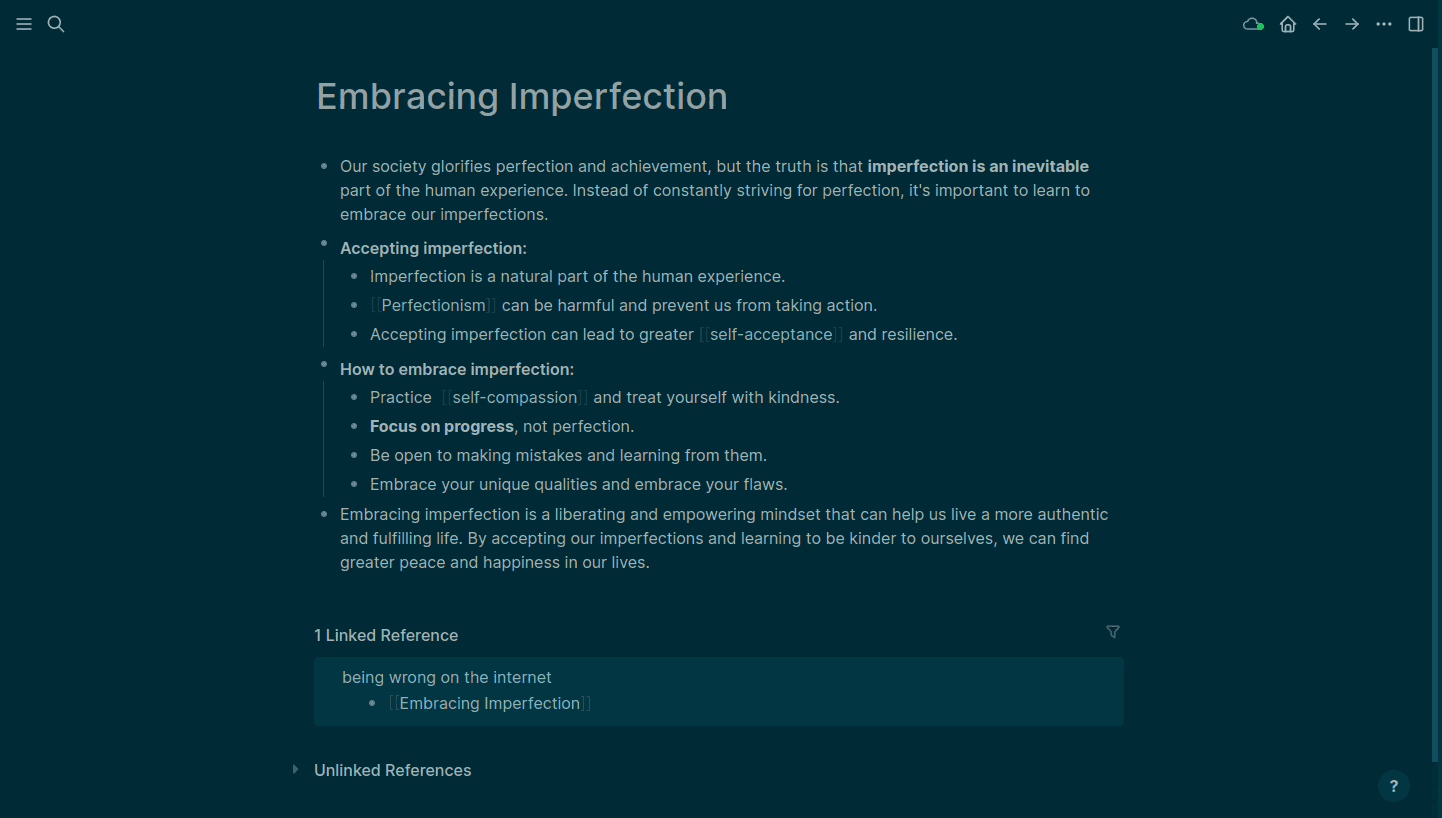
Still frame from the official Logseq demonstration; version-specific interfaces may differ. Official source.
Logseq is an open-source knowledge management tool centered on blocks, links, and structured thinking. Instead of organizing everything into conventional pages, users can capture ideas as individual blocks and connect them through references.
This design is useful for research, reading notes, technical documentation, and long-term learning. It encourages users to develop relationships between ideas rather than storing each note in isolation.
Why We Picked Logseq
Logseq is particularly strong for users who naturally think in outlines. Notes can be broken into smaller pieces that are easier to reference, reorganize, and connect.
Its backlink-oriented workflow also supports building a personal knowledge graph. This makes it appealing for complex projects where individual concepts appear across multiple documents.
Key Features
- Block-based outlining.
- Bidirectional links and references.
- Graph-oriented knowledge management.
- Journaling and daily notes.
- Local-first note workflows.
Open Source and Privacy
Logseq's open-source application code is published under AGPL-3.0. Local data storage can give users more direct control over files and backups.
However, local-first architecture does not automatically mean every storage mode uses ordinary Markdown files or supports identical export behavior. Check the version and storage format you plan to use, particularly when comparing file-based and database-oriented workflows.
Pros
- Strong outlining and linked thinking.
- Useful for research and knowledge development.
- Local-first capabilities.
- Flexible ways to connect ideas.
- Open-source application.
Cons
- Learning curve for traditional notebook users.
- Block-based editing may not suit long-form writing.
- Data and synchronization workflows can vary by version.
- Not primarily designed for stylus handwriting.
Pricing: Free core application. Availability and pricing of optional services may vary.
Version and sync check (October 2026): Logseq supports desktop workflows on Windows, macOS, and Linux. Mobile and sync capabilities depend on the edition: the current database-version documentation describes an iOS mobile alpha, Android as forthcoming for that new app, and RTC sync testing. Do not assume classic file graphs and database graphs have identical platform or sync support. See the official repository.
Who Should Choose Logseq? Logseq is a good choice for people who connect information across subjects, papers, and projects. It is especially appealing to users who want to build relationships between notes instead of maintaining isolated notebooks.
6. TriliumNext Notes: Best for Self-Hosted Knowledge Bases
Best for: Technical users, researchers, and people managing complex personal information.
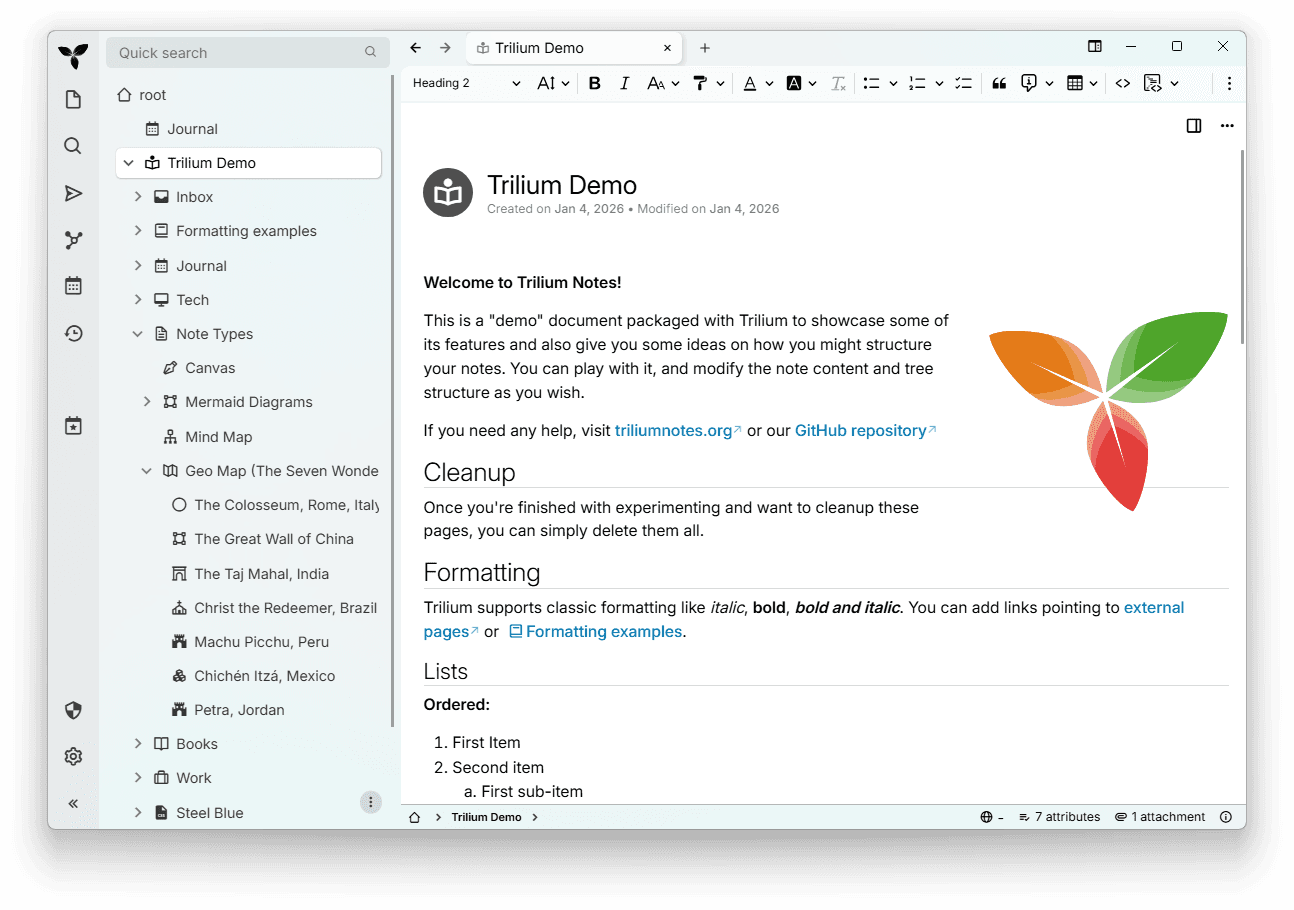
TriliumNext Notes is an open-source personal knowledge management application built around hierarchical notes. It supports large, structured collections of information, making it useful for people who maintain extensive reference libraries.
Unlike lightweight note apps, TriliumNext emphasizes detailed organization, linking, and flexible note types. Its self-hosting capabilities are especially relevant to users who want to manage their own knowledge infrastructure.
Why We Picked TriliumNext Notes
TriliumNext is useful when a simple folder or tag system is not enough. Users can organize notes into deeper hierarchies, connect information, and maintain a structured knowledge base.
Its technical flexibility also makes it appealing to people who want greater control over deployment and customization. The trade-off is that setup and maintenance require more effort than signing up for a hosted note service.
Key Features
- Hierarchical note organization.
- Rich-text and code-related note capabilities.
- Internal linking and knowledge management.
- Self-hosted server options.
- Search and advanced organization tools.
Open Source and Privacy
TriliumNext publishes its application code under AGPL-3.0. It supports self-managed deployments, allowing technically capable users to operate their own note environment.
Self-hosting gives more control over infrastructure but does not eliminate security responsibilities. Users must manage updates, access controls, backups, and the security of their own server.
Pros
- Strong hierarchical organization.
- Supports complex personal knowledge bases.
- Open-source code.
- Self-hosting options.
- Flexible note types.
Cons
- More technical setup than mainstream note apps.
- Interface can feel complex.
- Server maintenance requires ongoing attention.
- Less convenient for casual users wanting instant synchronization.
Pricing: Free open-source software. Hosting and maintenance can create additional costs.
Platform and sync check (October 2026): The project is now maintained as Trilium Notes in the TriliumNext/Trilium repository. Desktop builds support Windows, macOS, and Linux; synchronization uses a self-hosted server. Mobile browser access and third-party mobile clients are distinct from the desktop app, and client/server sync versions must be compatible. See the official repository.
Who Should Choose TriliumNext Notes? TriliumNext is suitable for users who want to build an extensive, structured, self-managed knowledge base. It is particularly useful for technical documentation and research archives that benefit from detailed organization.
7. Simplenote: Best for Lightweight and Minimal Notes
Best for: Users who want fast text notes without complicated organization or setup.
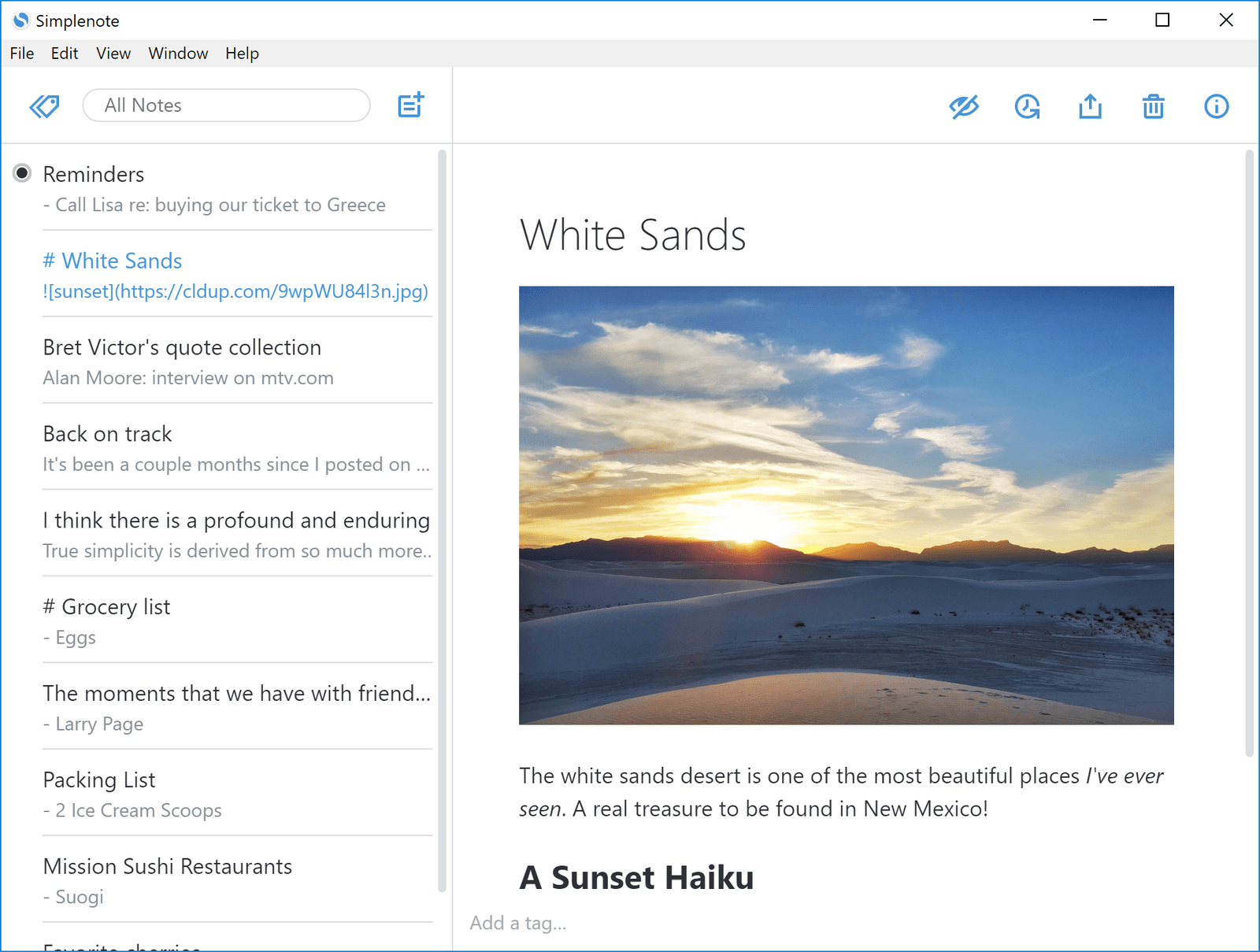
Official repository screenshot originally published in 2018; the current interface may differ. Official source.
Simplenote is a minimalist note-taking application focused on writing and synchronization. It provides a straightforward interface for text notes, tags, and basic organization.
Simplenote is available on major desktop and mobile platforms. It is useful for capturing thoughts, maintaining short lists, and accessing writing across devices.
Why We Picked Simplenote
Simplenote demonstrates that a note-taking application does not need an elaborate feature list to be useful. Its lightweight design makes it easy to start writing without configuring multiple workspaces or databases.
For users who mainly work with text, this simplicity can be an advantage. However, people who rely heavily on attachments, handwriting, or rich document formatting may find it too limited.
Key Features
- Lightweight text note editing.
- Tags and search.
- Cross-device synchronization.
- Version history.
- Markdown support.
Open Source and Privacy
Simplenote publishes open-source client applications, including its GPL-2.0 desktop client. However, that does not mean its complete hosted synchronization infrastructure is available as an equivalent open-source self-hosted service.
Users seeking full server control should consider this distinction. Simplenote is better understood as a simple app with open-source clients than as a turnkey self-hosted notebook platform.
Pros
- Free and easy to use.
- Minimal setup.
- Cross-platform access.
- Fast text-based workflow.
- Useful for everyday note capture.
Cons
- Limited rich media and attachments.
- No comprehensive handwriting workspace.
- Not designed for advanced team databases.
- Full hosted synchronization service is not a simple self-hosted replacement.
Pricing: Free.
Platform and sync check (October 2026): Simplenote supports iOS, Android, macOS, Windows, Linux, and the web, with its hosted automatic sync service. Supported native apps can use downloaded notes offline, while the web app requires internet access. Notes are encrypted in transit but not at rest on the service; this is not end-to-end encrypted note storage. See the official help center.
Who Should Choose Simplenote? Simplenote is ideal for people who want uncomplicated note-taking across devices. If your priorities are speed and simplicity rather than advanced customization, it is worth considering.
Need AI Study Notes Instead? Try Lynote
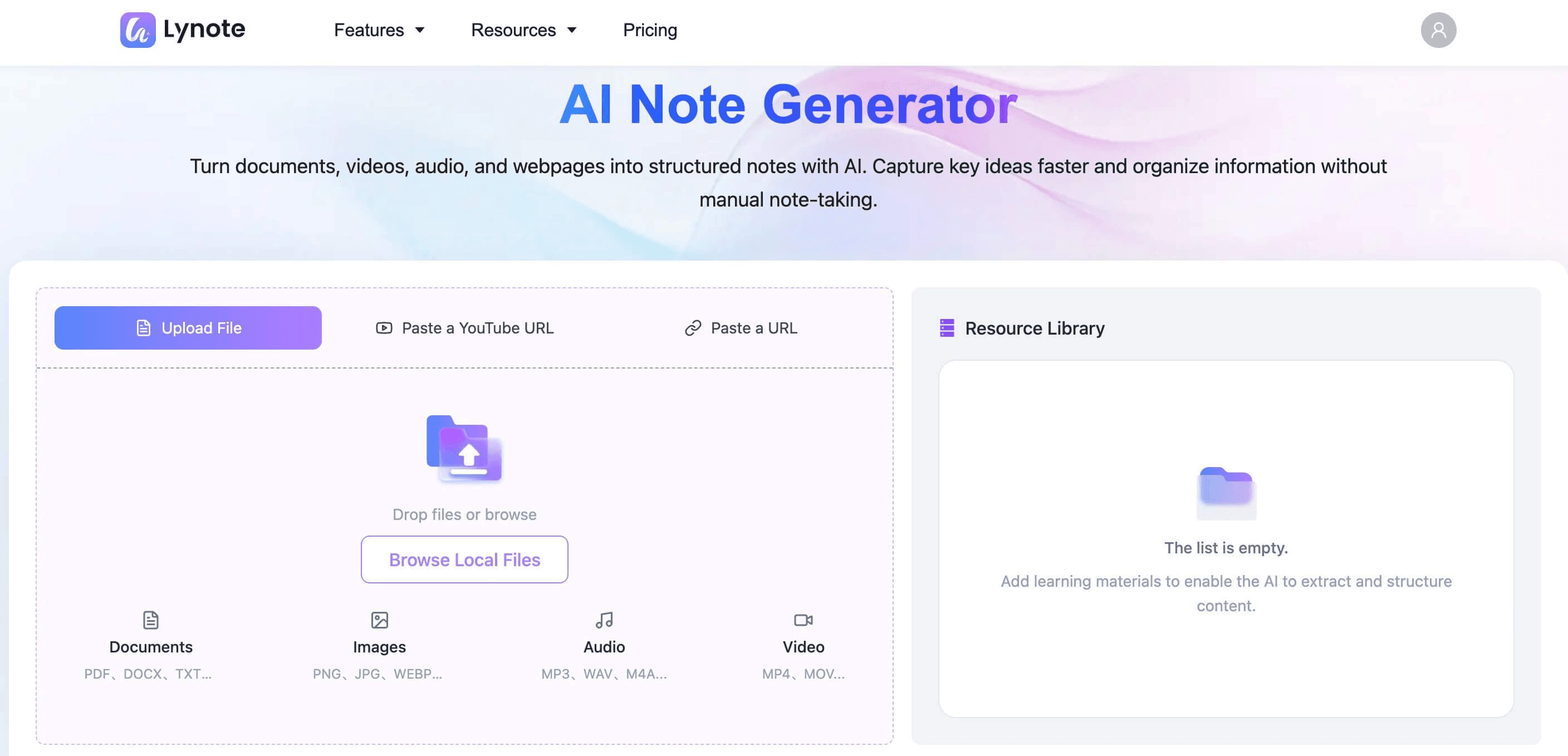
Official Lynote AI Note Generator upload interface, the starting point for the AI notes study workflow. Official source.
Open-source note-taking applications offer valuable choices for users who prioritize customization, local storage, and control over their software. But they are not always designed to solve another common problem: turning large amounts of existing learning material into useful notes.
If you regularly study from PDFs, lecture recordings, videos, and online articles, Lynote AI Note Generator offers a different approach.
Lynote is a proprietary AI learning tool, not an open-source application. Its purpose is to help users generate, edit, and review structured notes from supported study materials.
Turn Learning Materials into Structured Notes
Instead of manually extracting information from every lecture or document, you can use Lynote to generate organized notes from PDFs, audio recordings, videos, and webpages.
For example, a student preparing for an exam might have a textbook chapter, a recorded lesson, and several educational videos. Lynote can help prepare source-based notes from supported materials so the student can focus on reviewing and improving the content.
Edit and Personalize Your Notes
AI-generated notes are only a starting point. Lynote provides an editor that allows users to correct information, reorganize sections, and add their own explanations.
This is particularly useful when your instructor provides a syllabus or revision checklist. You can adapt the notes to match the information you actually need to study.
Review with AI Chat and Flashcards
Lynote also connects note-taking with active review. AI Chat can help you explore explanations available in uploaded source materials, while Flashcards turn important concepts into questions for recall practice.
This creates a workflow that goes beyond storing and organizing documents.
PDFs / Videos / Audio → AI Notes → Editing → AI Chat & Flashcards
When Should You Choose Lynote?
Choose Lynote when you want help preparing and reviewing notes from existing educational materials. Open-source apps such as Joplin, Logseq, and TriliumNext may be better choices when local ownership, source-code access, or self-hosting is essential.
Lynote does not replace those open-source capabilities. It provides a more specialized AI study-note workflow, and important AI-generated information should be verified against the original sources.
How to Choose the Right Open Source Note Taking App
The right note taking app open source solution depends on how you work with information. Before choosing, identify which requirements are essential and which features would simply be convenient.
Choose Local-First Apps for Offline Work
If you need an open source note taking app for Linux, Windows, or macOS, Joplin and Logseq are worth exploring. Both offer workflows that support local notes and offline access.
Joplin provides a conventional notebook experience, while Logseq focuses on connected blocks and outlines. The better choice depends on how you prefer to structure your information.
Choose Encryption-Focused Apps for Private Notes
Notesnook and Standard Notes are appropriate when protecting personal information is a major priority. Both emphasize encrypted note-taking, although their features, subscriptions, and recovery methods differ.
Always check the exact security guarantees before storing confidential material. Open source alone is not enough to establish privacy protection.
Choose Workspace Tools for Team Projects
AppFlowy is a strong candidate for users who need documents, structured information, and collaborative workspaces. It may be more appropriate than a simple notebook when notes are closely connected to ongoing projects.
Teams planning self-hosted deployments should review current licensing, server requirements, and maintenance responsibilities.
Choose Lightweight Tools for Everyday Notes
Simplenote is useful when speed matters more than advanced features. It provides an easy way to record thoughts and retrieve them later without a complex organizational system.
For users who want basic notes rather than extensive research or project management, simplicity can be the deciding advantage.
Consider Handwriting and Mobile Support
An open source note taking app for Android may be very different from an open source note taking app for iPad. Platform availability does not guarantee equivalent features on both devices.
Handwriting support is another separate requirement. If stylus input, ink recognition, and PDF annotation are essential, verify those capabilities in the exact mobile version before choosing a tool.
Open Source vs. Proprietary Note Taking Apps
Open-source and proprietary note-taking applications can both be useful. Their differences are mainly related to software licensing, customization, infrastructure control, and how individual services are provided.
| Feature | Open-Source Note Apps | Proprietary Apps Such as Lynote |
|---|---|---|
| Source-code access | Available for covered components | Not generally available |
| Code modification | Permitted under applicable licenses | Usually restricted |
| Local storage | Available in many tools | Depends on the product |
| Self-hosting | Available for some projects | Not offered unless documented |
| Cloud synchronization | Free or paid, depending on the service | Depends on the product |
| AI features | Built in, optional, or plugin-based | Lynote focuses on AI note generation |
| Study flashcards | Varies by application | Part of Lynote's AI Notes workflow |
| Maintenance | Higher when self-hosting | Typically managed by the provider |
If your top priority is controlling software and infrastructure, open-source tools may be the better starting point. If your main challenge is organizing large amounts of educational content, a specialized AI note generator may provide more immediate value.
These options can also complement one another, although exporting and transferring information between applications requires checking supported formats and permissions.
How to Switch to an Open Source Note Taking App
Moving your notes to a different application requires planning, especially if your existing workspace contains attachments, formatted text, links, and handwritten content.
Step 1. Export Your Existing Notes
Check which export formats your current application supports. Common options include Markdown, HTML, PDF, and app-specific backup formats.
Not every export format preserves editable content in the same way. For example, PDFs may preserve a readable snapshot without maintaining all the original editing features.
Step 2. Check Import Compatibility
Before transferring everything, read the destination application's import documentation. Confirm which formats, attachments, and metadata it supports.
Backlinks, tags, folders, and embedded media may require manual adjustment. If the destination app uses a different organizational model, some restructuring may be unavoidable.
Step 3. Test a Small Set of Notes
Move a few representative notes before attempting your entire library. Choose examples with text, images, links, tables, and attachments.
Check whether the imported results are complete and usable. Resolve problems before scaling the migration.
Step 4. Keep a Backup and Configure Sync
Maintain an accessible copy of your original notes until the transition is complete. Then configure backup and synchronization settings in the new application.
If you are self-hosting, document how your server is backed up and how data can be recovered. A successful import does not eliminate future data-loss risks.
Final Verdict: Which Open Source Note Taking App Is Best?
The best open source note taking apps in 2026 serve different needs. Joplin provides versatile offline notebooks, Notesnook and Standard Notes emphasize privacy, AppFlowy supports structured workspaces, Logseq connects ideas, TriliumNext handles complex knowledge bases, and Simplenote keeps everyday notes uncomplicated.
For users who specifically want open-source licensing, local control, or self-hosted infrastructure, choose a tool that documents those capabilities clearly.
If your priority is turning learning materials into structured notes and reviewing them with AI Chat and Flashcards, Lynote AI Note Generator is a separate proprietary option worth exploring.
Frequently Asked Questions
What Is the Best Free Open Source Note Taking App?
Joplin is a strong choice for people seeking a free, general-purpose open-source notebook. It supports offline access, Markdown, organization features, and several synchronization options.
Logseq is useful for connected knowledge management, while Simplenote is better for basic text notes. The best choice depends on the features and data-control options you need.
Is There an Open Source AI Note Taking App?
Yes. Some open-source note-taking projects include AI-related capabilities or support integrations with language models. AppFlowy, for example, offers AI features within parts of its workspace ecosystem.
However, an open-source client does not guarantee the AI models, inference services, or hosted backend are all open source. Review the specific components, licenses, and data-processing arrangements before choosing a service.
What Is the Best Open Source Note Taking App for Windows?
Joplin, Notesnook, Standard Notes, AppFlowy, Logseq, TriliumNext, and Simplenote provide options for Windows users, although their interfaces and features vary.
Joplin is a practical general-purpose option, while AppFlowy is more suitable for structured workspaces. Logseq may appeal to users who want linked knowledge rather than conventional notebooks.
What Is the Best Open Source Note Taking App for Linux?
Joplin, Logseq, AppFlowy, and TriliumNext are relevant choices for Linux users. They serve different needs, ranging from general note-taking to self-managed knowledge bases.
Before installing, check current Linux package availability and system requirements. Features and stability can vary between versions.
Are There Open Source Note Taking Apps for Android and iPad?
Yes. Several open-source note-taking applications provide Android and iOS or iPadOS clients, including Joplin, Notesnook, and Standard Notes.
However, an open source note taking app for Android may have different editing, plugin, or offline capabilities from its desktop version. The same applies when choosing an open source note taking app for iPad.
Which Open Source Note Taking App Supports Handwriting?
Handwriting features vary considerably across open-source applications. Many of the tools in this list focus on typed text, Markdown, or structured documents rather than full stylus-based note-taking.
If handwriting is essential, evaluate specialist applications such as Xournal++ alongside mobile-focused options. Check operating-system support, drawing tools, and PDF annotation features before choosing.
What Is the Difference Between Open Source and Self-Hosted Notes?
Open source refers to software distributed under a license that grants defined rights to inspect, modify, and redistribute its code. Self-hosting means running the application or its supporting services on infrastructure you control.
A product can be open source without providing a convenient self-hosted service. A self-hosted service can also contain proprietary components.
Can I Run a Self-Hosted Note Taking App with AI Features Using Docker?
Some open-source projects provide Docker-based deployment options and support integrations with AI services or locally hosted models. However, features depend on the exact application, server version, and extensions.
If you're searching for a self-hosted note taking app with AI features and Docker support, verify the deployment documentation, available AI integrations, model requirements, and whether any external APIs receive your data.
AppFlowy and other extensible workspace tools may be worth investigating, but self-hosting a workspace does not automatically make all AI services local.
Is Memos an Open Source Note-Taking App?
Yes. Memos is an open-source, self-hostable application focused on lightweight notes and quick personal updates.
It is a useful additional option for users who prefer short entries rather than detailed notebooks. This seven-app comparison focuses on a broader range of editing, privacy, and knowledge management approaches.
How Should I Compare GitHub Stars for Note Taking Apps?
An open source note taking apps GitHub stars comparison can provide a rough indication of project visibility and community interest. However, star counts change over time and do not directly measure software quality, security, or suitability.
For a meaningful comparison, examine release activity, issue maintenance, documentation, licensing, and the features you actually need. Popularity should be one factor, not the deciding criterion.
What Does Reddit Recommend as the Best Open Source Note Taking App?
Discussions about the best open source note taking app on Reddit often emphasize privacy, offline availability, Markdown portability, and avoiding platform lock-in. Individual preferences differ depending on whether users prioritize basic notes, linked knowledge, or self-hosting.
Rather than choosing a product solely because it is frequently recommended, compare its actual capabilities with your workflow. A lightweight note app and a technical knowledge-base system may both be excellent choices for different people.

Written by Danny
Product Marketing Manager
Danny explains how Lynote features fit real workflows, from everyday productivity to product-led writing use cases. View all articles →