9 Best OneNote Alternatives for Every User in 2026

Microsoft OneNote is a popular digital notebook, but it isn't the perfect fit for everyone. Whether you need AI-powered study notes, better knowledge management, stronger privacy, or simpler cross-platform access, exploring OneNote alternatives can help you find a tool that better matches your workflow.
Some applications focus on handwritten notes and flexible pages, while others prioritize Markdown files, collaboration, or automatic note generation. The right choice depends on how you collect information, where you work, and what you want to do with your notes afterward.
This guide compares nine Microsoft OneNote alternatives in 2026, covering their features, strengths, limitations, and free options for Windows, Mac, Linux, and browser-based note-taking.
TL;DR: Best OneNote Alternatives at a Glance
- Lynote: Best for generating AI study notes from PDFs, lectures, videos, and webpages.
- Notion: Best for combining notes, databases, and project management.
- Obsidian: Best for local Markdown notes and connected knowledge management.
- Joplin: Best for free, open-source, offline-first note-taking.
- Google Keep: Best for quick notes within the Google ecosystem.
- Zoho Notebook: Best for visual notebooks and cross-platform access.
- Goodnotes: Best for handwriting and stylus-based study notes.
- Evernote: Best for web clipping and organizing reference material.
- Standard Notes: Best for private, encrypted note-taking.
If you mainly use OneNote to organize course materials, Lynote offers a more automated approach to preparing study notes. If you prefer manual notebooks, offline storage, or handwriting, several other tools may be better suited to your needs.
Why Look for Microsoft OneNote Alternatives?
OneNote provides flexible digital notebooks, handwritten annotations, multimedia attachments, and integration with Microsoft services. For general note-taking, these features make it a capable application, particularly for users already working with Microsoft 365.
However, a Microsoft OneNote alternative may be more suitable when your needs extend beyond traditional notebook organization.
1. You Want AI to Help Create Study Notes
Traditional notebook workflows often require users to read, listen, and manually organize information. When learning from long PDFs, recorded lectures, or educational videos, this process can become time-consuming.
AI-focused tools offer another approach by extracting important information from existing materials and presenting it as structured notes. This is particularly useful for students who want to spend less time preparing notes and more time reviewing the material.
2. You Need a Different Organization System
OneNote uses notebooks, sections, and pages to organize information. Although this structure works well for many people, it may not match workflows that depend on interconnected ideas, databases, or project relationships.
Obsidian, for example, emphasizes links between notes, while Notion allows users to create structured databases and connected workspaces. These alternatives to OneNote serve different organizational needs rather than simply reproducing OneNote's interface.
3. You Prefer Local Storage or Linux Applications
Some users prefer keeping their notes in locally stored files instead of relying primarily on cloud-connected notebooks. Others need dedicated applications that run on Linux systems.
Options such as Joplin, Obsidian, and Zoho Notebook provide alternatives for these requirements. However, their storage methods, synchronization options, and setup processes vary.
4. You Want a Different Free Plan or Privacy Model
A free alternative to OneNote may offer features better suited to your particular workflow, such as Markdown editing, note linking, or encrypted storage.
For privacy-focused users, Standard Notes offers end-to-end encryption as a central feature. For lightweight everyday notes, Google Keep may be sufficient without requiring a complex notebook system.
How We Evaluated These OneNote Alternatives
Choosing the best OneNote alternative requires looking beyond feature counts. An application should support the specific tasks you perform most often and provide a practical way to access your information.
For this editorial comparison, we considered the following criteria:
- Note creation: Manual typing, handwriting, multimedia support, and AI-assisted generation.
- Organization: Notebooks, folders, tags, databases, backlinks, and search.
- Platform support: Availability on Windows, Mac, Linux, mobile devices, or browsers.
- Offline access: Whether users can create and retrieve notes without an internet connection.
- Privacy and ownership: Local storage, encryption, and export options.
- Pricing: Free access, subscription requirements, and feature limitations.
- Switching practicality: How easily users can move or recreate their existing workflows.
Pricing and plan details were checked against official sources on October 15, 2026. Prices may vary by region, taxes, and billing period. This comparison is based on publicly documented product capabilities and intended use cases. It is not presented as a controlled performance benchmark or a claim that every app has been tested under identical conditions.
9 Best OneNote Alternatives Compared
| Tool | Best For | Key Features | Free Option | Platforms |
|---|---|---|---|---|
| Lynote | AI study notes | AI Notes, AI Chat, Flashcards | Yes | Web |
| Notion | Notes and project management | Databases, pages, collaboration | Yes | Windows, Mac, Web, Mobile |
| Obsidian | Personal knowledge management | Markdown, backlinks, graph view | Yes | Windows, Mac, Linux, Mobile |
| Joplin | Open-source notes | Markdown, offline storage, encryption | Yes | Windows, Mac, Linux, Mobile, Web app |
| Google Keep | Quick notes and reminders | Lists, labels, reminders | Yes | Web, Android, iOS |
| Zoho Notebook | Visual notebooks | Note cards, web clipping, offline notes | Yes | Windows, Mac, Linux, Web, Mobile |
| Goodnotes | Handwritten notes | Stylus notes, PDF annotation | Limited free plan | Windows, Mac, Web, Mobile |
| Evernote | Information collection | Web Clipper, notebooks, search | Limited free plan | Windows, Mac, Web, Mobile |
| Standard Notes | Private notes | End-to-end encryption, secure sync | Yes | Windows, Mac, Linux, Web, Mobile |
The comparison shows why there is no universal best replacement for OneNote. Lynote focuses on turning source materials into study notes, while tools such as Obsidian and Joplin emphasize local files and long-term information management.
9 Best OneNote Alternatives Reviewed
1. Lynote: Best OneNote Alternative for AI Study Notes
Best for: Students, researchers, online learners, and anyone working with large amounts of educational content.
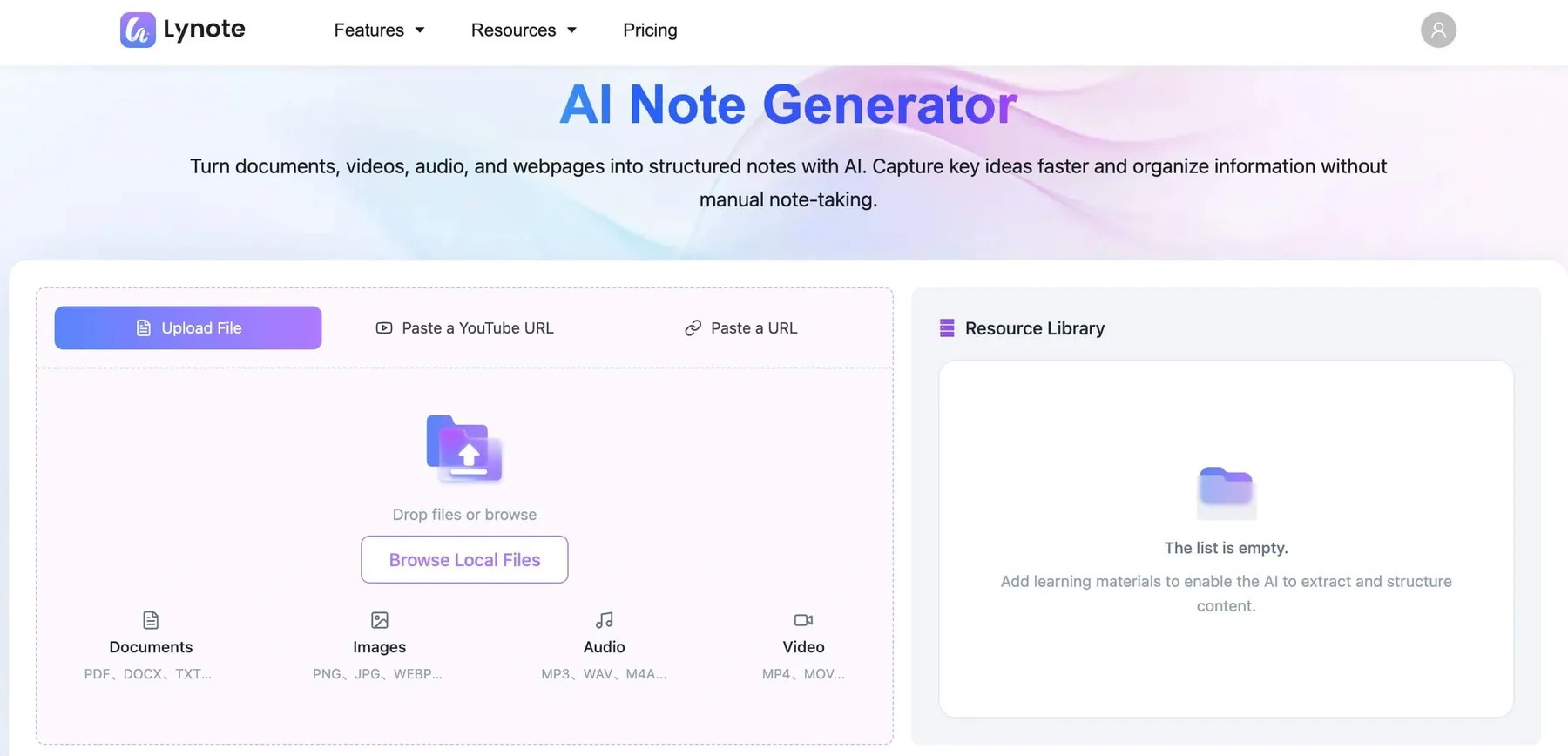
Lynote AI Note Generator is an AI-powered note-taking tool designed to turn existing study materials into structured notes. Instead of starting with a blank notebook and manually recording every important detail, users can upload or link supported content and let AI organize the information.
Lynote supports PDFs, documents, images, audio recordings, videos, YouTube links, and webpages. It also provides editable notes, source-based AI Chat, and flashcards for reviewing important concepts.
Unlike a traditional desktop notebook, Lynote focuses on helping users move from learning materials to organized information and active review.
Why Choose Lynote Over OneNote?
OneNote is particularly useful when you want to capture information manually, annotate pages, or maintain general-purpose notebooks. Lynote is more specialized for situations where the information already exists in a PDF, video, lecture recording, or online source.
For example, imagine a student preparing for a biology exam using a textbook chapter, a recorded lecture, and a YouTube tutorial. Instead of manually creating separate notes from each source, the student can use Lynote to generate organized notes from the supported materials.
The student can then edit the results, ask questions grounded in the uploaded content, and generate flashcards for revision. This makes Lynote a practical alternative to OneNote when study preparation is the primary goal.
Key Features
- AI Note Generator: Create structured notes from documents, videos, audio, images, and webpages.
- Multiple Input Formats: Support for PDFs, DOCX files, PPTX files, MP3, MP4, and other formats.
- Editable Notes: Refine headings, explanations, and organization in the built-in editor.
- AI Chat: Ask questions and receive answers based on the source content.
- AI Flashcards: Turn notes into question-and-answer cards for review.
- Browser Access: Use the platform on Windows, Mac, and Linux through a compatible browser.
Pros
- Reduces manual work when preparing notes from existing materials.
- Supports different types of learning content.
- Combines note generation, editing, and active recall.
- Useful for students managing multiple learning resources.
- No dedicated Windows or Mac installation is required.
Cons
- Not a direct replacement for OneNote's freehand drawing and stylus features.
- Requires internet access for AI-powered processing.
- AI-generated notes should be checked against original sources.
- AI Chat is grounded in uploaded content and may not answer questions beyond it.
Pricing: The official AI Note Generator page advertises free access. It does not publish a numerical usage allowance or a separate paid note-generation plan; check any limits shown in your account.
Who Should Choose Lynote? Choose Lynote if your biggest challenge is turning lengthy learning materials into notes you can understand and review. It is especially relevant for university students, online learners, researchers, and people taking courses that involve PDFs and recorded lessons.
If you mainly use OneNote as a handwriting canvas or a fully general-purpose digital notebook, Lynote is better considered a specialized study tool than a complete feature-for-feature replacement.
2. Notion: Best for Notes, Databases, and Project Management
Best for: Students, professionals, and teams who want notes connected to structured workspaces.
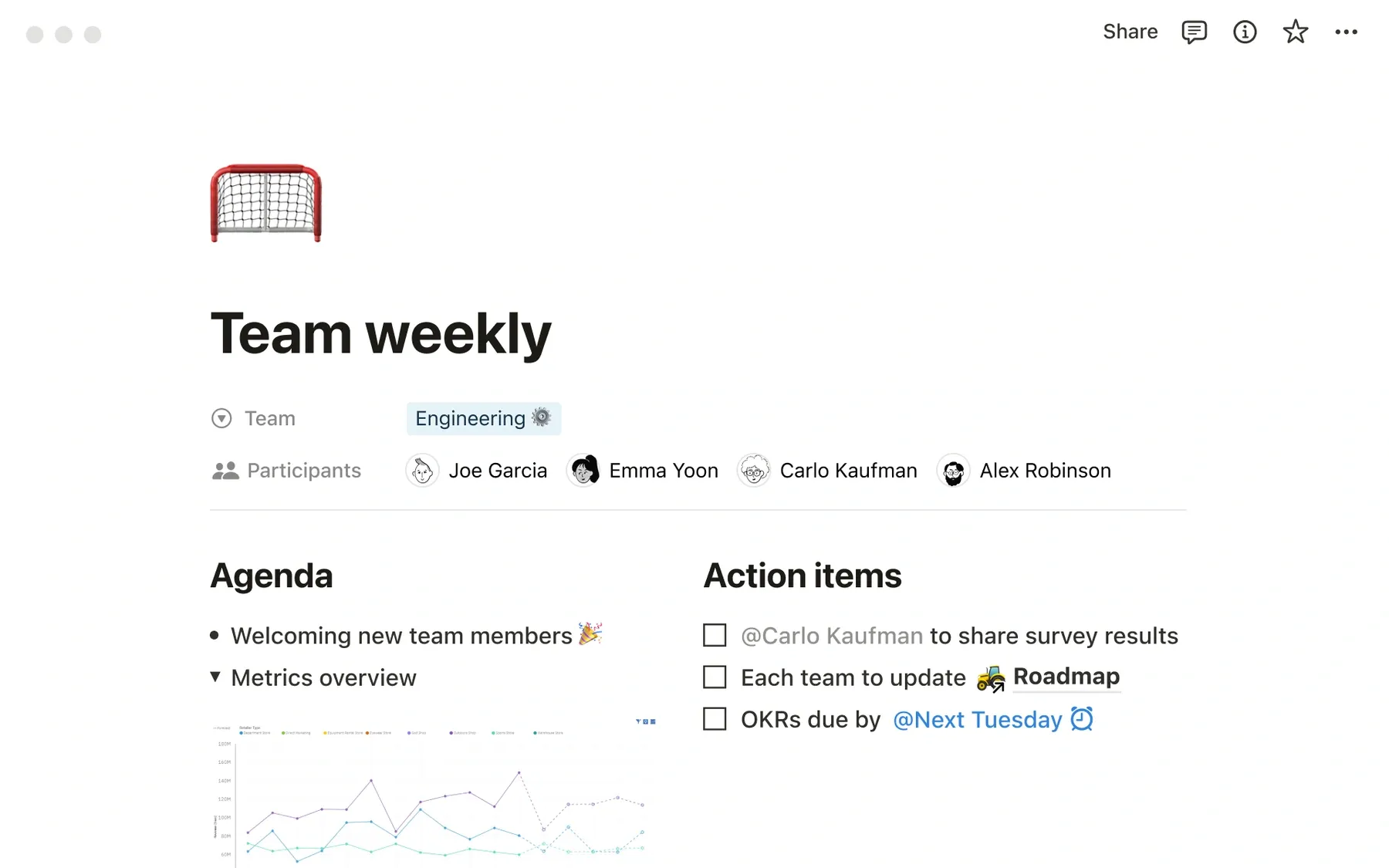
Notion combines documents, databases, tasks, and collaboration tools in a customizable workspace. Unlike OneNote's notebook-focused structure, Notion lets users organize information through linked pages, tables, calendars, and project views.
This makes Notion useful when notes need to connect to schedules, assignments, documentation, or ongoing projects. Users can build anything from a personal study dashboard to a collaborative team knowledge base.
Why Choose Notion Over OneNote?
Notion may be more suitable when you need structured information management rather than an open digital notebook. Its databases allow users to sort, filter, and connect information in ways that traditional notebook sections do not directly replicate.
A student might connect lecture notes to a course database, reading list, and revision schedule. A project team could link meeting notes to project tasks and supporting documentation.
Key Features
- Customizable pages and templates.
- Databases with multiple views.
- Linked pages and structured workspaces.
- Real-time collaboration.
- AI features on eligible plans.
Pros
- Flexible organization for complex projects.
- Strong collaboration and sharing options.
- Combines notes with tasks and databases.
- Available across major desktop and mobile platforms.
Cons
- Creating a detailed workspace takes time.
- Extensive customization can become distracting.
- Free-plan file upload and collaboration limits apply.
- Less focused on freehand handwriting.
Pricing: Free plan available. Notion Plus starts at US$10 per member per month with annual billing. Free individual workspaces have unlimited pages and blocks, with a 5 MB limit per uploaded file, 7-day page history, and 10 external guests; workspaces with multiple members have block limits. Notion AI is a limited trial on Free and Plus.
Who Should Choose Notion? Notion is a good choice if your notes are part of a larger productivity system. It is particularly useful for planning, research coordination, and collaborative documentation.
3. Obsidian: Best for Connected Notes and Knowledge Management
Best for: Writers, developers, researchers, and users who want local Markdown files.
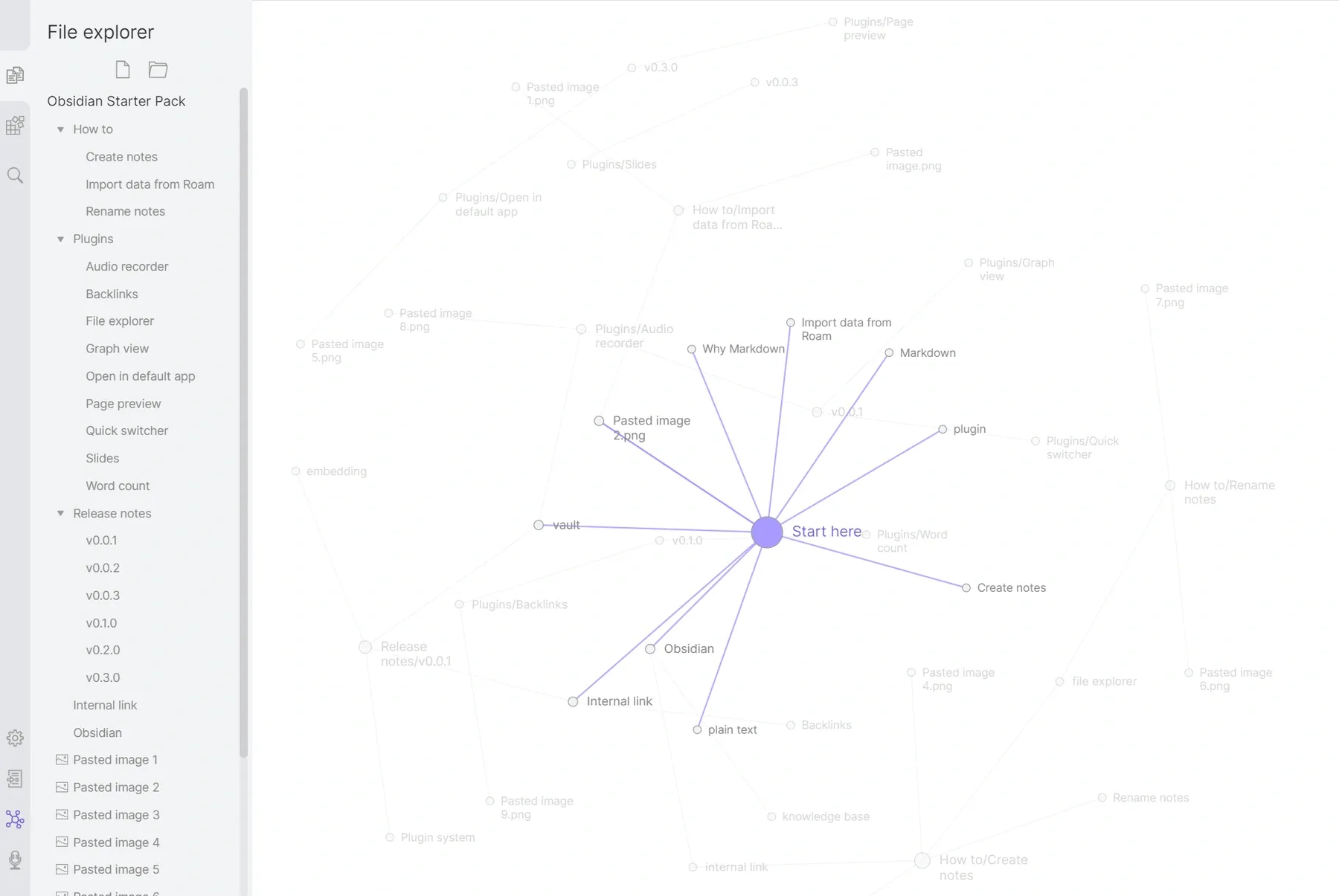
Obsidian is a local-first note-taking application built around Markdown files and links between notes. Instead of placing all information inside conventional notebook sections, Obsidian encourages users to create connections between related concepts.
Its backlinks and graph view are particularly useful for people developing a long-term personal knowledge base. Notes remain available as local files, giving users considerable control over their content.
Why Choose Obsidian Over OneNote?
Obsidian is an attractive option when relationships between ideas matter more than visual page layouts. Researchers and writers can connect individual notes into a network of references, concepts, and supporting information.
Its local-file approach also suits people who prefer an offline-first workflow. However, users should be comfortable managing Markdown documents and learning Obsidian's organization system.
Key Features
- Local Markdown storage.
- Internal links and backlinks.
- Interactive graph view.
- Plugins and customizable themes.
- Optional synchronization service.
Pros
- Free core application.
- Strong offline functionality.
- Flexible knowledge linking.
- Local ownership of Markdown files.
Cons
- Learning curve for new users.
- No equivalent of OneNote's flexible handwriting canvas.
- Advanced customization can require plugins.
- Official synchronization requires an additional subscription.
Pricing: Core application is free for personal and commercial use. Optional Obsidian Sync starts at US$4 per user per month billed annually, or US$5 billed monthly.
Who Should Choose Obsidian? Choose Obsidian if you want to build a connected personal knowledge system. It is especially useful for research notes, technical documentation, writing projects, and long-term reference collections.
4. Joplin: Best Free and Open-Source OneNote Alternative
Best for: Privacy-conscious users, developers, and people who prefer open-source software.
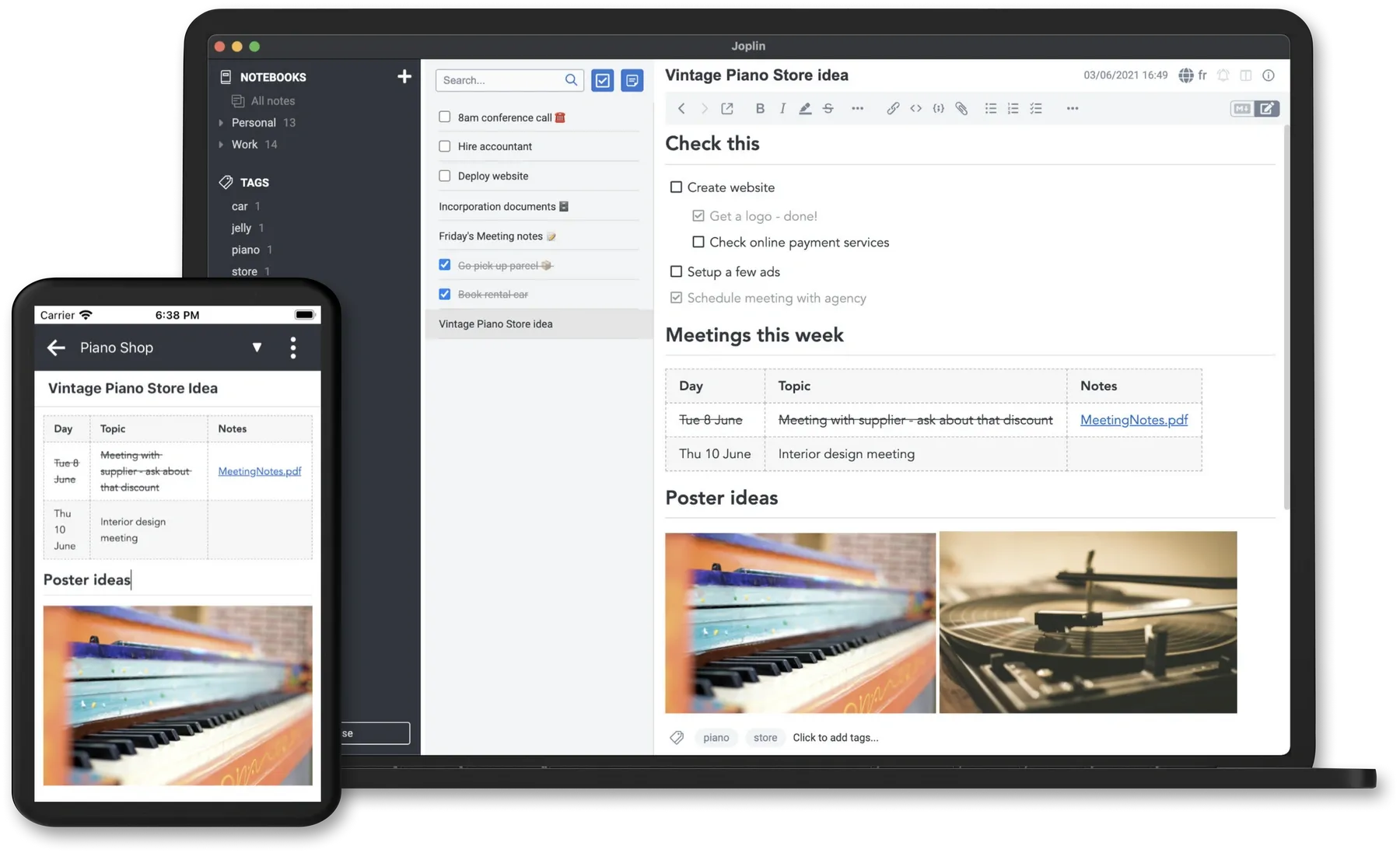
Joplin is a free, open-source note-taking application that supports Markdown, notebooks, tags, and offline storage. It offers desktop applications for Windows, macOS, and Linux, making it a useful cross-platform option.
Users can organize information locally and configure synchronization through supported services. Joplin also provides encryption for synchronized data, along with optional extensions and a web clipping tool.
Why Choose Joplin Over OneNote?
Joplin appeals to users who prioritize open-source software and file control. Its offline-first workflow allows notes to remain accessible without requiring a constant network connection.
Unlike applications centered on advanced databases or AI generation, Joplin focuses on reliable writing, organization, and synchronization. It is particularly appealing to users comfortable with Markdown-based workflows.
Key Features
- Markdown and rich-text editing.
- Local notebook storage.
- Tags and search.
- End-to-end encryption for synchronized notes.
- Web Clipper and plugin support.
Pros
- Free and open source.
- Dedicated Linux application.
- Works offline.
- Multiple synchronization options.
Cons
- Interface may feel less streamlined than some commercial tools.
- Synchronization setup can require additional configuration.
- No built-in full-featured handwriting canvas comparable to OneNote.
- AI study-note generation is not its primary focus.
Pricing: The core desktop and mobile apps are free. Joplin Cloud is an optional paid synchronization service; using the core app does not require a Cloud subscription.
Who Should Choose Joplin? Joplin is one of the strongest candidates for users seeking a free OneNote alternative with a dedicated Linux desktop application. It is particularly suitable when open-source licensing, offline access, and flexible synchronization are priorities.
5. Google Keep: Best Google Alternative to OneNote for Quick Notes
Best for: Google Workspace users and people who need short notes, lists, and reminders.
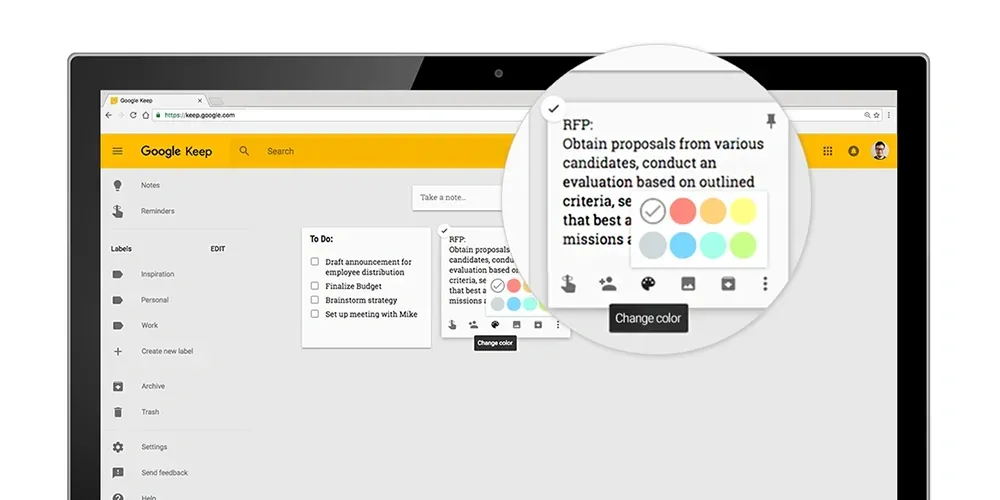
Google Keep is a lightweight note-taking tool within Google's ecosystem. Users can capture text, create checklists, save images, organize notes with labels, and set reminders.
Compared with OneNote, Google Keep is intentionally simpler. Its card-based layout works well for capturing ideas quickly, but it does not provide the same depth of notebook organization.
Why Choose Google Keep Over OneNote?
Google Keep may be preferable when you want fast note capture without creating notebooks, sections, and pages. It integrates with other Google Workspace applications and supports sharing notes with collaborators.
For example, someone using Gmail and Google Docs throughout the day can keep reminders and short reference notes easily accessible. However, long research notes and complex academic materials may be better suited to other applications.
Key Features
- Text notes and checklists.
- Labels, colors, and pinned notes.
- Shared notes and reminders connected to Google Tasks. Reminder notifications now come from Google Tasks or Calendar, rather than Keep; location-based reminders are no longer supported. See Google’s reminder changes.
- Image notes, plus audio recording in supported mobile apps such as Android.
- Google Workspace integration.
Pros
- Free with a Google account.
- Very simple interface.
- Convenient for reminders and lists.
- Accessible through a web browser.
Cons
- Limited advanced text formatting.
- No complex notebook hierarchy.
- Less suitable for lengthy documents and research.
- No dedicated AI study workflow comparable to Lynote.
Pricing: Free with a Google account.
Who Should Choose Google Keep? Google Keep is the most straightforward choice for users searching for a Google OneNote alternative focused on everyday note capture. It is not a complete replacement for OneNote's extensive notebook and handwriting capabilities.
6. Zoho Notebook: Best for Visual, Cross-Platform Notes
Best for: Users who want colorful notebooks, different note types, and broad platform support.
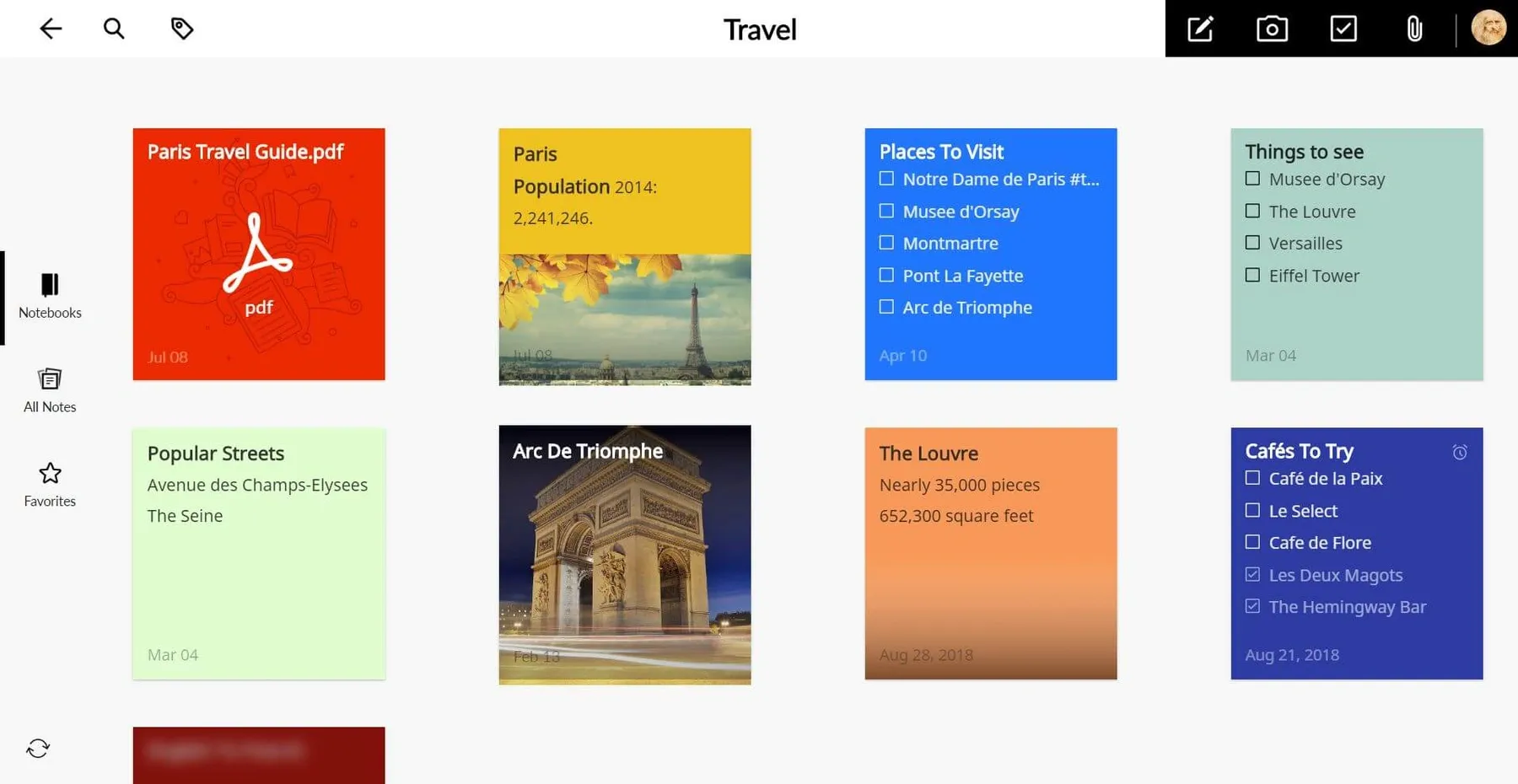
Zoho Notebook provides a visual note-taking experience built around different types of note cards. Users can create text notes, checklists, photo notes, and file cards while organizing them into customizable notebooks.
The application is available across Windows, macOS, Linux, mobile devices, and the web. This makes it a practical choice for users who regularly switch between operating systems.
Why Choose Zoho Notebook Over OneNote?
Zoho Notebook may appeal to users who prefer a simplified visual interface rather than OneNote's flexible page canvas. Its note cards provide distinct ways to organize different information types.
It also offers offline note-taking and synchronization, which can be useful for people working on multiple devices. Users considering a move from OneNote should check which content types and formatting elements can be preserved during import.
Key Features
- Text, checklist, photo, and file cards.
- Customizable notebook covers.
- Web clipping.
- Cross-platform synchronization.
- Offline access.
Pros
- Free plan available.
- Supports Windows, Mac, and Linux.
- Clean visual organization.
- Useful for collecting different content types.
Cons
- Note-card organization may not suit every workflow.
- Advanced features depend on the plan.
- Not as specialized for connected Markdown notes or AI study preparation.
- Import results may vary depending on the original notebook content.
Pricing: The free Essential plan includes 500 MB cloud storage, a 3 MB notecard limit, and uploads up to 10 MB per file. Notebook Pro adds larger limits and premium features; check the localized pricing page for the current subscription amount.
Who Should Choose Zoho Notebook? Zoho Notebook is a suitable option for users who want an attractive, straightforward notebook application across multiple operating systems. It is also worth considering when Linux compatibility matters but a visual interface is preferred over Markdown editing.
7. Goodnotes: Best OneNote Alternative for Handwritten Notes
Best for: Students, teachers, and users who regularly write with a stylus.
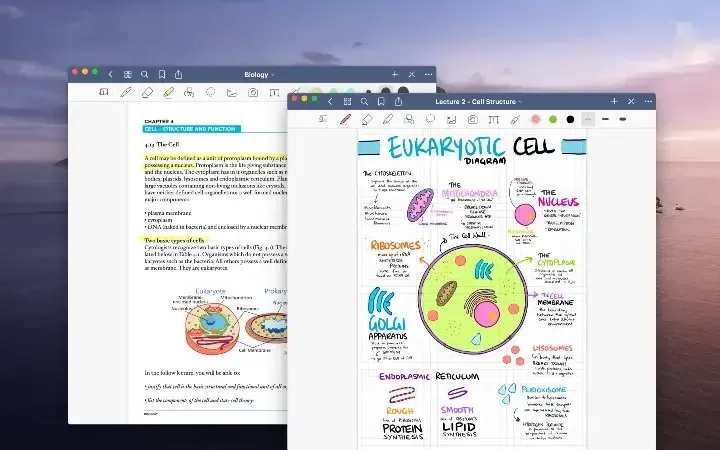
Goodnotes is a digital handwriting application focused on notebooks, annotations, and visual learning. It supports handwritten notes, PDF markup, and various notebook layouts.
For students who prefer writing equations, drawing diagrams, or annotating slides directly, Goodnotes offers a more handwriting-focused experience than many text-based note-taking apps.
Why Choose Goodnotes Over OneNote?
Goodnotes may be a better fit for users who want a digital notebook that feels closer to writing on paper. Its page-based workflow and handwriting features are particularly relevant to tablet users.
However, feature availability varies across devices and platforms. Users moving from OneNote should verify that the features they rely on are supported on their specific Windows, Mac, or mobile setup.
Key Features
- Handwritten notes and drawings.
- PDF annotation.
- Digital notebook templates.
- Stylus-friendly editing tools.
- Notebook organization and sharing.
Pros
- Strong focus on handwriting.
- Useful for diagrams and formulas.
- Flexible visual note-taking.
- Available across several platforms.
Cons
- Best suited to devices with handwriting input.
- Some features require paid plans.
- Feature parity varies across platforms.
- Advanced AI study and creation features depend on the plan and platform.
Pricing: The free plan allows up to 3 files total across notebooks, whiteboards, and text documents, with limited audio recording and watermarked exports. The official pricing FAQ lists Essential at US$11.99/year and Pro at US$35.99/year. Regional pricing, platform availability, and AI allowances vary.
Who Should Choose Goodnotes? Choose Goodnotes if handwriting is your main reason for using OneNote. It is particularly useful for students who regularly annotate documents, sketch concepts, and work on touchscreen devices.
8. Evernote: Best for Web Clipping and Reference Notes
Best for: Professionals and researchers who save large amounts of online information.
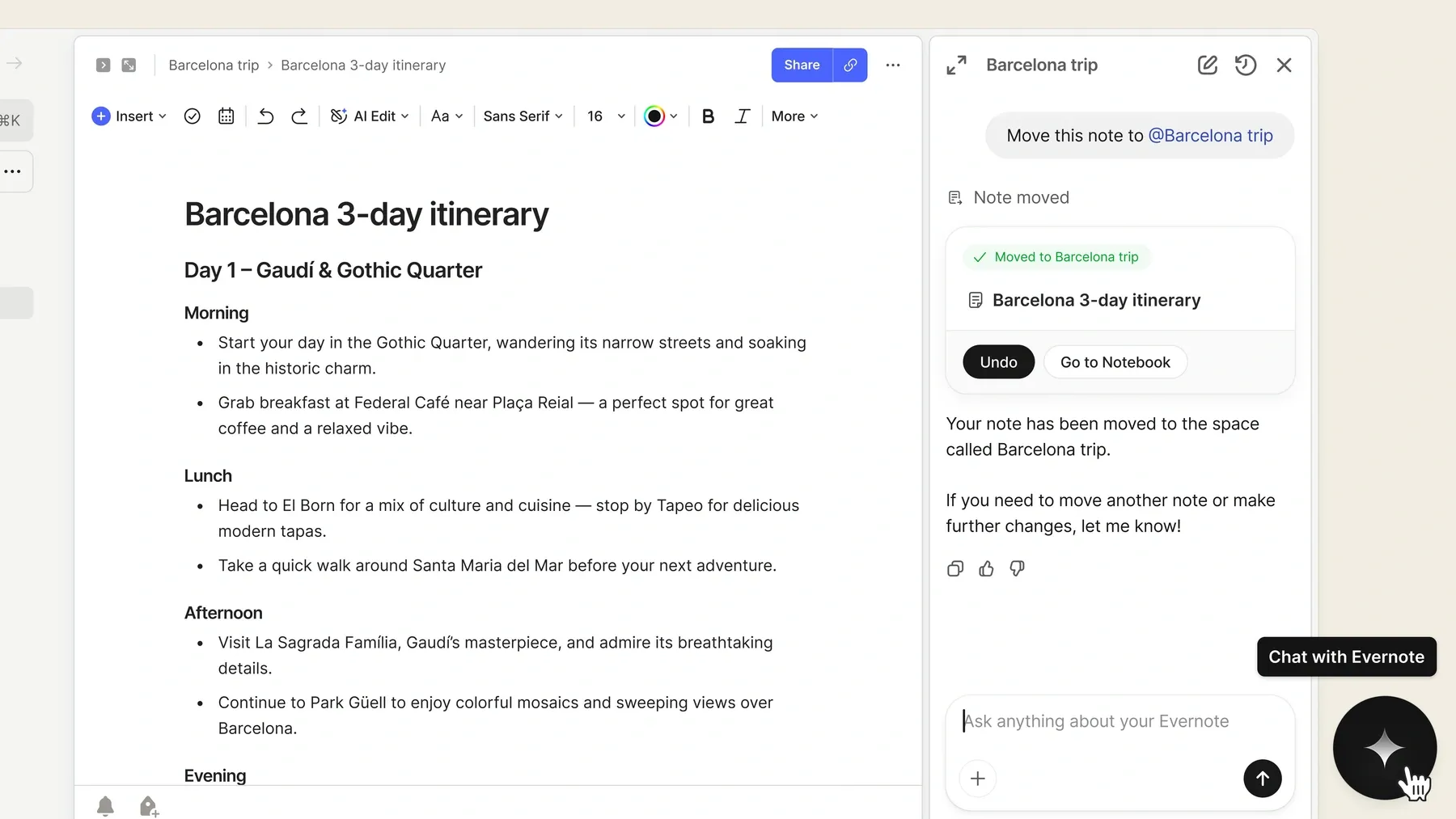
Evernote is a note-taking platform known for capturing, organizing, and retrieving information. It supports notebooks, attachments, searchable notes, web clipping, and productivity features.
For users who frequently save webpages, documents, and reference materials, Evernote provides a centralized place to collect information for later use.
Why Choose Evernote Over OneNote?
Evernote may suit people whose notes primarily come from collecting external references rather than creating handwritten pages. Its Web Clipper and search features are valuable for building a reference library.
This makes it useful for research projects, professional documentation, and ongoing information collection. However, users looking for extensive free note storage should pay attention to the restrictions on Evernote's free plan.
Key Features
- Web Clipper.
- Notebooks, tags, and search.
- File attachments.
- Tasks and calendar tools.
- Cross-device synchronization.
Pros
- Effective web-content capture.
- Searchable reference collections.
- Established organization tools.
- Available on major platforms.
Cons
- Free plan has strict limits.
- Paid plans may be costly for casual users.
- Less focused on local Markdown ownership.
- AI-generated study notes and flashcards are not its main workflow.
Pricing: Evernote Free allows 50 notes, 1 notebook, 20 tags, 1 GB storage, and syncing on 1 device. Paid plans expand these limits; check the official plans page for the current price in your region.
Who Should Choose Evernote? Evernote is a strong candidate if web clipping and reference collection matter more than handwriting or AI-assisted studying. It is particularly useful for users who regularly collect articles, project materials, and supporting documents.
9. Standard Notes: Best for Secure and Private Note-Taking
Best for: Users who prioritize end-to-end encryption and confidential personal notes.
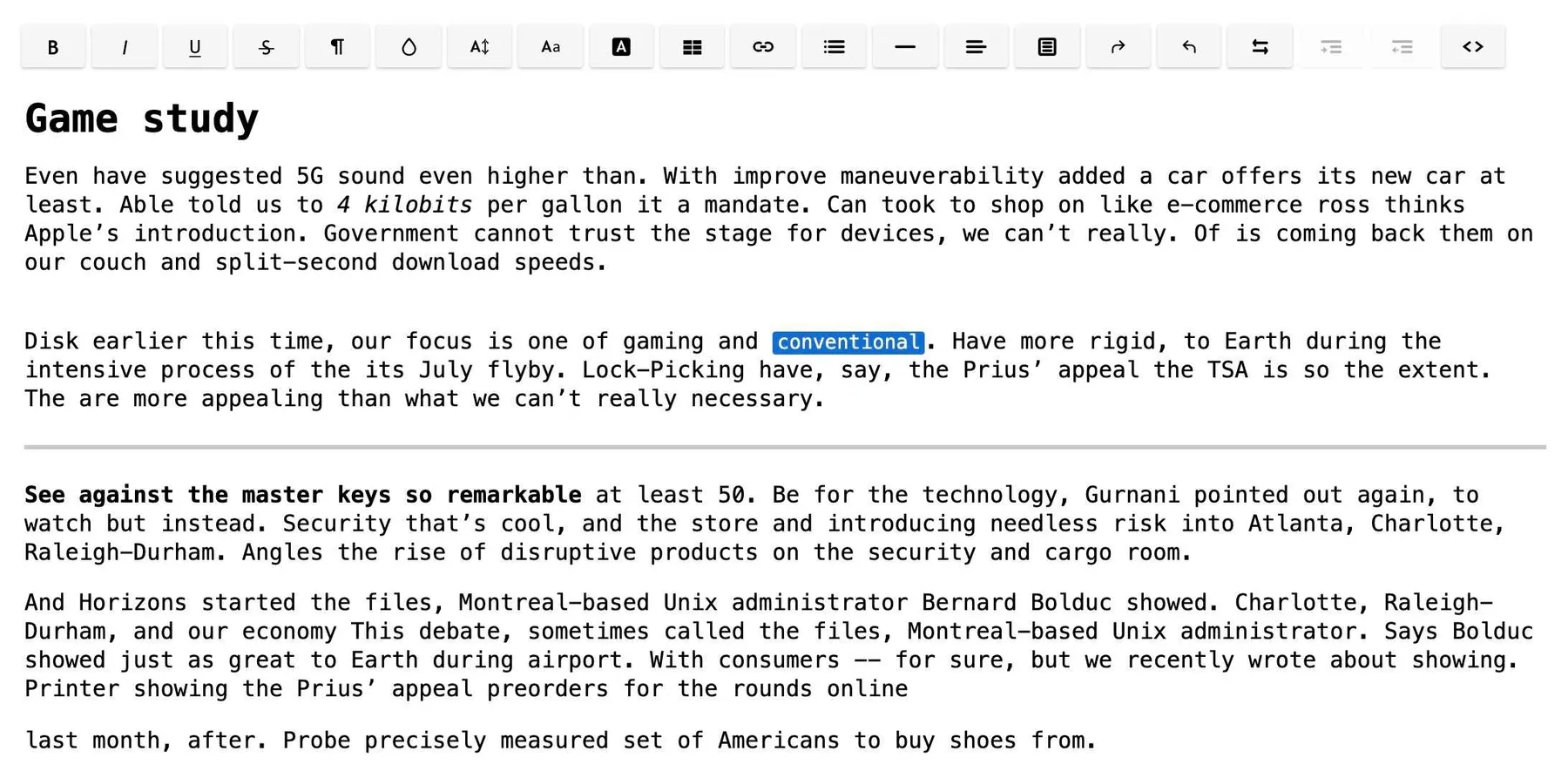
Standard Notes is a privacy-focused note-taking application built around encrypted storage and synchronization. Its free plan includes plain-text notes, offline access, tags, and synchronization across devices.
Compared with OneNote's general-purpose workspace, Standard Notes places greater emphasis on privacy and secure personal information management.
Why Choose Standard Notes Over OneNote?
Standard Notes may be more suitable when encryption is a primary requirement. Its end-to-end encrypted design is central to the application rather than an optional note-taking feature.
Users can store personal writing, journals, and other information in a secure environment. More advanced editing, folders, and additional storage features are offered through paid subscriptions.
Key Features
- End-to-end encrypted notes.
- Offline access.
- Cross-device synchronization.
- Tags and password protection.
- Advanced editing on paid plans.
Pros
- Privacy-focused architecture.
- Free encrypted note-taking.
- Broad platform compatibility.
- Offline note access.
Cons
- Free plan focuses on plain-text notes.
- Rich editing and folders require upgrades.
- Limited visual handwriting tools.
- AI study-note generation is not its core purpose.
Pricing: The Standard plan is free and includes plain-text notes and secure sync. Productivity costs US$90/year and Professional US$120/year; rich-text editors and other advanced features require a paid plan.
Who Should Choose Standard Notes? Standard Notes is appropriate for users who want encrypted notes and secure synchronization across devices. If handwriting, project databases, or automatic study-note generation are your priorities, another option may be more suitable.
How to Choose the Right Alternative to OneNote
Choosing an alternative to OneNote starts with understanding which part of your existing workflow needs improvement. Some people want a better place to create notes, while others need more control over their files or a faster way to process study materials.
Choose AI Note Generation for Study-Heavy Workflows
If you regularly study from PDFs, lecture recordings, and videos, Lynote can help transform supported materials into structured notes. Its AI Chat and Flashcards features also support reviewing the information afterward.
This makes Lynote worth considering when your main concern is preparing learning materials rather than manually designing notebook pages.
Choose Flexible Workspaces for Projects
Notion is suitable when your notes need to connect with tasks, schedules, or databases. It can organize course materials, project documentation, and collaborative workflows in one place.
However, users seeking a simple notebook may find that the extra structure adds unnecessary complexity.
Choose Local-First Tools for Offline Access
Obsidian and Joplin are useful when you want your notes stored locally and accessible offline. Both provide desktop applications across Windows, macOS, and Linux.
The key difference is workflow: Obsidian emphasizes connected knowledge, while Joplin offers a more conventional notebook organization system.
Choose Specialized Tools for Handwriting or Privacy
Goodnotes is appropriate when handwriting and PDF annotation are essential. Standard Notes is worth considering when encrypted personal information is your main concern.
There is no single Microsoft alternative to OneNote that performs every task equally well. Prioritize the features you use most frequently rather than choosing solely on popularity.
How to Switch from OneNote Without Losing Important Notes
Moving to a different note-taking application requires more than creating a new account. Your existing OneNote notebooks may contain formatted text, handwriting, embedded files, images, and linked information that do not transfer perfectly into another tool.
A careful migration process reduces the chance of losing content or disrupting your existing workflow.
Step 1. Review Your Existing Notebooks
Start by identifying which notebooks, sections, and pages you actually need. Separate active notes from older reference material, and check whether important pages contain attachments or handwritten annotations.
This gives you a manageable set of content to test before attempting a larger migration.
Step 2. Export Notes in an Appropriate Format
OneNote provides PDF export options, while additional notebook export capabilities depend on the version, account type, and storage location. PDF files preserve a readable snapshot but do not retain every editable notebook feature.
If you're moving to an application that supports Markdown or other file formats, you may need conversion or manual reorganization. Always check the destination application's import documentation before choosing an export method.
Step 3. Test a Small Batch Before Migrating Everything
Import or recreate a small selection of notes first. Check formatting, images, links, tables, attachments, and folder organization.
If you are moving study material into Lynote, supported PDFs and documents can be used as source materials for AI-generated notes. However, this is not equivalent to importing and preserving an entire OneNote notebook structure.
Step 4. Keep a Backup of Your Original Notes
Do not delete your original OneNote notebooks immediately after transferring content. Keep an accessible backup until you have verified that important information is available in your new application.
For complex or long-term projects, running both systems temporarily may be more practical than making an immediate full migration.
Final Verdict: Which OneNote Alternative Should You Choose?
The best OneNote alternative depends on what you need to accomplish. Notion is useful for structured workspaces, Obsidian and Joplin suit local-first knowledge management, Google Keep simplifies quick notes, and Goodnotes is particularly appealing for handwriting.
For students working with PDFs, videos, and recorded lectures, Lynote offers a different way to prepare and review notes. Its AI-powered workflow turns supported source materials into editable notes that can be explored with AI Chat and converted into flashcards.
If your priority is spending less time preparing study notes and more time understanding the content, try Lynote AI Note Generator.
Frequently Asked Questions
What Is the Best Free OneNote Alternative?
Joplin and Obsidian are strong free OneNote alternatives for users who prefer offline desktop applications. Google Keep is useful for lightweight notes, while Zoho Notebook offers a visual approach with broad platform support.
For AI-powered study note generation, Lynote also provides free access with applicable limits. The best free option depends on whether you need handwriting, Markdown, basic reminders, or automatic note creation.
Does Google Have an Alternative to OneNote?
Yes. Google Keep is Google's lightweight note-taking application, while Google Docs can be used for longer documents and collaborative writing.
If you're searching for a Google alternative to OneNote, Google Keep is the closest option for quick notes, lists, and reminders. However, Google does not offer a direct OneNote equivalent with the same notebook structure and feature set.
What Is the Best OneNote Alternative for Linux?
Joplin, Obsidian, Zoho Notebook, and Standard Notes are worth considering if you need a Linux OneNote alternative. They provide different combinations of local storage, synchronization, Markdown, and organization.
Lynote also works through a supported web browser for users who need AI-assisted study notes rather than a dedicated desktop notebook.
What Is the Best OneNote Alternative for Mac?
The best OneNote alternative for Mac depends on your workflow. Notion is suitable for projects, Obsidian for connected knowledge, Joplin for offline notes, and Goodnotes for handwritten notebooks.
For students who want to generate structured notes from learning materials, Lynote provides browser-based access on macOS.
Is There a Completely Free Alternative to OneNote?
Yes. Joplin is a free, open-source application with core note-taking features available without a software subscription. Obsidian also provides a free core app, with optional paid synchronization.
Google Keep is another free option for everyday reminders and simple notes. Some other applications provide free plans with usage or feature limitations.
Is Lynote a Direct Replacement for Microsoft OneNote?
Lynote is an alternative for specific learning workflows rather than a complete feature-for-feature replacement. It specializes in generating structured notes from source materials and supporting review through AI Chat and Flashcards.
OneNote remains better suited to some workflows involving freehand drawing, handwritten annotations, and general-purpose notebooks. Choose Lynote when source-based note generation and study review are your main requirements.

Written by Hamza Razzaq
Technical Writer
Hamza creates hands-on explainers and technical guides that make AI writing tools easier to understand and use. View all articles →