TwainGPT can make stiff AI-assisted writing sound smoother, and its simple Humanizer-to-Detector workflow is convenient. But it is not an automatic route to accurate, original writing that avoids every detector flag, and its conflicting public descriptions of free access and paid plans make the buying decision less clear than it should be.
That is the short answer to this TwainGPT review. The tool is most useful when you treat it as an editor: give it a draft, choose how strongly you want it rewritten, then check every meaningful change yourself.
It is much less useful when the goal becomes chasing a detector score. A lower score cannot tell you whether the revision preserved your facts, retained your voice, or improved the underlying ideas.
Quick Verdict: TwainGPT Is Convenient, but Its Claims Need Context
TwainGPT brings several related writing tasks into one interface. Its current public product centers on a Humanizer and AI Detector, while its help content also describes an essay generator and saved-document workflow.
That combination lowers the setup burden. You do not need to write a detailed rewriting prompt, move the result into a separate checker, or create a new document for every revision.
The tradeoff is that the workflow can encourage users to judge writing by a score instead of by quality. TwainGPT also makes strong marketing claims about humanization and detection performance without giving readers enough independent evidence to treat those figures as settled facts.
| Category | Verdict |
|---|---|
| Best for | Writers who want guided tone and readability editing |
| Not ideal for | Users seeking certain detector outcomes or proof of authorship |
| Strongest feature | A low-friction Humanizer with writing-purpose and rewrite-level controls |
| Most useful extra | An AI Detector available in the same writing workflow |
| Biggest product concern | Conflicting public information about free access, limits, and paid plans |
| Biggest writing risk | A stronger rewrite can alter facts, nuance, citations, or personal voice |
| Overall verdict | Useful as an editing assistant, unreliable as an outcome guarantee |
My recommendation is conditional. Try TwainGPT when you already have a factually sound draft and want to improve its rhythm or tone. Do not rely on it to establish originality, academic compliance, or whether a person or an AI wrote the text.
What Is TwainGPT?
TwainGPT is an AI writing platform built around rewriting and detection. Its Humanizer takes existing text and generates a new version intended to sound more natural, while its AI Detector estimates whether text contains patterns associated with AI generation.
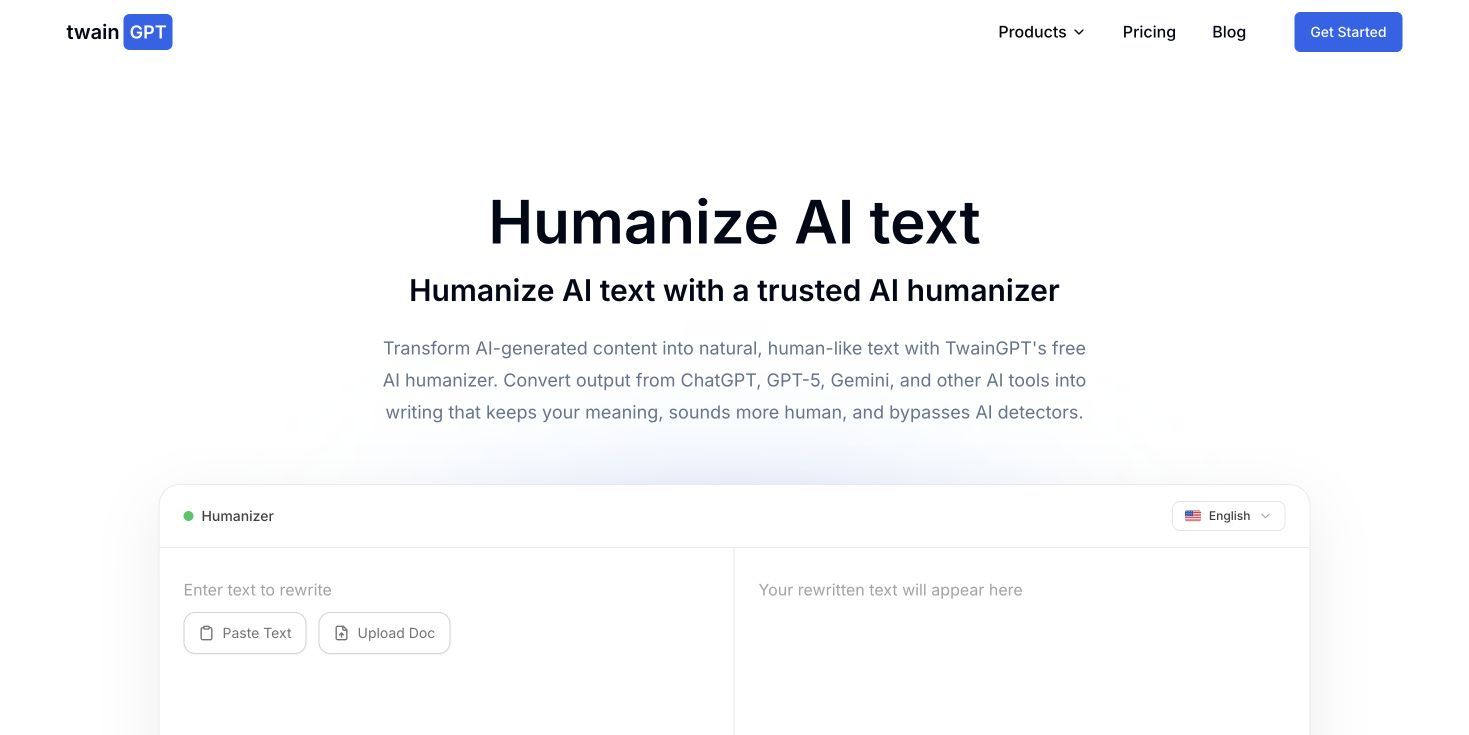
The current Humanizer interface presents several writing purposes, including Standard, Academic, Creative, Casual, and Professional. It also presents multiple rewrite levels, giving users some control over how far the output moves from the input.
TwainGPT's help center describes a broader product than the public Humanizer alone. It documents an essay generator, an AI Detector, and a Documents area where work can be saved and revisited.
The brand is harder to understand than it needs to be because its public information appears across different domains and surfaces. The current twaingpt.ai homepage, older twaingpt.com articles, the app, and the help center do not always describe access and pricing in the same way.
That inconsistency does not prove the product is illegitimate. It does mean readers should verify the exact product, plan, and terms shown inside the live app instead of relying on an older review or search snippet.
How I Evaluated TwainGPT
I evaluated TwainGPT as an editing workflow, not as a contest to produce the lowest possible detector score. That distinction matters because a rewrite can look less predictable to a detector while becoming less accurate, less personal, or simply worse to read.
These are the criteria that matter most:
| Review criterion | What a useful result should do | Main failure to watch for |
|---|---|---|
| Meaning preservation | Keep the original claim, relationship, and level of certainty | Change what the writer actually meant |
| Factual fidelity | Preserve names, dates, numbers, quotations, and technical terms | Add or alter unsupported details |
| Natural voice | Improve rhythm without creating artificial informality | Replace one generic voice with another |
| Mode usefulness | Produce changes appropriate to the stated audience | Apply superficial labels with little practical difference |
| Detector clarity | Present a review signal with visible uncertainty | Imply that one score proves authorship |
| Workflow efficiency | Reduce repetitive copying and setup | Encourage endless rewriting to chase a score |
| Pricing clarity | Make limits and upgrade requirements easy to understand | Show conflicting promises across official pages |
| Data confidence | Explain how submitted and saved text is handled | Leave users guessing about sensitive documents |
I do not use self-published accuracy or bypass percentages as the basis of the verdict. A meaningful benchmark would need a disclosed test set, sample lengths, source models, detector versions, repeat runs, and a human review of whether the rewritten content remained correct.
Without that context, a percentage is marketing information. It is not enough to answer whether the tool will work for your document.
TwainGPT Humanizer Review: More Than a Paraphraser?
The TwainGPT Humanizer is the clearest reason to use the product. Instead of asking a general chatbot to "make this sound human," you paste a draft, choose a purpose and rewrite level, and run a dedicated transformation.
That guided setup is useful for people who do not want to design prompts. A student revising a reflection, a marketer polishing a draft, and a professional editing an email do not necessarily need the same tone, so purpose controls are more useful than a single generic rewrite button.
The Basic Workflow
The workflow is straightforward:
- Paste the text you want to revise.
- Select the writing purpose and preferred rewrite level.
- Run the Humanizer.
- Compare the output with the original.
- Keep, reject, or rewrite individual changes.
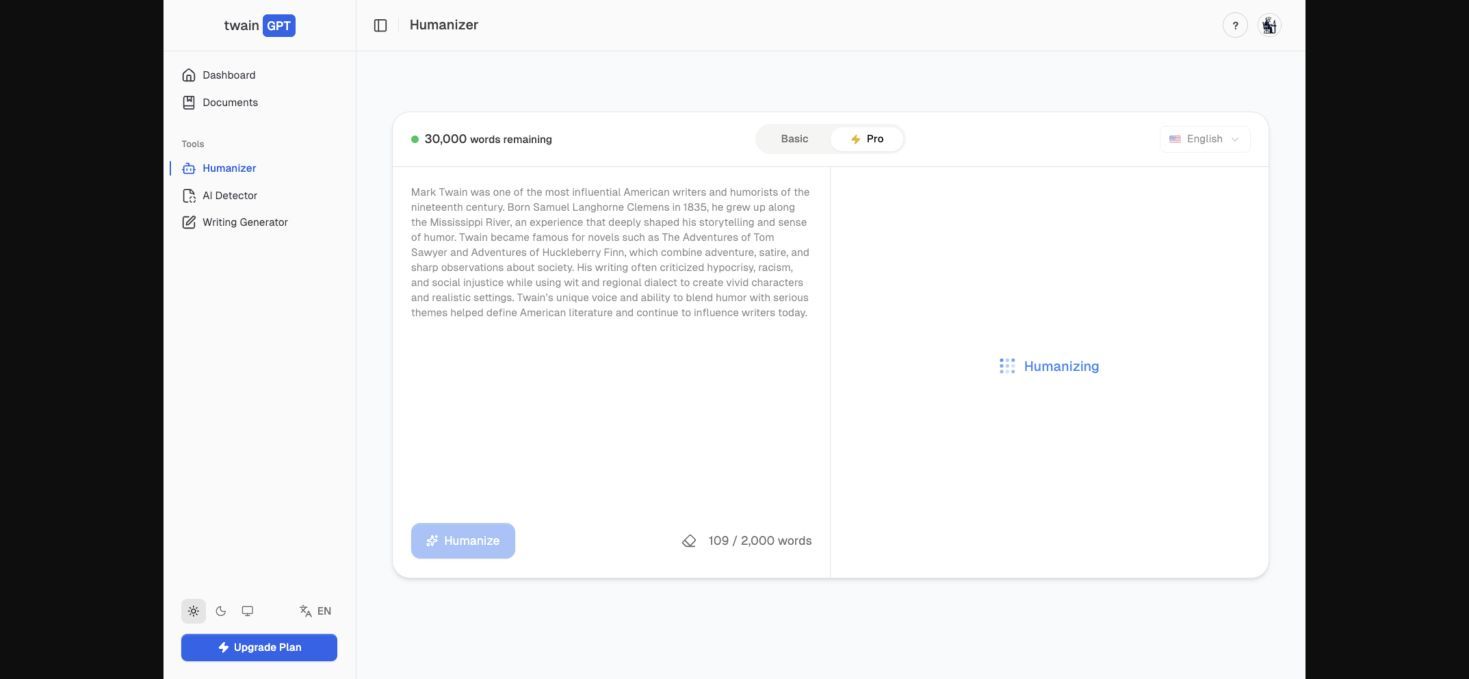
The fifth step is the important one. Humanization should produce options for an editor, not a replacement for editing.
What a Good Humanizer Should Change
A useful rewrite does more than substitute synonyms. It may shorten an overpacked sentence, vary sentence openings, remove repetitive transitions, replace vague claims with direct language already supported by the draft, or adjust formality for the audience.
It should not change who did what, turn uncertainty into certainty, invent an example, remove a necessary qualification, or alter a quotation. Those changes may make the prose look different, but they also make it less trustworthy.
TwainGPT's mode and level controls create the possibility of more intentional editing. The practical question is whether the result remains faithful to the input as the rewrite becomes stronger.
Balanced Rewriting Usually Has the Lower Risk
When a draft is already accurate, a lighter rewrite is normally the safer starting point. It gives the tool less room to reinterpret the content and makes the differences easier to review.
Stronger rewriting can be useful when the original text is repetitive or structurally awkward. It also increases the chance that the output will drop domain terminology, smooth over a necessary distinction, or add connective language that the source never supported.
This is why a dramatic before-and-after transformation is not automatically evidence of quality. Sometimes the best edit is a small one.
Academic and Professional Modes Still Need Human Judgment
An Academic label cannot verify a citation, strengthen an argument, or make unoriginal reasoning original. It can only influence how the language is rewritten.
Likewise, a Professional mode may make a message more formal without knowing whether the new tone fits your company, client, or recipient. Mode names are useful starting instructions, not quality certifications.
For important work, compare the output line by line. If you could not explain or defend a new sentence yourself, do not keep it merely because it sounds polished.
TwainGPT AI Detector Review: Useful Signal or False Certainty?
The Twain AI Detector gives users a way to scan text within the same general product. That is convenient when the goal is to identify passages that may sound repetitive, formulaic, or overly predictable.
The result must be interpreted carefully. AI detectors analyze language patterns; they do not observe the writing process, know who typed the words, or prove that a person violated a rule.
What a Detector Result Can Tell You
A detector result can be a prompt for review. If one paragraph receives a very different result from the rest of a document, you might check whether its tone changed, whether it relies on generic transitions, or whether it no longer sounds like the surrounding work.
That review can improve consistency even when the detector's authorship guess is wrong. Used this way, the score begins a useful question rather than ending the investigation.
What It Cannot Tell You
The Twain AI Detector cannot establish that a particular model wrote the passage. It also cannot determine whether AI assistance was permitted, whether the writer disclosed it, or how much human research and revision went into the final version.
False positives matter because naturally predictable writing exists. Short answers, formal explanations, standard academic phrases, translated prose, technical summaries, and writing by non-native English speakers can all contain regular patterns without being generated by AI.
False negatives matter too. A passage can receive a reassuring result while still containing fabricated facts, copied ideas, weak reasoning, or undisclosed AI assistance.
Why TwainGPT Checking TwainGPT Can Become a Closed Loop
Using TwainGPT's Detector after TwainGPT's Humanizer feels efficient, but it creates an important methodological problem. The product is effectively evaluating a transformation produced within its own workflow.
Even if the displayed score improves, that does not independently validate the output. The Humanizer and Detector may respond to overlapping patterns, and another detector may evaluate the same passage differently.
The safer question is not "Did TwainGPT approve its own rewrite?" It is "Is this version accurate, clear, specific, and genuinely representative of the writer's thinking?"
The Generate-Humanize-Detect Loop: Efficient, but Easy to Misuse
TwainGPT's broader workflow can connect generation, humanization, detection, and document management. On paper, that is appealing: create a starting draft, refine its tone, check it, and save the result without assembling several tools.
This loop can save time during early revision. It can also create a score-chasing habit in which the user repeatedly rewrites already acceptable prose because the detector has not produced the desired label.
Each pass introduces another opportunity for semantic drift. A qualification may disappear, a technical phrase may be replaced with an inaccurate everyday term, or a personal example may become a generic statement.
Repeated rewriting can also flatten voice. Human writing contains preferences, uneven rhythms, discipline-specific habits, and deliberate emphasis. A tool that continually optimizes away those features may produce cleaner prose that feels less like the actual writer.
Use this stopping rule instead:
- The claims are accurate and supported.
- The language is clear for the intended reader.
- The writer can explain and defend every sentence.
- The draft contains real examples, reasoning, or experience where appropriate.
- Further rewriting would change the text more than it improves it.
A detector result may still be present in the workflow, but it should not override those editorial checks.
Output Quality: What to Check After TwainGPT Rewrites Your Text
The fastest way to evaluate any TwainGPT Humanizer result is to compare it against the original in categories. Reading only the new version makes subtle factual and tonal changes easy to miss.
| Check | Warning sign | What to do |
|---|---|---|
| Facts | A date, number, name, or result changed | Restore the verified original information |
| Certainty | "May" becomes "will," or a possibility becomes a fact | Reinstate the correct qualification |
| Citations | A citation no longer supports the rewritten sentence | Rewrite around what the source actually supports |
| Quotations | Quoted language was paraphrased inside quotation marks | Restore the exact quotation or remove quotation marks |
| Terminology | A technical term was replaced by an inaccurate synonym | Keep the domain-appropriate term |
| Voice | The output sounds casual, inflated, or unlike the writer | Rewrite the line in language you would naturally use |
| Logic | A transition implies a relationship not present in the original | Remove it or explain the relationship with evidence |
| Specificity | Concrete detail becomes generic filler | Restore the example, condition, or observation |
This audit is especially important for academic, legal, medical, financial, and technical writing. A sentence can become easier to read while becoming materially less correct.
It also helps with ordinary marketing content. If a rewrite turns a limited feature into a broad promise, the style has improved at the cost of accuracy.
Pricing: Is TwainGPT Really Free?
TwainGPT's public pricing story is currently confusing. The current twaingpt.ai homepage promotes free and unlimited access, while a promotional message on the same surface appears time-bound.
The help center describes Basic, Premium, and Ultimate plans with higher limits available through upgrading. Older first-party TwainGPT content describes a small free allowance and paid subscriptions.
These statements may reflect a product transition, a promotion, different domains, or information that has not been updated consistently. Whatever the reason, readers should not assume that an older price, a permanent free promise, or an unlimited allowance applies to the exact app session they are using.
| Official surface | What it communicates | What to verify |
|---|---|---|
| Current public homepage | Free and unlimited positioning | Whether the offer is permanent, promotional, or subject to fair-use limits |
| Homepage promotion | Time-specific free-access language | The end date and what happens afterward |
| Help center | Basic, Premium, and Ultimate plans | Current allowances and which features require an upgrade |
| Older first-party articles | Limited free use and paid tiers | Whether the article is still current |
| Live app or checkout | The offer attached to your account or session | Price, billing period, renewal, cancellation, taxes, and usage limits |
Before paying, open the live app and check the current plan screen. Record the billing period, renewal price, cancellation process, refund terms, and any word or scan limits that matter to your workflow.
Pricing clarity is part of product quality. Users should not have to reconcile several official descriptions to understand what they are buying.
Privacy, Data Handling, and Trust Signals
Humanizer users often paste more sensitive material than they realize. A draft may contain unpublished research, student information, client strategy, personal details, internal reports, or confidential product plans.
TwainGPT's public marketing and help content discuss quick use, saved documents, and product access in different contexts. Before uploading sensitive text, confirm which policy applies to the exact domain and app you are using.
Check these questions:
- Is submitted text stored, and for how long?
- Are saved documents optional or automatic?
- Is input used to train or improve models?
- Can users delete their documents and account data?
- Are third-party model or infrastructure providers involved?
- Which legal entity and privacy policy govern the service?
- Does your school, employer, or client allow this type of processing?
Do not paste confidential or regulated content merely because an input box is easy to access. Convenience is not a substitute for a clear data-handling decision.
Testimonials, usage counters, and polished interface design can make a product feel established, but they do not answer those privacy questions. Trust should come from clear terms, consistent product information, and behavior you can verify.
TwainGPT Pros and Cons
TwainGPT has a credible use case, but its value depends heavily on how it is used.
| Pros | Cons |
|---|---|
| Simple paste, configure, and rewrite workflow | Strong rewrites can introduce semantic drift |
| Purpose and rewrite-level controls reduce prompt setup | Detector results can encourage false confidence |
| Humanizer and Detector are available in one product | The same-tool rewrite-and-check loop is not independent validation |
| Useful for tone and readability experiments | Public pricing and access information is inconsistent |
| Broader writing and document workflow may reduce tool switching | Marketing performance claims lack enough transparent test context |
| Multilingual positioning may help international users | Sensitive documents require careful policy review |
The strongest advantage is low friction. The largest weakness is that low friction makes it easy to accept a rewrite before checking what changed.
Who Should Use TwainGPT—and Who Should Skip It?
TwainGPT is not equally useful for every writer. The best decision depends on the stakes of the document and the amount of review you are prepared to do.
| User | Likely benefit | Main risk | Recommendation |
|---|---|---|---|
| Student | Can improve awkward wording in permitted AI-assisted work | Policy violations, citation changes, and dependence on detector scores | Use only within course rules and review every sentence |
| Marketer | Fast tone adjustments and cleanup of early drafts | Inflated claims and generic brand voice | Useful for drafts with a final brand and fact check |
| Freelancer | Reduces time spent on repetitive line editing | Client confidentiality and voice inconsistency | Verify client policy and edit the result manually |
| Educator | Can demonstrate how rewriting changes language patterns | Detector output may be mistaken for evidence | Use results for discussion, not accusation |
| Multilingual writer | May help smooth English phrasing | Correct original meaning may be replaced by more idiomatic but inaccurate language | Compare carefully with the intended meaning |
| Technical professional | Can simplify dense explanations | Domain terms and qualifications may be lost | Use light rewriting and preserve technical language |
Skip TwainGPT if your only goal is to guarantee that a detector will label text as human. No responsible review can promise that result across changing detectors, different sample lengths, and different kinds of writing.
Also skip automatic humanization for a document you are not allowed to process through an external service. The right editing tool cannot make the wrong data-handling decision safe.
TwainGPT vs Lynote AI Humanizer
If your main goal is revising an existing AI-assisted draft, Lynote AI Humanizer offers a focused alternative. It accepts pasted text or supported document uploads and provides several levels of rewriting control.
The important similarity is that both tools should be used as editors, not as guarantees. The important decision is which workflow gives you enough control to make a useful revision and enough visibility to review the result.
| Area | TwainGPT | Lynote AI Humanizer |
|---|---|---|
| Primary workflow | Paste, select purpose and rewrite level, then humanize | Paste or upload a document, select a mode, then humanize |
| Rewrite controls | Writing-purpose and rewrite-level choices | Balanced, Focus, and Advanced modes |
| Document input | Verify current support in the live TwainGPT app | PDF, DOC, DOCX, and TXT uploads are supported |
| Result checking | Integrated TwainGPT detector workflow | Instant Authenticity Report with predicted multi-detector scores |
| Best fit | Users who want TwainGPT's broader generate-rewrite-check environment | Users who want a focused document or text rewriting workflow |
| Essential caution | Review meaning and do not chase one detector result | Treat predicted scores as review signals, not guarantees |
How to Humanize Text With Lynote
Step 1. Paste Text or Upload a Document
Open Lynote AI Humanizer and paste the draft into the input box. You can also upload a PDF, DOC, DOCX, or TXT file; the free tier supports up to 600 words per request.

Step 2. Select a Humanization Mode
Choose Balanced for standard rewriting and readability. Focus applies a stronger rewrite, while Advanced is slower and intended for a more deliberate balance of quality and rewriting depth.

Step 3. Humanize and Review the Result
Click Humanize to generate the revised text. Review the result and the Instant Authenticity Report, which shows predicted scores across several major detectors.
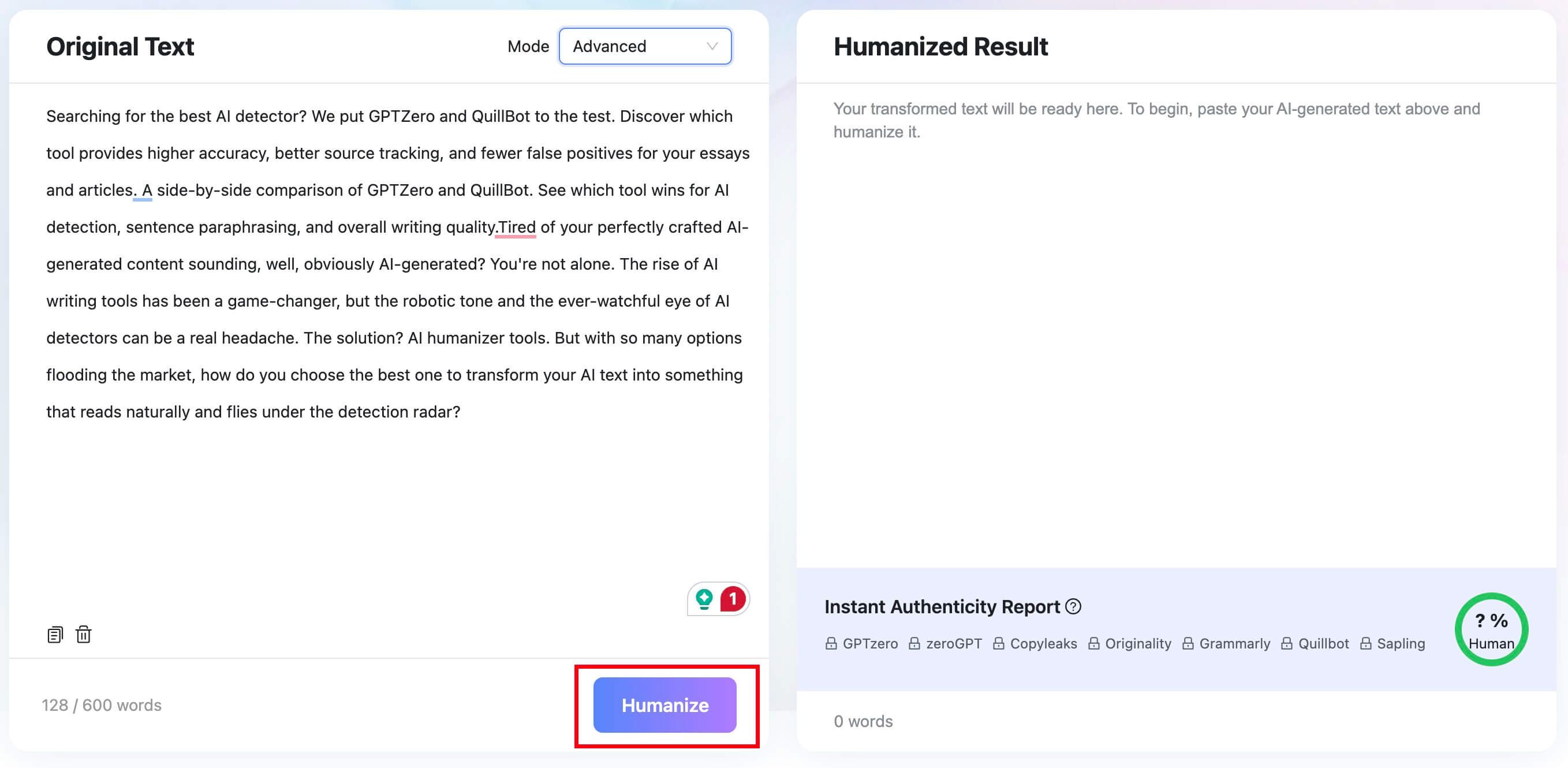
Use those predictions as prompts for closer reading, not as promises. Compare the revision with the original before copying or downloading it.
Step 4. Restore Your Facts and Voice
Check every fact, quotation, citation, example, and technical term. Replace any line that no longer sounds like you or no longer expresses the original meaning precisely.

This final step is what turns automated rewriting into responsible editing. The quality of the finished text depends on the decisions you make after the tool produces it.

What Most TwainGPT Reviews Get Wrong
The biggest mistake in many humanizer reviews is treating a detector outcome as the definition of success. That is an incomplete and sometimes misleading standard.
A claimed bypass rate means little without a documented method. Readers need to know which source models generated the input, how long each sample was, which detector and version were used, whether the tests were repeated, and whether a human checked the output for errors.
A second mistake is assuming that "more human" and "better writing" are the same thing. A passage can contain more varied sentence structures while losing clarity, evidence, or a distinctive point of view.
A third mistake is ignoring the input. If the original draft contains generic ideas, unsupported claims, or no firsthand insight, surface rewriting will not make it authoritative.
The better evaluation order is:
- Is the argument or message useful?
- Are the facts and examples accurate?
- Does the language fit the writer and audience?
- Is the use of AI permitted and disclosed where required?
- Does any automated score reveal a passage worth reviewing?
This order keeps the writing goal in control. It prevents a probabilistic tool from becoming the final judge of authorship or quality.
FAQs About TwainGPT
Is TwainGPT free?
TwainGPT's current homepage promotes free and unlimited access, but its promotional messaging, help center, and older first-party articles describe access differently. Check the live app and plan screen for current limits, billing, and renewal terms.
Is TwainGPT legit?
TwainGPT is a functioning AI writing product with public tools and help documentation. However, users should evaluate its current pricing clarity, privacy terms, and marketing claims before uploading sensitive content or paying for a plan.
What does the TwainGPT Humanizer do?
The TwainGPT Humanizer rewrites existing text with the goal of making its tone and sentence patterns feel more natural. Users can choose writing purposes and rewrite levels, but they still need to verify meaning, facts, and voice.
Does TwainGPT have an AI detector?
Yes. TwainGPT includes an AI Detector that scans text for patterns associated with AI writing. Its result should be treated as a review signal rather than proof of who wrote the text.
Can TwainGPT guarantee that text will not be detected?
No responsible tool can guarantee the same result across every AI detector, document type, sample length, and future model update. Humanization may change a score, but it does not make a detector outcome certain.
Does TwainGPT preserve the original meaning?
It is designed to rewrite existing content, but any generative rewrite can alter nuance, certainty, terminology, or factual detail. Compare the output with the original and correct every unsupported change.
What languages does TwainGPT support?
TwainGPT markets multilingual support. Because language availability can change by tool and plan, verify the exact language and mode you need in the current interface before relying on it for a project.
Is TwainGPT safe for academic writing?
It can be used to revise wording only when that use follows the applicable course or institution rules. It cannot make prohibited AI assistance acceptable, verify citations, or guarantee that a submission will not be flagged.
What is the best TwainGPT alternative?
The best alternative depends on the task. Lynote AI Humanizer is a practical option for focused text and document rewriting, while a grammar editor may be better for light corrections and a general chatbot may be better for flexible drafting.
Final Verdict: Use TwainGPT as an Editor, Not an Outcome Guarantee
TwainGPT does work as a convenient rewriting assistant. Its guided Humanizer can help users experiment with tone and sentence structure, and the surrounding writing tools reduce the need to move between several interfaces.
The product is harder to recommend without qualification. Its Detector cannot prove authorship, stronger rewrites can change meaning, and its official pricing and access information is not consistent enough across public surfaces.
Use TwainGPT when you already own the ideas and facts, want help revising the language, and are willing to compare every important change. Avoid using it as a shortcut to a certain detector label, a substitute for original thought, or a reason to ignore academic, professional, or privacy rules.
The best final draft is not the one with the most reassuring score. It is the one you can verify, explain, and confidently claim as your own work.

Written by Danny
Product Marketing Manager
Danny explains how Lynote features fit real workflows, from everyday productivity to product-led writing use cases. View all articles →