If you are wondering whether Humbot AI is worth using, the answer depends heavily on your editing workflow and expectations. Humbot is broad in scope, offering a suite of writing tools alongside its core humanizer. However, its true value depends on careful proofreading, the amount of text you process, and your tolerance for potential subscription friction.

No AI humanizer can guarantee perfect detector outcomes, and Humbot is no exception to this rule. This review evaluates the humbot.ai platform based on its transparent access limits, pricing structure, usability, and public feedback. We will look beyond the marketing claims to help you build an evidence-conscious evaluation framework for your own writing tasks.
Quick Verdict: Is Humbot AI Good?
For users who need a fast rewriting tool, Humbot AI provides a convenient all-in-one dashboard. It works best when you treat it as a rough first-pass editor rather than a final publisher.
- Best for: Casual writers looking to quickly rephrase short AI drafts using a consolidated dashboard.
- Think twice if: You are working with highly technical content, dense facts, or strict academic citations.
- Main strength: A simple interface that bundles a humanizer, AI checker, and grammar tools in one place.
- Main weakness: Public reviewers report recurring issues with altered meaning, billing, and customer support.
- Free access: The official website advertises a free web plan, but our anonymous test displayed 0 remaining Basic words and produced no output.
- Overall verdict: Humbot AI offers a broad suite of tools, but users must carefully test the platform themselves to ensure it meets their specific editing needs.
What Is Humbot AI, Exactly?
Humbot.ai vs. Humbot.one: Two Different Products
Search results for Humbot can be confusing because two different domains share similar names. This review focuses specifically on humbot.ai, which positions itself as an AI humanizer and comprehensive writing suite. The other site, humbot.one, operates separately and offers a different set of features.
When evaluating reviews or pricing, it is important to verify which platform you are actually looking at. The humbot.ai platform is the one that bundles multiple text-processing modes and integrated detector checks.
From a Humanizer to a Broader Writing Suite
Originally known primarily for its AI text humanizer, Humbot has expanded into a broader writing and study assistant. The official page lists a dashboard that includes an AI Checker, a plagiarism checker, and a grammar checker. It also advertises an article rewriter, summarizer, translator, citation generator, and a math solver.
This expansion makes the platform more versatile for general writing tasks. Instead of jumping between different tabs, users can theoretically run a draft through multiple checks within a single account.
Who Humbot Appears to Be Built For
Humbot AI targets a wide mix of users, including digital marketers, bloggers, and students. Marketers often look for tools to smooth out generic AI copy for better readability. Students and researchers may seek out rephrasing tools, though they must be careful to preserve citations and avoid academic policy evasion.
Ultimately, it appeals to anyone who relies on AI generation but wants the final product to sound less robotic. However, professional editors must evaluate whether automated changes are appropriate for polished publication.
How Humbot AI Works
Add or Upload the Source Text
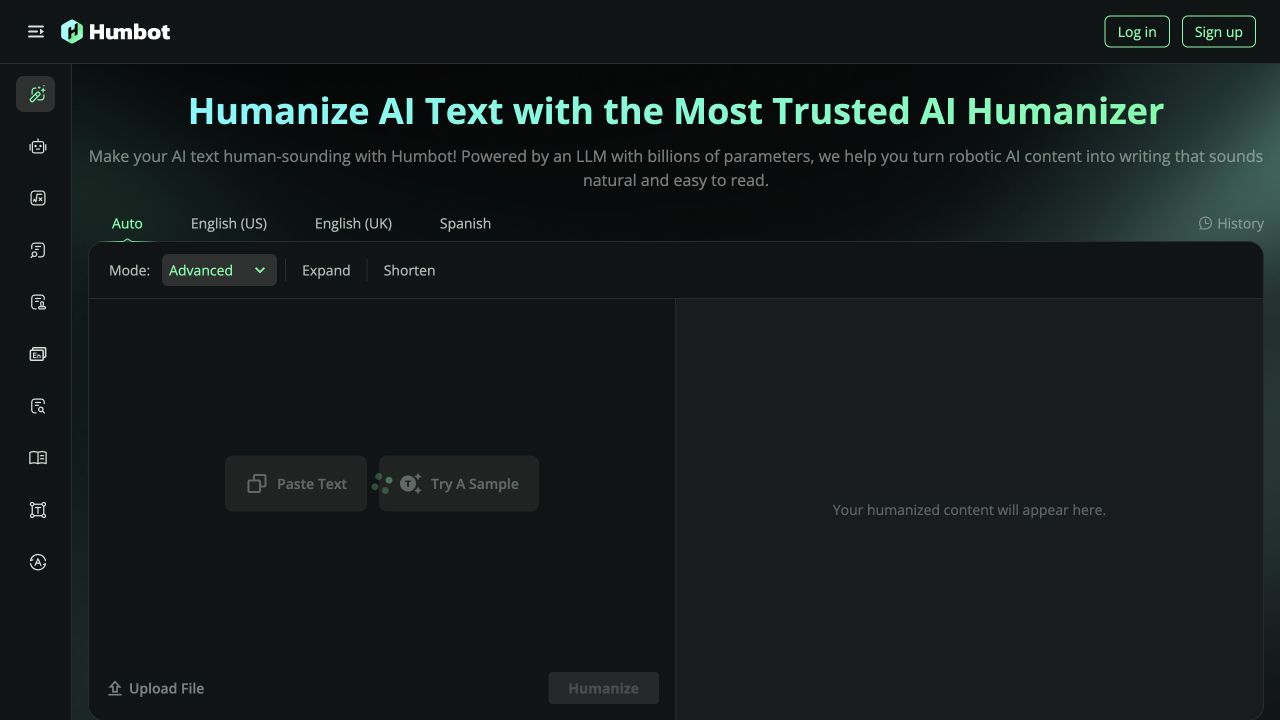
The Humbot workflow begins with a straightforward input screen on the main dashboard. Users can paste their AI-generated text directly into the primary text box. Alternatively, the platform lists an option for file uploads for longer documents.
This flexibility is helpful if you are working with existing drafts saved on your computer. The interface clearly displays your current word count and available credits.
Choose a Rewrite Mode
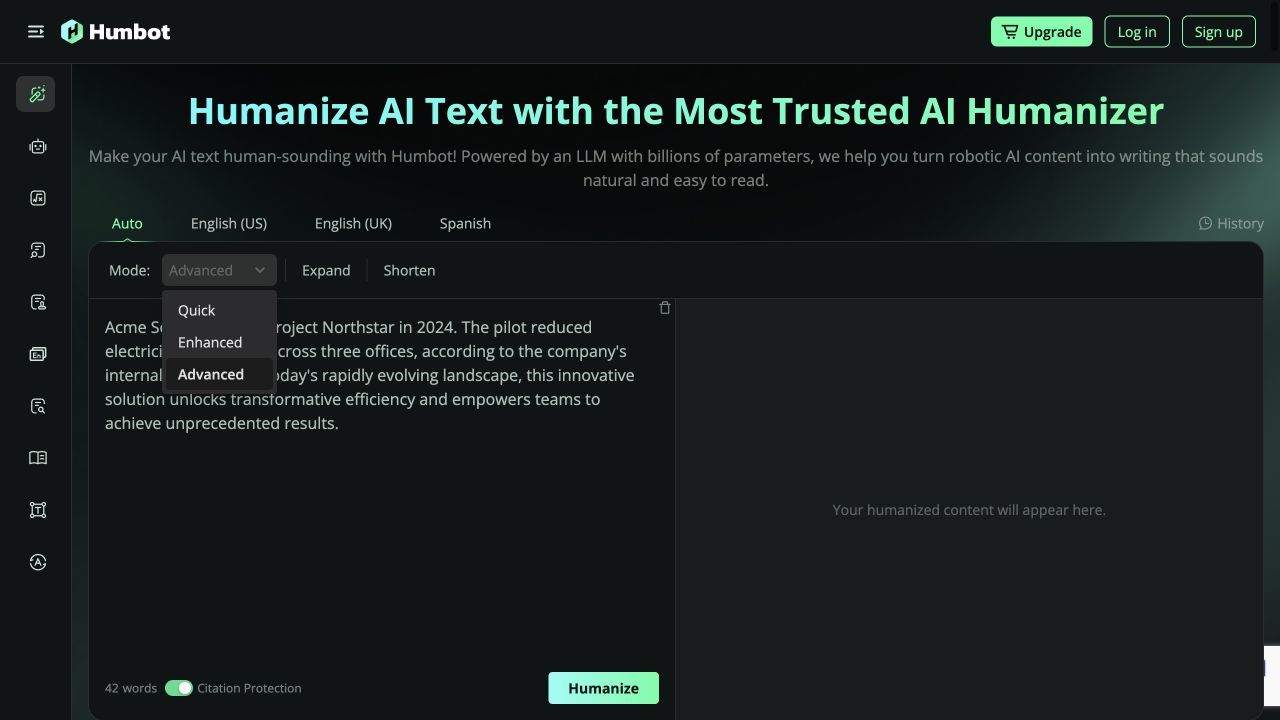
Before running the tool, users must select a humanization mode. The official pricing and dashboard list options like Quick, Enhanced, and Advanced modes. Each mode is designed to apply a different level of rewriting intensity to the source text.
Humbot describes these modes as different levels of rewriting intensity. Because the anonymous session returned no output, we could not independently compare how the modes changed the same passage.
Review the Changes and Checker Results
Once the text is processed, Humbot displays the rewritten output alongside a bundled AI checker report. This report provides diagnostic signals regarding how the text might be perceived by external detection tools.
It is crucial to remember that visible checker results are diagnostic signals, not proof of authorship. A lower AI score on the dashboard does not guarantee the same result on a different platform.
Transparent Access Test: Our Experience
The 42-Word Synthetic Test
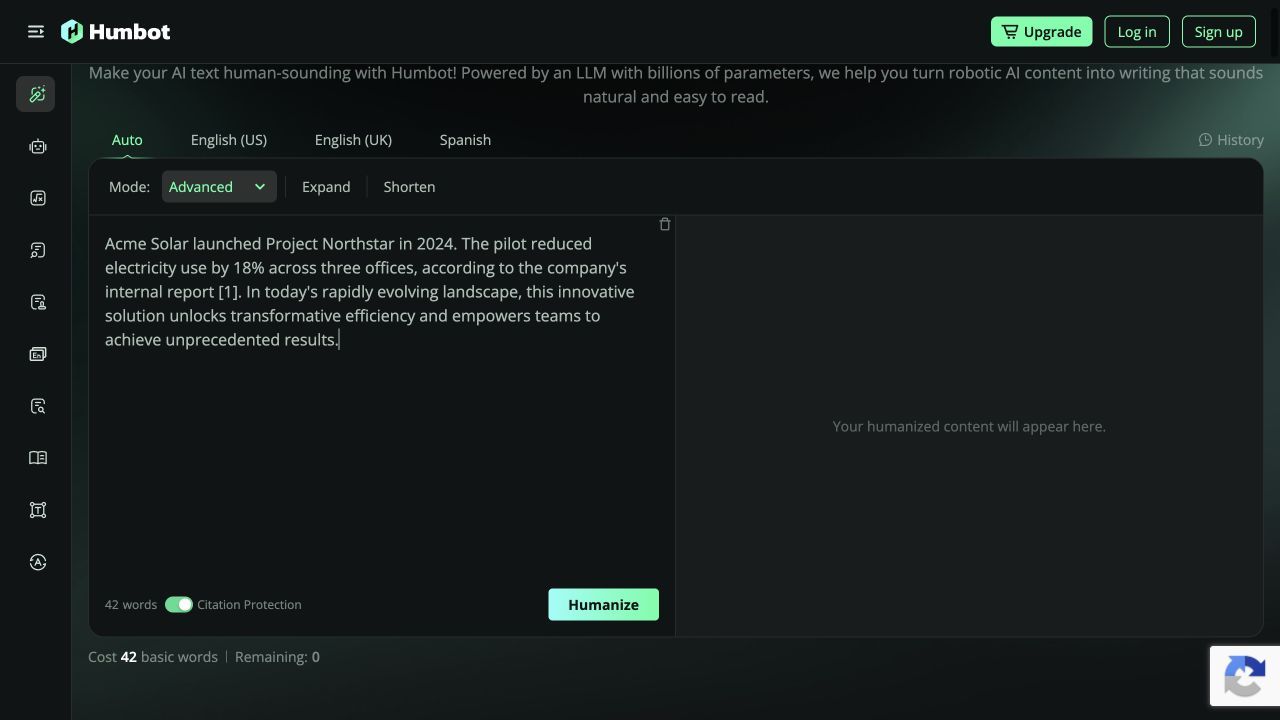
To evaluate the platform's accessibility, we attempted one 42-word synthetic test on Humbot's public page. We pasted a short, generic AI-generated paragraph into the main input box. We then clicked the button to initiate the humanization process.
The Zero-Balance Result
Unfortunately, no rewritten output appeared during our test. The anonymous free balance displayed 0 remaining words immediately upon submission. Because of this restriction, we could not observe any actual rewriting results.
What This Means for New Users
This access result highlights the importance of managing expectations regarding free trials. The official Humbot website advertises a free web plan, but it does not clearly expose one stable public word allowance. Users should be prepared to encounter immediate paywalls or zero-balance notifications when attempting to test the service anonymously.
Evidence-Conscious Evaluation Framework
Because marketing claims cannot guarantee output quality, you must test Humbot AI yourself using an evidence-conscious approach. Relying solely on advertised features or dashboard scores is a risky strategy for serious writers. You need a structured way to evaluate how the tool handles your specific content.
We recommend running three distinct types of text through the platform if you secure access. This framework will help you determine if the tool's rewriting logic aligns with your editorial standards. Always evaluate the output for meaning preservation before looking at any predicted detector scores.
Test 1: Short Explanatory Writing
First, test a concise explanatory paragraph about a common software or business concept. The goal here is to check for basic readability and natural sentence flow. A capable humanizer should make the explanation clearer without overcomplicating the vocabulary.
Pay close attention to the transitions between sentences. If the tool inserts awkward synonyms or breaks the logical progression of the explanation, it may require too much manual editing. This test establishes a baseline for the tool's linguistic competence.
Test 2: Generic Marketing Copy
Next, test a marketing-style paragraph filled with generic AI phrasing and industry buzzwords. This test checks the tool's ability to remove robotic clichés and create engaging, human-sounding copy. The evaluation should focus on the degree of unnecessary rewriting and overall tone improvement.
Marketing copy relies heavily on voice and persuasion. If the rewriting process strips away the persuasive element or introduces bizarre phrasing, the output becomes unusable for professional campaigns. You want to see if the tool can simplify the text without losing its promotional impact.
Test 3: Fact-Dense Text With a Citation Marker
Finally, evaluate a fact-dense paragraph containing specific names, historical figures, and a citation marker. This is the most challenging test for any rewriting tool. The criteria here are strict meaning preservation, factual stability, and ensuring the citation remains attached to the correct claim.
Check every name, figure, qualifier, and citation position after processing. If you observe semantic drift during this test, the output needs manual correction and should not be reused as-is.
The Humbot Features That Matter Most
Quick, Enhanced, and Advanced Rewrite Modes
The choice of rewriting modes is one of Humbot's most prominent advertised features. Having different intensity levels theoretically allows users to tailor the output to the specific draft. The official page lists Quick, Enhanced, and Advanced modes as the primary options for users.
Humbot says these modes dictate how aggressively the underlying AI alters the original text. Users must experiment with these settings to find a balance between readability and meaning preservation.
All-in-One AI Checker
The bundled AI checker is designed to save time by eliminating the need to copy and paste text into a separate tab. It aggregates predicted scores to give you a general sense of how the text reads. However, users should treat this feature as a helpful gauge rather than a definitive compliance tool.
Detector tools update constantly, and their results vary widely across different platforms. A favorable score on Humbot's internal checker does not promise undetectable writing elsewhere.
Article Rewriter and Citation Tools
Humbot lists an article rewriter designed to overhaul longer pieces of content. The platform claims to handle complex structures, though users must verify this through their own testing. If you are relying on specific citation styles, you should double-check that the formatting survives the rewriting process.
Compare every citation marker and reference against the source after rewriting. Do not assume that a "citation protection" setting guarantees the relationship between a claim and its supporting reference.
Supporting Writing Tools
The addition of grammar checkers, summarizers, and math solvers makes Humbot feel like a comprehensive hub. For students or casual writers, the official page lists this consolidation as a valuable convenience. For users who only want a dedicated AI humanizer, these extra tools may feel like unnecessary dashboard clutter.
Lynote AI Humanizer: A Focused Alternative to Try
If you want to compare Humbot with a more focused rewriting workflow, Lynote AI Humanizer is another option to test. It concentrates on rewriting and review rather than placing a large collection of unrelated study tools around the main task.
Lynote supports pasted text and PDF, DOC, DOCX, or TXT uploads. The free tier handles up to 600 words per request, which gives you enough room to evaluate a representative passage rather than a single sentence.
When Lynote Fits the Workflow
Lynote is relevant when you want to compare multiple rewrite strengths while keeping the review process visible. Balanced is the standard option for quality and readability, Focus applies a stronger rewrite, and Advanced takes a slower, more deliberate approach.
No mode removes the need for editorial judgment. The useful question is whether the result preserves your claims, examples, terminology, and voice while reducing stiff or repetitive phrasing.
How to Humanize Text With Lynote
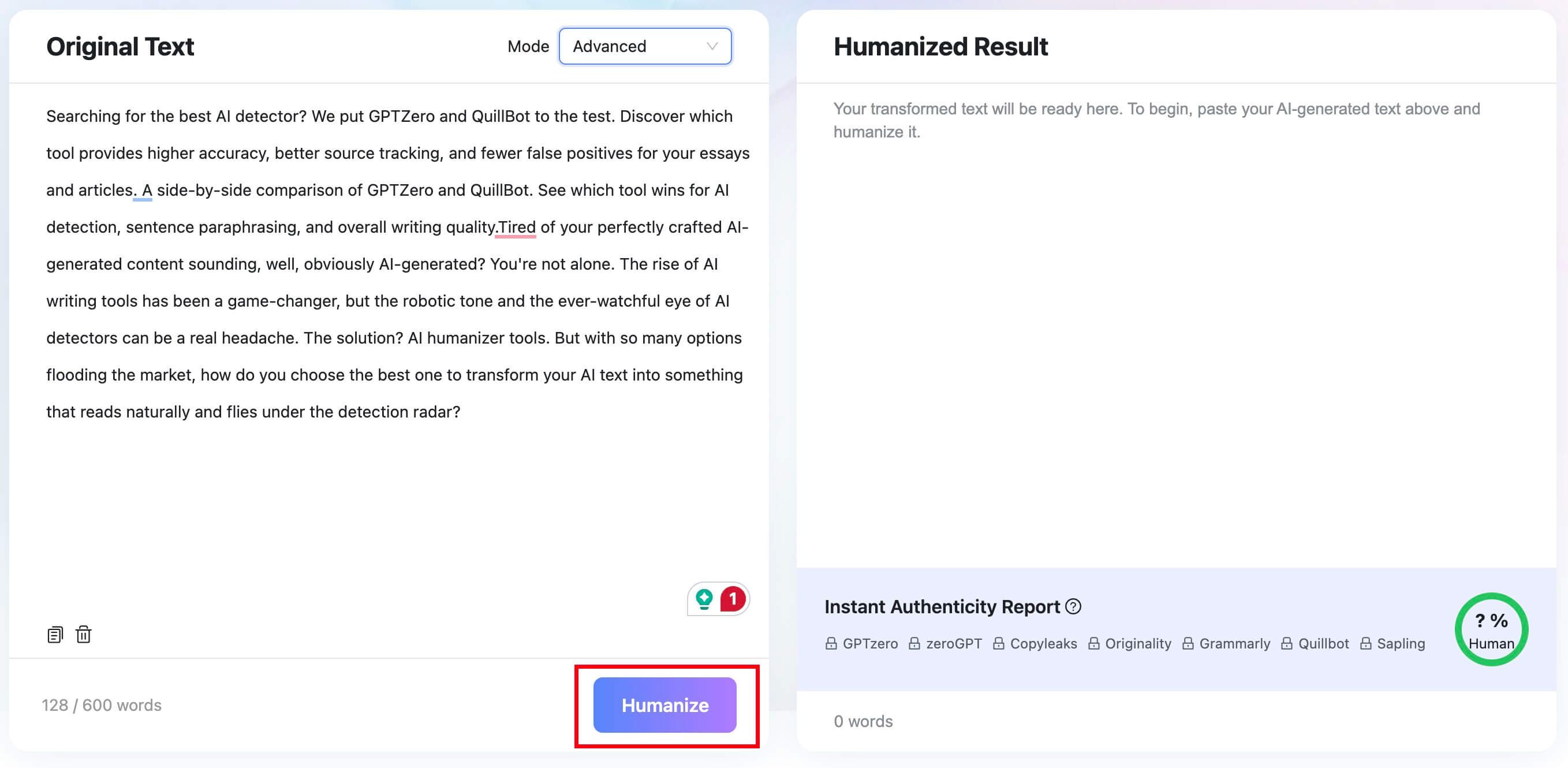
Step 1: Paste text or upload a document. Open the input panel and paste up to 600 words, or use Upload Document for a PDF, DOC, DOCX, or TXT file. Choose a passage that represents your real workload so the comparison is meaningful.

Step 2: Select a humanization mode. Start with Balanced when you want a moderate revision. Compare Focus or Advanced only when you need a stronger rewrite, and keep the original text available for a line-by-line check.

Step 3: Humanize and review the result. Click Humanize to generate the rewritten text. The result panel includes an Instant Authenticity Report with predicted detector scores, plus options to copy the text or download the file.


Review the Result Before Reusing It
Read the rewrite without looking at the predicted scores first. Confirm that facts, names, numbers, citations, and important qualifiers remain intact, then decide whether the new wording genuinely improves clarity and flow.
Detector predictions are secondary signals, not proof of authorship or quality. The final version should still reflect your own reasoning, comply with the relevant AI-use policy, and receive a human edit before publication or submission.
Is Humbot AI Free? What Free Actually Means
The Ambiguous Free Web Plan
Humbot AI advertises a free web plan on its official website, suggesting users can test the interface before paying. However, the platform does not clearly expose one stable public word allowance for this tier. As noted in our transparent access test, our anonymous attempt displayed 0 remaining Basic words after submitting just a 42-word sample.
Because of this ambiguity, users should not assume the free web plan will support their regular workflow. It is impossible to state that the free option is enough for a certain number of emails or paragraphs. You may encounter a paywall immediately upon your first use.
The Separate 250-Word API Trial
It is important not to confuse the web dashboard limits with Humbot's developer API limits. The separate Humbot API page explicitly states that it offers a 250-word API trial. This trial is strictly intended for developers testing backend integrations.
This API allowance does not reflect the standard consumer web plan experience. Regular users looking to rewrite text through the main dashboard will not benefit from the developer API trial.
Upgrading for Consistent Access
Given the unpredictable nature of the free web plan, consistent access requires a paid subscription. The free option serves primarily as a gateway to view the dashboard interface. Anyone handling regular writing tasks will need to evaluate the paid tiers carefully.
Humbot AI Pricing and Value for Money
Input Limits Across Tiers
When evaluating Humbot's value, it is crucial to understand its structural input limits. The official pricing page lists plan input limits of 500 words, 1,200 words, and unlimited words across its various tiers. These limits dictate how much text you can process in a single request.
A 500-word limit is roughly equivalent to one standard page of text. If you regularly write long-form articles, you will likely need a tier that supports 1,200 words or unlimited words per request.
Basic and Advanced Word Credits
Humbot's pricing structure also differentiates between types of word credits. The official pricing page lists both Basic and Advanced word credits depending on the plan you choose. Users must pay close attention to which modes consume which type of credit.
Understanding this distinction is vital for calculating the true cost of the service. If your preferred rewriting mode requires Advanced credits, your monthly allowance may deplete faster than expected.
Evaluating the Investment
For users who only need occasional rewriting, a subscription may be harder to justify than it is for a high-volume workflow. Compare the current charge with the number of representative passages you process and the time still required for manual editing.
Bloggers and content marketers processing thousands of words a week will naturally gravitate toward higher-tier plans. When evaluating value, consider whether the output quality justifies the monthly cost. Always review the cancellation policy before committing to a long-term subscription.
Free and Paid Access Compared
| Plan Type | Input Limits | Credit Types |
|---|---|---|
| Free Web Plan | Unclear public allowance. | Displayed 0 Basic words in our test. |
| Paid Tiers | 500, 1,200, or unlimited words. | Basic and Advanced word credits. |
| API Trial | 250 words per request. | Developer testing only. |
What Real Humbot AI Reviews Reveal
App Store Ratings Snapshot
Public feedback provides valuable context for how Humbot performs in the real world. When researched, the App Store displayed a rating of 4.2 out of 5 from 158 ratings. This serves as a dated snapshot, and it is important to remember that app ratings change over time.
The rating provides useful context, but it does not reveal which feature each reviewer used or whether a rating reflects the web humanizer, the mobile app, billing, or another part of the product. It should not be treated as a direct measure of rewrite quality.
Trustpilot Review Themes
Web-based review platforms paint a slightly more complex picture of the user experience. On Trustpilot, there are recurring visible complaints regarding several specific aspects of the service. These complaints should be viewed as common review themes rather than universal facts.
Public reviewers report recurring issues with meaning preservation, noting that the tool sometimes alters the original context. There are also visible complaints regarding billing practices, customer support responsiveness, and unmet detector expectations.
Meaning and Detector Expectations
The theme of altered meaning is particularly relevant for professional writers. Reviewers frequently mention that aggressive synonym swapping can distort the intended message of their text. This reinforces the need for careful manual proofreading after using the tool.
Additionally, some users express frustration when detector outcomes do not match their expectations. This highlights the danger of relying on marketing claims rather than treating detector scores as mere diagnostic signals.
Billing and Support Concerns
A recurring theme in critical reviews involves subscription friction. Some users have reported frustration with subscription renewals and delayed customer support responses. It is highly recommended to read the platform's refund policy carefully before entering your payment details.
Humbot AI Pros and Cons
Pros:
- Offers a simple paste-and-rewrite workflow on the main dashboard.
- The official page lists multiple rewriting modes (Quick, Enhanced, Advanced).
- Consolidates a humanizer, AI checker, and grammar tools into one platform.
- Provides a separate 250-word API trial for developers.
Cons:
- Our anonymous test displayed 0 remaining Basic words, preventing free output.
- Public reviewers report recurring complaints about altered meaning and context.
- Trustpilot shows visible complaints regarding billing and customer support.
- Official pricing page lists input limits of 500 or 1,200 words on lower tiers.
Who Should Use Humbot AI, and Who Should Skip It?
Good Fit: Low-Stakes First-Pass Editing
Humbot AI is a potential fit for casual emails or brainstorming drafts if a paid or credited test produces acceptable output on your own text. Low-stakes material also makes it easier to identify and correct awkward phrasing before reuse.
Users who value having multiple writing tools in one place will appreciate the consolidated dashboard. It serves as a convenient hub for basic text processing.
Conditional Fit: Marketing and SEO Drafts
Marketers and SEO writers should evaluate Humbot conditionally rather than assuming it will match a brand voice. Test generic introductions and product copy, then compare the rewrite against the approved terminology, factual claims, and tone guidelines.
You cannot rely on the tool to perfectly preserve your persuasive marketing angles. Always review the final text to ensure the core message remains intact.
Poor Fit: Sensitive, Citation-Heavy, or High-Stakes Work
Be especially cautious with academic papers, legal documents, confidential material, and highly technical reports. Because we could not verify Humbot's output and public reviews include meaning-related complaints, manual editing and source-level verification are the more defensible choices for high-stakes work.
Furthermore, no tool should be used to encourage academic policy evasion. Students must adhere to their institution's guidelines regarding AI usage.
How to Decide Before Paying for Humbot
Before entering your credit card information, take a few steps to validate the tool for your specific needs. Do not rely solely on the marketing copy found on the official website. You must build your own evidence-conscious evaluation framework.
- Test a representative paragraph: If you secure access, use a real paragraph from your typical workload, not a disposable sample.
- Check meaning before scores: Verify that your named entities and facts survived the rewrite before looking at the AI detector score.
- Review renewal terms: Check how easy it is to cancel the subscription and read public reviews regarding billing.
- Consider input limits: Ensure the 500-word or 1,200-word input limits align with your typical document length.
- Focus on editing quality: Make your decision based on how much time the tool saves you in editing, not on a promise of undetectable writing.
FAQs About Humbot AI
What is Humbot AI? Humbot AI is an online writing suite that primarily functions as an AI text humanizer. The official page lists additional features like grammar checking, summarization, and an AI checker.
Is Humbot AI free? The official website advertises a free web plan, but it does not clearly expose a stable public word allowance. Our anonymous test displayed 0 remaining Basic words and produced no output.
What are Humbot's input limits? The official pricing page lists plan input limits of 500 words, 1,200 words, and unlimited words across its tiers. You must choose a plan that accommodates your typical document length.
Does Humbot AI preserve the original meaning? Public reviewers report recurring complaints about altered meaning and context. Users must carefully proofread the output to ensure facts and original intent remain intact.
Is Humbot AI the same as humbot.one? No, humbot.ai and humbot.one are separate products with different features. This review focuses specifically on the humbot.ai platform and its bundled writing suite.
Can any AI humanizer guarantee a human detector score? No. Detector tools update constantly, and their results vary widely across different platforms. AI humanizers should be used to improve readability and flow, not relied upon for guaranteed evasion.
Is Humbot AI worth paying for? It may be worth testing with paid access if you frequently process generic AI copy and value a consolidated dashboard. Look elsewhere if you need verified factual preservation without substantial manual review.
Final Verdict: Is Humbot AI Worth It?
Humbot AI offers a broad suite for users who want humanization, checking, rewriting, and supporting writing tools in one dashboard. Its controls are easy to understand, but the anonymous session's zero balance meant we could not independently judge the rewritten output.
Ultimately, Humbot should not be chosen on an "undetectable" promise. Try it only with representative, non-sensitive text; compare facts and meaning before detector scores; and pay only if the resulting edit saves more time than it creates.

Written by Janet L. Harris
AI Writing Specialist
Janet reviews AI detectors and humanization tools, with a focus on accuracy, limitations, and responsible use. View all articles →