For writers, students, and professionals, finding the right words can often slow down the drafting process. QuillBot has built a massive user base by offering a fast, accessible way to rephrase sentences and paragraphs. However, relying on an automated system to rewrite your work requires a clear understanding of its strengths and limitations.
This QuillBot paraphrase review evaluates the core rewriting tool in detail. We will examine how the different modes function, where the output shines, and when automated paraphrasing can actually harm your writing. For this review, the practical criteria are clarity, meaning preservation, synonym control, and overall pricing value.
By the end of this guide, you will know exactly when to use QuillBot for quick edits. You will also learn when a different workflow, such as manual revision or a dedicated AI humanizer, makes more sense for your specific project.
Quick Verdict: QuillBot Is Still Strong for Fast Paraphrasing
QuillBot remains one of the most convenient tools for rapid sentence-level rewriting. The interface is highly intuitive, allowing users to paste text and generate alternate phrasing within seconds. For simple clarity improvements or overcoming minor writer's block, it typically performs very well.
However, the tool is not a replacement for original thought or careful manual editing. Heavy reliance on the paraphraser can flatten your unique voice, cause subtle meaning drift, and create citation risks if source material is not properly attributed. Users must treat the output as a draft suggestion rather than a finished product.
If you are looking for a quick way to clean up awkward phrasing, the free version often provides enough value. For users dealing with complex academic text or highly nuanced marketing copy, the premium modes offer better control, though manual review remains essential.
Quick Verdict Table
| Use Case | Verdict | Key Takeaway |
|---|---|---|
| Casual Writing & Emails | Highly Recommended | Quickly smooths out awkward sentences and improves general fluency. |
| ESL Drafting | Recommended | Helps non-native speakers find natural phrasing and correct minor syntax issues. |
| Academic Research | Use With Caution | Can cause meaning drift; does not replace proper citation or original analysis. |
| AI Text Revision | Not Ideal | Standard paraphrasing often leaves structural AI patterns intact; specialized tools are better. |
What Is QuillBot Paraphraser?
The QuillBot Paraphraser is an AI-powered writing assistant designed to restructure sentences, swap synonyms, and alter the tone of existing text. It operates primarily as a web-based application, though it also offers extensions for popular word processors and browsers. The core promise is to help users improve clarity and comprehension without losing the original message.
While the platform has expanded over the years, the paraphrasing tool remains its flagship feature. It uses natural language processing to understand the context of a pasted passage before generating a new version. Users can adjust how aggressively the AI changes the text by using a built-in synonym slider.
It is important to note that this tool is just one part of a larger ecosystem. For users interested in the platform's grammar checker, citation generator, and summarizer, reading a full QuillBot review provides a broader picture. This specific review focuses exclusively on the mechanics and quality of the paraphrasing feature itself.
QuillBot Paraphraser Walkthrough With Screenshots
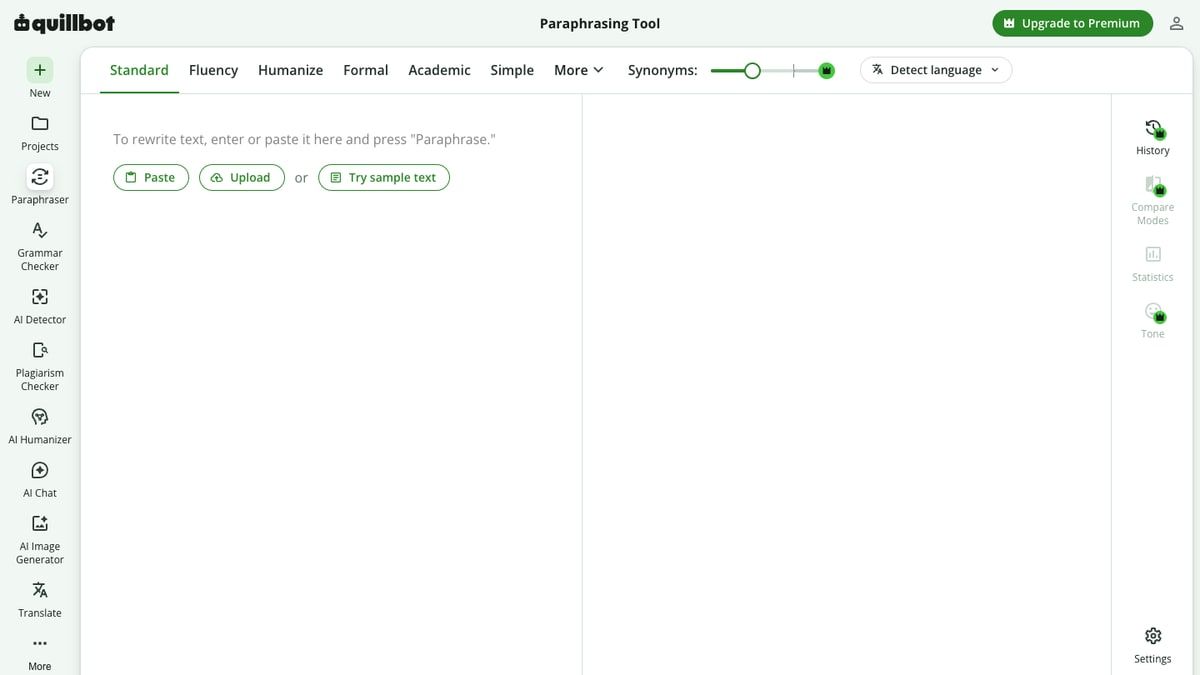
Using the paraphraser is designed to be as frictionless as possible. The interface is split into two main panels: an input box on the left and an output box on the right. This side-by-side layout makes it easy to compare the original text with the newly generated version.
The workflow is highly linear and requires almost no technical knowledge to operate. Users simply provide their text, adjust a few visible settings, and let the system process the request. Below is a breakdown of the standard user journey when operating the tool.
Paste a Neutral Paragraph
The process begins by pasting your draft into the left-hand text box. Free users face a strict character or word limit, which typically restricts them to processing one or two short paragraphs at a time. It is always best to use a neutral, non-sensitive sample when evaluating web-based writing tools.
Once the text is pasted, the system automatically counts the words to ensure you are within your current tier's limits. If you exceed the limit, the interface will prompt you to upgrade or trim your selection. For this evaluation, pasting a standard 100-word paragraph provides a clear baseline.
Choose a Paraphrasing Mode
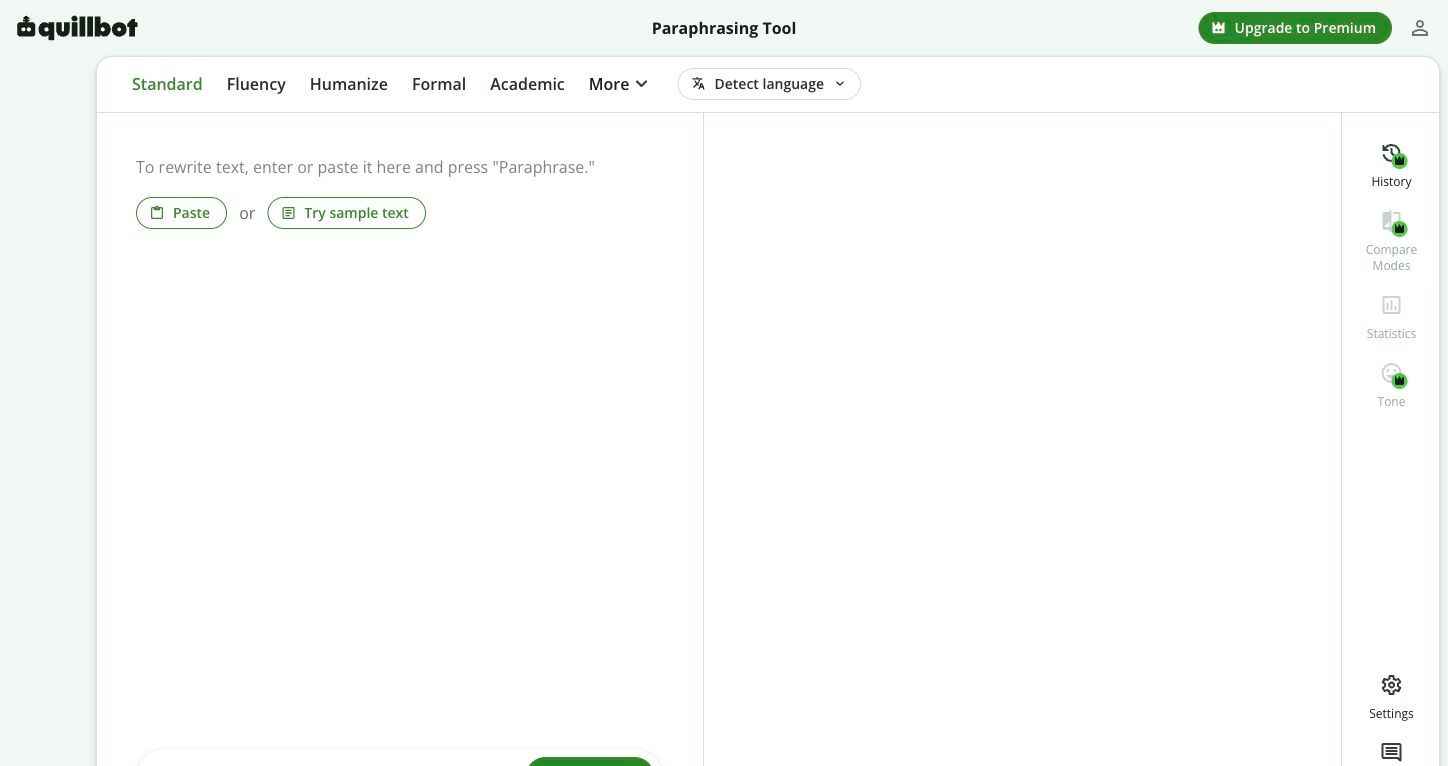
Above the text boxes, users will find a selection of rewriting modes. These modes dictate the style, tone, and structural depth of the upcoming paraphrase. Free users typically have access to the Standard and Fluency modes, while premium subscribers unlock the rest of the options.
Next to the modes, a synonym slider allows you to control how many words the AI attempts to replace. A lower setting keeps the text closer to your original draft, prioritizing accuracy. A higher setting forces more creative vocabulary changes, though this increases the risk of altering your intended meaning.
Run the Paraphrase
After selecting your mode and synonym frequency, clicking the "Paraphrase" button initiates the rewriting process. The AI typically generates the new text in just a few seconds, depending on the length of the passage and current server loads. The rewritten text populates in the right-hand panel.
During this step, the tool highlights changed words and altered sentence structures using color codes. This visual feedback is incredibly helpful for quickly spotting what the AI has modified. It allows writers to see exactly how their original syntax was dismantled and rebuilt.
Compare Output Against Source Meaning
The final and most critical step is the manual review. Users should read the output panel carefully to ensure the core message remains intact. Because AI lacks true contextual understanding, it may occasionally swap a vital keyword for a synonym that does not fit the specific topic.
If a particular word feels out of place, clicking on it usually opens a dropdown menu of alternative synonyms. This allows for granular, word-by-word editing without having to regenerate the entire passage. Once satisfied, the user can copy the text or export it back to their document.
QuillBot Modes Reviewed: Which One Should You Use?
The true flexibility of the paraphrasing tool lies in its various modes. Each mode is trained to prioritize different linguistic goals, from simplifying complex jargon to expanding short sentences. Understanding which mode to select is crucial for getting a usable result.
Choosing the wrong mode can lead to frustrating revisions. For instance, applying a highly creative mode to a strict technical document will likely introduce unwanted flair and inaccuracy. The table below outlines how these modes typically behave based on practical evaluation.
QuillBot Paraphraser Mode Review
| Mode | Rewrite Depth | Likely Output Style | Best Practical Use Case |
|---|---|---|---|
| Standard | Moderate | Balanced and neutral | General rewriting and basic sentence restructuring. |
| Fluency | Low | Natural and grammatically correct | Fixing ESL phrasing or minor awkwardness without major changes. |
| Formal | High | Professional and sophisticated | Upgrading casual emails or business proposals. |
| Academic | High | Objective and detail-oriented | Adjusting tone for research drafts and analytical writing. |
| Simple | High | Accessible and direct | Breaking down complex jargon for general audiences. |
| Creative | Very High | Expressive and varied | Brainstorming new angles for marketing copy or fiction. |
| Shorten | Moderate | Concise and stripped down | Removing fluff to meet strict word counts. |
| Expand | Moderate | Detailed and elaborated | Adding transitional phrases to flesh out sparse ideas. |
Standard and Fluency Modes
Standard mode acts as the default setting and attempts to balance vocabulary changes with structural edits. It is generally reliable for everyday writing tasks where you simply need a fresh perspective on a sentence. The output remains relatively close to your original voice.
Fluency mode is arguably the most useful setting for non-native speakers. It focuses heavily on grammatical correctness and natural phrasing while minimizing aggressive vocabulary swaps. If your goal is simply to ensure your draft reads smoothly, this mode is often the safest choice.
Formal and Academic Modes
Formal mode is designed to strip away colloquialisms and elevate the vocabulary. It is particularly useful for business communications, cover letters, or professional reports. However, it can sometimes introduce overly stiff phrasing that feels unnatural in modern business contexts.
Academic mode targets the specific conventions of scholarly writing. It attempts to make the tone more objective and precise, often favoring passive voice or complex sentence structures. Writers must review this output carefully to ensure nuanced research terms are not accidentally replaced with generic synonyms.
Simple and Creative Modes
Simple mode does exactly what its name suggests: it strips away complexity. This is excellent for bloggers or marketers trying to make technical subjects accessible to a broader audience. It often breaks long, winding sentences into shorter, punchier statements.
Creative mode takes the most liberties with your original text. It will aggressively restructure paragraphs and introduce unexpected vocabulary. While this can be great for overcoming writer's block, it also carries the highest risk of completely changing your intended meaning.
Shorten and Expand Modes
Shorten mode is a practical tool for writers struggling to meet strict character limits. It identifies and removes redundant adjectives, filler words, and unnecessary clauses. The result is a tighter, more concise paragraph that gets straight to the point.
Expand mode operates in the opposite direction. It looks for opportunities to add descriptive words and transitional phrases to lengthen the text. While this can help flesh out a sparse outline, it can also introduce unwanted fluff if overused.
Rewrite Quality: Where QuillBot Works Best
When evaluating an AI writing tool, it is important to test it across various content types. QuillBot is not a universal solution for every writing problem. Its effectiveness heavily depends on the complexity of the source material and the user's end goal.
For this review, the practical criteria involve testing the tool against common writing scenarios. The results show that the paraphraser excels at specific, targeted tasks rather than wholesale document generation. Below is a breakdown of where the tool typically provides the most value.
Rewrite Quality Test Matrix
| Content Type | Clarity Impact | Meaning Preservation | Voice & Tone | Overall Verdict |
|---|---|---|---|---|
| Short Paragraph | High | Excellent | Neutral | Great for quick structural fixes. |
| Academic Intro | Moderate | Fair | Stiff | Requires manual review for specific terminology. |
| Marketing Copy | Moderate | Good | Variable | Creative mode helps, but can feel generic. |
| Casual Email | High | Excellent | Natural | Fluency mode cleans up awkward phrasing smoothly. |
| AI-Like Text | Low | Good | Robotic | Often fails to remove underlying structural patterns. |
Short Explanations and Emails
The paraphraser is highly effective at cleaning up short, straightforward communications. If you have drafted a quick email that feels a bit clunky, running it through the Fluency mode usually resolves the issue instantly. It removes minor grammatical friction without altering the core message.
This makes it a valuable tool for customer service representatives or professionals who send high volumes of short messages. It speeds up the drafting process by providing instant alternatives when you cannot find the right words. The side-by-side comparison makes it easy to grab a single improved sentence.
ESL Fluency and Sentence Flow
For writers who speak English as a second language, QuillBot serves as an excellent real-time tutor. It excels at identifying awkward prepositional phrases or incorrect verb tenses and smoothing them out. The Fluency mode is particularly adept at making text sound like it was written by a native speaker.
Unlike standard grammar checkers that only highlight errors, the paraphraser offers complete structural alternatives. This helps ESL writers learn how sentences can be constructed differently. It builds confidence by ensuring the final output is highly readable.
Overcoming Writer's Block
Staring at a poorly constructed sentence can halt the writing process entirely. QuillBot is very useful as a brainstorming partner in these moments. By pasting a rough, incomplete thought into the tool, writers can generate multiple variations to spark new ideas.
Even if you do not use the exact text the AI generates, seeing different vocabulary options can help you break through a creative wall. The Creative mode is particularly useful here, as it forces the text into unexpected directions. It serves as a digital sounding board for stuck writers.
Rewrite Quality: Where QuillBot Can Go Wrong
Despite its utility, automated paraphrasing carries significant risks if used blindly. AI models do not actually understand the facts, emotions, or nuances behind the words they process. They simply predict which words should logically follow one another based on training data.
When writers rely on QuillBot to handle complex or high-stakes content, the quality of the work often degrades. Understanding these failure points is essential for maintaining your credibility as a writer. Here is where the tool typically struggles during practical evaluation.
The Risk of Meaning Drift
Meaning drift occurs when an AI replaces a specific word with a synonym that does not fit the context. For example, swapping the word "capital" (meaning money) with "capital" (meaning a city) completely ruins a financial sentence. The paraphraser's synonym slider directly impacts how often this happens.
When the slider is set to maximum, the AI prioritizes unique vocabulary over accuracy. This can lead to sentences that are grammatically correct but factually wrong. Writers must carefully review every generated sentence to ensure their original intent has not drifted away.
Generic Phrasing and Loss of Voice
Every writer has a unique voice characterized by their rhythm, vocabulary choices, and sentence lengths. When you push large sections of text through a paraphraser, that unique voice is often flattened. The AI tends to output a highly standardized, somewhat sterile version of English.
If you use the tool to rewrite an entire blog post or essay, the final product may read as generic. It loses the human quirks that make writing engaging. This is why paraphrasing is best used sparingly on isolated sentences rather than entire documents.
Patchwriting and Citation Gaps
Patchwriting is the practice of taking a source text and merely swapping out a few words while maintaining the original sentence structure. QuillBot makes patchwriting incredibly easy, which is a major problem for academic and professional integrity. Many users mistakenly believe that paraphrasing a source removes the need to cite it.
Using an AI to scramble someone else's work does not make the idea yours. If the original thought, data, or analysis belongs to another author, it must be cited, regardless of how heavily it was rewritten. Relying on a tool to hide poor research practices frequently leads to plagiarism concerns.
Source Misrepresentation
When summarizing or paraphrasing external research, accuracy is paramount. If you paste a dense scientific abstract into QuillBot, the AI may simplify it by removing vital qualifiers. A sentence that originally stated a drug "may reduce" symptoms could be rewritten to say it "eliminates" them.
This misrepresentation of source material can have serious consequences in academic or professional reporting. The AI does not know which details are critical and which are filler. Manual reading and comprehension must always precede automated rewriting.
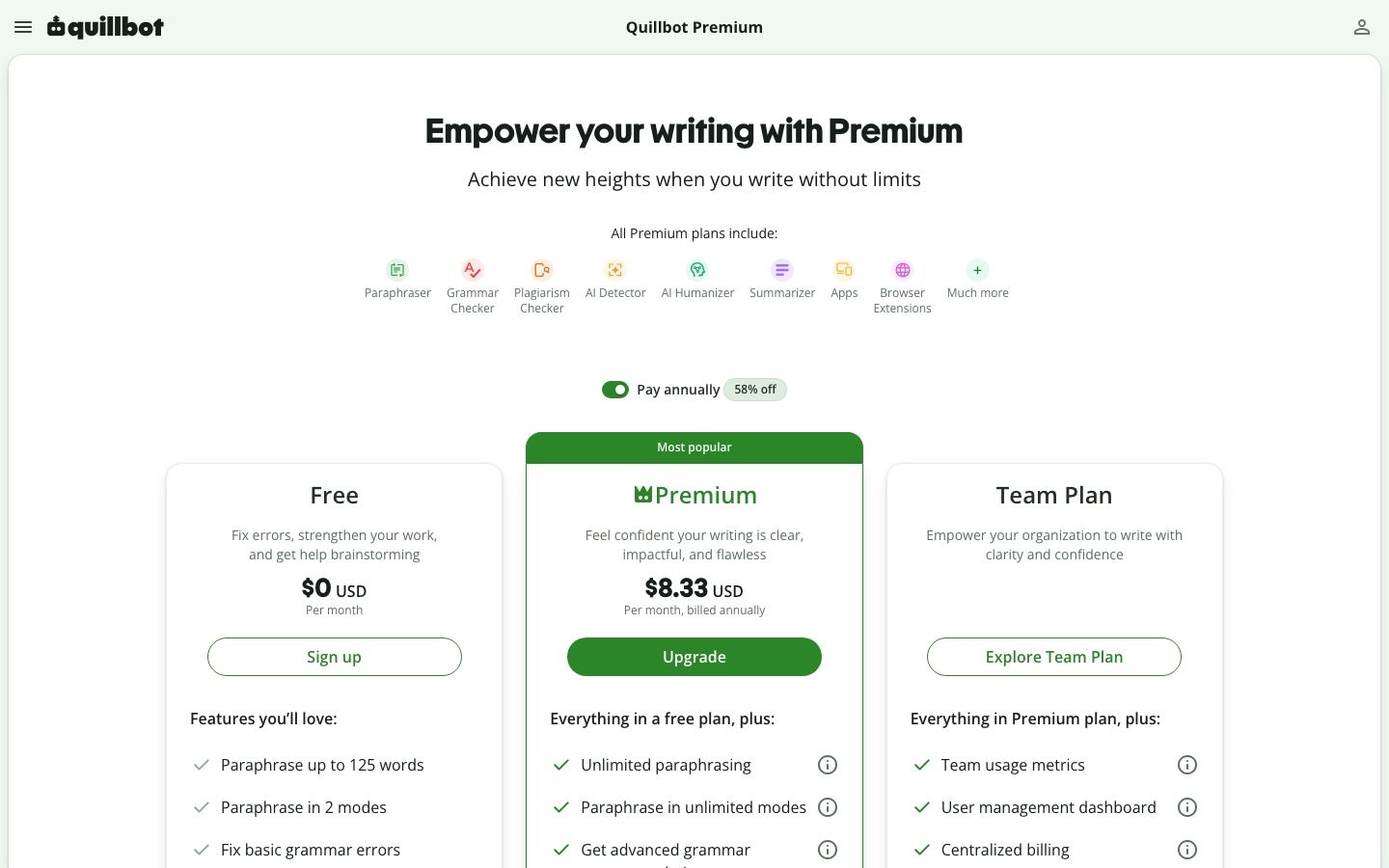
Free vs Premium: Is QuillBot Paraphraser Worth Paying For?
Like many AI writing assistants, QuillBot operates on a freemium model. The free version provides immediate access to the core technology, but it places strict limits on how much you can do. Deciding whether to upgrade depends entirely on your daily writing volume and specific needs.
For casual users, the free tier is often sufficient. For professionals, the restrictions can quickly become a bottleneck. Evaluating the pricing value requires looking at exactly what is gated behind the premium subscription.
Evaluating the Free Tier
The free version of the paraphraser typically restricts users to a low word count per prompt, often around 125 words. This means you can only rewrite a few sentences at a time. It also limits access to only the Standard and Fluency modes.
Additionally, free users have limited control over the synonym slider, preventing them from exploring highly varied vocabulary changes. Despite these limits, the free tier is excellent for occasional use. If you only need to fix a clunky email once a day, there is little reason to pay.
Unlocking Premium Modes
A premium subscription unlocks the full suite of rewriting modes, including Formal, Academic, Simple, Creative, Expand, and Shorten. This flexibility is the primary draw for paying users. It allows you to tailor the AI's output to specific audiences and formats.
Premium also significantly increases the word limit per prompt, allowing users to process entire pages of text at once. Furthermore, it unlocks the highest settings on the synonym slider. This tier is clearly designed for power users who rely on the tool for daily content creation.
Is the Upgrade Worth It?
If you are a student writing occasional essays or a professional sending standard emails, the free version is likely enough. You can work around the word limit by pasting text in smaller chunks. However, if you are an editor, a high-volume blogger, or an ESL writer who needs constant structural support, the premium upgrade saves significant time.
It is important to remember that paying for premium does not eliminate the need for manual review. The AI will still make contextual mistakes, even in the Academic or Formal modes. You are paying for convenience and variety, not for a flawless final draft.
Is QuillBot Paraphrasing Safe for Academic Writing?
The intersection of AI writing tools and academic integrity is highly complex. Many students use paraphrasers to help clarify their notes or simplify dense reading assignments. While this is generally safe, using the tool to rewrite source material for an essay enters dangerous territory.
Institutions are increasingly scrutinizing how students use AI in their coursework. Understanding the boundaries of acceptable use is critical for avoiding academic misconduct. Paraphrasing tools can be helpful aids, but they carry distinct risks.
Paraphrasing Does Not Replace Citation
The most common mistake students make is assuming that a rewritten sentence does not need a citation. If you take a paragraph from a journal article, run it through QuillBot, and paste it into your paper, you are still using the original author's ideas. Failing to attribute those ideas is plagiarism.
A paraphraser changes the vocabulary, but it does not generate original analysis. Academic writing requires you to synthesize information and contribute your own perspective. Using a tool to merely disguise someone else's work violates the core principles of academic research.
Navigating Turnitin and Detection Tools
Many students worry about whether grading software will flag their rewritten text. While no system is flawless, modern detection tools analyze structural patterns, vocabulary predictability, and sentence variation. You can read more about can Turnitin detect QuillBot for specific details on how that platform operates.
Furthermore, heavily paraphrased text often exhibits the same predictable linguistic markers as fully AI-generated text. For a broader understanding of this technology, exploring can AI detectors detect paraphrasing provides useful context. Ultimately, relying on a tool to evade detection is a flawed strategy; the focus should always be on writing original, well-cited content.
Emphasizing Original Analysis
The safest way to use a paraphraser in an academic setting is as an editing assistant for your own original drafts. Write your essay yourself, focusing on your arguments and evidence. Then, if you find a specific sentence you wrote is awkward or unclear, use the tool to explore better phrasing.
By applying the tool only to your own original thoughts, you eliminate the risk of patchwriting external sources. You maintain your unique voice while benefiting from the AI's grammatical cleanup. Manual review remains essential to ensure the academic tone is preserved.
Paraphrasing vs Humanizing vs Editing: Choose the Right Workflow
Not every writing problem can be solved by a standard paraphraser. Pushing text through QuillBot when it actually needs a different type of revision will only lead to frustration. Writers must learn to choose the right workflow based on the specific nature of their draft.
Sometimes you need to fix a simple grammar issue. Other times, you need to completely overhaul a robotic-sounding AI draft. The table below helps clarify when to use which approach.
Paraphrasing vs Humanizing vs Editing
| Workflow | Primary Goal | Best Tool/Method | When to Use It |
|---|---|---|---|
| Paraphrasing | Rephrasing and clarity | QuillBot | Fixing awkward sentences or finding synonyms in original drafts. |
| Humanizing | Naturalizing AI text | Lynote AI Humanizer | Rewriting robotic, AI-generated drafts to sound authentic. |
| Manual Editing | Deep structural logic | Human review | Ensuring factual accuracy, narrative flow, and specific voice. |
When to Use a Standard Paraphraser
A standard paraphraser is best utilized for micro-edits. When you have a solid paragraph but one sentence feels clunky, a quick rewrite is a useful solution. It is also highly effective for adjusting the formality of an email before hitting send.
It is not the right choice for processing long, complex documents or trying to inject personality into a bland draft. Standard paraphrasers focus on sentence-level mechanics, not high-level narrative flow.
When to Use an AI Humanizer
If you have used an AI model to generate a first draft, running it through a standard paraphraser often fails to remove the robotic tone. Standard tools just swap synonyms, leaving the predictable AI sentence structures intact. In these cases, a dedicated AI humanizer is required.
Humanizers are trained specifically to break up predictable text patterns, vary sentence lengths, and introduce natural phrasing. They look at the document holistically rather than just swapping words in a single sentence. This is the better workflow for naturalizing AI-assisted content.
When to Rely on Manual Editing
No AI tool can replace the critical eye of a human editor. If your document relies on strict factual accuracy, nuanced emotional appeal, or a highly specific brand voice, manual editing is mandatory. AI cannot verify facts or understand the emotional weight of a narrative.
Use AI tools for the heavy lifting of initial drafting and basic cleanup. Reserve your manual energy for the final polish, making sure the logic flows cleanly and the tone aligns with your goals.
How to Rewrite AI-Like Text With Lynote AI Humanizer
If you are dealing with text that feels overly robotic or predictable, standard paraphrasing might not be enough. When you need to rewrite AI-generated drafts to read more naturally while preserving the original meaning, the Lynote AI Humanizer offers a specialized workflow. It provides different intensity modes and includes an Instant Authenticity Report to help you evaluate the final output.
This tool is designed specifically to address the structural patterns common in AI writing. Below is the standard process for humanizing a draft using Lynote.
Step 1: Paste Text or Upload Document
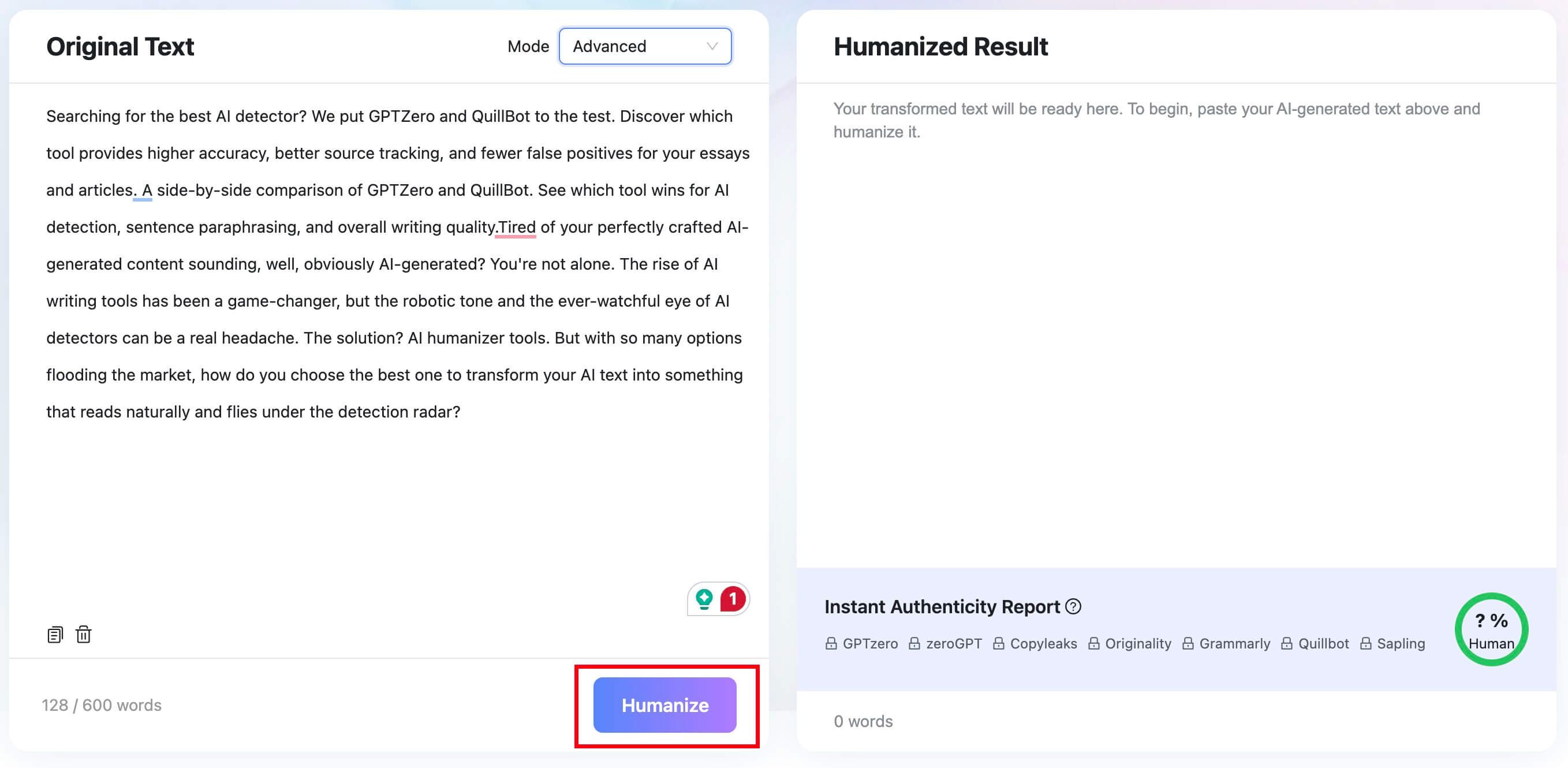
Access the Lynote AI Humanizer. Paste your AI-generated text into the input box, or switch to the “Upload Document” tab to upload a .pdf, .doc, .docx, or .txt file. The free tier supports up to 600 words per request.

Step 2: Select a Humanization Mode
Choose your preferred rewriting intensity from the mode dropdown. “Balanced” is the standard option for quality and readability. “Focus” applies a stronger rewrite, while “Advanced” is slower but gives a more deliberate balance of quality and rewriting depth.

Step 3: Humanize and Review the Result
Click the “Humanize” button to start the transformation. Within seconds, the rewritten text appears in the result panel. Below it, an Instant Authenticity Report shows predicted scores across major detectors (GPTZero, Copyleaks, Originality, etc.).
If you want to run a dedicated, deep scan on a different document later, you can always use the standalone Lynote AI Detector to review sentence-level highlights.
Step 4: Copy or Download the Output
Once you have reviewed the humanized text to ensure your core meaning was preserved, you can finalize the process. Copy the output directly to your clipboard or download the file for your records. Always perform a final manual read-through before publishing or submitting your work.


When to Use a QuillBot Alternative
While QuillBot is a popular choice for quick paraphrasing, it is not the only tool available. Depending on your specific workflow, you might find that other platforms better suit your needs. Recognizing when to step away from a simple paraphraser can save you time and improve your final product.
If you require deep document formatting, long-form generation, or specialized academic formatting, you may need a different suite of tools. Exploring QuillBot alternatives can help you find platforms tailored to these specific use cases.
Seeking Stronger Grammar Feedback
QuillBot has a grammar checker, but its primary strength is rewriting. If your main goal is to learn from your grammatical mistakes and receive detailed explanations for punctuation rules, dedicated grammar platforms are often superior. They focus on teaching rather than just replacing.
Requiring Full Document Workflows
If you need to rewrite, format, and organize a 10-page report, a web-based text box is highly inefficient. Writers working on long-form content usually benefit more from AI tools integrated directly into their word processors. Additionally, if you need to evaluate the AI-like patterns of a rewritten text, utilizing a dedicated tool like the QuillBot AI Checker review details can provide better insights than the paraphraser alone.
FAQs About QuillBot Paraphrasing
Is QuillBot good at paraphrasing?
Yes, it is generally very good for quick rewrites, fixing awkward phrasing, and improving ESL fluency. However, users must always manually review the output for meaning drift, voice consistency, and proper citation context.
Is QuillBot Paraphraser free?
QuillBot offers a free entry point that includes the Standard and Fluency modes, but it restricts users with a strict word limit per prompt. Frequent users or those needing advanced modes like Academic or Formal should verify the current free versus Premium restrictions to see if an upgrade is necessary.
Can QuillBot paraphrasing be detected?
Yes, detection tools and instructors can often flag text that has been heavily paraphrased by AI, as it may still retain predictable structural patterns. However, no detector provides absolute proof of tool usage by itself; they should be viewed as signals rather than definitive evidence.
Is QuillBot paraphrasing plagiarism?
Using a paraphraser is not automatically plagiarism if you are editing your own original thoughts. However, if you rewrite an external source without providing proper citations, or if you engage in patchwriting to hide poor research, it can easily cross the line into academic misconduct.
What is better than QuillBot for AI-like text?
The best choice depends entirely on your specific use case. For AI-like drafts that need deep structural naturalization rather than just synonym swapping, the Lynote AI Humanizer is often a better workflow for achieving a natural, human-like tone.
Final Verdict: Should You Use QuillBot Paraphraser?
QuillBot's paraphrasing tool remains a highly effective utility for writers needing fast, sentence-level revisions. It excels at smoothing out awkward phrasing, assisting non-native speakers with fluency, and providing quick alternatives during bouts of writer's block. The free version offers enough functionality for casual users to see immediate benefits.
However, it is vital to approach the tool with realistic expectations. It cannot replace the need for original research, proper citation, and careful manual editing. High-stakes academic or professional work requires a human touch to ensure factual accuracy and a consistent voice.
Ultimately, QuillBot is a strong drafting assistant, not a final-stage editor. Use it to refine your own original ideas, but rely on specialized tools like the Lynote AI Humanizer when dealing with heavily AI-generated drafts that require a more natural workflow.

Written by Janet L. Harris
AI Writing Specialist
Janet reviews AI detectors and humanization tools, with a focus on accuracy, limitations, and responsible use. View all articles →