Lynote is the better AI humanizer when you need a real first-pass rewrite, disclosed input limits, document support, and built-in feedback. ZeroGPT is easier to try without signing in, but its Free Basic Humanizer returned my test passage unchanged. ZeroGPT still has value as a quick public tool; it simply did not perform the core rewriting job in this particular test.
That distinction matters because a polished product page cannot tell you whether a humanizer will save editing time. I ran the same 171-word passage through both tools, kept the first result, compared every meaningful change, and checked the current pricing and usage terms separately.
| Category | Lynote | ZeroGPT | Winner |
|---|---|---|---|
| Rewrite quality and naturalness | 8/10 | 2/10 | ✓ Lynote |
| Meaning and fact preservation | 7.5/10 | 10/10 | ✓ ZeroGPT, because it made no changes |
| Controls and workflow | 8/10 | 5/10 | ✓ Lynote |
| Free value | 6/10 | 7/10 | ✓ ZeroGPT |
| Paid value and disclosed limits | 7/10 | 5/10 | ✓ Lynote |
| Output review and transparency | 8/10 | 5/10 | ✓ Lynote |
| Input, export, and adjacent tools | 9/10 | 7/10 | ✓ Lynote |
| Weighted total | 77/100 | 57/100 | ✓ Lynote |
The scores are not a claim that Lynote wins every possible prompt. They summarize the current interfaces, one controlled output test, the information each company publishes, and the amount of practical editing help each result provided.
How I Tested Lynote and ZeroGPT
I wanted a passage that was long enough to expose repetitive rhythm but short enough to fit both free-facing editors. The source text therefore contained 171 words, a clear argument, several qualifications, and phrases whose meaning could be weakened by careless rewriting.
Both tools received exactly the same passage. I used Lynote's General/default setup and ZeroGPT's Free Basic Humanizer, kept the first completed output, and did not rerun either tool to hunt for a more favorable result.
| Test Detail | Method |
|---|---|
| Source text | One 171-word English passage |
| Topic | Using AI to create and revise first drafts |
| Lynote setting | General/default |
| ZeroGPT setting | Free Basic Humanizer |
| Runs retained | First completed result |
| Primary checks | Amount rewritten, naturalness, meaning, factual drift, and manual edits |
| Secondary checks | Account friction, input limits, controls, result feedback, and pricing clarity |
| Detector treatment | Vendor scores recorded as interface signals, not independent proof |
The test passage included an important distinction: humanizing should improve communication rather than hide how work was created. A useful tool needed to preserve that point while changing enough of the draft to justify calling the output a rewrite.
One passage cannot establish a universal success rate. Humanizers may behave differently with academic prose, marketing copy, emails, short captions, technical material, or another language, so the results below should be read as a reproducible case study.
Lynote vs. ZeroGPT AI Humanizer at a Glance
The largest difference is not simply that one tool has more buttons. Lynote treats humanization as an editing workflow connected to document input and output review, while ZeroGPT offers a very accessible Basic public editor and promotes a separate partner for more advanced humanization.
| Feature | Lynote | ZeroGPT | Practical Impact |
|---|---|---|---|
| Paste text | ✓ | ✓ | Both support a fast browser workflow |
| File upload | ✓ | ✓ | Both expose an upload option |
| Published file formats | PDF, DOC, DOCX, TXT | Not disclosed on the Humanizer page | Lynote is clearer for document workflows |
| Free request limit | 300 words | Not disclosed | Lynote gives a planning number; ZeroGPT does not |
| Paid request limit | 3,000 words | Not disclosed | Lynote is easier to evaluate for long drafts |
| No-signup public interaction | Limited by Study Credit login prompt in my check | ✓ | ZeroGPT is easier for an immediate test |
| Purpose or rewrite controls | ✓ | Basic public model has no visible tone or strength controls | Lynote provides more direction |
| Built-in result feedback | Instant Authenticity Report | AI Probability, Confidence, Classification | Both show signals, but neither is independent verification |
| Copy result | ✓ | ✓ | Both support a quick handoff to editing |
| Direct detector follow-up | ✓ Detect AI action | ✓ Check for AI action | Both connect rewriting with detection |
| Humanizer-specific paid quota published | Study Credits plus 3,000-word request cap | No | ZeroGPT's practical paid capacity is harder to estimate |
| Wider tool access | Detector, translation, transcripts, summaries, study tools, and more | Detector, plagiarism, paraphraser, summarizer, grammar, translator, chat, and more | Both are broader tool suites |
| Ads in tested editor | No prominent display ads in the logged-in test | Yes | ZeroGPT's free experience is more visually crowded |
| Advanced Humanizer location | Inside Lynote workflow | External partner platform | The upgrade paths are materially different |
Checkmarks mean that I confirmed the feature in the current interface or current product information. "Not disclosed" does not mean a limit is infinite or the capability is absent; it means a buyer cannot verify the number from the pages reviewed.
What Each Product Actually Includes
Lynote: Humanizer, Detector, and Study Tools in One Credit System
Lynote AI Humanizer sits inside a broader writing and study workspace. The editor accepts pasted text or supported documents, lets the user set a purpose and rewriting preferences, returns revised text, and connects the result to an Instant Authenticity Report and a Detect AI follow-up.
Usage is measured through Study Credits rather than a separate monthly bucket labeled only for humanization. This is flexible when the same person also uses detection, translation, transcripts, summaries, flashcards, or Q&A, but it makes a simple cost-per-humanized-word calculation impossible.
The current pricing interface states a 300-word Humanizer cap per Free request and a 3,000-word cap for Pro. That is more useful than an unspecified limit because it tells you whether a long section can be processed in one pass before you pay.
ZeroGPT: A Basic Public Humanizer With an External Advanced Upgrade
ZeroGPT's Humanizer page is built around a simple two-panel workflow. You paste text, optionally run Check for AI, choose Humanize Text, and review the output with AI Probability, Confidence, and Classification labels.
The page clearly identifies the public tool as the Free Basic Humanizer and warns that AI detectors might still flag its output. That is a candid limitation, although the surrounding page also makes stronger claims about advanced performance.
The most important product detail is easy to miss: the Continue and Switch to the Advanced Model actions lead to a separate humanizer company through a ZeroGPT partnership URL. They do not open a more powerful mode inside the ZeroGPT editor.
ZeroGPT's paid pricing table says paid plans can "Humanize AI generated text." However, it does not state how many words can be humanized per request or per month, and it does not clearly say that a ZeroGPT subscription includes the externally linked partner model.
How to Use Lynote AI Humanizer
Step 1: Paste the Text or Upload a Document
Open the Humanizer and paste at least 60 words into the original-text editor. For a document workflow, switch to upload and use a supported PDF, DOC, DOCX, or TXT file.
Start with a section you can verify instead of an entire high-stakes document. Smaller inputs make it easier to notice when a rewrite removes a qualification, adds certainty, changes terminology, or expands beyond the original evidence.

Step 2: Choose a Purpose and Humanization Settings
Select the purpose that best matches the reader and task. The default General option is suitable for a broad comparison, while more specific settings can help prevent an email, essay, report, or marketing paragraph from being revised toward the wrong style.
Use a lighter setting when the source already reflects your voice. Stronger restructuring can create more variation, but it also gives the system more opportunities to change meaning or add awkward language.

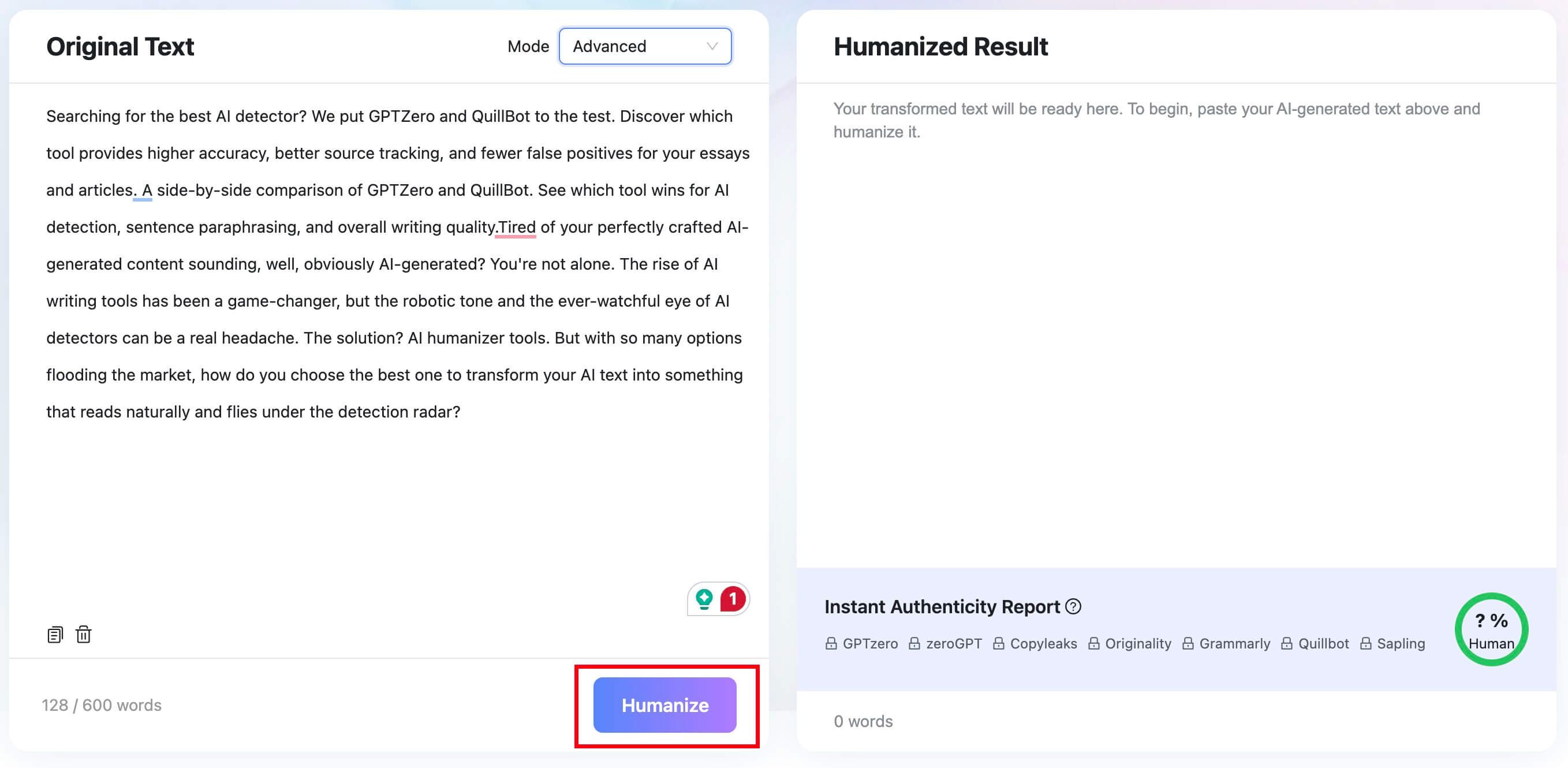
Step 3: Run Humanize
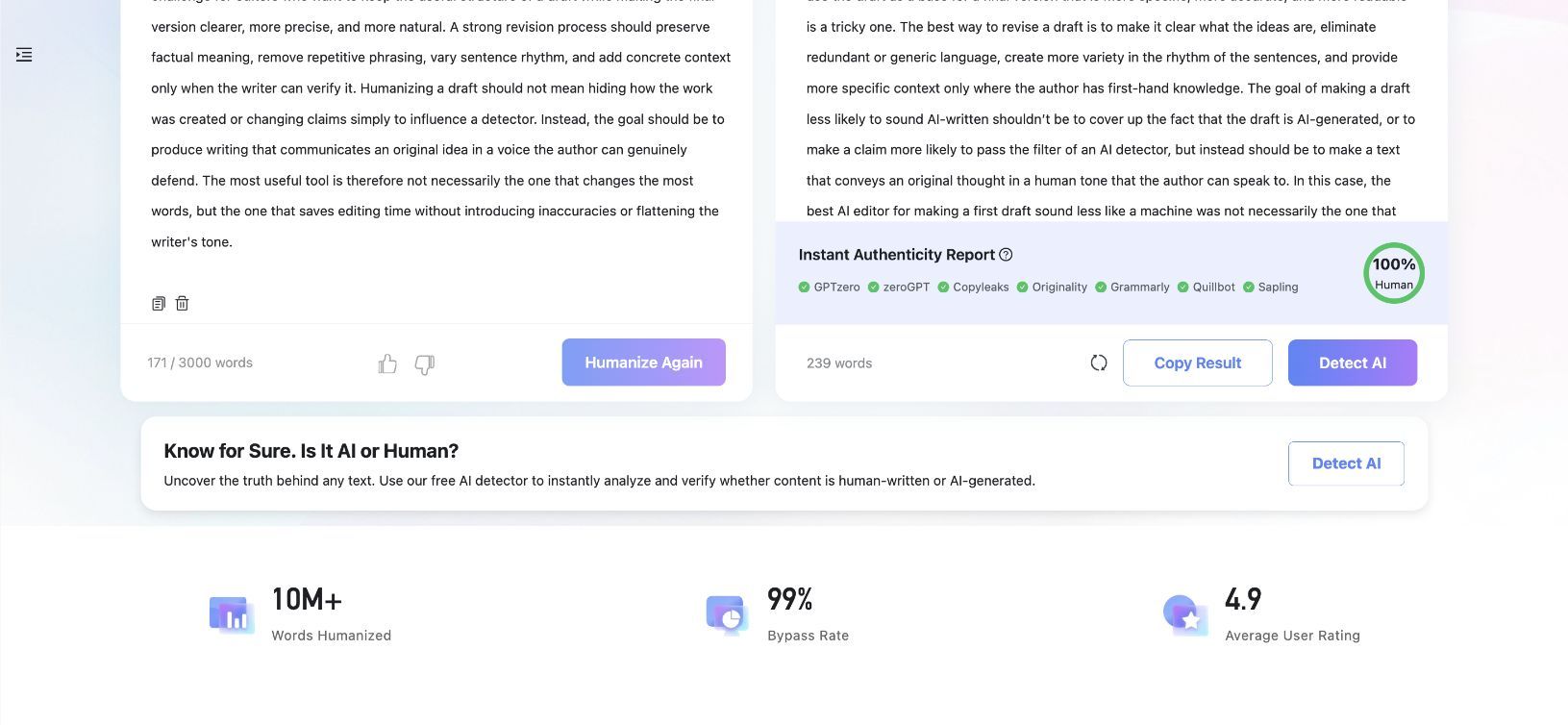
Click Humanize and wait for the revised text to appear in the result panel. In this comparison, the 171-word source became a 239-word result, so the tool did more than replace individual words.
A longer output is not automatically better. Expansion can improve explanation, but it can also add repetition, soften a concise point, or introduce a detail the original author did not intend.
Step 4: Review the Rewrite and Authenticity Report
Compare the original and output side by side before copying anything. Check names, numbers, definitions, citations, quoted language, modal verbs, and the relationship between evidence and conclusion.
The result panel also provides an Instant Authenticity Report and a direct Detect AI action. Treat these as review signals rather than proof of authorship, because different detectors can classify the same passage differently.


How to Use ZeroGPT AI Humanizer
Step 1: Paste Text or Choose Upload File
Open ZeroGPT's Humanizer and paste the draft into the left editor. The public page also has an Upload File button, but it does not clearly publish accepted formats or a file-size limit in the Humanizer workflow.
The editor displays a live word count. It did not show a maximum in my test, and the underlying text area did not expose a visible maximum-length value, so the responsible description of the cap is "not disclosed," not "unlimited."
Step 2: Run Check for AI if You Want a Baseline
The Check for AI button provides a baseline before rewriting. This can help you record how ZeroGPT classifies the original, but the number should not be treated as a factual determination that a person or model wrote the passage.
For repeatable testing, save the original text and baseline result before clicking Humanize. Otherwise, it becomes easy to compare a rewritten result with the wrong earlier version.
Step 3: Click Humanize Text
Choose Humanize Text to run the Free Basic model. The interface does not provide visible tone, purpose, or rewrite-strength controls, which keeps the workflow quick but gives the user less influence over the result.
In my first run, the output panel displayed the same 171 words as the input. No sentence, word, or punctuation change appeared, so the result preserved the exact meaning but did not perform a useful rewrite.
Step 4: Interpret AI Probability, Confidence, and Classification
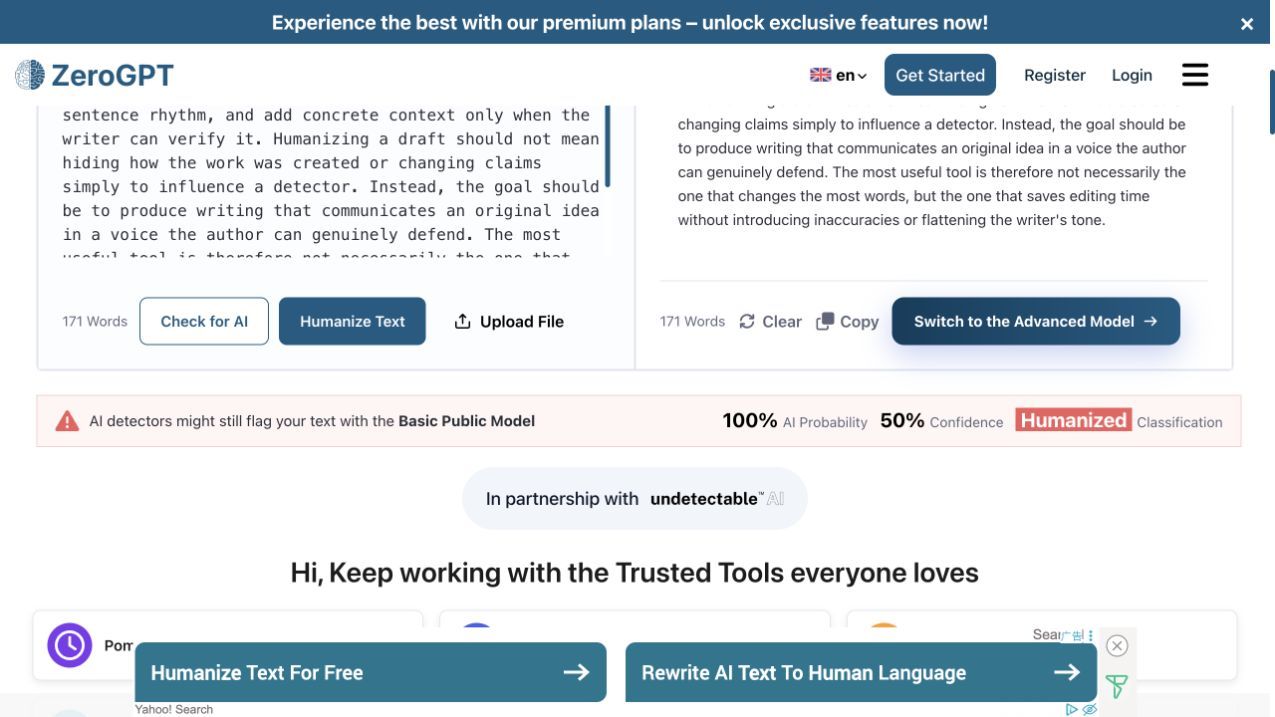
ZeroGPT displayed three signals after the run: a full AI Probability, 50% Confidence, and Humanized Classification. Those labels are difficult to interpret together because "Humanized" sounds like a successful transformation while the AI Probability remains at the top of the scale.
The page also warns that detectors might still flag text from the Basic Public Model. That warning is consistent with the unchanged output in this run, although another passage or session may produce a different result.
Step 5: Understand What Switch to the Advanced Model Does
The green Advanced Model actions do not change settings inside the ZeroGPT page. They send the user to a separate humanizer service promoted through ZeroGPT's partnership link.
This does not make the option illegitimate, but it affects purchase decisions. Before paying, verify which company provides the model, which subscription applies, what limits are included, and which privacy and refund terms govern the submitted text.
Same-Text Test: The Two Outputs Were Not Close
The Original 171-Word Passage
Modern teams often rely on artificial intelligence to produce first drafts because the technology can organize ideas quickly and reduce the time required to begin a project. However, AI-generated writing frequently uses predictable transitions, similar sentence lengths, and broad statements that do not reflect a specific writer's experience. This creates a challenge for editors who want to keep the useful structure of a draft while making the final version clearer, more precise, and more natural. A strong revision process should preserve factual meaning, remove repetitive phrasing, vary sentence rhythm, and add concrete context only when the writer can verify it. Humanizing a draft should not mean hiding how the work was created or changing claims simply to influence a detector. Instead, the goal should be to produce writing that communicates an original idea in a voice the author can genuinely defend. The most useful tool is therefore not necessarily the one that changes the most words, but the one that saves editing time without introducing inaccuracies or flattening the writer's tone.
The passage intentionally combines criticism of generic AI prose with a warning against detector-driven editing. A successful rewrite should make the writing less uniform without changing "verified context" into invented personal experience or weakening the disclosure point.
Lynote Rewrote 171 Words Into 239 Words
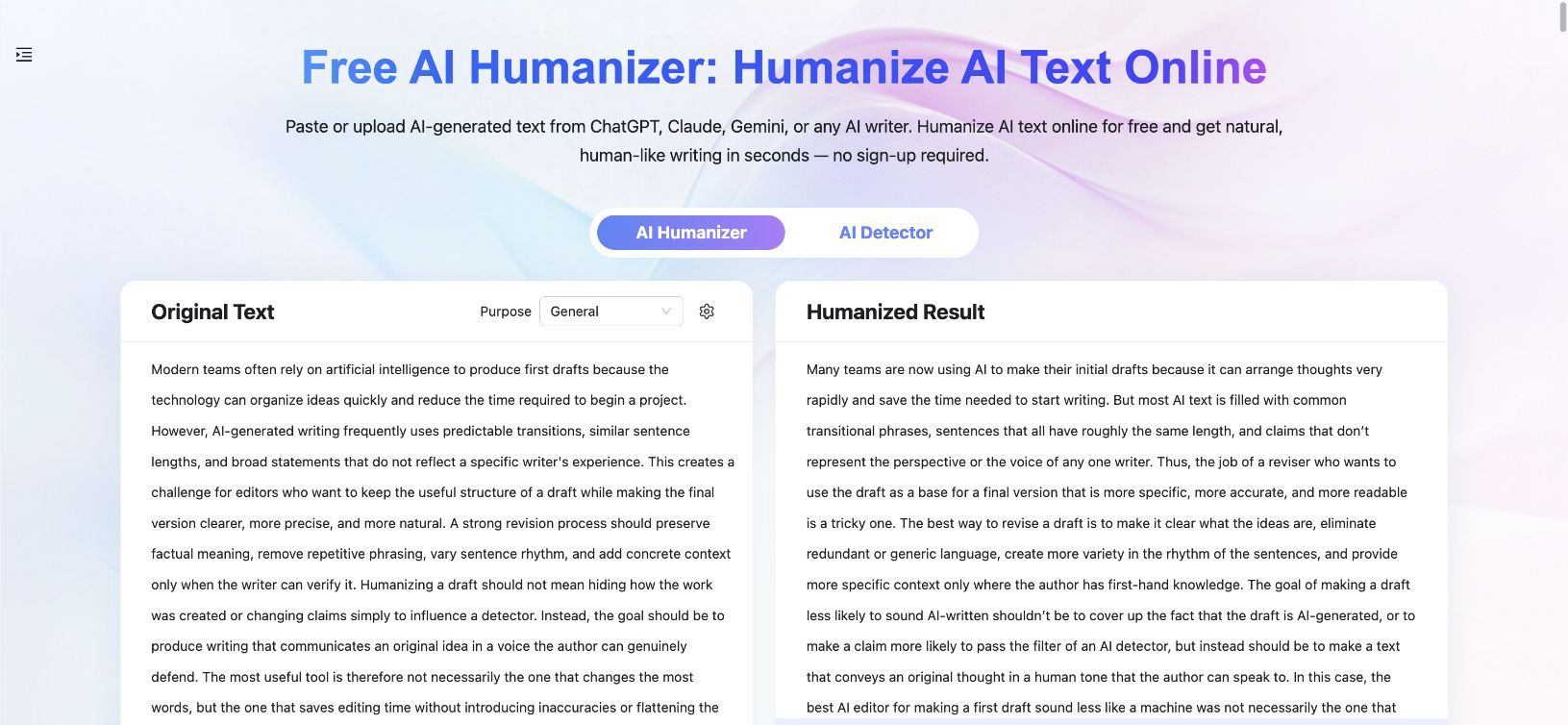
Lynote reorganized the passage, changed sentence structures, and used more varied phrasing. For example, the general description of predictable AI patterns became a more direct list of "common transitional phrases," similar sentence lengths, and claims that lack an individual perspective.
The result retained the main argument that a humanizer should support accountable writing rather than conceal AI use. It also preserved the final criterion: the better editor saves time without distorting claims or suppressing the writer's voice.
The rewrite was not ready to publish untouched. "Where the author has first-hand knowledge" narrowed the original phrase "when the writer can verify it," and "pass the filter of an AI detector" sounded less natural than the original wording.
ZeroGPT Returned the Same 171 Words
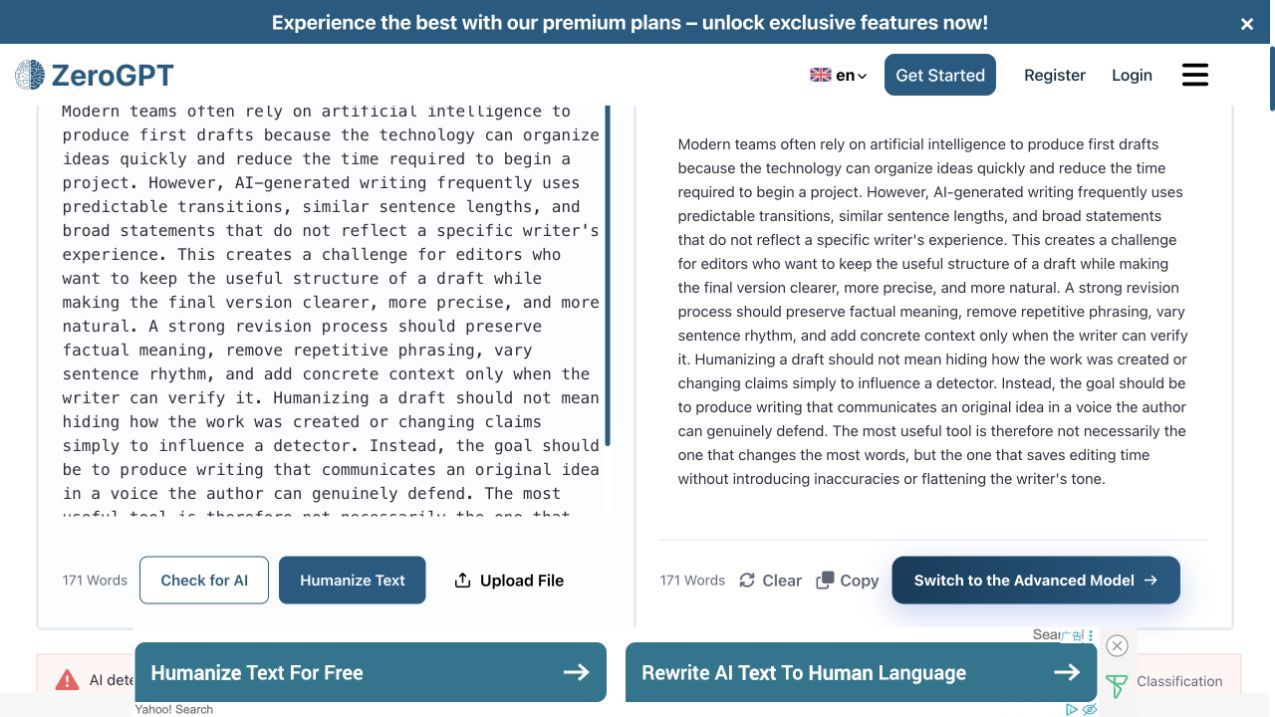
ZeroGPT's displayed result matched the original text exactly in this first Basic-model run. That eliminated factual drift, but it also meant there was no improvement in rhythm, specificity, or voice.
This result should not be generalized into "ZeroGPT never rewrites text." It shows that a real user can complete the advertised workflow and still receive no practical revision from the public Basic model on a valid 171-word input.
| Metric | Original | Lynote | ZeroGPT |
|---|---|---|---|
| Word count | 171 | 239 | 171 |
| Materially rewritten | N/A | ✓ Yes | ✗ No in this run |
| Main argument preserved | N/A | ✓ Mostly | ✓ Exactly |
| New meaning risk | N/A | One narrower phrase | None because unchanged |
| Rhythm changed | N/A | ✓ | ✗ |
| Manual editing needed | N/A | Moderate | Full rewrite still needed |
| Vendor result signal | N/A | Full Human score | Full AI Probability, 50% Confidence, Humanized |
| Best interpretation | Source | Useful first draft, not final copy | Workflow completed without a useful rewrite |
Output Quality Compared: Naturalness, Meaning, and Editing Time
How Much the Text Actually Changed
Lynote made the kind of changes people normally expect from a humanizer: sentence reconstruction, altered transitions, a different order of emphasis, and a longer explanation. ZeroGPT's Basic output made none of those changes in this run.
Change volume alone is a poor quality metric. A tool can rewrite every sentence and still produce inaccurate prose, but a humanizer that returns the exact input has not reduced the user's editing workload.
Sentence Rhythm and Readability
Lynote introduced more variation in sentence openings and clause structure. The result sounded less mechanically balanced than the source, although several sentences became longer and more formal than necessary.
ZeroGPT preserved the source's readability because it preserved the source itself. That is not harmful, but it does not address the repetitive patterns the task asked the tool to improve.
Meaning and Factual Preservation
ZeroGPT earned the higher raw preservation score because an unchanged output cannot drift from the original. That score needs context: exact preservation achieved through no rewriting is less useful than careful preservation during a meaningful edit.
Lynote kept the central claims but changed one important boundary. A writer can verify information through records, sources, or subject-matter review without having first-hand knowledge, so the replacement phrase should be edited back.
Awkward Phrases and Manual Edits Still Needed
Lynote's result needs trimming and a few phrase-level corrections. I would shorten the sentence beginning "The goal of making a draft less likely to sound AI-written" and replace the detector-filter phrase with a more direct statement.
ZeroGPT's result needs the same editing work as the original because it is the original. Its free workflow was faster and easier to enter, but it did not create a usable second draft in this case.
Why Vendor Detector Scores Are Not Independent Proof
Lynote's full Human report and ZeroGPT's result labels describe what each product's own interface reported. They do not prove human authorship, promise acceptance by another detector, or establish that the passage meets an institution's or client's policy.
The more useful questions are whether the text is accurate, specific, readable, consistent with the writer's voice, and permitted in its intended context. Detector feedback can identify a revision signal, but it should not replace editorial judgment.
Feature-by-Feature Comparison
Paste, Upload, and Supported Files
Both products support pasted text and show an upload action. Lynote publishes support for PDF, DOC, DOCX, and TXT files, making it the clearer choice when a user wants to revise a document rather than manually copy sections.
ZeroGPT's Humanizer page did not state accepted formats or file-size limits during this review. The upload option may still work with common documents, but unsupported assumptions should not drive a purchase.
Purpose, Tone, and Rewrite Controls
Lynote exposes a Purpose selection and additional Humanizer settings. These controls help distinguish a general rewrite from an academic, professional, or audience-specific revision.
ZeroGPT's public Basic editor has no visible tone or rewrite-strength controls. Its simplicity is helpful for a quick run, but users cannot tell the model to preserve a formal register, apply only light edits, or prioritize a specific audience.
AI Detection and Result Feedback
Both products connect humanization with detection. Lynote places an Instant Authenticity Report beside the result and offers a Detect AI action, while ZeroGPT offers Check for AI and displays probability, confidence, and classification after humanization.
Lynote's report was easier to read in the tested workflow. ZeroGPT's three labels provided more fields, but the combination of full AI Probability and Humanized classification required interpretation the interface did not supply.
Copy, Export, and Follow-Up Editing
Both result panels support copying text. Lynote also positions document input and connected tools as part of the same workspace, which is useful when the next task is detection, translation, or another document operation.
Neither copy button removes the need for revision history. Keep the source and first output separately so you can restore an omitted qualification or compare later runs without confusing versions.
Languages and Broader Tool Access
Lynote promotes multilingual humanization and supports a wider writing and study workflow. ZeroGPT offers a language selector for its website and includes translation among its adjacent tools, but the Humanizer page does not clearly state a verified number of supported output languages.
Both products are broader than a single rewriting page. ZeroGPT's suite includes detection, plagiarism checking, paraphrasing, summarization, grammar, translation, chat, and utility tools; Lynote adds document translation, transcripts, summaries, note and study workflows.
Ads, Account Friction, and Interface Clarity
ZeroGPT's public editor worked without registration, which is its clearest usability advantage. The tradeoff is a more ad-heavy page and repeated prompts to switch to an external Advanced Model.
Lynote's logged-out page displayed a prompt to log in and claim Study Credits when I attempted to run the same text. Once signed in, the editor was less visually crowded and provided a more complete result-review path.
Free Plans Compared: A Clear Cap vs. an Undisclosed Cap
Lynote and ZeroGPT define "free" differently. Lynote publishes a per-request cap and uses a credit balance, while ZeroGPT provides an immediate ad-supported Basic editor but does not publish a Humanizer-specific word allowance.
| Free Detail | Lynote | ZeroGPT |
|---|---|---|
| Price | $0 | $0 |
| Credit card required | No | No |
| Signup experience | Login prompt appeared when claiming free Study Credits | No signup required for tested Basic run |
| Free allowance | 50 credits described for anonymous users; one-time 100 credits for registered users | Not disclosed for Humanizer |
| Humanizer cap per request | 300 words | Not disclosed |
| Rewrite controls | Purpose and settings available | No visible Basic controls |
| File upload | ✓ PDF, DOC, DOCX, TXT | ✓ Upload button; formats not disclosed |
| Result feedback | Authenticity Report | AI Probability, Confidence, Classification |
| Ads | No prominent ads in tested signed-in workflow | Multiple display ads |
| Test result | Material 239-word rewrite | Same 171 words returned |
| Main advantage | Clear cap and fuller review workflow | Immediate public access |
| Main limitation | Credit and login friction | Basic result may not provide a useful rewrite |
For a one-off no-account experiment, ZeroGPT is easier to open and run. For someone who needs to know the request size and wants an actual revised draft, Lynote provided more practical value in this test.
Pricing and Paid Benefits Compared
Lynote Pro Monthly, Yearly, and Add-On Credits
Lynote's monthly path begins with a $1.95 three-day Pro trial. It then renews at $29.99/month unless canceled, so the renewal matters more than the small introductory price.
The annual plan costs $99.99/year, displayed as $8.33/month. Both Pro options allow up to 3,000 words in a single Humanizer request.
The current pricing page conflicts on the Monthly credit allowance. The Monthly plan card shows 1,000 Study Credits/month, while the comparison table and pricing FAQ state 10,000/month; the Yearly card shows 10,000/month. Because those values appear on the same live page, verify the allowance shown at checkout rather than treating either Monthly number as settled.
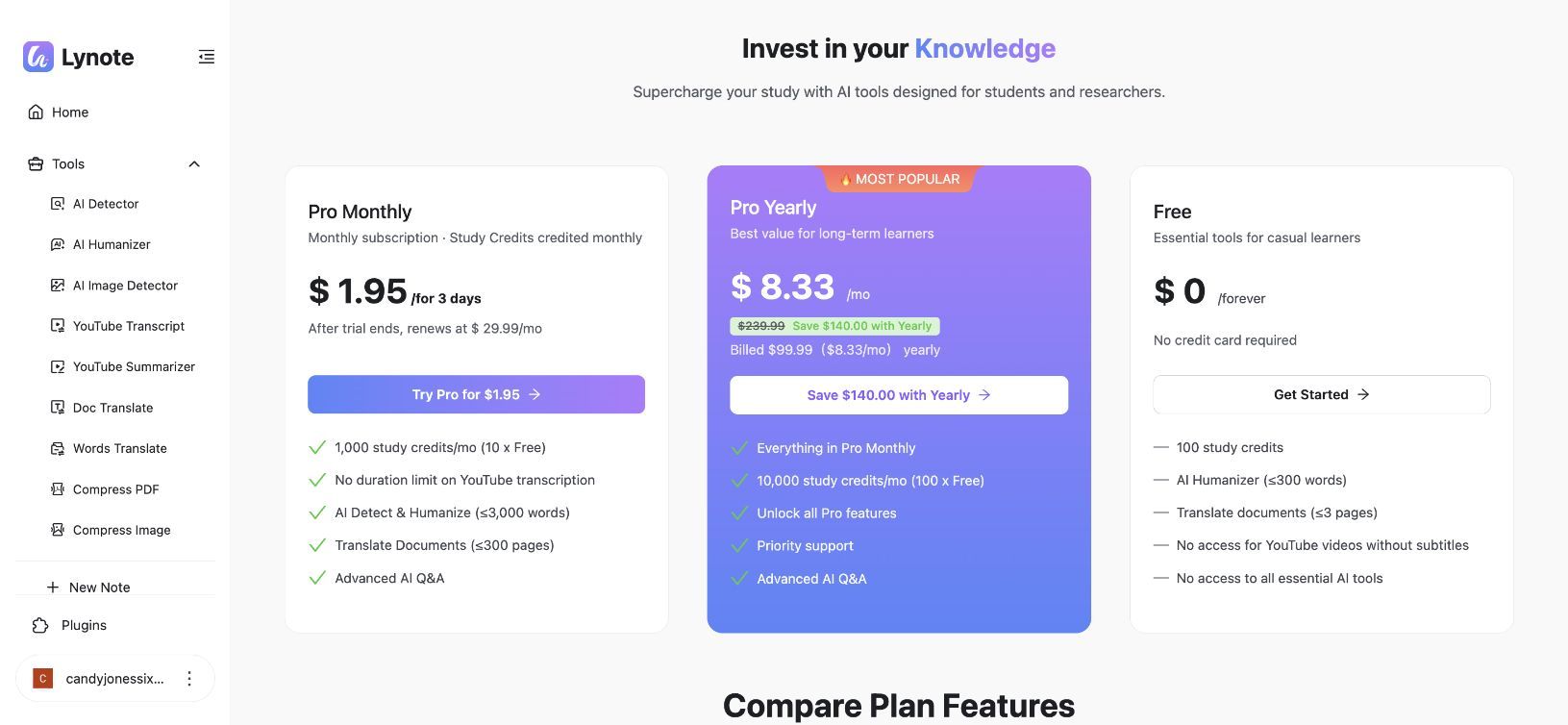
Users can also buy 10,000 Study Credits for $9.99 as an add-on. The add-on is described as valid for 365 days, while monthly subscription credits reset and unused credits do not roll over.
ZeroGPT Pro, Plus, and Max
ZeroGPT offers lower displayed subscription prices, especially when paid annually. Pro is $9.99/month or $95.88/year, Plus is $19.99/month or $179.88/year, and Max is $26.99/month or $227.88/year.
Its table publishes detailed limits for detection, plagiarism, summarization, paraphrasing, grammar, translation, and chat. Humanization appears as an included feature, but the table does not attach a per-check or monthly Humanizer quota to any plan.
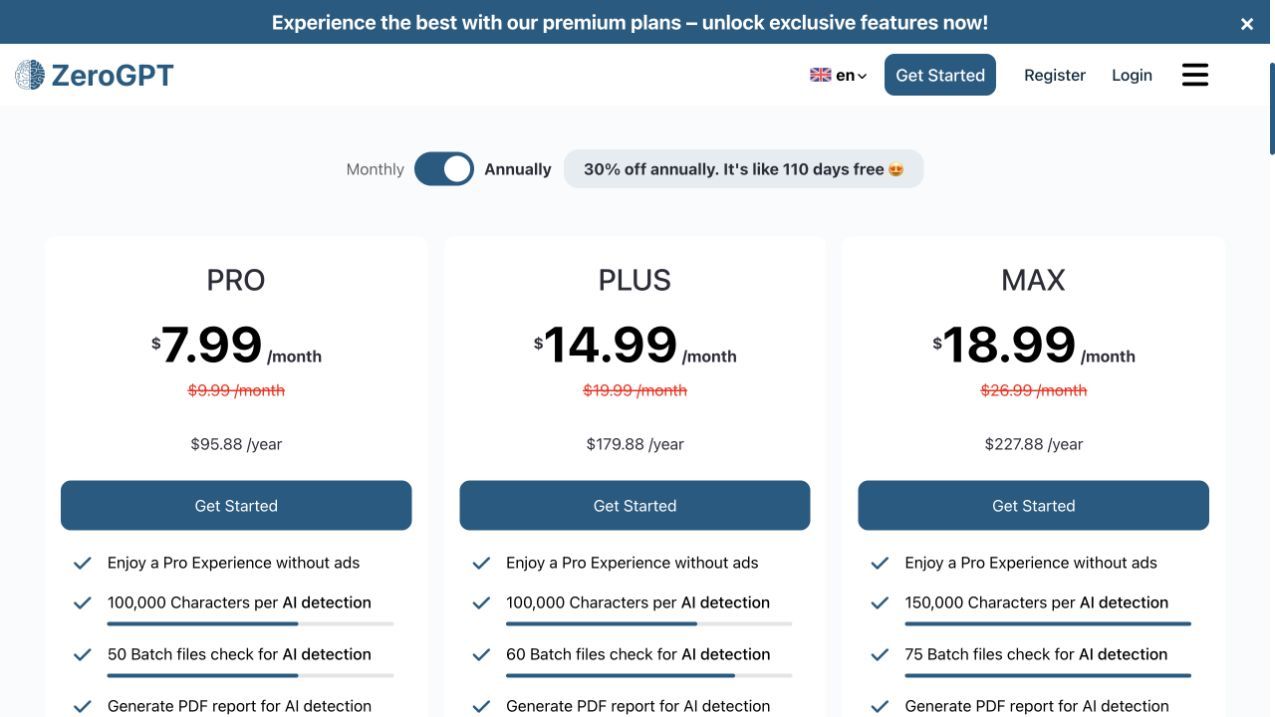
| Plan | Monthly Billing | Annual Billing | Humanizer Request Limit | Humanizer Allowance | Other Relevant Value |
|---|---|---|---|---|---|
| Lynote Free | $0 | N/A | 300 words | Credit-based | Connected report and broader tools |
| Lynote Pro Monthly | $1.95/3 days, then $29.99/month | N/A | 3,000 words | Card: 1,000 credits/month; comparison and FAQ: 10,000 | Verify at checkout |
| Lynote Pro Yearly | N/A | $99.99/year ($8.33/month effective) | 3,000 words | Shared 10,000 Study Credits/month | Priority support |
| ZeroGPT Free | $0 | N/A | Not disclosed | Not disclosed | Basic public model with ads |
| ZeroGPT Pro | $9.99/month | $95.88/year ($7.99/month effective) | Not disclosed | Not disclosed | Larger limits across other tools |
| ZeroGPT Plus | $19.99/month | $179.88/year ($14.99/month effective) | Not disclosed | Not disclosed | Monthly plagiarism allowance |
| ZeroGPT Max | $26.99/month | $227.88/year ($18.99/month effective) | Not disclosed | Not disclosed | Higher limits across adjacent tools |
Prices and plan rules can change. The live checkout should always be checked for billing frequency, renewal terms, taxes, currency, and any difference between promotional and standard prices.
Does ZeroGPT Paid Include the Advanced Humanizer?
The current pages do not provide enough evidence to answer yes. ZeroGPT subscriptions list humanization, but the Humanizer page's Advanced Model buttons send users to a separate partner service instead of describing a ZeroGPT plan requirement.
Treat these as two separate facts until the checkout or support team confirms otherwise: ZeroGPT paid plans include some humanization capability, and the Humanizer page promotes an external advanced service. Do not purchase a ZeroGPT plan solely for the partner model without verifying entitlement.
Which Pricing Model Is Better Value?
ZeroGPT has the lower headline annual entry price: $95.88/year for Pro versus Lynote's $99.99/year. The four-dollar difference is less important than the undisclosed Humanizer limits, because a low subscription price does not establish how much useful rewriting it buys.
Lynote is easier to plan around: 3,000 words per Pro request and a shared monthly credit pool. ZeroGPT may be attractive to someone who also needs its detection or plagiarism features, but its Humanizer value cannot be normalized into cost per word from the published table.
Which Humanizer Is Better for Your Workflow?
| User or Task | Better First Choice | Why |
|---|---|---|
| A substantive first rewrite | ✓ Lynote | It materially rewrote the controlled passage |
| A no-signup public experiment | ✓ ZeroGPT | Its Basic editor ran without an account |
| A document upload with known formats | ✓ Lynote | PDF, DOC, DOCX, and TXT support is published |
| A paid request longer than 300 words | ✓ Lynote | The 3,000-word Pro cap is disclosed |
| A writer who wants rewrite and detector feedback together | ✓ Lynote | Result, report, and Detect AI follow-up are integrated |
| A user who wants a simple Basic interface | ✓ ZeroGPT | Fewer controls and a direct two-button flow |
| A buyer prioritizing the lowest displayed annual price | ZeroGPT by $4.11/year | Humanizer quotas remain undisclosed |
| Someone using translation, transcripts, notes, and study tools | ✓ Lynote | Shared credits span the wider workspace |
| Someone already using ZeroGPT's wider detection suite | ZeroGPT may be convenient | One account covers several adjacent tools |
| High-stakes academic or professional writing | Neither without manual review | Facts, citations, voice, and policy compliance still require a person |
Lynote is the stronger first choice for writers who want the tool to perform visible editorial work. ZeroGPT is more convenient when the goal is to inspect a public interface quickly, but its Basic result needs to be checked before assuming it has reduced any editing.
Final Score: Lynote vs. ZeroGPT AI Humanizer
The weighted score gives rewrite quality and meaning preservation almost half of the total points. This prevents a product from winning solely because it is cheaper, has more adjacent tools, or reports a favorable detector number.
| Scored Category | Weight | Lynote | Weighted Points | ZeroGPT | Weighted Points |
|---|---|---|---|---|---|
| Rewrite quality and naturalness | 25 | 8/10 | 20 | 2/10 | 5 |
| Meaning and fact preservation | 20 | 7.5/10 | 15 | 10/10 | 20 |
| Controls and workflow | 15 | 8/10 | 12 | 5/10 | 7.5 |
| Free value | 10 | 6/10 | 6 | 7/10 | 7 |
| Paid value and disclosed limits | 10 | 7/10 | 7 | 5/10 | 5 |
| Output review and transparency | 10 | 8/10 | 8 | 5/10 | 5 |
| Input, export, and adjacent tools | 10 | 9/10 | 9 | 7/10 | 7 |
| Total | 100 | 77/100 | 56.5/100, rounded to 57 |
Lynote lost points because its rewrite expanded the text, introduced one meaning shift, and required manual cleanup. It also placed a login-and-credit step between a logged-out user and the free run, and its pricing page gives conflicting Monthly credit totals.
ZeroGPT earned full preservation points and won free-access convenience. It lost heavily on rewrite quality because the first output was identical to the input, and it lost transparency points because Humanizer limits were not disclosed and the Advanced path led to another provider.
FAQs About Lynote vs. ZeroGPT AI Humanizer
Is Lynote better than ZeroGPT for humanizing AI text?
Lynote was better in this controlled test because it produced a materially revised draft, disclosed its word limits, and offered more output-review tools. ZeroGPT may perform differently with another passage, but its Free Basic result in this run was identical to the input.
Is ZeroGPT AI Humanizer free?
Yes, ZeroGPT offers a public Free Basic Humanizer that worked without registration during testing. The page contains ads, warns that Basic output may still be detected, and does not publish a Humanizer-specific usage cap.
How many words can Lynote humanize for free?
The current Lynote pricing interface lists a 300-word limit per Free Humanizer request. Free usage also depends on available Study Credits.
What is the ZeroGPT Humanizer word limit?
ZeroGPT does not currently state a Humanizer-specific per-request or monthly word limit on the Humanizer or pricing pages reviewed. The absence of a published limit should not be interpreted as unlimited use.
Does ZeroGPT Pro include the Advanced Humanizer?
ZeroGPT's paid plans list AI humanization as a feature, but its Advanced Model buttons lead to another company through a partner link. Confirm the exact entitlement before assuming a ZeroGPT subscription includes that external advanced service.
Can Lynote upload PDF, DOC, DOCX, and TXT files?
Yes. Lynote's Humanizer workflow supports pasted text and PDF, DOC, DOCX, or TXT document uploads.
Which tool changed the same test text more?
Lynote changed the 171-word source into a 239-word result. ZeroGPT displayed the same 171-word passage as its output in the retained first run.
Can either tool guarantee a human detector score?
No responsible comparison should promise a fixed result across detectors. Scores can vary by tool, model update, passage length, genre, and editing history, and they do not prove authorship.
Which tool is better for students?
Lynote offers the more complete revision workflow and clearer document limits, but students must follow course rules and disclose AI assistance when required. Neither product should be used to misrepresent authorship or replace source checking.
Which tool is better for SEO writing?
Lynote is the better first choice when the objective is to rewrite a draft while retaining a review workflow. SEO performance still depends on search intent, factual value, originality, structure, internal links, and usefulness rather than whether a detector labels the text human.
Final Verdict: Which One Should You Choose?
Choose Lynote when you want a humanizer that visibly reconstructs a draft, accepts documented file types, supports up to 3,000 words per Pro request, and keeps rewriting and detection feedback in one workspace. Its first output still needs an editor, but it reduced the amount of work left to do.
Choose ZeroGPT when immediate no-signup access matters most and you want to test a Basic public tool before creating an account. Check the actual output carefully, because this test completed with no textual changes, and verify what is included before paying for an Advanced workflow promoted through another company.
The broader lesson is simple: the best humanizer is not the one that changes the most words or reports the most reassuring detector score. It is the one that helps you produce accurate, specific writing in a voice you can review, explain, and stand behind.

Written by Janet L. Harris
AI Writing Specialist
Janet reviews AI detectors and humanization tools, with a focus on accuracy, limitations, and responsible use. View all articles →