Lynote is the better AI humanizer for users who want a more generous free input limit, document upload, and built-in detector-style feedback. QuillBot is better for users who value polished light editing, mature writing integrations, and unlimited Premium humanizing.
That split became clear when I entered the same 108-word passage in both tools. QuillBot produced the cleaner sentence-level rewrite and preserved every factual anchor. Lynote changed the structure more aggressively and added a seven-detector authenticity report, but a few substitutions sounded less natural.
The right winner therefore depends on what you mean by "better." This comparison separates output quality, free value, paid value, workflow, and feedback instead of hiding them inside one vague rating.
Quick Verdict: Lynote or QuillBot?
For occasional free rewriting, document-based work, and users who want a rewrite plus immediate detector feedback, choose Lynote AI Humanizer. Its current free plan accepts up to 300 words per request, compared with QuillBot's 125-word free limit.
For high-volume paid use or a broader editing ecosystem, choose QuillBot Premium. Its Humanizer is unlimited, and the subscription includes grammar, paraphrasing, plagiarism, AI detection, history, tone insights, and multiple app integrations.
| Category | Lynote | QuillBot | Winner |
|---|---|---|---|
| Free words per request | ✓ Up to 300 | ✓ Up to 125 | Lynote |
| Use without paying | ✓ Credit-based free access | ✓ 6 free uses per day | Depends on frequency |
| Document upload in Humanizer | ✓ PDF, DOC, DOCX, TXT | — Direct Humanizer is paste-based | Lynote |
| Same-text naturalness | 3.6/5 | 4.4/5 | QuillBot |
| Meaning preservation in my test | 4.4/5 | 5/5 | QuillBot |
| Structural rewriting | 4.3/5 | 3/5 | Lynote |
| Free output feedback | ✓ Seven detector labels and overall score | ✓ AI signals and style labels; Human score restricted | Lynote |
| Paid Humanizer allowance | Up to 3,000 words per request, credit-based | Unlimited words and uses | QuillBot |
| App and browser integrations | Limited compared with QuillBot | ✓ Browser, desktop, mobile, and Word options | QuillBot |
| Effective annual price | $8.33/month, billed $99.99 yearly | $8.33/month, billed annually | Tie |
| Best for | Free and document-first humanizing | Premium, high-volume writing workflow | Depends on use case |
My overall weighted result was Lynote 81/100 and QuillBot 80/100. That one-point difference does not mean Lynote wrote the better paragraph. It means its larger free allowance, document workflow, and richer included feedback offset QuillBot's stronger test output.
How I Compared Lynote and QuillBot AI Humanizer
I tested both products on July 23, 2026, in the same desktop browser environment. The Lynote rewrite was run in a signed-in account using the default General purpose, while QuillBot used its standard free Humanizer workflow in English (US).
The source passage was deliberately plain and slightly mechanical. It contained repeated transitions, uniform explanatory sentences, and eight factual anchors:
- Riverside Library opened in 1998.
- It serves residents.
- It has 420 study seats.
- It has 28 public computers.
- It stays open until 9 p.m. on weekdays.
- Solar panels were installed in 2022.
- Annual electricity use fell by 18 percent.
- The library supports educational and professional needs.
The full input contained 108 words in QuillBot's counter and 109 words in Lynote's counter. That one-word difference appears to come from the tools' tokenization rules, not from different source text.
I scored the outputs across seven categories:
| Criterion | Weight | What I checked |
|---|---|---|
| Meaning and fact preservation | 25 | Whether every number, date, relationship, and claim remained accurate |
| Naturalness and voice | 25 | Whether the output sounded fluent rather than mechanically paraphrased |
| Structural variety | 15 | Whether the tool changed rhythm and sentence construction |
| Editing control | 10 | Modes, language, purpose, settings, and post-output editing |
| Workflow and friction | 10 | Limits, upload support, clicks, and interruptions |
| Output feedback | 10 | Style signals, detector feedback, history, and transparency |
| Value | 5 | What the current free and paid plans provide |
Detector scores were not used as proof that one paragraph was written by a human. They were evaluated only as product feedback because detector labels can change across models, thresholds, and text lengths.
How to Use Lynote AI Humanizer
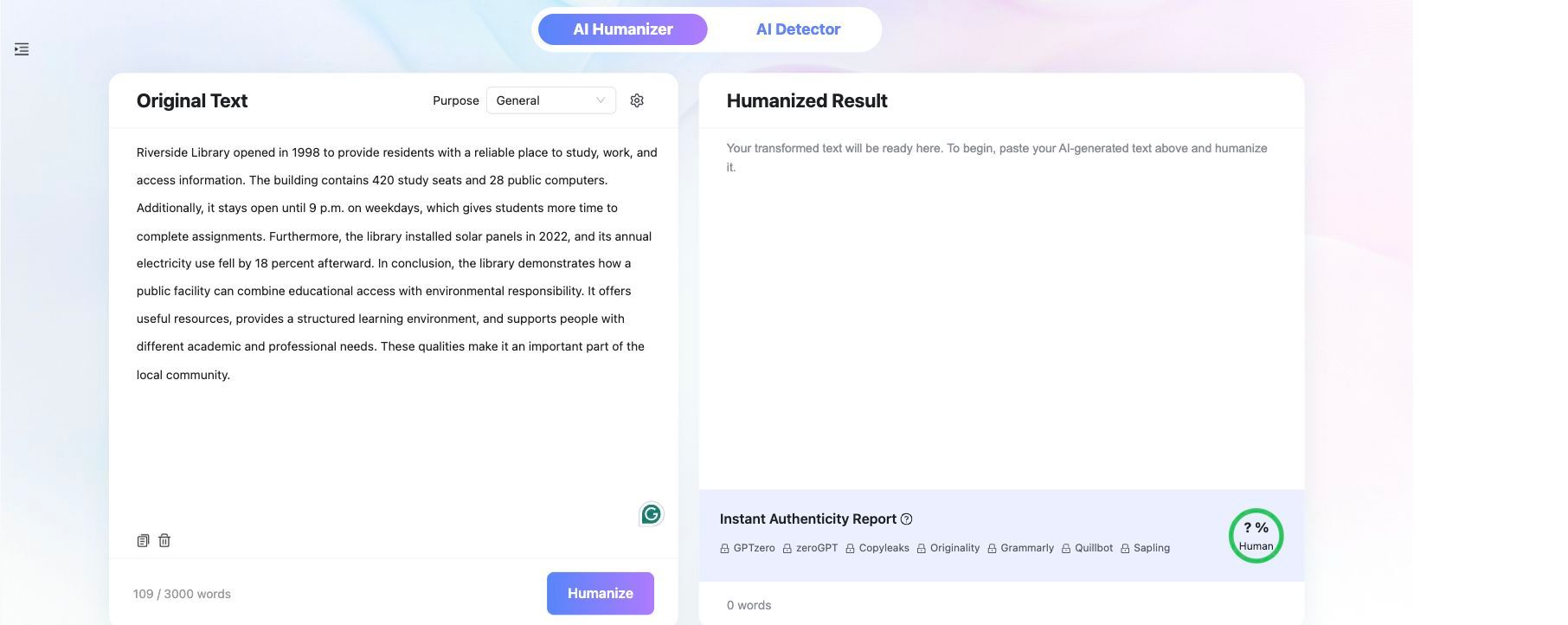
Lynote presents the source and humanized result in two side-by-side panels. The production interface also includes a purpose selector, settings, a paste workflow, document upload, and an authenticity report.
Step 1: Paste the text or upload a document
Open Lynote AI Humanizer. Paste the draft into the Original Text panel, or choose Upload Document for a PDF, DOC, DOCX, or TXT file.
The current free plan lists a 300-word per-request limit. Signed-in Pro access displays a 3,000-word limit, which is the state shown in my test screenshot.
Step 2: Choose the purpose and rewrite settings
The main interface includes a Purpose selector. For a fair general-purpose test, I left it on General rather than applying an academic, SEO, or other specialized direction.
Lynote's current marketing materials describe multiple rewrite strengths, including Simple, Standard, and Enhanced. Availability can depend on the account and current product version, so the labels visible in the live interface should take priority over older screenshots or descriptions.
Step 3: Click Humanize
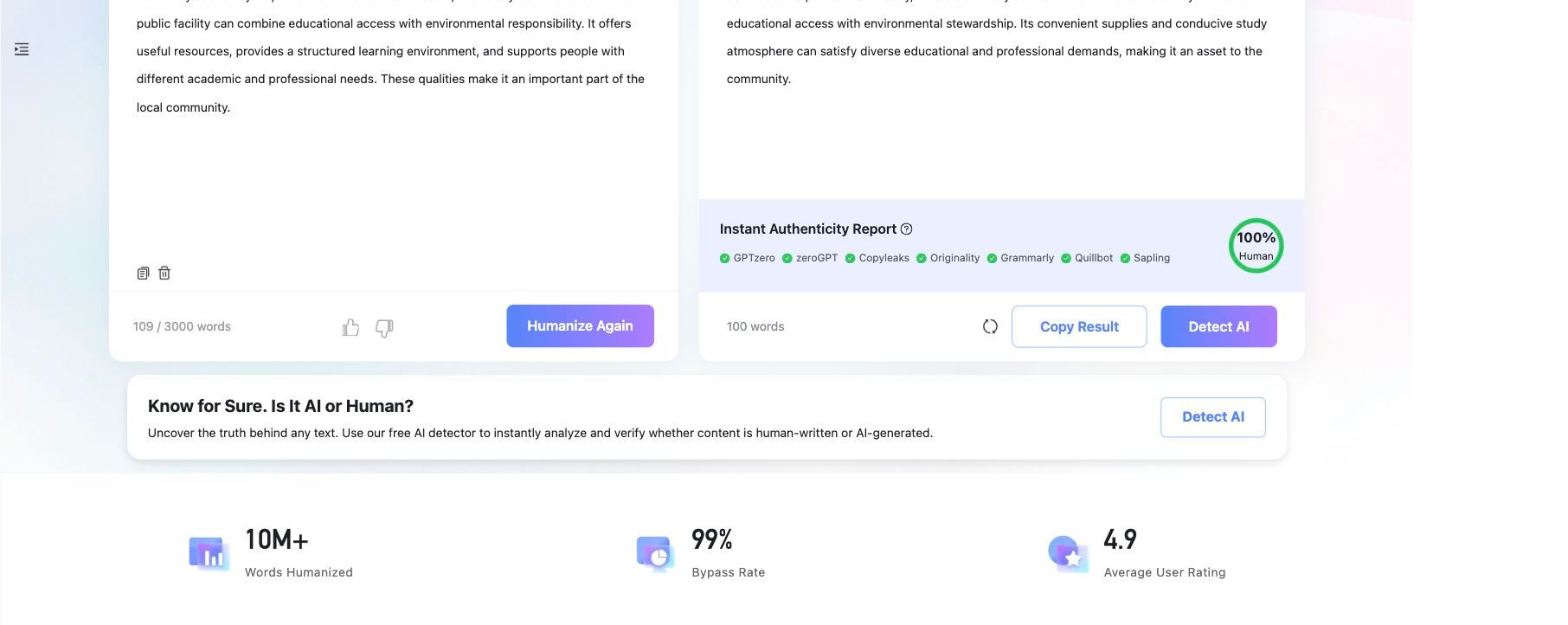
Click Humanize and wait for the transformed text to appear in the right panel. My 109-word input became a 100-word result.
The interaction itself was simple. The source text, output, word counts, and next actions remained visible on one screen.
Step 4: Review the rewrite and authenticity report
Lynote displayed a full Human score and green checks beside GPTZero, ZeroGPT, Copyleaks, Originality, Grammarly, QuillBot, and Sapling. These are predictions presented inside Lynote, not confirmed scans performed independently in every external product.
The report is still useful as an immediate review layer. It lets a writer compare the rewrite with several detector-oriented labels without copying the text into seven separate tabs.
Step 5: Copy, revise, or check the result
Use Copy Result to move the rewrite into your editor. The interface also offers Humanize Again and Detect AI, but the best next step is a manual reading pass.
In my output, the facts survived, but phrases such as "civic structure" and "convenient supplies" needed editing. A high Human score did not remove that editorial responsibility.

How to Use QuillBot AI Humanizer
QuillBot also uses a side-by-side editor, but its workflow feels more like an editing application. The right panel highlights individual changes, while controls around the editor expose language, AI signals, clarity, concision, statistics, tone, settings, and history.
Step 1: Paste the same source text
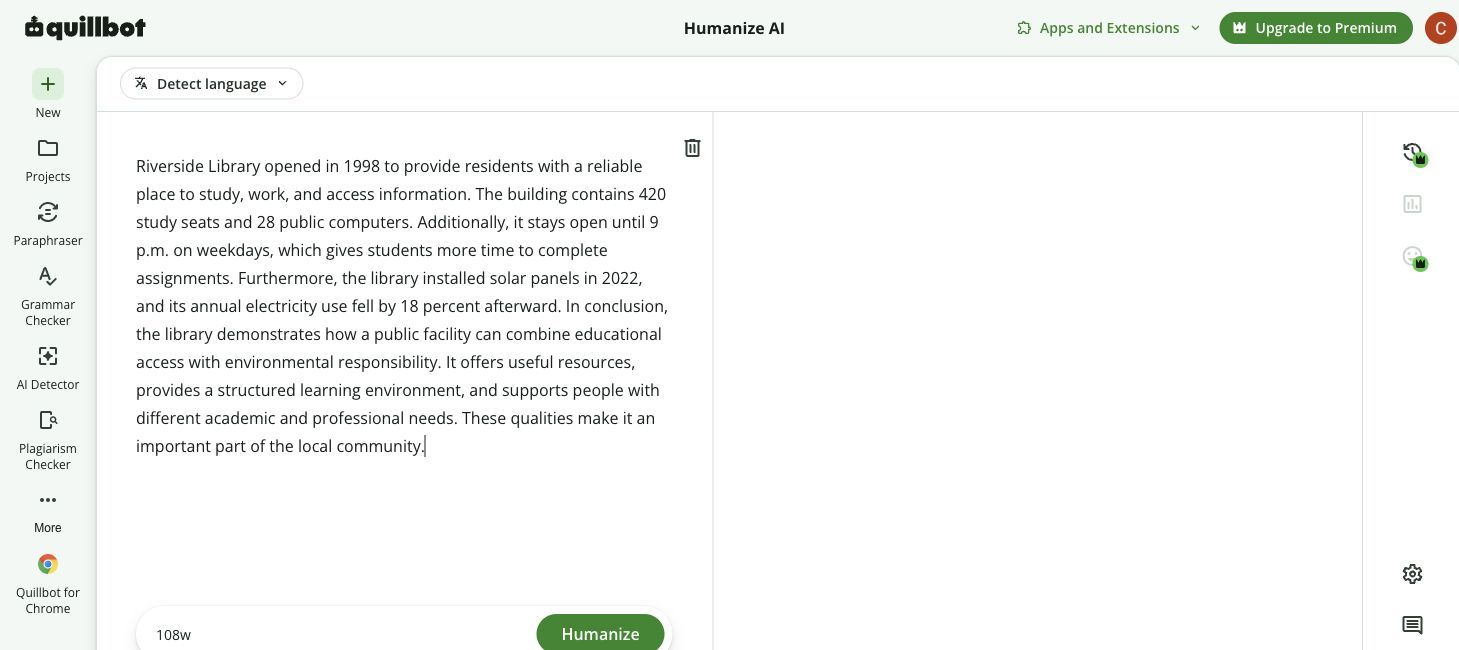
Open QuillBot AI Humanizer and paste the draft into the left editor. The free plan accepts up to 125 words per use, so my 108-word passage fit without trimming.
QuillBot offers automatic language detection and a language menu. I used English (US) for the output comparison.
Step 2: Click Humanize
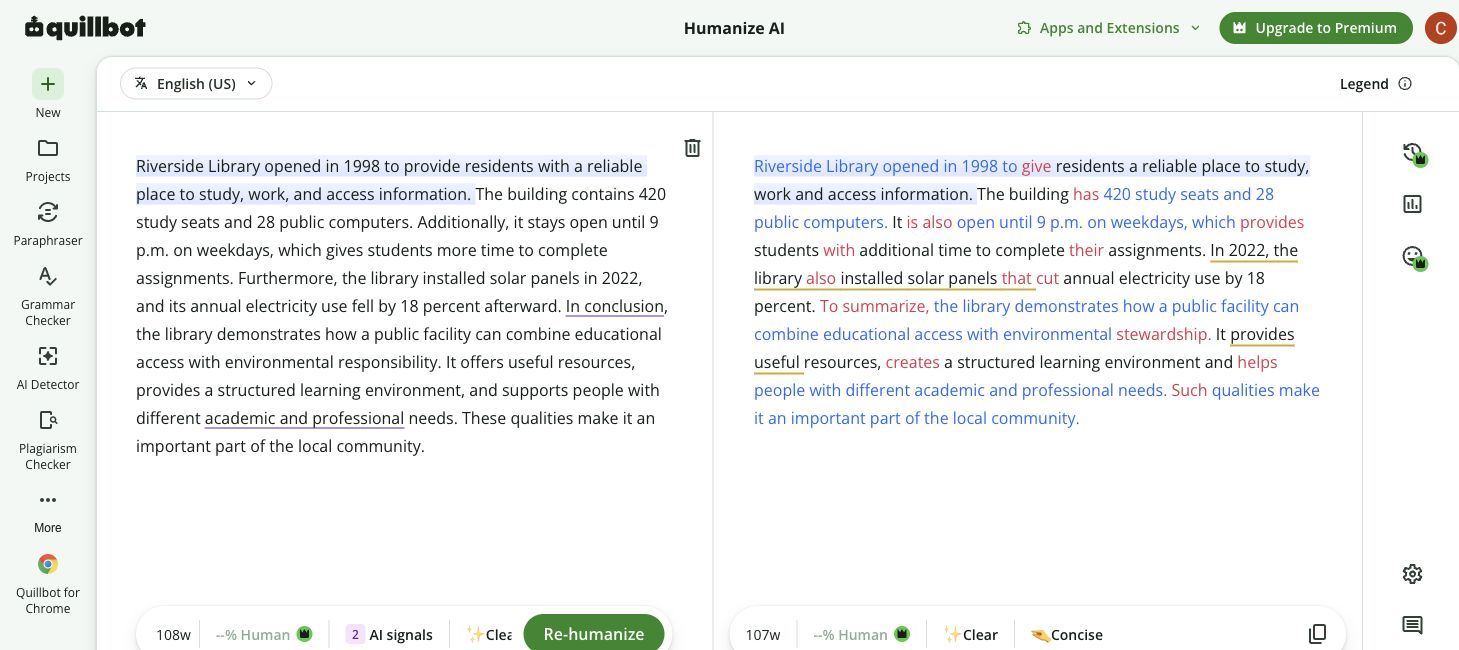
Click Humanize. QuillBot places the rewritten version in the right panel and color-codes changed wording.
The free workflow does not expose every Premium insight. In my session, the interface showed two AI signals plus Clear and Concise labels, while the numerical Human score remained locked behind Premium.
Step 3: Compare changes line by line
This is where QuillBot's interface was stronger. The colored changes made it easy to see that "provide residents with" became "give residents," "contains" became "has," and the solar-panel sentence was tightened without changing the date or percentage.
The output also supports continued editing rather than treating the first rewrite as final. Writers can copy the result, re-humanize it, or revise individual wording.
Same Text, Two Humanizers: Real Output Comparison
The most important difference was not the detector feedback. It was how each product handled the same facts and the same deliberately generic transitions.
Lynote's output
Lynote reduced the passage from 109 words to 100. It removed "Additionally," "Furthermore," and the final repetitive sentence, producing a more compressed structure.
It preserved the opening year, seat count, computer count, closing time, solar-panel year, and 18 percent reduction. It also kept the relationship between educational access and environmental responsibility.
The main weakness was word choice. "Reliable place" became "secure location," "residents" became "neighbors," and "public facility" became "civic structure." Those substitutions are understandable, but they slightly change emphasis.
The ending was more problematic:
Its convenient supplies and conducive study atmosphere can satisfy diverse educational and professional demands.
"Convenient supplies" is not a natural description of library resources, and "satisfy demands" sounds more corporate than the source. Lynote created stronger structural change, but it also created more cleanup work.
QuillBot's output
QuillBot reduced the passage from 108 words to 107. Its rewrite was lighter and stayed closer to the original sentence order.
Every factual anchor remained intact. "Reliable place" remained "reliable place," residents stayed residents, and the reduction remained tied specifically to annual electricity use.
The strongest edits were simple:
- "Provide residents with" became "give residents."
- "The building contains" became "The building has."
- "Gives students more time" became "provides students with additional time."
- "It offers useful resources" became "It provides useful resources."
The output still needed editing. It repeated "also" in consecutive ideas and replaced "In conclusion" with the equally formulaic "To summarize." It improved readability without fully removing the source's AI-like conclusion pattern.
Hands-on scorecard
| Criterion | Lynote | QuillBot | Why |
|---|---|---|---|
| Meaning and fact preservation | 22/25 | 25/25 | QuillBot retained all anchors with less semantic drift |
| Naturalness and voice | 18/25 | 22/25 | QuillBot had fewer awkward substitutions |
| Structural variety | 13/15 | 9/15 | Lynote compressed and rebuilt more of the paragraph |
| Editing control | 7/10 | 8/10 | QuillBot's inline changes and surrounding editing tools were clearer |
| Workflow and friction | 9/10 | 7/10 | Lynote supports files and larger free inputs |
| Output feedback | 9/10 | 5/10 | Lynote included broad detector-style feedback for the result |
| Value | 3/5 | 4/5 | QuillBot's Premium Humanizer is unlimited; Lynote offers stronger free input value |
| Total | 81/100 | 80/100 | Different strengths produced a near tie |
QuillBot won the actual prose test. Lynote won the surrounding free workflow and feedback comparison. That distinction is more useful than calling either product universally superior.
Feature-by-Feature Comparison
Input methods and document support
Lynote supports both pasted text and direct document upload in the Humanizer. That matters for users working with an essay, report, or content draft that already exists as a PDF or Word file.
QuillBot's Humanizer is centered on pasted text. QuillBot has document-oriented products elsewhere in its suite, but the direct Humanizer interface in this test did not present a comparable upload action.
Winner: Lynote.
Rewrite modes and editing control
Lynote emphasizes purpose and rewrite intensity. Its product materials describe Simple, Standard, and Enhanced options, and the interface provides a purpose selector and settings.
QuillBot divides the Humanizer experience into Basic free humanizing and more advanced Premium capabilities. It also surrounds the output with inline color changes, language selection, statistics, tone, and editing controls.
Lynote gives more control over how far the system should move from the source. QuillBot gives more control over reviewing and refining the result.
Winner: Tie, for different stages of the workflow.
Languages
Lynote advertises support for more than 80 languages. That breadth makes it the stronger option for multilingual users, especially when the required language falls outside the most common Western European set.
QuillBot's Humanizer currently highlights English, Spanish, French, German, and Portuguese, plus US, UK, Australian, and Canadian English dialects. Its list is narrower, but the explicit dialect options are useful for English localization.
Winner: Lynote for breadth; QuillBot for explicit English dialect control.
Meaning preservation
QuillBot won this category in the same-text test. Its edits stayed close to the source and retained every factual anchor without introducing a questionable noun replacement.
Lynote preserved the core message and all numbers, but "secure location," "neighbors," and "convenient supplies" moved further from the source than necessary.
This is one sample, not a universal benchmark. A more aggressive mode may perform differently, and results can vary by genre and length.
Winner in this test: QuillBot.
Structural rewriting
Lynote made the larger structural change. It removed more repetitive transitions, shortened the passage by about eight percent, and consolidated the ending.
QuillBot kept nearly the same length and sentence sequence. Its output was smoother, but it behaved more like a careful line editor than a deep structural rewriter.
Winner: Lynote for transformation depth.
Output feedback
Lynote's authenticity report was the most visible differentiator. It gave an overall Human percentage plus labels associated with seven detector brands.
QuillBot showed two AI signals and Clear and Concise labels in the free experience. Human score, richer tone insights, and full history are Premium benefits.
Neither feedback system proves authorship. Lynote gives more free detector-oriented feedback, while QuillBot provides a more mature editing analysis once Premium features are included.
Winner for free feedback: Lynote.
History, integrations, and wider ecosystem
QuillBot is substantially stronger here. Premium includes Humanizer history and connects the Humanizer with a larger suite that includes the Paraphraser, Grammar Checker, AI Detector, Plagiarism Checker, Summarizer, Citation Generator, Flow, browser extensions, mobile apps, desktop apps, and a Word add-in.
Lynote's ecosystem is broader in a different direction. It combines humanizing and detection with document translation, YouTube transcription and summarization, notes, flashcards, AI Q&A, and compression tools.
Choose QuillBot when writing and editing are the center of your workflow. Choose Lynote when humanizing is part of a wider document, study, and content-processing workflow.
Winner for writing integrations: QuillBot.
Free Plan Comparison
The free plans use different models. QuillBot provides a daily number of short Humanizer uses. Lynote provides Study Credits that can be spent across its tools.
| Free-plan detail | Lynote | QuillBot |
|---|---|---|
| Price | $0 | $0 |
| Humanizer input limit | Up to 300 words per request | Up to 125 words per request |
| Usage model | 50 anonymous credits or a one-time 100 registered credits | 6 Humanizer uses per day |
| Humanizer cost | Current guide lists 10 credits per 100 words | One use per rewrite |
| Account | Basic guest use is available | Free account workflow is promoted |
| Document upload | ✓ | — in the direct Humanizer |
| Output feedback | Overall Human score and detector-oriented labels | AI signals and style labels; numerical Human score restricted |
| Best fit | Fewer, longer inputs and file-based work | Repeated short rewrites |
Lynote's 300-word input limit is 2.4 times QuillBot's 125-word limit. That does not automatically mean more total free words because Lynote credits are finite while QuillBot's six-use allowance resets daily.
For example, a user rewriting one 250-word passage benefits more from Lynote's larger request size. A user rewriting six separate 100-word snippets every day may get more recurring utility from QuillBot.
What happens when QuillBot exceeds 125 words?
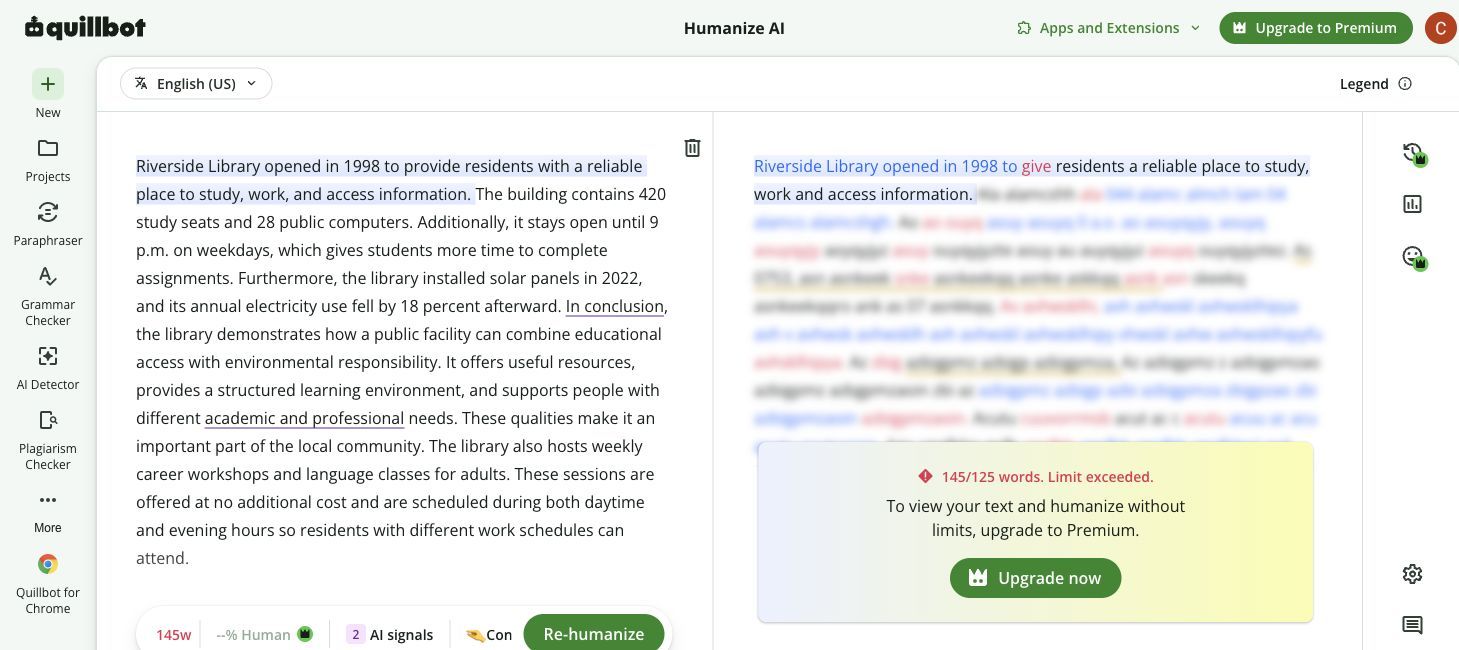
I entered a separate 145-word passage in QuillBot's free Humanizer. The interface accepted the input and ran the action, but the right panel obscured most of the result and displayed:
145/125 words. Limit exceeded.
It then prompted me to upgrade to view the text and humanize without limits. This is less convenient than blocking the action before processing because the visible beginning can make the result look temporarily available.
Free-plan verdict: Lynote is better for larger individual inputs and document upload. QuillBot is better for recurring short daily rewrites.
Pricing and Paid Benefits
Prices and allowances below were checked on July 23, 2026. Both companies can change prices, discounts, credits, and plan limits, so the checkout page should be verified before purchase.
Lynote pricing
Lynote currently displays three choices:
| Lynote plan | Current price | Humanizer allowance | Other important benefits |
|---|---|---|---|
| Free | $0 | Up to 300 words per request | 100 registered-user credits; core tools available through credits |
| Pro Monthly | $1.95 for 3 days, then $29.99/month | Up to 3,000 words per request | Pro tools, document translation, advanced Q&A |
| Pro Yearly | $99.99/year, displayed as $8.33/month | Up to 3,000 words per request | 10,000 credits per month, all Pro features, priority support |

The trial deserves attention: the $1.95 payment covers three days, then renews at $29.99 per month unless canceled.
There is also a pricing-page inconsistency worth knowing. The Pro Monthly card shows 1,000 study credits per month, while the detailed comparison table and FAQ on the same page describe 10,000 credits per month for Pro. Buyers should confirm the allowance shown at checkout or in the account before subscribing.
Lynote also lists a $9.99 add-on pack for 10,000 Study Credits. That can suit temporary high-volume work without changing the main subscription, although credit costs may change as models and features change.
QuillBot pricing
QuillBot's current monthly Premium price is $19.95. With annual billing enabled, the displayed effective price falls to $8.33 per month.
| QuillBot plan | Current price | Humanizer allowance | Other important benefits |
|---|---|---|---|
| Free | $0 | 125 words, 6 uses per day | Basic humanizing and limited AI Detector |
| Premium Monthly | $19.95/month | Unlimited words and usage | Human score, tone insights, history, and wider writing suite |
| Premium Annual | $8.33/month, billed annually | Unlimited words and usage | Same Premium benefits at the annual rate |
| Team | Custom or account-based pricing | Premium access plus team controls | Usage metrics, user management, billing, data control, priority support |
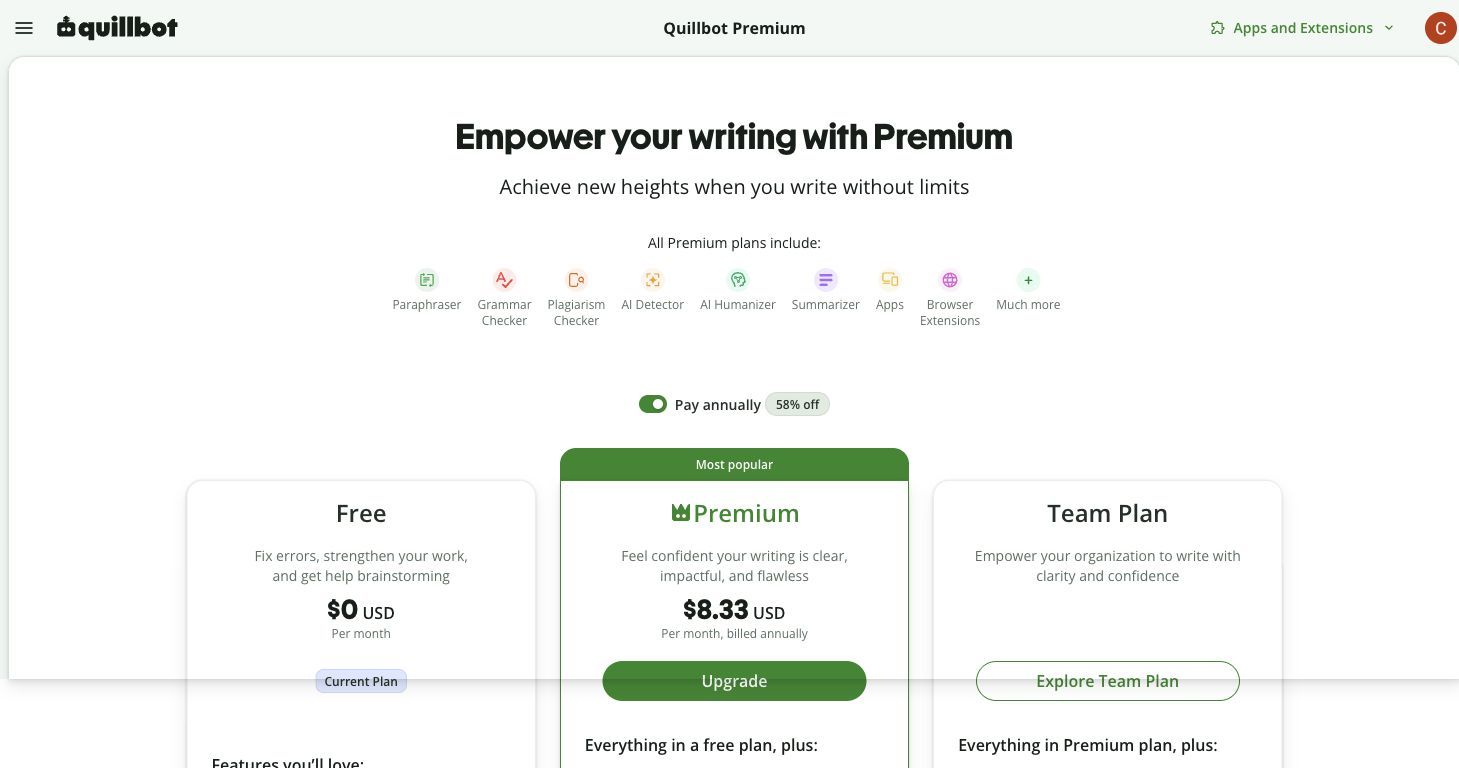
QuillBot's strongest paid advantage is the absence of a Humanizer word or usage cap. Users processing large volumes do not have to calculate credits or split a document at a 3,000-word boundary.
Its annual effective price matches Lynote's displayed $8.33 per month. The choice is therefore about entitlement rather than headline annual cost: QuillBot offers unlimited writing tools, while Lynote combines 10,000 monthly credits with study, document, translation, transcription, and Q&A tools.
Paid-value verdict
Choose QuillBot Premium if AI humanizing and writing refinement will consume most of the subscription. Unlimited use is easier to understand and better suited to volume.
Choose Lynote Pro if the same subscription also needs document translation, YouTube processing, study tools, notes, flashcards, and AI Q&A. The Humanizer is not unlimited, but the credits can be allocated across a broader learning workflow.
User Experience: Where Each Tool Feels Better
Lynote feels simpler at the task level
Lynote keeps the essential process on one page: source, purpose, rewrite, report, and copy. Direct file upload removes a separate extraction step for document users.
Its weakness is product clarity around plans and modes. The free and signed-in limits differ, and the pricing page currently presents conflicting monthly credit numbers.
QuillBot feels more mature as an editor
QuillBot's colored changes make review easier. It feels designed for writers who will inspect individual edits rather than accept a rewritten paragraph wholesale.
The surrounding ecosystem is also more visible. A writer can move between grammar, paraphrasing, detection, plagiarism, citations, and projects without leaving the same product family.
Its main free-plan friction is the 125-word ceiling. My 145-word test produced an obscured output only after the action ran, which is less direct than warning the user before processing.
Speed
Both tools returned the short test quickly enough for interactive editing. I did not treat small timing differences as meaningful because network conditions and server load can vary between runs.
For long workflows, limits matter more than a few seconds. QuillBot Premium avoids splitting, while Lynote's 3,000-word request cap requires sections for very long documents.
Which Tool Should You Choose?
| Your main need | Better choice | Reason |
|---|---|---|
| Humanize 126-300 words for free in one request | Lynote | QuillBot's free request stops at 125 words |
| Upload a PDF or Word document | Lynote | Direct Humanizer upload workflow |
| Get the cleanest light rewrite from this test | QuillBot | Better factual fidelity and fewer awkward substitutions |
| Make a deeper structural rewrite | Lynote | Greater compression and sentence restructuring |
| Review detector-oriented feedback immediately | Lynote | Overall score and seven detector labels |
| Humanize large volumes with a paid plan | QuillBot | Unlimited Premium words and usage |
| Edit inside browser, mobile, desktop, or Word workflows | QuillBot | Wider writing integrations |
| Combine rewriting with study and document tools | Lynote | Translation, transcription, notes, flashcards, and Q&A |
| Refine English for a specific regional dialect | QuillBot | Explicit US, UK, AU, and CA choices |
| Work across a wider set of languages | Lynote | Advertised support for more than 80 languages |
Students
Lynote is the more practical free option when an assignment section exceeds 125 words or exists as a document. Its study and document tools also fit research and revision workflows.
QuillBot is stronger when the student already uses its Grammar Checker, Citation Generator, and Word integration. In either case, the student must follow institutional AI-use and disclosure rules.
SEO and content writers
Lynote's larger free input, document upload, and more aggressive restructuring can help with robotic sections. Writers should manually review keyword placement and meaning after a stronger rewrite.
QuillBot is better for high-volume paid editing and controlled line-level refinement. Its lighter output in this test kept the source structure but improved wording without disturbing facts.
Professional emails and reports
QuillBot's restrained rewrite is the safer starting point when factual precision matters and the source already has a usable structure. Tone insights and integrations strengthen the paid workflow.
Lynote is useful when a long passage feels uniformly generated and needs more structural movement. A manual pass is important because aggressive synonyms can sound less natural than the original.
Multilingual writers
Lynote has the stronger breadth claim, while QuillBot provides clearer support for five named languages and four English dialects. Test a representative paragraph before processing an important document because quality can vary by language and register.
Lynote Pros and Cons
Pros
- ✓ Up to 300 free words per request.
- ✓ Direct PDF, DOC, DOCX, and TXT upload.
- ✓ Larger structural changes than QuillBot in the test.
- ✓ Immediate authenticity report with several detector-oriented labels.
- ✓ More than 80 advertised languages.
- ✓ Fits document, study, translation, transcription, and Q&A workflows.
Cons
- Some substitutions in the test sounded unnatural.
- Paid Humanizer requests remain capped at 3,000 words.
- The credit system takes more effort to understand than unlimited use.
- The current pricing page contains inconsistent Pro Monthly credit figures.
- A combined detector report should not be mistaken for independent proof of authorship.
QuillBot Pros and Cons
Pros
- ✓ Best naturalness and meaning preservation in the same-text test.
- ✓ Colored changes make revisions easy to inspect.
- ✓ Six short free Humanizer uses per day.
- ✓ Unlimited Humanizer words and uses with Premium.
- ✓ Strong history, tone, app, browser, desktop, mobile, and Word ecosystem.
- ✓ Premium includes a broad set of writing and integrity tools.
Cons
- Free inputs stop at 125 words.
- Direct document upload was not available in the Humanizer interface tested.
- The free numerical Human score is restricted.
- The rewrite remained close to the source and retained a formulaic summary transition.
- Monthly Premium costs more than its annual effective rate.
Frequently Asked Questions
Is Lynote better than QuillBot AI Humanizer?
Lynote is better for larger free inputs, file upload, structural rewriting, and detector-style feedback. QuillBot is better for polished light editing, unlimited Premium humanizing, and writing integrations. QuillBot produced the more natural result in this article's same-text test.
Which AI humanizer gives more free words?
Lynote currently accepts up to 300 words per free request. QuillBot accepts up to 125 words per free Humanizer use. QuillBot provides six uses per day, while Lynote uses a credit balance.
Is QuillBot AI Humanizer free?
Yes. The free plan currently supports up to 125 words per Humanizer use and six uses per day. Premium removes the word and usage limits and adds Human score, tone insights, and history.
Can Lynote or QuillBot guarantee that text will pass AI detectors?
No. Detector models can disagree and can produce false positives or false negatives. A Human score is a prediction about writing patterns, not proof of who wrote the text or whether it complies with a policy.
Which tool is better for long documents?
Lynote is better for uploading a document and processing sections of up to 3,000 words. QuillBot Premium is better for high-volume pasted text because it advertises unlimited Humanizer words and usage.
Which tool preserves meaning better?
QuillBot preserved meaning better in this article's 108-word test. It retained every factual anchor and stayed closer to the original wording. Results may differ with another topic, language, or rewrite mode.
Does QuillBot Premium include AI Humanizer?
Yes. QuillBot Premium includes unlimited Humanizer use, Human score and tone insights, rewrite history, and access to the wider QuillBot writing suite.
Final Verdict: Which AI Humanizer Is Better?
Lynote is better overall for free humanizing, document upload, structural rewriting, and built-in detector feedback. QuillBot is better for polished output, high-volume Premium use, and an integrated writing environment.
In my same-text test, QuillBot wrote the better paragraph. It preserved every factual anchor and made fewer awkward changes. If output quality on a short, already well-structured passage is the deciding factor, QuillBot wins.
Lynote won more of the surrounding workflow. Its free request is larger, it accepts documents, and it gives immediate feedback across several detector labels. If you want to process a longer free passage and review the result in one place, Lynote is the better starting point.
The sensible choice is not to trust either first output automatically. Use the tool that fits your volume and workflow, then restore your own voice, verify every fact, and remove any phrase you would not naturally write.

Written by Danny
Product Marketing Manager
Danny explains how Lynote features fit real workflows, from everyday productivity to product-led writing use cases. View all articles →