Quick answer: WalterWrites produced the better first-pass rewrite in my same-text test. It preserved the source's cautious meaning more reliably, finished faster, and required fewer factual corrections. Lynote still has meaningful advantages for people who upload documents, work with longer single inputs, want a broader study toolkit, or prefer a built-in report that compares several AI-detection signals.
That verdict needs context. I tested one 204-word English passage using Lynote's signed-in General mode and WalterWrites' public Lite mode, so this is an editorial comparison rather than a universal benchmark. The right choice depends on whether your priority is first-pass fidelity, detailed rewrite controls, predictable monthly volume, document handling, or access to tools beyond humanization.
| Quick verdict | Lynote | WalterWrites |
|---|---|---|
| Better first-pass result in this test | — | ✓ |
| Faster in this test | — | ✓ |
| Higher maximum paid words per request | ✓ | — |
| Paste and document upload workflow | ✓ | — |
| Visible multi-detector result panel | ✓ | — |
| Predictable word-based monthly quotas | — | ✓ |
| Team, API, and MCP options | — | ✓ |
| Broader study and document toolkit | ✓ | — |
| Editorial score | 7.2/10 | 8.0/10 |
The checkmarks above indicate which product had the clearer advantage in each category. They do not mean that every feature or output is equally good.
How I Compared Lynote and WalterWrites
I wrote a controlled passage about a fictional college study-planning pilot. It included dates, participant counts, a session schedule, an exact quotation, a cautious conclusion, and several details that a rewrite could accidentally distort.
I pasted the same 204 words into both tools and scored the first completed output. I did not manually improve either result before comparing them. I later repeated the Lynote run to capture a cleaner interface screenshot; that separate rerun returned 228 words, so I did not substitute it for the 188-word first pass used in the score.
| Test rule | What I did |
|---|---|
| Input | Same 204-word English passage |
| Lynote mode | Signed-in General mode |
| WalterWrites mode | Public Lite mode |
| Output selection | First completed rewrite used for scoring |
| Timing | From clicking the humanize button to visible output |
| Quality checks | Facts, quotation, caveats, readability, omissions, and editing effort |
| Detector readings | Treated as interface signals, not proof of authorship |
This setup has limits. The two accessible modes were not identical, and one passage cannot represent every essay, blog post, or language. I also did not test the output against a separate panel of detectors because detector disagreement would require its own repeatable study.
There is one more practical caveat. Lynote's guest editor accepted the sample and showed a 300-word cap, but the anonymous run did not complete in my clean automated browser session. I therefore used the completed signed-in General result for the output comparison rather than guessing what the guest result would have been.
Lynote vs. WalterWrites at a Glance
Lynote AI Humanizer is part of a wider learning and document platform. Its humanizer supports pasted text and document upload, provides purpose and rewrite settings, and presents the result beside an authenticity report.
WalterWrites is more narrowly focused on AI rewriting and detection. Its plans use word quotas, its paid workflow exposes purpose, readability, and rewrite-level controls, and its higher tiers add collaboration and integration options.
| Capability | Lynote | WalterWrites |
|---|---|---|
| Paste text | ✓ | ✓ |
| Upload a document in the humanizer | ✓ | Not shown in the tested public editor |
| Guest input limit observed | 300 words | 300 words total trial advertised |
| Paid per-request ceiling | 3,000 words | Up to 2,000 words |
| Purpose controls | ✓ | ✓ |
| Rewrite intensity or mode controls | ✓ | ✓ |
| Readability control | Available through settings | ✓ on the advanced workflow |
| Built-in AI-checking context | Multi-detector authenticity panel | Humanize and Scan workflow |
| Adjacent study tools | ✓ | Limited compared with Lynote |
| Teams | Not the main positioning | ✓ on Teams plan |
| API and MCP | Not the main positioning | ✓ on eligible plans |
| Billing model | Study Credits | Monthly word allowance |
Some rows are not direct equivalents. A credit-based suite and a word-based writing subscription solve different budgeting problems, so the pricing comparison later in this article separates plan price, monthly allowance, and per-request capacity.
What Lynote and WalterWrites Actually Offer
Lynote AI Humanizer in Brief
Lynote combines a humanizer with note-taking, summarization, document, and study workflows. That makes it useful when rewriting is one step in a larger research or learning process rather than the only task.
The editor lets you paste text or upload a document, choose a purpose, adjust settings, and review the rewrite beside an authenticity report. On the current paid plan, the humanizer accepts up to 3,000 words per request.
WalterWrites AI Humanizer in Brief
WalterWrites is a dedicated writing product built around humanization and AI checking. Its public Lite editor provides a low-friction test, while the signed-in workflow adds more controls and a combined Humanize and Scan action.
Its pricing is easier to translate into a writing budget because each plan states a monthly word allowance and a per-request cap. That clarity is valuable for agencies and writers who can estimate their monthly volume.
Feature-by-Feature Comparison
Input Options and Document Support
Lynote has the cleaner workflow for long source material because the editor offers both paste and upload paths. A student can move from a document to a rewrite without first extracting the text into another application.
WalterWrites' public editor centered on pasted text during my test. That is efficient for short passages, but it gives Lynote an edge for document-heavy workflows.
Rewrite Modes, Purpose, Tone, and Readability
Both tools go beyond a single rewrite button. Lynote exposes a Purpose selector and settings, while its product flow describes Simple, Standard, and Enhanced rewrite choices.
WalterWrites gives advanced users a more explicitly writing-oriented control set: purpose, readability level, and detection rewrite level. Its public Lite mode is intentionally simpler, and Standard mode required a free account in the session I checked.
| Control question | Lynote | WalterWrites |
|---|---|---|
| Can I choose a purpose? | ✓ | ✓ |
| Can I change rewrite intensity? | ✓ | ✓ |
| Is readability presented as a named control? | Less prominent | ✓ |
| Can I start with a lightweight public mode? | Guest editor available | ✓, Lite mode |
| Are advanced controls account-dependent? | Some capabilities depend on account/plan | Standard required signup in my check |
Output Review and Built-In Detection
Lynote places the rewrite next to an Instant Authenticity Report. The result I received showed a full Human reading across the displayed report, but that reading did not catch the output's factual drift.
This is an important lesson: a favorable detector panel is not the same as a faithful rewrite. You still need to compare names, numbers, quotations, qualifications, and conclusions with the source.
WalterWrites connects rewriting to its AI-checking workflow through Humanize and Scan. That is convenient, but its checker should be interpreted with the same caution. A detector score is an estimate based on patterns, not a reliable authorship certificate.
Languages, Integrations, and Team Features
Lynote is the stronger fit when humanization sits beside multilingual study, document, audio, and note workflows. You can keep more of the research-to-output process inside one product.
WalterWrites is the clearer choice for a writing team that specifically wants seats, shared volume, API access, or MCP integration. Its Teams plan lists support for ten members, while the individual tiers focus on increasingly large monthly word pools.
Privacy, Account Friction, and Export
Both products require users to submit text to a hosted service, so sensitive material deserves extra care. Remove personally identifiable information, confidential research, private client details, and restricted institutional content before uploading it to either tool.
For low-friction testing, WalterWrites' public Lite editor completed the sample without requiring an account. Lynote's guest editor displayed the sample and its 300-word limit, although my automated anonymous run did not complete; the signed-in run did.
Free Plans: Both Start Around 300 Words, but the Experience Differs
The number 300 appears on both products, but it does not represent the same allowance. Lynote's guest editor showed 300 words per humanizer request. Lynote also currently describes 50 Study Credits for guests and a one-time 100 Study Credits for registered free users.
WalterWrites advertises a 300-word free trial in total, not 300 words on every free request. Its help material also describes limited detector access during the trial period.
| Free-access detail | Lynote | WalterWrites |
|---|---|---|
| Headline free allowance | 300 words per guest request shown | 300 words total trial advertised |
| Account-free editor | Available, but my automated run did not complete | Lite mode completed the test |
| Free account benefit | One-time Study Credits described | Standard mode and trial access |
| Budget unit | Credits plus request cap | Words |
| Best free use | Trying the workflow and broader toolkit | Completing a small first-pass test |
WalterWrites offered the smoother account-free experience in this specific session. Lynote's free value is broader, but its credit system takes more interpretation because Study Credit cost varies by task.
Pricing and Paid Limits Compared
Prices and allowances can change, so this section reflects the plans displayed during the July 2026 review.
Lynote Pro Pricing
Lynote displayed a $1.95 three-day trial that renews at $29.99 per month unless canceled. Its annual plan was $99.99 per year, shown as $8.33 per month.
Pro includes 10,000 Study Credits each month, and unused monthly credits do not roll over. The humanizer supports up to 3,000 words per request. Lynote also listed a $9.99 add-on for 10,000 credits valid for 365 days.
The complication is that Study Credits cover multiple Lynote tasks and the cost varies by operation. That makes the plan flexible across tools, but it prevents a clean one-line calculation of humanizer words per dollar.
WalterWrites Pricing
WalterWrites uses a conventional monthly word allowance. The annual prices below are expressed as monthly equivalents, but the full annual amount is billed at once.
| WalterWrites plan | Monthly billing | Annual billing | Monthly words | Words per request | Notable fit |
|---|---|---|---|---|---|
| Starter | $12/month | $96/year ($8/month equivalent) | 30,000 | 750 | Light individual use |
| Pro | $23/month | $156/year ($13/month equivalent) | 70,000 | 1,500 | Regular writers |
| Elite | $47/month | $312/year ($26/month equivalent) | 200,000 | 2,000 | High-volume individual work |
| Teams | $139/month | $1,188/year ($99/month equivalent) | 500,000 | 2,000 | Up to 10 members |
Current pricing should take priority over old help-center limits. Some older WalterWrites material lists lower per-request figures, while the current pricing page showed 750, 1,500, and 2,000 words across the individual plans.
Which Pricing Model Gives Better Value?
Lynote's annual plan costs slightly more than WalterWrites Starter annually, but it provides a broader tool suite and a much higher 3,000-word humanizer request cap. It is the more attractive bundle when you will also use Lynote's note, document, study, or media features.
WalterWrites is easier to budget for humanization alone. A writer who expects 30,000, 70,000, or 200,000 words per month can choose a clearly stated tier without converting credits.
| Value question | Better fit | Why |
|---|---|---|
| Lowest annual individual price | WalterWrites Starter | $96/year versus Lynote's $99.99/year |
| Longest single paid request | Lynote | 3,000 words versus WalterWrites' 2,000-word maximum |
| Predictable humanizer volume | WalterWrites | Explicit monthly word pools |
| One subscription for several study tools | Lynote | Credits work across a wider toolkit |
| Multi-user writing operation | WalterWrites | Dedicated Teams tier |
How to Use Lynote AI Humanizer
1. Paste the Text or Upload a Document
Open Lynote AI Humanizer, paste the source into the left editor, or use the upload option for a supported document. Check the visible word count before continuing.
2. Choose the Purpose and Rewrite Settings
Select the purpose that best matches the material, then open the available settings. Use the least aggressive rewrite that solves the problem because stronger transformation can change terminology, quotations, and qualifications.
3. Run the Humanizer
Click Humanize and wait for the result to appear in the output panel. My 204-word signed-in General test took about 37.8 seconds.
4. Review the Rewrite and Authenticity Report
Compare the output against the source before using the copy or download action. Review numbers, dates, names, quotations, causal claims, and words such as "may," "suggests," or "proves."
The report is useful as a second signal, but the text itself remains the primary review surface. In my test, the report was strongly favorable even though the rewrite introduced several meaning changes.
How to Use WalterWrites AI Humanizer
1. Paste the Same Source Text
Open WalterWrites' humanizer and paste the material into the input panel. The public editor showed a 300-word trial allowance and offered Lite and Standard choices.
2. Select the Available Mode and Writing Controls
Lite was available in the public editor, while Standard prompted for a free account. In the signed-in workflow, choose the relevant purpose, readability, and rewrite settings rather than accepting a generic configuration for every document.
3. Run Humanize or Humanize and Scan
Start the rewrite and keep the first result if you want a fair before-and-after test. WalterWrites completed my Lite-mode sample in about 12.1 seconds.
4. Review the Rewrite and AI Checker
Read the result line by line before treating any checker result as meaningful. WalterWrites preserved the central caution better in this test, but it still rewrote the exact quotation and omitted part of the final sentence.
Same-Text Test: Lynote vs. WalterWrites Results
The Original Test Passage
The source described a fictional four-week pilot with 120 first-year students. It stated that students attended three sessions per week, used 25-minute focus blocks and five-minute breaks, and completed more planned sessions.
It deliberately avoided claiming improved grades. It also included the exact quotation, "A clear plan reduces wasted effort," and ended by saying the pilot suggests a simple schedule can help when adapted to the learner.
Lynote First-Pass Result
Lynote kept the date, participant count, three-session schedule, and 25/5 timing. It also produced a concise 188-word output and presented the result beside its authenticity report.
The main issue was factual drift. "Study-planning pilot" became "new curriculum study," the output added that students "unanimously acknowledged" a problem, and the plural advisers became one instructor.
The conclusion changed even more. The source said the pilot suggests a schedule can make studying manageable; the output said the experiment "proves" that a simple plan can significantly improve learning. That stronger causal statement was not supported by the source.
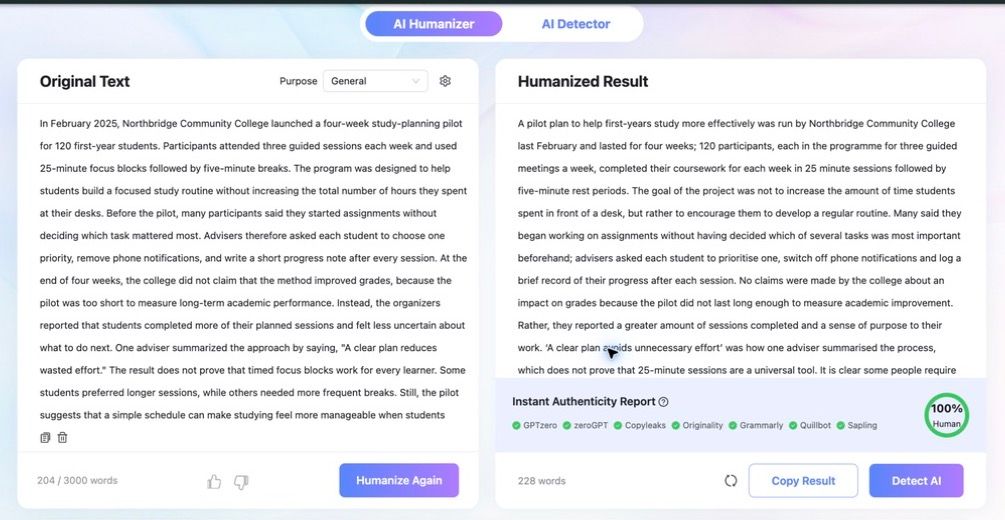
The screenshot above shows the separate 228-word Lynote rerun used to document the live interface. It preserved the source's no-grade-claim caveat better than the scored first pass, which is a useful reminder that generative rewrites can vary between runs.
WalterWrites First-Pass Result
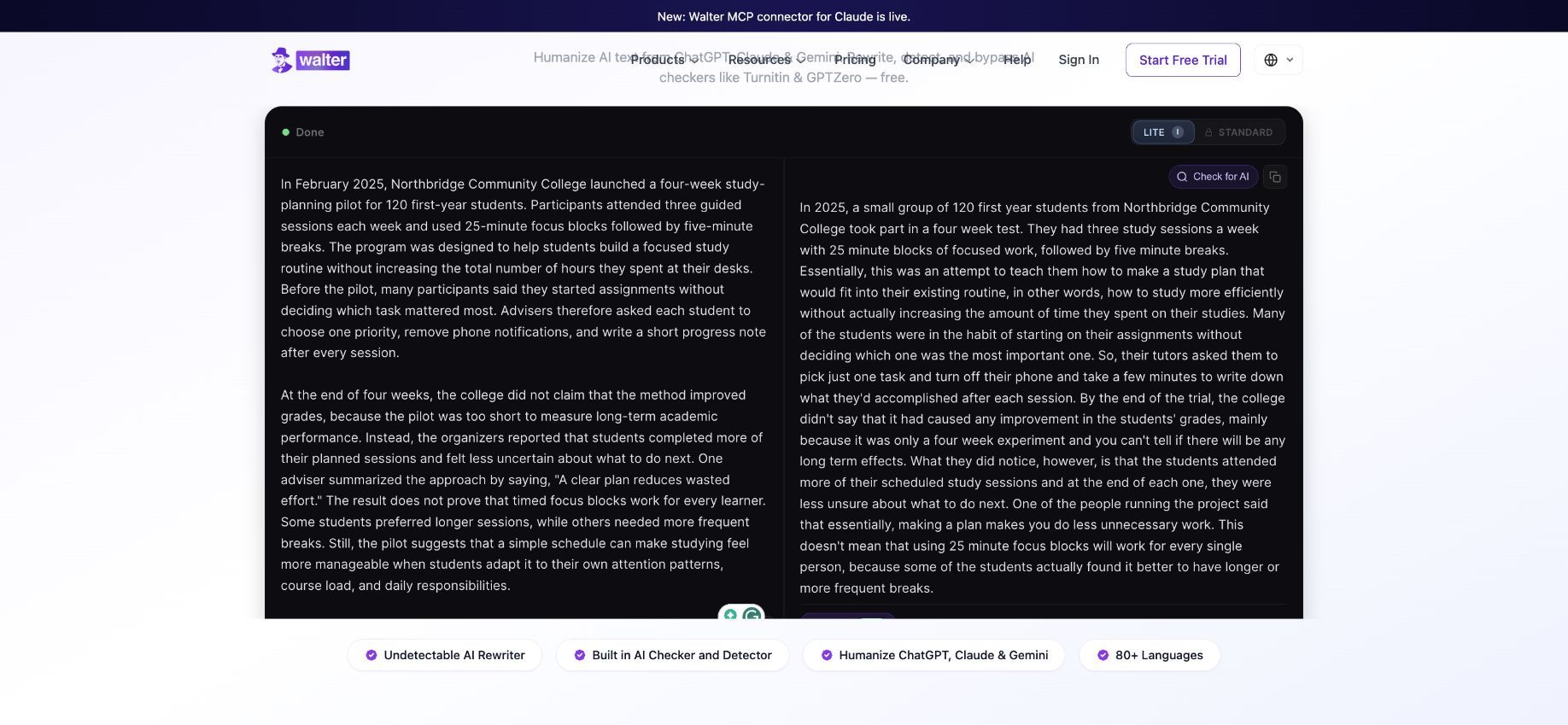
WalterWrites preserved the participant count, weekly schedule, timed blocks, lack of a grade claim, increased session completion, and uncertainty outcome. It kept the cautious idea that the method may not work for everyone.
Its 255-word output was more conversational, but not clean enough to publish untouched. It dropped the month, paraphrased the exact quotation, repeated "essentially," used several long sentences, and omitted the final conditions about attention patterns, course load, and daily responsibilities.
Meaning, Naturalness, and Editing Effort Compared
| Test detail | Source requirement | Lynote result | WalterWrites result |
|---|---|---|---|
| Date | February 2025 | Preserved | Month omitted |
| Participants | 120 first-year students | Preserved | Preserved |
| Session schedule | Three per week, 25/5 blocks | Preserved | Preserved |
| No grade claim | Explicit caution | Meaning shifted toward stronger success | Preserved |
| Exact quotation | Keep or clearly mark as paraphrase | Rewritten as a quote | Rewritten as a quote |
| Final claim strength | "Suggests" | Changed to "proves" | Kept a caution |
| Final conditions | Attention, course load, daily responsibilities | Compressed and changed | Omitted |
| Main editing need | Factual and stylistic review | Correct factual drift | Tighten prose and restore omissions |
WalterWrites required less substantive correction on this sample, so it wins the first-pass output test. Neither result was ready to publish without human editing.
Lynote vs. WalterWrites Scores
I weighted meaning and readability most heavily because a fluent rewrite is not useful if it changes the evidence. Feature breadth and pricing matter, but they should not erase output-quality problems.
| Category | Weight | Lynote | WalterWrites |
|---|---|---|---|
| Meaning and fact preservation | 20% | 4.5/10 | 7.0/10 |
| Naturalness and readability | 20% | 5.5/10 | 7.5/10 |
| Rewrite controls | 15% | 8.5/10 | 9.0/10 |
| Input and workflow | 10% | 9.0/10 | 7.5/10 |
| Output review | 10% | 9.0/10 | 8.5/10 |
| Free and paid value | 15% | 8.5/10 | 8.0/10 |
| Languages, integrations, and teams | 10% | 8.5/10 | 9.0/10 |
| Weighted total | Total weight | 72/100 | 79.5/100 |
The scores are my editorial assessment of the tested workflows and current plan information, not laboratory measurements. A different genre, language, or mode could produce a different result.
Which AI Humanizer Is Better for Your Use Case?
Best for Free, No-Commitment Testing: WalterWrites
WalterWrites completed the 204-word Lite test without an account and returned the faster result. Its 300-word trial is small, but it is sufficient for evaluating one short passage.
Best for Long Single Documents: Lynote
Lynote's paid 3,000-word request cap is higher than WalterWrites' 2,000-word maximum. The upload option also reduces friction when the source already exists as a document.
Best for Predictable Monthly Writing Volume: WalterWrites
WalterWrites publishes straightforward monthly word pools. That makes forecasting easier for writers who know approximately how much text they process.
Best for SEO Writers and Content Teams: WalterWrites
WalterWrites has the stronger dedicated writing stack for teams, including larger shared allowances and integration options. Its granular readability and rewrite controls are also relevant to editors managing multiple content types.
Best for Students and Researchers: Lynote
Lynote is better suited to a workflow that moves between documents, notes, summaries, and rewritten explanations. That breadth can be more valuable than a specialized humanizer subscription.
Students should still follow their institution's disclosure and authorship rules. A rewrite tool should help clarify your own work, not conceal copied material or replace the reasoning an assignment is designed to assess.
Best for Users Who Need More Than a Humanizer: Lynote
Choose Lynote when you want one account for humanization plus a broader set of learning and document tools. Choose WalterWrites when humanization, checking, and writing-team operations are the core workload.
Lynote and WalterWrites Pros and Cons
Lynote Pros and Cons
Pros
- Supports paste and document-upload workflows.
- Offers a higher paid per-request cap.
- Places the rewrite beside a multi-detector report.
- Extends into notes, documents, summaries, and other study tasks.
- Annual plan offers broad toolkit value.
Cons
- Credit-based pricing is harder to convert into a humanizer word budget.
- The tested output introduced important factual drift.
- The signed-in test was slower than WalterWrites Lite.
WalterWrites Pros and Cons
Pros
- Produced the stronger first-pass rewrite in this test.
- Completed the public Lite test quickly without an account.
- Uses clear monthly word allowances.
- Offers detailed writing controls on the advanced workflow.
- Provides team, API, and MCP paths for larger operations.
Cons
- Maximum paid request size is lower than Lynote's.
- The free trial is limited to a small total word allowance.
- The tested output still altered a quotation and omitted source details.
FAQs About Lynote vs. WalterWrites AI Humanizer
Is Lynote or WalterWrites better for free AI humanization?
WalterWrites provided the smoother no-account test in this review and completed the 204-word sample in Lite mode. Lynote showed a 300-word guest limit, but its wider free value is tied to Study Credits and the anonymous automated run did not complete in my session.
Which tool allows more words per request?
Lynote allows up to 3,000 words per humanizer request on Pro. WalterWrites lists up to 2,000 words per request on Elite and Teams, with lower limits on Starter and Pro.
Is Lynote cheaper than WalterWrites?
WalterWrites Starter was slightly cheaper annually at $96 per year, compared with Lynote's $99.99 annual plan. Lynote includes a wider tool suite, while WalterWrites provides a clearer word-based humanizer allowance.
Do both tools include AI-detection features?
Yes, both connect humanization with AI-detection context. Lynote displays an authenticity report with the result, and WalterWrites offers checking through its scan workflow. Treat either reading as an estimate rather than proof.
Which tool preserved meaning better?
WalterWrites preserved meaning better in this single controlled test. Lynote retained the main numbers but introduced stronger and unsupported claims, while WalterWrites mainly needed quotation, omission, and style corrections.
Can either tool remove every AI-detection signal?
No responsible test can promise the same result across every detector, text type, or future model. Focus on factual accuracy, original reasoning, disclosure requirements, and a careful human edit rather than chasing a particular score.
Which tool is better for students?
Lynote is the stronger all-in-one option for students who also need document, note, and study tools. WalterWrites can be the better specialized choice when the main task is controlled rewriting and the student has permission to use it.
Which tool is better for teams and API workflows?
WalterWrites is the clearer fit because it publishes a Teams plan and integration paths for API and MCP use. Lynote is positioned more strongly around individual learning and document workflows.
Final Verdict: Lynote vs. WalterWrites AI Humanizer
WalterWrites wins this comparison by a narrow but meaningful margin. Its public Lite mode was faster, and its first rewrite preserved the source's central caveat better, producing a weighted editorial score of 8.0/10 versus Lynote's 7.2/10.
Lynote is still the better product for several specific needs. It accepts document uploads, supports longer paid requests, includes a broader learning toolkit, and gives users a visible multi-detector report beside the output.
My practical recommendation is simple: choose WalterWrites for specialized, predictable-volume rewriting and team workflows; choose Lynote for longer document-based work and an all-in-one study environment. Whichever tool you use, compare every result with the source before publishing it, because fluent language can still carry a changed fact, quotation, or conclusion.

Written by Danny
Product Marketing Manager
Danny explains how Lynote features fit real workflows, from everyday productivity to product-led writing use cases. View all articles →