Lynote is the better overall AI humanizer in this comparison. It produced the more concise and faithful rewrite in our same-input test, and it offers a more complete workflow with document uploads, adjustable rewriting, multilingual support, and an Instant Authenticity Report.
Clever AI Humanizer has one major advantage that should not be dismissed: it is currently free and accepts up to 3,000 words per request. If you only need to paste a long English draft and receive a free rewrite, Clever offers unusually generous access.
The tradeoff became visible when both tools processed the same 239-word passage. Lynote returned 204 words and preserved most of the source structure. Clever expanded the passage to 376 words and introduced several claims that were not present in the original, creating considerably more verification and editing work.
Quick Verdict: Lynote vs. Clever AI Humanizer
The right choice depends on whether you value the lowest price or the most complete revision workflow.
| Category | Winner | Why |
|---|---|---|
| Overall | Lynote | Better result in our test plus uploads, rewrite controls, and built-in review feedback |
| Free long-form use | Clever | Up to 3,000 words per request for $0 |
| Meaning preservation | Lynote | Fewer unsupported additions in the tested output |
| Document workflow | Lynote | Paste text or upload DOC, DOCX, PDF, and TXT |
| Multilingual use | Lynote | Designed for multilingual rewriting; Clever currently states English only |
| Simplest interface | Clever | Paste, keep the Normal style, and click one button |
| Post-rewrite review | Lynote | Instant Authenticity Report plus copy and download options |
| Paid scale | Lynote | Free, monthly, yearly, and add-on credit choices |
Our recommendation: Choose Lynote AI Humanizer when output fidelity, control, file handling, or multilingual work matters. Choose Clever when the budget must remain at zero and you are prepared to fact-check and edit the result carefully.
Neither recommendation guarantees a particular AI detector result. Humanizer output can still be classified differently by different detectors, and an automated score cannot establish who wrote a document.
Lynote vs. Clever AI Humanizer at a Glance
The table below combines verified product capabilities with observations from our July 2026 test. A checkmark means the feature is currently available, a half mark means availability is conditional or incomplete, and a cross means we could not find an equivalent feature.
| Feature | Lynote | Clever AI Humanizer |
|---|---|---|
| Free access | ✅ | ✅ |
| No sign-up trial | ✅ | ✅ |
| Free humanizer limit per request | 300 words | 3,000 words |
| Paid humanizer limit per request | 3,000 words | No paid tier |
| Fixed monthly free word allowance | Credit-based | No fixed allowance |
| Capacity or fair-use restrictions | Credit balance applies | ◐ Service capacity and fair use apply |
| Paste text | ✅ | ✅ |
| Upload DOC/DOCX/PDF/TXT | ✅ | ❌ |
| Multiple rewrite controls | ✅ | ◐ Normal is live; two styles are marked coming soon |
| Multilingual workflow | ✅ | ❌ English only |
| Built-in authenticity feedback | ✅ | ❌ |
| Content history | ✅ with account workflow | ✅ for registered users |
| Copy output | ✅ | ✅ |
| Download output | ✅ | ❌ No equivalent visible in our guest test |
| Paid subscription | ✅ | ❌ |
| Overall workflow score | 4.6/5 | 3.1/5 |
Clever wins the allowance comparison for an anonymous or free user. Lynote wins the breadth comparison because it covers more of the process before and after the rewrite.
How We Compared Lynote and Clever Humanizer
We did not compare promotional examples supplied by either company. We wrote one 239-word informational passage about a fictional 18-person design team called Northstar Studio and pasted the exact same text into both tools.
The passage deliberately included details that a rewrite should preserve:
- The year 2024
- An 18-person team
- Specific remote and office days
- A 27 percent increase in revision requests
- A four-part decision log
- A direct quotation
- A qualified conclusion about hybrid work
Lynote was tested with the General purpose selected. Clever was tested with its currently available Normal writing style. No manual changes were made to the source between runs.
We evaluated the results across ten dimensions: meaning, factual accuracy, naturalness, sentence variation, readability, tone, names and numbers, awkward wording, required editing, and workflow completeness. Every quality score below refers to this specific test, not a universal benchmark.
What Lynote and Clever AI Humanizer Are Designed to Do
Although both products rewrite AI-like text, they approach the task differently.
Lynote: Controlled Rewriting With Review Feedback
Lynote treats humanization as a broader revision workflow. A user can paste text or upload a supported document, choose how the material should be handled, generate the rewrite, and then review an Instant Authenticity Report.
This structure is useful when the first output is not the end of the job. The file workflow, rewrite controls, detector predictions, and result actions reduce the number of separate tools needed to inspect and revise a draft.
Lynote also sits inside a larger paid product with shared Study Credits. That is more complex than a completely free editor, but it creates a path for users who need larger limits and adjacent tools.
Clever AI Humanizer: Free and Deliberately Simple
Clever is designed around a direct paste-and-rewrite experience. The current public tool accepts between 30 and 3,000 words, exposes a Normal writing style, and returns a result that can be copied.
The simplicity is appealing. A guest can open the page, paste a substantial English draft, and use the tool without choosing a subscription.
Clever promotes two additional styles, Clear & Structured and Simple Formal, but the live interface currently marks them as coming soon. For a fair comparison, we treated Normal as the only available style rather than scoring announced options as finished features.
Hands-On Workflow Comparison: Using the Same Text
Both products were easy to start, but they offered different amounts of control and feedback.
How We Used Lynote
- We opened Lynote AI Humanizer and kept the purpose set to General.
- We pasted the 239-word source into the editor.
- The interface confirmed the word count and made the Humanize button available.
- We ran the rewrite and reviewed the result beside the source.
- We inspected the Instant Authenticity Report and the result word count.
- We reviewed the available copy and detector actions.


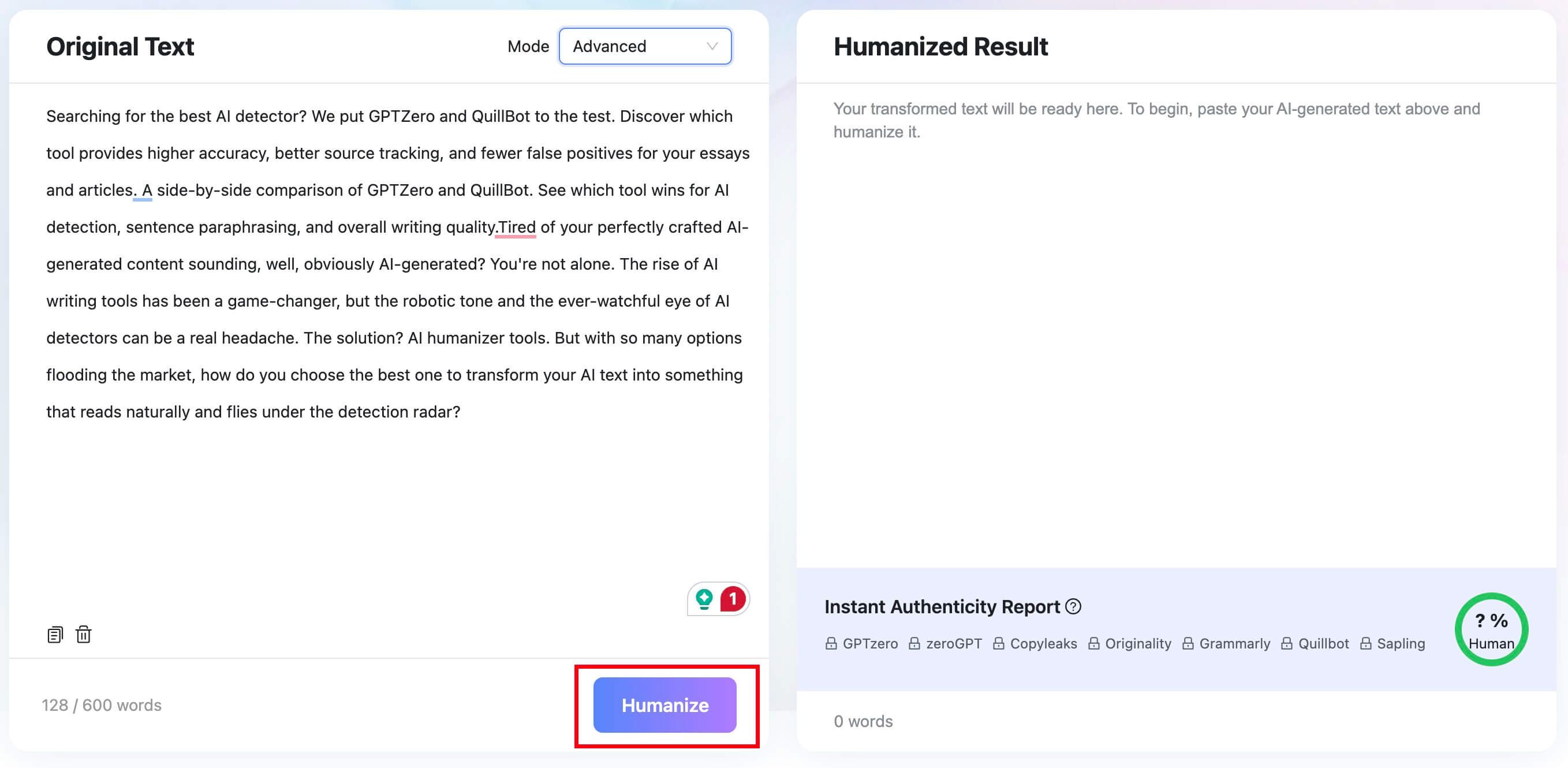

The test account showed a 3,000-word input ceiling because it had access to the larger plan limit. The public pricing table separately lists 300 words per request for Free and 3,000 for Pro.
Lynote returned 204 words. Its result panel also displayed a 100 percent Human prediction, but we treated that number only as Lynote's own review signal rather than independent validation.

How We Used Clever AI Humanizer
- We opened Clever AI Humanizer as a guest.
- We pasted the identical 239-word source into the rich-text editor.
- We confirmed that Normal was the active writing style.
- We clicked Humanize AI.
- The interface estimated approximately 15 seconds of processing.
- We reviewed the 376-word result and the Copy Text action.
The Clever workflow required fewer choices. However, it did not provide a built-in multi-detector report or a download option in the guest interface we tested.
Which Workflow Was Easier?
Clever required fewer decisions, so it wins for immediate simplicity. There was no need to understand credits, upload tabs, or post-result reports.
Lynote wins for workflow completeness. Its extra controls and result information were useful rather than decorative, particularly when the rewrite needed to be checked instead of copied immediately.
| Workflow factor | Lynote | Clever |
|---|---|---|
| Fast to understand | 4/5 | 5/5 |
| Input flexibility | 5/5 | 3/5 |
| Rewrite control | 5/5 | 2/5 |
| Result review | 5/5 | 2/5 |
| Export and next actions | 4/5 | 3/5 |
| Overall workflow | 4.6/5 | 3.0/5 |
Same-Input Results: Which Rewrite Was Better?
The biggest difference was not an AI score. It was how aggressively each product changed the source.
| Test metric | Original | Lynote | Clever |
|---|---|---|---|
| Word count | 239 | 204 | 376 |
| Change from source | — | -14.6% | +57.3% |
| Northstar Studio preserved | ✅ | ✅ | ✅ |
| 2024 preserved | ✅ | ✅ | ✅ |
| 18-person detail preserved | ✅ | ✅ | ✅, with altered phrasing |
| 27 percent preserved | ✅ | ✅ | ✅ |
| Direct quotation preserved exactly | ✅ | ❌ | ❌ |
| Unsupported details added | — | ◐ Minor | ❌ Several |
| Built-in detector feedback | — | ✅ | ❌ |
Lynote Result
Lynote opened with the direct sentence, “Flexible doesn't always mean better.” It then compressed the setup and retained the central sequence: hybrid schedule, faster delivery, more revisions, incomplete handoffs, decision logs, and normalized revision rates.
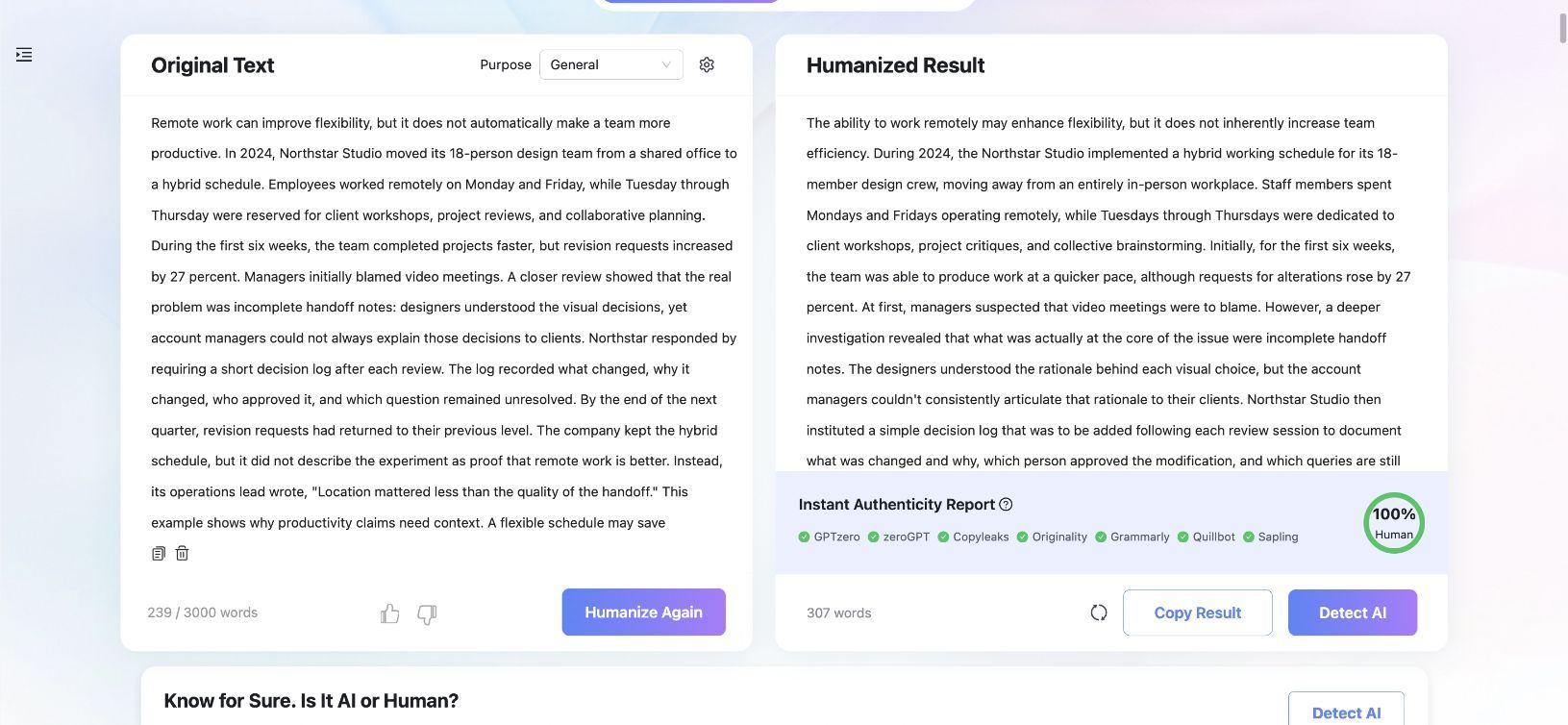
The result was not flawless. It replaced the generic phrase “video meetings” with “Zoom,” which introduced a brand absent from the source. It also changed the wording of the direct quotation and used the awkward shorthand “accounts” for account managers.
Those issues matter because a humanizer should not receive a free pass merely for sounding smooth. Still, the result remained close enough to the source that a focused editorial pass could correct it quickly.
Clever AI Humanizer Result
Clever produced a much longer article-style rewrite. It added an introductory address to the reader, expanded the background, and turned the final lesson into a broader management recommendation.
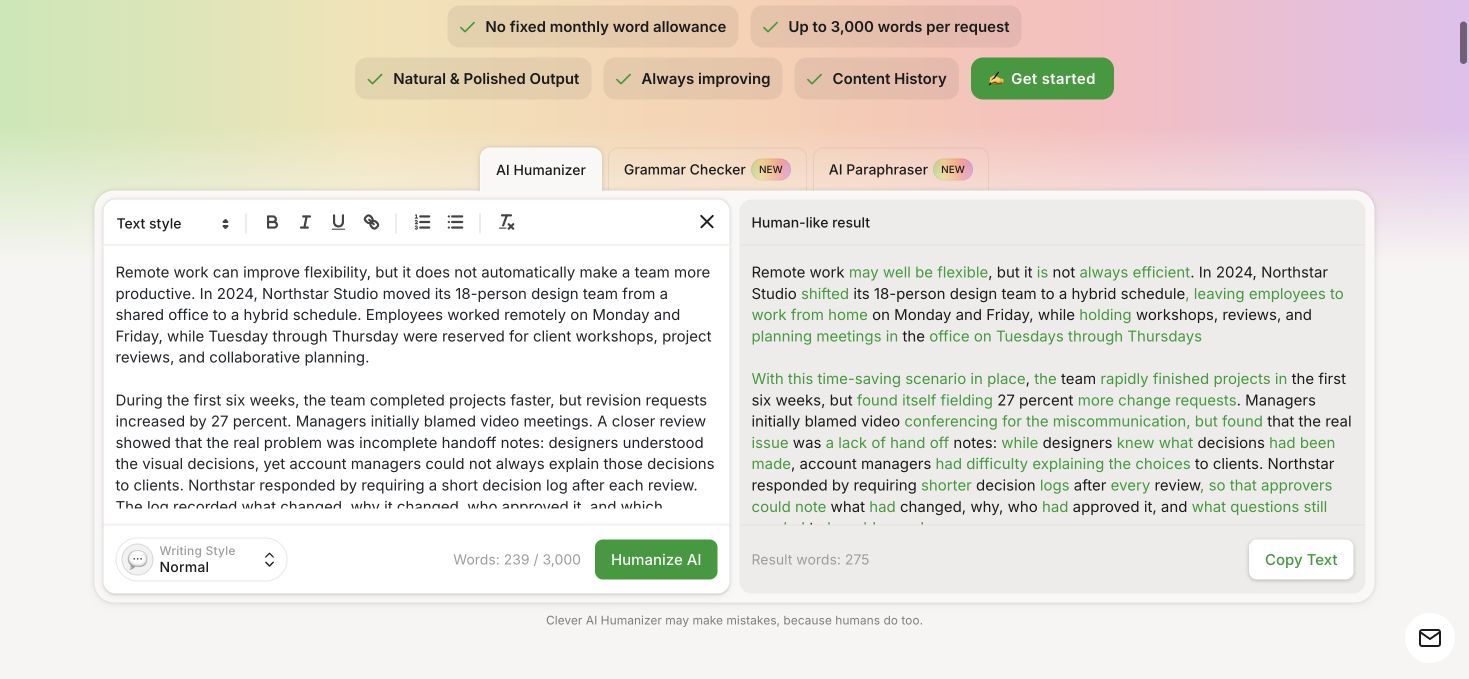
Some expansion improved structure, but several changes crossed from style into substance. “Completed projects faster” became “projects finished on time.” The result added strategic planning on “core workdays,” described the hybrid model as permanent, referred to an official statement, and introduced employee free time as a consideration.
None of those details appeared in the test input. Clever also replaced the direct quotation with a substantially different statement about accountability and decision-making.
The output was usable as raw material, but it required a line-by-line fact check. For a short source, expanding the word count by more than half also worked against the goal of efficient revision.
Hands-On Quality Scores
| Quality dimension | Lynote | Clever | Test winner |
|---|---|---|---|
| Meaning preservation | 4/5 | 3/5 | Lynote |
| Factual preservation | 3/5 | 2/5 | Lynote |
| Naturalness | 4/5 | 3/5 | Lynote |
| Sentence variation | 4/5 | 4/5 | Tie |
| Readability | 4/5 | 3/5 | Lynote |
| Tone control | 4/5 | 3/5 | Lynote |
| Names and numbers | 5/5 | 4/5 | Lynote |
| Freedom from awkward wording | 3/5 | 2/5 | Lynote |
| Low editing effort | 4/5 | 2/5 | Lynote |
| Workflow completeness | 5/5 | 3/5 | Lynote |
| Average | 4.0/5 | 2.9/5 | Lynote |
This test supports an overall Lynote recommendation, but it does not prove that Lynote will win every passage. Both tools use changing models, and another genre or run could produce a different result.
Rewrite Quality and Meaning Preservation
Humanizer quality is often reduced to whether a detector score falls. That misses the more important editorial question: did the rewrite remain true to the source?
Both Tools Changed a Direct Quote
The source contained the exact quotation: “Location mattered less than the quality of the handoff.”
Lynote changed it to a close paraphrase about location and handoff quality. Clever replaced it with a longer statement about where people worked, accountability, and how decisions were made.
Changing quoted language is a serious issue because quotation marks promise exact wording. The correct editorial response is to restore the original quotation or remove the quotation marks and attribute the idea as a paraphrase.
Lynote Added Less, but It Still Added Something
Lynote's substitution of “Zoom” for “video meetings” illustrates a smaller form of factual drift. Zoom is plausible, but plausible is not the same as present in the source.
This is why even the stronger result still needs review. The advantage was scale: Lynote introduced fewer unsupported changes, making them easier to identify.
Clever Added an Argument
Clever did more than adjust rhythm and wording. It added a stronger reader-facing thesis, management context, an official statement, and a broader conclusion about employee free time.
That may be useful when a writer explicitly asks for expansion, but it is risky when the goal is humanization with meaning preservation. A longer result can sound more developed while quietly becoming less faithful.
Editing Effort Matters
An AI humanizer saves time only when reviewing its output takes less effort than rewriting the draft manually.
Lynote's 204-word result needed several targeted corrections. Clever's 376-word result required checking a much larger number of claims and simplifying awkward sentences. That difference drove our editing-effort scores more than either tool's interface did.
Controls, Modes, and Writing Styles
Lynote offers more control over what the rewrite is supposed to do. Its current workflow includes purpose selection and adjustable humanization options, allowing the user to balance lighter editing against stronger restructuring.
Clever's public interface presents a cleaner choice. Normal is live and described as the most natural option. Clear & Structured and Simple Formal are displayed as future options rather than available settings.
| Control | Lynote | Clever |
|---|---|---|
| General-purpose rewriting | ✅ | ✅ Normal |
| Lighter editing option | ✅ | ❌ |
| Stronger restructuring option | ✅ | ❌ |
| Purpose selection | ✅ | ❌ |
| Clear and structured style | ✅ through controls | ◐ Coming soon |
| Formal style | ✅ through controls | ◐ Coming soon |
Clever's limited control is not automatically a defect. A user who wants one sensible default may prefer it. The limitation appears when the first output is too expansive or insufficiently formal, because there is no live style alternative to correct the direction before rerunning.
Input Options, Word Limits, and Long-Document Handling
Word-limit comparisons become misleading when they mix four different concepts: the maximum per request, a monthly allowance, a credit balance, and a temporary capacity restriction.
Lynote Limits
The current Lynote pricing page lists:
- Free: up to 300 AI Humanizer words per request
- Pro Monthly: up to 3,000 words per request
- Pro Yearly: up to 3,000 words per request
- Free credit allocation: 100 one-time Study Credits for registered users
- Pro credit allocation: 10,000 Study Credits per month
Lynote accepts pasted text and DOC, DOCX, PDF, or TXT uploads. That makes the practical limit easier to manage for reports and papers that already exist as documents.
Clever Limits
Clever currently accepts a minimum of 30 words and a maximum of 3,000 words per request. It states that there is no fixed monthly word allowance.
That does not mean unrestricted processing will always be available. The live page and terms make access subject to service availability, daily or periodic quotas, fair use, throttling, and capacity. During research, the page displayed a processing-capacity message at least once, although our hands-on test later completed normally.
Why Older Clever Limits Are Wrong
Several third-party reviews still list 7,000 words per request and 200,000 words per month. Clever's own June 2026 update says the old 200,000-word monthly limit was removed, while the current interface displays 3,000 words per request.
The newer policy is better in one way and less predictable in another. There is no fixed monthly bucket, but availability is not a contractual promise of endless daily usage.
| Limit | Lynote Free | Lynote Pro | Clever Free |
|---|---|---|---|
| Minimum input | Tool-dependent | Tool-dependent | 30 words |
| Maximum per request | 300 words | 3,000 words | 3,000 words |
| Monthly model | Study Credits | 10,000 Study Credits/month | No fixed allowance |
| Long document upload | ✅ | ✅ | ❌ |
| Capacity caveat | Credit balance | Credit balance | Service availability and fair use |
For a free 2,000-word English article, Clever is the easier fit. For a DOCX report that needs controlled revision and post-output review, Lynote has the more capable workflow.
AI Detector Feedback and Post-Rewrite Review
Lynote's Instant Authenticity Report is the clearest functional difference after the result appears. It provides predicted views associated with several detector brands and a combined human-likelihood presentation.
The report can help a writer identify whether the rewrite still contains patterns worth reviewing. It should not be treated as a guarantee that an external service will return the same score.
Clever's result panel focuses on the rewritten text and word count. In our guest test, it did not provide an equivalent multi-detector report.
| Post-rewrite task | Lynote | Clever |
|---|---|---|
| Read rewritten text | ✅ | ✅ |
| See result word count | ✅ | ✅ |
| Copy result | ✅ | ✅ |
| Download result | ✅ | ❌ in tested guest workflow |
| Review built-in detector predictions | ✅ | ❌ |
| Run a connected detector action | ✅ | ❌ |
| Preserve result history | ✅ with account workflow | ✅ for registered users |
Lynote wins this category because it supports a review loop. Clever is closer to a single-purpose rewriting box.
Pricing, Free Benefits, and Paid Value
Clever and Lynote use fundamentally different pricing models. Clever is a free product with availability controls. Lynote combines a smaller free allocation with subscriptions and optional credits.
Clever AI Humanizer Pricing
Clever costs $0 at the time of this review. It has no paid plan, subscription, or premium writing mode currently available.
Its terms reserve the right to introduce paid features later. Until that happens, there are no “paid Clever benefits” to compare; claims about Clever Basic, Pro, or Enterprise plans belong to other products or outdated pages.
Lynote Free
Lynote Free costs $0 and does not require a credit card. The live pricing page lists 100 one-time Study Credits for registered users and a 300-word per-request AI Humanizer limit.
The free plan is enough to test short passages, but it is less generous than Clever for a long pasted draft.
Lynote Pro Monthly
The current monthly offer begins with a $1.95 three-day trial. It then renews at $29.99 per month unless canceled.
Pro Monthly includes 10,000 Study Credits per month and increases the AI Humanizer request limit to 3,000 words. It also expands limits across Lynote's wider toolset.
Lynote Pro Yearly
Pro Yearly costs $99.99 billed annually, equivalent to $8.33 per month. It includes 10,000 Study Credits per month, the 3,000-word humanizer limit, all Pro features, and priority support.
The annual plan is substantially less expensive per month, but it requires the larger upfront commitment.
Lynote Add-On Credits
Users can purchase 10,000 additional Study Credits for $9.99. The current pricing FAQ states that add-on credits remain valid for 365 days.
This option suits occasional bursts better than starting a recurring monthly subscription, although feature costs can change as models and pricing rules evolve.
| Plan | Price | Humanizer limit | Included usage | Paid benefits |
|---|---|---|---|---|
| Clever Free | $0 | 3,000 words/request | No fixed monthly allowance; fair use applies | No paid tier |
| Lynote Free | $0 | 300 words/request | 100 one-time registered-user credits | All core tools available within credits |
| Lynote Pro Monthly | $1.95/3 days, then $29.99/month | 3,000 words/request | 10,000 credits/month | Larger limits and all Pro features |
| Lynote Pro Yearly | $99.99/year | 3,000 words/request | 10,000 credits/month | Monthly Pro features plus priority support |
| Lynote Add-On | $9.99 | Depends on account plan | 10,000 credits valid 365 days | One-time top-up |
Best free value: Clever.
Best paid workflow: Lynote Pro Yearly for regular users, provided the wider Lynote feature set is useful.
Best occasional paid option: Lynote's add-on pack when a user needs temporary extra capacity without another monthly renewal.
Speed, Ease of Use, History, and Export
Clever's interface estimated about 15 seconds and produced the result by our first check after 16 seconds. The page clearly communicated that processing was underway.
Lynote also completed the short passage promptly, but our test did not instrument the exact completion event. We therefore will not invent a precise head-to-head timing result.
Clever is easier to understand at first glance. Lynote requires slightly more attention because it exposes purpose, settings, account limits, and result feedback.
That relationship reverses after the rewrite. Lynote provides more ways to review and move the output, while Clever leaves more of the next step to the user.
| Usability factor | Lynote | Clever |
|---|---|---|
| First-run simplicity | 4/5 | 5/5 |
| Clear input limit | 5/5 | 5/5 |
| Setting clarity | 4/5 | 4/5 |
| Progress feedback | 4/5 | 5/5 |
| Result actions | 5/5 | 3/5 |
| Account history | 4/5 | 4/5 |
| Capacity predictability | 4/5 | 3/5 |
Language Support and Best Content Types
Clever's current FAQ states that it supports English only. Its Normal style is a reasonable fit for English blog posts, social posts, product descriptions, and general prose.
Lynote is the better option for multilingual workflows. It is also better suited to documents because users can upload common file formats rather than splitting and pasting everything manually.
| Content type | Better choice | Reason |
|---|---|---|
| Short English paragraph | Lynote | Better review and control in our test |
| Long free English paste | Clever | 3,000 free words per request |
| Multilingual content | Lynote | Clever currently states English only |
| PDF or DOCX workflow | Lynote | Supported document upload |
| SEO content | Lynote | More control and stronger keyword-review workflow |
| Quick social rewrite | Clever | Low-friction Normal style |
| Report requiring factual fidelity | Lynote | Fewer unsupported additions in our test |
We did not run a multilingual quality benchmark, so this recommendation reflects product support and workflow rather than a claim that every supported language performs equally.
Privacy and Data Handling
Any humanizer receives the text a user submits. That makes privacy relevant even when the product is free.
Clever's privacy policy says registered-user inputs and outputs may remain in account history for up to 30 days. It also states that usage logs may be retained for up to 180 days, subject to legal and security exceptions.
Lynote states that input data is processed securely and is not stored or used for model training. We did not find a directly comparable public retention schedule for every account and log type, so we will not claim a more specific period.
| Privacy question | Lynote | Clever |
|---|---|---|
| Public privacy information | ✅ | ✅ |
| Account history | ✅ | ✅ registered users |
| Stated content-history period | Not specified in the compared workflow | Up to 30 days |
| Stated usage-log period | Not specified in the compared workflow | Up to 180 days |
| Appropriate for secrets without review | ❌ | ❌ |
Do not paste confidential client data, unpublished research, personal identifiers, regulated records, or legally privileged text into either tool unless the applicable policy and agreement meet your requirements.
Where Each AI Humanizer Falls Short
A useful comparison should make the limitations as visible as the strengths.
Lynote Limitations
- The free per-request allowance is only 300 words on the current pricing page.
- Pro uses a shared Study Credit pool rather than a humanizer-only unlimited plan.
- The $1.95 trial renews at $29.99 per month unless canceled.
- Our tested output still introduced “Zoom” and changed a direct quotation.
- Built-in authenticity predictions are not independent guarantees.
Clever AI Humanizer Limitations
- It supports English only according to the current FAQ.
- Normal is the only live writing style; two advertised alternatives are coming soon.
- There is no built-in multi-detector feedback panel.
- Free access remains subject to capacity, throttling, quotas, and fair use.
- Our result expanded by 57.3 percent and added multiple unsupported details.
- The output changed the direct quotation and required substantial fact-checking.
Limitations Shared by Both
Neither tool can verify the truth of the source, create original expertise, or decide whether AI assistance is permitted in a school or workplace. Both results required human review.
A humanizer should be used to improve a draft the user is allowed to edit, not to misrepresent authorship or hide prohibited assistance.
Which One Should You Choose?
Choose Lynote when:
- You want the stronger overall result from this comparison.
- Meaning preservation and lower editing effort matter.
- You need DOC, DOCX, PDF, or TXT upload.
- You want multiple rewrite controls.
- You work with more than English.
- You want authenticity feedback in the same workflow.
- You are willing to use credits or pay for larger recurring limits.
Choose Clever AI Humanizer when:
- The tool must cost nothing.
- Your content is in English.
- You need to paste more than Lynote's 300-word free limit.
- One general-purpose writing style is sufficient.
- You are prepared to inspect every changed fact and quotation.
- Temporary capacity limits will not disrupt a deadline.
Choose manual editing when:
- The writing contains sensitive information.
- Exact quotations and technical language must remain unchanged.
- The assignment requires entirely original unaided writing.
- The draft needs new reasoning, evidence, or personal experience rather than stylistic revision.
| Your priority | Recommended choice |
|---|---|
| Best overall workflow | Lynote |
| Most generous free request | Clever |
| Best tested meaning preservation | Lynote |
| Simplest guest experience | Clever |
| Best for document uploads | Lynote |
| Best for multilingual work | Lynote |
| Best for detector-aware review | Lynote |
| Best for zero-budget English drafts | Clever |
FAQs About Lynote vs. Clever AI Humanizer
Is Clever AI Humanizer completely free?
Yes, Clever AI Humanizer is currently free. Its official terms state that paid features may be introduced later, and free usage remains subject to capacity, quotas, throttling, and fair use.
Does Clever AI Humanizer have a paid plan?
No current paid plan is listed on the official site or in its current terms. Pages claiming Clever Basic, Pro, or Enterprise pricing may be outdated or referring to another product.
How many words can Clever AI Humanizer process?
The current limit is a minimum of 30 words and a maximum of 3,000 words per request. Older figures of 7,000 words per run and 200,000 words per month no longer match the live product.
How many words can Lynote humanize for free?
The current Lynote pricing page lists up to 300 AI Humanizer words per free request. Pro raises the request limit to 3,000 words.
Does Lynote support document uploads?
Yes. Lynote AI Humanizer supports pasted text and DOC, DOCX, PDF, and TXT uploads.
Which tool supports more languages?
Lynote is the better multilingual option. Clever's current FAQ states that it supports English only.
Which tool provides AI detector feedback?
Lynote provides an Instant Authenticity Report with several detector predictions. Clever did not show an equivalent multi-detector panel in our guest test.
Can either tool guarantee a human detector score?
No. Detector models and thresholds change, and different services can disagree about the same text. Clever explicitly rejects guarantees, and Lynote's report should also be treated as a prediction rather than proof.
Which tool is better for long documents?
Clever is more generous for a free pasted English draft because it accepts up to 3,000 words per request. Lynote Pro is better for a structured long-document workflow because it combines the same 3,000-word limit with file uploads, rewrite controls, and post-result review.
Which tool is better for students?
Lynote provides the more complete revision workflow, but the correct choice depends on the assignment rules. A student should use either tool only when AI-assisted editing is permitted and should preserve drafts, sources, quotations, and their own reasoning.
Final Verdict: Lynote or Clever AI Humanizer?
Lynote wins this comparison. It produced the more concise and faithful output in our same-input test, required less corrective editing, and offered stronger controls, document support, multilingual capability, and post-rewrite feedback.
Clever AI Humanizer remains an impressive free-value option. Processing up to 3,000 English words per request without a subscription is a meaningful advantage, especially for users who cannot justify a paid plan.
The choice is therefore not “paid good, free bad.” It is a tradeoff between Clever's free capacity and Lynote's stronger end-to-end revision workflow. In our test, the quality and verification difference was large enough for Lynote to be the better overall choice.
Whichever tool you use, restore exact quotations, verify every factual change, and edit the result in your own voice. A useful humanizer reduces mechanical phrasing; it does not remove the writer's responsibility for accuracy, originality, or disclosure.

Written by Danny
Product Marketing Manager
Danny explains how Lynote features fit real workflows, from everyday productivity to product-led writing use cases. View all articles →