Best AI Tools for PhD Students by Research Stage

If you are a PhD student searching for the best AI tools, you probably do not need one “magic” app. You need a small workflow that helps at different stages: finding papers, understanding dense material, organizing notes, writing more clearly, and checking whether your final work still meets academic standards.
That distinction matters. A tool that is great for literature discovery may be weak for note-taking. A chatbot that helps you brainstorm may not be safe for citation work. A summarizer can save hours, but you still need to verify claims against the original source.
This guide breaks the best AI tools for PhD students by actual research task, so you can build a stack that supports your work without replacing your judgment.

Quick Answer: Best AI Tools for PhD Students by Task
| PhD task | Best-fit tools | What they help with | Watch out for |
|---|---|---|---|
| Finding academic papers | Elicit, Consensus, Semantic Scholar, Research Rabbit | Searching, paper discovery, citation trails, related-work mapping | Do not rely on AI summaries without opening the original papers |
| Screening literature | Elicit, Paperpal, Scite, Research Rabbit | Comparing abstracts, checking claims, exploring citation context | Coverage varies by field and database |
| Summarizing papers, lectures, or long videos | Lynote AI Summarizer, NotebookLM, Claude, ChatGPT | Turning long materials into structured notes and questions | Summaries can miss nuance; verify important details |
| Extracting lecture or conference transcripts | Lynote YouTube Video Summarizer, YouTube Transcript tools, NotebookLM | Reviewing talks, lectures, interviews, methods walkthroughs | Works best when captions or transcript quality is good |
| Organizing notes | Lynote AI Note Generator, Notion, Obsidian, Zotero notes | Turning source material into reusable research notes | Notes need consistent naming and manual cleanup |
| Studying for exams or qualifying reviews | Lynote AI Flashcard Generator, Anki, Quizlet | Active recall from your own materials | AI-generated cards should be edited before serious exams |
| Writing and editing | Grammarly, Paperpal, Claude, ChatGPT | Clarity, grammar, structure, title ideas, plain-language rewrites | Check your department’s AI-writing policy |
| Checking AI-assisted text | Lynote AI Detector, manual review, institutional guidance | Flagging sections that may read too machine-written | Detection should not be treated as final proof |
The best setup for most PhD students is not one tool. It is a modest stack: one paper-discovery tool, one reading/summarizing tool, one citation manager, one writing assistant, and a clear rule for disclosure.
How to Choose AI Tools During a PhD
Before you sign up for every tool on a recommendation list, ask what kind of work you are trying to improve.
If the bottleneck is discovery, you need a research database or citation-mapping tool. If the bottleneck is understanding, you need summaries, transcripts, and notes. If the bottleneck is writing, you need editing help. If the bottleneck is academic compliance, you need your university policy, your supervisor’s expectations, and a record of how AI was used.
A useful AI tool for PhD work should do at least one of these things well:
- reduce the time needed to triage large amounts of material;
- preserve a clear trail back to the original source;
- help you ask better questions about a paper, lecture, dataset, or chapter;
- make your own notes easier to review later;
- improve clarity without inventing claims or citations;
- fit your field’s standards for accuracy, citation, and disclosure.
The less visible the AI contribution is, the more careful you need to be. Using AI to summarize a lecture for your private notes is very different from asking it to write a dissertation section.
1. Literature Discovery Tools: Elicit, Consensus, Semantic Scholar, and Research Rabbit
Literature discovery is where many PhD students first feel the pressure. You search one phrase, find fifty papers, open ten PDFs, then realize the important debate uses a slightly different term.
This is where dedicated research tools are usually stronger than general chatbots.
Elicit is useful when you have a research question and want to find papers, compare abstracts, extract structured information, or ask questions over a set of sources. It is especially relevant for empirical fields where you need to compare study design, sample size, outcomes, and findings.
Consensus is helpful when you want evidence-oriented answers based on academic papers. It can be useful for early-stage question framing, although you should still inspect the underlying papers before citing anything.
Semantic Scholar is a strong free option for paper discovery, author trails, and related research. It is not just an AI novelty tool; it is a serious research search engine.
Research Rabbit is useful when your problem is not “summarize this PDF” but “show me nearby papers and citation networks.” For mapping a topic area, it can save a lot of manual searching.
Use these tools when your question is:
- “What has been published on this topic?”
- “Which papers are adjacent to this one?”
- “Which studies should I screen first?”
- “What are the main clusters in this research area?”
Do not use them as a shortcut for reading. A PhD literature review still needs your judgment, your inclusion/exclusion criteria, and your own synthesis.
2. Summarizing Papers, Lectures, and Research Videos
Once you have sources, the next problem is volume. PhD students often read PDFs, watch conference talks, review recorded seminars, and revisit methodology videos. AI summarizers can help here, but only if you treat them as a reading aid rather than a final authority.
For text-heavy sources, a good summarizer should produce:
- the main claim or argument;
- the method or evidence used;
- key terms and definitions;
- limitations or assumptions;
- follow-up questions you should verify in the original source.
For video-heavy sources, timestamps and transcripts matter. A two-hour lecture is much easier to reuse if you can jump to the section where the speaker explains a method, dataset, theory, or limitation.
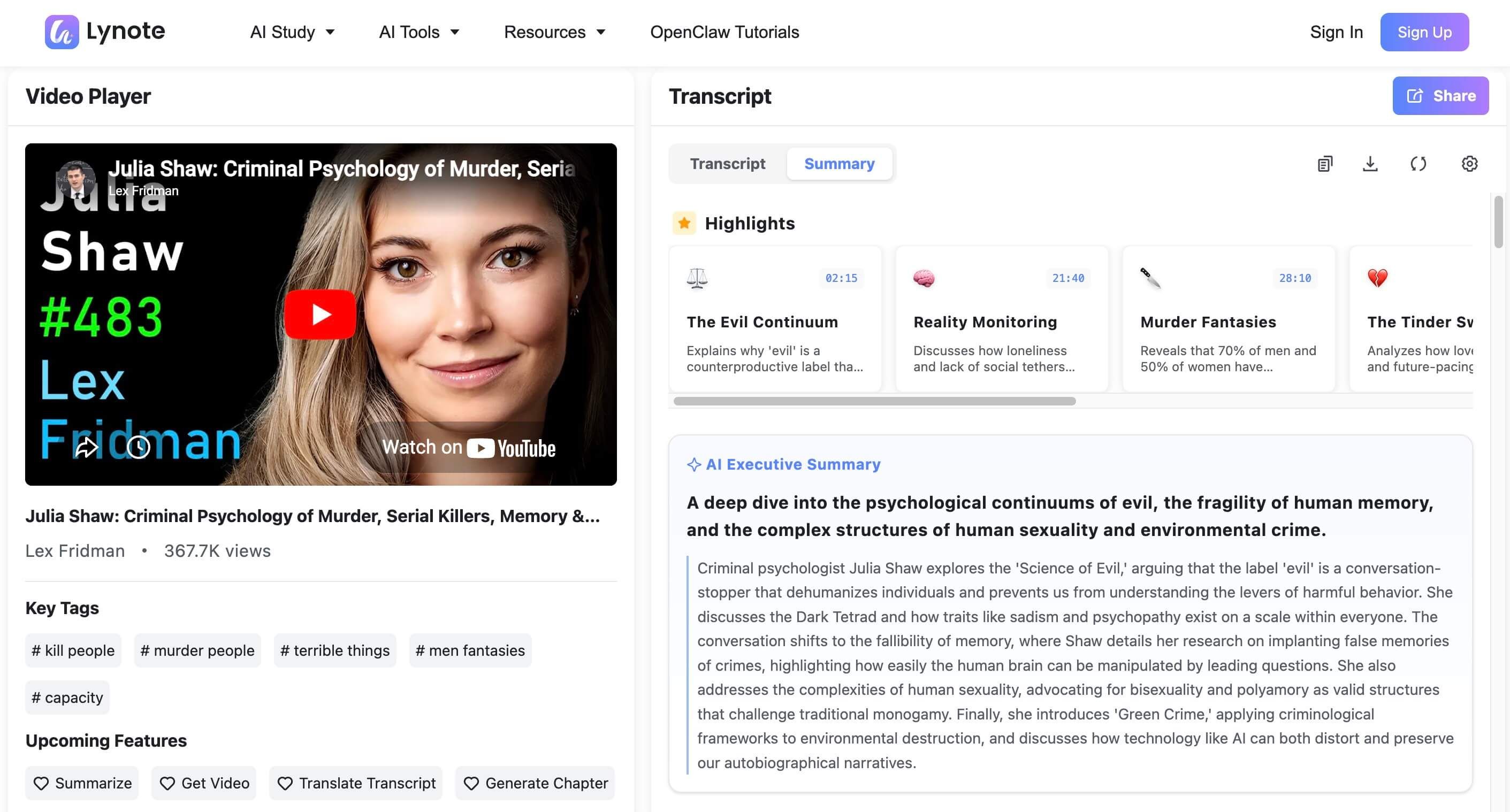
This is where Lynote can fit naturally into a PhD workflow. You can use it to turn lectures, interviews, tutorials, and other learning materials into structured summaries or notes, then return to the original source for verification.
A practical workflow:
- Paste a lecture, interview, or research video URL.
- Generate a transcript or summary.
- Pull out concepts, definitions, methods, and unanswered questions.
- Add only the verified points to your research notes.
- Revisit the original timestamp before citing or relying on a claim.
This is useful for keeping up with conference talks, invited lectures, methods explainers, and long expert interviews. It is not a replacement for database search or peer-reviewed reading.
3. Note-Taking and Knowledge Organization
AI notes are only useful if you can find and reuse them later. A beautiful summary that disappears into a random document folder will not help you six months into a literature review.
For PhD work, notes should usually include:
- bibliographic details or source link;
- research question or topic tag;
- key claims;
- method and sample/context;
- useful quotes or page references;
- limitations;
- your own reaction or “why this matters” note;
- possible connection to your dissertation chapter, paper, or project.
Tools like Notion and Obsidian are strong for building a personal knowledge base. Zotero is essential for citation management and can also support notes tied to papers. Lynote is useful when you want to turn raw material into a structured note quickly, especially from mixed input types such as documents, webpages, audio, video, or YouTube.
The key is to keep AI-generated notes visibly separate from your own interpretation. A simple label like “AI summary — needs verification” prevents future-you from treating a quick draft as a reviewed source.
4. Citation and Reference Management
No AI tool replaces a citation manager. If you are doing a PhD, you need a reliable system for storing PDFs, metadata, tags, notes, and citation styles.
Zotero is the safest default recommendation for most students because it is free, widely used, and strong for browser-based saving, PDF organization, citation styles, and Word or Google Docs workflows. Paperpile and Mendeley can also work well depending on your institution and writing setup.
Use AI around your citation manager, not instead of it.
For example:
- use a discovery tool to find promising papers;
- save real PDFs and metadata in Zotero;
- summarize or annotate the paper separately;
- write your own synthesis note;
- cite from the citation manager, not from an AI-generated bibliography.
This protects you from one of the most common AI research problems: plausible but wrong citations.
5. Academic Writing and Editing Tools
Writing tools can help, but this is where PhD students need the most discipline. It is usually fine to use AI to make a paragraph clearer, shorten a long sentence, brainstorm headings, or check grammar. It is much riskier to let AI generate substantive argumentation, literature synthesis, or evidence claims.
A good rule: use AI to improve the expression of ideas you already understand, not to create expertise you do not have.
Helpful uses include:
- turning a rough outline into a clearer structure;
- simplifying an overlong sentence;
- checking grammar and punctuation;
- making an abstract more concise;
- generating possible section headings;
- identifying vague phrases that need evidence.
Riskier uses include:
- writing a literature review from scratch;
- creating citations;
- summarizing papers you have not checked;
- making claims about your data;
- rewriting so heavily that your meaning changes.
If you use AI while writing, keep a record. Some supervisors, journals, and universities require disclosure. Even when disclosure is not required, your own notes should make it clear which parts were assisted and how.
6. Data Analysis and Coding Support
The best AI tools for data work depend heavily on your field.
For quantitative projects, you may use R, Python, SPSS, Stata, MATLAB, or Julia. AI assistants can help explain code, debug errors, generate plotting ideas, or translate a statistical plan into starter code. For qualitative work, tools such as NVivo, ATLAS.ti, or MAXQDA may be more relevant, with AI features increasingly appearing inside those ecosystems.
The danger is not that AI writes code. The danger is that it writes code you cannot explain.
For PhD-level work, you should be able to answer:
- Why did you choose this model?
- What assumptions does it make?
- How did you clean the data?
- What does each variable mean?
- How did you verify the output?
Use AI as a tutor or assistant, not as the final analyst.
7. Checking AI Use Before Submission
AI detection is a sensitive area. Detection tools can be useful as a signal, but they should not be treated as perfect proof that a text was or was not written by AI.
For a PhD student, the better question is not “Can I beat a detector?” It is:
- Does this paragraph accurately represent my source?
- Did I write the argument myself?
- Did AI change the meaning?
- Does my university or journal require disclosure?
- Can I explain and defend every claim?
If a detector flags a section, review it manually. Look for generic phrasing, unsupported claims, repetitive structure, and places where the writing sounds smoother than the thinking behind it.
The safest workflow is: draft with your own argument, use editing tools lightly, check for clarity, verify sources, and disclose AI assistance when required.
Where Lynote Fits in a PhD Workflow
Lynote is strongest when your research workflow involves learning from long materials and turning them into reusable notes.
Use Lynote when you need to:
- summarize a lecture, tutorial, interview, webinar, or research video;
- extract a transcript from a YouTube lecture when captions are available;
- turn a PDF, webpage, audio file, video, or note into a structured summary;
- convert source material into study notes;
- generate flashcards from verified notes for active recall;
- review AI-assisted writing before final human editing.
Do not use Lynote as your only literature discovery tool. For finding and screening peer-reviewed papers, use dedicated research tools such as Elicit, Consensus, Semantic Scholar, Research Rabbit, Scite, or your university library databases.
In other words: let research databases help you find sources. Let Lynote help you understand, organize, and review source material faster.
Example AI Workflow for a Literature Review Week
Here is a realistic workflow for a PhD student preparing a literature review section.
- Start with a research question and keywords.
- Use Elicit, Semantic Scholar, or your library database to find candidate papers.
- Save PDFs and citation metadata in Zotero.
- Screen abstracts and methods manually.
- Use AI summaries only to speed up first-pass understanding.
- Create structured notes with source links, page references, and your own comments.
- Map papers by theme, method, population, theory, or debate.
- Draft your synthesis in your own words.
- Use a writing assistant only for clarity and readability.
- Check policy requirements before submitting, publishing, or sharing the work.
This workflow is slower than asking a chatbot for a literature review. It is also much safer and more credible.
Common Mistakes PhD Students Make With AI Tools
The first mistake is using one tool for every task. A chatbot is not a citation manager. A summarizer is not a peer reviewer. A detector is not a university policy.
The second mistake is trusting confident output. AI can produce fluent summaries that skip limitations, flatten disagreements, or misunderstand technical terms.
The third mistake is losing the source trail. If you cannot trace a claim back to a paper, page, timestamp, dataset, or field note, do not put it into academic writing.
The fourth mistake is over-editing your own voice. Academic writing does not need to sound generic. It needs to be precise, accountable, and clear.
The fifth mistake is ignoring disclosure rules. Different departments, supervisors, journals, and conferences may have different standards. Check before you submit.
FAQ: AI Tools for PhD Students
What is the best AI tool for PhD students?
There is no single best tool for every PhD student. For literature discovery, tools like Elicit, Consensus, Semantic Scholar, and Research Rabbit are useful. For summarizing lectures, PDFs, videos, and notes, Lynote or NotebookLM can help. For citations, use Zotero or another reference manager. For writing polish, use tools like Grammarly, Paperpal, Claude, or ChatGPT carefully.
Can I use AI to write my dissertation?
You should not use AI to replace your own argument, evidence, or analysis. Some programs allow limited AI assistance for brainstorming, editing, or language improvement, while others restrict it. Always check your university, department, supervisor, journal, or funder policy.
Are AI summaries reliable for academic papers?
AI summaries are useful for first-pass understanding, but they are not reliable enough to cite without checking the original source. Always verify methods, results, limitations, and quotations directly in the paper.
What AI tools help with literature review?
For literature review, start with tools built for research discovery and screening, such as Elicit, Consensus, Semantic Scholar, Research Rabbit, Scite, Paperpal, and your university library databases. Use summarizers and note tools after you have identified real sources.
How can PhD students use Lynote?
PhD students can use Lynote to summarize long materials, extract YouTube transcripts when captions are available, turn lectures or PDFs into structured notes, create flashcards from study materials, and review AI-assisted text before final editing. It works best as a learning and note workflow tool, not as a replacement for academic databases.
Should I disclose AI use in research writing?
If your institution, instructor, journal, or conference requires disclosure, yes. Even when disclosure is not explicitly required, it is wise to keep a private record of which tools you used and for what purpose.
Conclusion
The best AI tools for PhD students are the ones that make your research process clearer, faster, and more accountable. Use dedicated research tools to find papers, a citation manager to preserve source records, summarizers to speed up understanding, note tools to organize what you learn, and writing assistants only where they improve clarity without changing substance.
AI can reduce friction in a PhD. It should not remove the thinking.

Written by Janet L. Harris
AI Writing Specialist
Janet reviews AI detectors and humanization tools, with a focus on accuracy, limitations, and responsible use. View all articles →