How to Detect AI-Generated Images in 2026: 7 Practical Checks

To detect an AI-generated image in 2026, preserve the best available file, verify its source, check Content Credentials and supported watermarks, inspect metadata, run an AI image detector, and examine the scene for inconsistencies. No single missing label, strange finger, or detector score proves that a picture was made by AI.

The strongest conclusion usually comes from several independent signals that agree. A trusted provenance record may identify the tool that created an image, while source research can show when and where it first appeared. Metadata, detector scores, and visual clues then help fill gaps rather than acting as verdicts by themselves.
Use this seven-step order:
- Save the highest-quality version you can find.
- Trace the source and run a reverse image search.
- Check C2PA Content Credentials.
- Look for supported generator watermarks such as SynthID.
- Inspect EXIF, filename, and file history.
- Run a multi-signal AI image check.
- Zoom in and inspect the scene's physical and semantic logic.
Your final answer does not have to be simply "real" or "fake." A responsible review may conclude that the image is likely AI-generated, likely AI-edited, likely authentic, or inconclusive.
First Decide What You Are Actually Trying to Prove
People often ask whether a photo is AI-generated when they are really asking one of four different questions. Those questions require different evidence.
| Question | What It Means | Most Useful Evidence |
|---|---|---|
| Was the whole image generated by AI? | The scene was synthesized rather than captured by a camera | Generator provenance, watermark, detector signals, scene inconsistencies |
| Was a real photo edited with AI? | A camera image was expanded, altered, or had objects or faces replaced | Edit history, Content Credentials, local inconsistencies, original comparison |
| Was the image conventionally retouched? | Color, exposure, skin, background, or composition was edited without necessarily using generative AI | File history, editor records, original file, photographer confirmation |
| Is a real image being used out of context? | The pixels may be authentic, but the caption, date, location, or identity claim is false | Reverse search, earliest publication, independent reporting, event chronology |
An AI image detector addresses only part of this problem. It may find statistical signals associated with synthetic generation, but it cannot establish that a caption is truthful, a person consented to the image, or an account is trustworthy.
This distinction prevents a common mistake: spending ten minutes studying a person's hands while overlooking that the exact same photo was published five years earlier under a different caption.
The 2026 Evidence Ladder: Strong Signals vs. Weak Clues
Not all clues deserve the same weight. A signed record that identifies an image generator is different from a vague feeling that the lighting looks too polished.
| Signal | Evidence Strength | What It Supports | Important Limitation |
|---|---|---|---|
| Trusted AI watermark or signed generator provenance | Strong positive attribution | The file was generated or edited by a supported AI system | Usually ecosystem-specific; does not prove the image's message is false |
| Trusted camera-origin Content Credentials | Strong provenance evidence | A compatible device captured the original and recorded its history | Does not prove the caption, date, or interpretation is correct |
| Original source plus independent corroboration | Strong contextual evidence | The claimed event, person, place, or chronology is supported | May be unavailable for private or newly published images |
| Consistent EXIF and file history | Supporting evidence | The file has a plausible camera and editing history | Metadata can be stripped, altered, or copied |
| AI image detector result | Supporting probabilistic evidence | The pixels resemble examples associated with synthetic generation | Reliability varies by generator, edits, compression, and image type |
| Visual artifacts | Investigative lead | A region deserves closer examination | Real photography and ordinary editing can produce similar defects |
| No metadata, watermark, or search match | No conclusion | The evidence may have been lost | Common after screenshots, messaging apps, and social-media processing |
Positive evidence and missing evidence are not mirror images. Finding a trusted AI-generation record can be highly informative. Failing to find one only means the check did not find a supported signal in that version of the file.

Step 1: Preserve the Best Available Version
Start before you inspect the pixels. The version you choose can determine which evidence survives.
Download the original image from the source when possible. Avoid using a cropped preview, search-result thumbnail, screenshot, or image forwarded through a messaging app if a better copy exists. Screenshots remove the original file container, while social platforms often resize, recompress, rename, and strip metadata.
Record the surrounding context as well:
- Page or post URL
- Account name and profile description
- Caption and disclosure labels
- Publication date and visible edit history
- Comments that mention the source
- Other images or frames from the same event
If the claim could cause harm, keep the original and your working copy separate. Perform checks on the copy so you can return to the untouched file if results are disputed.
Why Screenshots Are Harder to Verify
A screenshot is a new image captured from a screen. It may preserve the visible content while discarding the original EXIF, C2PA manifest, filename, dimensions, compression profile, and embedded watermark strength.
An AI image detector can still analyze screenshot pixels, but the result has less context. A negative watermark check on a screenshot should therefore carry much less weight than the same result on the original download.
Step 2: Verify the Source Before Studying the Pixels
The fastest useful discovery often comes from the source rather than the image itself. Ask who posted it first, what that account claims, and whether anyone independent confirms the event.
Look for explicit labels such as AI-generated, parody, concept art, virtual influencer, synthetic media, or dramatization. Check whether the account routinely publishes generated images. A clear disclosure from the original creator can settle the generation question even when the picture itself looks convincing.
Run a Reverse Image Search
Use a reverse image search on the full image, then repeat with a distinctive crop if necessary. Search results may reveal:
- An older publication of the same image
- A higher-resolution or uncropped version
- The creator's portfolio or original post
- A real photo that was later modified
- Different captions attached to the same picture
- Fact-checks or reporting about the scene
Reverse search is especially valuable for viral news photos. If an image allegedly shows an event from today but an identical version appeared years ago, the immediate problem is false context, regardless of whether AI was involved.
A failed reverse search does not prove that the image is synthetic. Private photos, newly created work, obscure uploads, and heavily cropped images may have no searchable match.
Check the Claim Against the Scene
Search for the named event, person, venue, date, and location separately. A major public event should often have other photos, footage, eyewitness accounts, schedules, or reputable coverage.
Compare details that should remain consistent across independent images: weather, clothing, signage, stage layout, shadows, crowd barriers, building features, and the positions of public figures. This method tests the claim, not merely the aesthetics.
Step 3: Check Content Credentials and C2PA Provenance
C2PA Content Credentials are cryptographically signed records that can describe how a digital asset was captured, generated, or edited. A compatible file may show the issuing organization or device, the software used, and a sequence of recorded changes.
This is more informative than ordinary EXIF because the manifest can be signed and its integrity verified. A trusted record stating that a supported generative tool created the image is strong positive attribution.
How to Read the Result
| Credential Result | Reasonable Interpretation | Do Not Conclude |
|---|---|---|
| Trusted manifest identifies AI generation | The supported tool recorded the image as generated or AI-edited | Every visible claim is false or harmful |
| Trusted camera-origin record with intact history | The file has credible capture provenance and a recorded edit chain | The caption, date, and context are automatically true |
| Manifest exists but is invalid or incomplete | The file changed, the chain broke, or verification failed | That result alone establishes AI generation |
| No Content Credentials found | This version carries no readable supported manifest | The image is authentic |
Many genuine photos have no Content Credentials. Adoption is growing, but older cameras, unsupported devices, exports, screenshots, and social networks may not preserve them.
Provenance also differs from truth. A camera can authentically capture a staged scene, and a genuine photo can be paired with a misleading caption. Treat Content Credentials as evidence about origin and edits, not a universal fact-check.
Step 4: Check Generator-Specific Watermarks
An invisible watermark is embedded into the media itself rather than stored only as ordinary metadata. It may survive some resizing, cropping, filtering, compression, or screenshotting, although no signal is indestructible.
In 2026, supported verification systems can provide useful positive attribution:
- Google's SynthID can identify supported images created or altered with Google AI tools.
- OpenAI's verification flow can check for supported provenance signals associated with images from OpenAI tools.
- Other platforms may provide their own labels, manifests, or verification systems.
These systems are not universal detectors. A Google-specific check is not designed to identify every image made by every unrelated generator.
C2PA vs. Invisible Watermarks
| Method | Where the Signal Lives | Main Advantage | Main Limitation |
|---|---|---|---|
| C2PA Content Credentials | Signed provenance data attached to the asset | Can carry rich origin and edit history | May be removed when the file is re-exported or platforms strip data |
| Invisible watermark | Encoded into the generated media | Can survive some common transformations | Requires a compatible detector and usually identifies only supported systems |
| Ordinary EXIF | Standard metadata fields | Easy to inspect and useful for camera context | Not cryptographically reliable and commonly removed |
If a trusted verifier finds a matching supported watermark, treat that as a strong signal of origin. If it finds nothing, record the result as "not detected," not "confirmed real."
Step 5: Inspect EXIF, Filename, and File History
EXIF metadata may include camera make and model, lens, exposure time, aperture, ISO, focal length, orientation, timestamp, and sometimes location. Editing software may add software names, export times, color profiles, or other history.
A plausible set of camera fields supports a capture story, particularly when it agrees with the image dimensions and source. It does not prove authenticity because metadata can be edited or copied from another file.
Look for:
- Camera make, model, and lens
- Exposure time, aperture, ISO, and focal length
- Capture and modification timestamps
- Editing or generator software fields
- Digital source type or provenance references
- Image dimensions, color profile, and compression history
- Filename patterns that may point to an export workflow
Explicit generator or software names are useful leads. Filenames containing a prompt, model name, or job identifier can also help, but filenames are trivial to change.
Why Missing EXIF Is Weak Evidence
Genuine images frequently arrive without EXIF. Social networks, website optimizers, messaging apps, screenshots, privacy tools, and image compressors may remove it automatically.
The absence of camera metadata becomes meaningful only when combined with other evidence. For example, missing EXIF plus an AI watermark plus a disclosure from the original account forms a coherent case. Missing EXIF by itself does not.
Step 6: Run a Multi-Signal Check With Lynote
After checking the source and available provenance, an AI image detector can add a pixel-level opinion. Lynote Deepfake Detector is useful here because the workflow separates a quick probability check from a more evidence-oriented review.
1. Upload the Clearest Image
Open the tool and upload the best version you preserved earlier. It accepts JPG, JPEG, PNG, and WebP images up to 10 MB.
Prefer the original download over a screenshot. A clearer file gives the detector more pixel information and may preserve metadata or provenance that a screenshot loses.
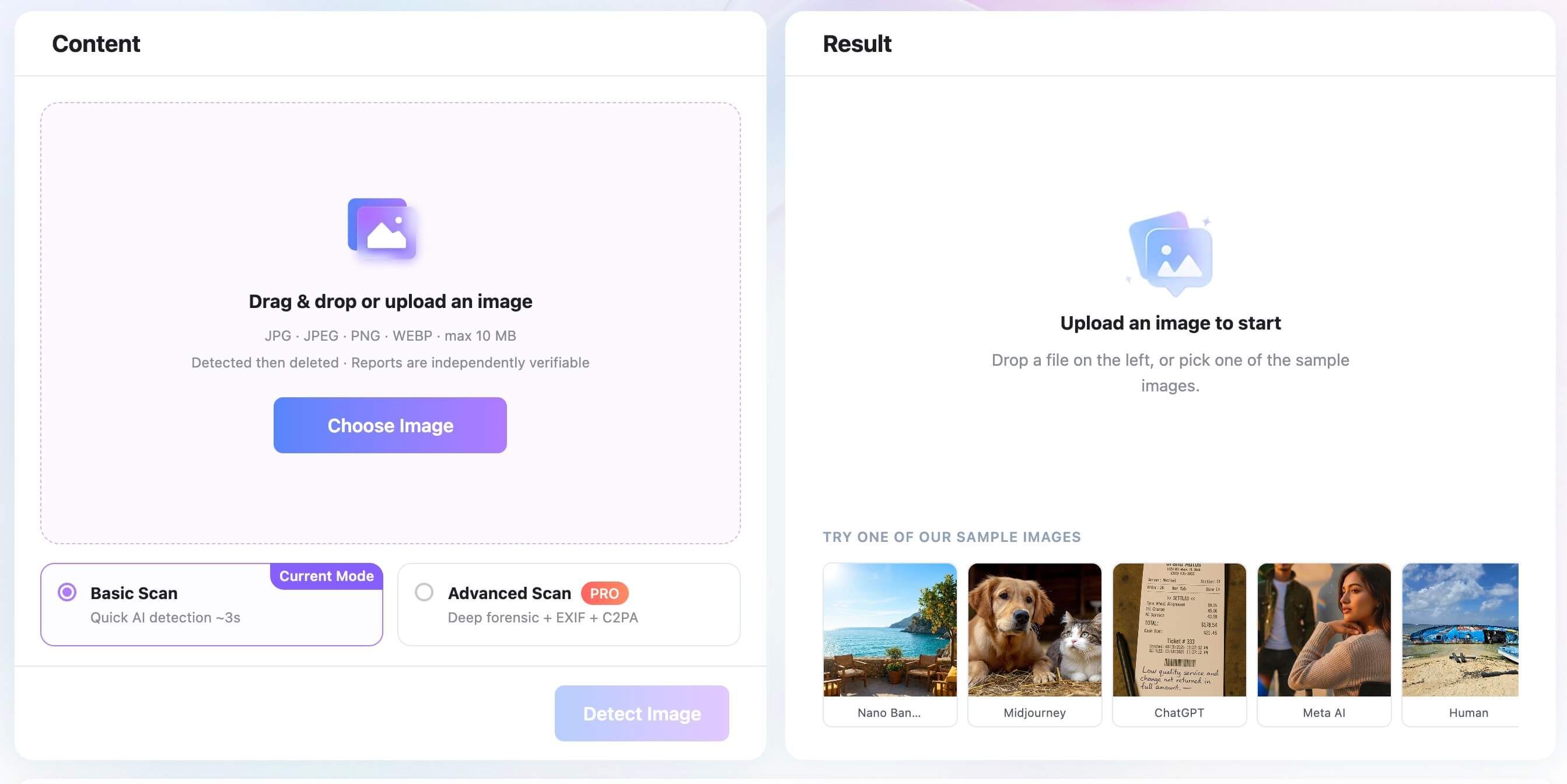
2. Choose Basic or Advanced Scan
Use Basic Scan when you need a quick initial AI probability. Choose Advanced Scan when available watermark, C2PA, EXIF, and file evidence would help you evaluate the image in more context.
This distinction matters because a probability score and provenance record answer different questions. One estimates whether the pixels resemble synthetic imagery; the other may describe where the file came from or how it changed.
3. Review the Result in Context
Read the AI probability beside the source, metadata, watermark, and visual findings you already collected. A high probability is a reason to investigate further, not proof of who created the image or why.
If Lynote's result conflicts with strong provenance or independent corroboration, do not discard the stronger evidence automatically. Check whether the uploaded image was compressed, heavily edited, unusually stylized, or outside the detector's strongest coverage.
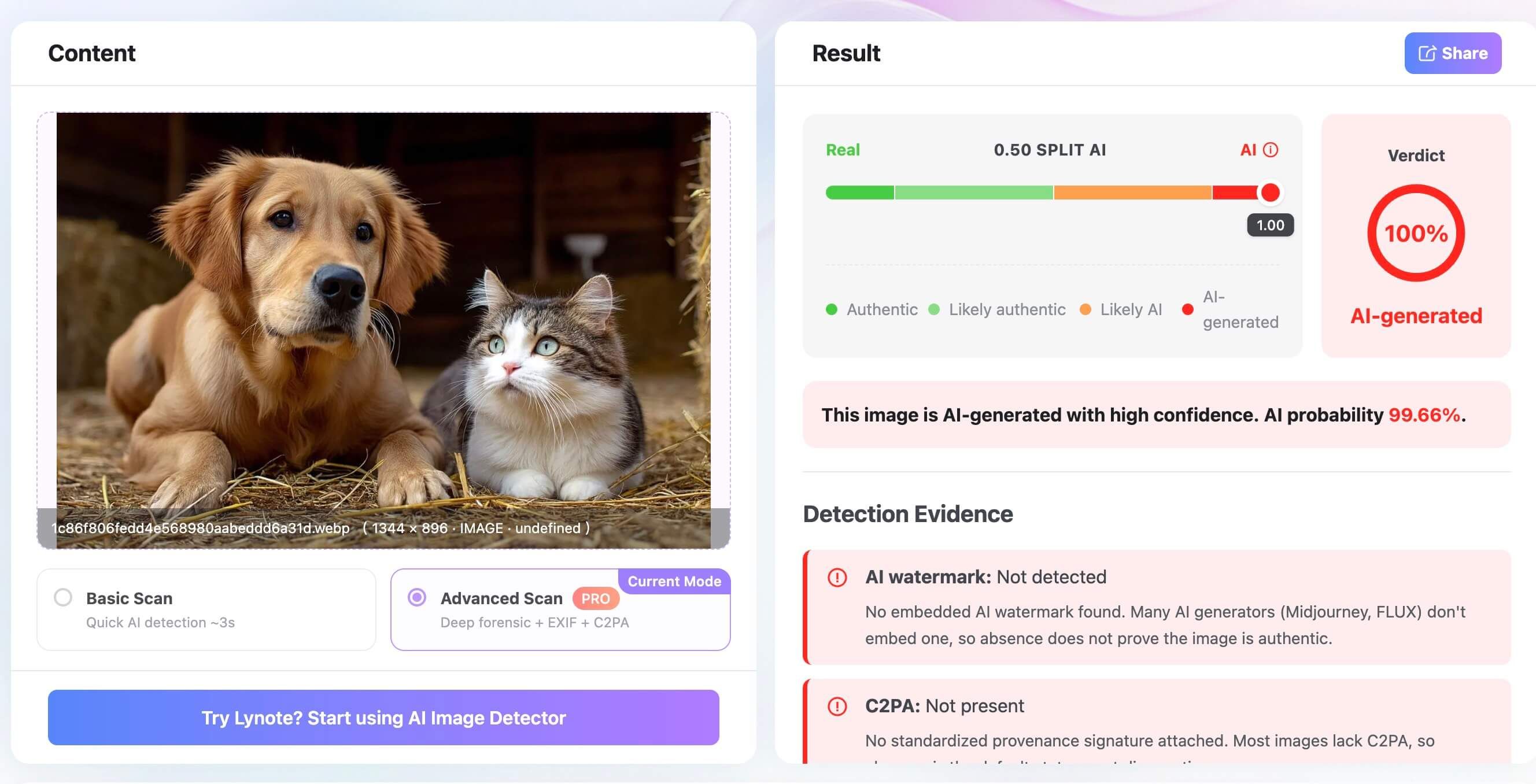
Lynote's tool analyzes still images. It does not inspect full-video motion, lip-sync, or audio, although you can extract a clear frame and review that frame at image level.
Step 7: Zoom In, but Look Beyond Hands
Visual inspection still matters, especially when provenance has been stripped. The useful question is not "Does this look like AI?" but "Does every part of this scene obey the same physical and semantic rules?"
Text, Logos, and Repeated Details
Inspect small signs, labels, packaging, jewelry, buttons, railings, windows, plates, and repeated objects. Look for characters that change shape, repeated patterns that mutate, objects that merge into neighbors, or details that disappear behind an obstruction and return differently.
Current generators can produce correct text and logos, especially when the prompt or editing workflow supplies them directly. Clean text therefore cannot clear an image, while malformed text remains only one clue.

Light, Shadows, and Reflections
Identify the main light sources. Cast shadows should point in directions compatible with those sources, and their softness should fit the scene. Reflections should contain objects and angles that make sense from the reflective surface's position.
Check eyes, glasses, mirrors, polished furniture, cars, and water. A reflection that omits a major object or shows a different room may be significant, but ordinary compositing, HDR processing, and difficult lighting can also produce odd results.

Anatomy, Occlusion, and Object Boundaries
Hands and teeth remain worth inspecting, but do not stop there. Examine ears, eyewear, hair against the background, clothing straps, limbs behind objects, and where one person overlaps another.
The strongest visual errors often involve continuity. A necklace may enter hair and never emerge, a chair leg may connect to the floor incorrectly, or a background object may change identity across an edge.
Perspective and Scene Logic
Follow straight lines through the scene. Buildings, windows, floor tiles, shelves, stairs, and furniture should share a plausible perspective. Repeated architectural elements should remain structurally consistent.
Then ask whether the scene makes sense as an event. Are people looking toward the claimed subject, and are the barriers, signs, uniforms, weather, and venue details appropriate?
Semantic contradictions can be more revealing than a slightly unusual finger.

Texture and Camera Behavior
Real cameras create sensor noise, lens blur, motion blur, sharpening, and compression patterns. Generated images may show overly uniform texture, abrupt changes in sharpness, or detail that dissolves at high zoom.
These are specialist clues, not proof. Modern phone cameras use computational photography, denoising, portrait blur, face enhancement, HDR, and generative editing. A genuine phone photo can therefore look synthetic, while a generated image can imitate photographic noise.
How to Resolve Conflicting Results
Real investigations rarely produce fully aligned signals. Use the strongest available evidence first and document uncertainty.
| Scenario | Best Interpretation | Next Action |
|---|---|---|
| Trusted AI watermark and matching generator provenance | Strong evidence of supported AI generation or editing | Confirm the verifier and preserve the result |
| High detector score, valid camera credentials, and independent corroboration | Possible detector false positive or later processing | Obtain the original and test another version |
| No metadata or watermark on a social-media screenshot | Inconclusive | Find the original upload or higher-quality copy |
| Image looks natural but carries trusted AI provenance | Provenance outweighs visual intuition | Treat it as generated or AI-edited within the stated system |
| Several detectors disagree | Tool-dependent or borderline result | Compare source, provenance, and original-file evidence |
| Strange details but reputable source and multiple independent frames | Visual anomaly may come from capture or compression | Check adjacent frames and the original file |
| No corroboration, suspicious account, odd scene logic, and high detector score | Multiple concerns support further scrutiny | Do not publish or act until independently verified |
Do not average detector percentages as though they measured the same thing. Different systems may use different training data, thresholds, labels, and definitions of AI editing.
For high-stakes decisions, "inconclusive" is a valid result. It is better than converting weak evidence into a confident accusation.
Detection Methods That No Longer Work Reliably on Their Own
Some advice remains useful as a first glance but has aged badly as a final test.
| Common Shortcut | Why It Fails Alone | When It Still Helps |
|---|---|---|
| Count the fingers | Strong models often render hands correctly; real photos can contain blur or occlusion | An impossible hand can justify closer review |
| Look for gibberish text | Current systems can render short text and supplied logos accurately | Mutating background text can expose weak generations |
| Smooth skin means AI | Beauty filters, retouching, lighting, and phone processing create the same effect | Combine with hair, pores, reflections, and source evidence |
| Trust the filename | Anyone can rename a file | Original export names may reveal a workflow |
| Missing EXIF means fake | Genuine platforms and screenshots routinely strip EXIF | More meaningful when other AI signals agree |
| Use error-level analysis as an AI detector | It was designed to expose compression differences, not identify every synthetic image | May help locate edited regions in suitable JPEGs |
| Believe one probability score | Detectors vary across generators, styles, and processing | Useful as one supporting signal |
| Trust an AI disclosure label blindly | Labels may be missing, broad, or applied because of minor editing | Follow the label to its explanation and provenance |
The biggest outdated assumption is that realism itself is the test. In 2026, an image can be visually flawless and still carry strong AI provenance. A genuine photo can look unnatural after aggressive phone processing.
Use Different Standards for Photos, Art, Screenshots, and AI-Edited Images
The same checklist should not be applied mechanically to every image.
Photographs
Prioritize capture provenance, EXIF consistency, scene physics, source history, and corroboration. Camera behavior matters because the image claims to record a physical scene.
Illustrations and Digital Art
Missing camera data and stylized anatomy are expected. Focus on creator disclosure, file history, provenance, and whether the question concerns AI assistance rather than photographic authenticity.
Screenshots and Memes
Metadata is usually unhelpful because the screenshot describes the capture device, not the origin of the content shown on screen. Trace the post, locate earlier versions, and inspect whether elements were combined.
AI-Edited Real Photos
A binary real-versus-AI label may be misleading. A genuine portrait can include a generated background, replaced clothing, face edits, object removal, or generative expansion.
Look for edit history and local inconsistencies. Phrase the result precisely: "camera-captured image with possible AI edits" is more informative than "fake."
Social-Media Copies
Expect resized dimensions, recompression, stripped metadata, and overlays. Source verification often deserves more weight than a detector result on the downloaded copy.
What to Do Before You Accuse, Reject, or Publish
Detection affects real people. A false accusation can harm a photographer, student, seller, applicant, or person depicted in an image.
Before taking consequential action:
- Request the original file or another frame.
- Record each check, result, and limitation.
- Separate pixel authenticity from caption accuracy.
- Seek independent confirmation for public claims.
- Avoid inferring intent or authorship from a detector score.
- Escalate identity, fraud, safety, or legal cases to trained reviewers.
If you are publishing a correction or label, describe the evidence. "A supported watermark identified the image as generated with a specific tool" is clearer than "It looks fake."
FAQs About Detecting AI-Generated Images
What is the fastest way to detect an AI-generated image?
Check the original source and any AI disclosure first, then inspect Content Credentials or supported watermarks. Follow with metadata, reverse search, an AI image detector, and visual review. A single visual clue is rarely enough.
Can Google tell if a photo is AI-generated?
Google can verify supported SynthID watermarks in content created or altered with compatible Google AI tools. Its verification features can also surface available provenance information. A negative result does not rule out images made by other systems.
Can ChatGPT verify whether an image was made by AI?
OpenAI provides verification for supported provenance signals associated with images from OpenAI tools. That can attribute a matching image to the supported ecosystem, but it is not a universal detector for every generator.
Does missing EXIF mean an image is AI-generated?
No. Screenshots, social networks, messaging apps, exports, and privacy tools often remove EXIF from genuine photos. Missing metadata should be recorded as missing evidence, not proof of AI generation.
Can AI image detectors check screenshots?
They can analyze screenshot pixels, but screenshots remove original metadata and may weaken watermark or pixel signals. Results are generally more useful when you upload the original image.
Can a detector identify the exact image generator?
Sometimes a supported watermark, provenance record, or specialized classifier can point to a generator. A generic probability score usually cannot identify the exact model with certainty.
Are strange hands still a reliable clue in 2026?
Impossible anatomy remains suspicious, but correct hands do not prove that a photo is real. Current generators often render hands accurately, while motion blur and occlusion can make genuine hands look malformed.
How can I tell whether a real photo was edited with AI?
Look for Content Credentials or edit history, compare the image with an earlier original, inspect local boundaries and lighting, and review detector or provenance evidence. Describe the result as possible AI editing rather than claiming the whole image was generated.
What should I do when two AI image detectors disagree?
Do not average the scores. Check whether both tools support the image type and likely generator, then prioritize source history, trusted provenance, watermarks, and the original file. If the evidence remains mixed, classify the result as inconclusive.
Final Verdict: Build a Case, Not a Guess
The best way to detect AI-generated images in 2026 is to combine origin, context, file evidence, machine analysis, and visual reasoning. Start with the original source and trusted provenance because they can provide direct information about where a file came from.
Use metadata, detector scores, and visual artifacts as supporting layers. When important evidence has been stripped or the signals disagree, do not force a binary answer. A careful "inconclusive" is more accurate than a confident guess.

Written by Janet L. Harris
AI Writing Specialist
Janet reviews AI detectors and humanization tools, with a focus on accuracy, limitations, and responsible use. View all articles →