WhatsApp Audio to Text: Turn Voice Notes Into Text

Need whatsapp audio to text? You may have received a WhatsApp voice note when you were not able to listen right away. Perhaps you were in a meeting, riding the train, studying, or just trying to capture key points without listening to the same voice note repeatedly.
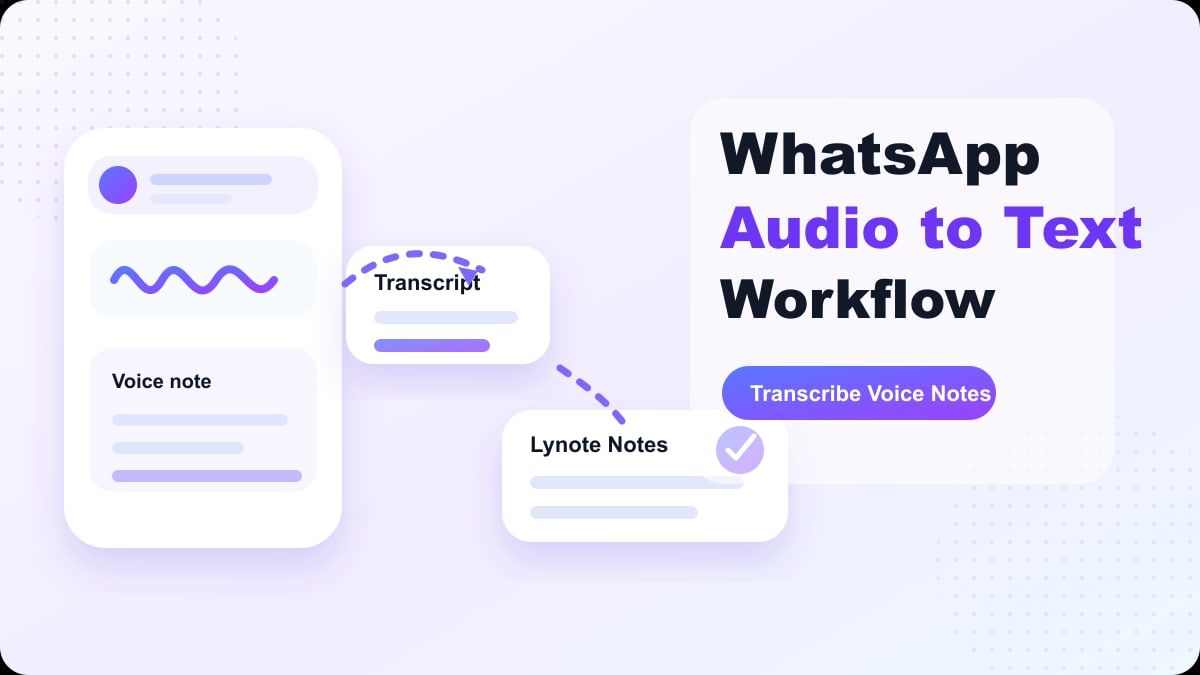
While WhatsApp voice messages are great for the sender, they are not always as easy for the receiver to process, remember, and reply to. So, many people look for ways to transcribe WhatsApp audio to text. Text versions are more scannable, copyable, translatable, summarizable, and archivable.
Here, we will cover why WhatsApp voice notes are so widely used, how the built-in voice message transcripts feature works, and when Lynote Audio to Text could be the better choice for your needs.
Why WhatsApp Voice Notes Are So Popular
Voice notes are quick. Rather than typing out a long message on a tiny mobile keyboard, a sender can just tap record and talk. That is especially handy for long status updates, sentimental messages, directions, travel plans, work-related info, and non-native language conversations.
WhatsApp has also continued to improve the usability of voice messages. Meta has confirmed that WhatsApp voice messages are secured by end-to-end encryption, and WhatsApp has added several features, such as out-of-chat playback, pause and resume capability, waveform visualization, draft preview, and faster playback speed, to its voice messaging feature in recent years. These additions have made it easier to send and listen to voice notes.
Yet, voice notes remain a challenge for the receiver. Listening takes time, and if you do not jot down the information, it is easy to lose it inside the audio file. That is why whatsapp audio to text software is helpful when a message contains valuable information.
Why Convert WhatsApp Audio to Text?
A WhatsApp voice message can be a nice touch, but text is more practical. When someone leaves you an address, deadline, cost, name, schedule, meeting spot, or to-do list, you will likely want to reference the details again. A transcript is much easier to search through than an audio clip.
Text is also more useful when you cannot easily listen. Maybe you are in a quiet office, a lecture hall, a library, or somewhere public where you do not have earbuds handy. With a WhatsApp voice message to text solution, you can quickly learn what is being said without having to play it out loud.
Then there is the language factor. If you want to translate the contents of a WhatsApp voice message, it is generally simpler to start with text. Once the audio is converted to text, you can review it, double-check any names, and translate it more accurately.
Does WhatsApp Already Have Voice Message Transcripts?
WhatsApp has introduced voice message transcripts in certain regions, on specific devices, and in limited languages. As WhatsApp and Meta have stated, transcripts will be created on the user's device, ensuring privacy for personal messages. In general, if this feature is available, you can enable it in your WhatsApp settings.
If your phone, language, and WhatsApp app support it, you might be able to long press on any given voice message and see its transcript. However, this is not always the case. Depending on your device, language, region, and WhatsApp app version, this feature may not be available.
If you are looking to convert WhatsApp audio to text online, save the transcript, organize and review it, take notes, or even work on longer audio recordings, Lynote has got you covered.
When Built-In WhatsApp Transcripts May Not Be Enough
Although built-in transcripts are quite handy, they are not really meant for anything beyond being able to read the voice message inside WhatsApp. There may be cases where you do not have access to this feature, or when you want to use the transcript for things like studying, working, doing research, or writing something. If you want to copy the transcript to your notes app, word processor, or any other application, you need a different audio to text workflow.
There are also limitations regarding language support. For example, some users want to translate WhatsApp audio to text since the voice message was not originally sent in their language of choice. If this feature does not exist in your language, you might have to save or export the audio file and then transcribe it elsewhere.
Another issue is reusing the text. A transcript in WhatsApp could help you understand the voice note, but it would not be very useful if you want to turn it into meeting notes, study notes, customer service notes, or something more structured.
What Is Lynote Audio to Text?
Lynote Audio to Text is a web app that helps you transcribe audio files into editable text. It works with voice notes, lectures, meetings, interviews, podcasts, and other audio files. The idea is not just to create a transcript, but to make the text easier to work with.
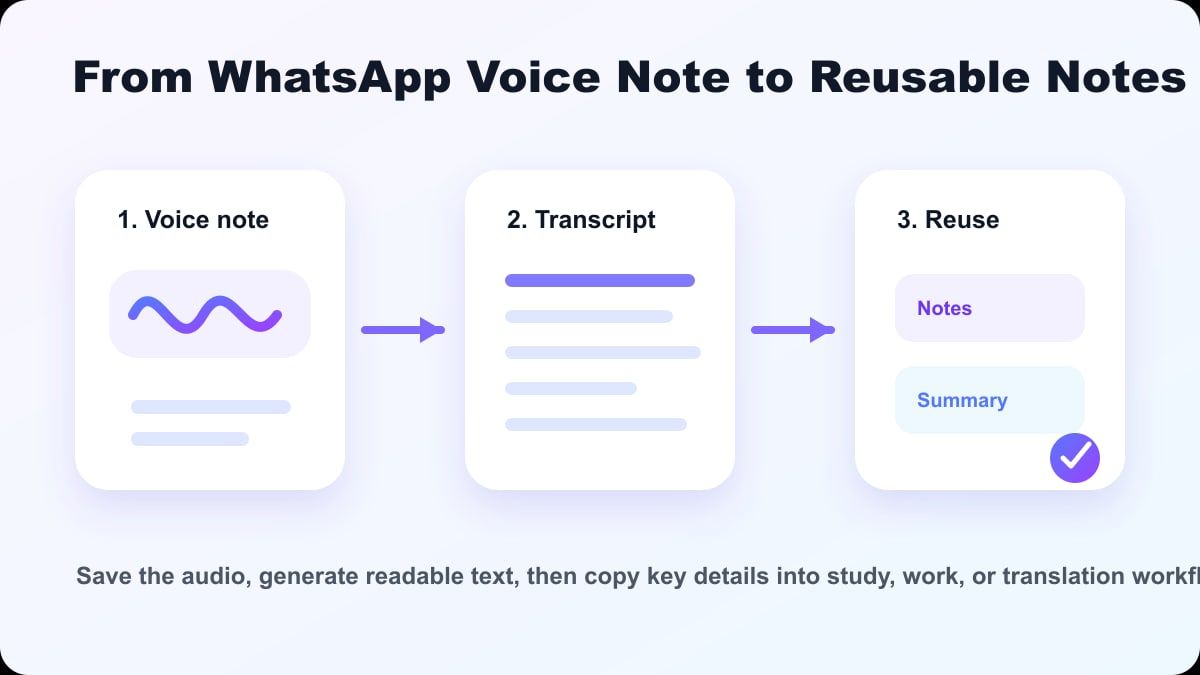
In the context of WhatsApp, this app comes in handy when you want to transcribe a voice note outside of the chat. You can use the text generated by Lynote to review the content, edit certain parts, and use it for notes, summaries, study materials, work reports, and follow-up messages. This is more practical than trying to transcribe the voice note manually while listening to it.
Moreover, this is particularly useful when dealing with long WhatsApp voice messages. While you may not need to transcribe a short ten-second message, a five-minute explanation, update, class note, response to an interview question, or set of directions can be a lot easier to work with when you can read it.
How to Convert WhatsApp Audio to Text with Lynote
Step 1. Save or Export the WhatsApp Voice Note
First, find the WhatsApp voice message that you want to transcribe. Depending on your phone and WhatsApp app version, you should be able to share, forward, save, or export the audio file. The specific steps may differ slightly depending on whether you are using an iPhone or an Android device, as well as whether you are working within regular WhatsApp or WhatsApp Business.
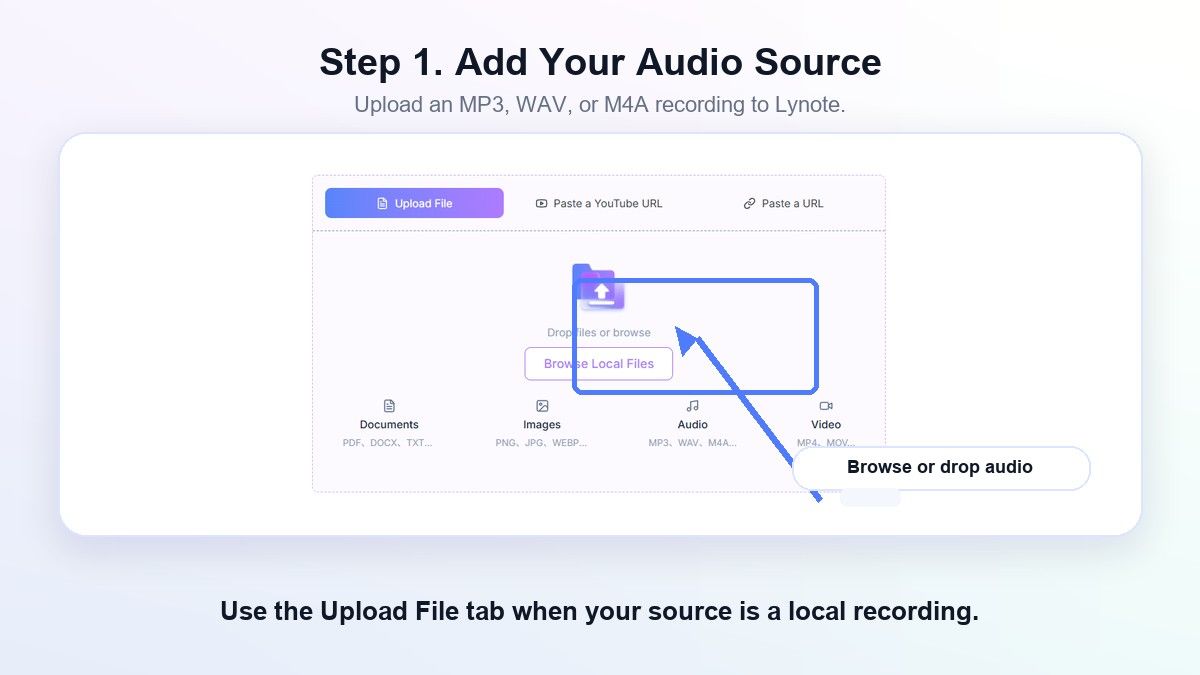
Save the audio message in a location you can easily find from your browser, such as Files, a cloud service, or your computer. Ensure you have authorization to process the message, particularly if it contains personal or sensitive data.
Step 2. Upload the Audio to Lynote
Open Lynote Audio to Text and choose the WhatsApp audio source file. Select the highest quality file available. Keep in mind that background noise, multiple voices, or poor audio quality in the original recording will require additional review.
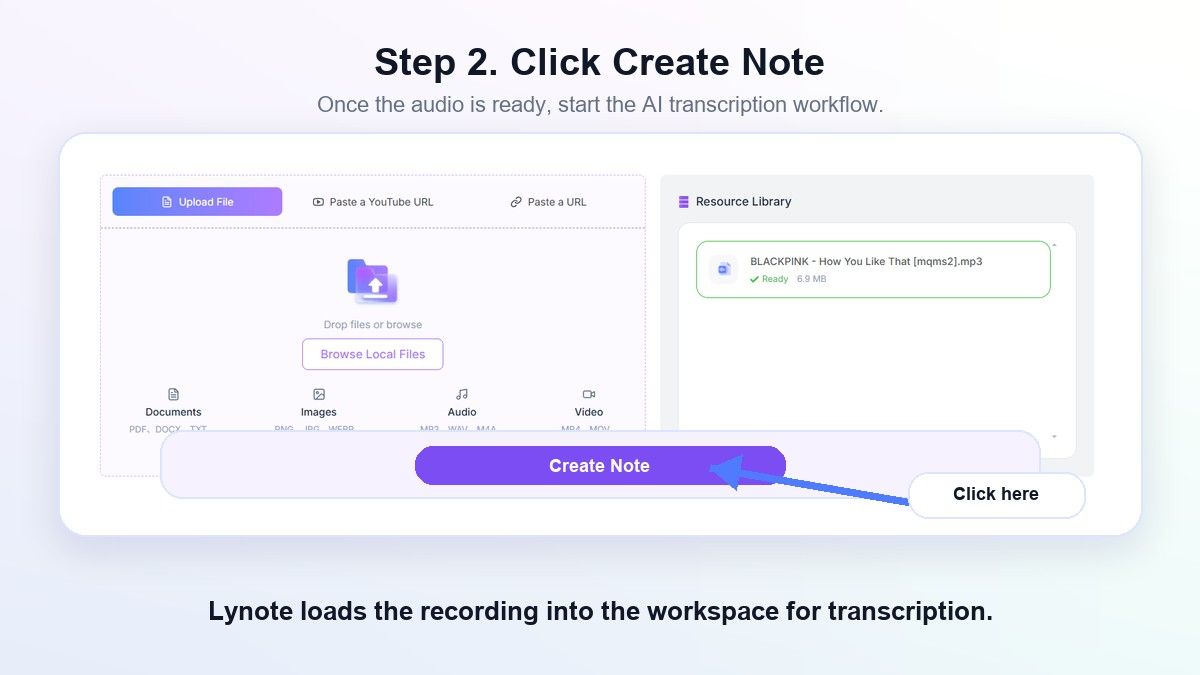
Next, Lynote will convert the audio to text. This allows you to read the message instead of repeatedly listening to it. For lengthy WhatsApp voice messages, this is a significant time-saver.
Step 3. Review the Transcript
Review the generated transcript thoroughly. Double-check all names, dates, addresses, phone numbers, monetary values, industry terminology, or any other content that may have been difficult to hear in the original recording. Although automated transcription is convenient, it is essential to confirm crucial information.
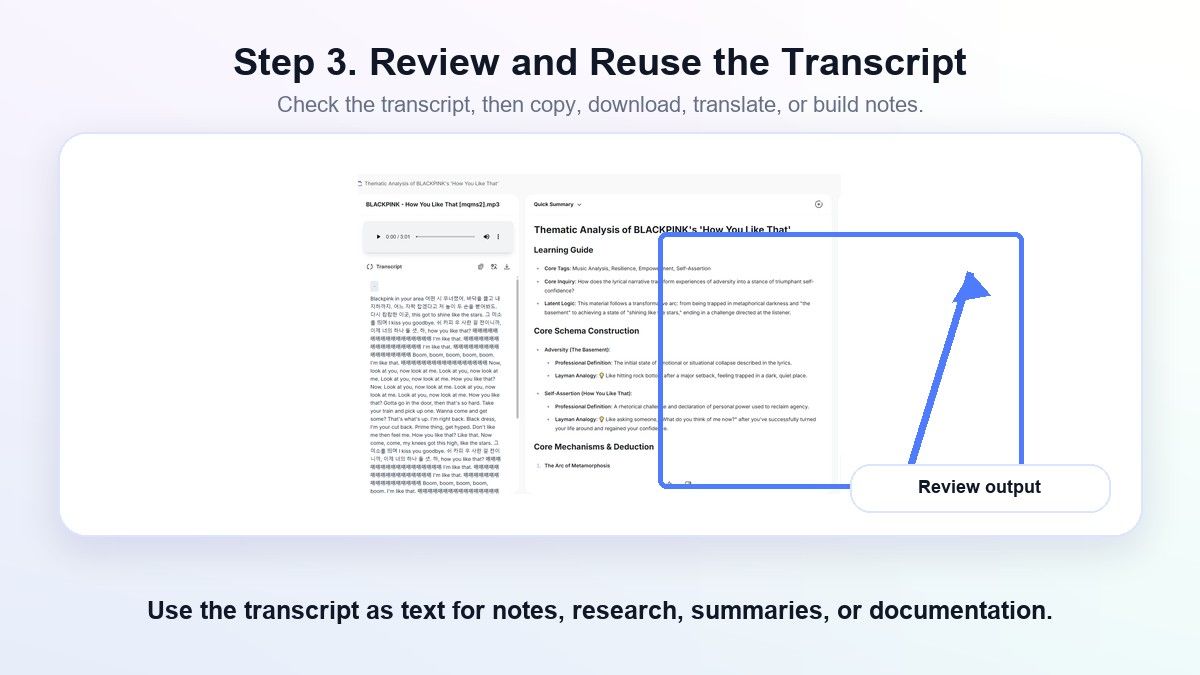
This is the stage at which the transcript actually provides value. You can eliminate unnecessary words, reformat the content, and break it down into more digestible chunks. Rather than dealing with a raw audio file, you will have a readable document that is simple to interpret and follow up on.
Step 4. Copy, Summarize, or Reuse the Text
With your WhatsApp audio message converted to text, you have many options for how to use it. You can copy the text into your notes app, create a to-do list from it, summarize it for a meeting, or archive it in your documents folder. If the audio message was in a foreign language, you can also use the text version as a clean base for translation.
This demonstrates why Lynote goes beyond being a WhatsApp audio to text converter. It takes you from "I got a voice message" to "I have something I can work with." The distinction here is between mere transcription and a functional workflow.
WhatsApp Audio to Text: Common Scenarios
Work-Related Communications
It is common for businesses to communicate via WhatsApp for job assignments, customer instructions, and group collaboration. A voice note could contain tasks, due dates, figures, or modifications to a project. Converting the audio to text helps you record these details without having to memorize them.
Freelancers, sales representatives, customer service agents, consultants, and entrepreneurs will benefit from this feature. Instead of listening to the message multiple times before responding, you can simply read through the transcript and send a more accurate response.
Study Notes and Class Discussions
Students frequently get voice notes from peers, instructors, or study partners. These notes could cover class concepts, assignment reminders, test subjects, or language learning exercises. Transcribing the message makes it much simpler to organize the material into study notes.
If you are studying a new language, a WhatsApp audio-to-text conversion can also allow you to compare what you heard with its written form. This lets you check spelling, grammar, and pronunciation without playing the audio over and over.
Trip Arrangements and Family Conversations
WhatsApp is commonly used to share vacation plans and family news. A voice note might contain hotel information, pickup details, directions, shopping lists, or event plans. When all of that is stuck in a voice note, it is easy to miss something.
Transcribing the message creates a checklist. You can copy the address, highlight the time, and share the relevant portion with another person. It is far easier than scrubbing through a voice note while on the go.
Multilingual Communication
People frequently search for translate WhatsApp voice message because voice notes cross language boundaries. Your friend, client, or relative might send you a voice note in a language you only partially understand. A transcript provides a text foundation that is simpler to review and translate.
To get the best results, start with a clean recording and review the text before translating. Names, slang, accents, and regional terms may require human interpretation. Lynote helps by converting the spoken message to text first.
WhatsApp Audio to Text on iPhone
Voice message transcript availability on iPhone depends on your app version, iOS version, and supported languages. If the built-in transcript is available in your settings, it might be the quickest way to read a short voice note. You can also check WhatsApp settings for voice message transcript options.
If you need to translate WhatsApp voice message iPhone content or use the transcript outside of WhatsApp, Lynote might still be a good choice. Save or share the audio file, then upload it to Lynote for a more versatile transcript. This is useful if the voice note has specific information you want to retain.
WhatsApp Audio to Text on Android
Voice message transcript availability on Android might depend on your device, language, and app rollout. Some users may have access, while others may not. This is why many people continue to search for WhatsApp audio to text Android.
If you can export or save the audio, Lynote offers a browser-based option. You do not have to rely on an audio to text for WhatsApp APK or a phone-specific solution. A web tool is usually easier if you want to view the transcript on your computer or in a document.
Tips for Better WhatsApp Audio Transcription
Start with the clearest recording possible. If the person recorded in a busy street, a crowded room, or windy conditions, the results might require additional editing. High-quality audio allows any transcription tool to function more effectively.
If you are requesting a crucial voice message from someone, ask them to speak close to their microphone and reduce background noise. In business contexts, they should enunciate names, figures, and dates carefully. Minor adjustments to how they record can significantly reduce the amount of editing required.
Always proofread the transcript before making critical choices. This applies to WhatsApp, Lynote, built-in transcripts, and any audio to text converter. Think of the transcript as an excellent starting point, not an absolute official or medical document.
FAQs About WhatsApp Audio to Text
Is It Possible for WhatsApp to Convert Audio to Text?
WhatsApp does offer a voice message transcript feature on select devices and languages. If this feature is available, you may be able to enable it in your settings and transcribe some voice messages within the app. Availability may vary based on your current version of WhatsApp.
How Do I Convert WhatsApp Audio to Text Online?
Save or export the WhatsApp voice note, and then upload the audio file to an online converter like Lynote Audio to Text. Lynote will produce a transcript that you can read, review, copy, and reuse. This is particularly useful when the WhatsApp transcript is unavailable or insufficient.
Can I Translate a WhatsApp Voice Message?
Yes, however it is generally easier to convert the voice message to text first. Once you have the text transcript, you can review it more closely and translate the words yourself. This is great for travel, family, work, and study voice messages.
Is WhatsApp Audio to Text Useful for Long Voice Notes?
Yes. Long voice notes are often the best reason to use WhatsApp audio to text. Rather than having to replay a long voice message multiple times to catch every detail, you can scan the text, pick out the most relevant points, and copy the text into notes.
Which Is the Best WhatsApp Audio to Text Converter?
The best WhatsApp audio to text converter depends on your needs. If you only need a quick transcript inside the chat, and your device supports it, WhatsApp's built-in transcript feature may be sufficient. If you want text that you can edit and use in notes, summaries, translations, or work-related documents, Lynote is likely a better choice.
Does Lynote Transcribe WhatsApp Voice Messages?
Yes, as long as you are able to save or export the WhatsApp voice note as an audio file, Lynote can help convert it to text. You can review the transcript and reuse it in notes, summaries, documents, or study materials. It is always a good idea to double check any important information in the transcript.
Conclusion
While WhatsApp voice notes are convenient for the sender, they can be inconvenient for the receiver. A good whatsapp audio to text workflow allows you to read, search, translate, and reuse the message, rather than having to replay it over and over again. If WhatsApp's built-in transcript is not available or is not sufficient for your needs, try Lynote Audio to Text to turn voice notes into editable text.

Written by Hamza Razzaq
Technical Writer
Hamza creates hands-on explainers and technical guides that make AI writing tools easier to understand and use. View all articles →