Work Notes: A Practical Guide to Better Note-Taking

Every workday brings meetings, project updates, decisions, and unexpected ideas. Without an organized system, important details can disappear into scattered documents, notebooks, and chat messages. Keeping clear work notes helps you capture useful information, understand decisions, and know what needs to happen next.
Effective note-taking at work isn't about recording everything. It's about identifying relevant information, organizing it consistently, and turning discussions into actions.
In this guide, you'll learn how to take better notes at work, organize information across multiple projects, and use practical templates for meetings, projects, and daily tasks. You'll also discover how AI tools like Lynote AI Notes can help turn supported work materials into editable notes.
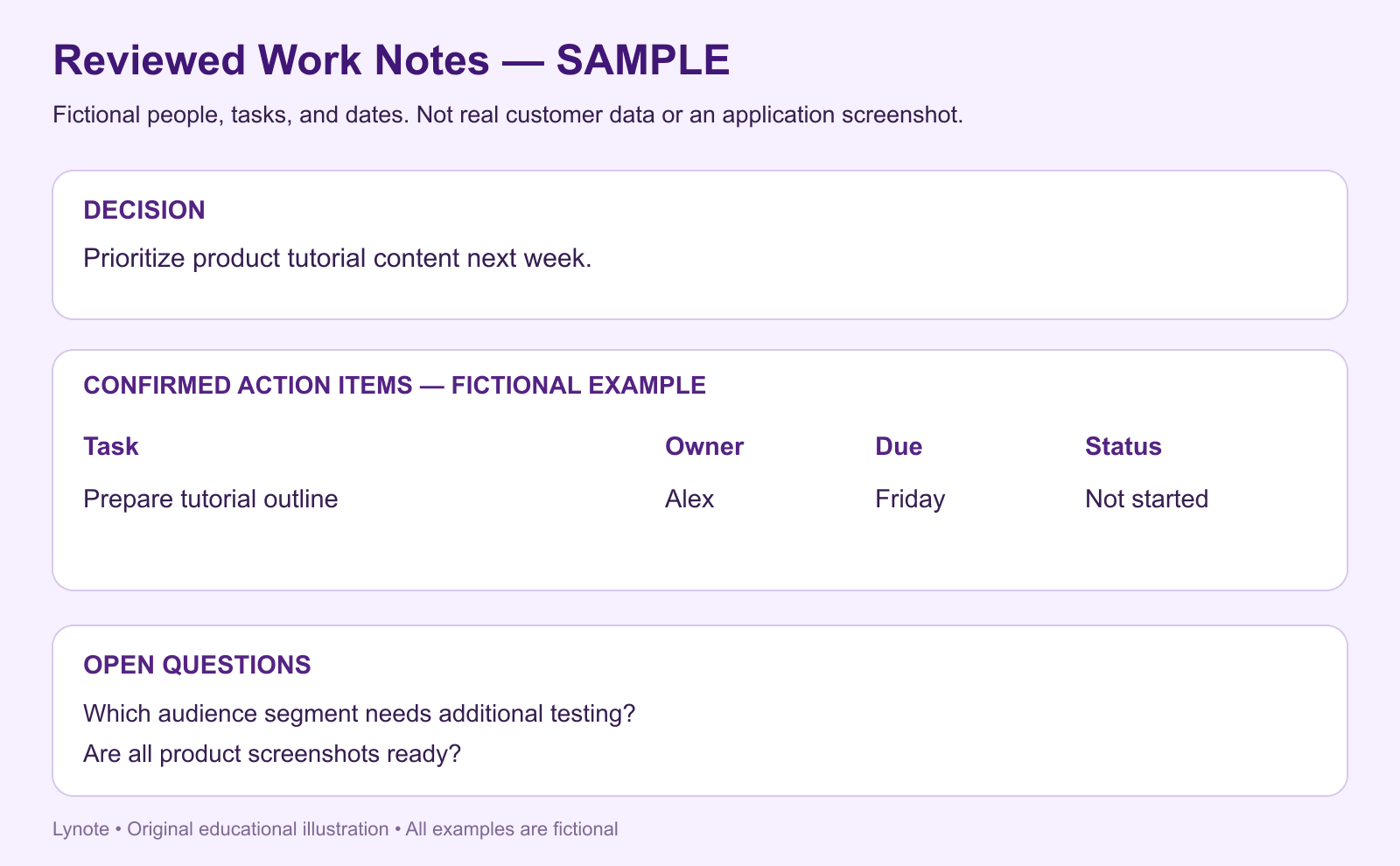
All meeting names, people, tasks, owners, and dates in the examples below are fictional and illustrative; they are not real customer data.
TL;DR: Key Takeaways
- Capture what matters. Focus on important facts, decisions, questions, and next steps instead of writing down every word.
- Use a consistent structure. Include a title, date, purpose, key information, and action items in each note.
- Organize by project or topic. Make notes easy to retrieve with clear naming conventions and appropriate categories.
- Review and follow up. Check action items, clarify missing details, and revisit important information regularly.
- Choose a suitable method. Bullet points, Cornell notes, outlines, and daily logs work for different tasks.
- Use AI when appropriate. Lynote can generate editable notes from supported documents, recordings, and videos, which you should review before using for work.
What Are Work Notes?
Work notes are written or digital records of information collected during professional activities. They may contain meeting discussions, project updates, research findings, decisions, training explanations, personal observations, and tasks.
Unlike formal reports, working notes are often created while information is still being discussed or developed. Their purpose is to preserve useful context and make it easier to return to important details later.
A good work note should answer three basic questions: What happened? What matters? What should happen next?
Common Types of Notes for Work
| Type | Main Purpose | Typical Content |
|---|---|---|
| Meeting Notes | Record discussions and decisions | Key points, decisions, action items |
| Project Notes | Track project information | Progress, risks, issues, next steps |
| Daily Work Notes | Capture everyday priorities | Tasks, ideas, blockers, follow-ups |
| Training Notes | Preserve learning from training | Processes, instructions, examples |
| Research Notes | Organize supporting information | Findings, references, questions |
| Personal Work Notes | Support individual reflection | Observations, lessons, improvements |
These categories can overlap, but they shouldn't be treated as identical. A meeting note captures a specific discussion, while a project note helps maintain context across several meetings and work sessions.
Why Are Organized Work Notes Important?
Taking notes is useful only when the information remains understandable and accessible afterward. If important decisions are buried inside lengthy paragraphs, you may still need to reconstruct what happened.
Organized workplace notes can reduce this problem by giving information a consistent location and structure.
1. Keep Important Information Accessible
Projects often involve repeated discussions, changing requirements, and multiple contributors. Without clear records, it becomes difficult to remember why a decision was made.
Organized notes preserve explanations and relevant context. When you revisit a project, you can refer to previous discussions instead of relying only on memory.
2. Make Decisions and Responsibilities Clear
A meeting can end with everyone understanding the discussion but disagreeing about the next steps. Written action items help clarify what was decided and who is responsible for following up.
For important actions, record the task, owner, deadline, and relevant dependencies. Confirm these details with the people involved rather than assuming that a discussion automatically establishes responsibility.
3. Reduce Repeated Work
When useful information is difficult to find, people may repeat the same research, ask the same questions, or recreate previously completed explanations.
A consistent note-taking system makes existing information easier to reuse. This is particularly helpful for recurring projects, training materials, and procedures.
4. Support Better Project Follow-Up
Project information changes over time. Notes can help you compare earlier plans with current progress, recognize unresolved issues, and identify decisions requiring further attention.
Regular review also helps distinguish active tasks from outdated information. This keeps your notes relevant instead of allowing them to become an archive you never use.
How to Take Better Work Notes in 6 Steps
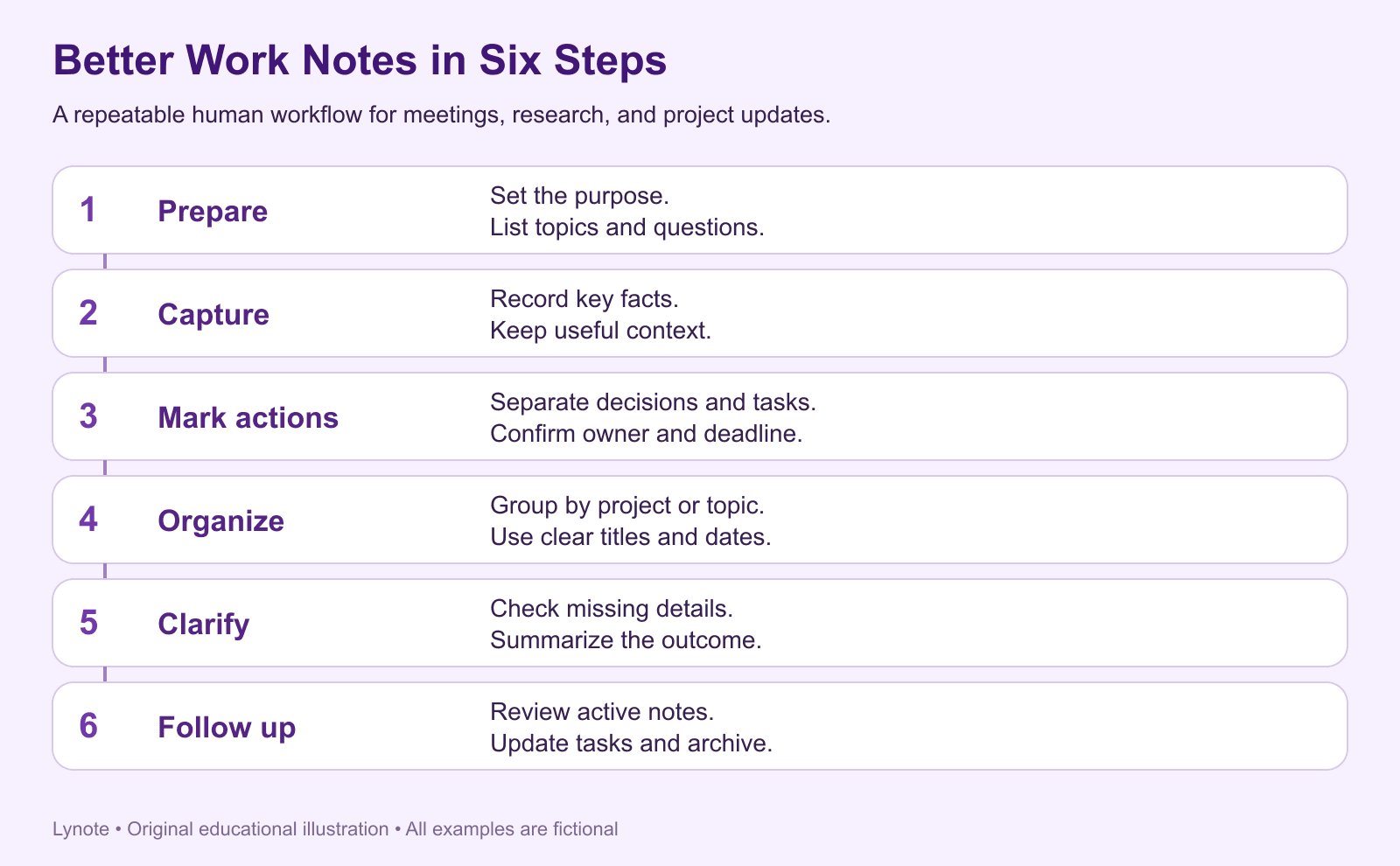
Learning how to take better notes at work starts with a repeatable process. You don't need to record every detail or use an elaborate application.
The following six steps work for meetings, project discussions, individual research, and everyday work.
Step 1. Prepare Before You Start
Before a meeting or work session, identify its purpose. Write a short heading and list the questions or topics you expect to cover.
If you're attending a project review, prepare sections for progress, problems, decisions, and next steps. If you're reviewing a document, identify what information you need to extract.
Preparation makes it easier to recognize relevant points while the discussion or activity is happening.
Quick example:
- Meeting: Product Launch Review
- Date: October 26
- Purpose: Confirm launch readiness
- Questions: What is complete? What is blocked? Who owns the remaining tasks?
Step 2. Capture Key Information, Not Every Word
During the discussion, listen for important facts, decisions, explanations, and unresolved questions. Use concise bullet points instead of attempting to reproduce every sentence.
Record enough context to understand why a point matters. A short statement such as "Launch delayed" is less useful than "Launch delayed pending final payment testing."
When information is unclear, mark it as a question instead of guessing. You can clarify it before finalizing the notes.
Step 3. Highlight Decisions and Action Items
Separate decisions from general discussion points. A decision explains what the team agreed to do, while an action item describes work that needs to be completed.
Use a simple action-item format:
Task + Owner + Deadline + Status
For example:
- Task: Update landing page copy
- Owner: Content team
- Deadline: Friday
- Status: In progress
If a deadline or owner hasn't been confirmed, mark it as pending. Do not turn an informal suggestion into an assigned task without confirmation.
Step 4. Organize Notes by Topic or Project
After capturing the information, place it in a structure that makes sense for future retrieval. Depending on your work, you might organize notes by client, team, project, or activity type.
Use consistent headings and naming conventions. For example, Project Atlas | Weekly Review | 2026-10-26 is easier to recognize than Meeting Notes Final 3.
Avoid creating too many categories at the beginning. A simple system that you maintain is more useful than a complicated structure that becomes inconsistent.
Step 5. Summarize and Clarify
After the work session, review what you've written while the context is still fresh. Correct unclear wording, remove repeated points, and identify missing information.
Add a short summary explaining the main outcome. Then confirm important decisions, owners, and deadlines with the relevant people.
The goal is to create an accurate record that someone can understand without attending the original discussion.
Step 6. Review and Follow Up
Return to your notes when preparing for the next meeting or continuing a project. Review outstanding action items and check whether any information has changed.
A brief daily review can help you manage immediate priorities. A weekly review can help identify recurring problems, unfinished tasks, and information that should be archived.
Taking good notes is only the beginning. Consistent follow-up is what turns the information into practical work.
Best Note-Taking Methods for Work
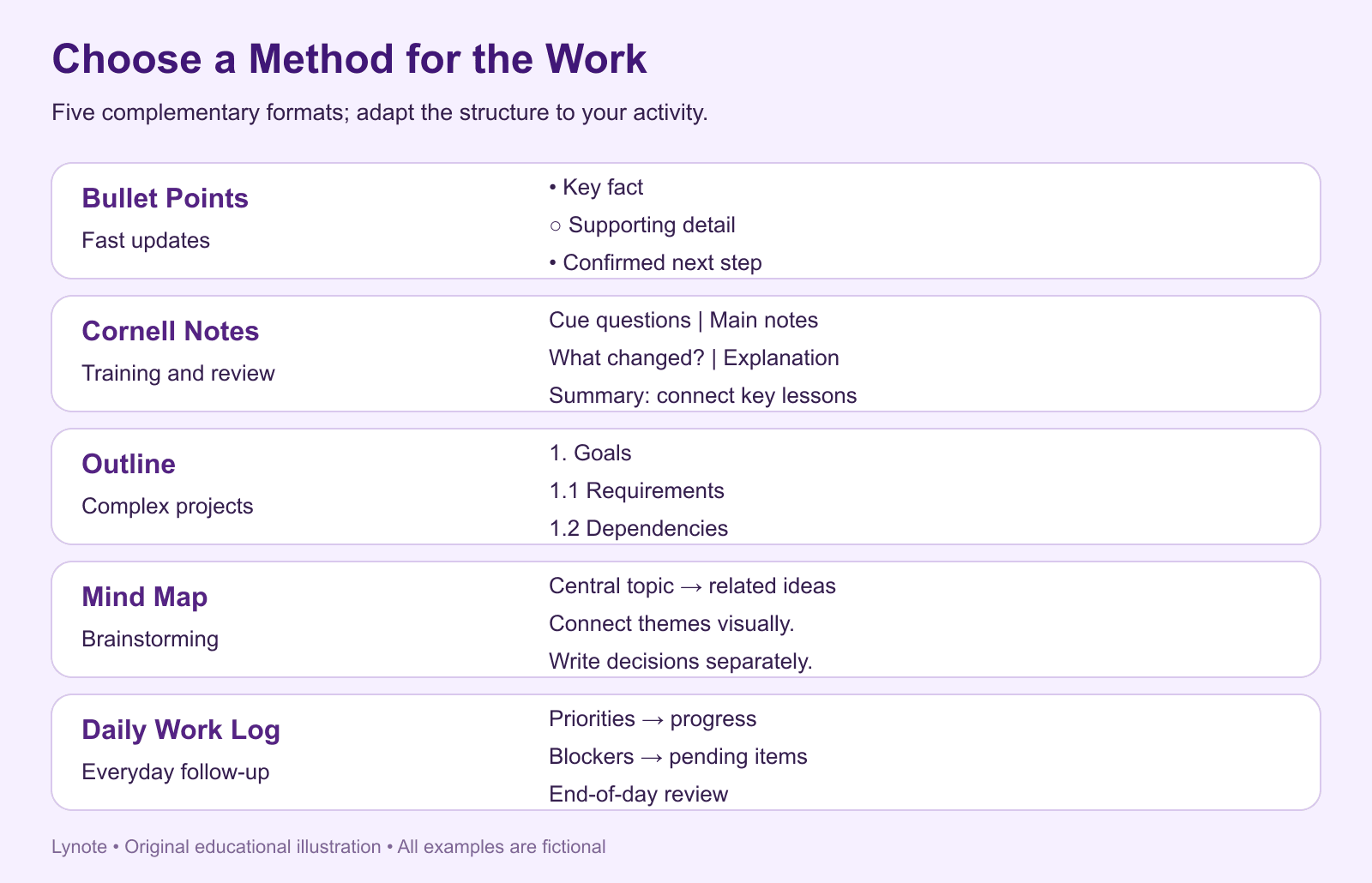
Different activities require different note-taking styles. A quick internal discussion may work best with bullet points, while a complex project may need a more structured outline.
You can use one primary method and adapt it when necessary.
1. Bullet Point Method
Bullet points organize information into short, readable statements. This method is useful when discussions move quickly or when you need to capture facts, decisions, and questions.
Example:
- Campaign performance
- Click-through rate increased
- Conversion rate remained unchanged
- Next steps
- Review landing page behavior
- Compare audience segments
Use indentation to connect supporting information with main ideas.
2. Cornell Note-Taking Method
Cornell notes divide the page into a main note area, a cue column, and a summary section. The structure is useful for training sessions, workshops, and professional learning.
Record explanations in the main column, add questions in the cue column, and summarize the key lessons afterward. This makes it easier to revisit information and check your understanding.
3. Outline Method
The outline method arranges information under headings and subheadings. It is especially useful for project planning, research, and technical documentation.
For example, a project note might contain sections for Goals, Requirements, Risks, Dependencies, and Next Steps. Each heading can include supporting points without mixing unrelated information.
4. Mind Mapping
Mind maps place a central topic in the middle and connect it to related ideas. They can help during brainstorming, early planning, and discussions involving multiple interconnected topics.
For detailed decisions or formal action items, a structured written format is usually easier to maintain. You can combine a mind map with a written summary after brainstorming.
5. Daily Work Log
A daily work log records priorities, progress, blockers, and lessons throughout the day. This is useful for people managing several projects or frequently switching tasks.
Use a short entry for each date and move unfinished work into a clearly identified follow-up section. The log should help you remember what happened without becoming a second full project-management system.
Which Method Should You Choose?
| Method | Best Use Case | Main Strength |
|---|---|---|
| Bullet Points | Fast meetings and updates | Simple, quick recording |
| Cornell Notes | Training and workshops | Questions and review |
| Outline | Complex projects | Clear information hierarchy |
| Mind Map | Brainstorming | Visual relationships |
| Daily Work Log | Everyday priorities | Progress and follow-up tracking |
How to Organize Notes for Work Across Multiple Projects
If you manage several projects, the biggest challenge is often finding information later. Notes may be scattered across meeting documents, personal notebooks, messages, and shared folders.
A consistent organization system should make it clear where each note belongs and how to retrieve it.
Create a Simple Project Structure
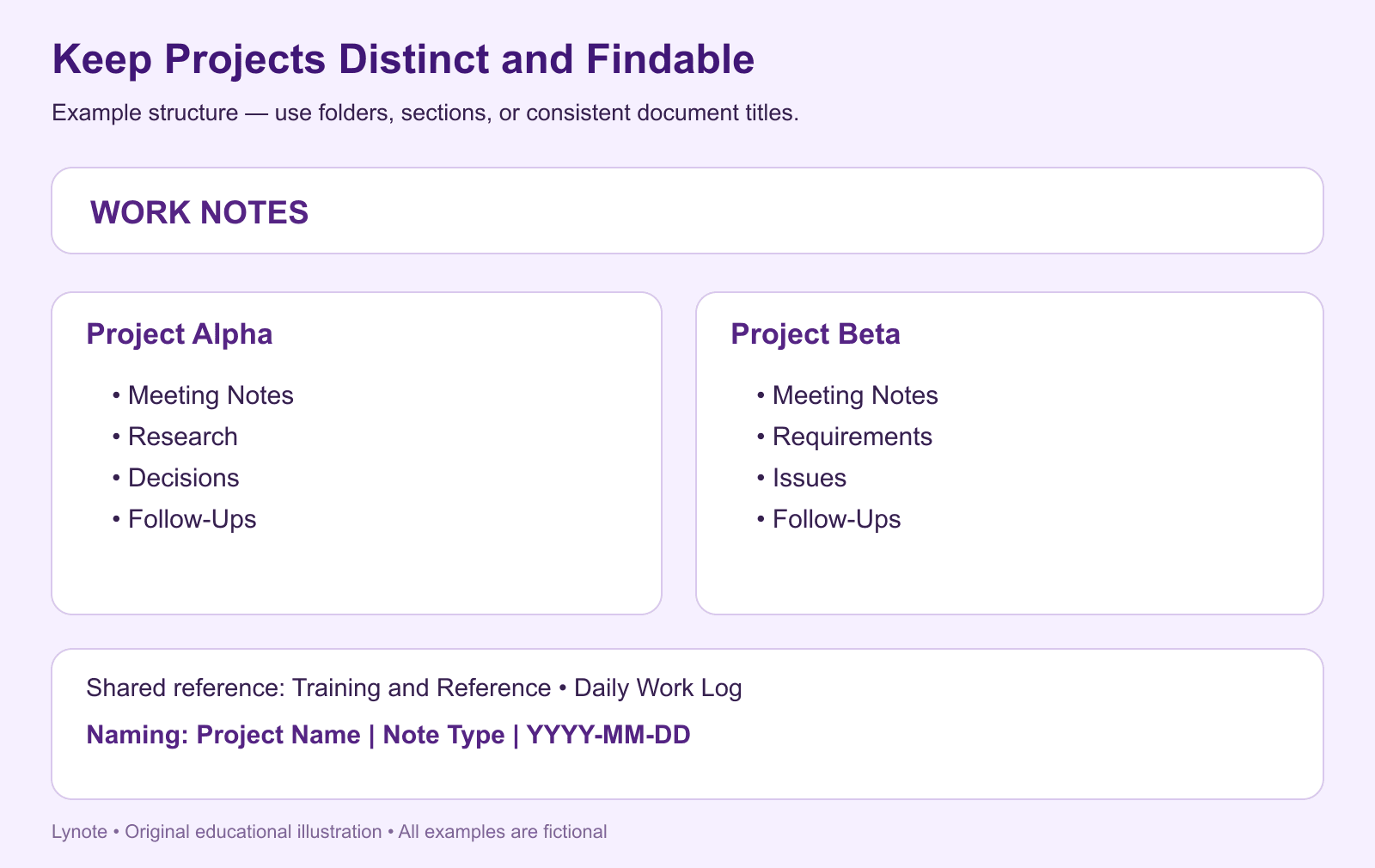
Start with broad categories based on your work. For example:
Work Notes
- Project Alpha
- Meeting Notes
- Research
- Decisions
- Follow-Ups
- Project Beta
- Meeting Notes
- Requirements
- Issues
- Follow-Ups
- Training and Reference
- Daily Work Log
You can implement this structure using folders, notebook sections, or document titles, depending on your tool. The goal is consistency, not a particular software feature.
Use Clear Titles and Dates
Give each note a descriptive title that identifies its purpose. Dates are particularly useful for recurring meetings and project updates.
Recommended naming format:
Project Name | Note Type | YYYY-MM-DD
For example, Website Redesign | Design Review | 2026-10-26 is easier to identify than New Notes.
Separate Active Work from Reference Material
Active notes often contain decisions and tasks that need follow-up. Reference notes contain information you may need later but do not require immediate action.
Keeping these categories distinct makes current priorities easier to review. Move completed or inactive materials into an archive rather than mixing them with ongoing work.
Establish a Weekly Review Habit
At the end of each week, scan your recent working notes. Identify unresolved tasks, outdated information, and questions that still need answers.
Update the relevant project notes and remove unnecessary duplicates. A short review helps prevent information from becoming disorganized over time.
Work Notes Examples and Templates
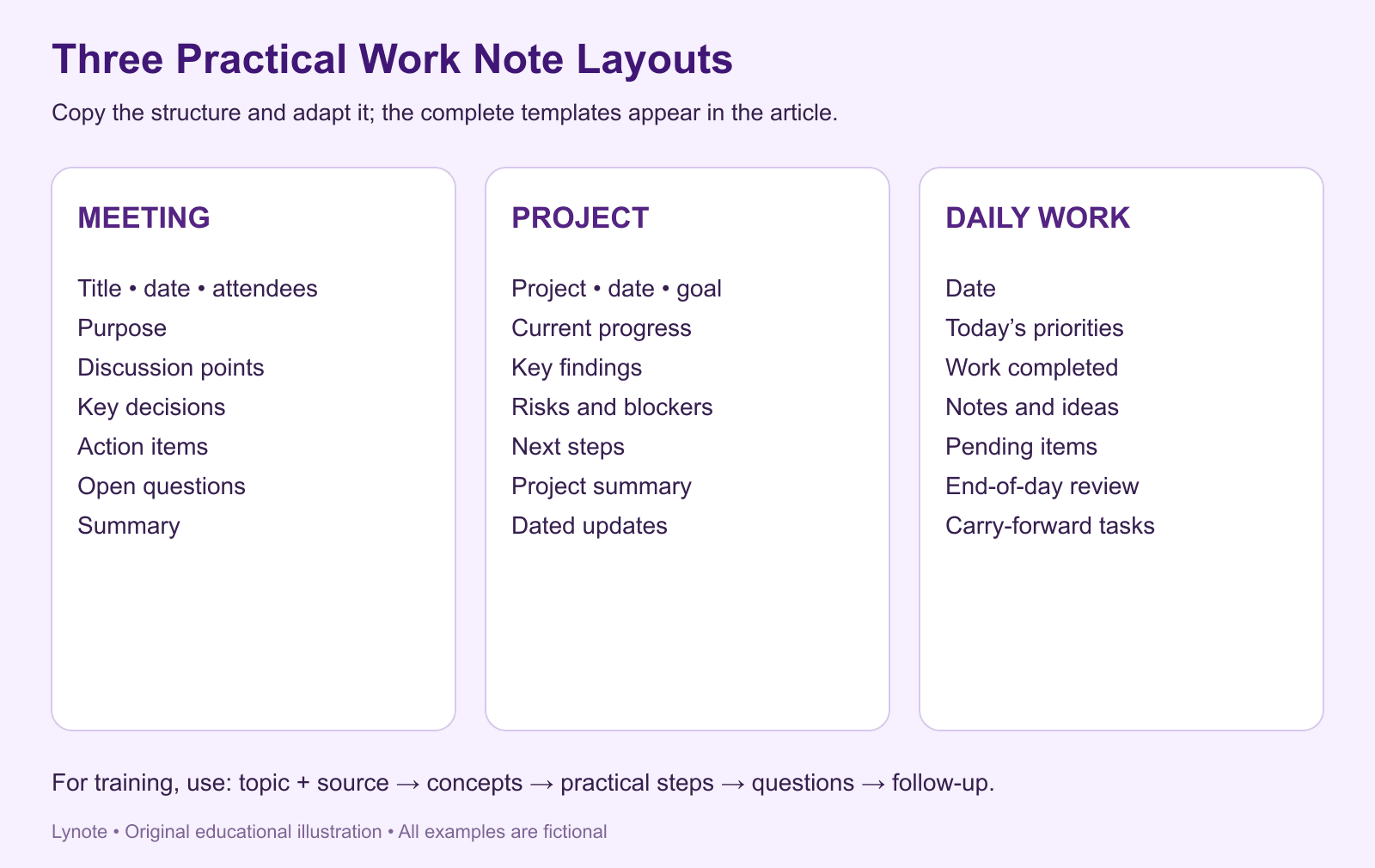
A consistent work notes template makes capturing information easier because you don't need to recreate the structure every time. The following examples can be copied into a digital document or adapted for a paper notebook.
Example 1. Meeting Notes Template
Meeting: Weekly Marketing Sync
Date: [Date]
Attendees: [Names]
Purpose: Review results and align on upcoming priorities.
Discussion Points
- Campaign performance
- Content production status
- Upcoming launch requirements
Key Decisions
- Prioritize product tutorial content next week.
- Review landing page performance before increasing promotion.
Action Items
| Task | Owner | Deadline | Status |
|---|---|---|---|
| Prepare tutorial outline | Alex | Friday | Not started |
| Review campaign metrics | Sam | Thursday | In progress |
| Confirm launch assets | Taylor | Monday | Pending |
Open Questions
- Which audience segment should receive additional testing?
- Are all product screenshots ready?
Summary
The team reviewed current performance and agreed on the next content priorities. Several launch-related tasks require follow-up before the next meeting.
This format separates discussion, decisions, and actions. It can help reduce confusion when multiple people are involved.
Example 2. Project Work Notes Template
Project: Website Redesign
Date: [Date]
Goal: Improve website navigation and landing page clarity.
Current Progress
- Homepage wireframes approved.
- Mobile layout under review.
- Product illustrations being updated.
Key Findings
- Some navigation labels may be unclear.
- Mobile content hierarchy needs further review.
Risks and Blockers
- Delayed design approval may affect development.
- Final illustrations are not yet available.
Next Steps
- Confirm final mobile layout.
- Review updated visual assets.
- Agree on the implementation schedule.
Project Summary
The redesign is progressing, but remaining design decisions may affect the delivery schedule. The next review should focus on unresolved mobile and visual requirements.
Use this template as a running project reference. Add new dated updates rather than replacing important historical decisions.
Example 3. Daily Work Notes Template
Date: [Date]
Today's Priorities
- Complete content outline.
- Review campaign performance.
- Prepare feedback for the landing page.
Work Completed
- Updated the weekly content calendar.
- Reviewed audience engagement trends.
Notes and Ideas
- Test shorter introductions for future video content.
- Compare traffic quality across acquisition channels.
Pending Items
- Feedback on landing page changes.
- Confirmation of next week's publishing schedule.
End-of-Day Review
- What went well?
- What needs further attention?
- Which tasks should carry forward?
A daily work note doesn't need to be lengthy. Its purpose is to provide a quick record of priorities, progress, and items you need to revisit.
Example 4. Training Notes Template
Training Topic: [Topic]
Date: [Date]
Source: [Trainer, document, or recording]
Key Concepts
- Main principle or process
- Important definitions
- Supporting examples
Practical Steps
- First action or procedure
- Second action or procedure
- Final verification step
Questions
- Which steps require approval?
- What exceptions should be considered?
Summary and Follow-Up
Write a short explanation of what you've learned and identify anything that needs clarification before applying the process.
This format is useful for onboarding, software training, and professional workshops.
Digital vs. Handwritten Work Notes
Digital and handwritten notes can both work well in professional settings. The right choice depends on whether you prioritize speed, flexibility, searchability, or freedom from screen-based distractions.
| Feature | Digital Work Notes | Handwritten Work Notes |
|---|---|---|
| Editing | Easy to revise and reorganize | Changes may require rewriting |
| Search | Often searchable | Usually requires manual review |
| Sharing | Convenient in supported apps | May require scanning or copying |
| Visual Sketches | Depends on device and software | Easy with pen and paper |
| Offline Access | Depends on application | Available without power or internet |
| Long-Term Organization | Folders, titles, and digital files | Notebooks, indexes, and tabs |
When Digital Notes Work Best
Digital note-taking is useful for projects involving frequent updates, shared documents, and searchable information. It also makes it easier to reorganize content after a meeting.
For work involving multiple documents or recorded training materials, digital tools can reduce repetitive copying.
When Handwritten Notes Work Best
Handwriting can be useful for brainstorming, informal meetings, and quick sketches. Some people prefer writing by hand when thinking through complex ideas.
The main limitation is that handwritten notes may become difficult to search or share as the collection grows.
Try a Hybrid Note-Taking System
You can use a paper notebook for quick ideas and a digital workspace for organized reference notes. After a meeting, transfer important decisions and follow-ups into the system you use for work.
Choose a simple routine rather than maintaining two completely separate sets of information. The objective is to make your notes easier to use, not create additional administrative work.
How to Turn Work Materials into Organized Notes with Lynote AI
Work information doesn't always begin as a written note. It may come from a meeting recording, a training video, a presentation, or a lengthy document.
Lynote AI Notes helps turn supported materials into structured, editable notes. It can assist with preparing information for review, but important workplace details still require human verification.
Step 1. Add Your Work Materials
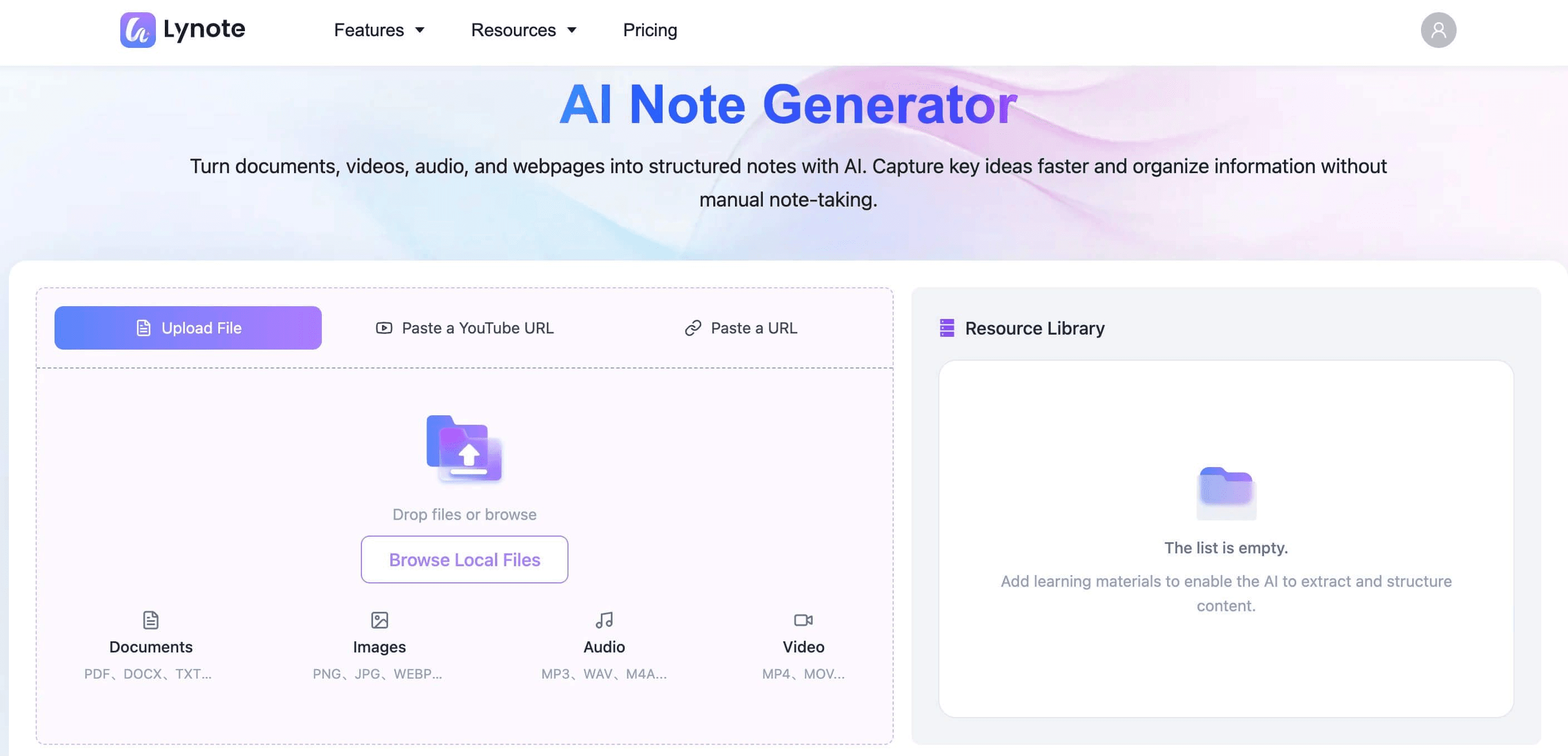
Actual Lynote interface shown for demonstration. Official source.
Upload supported documents, PDFs, audio recordings, or videos to Lynote. You can also provide a supported webpage or YouTube link when relevant.
For example, you might upload a recorded internal training session or a project briefing document that your organization permits you to process. Always confirm recording consent, confidentiality requirements, and company data-handling policies first.
Step 2. Generate Structured AI Notes
Lynote analyzes the provided source and generates organized notes with headings, summaries, and key points. This can provide an initial record of important information without manually copying every section.
Review the output carefully, especially when the source includes names, decisions, dates, or technical details. AI-generated text may omit context or misinterpret parts of the material.
Step 3. Edit Decisions and Action Items
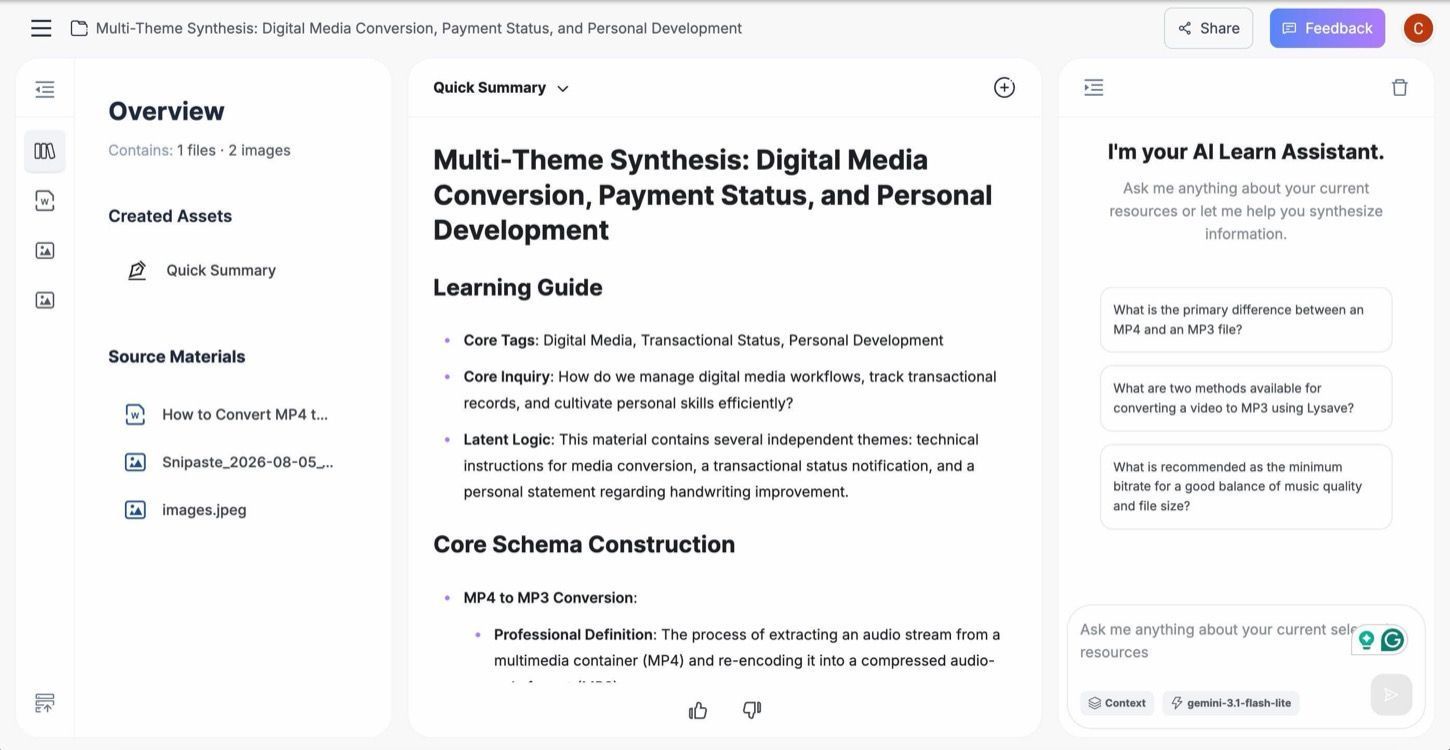
Actual Lynote interface shown for demonstration. Official source.
Use Lynote's editor to refine the notes. Add missing explanations and organize the information into sections such as Summary, Key Decisions, Action Items, and Open Questions.
Only assign owners and deadlines when those details are confirmed. If the source material does not identify an action owner, mark the field as unconfirmed rather than inventing one.
Step 4. Review Information with AI Chat
Use AI Chat to ask questions about information contained in the uploaded source materials. For example, you could ask which product requirements were discussed in a briefing document.
AI Chat is grounded in the material you provide. It should not be treated as a way to discover decisions or facts that were never recorded.
After reviewing the notes, copy or export the confirmed information as appropriate for your normal workflow. Lynote is not a replacement for a full project-management platform or organizational approval process.
Common Work Note-Taking Mistakes to Avoid
Even a well-designed note-taking system can become difficult to maintain when certain habits get in the way.
Recording Everything Word for Word
Trying to capture every sentence can make it harder to recognize important information. Long transcripts may preserve details but do not automatically make decisions or next steps clear.
Better approach: Focus on meaningful information and keep the original recording or document available when permitted. Create a concise, reviewed summary afterward.
Mixing Decisions with Suggestions
A suggestion discussed during a meeting is not necessarily an approved decision. Treating the two as equivalent can cause misunderstandings.
Better approach: Create separate sections for Decisions, Proposed Ideas, and Open Questions. Confirm important outcomes with the appropriate person.
Forgetting Owners and Deadlines
An action item without a clear owner or deadline may be difficult to follow up. However, guessing those details can be just as problematic.
Better approach: Record the confirmed owner and due date when available. Otherwise, identify what still needs clarification.
Using Inconsistent Note Titles
Generic names such as "Meeting Notes" or "Project Update" become difficult to search when repeated across different projects.
Better approach: Use a consistent naming format with a project name, note type, and date.
Never Reviewing Old Notes
Notes that are never revisited may become outdated or disconnected from current work. This is particularly problematic when decisions and responsibilities change.
Better approach: Include a short daily or weekly review. Update active notes and archive completed materials when appropriate.
Uploading Confidential Material Without Permission
Work documents and recordings can contain sensitive business, customer, or employee information. Convenience should not override company policies or legal responsibilities.
Better approach: Confirm you are permitted to upload the material and use the chosen service. Remove unnecessary sensitive information when possible, and follow your organization's retention and security requirements.
Conclusion: Build a Work Notes System You Can Actually Use
Organized work notes help turn meetings, projects, and everyday discussions into information you can retrieve and act on. Focus on important facts, keep decisions separate from suggestions, use consistent templates, and review outstanding tasks regularly.
Whether you prefer a paper notebook or digital notes for work, the most effective system is one you can maintain without unnecessary effort.
If you want to turn supported recordings, documents, and training materials into editable structured notes, try Lynote AI Notes and review the output before using it for professional decisions.
Frequently Asked Questions
What Are Work Notes?
Work notes are records of information collected during professional activities, such as meetings, projects, research, training, and daily tasks. They may include important facts, decisions, questions, and action items.
A good work note should remain understandable when you revisit it later. Clear headings and consistent formatting make the information easier to retrieve.
How Do I Organize Notes for Work?
Start by organizing notes according to projects, teams, or activity types. Use consistent titles and dates so you can identify the purpose of each note.
Separate ongoing work from reference materials and archive outdated information when appropriate. Regular reviews help keep your system manageable.
What Is a Good Work Notes Template?
A useful work notes template includes a title, date, purpose, key information, decisions, action items, and open questions. The exact sections depend on whether you're recording a meeting, tracking a project, or writing a daily work log.
Choose a consistent structure but leave room for different types of content. Avoid adding sections that don't support your workflow.
What Is the Difference Between Work Notes and Meeting Notes?
Meeting notes document a specific discussion, including decisions and follow-up actions. Work notes are broader and may include project research, personal observations, daily updates, and training information.
Meeting notes are one category of workplace notes. A complete work note-taking system can include several categories under a shared organizational structure.
How Can I Take Better Notes at Work?
Prepare a clear purpose before starting, then focus on important facts, decisions, and unanswered questions. Use headings and bullets to separate information while recording enough context for future review.
Afterward, clarify responsibilities and deadlines and write a short summary. Review the notes when preparing for your next task or meeting.
What Are the Best Note Taking Apps for Work?
The best note taking apps for work depend on how you use information. OneNote and Evernote provide general-purpose note-taking options, Notion supports structured workspaces, and Obsidian emphasizes connected personal knowledge.
Lynote is useful when you want AI assistance generating notes from supported recordings, documents, and videos. It is not a complete replacement for team project management or live meeting automation.
Can AI Create Work Notes from Meeting Recordings?
Yes. AI note-taking tools can help generate structured notes from supported audio or video recordings. The results should be reviewed for accuracy, particularly when they include decisions, names, and deadlines.
Lynote supports source-based note generation from uploaded audio and video materials. It does not need to be described as an automatic live meeting participant.
How Often Should I Review My Working Notes?
A brief daily review can help track immediate tasks and unresolved questions. A weekly review is useful for checking project progress, updating reference information, and archiving completed work.
Choose a schedule that matches your responsibilities. The purpose is to keep important information current without turning review into unnecessary administration.
Can I Use One Notebook for Multiple Work Projects?
Yes. You can maintain one notebook or digital workspace and divide it into sections for different projects. This approach works well when you use consistent headings and clearly separate unrelated information.
If your projects become more complex, separate notebooks or folders may be easier to manage. Choose the structure that makes finding information simplest.
Should I Take Handwritten or Digital Notes at Work?
Handwritten notes work well for brainstorming, sketches, and quick personal records. Digital notes are often easier to edit, search, and reuse across longer projects.
You can combine both methods by capturing ideas on paper and transferring essential information into a structured digital note afterward.
Are AI-Generated Work Notes Reliable?
AI-generated notes can provide a useful starting point, but they may miss details or misunderstand context. Important decisions, figures, action owners, and deadlines should always be checked against the original materials and confirmed where needed.
Lynote generates notes based on supplied sources. It should be used as an assistant to workplace note preparation, not as an independent authority on what a team decided.

Written by Hamza Razzaq
Technical Writer
Hamza creates hands-on explainers and technical guides that make AI writing tools easier to understand and use. View all articles →