How to Make an Executive Summary That Drives a Decision

An executive summary turns a long document into a short, self-contained decision brief. It should tell a busy reader what matters, why it matters, what the evidence supports, and what should happen next without requiring them to read the full report first.
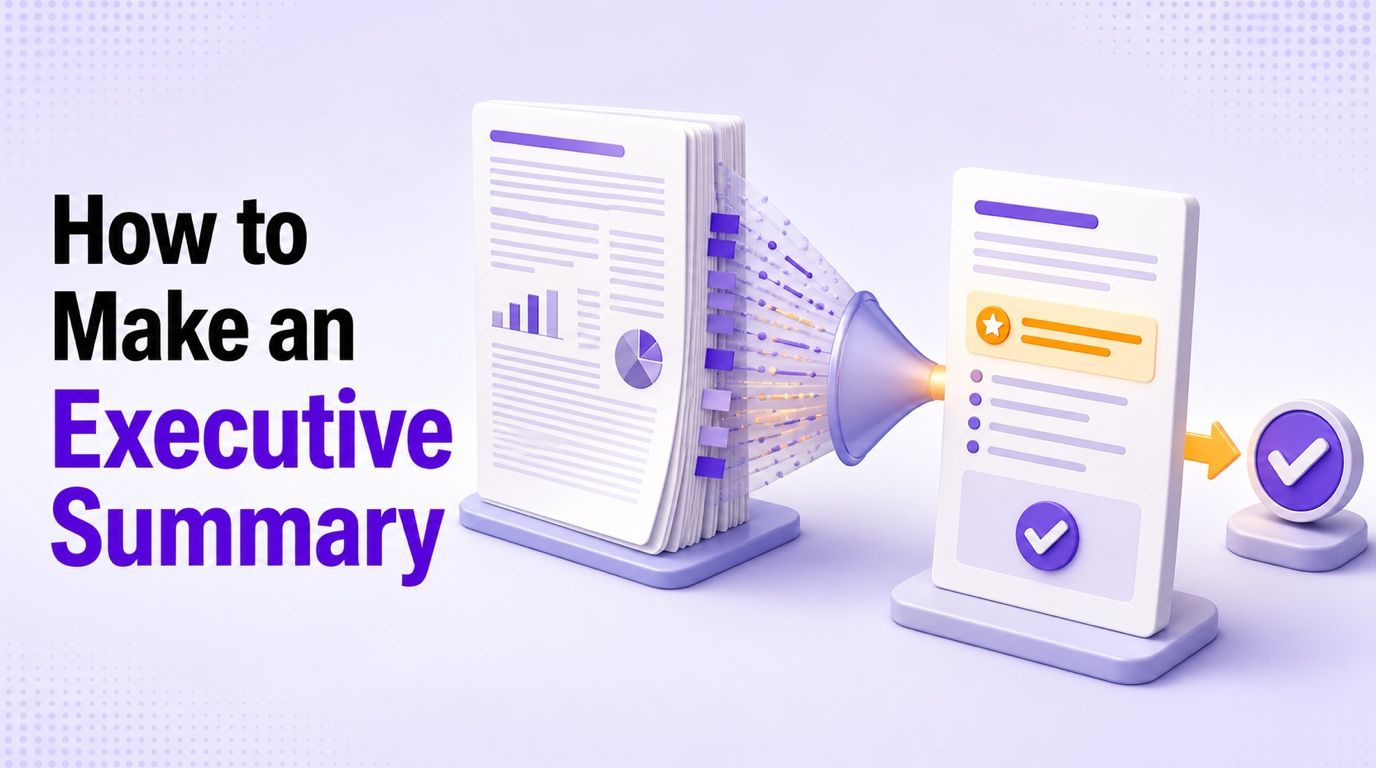
The most reliable rule is simple: write the executive summary last, place it first. Finish the underlying report or plan before summarizing it, then verify every important figure, conclusion, risk, and commitment against that source.
Quick Answer: How to Make an Executive Summary
To make an executive summary, follow these seven steps:
-
Finish the source document. Work from final findings and recommendations, not early assumptions.
-
Define the reader and decision. Know who has authority and what you need them to approve, understand, or do.
-
Lead with the answer. Put the conclusion, recommendation, or opportunity in the opening paragraph.
-
Select decision-changing evidence. Include only the findings and figures that materially support the answer.
-
State important risks and assumptions. Explain uncertainties that could change cost, timing, confidence, or outcomes.
-
Make the next action explicit. Name the approval, owner, budget, deadline, or next step.
-
Cut and verify. Remove repetition, check every high-impact fact, and test whether the summary works on its own.
Use this formula as a final check:
Decision or conclusion + supporting evidence + impact + material risk + next action
A summary is not successful merely because it is short. It succeeds when the intended reader can understand the situation and make the right next decision with less effort.
What Makes a Good Executive Summary?
A good executive summary answers three questions in the reader's language:
- What should I know? State the central issue, opportunity, finding, or conclusion.
- Why should I care? Explain the operational, financial, academic, strategic, or customer impact.
- What should I do? Present the recommendation, approval request, or next action.
The summary must also be traceable. Every material claim should come from the full document or its supporting evidence; the summary is not the place to introduce a new forecast, conclusion, or promise that the main document never establishes.
| Element | Weak version | Strong version |
|---|---|---|
| Opening | “This report discusses customer retention.” | “Approve the revised onboarding program because early-stage drop-off is the largest preventable source of churn.” |
| Evidence | Lists many statistics without priority | Uses the few findings that directly support the decision |
| Recommendation | Hints that improvement may be useful | States the recommended action and why it is preferred |
| Risk | Omits uncertainty to sound confident | Names material assumptions, limitations, and dependencies |
| Ask | Ends with general observations | Names the decision, owner, budget, or deadline required |
Executive Summary vs. Introduction, Abstract, and Conclusion
An introduction prepares the reader for what follows. It may explain the topic, scope, and structure, but it does not have to reveal the final recommendation immediately.
An abstract commonly condenses the purpose, method, results, and conclusion of academic research. It helps readers understand what the study contains, while an executive summary is usually more decision- and action-oriented.
A conclusion closes the full document after the reader has seen the evidence. An executive summary appears at the beginning and must make sense to someone who has not read the supporting sections.
A table of contents shows where information is located. An executive summary interprets that information, ranks what matters, and tells the reader what it means.
How to Make an Executive Summary in 7 Steps
1. Finish the Source Document First
Do not summarize a moving target. Complete the report, business plan, case study, proposal, or analysis so that the final findings and recommendations are available before you begin.
Create a small evidence sheet as you review the source. Record each essential conclusion or figure beside its page, section, table, or file location; this makes verification faster and reveals when a polished sentence is not actually supported.
| Summary claim | Evidence needed | Source location | Verified? |
|---|---|---|---|
| Main finding | Final analysis or result | Section or page | Yes/No |
| Financial figure | Approved calculation | Table or appendix | Yes/No |
| Recommendation | Evaluated options | Findings section | Yes/No |
| Deadline or owner | Confirmed plan | Action plan | Yes/No |
If the source contains conflicting numbers or unresolved assumptions, resolve them before drafting. Concision cannot repair unreliable evidence.
2. Define the Reader and the Decision
Write down who will read the summary, what they already know, what authority they have, and what decision is expected. A founder pitching an investor, a student presenting a case analysis, and a project manager requesting budget approval need different summaries even when their documents are similar in length.
Use one sentence to define the job:
After reading this summary, [reader] should be able to decide [decision] because they understand [most important evidence and consequence].
Delete details that cannot change that decision. They may still belong in the full document, but they do not automatically belong in the executive summary.
3. Lead With the Answer
Open with the recommendation, conclusion, or central opportunity. Do not make an executive search through company history, methodology, and scene-setting paragraphs to discover why the document exists.
A useful opening often follows this pattern:
[Situation or finding]. We recommend [action] because [primary evidence and impact]. Approval is needed for [specific next step].
Avoid empty openings such as “This report will discuss” or “The purpose of this document is to provide an overview.” The heading already tells the reader that they are looking at a summary; use the first sentence to deliver substance.
4. Select the Evidence That Changes the Decision
Choose a small number of findings, comparisons, figures, or trends that directly support the opening recommendation. Evidence earns space when removing it would make the decision less informed or the recommendation less credible.
Connect every number to an implication. “Support requests increased by 18%” is only a statistic; “Support requests increased by 18%, exceeding current staffing capacity and extending response times” tells the reader why the number matters.
Use ranges or rounded figures only when that level of precision is appropriate and remains faithful to the source. Never simplify a number in a way that changes its meaning, uncertainty, or reporting period.
5. State Risks, Assumptions, and Constraints
Decisive writing does not require false certainty. Include the material caveats that could change the recommendation, cost, timing, confidence level, or expected result.
Prioritize risks that a decision-maker can act on. A useful risk statement identifies the uncertainty, its possible effect, and any mitigation or decision condition rather than dropping a vague warning into the final sentence.
For example:
The schedule assumes vendor approval by [date]. A delay beyond that point would move the launch into [later period], so contract approval is the immediate dependency.
Minor technical limitations can stay in the full document. The summary needs the constraints that could alter the decision.
6. Make the Next Action Explicit
End with a concrete request. State whether the reader needs to approve a plan, release a budget, select an option, assign an owner, schedule a review, or accept a recommendation.
Include the amount, owner, or deadline when the source confirms it. “Leadership should consider the proposal” creates no momentum; “Approve the pilot budget by [date] so [owner] can begin the eight-week test” defines an executable next step.
If no immediate approval is required, specify the next information milestone. A summary can ask the reader to review findings, authorize further analysis, or choose between options as long as the action is unambiguous.
7. Cut, Verify, and Read It as a Standalone Document
Remove repeated background, procedural detail, and specialist language that does not affect confidence in the conclusion. Keep method information only when the sampling, scope, data quality, or analytical approach materially changes how the reader should interpret the result.
Then verify names, dates, figures, units, owners, recommendations, assumptions, and commitments against the source. Pay particular attention to percentages without baselines, totals from different reporting periods, and claims that sound stronger than the underlying evidence.
Finally, give the summary to someone who has not read the full document. Ask them to identify the issue, recommendation, evidence, risk, and requested action; anything they cannot identify needs revision.
How to Use Lynote as an Executive Summary Maker
The manual method above remains the quality standard, but an Executive Summary Generator can create a structured first draft when the source is long or spread across related material. Lynote accepts supported files and links, then keeps the generated summary editable so you can reshape it for the actual decision-maker.
Step 1: Add the Source Material
Upload the report, proposal, business plan, case-study material, transcript, or another supported source. You can also paste a webpage or YouTube URL when that content forms part of the evidence behind the decision.
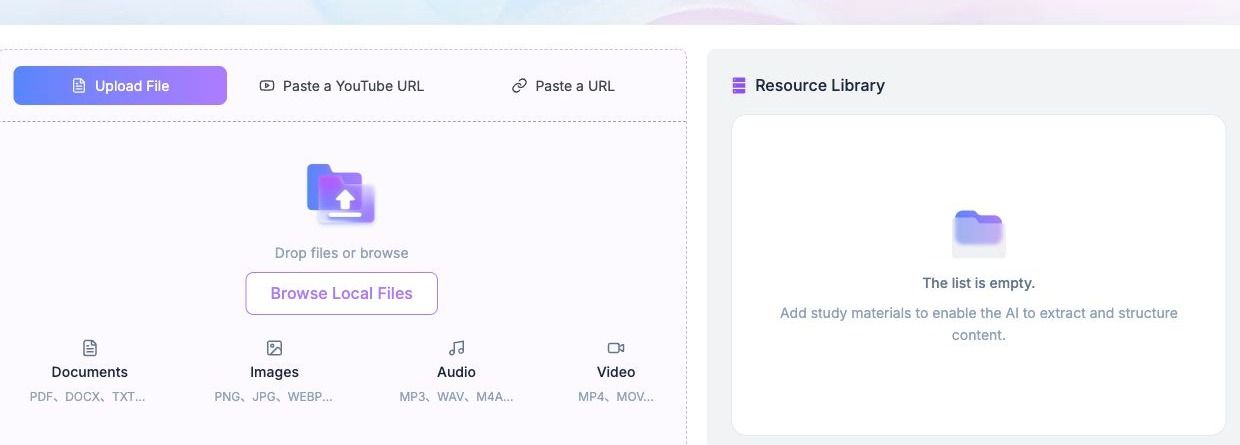
When several documents support one decision, include only the relevant files and links. A clean source set reduces the chance that background material will crowd out the final recommendation.
Step 2: Click Generate Summary
Select Generate Summary so Lynote can organize the purpose, central findings, recommendations, risks, figures, and next steps available in the source. Treat the result as a structured draft rather than an independent validation of the material.
The source may not contain every element required for a decision-ready brief. If an owner, deadline, financial assumption, or approval request is absent, mark it for human completion instead of allowing smooth wording to hide the gap.
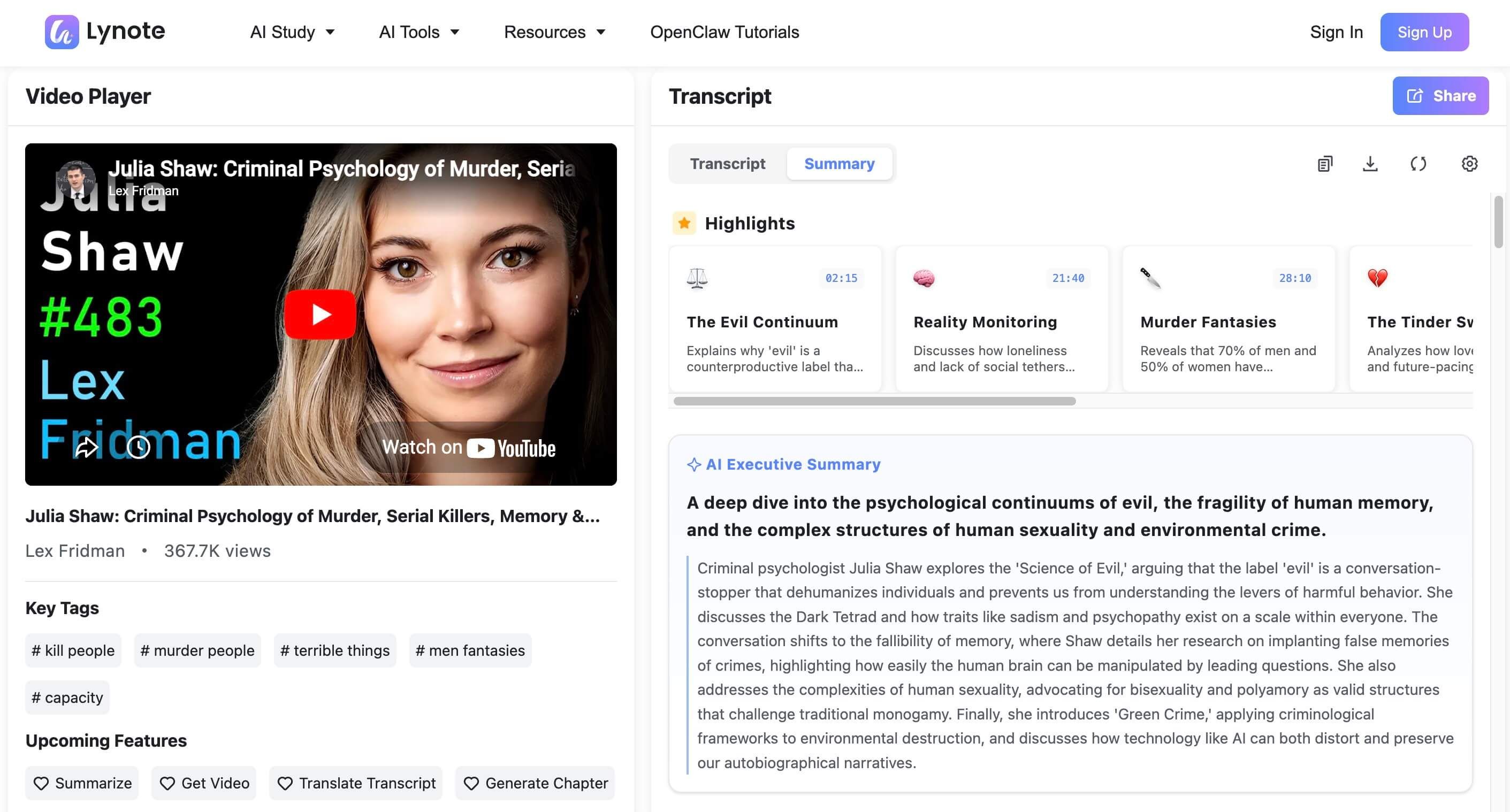
The screenshot below shows a real Lynote AI Executive Summary generated from a YouTube source. The transcript, highlighted moments, and summary remain visible together, making it easier to trace important claims back to the source.
Step 3: Review, Refine, and Export
Compare each high-impact statement with the original material. Adjust the opening for the reader, remove low-priority detail, restore material caveats, and make the final action explicit before copying, editing, or exporting the result.
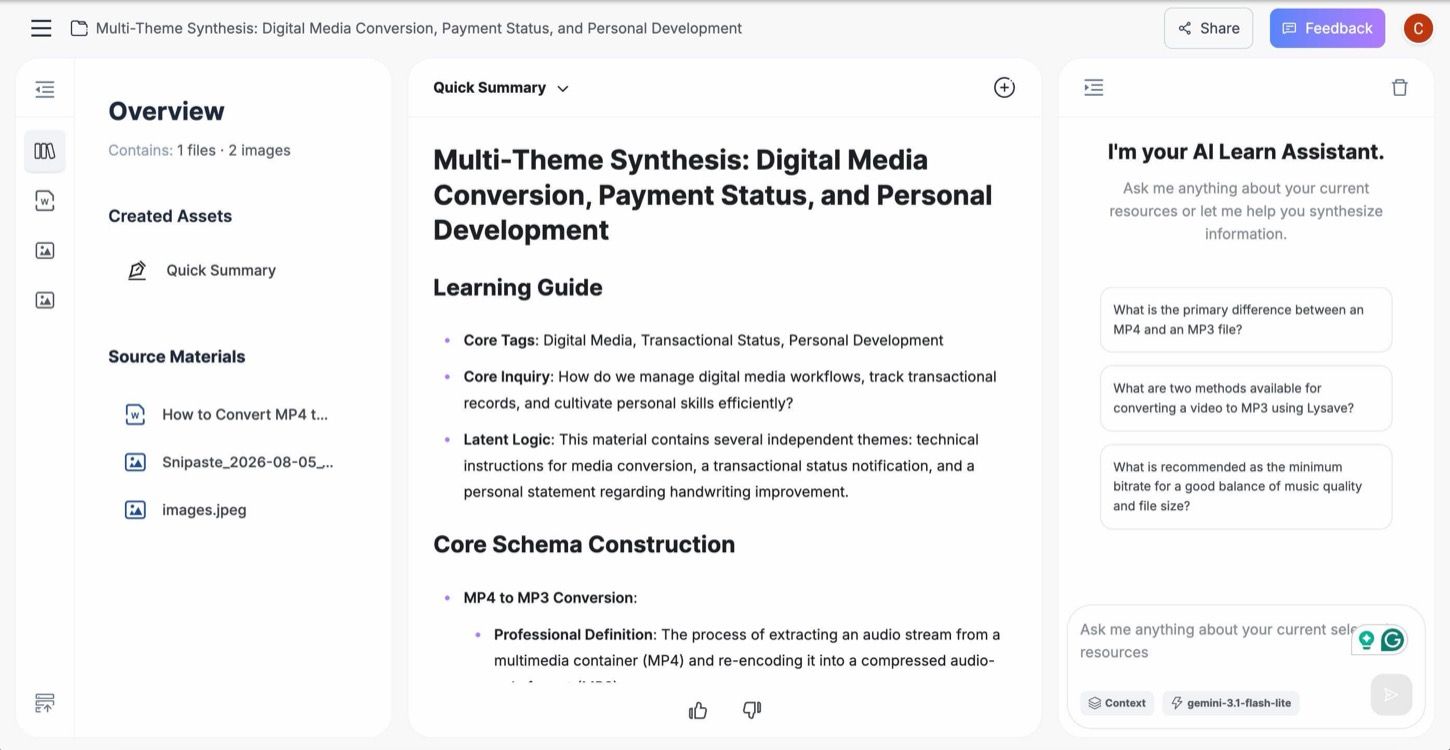
In the Lynote workspace, the selected source materials stay visible beside the generated summary and follow-up assistant. This layout helps you check what was included, question unclear points, and revise the output before sharing it.
Use this verification rule:
AI can condense and organize the source; the author remains responsible for judgment, factual accuracy, and the final recommendation.
Do not share the draft until names, figures, dates, commitments, recommendations, and unresolved risks have been checked. For large or sensitive projects, have the relevant subject owner review the summary as well.
Executive Summary Structure by Document Type
The decision-first principle stays consistent, but the evidence and ask change with the document. Use the structure that fits the source instead of forcing every summary into the same template.
| Document type | Best opening | Essential evidence | Typical recommendation | Material risk | Final ask |
|---|---|---|---|---|---|
| Business plan | Customer problem and business opportunity | Market, model, traction, financial need | Fund, launch, or support the plan | Adoption, cost, competition, execution | Investment, approval, or next meeting |
| Case study | Central problem and analytical conclusion | Major findings and evaluated options | Preferred response or lesson | Assumptions and case limitations | Adopt, reject, or further evaluate |
| Report or research | Most important finding and implication | Results that support the conclusion | Policy, operational, or research action | Scope, data, or method limits | Approve action or commission next work |
| Proposal or update | Proposed change or current status | Value, progress, resources, and milestones | Proceed, adjust, pause, or select an option | Budget, schedule, ownership, dependency | Approval, resources, or escalation |
How to Make an Executive Summary for a Business Plan
Start with the customer problem, the proposed solution, and why the opportunity matters now. Then explain the target market, business model, evidence or traction, relevant competitive advantage, team capability, financial need, and the exact ask.
Do not turn the summary into a product-feature inventory. Investors and internal approvers need to understand how the business creates value, what evidence supports demand, what resources are required, and what could prevent the plan from succeeding.
A practical order is:
-
Customer problem and target market
-
Solution and value proposition
-
Business and revenue model
-
Evidence, traction, or validation
-
Team and execution capability
-
Financial outlook and resource requirement
-
Risks and specific investment or approval ask
Use only figures supported by the financial model and market analysis. A confident forecast without visible assumptions weakens the plan rather than strengthening it.
How to Make an Executive Summary for a Case Study
Open with the central problem and the conclusion reached through the case analysis. Briefly identify the organization or setting, then present the major findings, evaluated response, recommended action, and important assumptions or limitations.
For a problem-solving case study, explain why the selected option is preferable to the alternatives. For an analytical case study, emphasize what the evidence reveals and how that insight should affect future decisions.
A useful structure is:
-
Context and central problem
-
Most important findings
-
Options or response evaluated
-
Recommended solution or analytical conclusion
-
Limitations and assumptions
-
Result, implementation step, or next action
Avoid retelling the entire case chronologically. The summary should reveal the analytical outcome, not recreate the reader's journey through the evidence.
For a Report or Research Study
Lead with the main finding and its consequence. Follow with the few results that establish the conclusion, material limitations, the recommended response, and the decision required.
If the source is a long paper, an AI Paper Summarizer can help you map its question, methods, findings, and limitations before you write the decision-focused executive summary. Method detail belongs in the final summary only when it affects trust or applicability: sample size, data age, geographic scope, or a major methodological limitation may matter, while routine procedural steps usually do not.
For a Proposal or Project Update
State what should change or what the current status means. Summarize the expected value, resources required, progress or evidence, material dependencies, owners, milestones, and approval needed.
For a project update, make variance visible. Explain what changed from the approved baseline, why it changed, what impact it creates, and what decision is now required.
A Reusable Executive Summary Template
Use the template below as a drafting scaffold. Replace every bracketed field with source-supported information and remove any line that does not apply.
Purpose and decision
[State the issue, opportunity, or finding] requires [decision or action] from [reader or decision-maker].Recommendation or conclusion
We recommend [specific action or preferred option] because [primary reason supported by the source].Evidence and impact
The decision is supported by [two to four most material findings]. Together, these findings indicate [operational, financial, academic, customer, or strategic implication].Risks and assumptions
The recommendation depends on [material assumption or dependency]. The main risk is [risk and possible effect], which can be addressed by [mitigation or decision condition].Next action
Approve or complete [specific action] by [date, if confirmed], with [owner] responsible for [next milestone].
Before and After: From Vague to Decision-First
Before:
This report reviews the current onboarding process and discusses several opportunities that the company may wish to consider in the future.
After:
Approve a targeted onboarding pilot focused on [verified problem area]. The source analysis identifies [finding one] and [finding two] as the largest preventable barriers, and the pilot would test the proposed response before a wider rollout.
The improved version does not require invented results. It states the requested decision, connects it to verified findings, and defines the next step.
How Long Should an Executive Summary Be?
One page is common, but there is no universal length. Some longer academic or professional reports allow an executive summary up to roughly 5-10% of the full document, while a short internal decision memo may need only a few paragraphs.
Always follow a required word, page, grant, assignment, or company limit first. Within that boundary, make the summary long enough to explain the decision and short enough that a busy reader can identify the answer, evidence, risk, and action quickly.
| Document | Practical starting range | What determines the final length |
|---|---|---|
| Short internal memo | 150-300 words | Number of decisions and risks |
| Business plan | 1-2 pages | Market, model, evidence, financial need, and ask |
| Case-study report | 5-10% of the report when no stricter limit applies | Complexity of problem, findings, and recommendation |
| Research or analytical report | About 1 page for routine reports; longer for complex work | Number of material findings and limitations |
| Formal proposal | 1-2 pages or the prescribed limit | Value, resources, risk, milestones, and approval |
These ranges are starting points, not automatic targets. If a half-page summary omits the risk that could reverse the decision, it is too short; if a two-page summary repeats background that cannot affect the decision, it is too long.
Common Executive Summary Mistakes
Writing It Before the Source Is Complete
An early summary often preserves assumptions that the final analysis changes. Draft notes are useful, but finalize the summary only after the evidence and recommendations stabilize.
Treating It as an Introduction
Background without a conclusion forces the reader into the full report. Put the result or recommendation near the beginning, then supply the minimum context needed to understand it.
Burying the Recommendation
Do not wait until the final paragraph to reveal the preferred action. A decision-maker should be able to identify the recommendation during a quick first scan.
Copying Paragraphs Without Synthesis
A set of shortened report paragraphs is not automatically a coherent executive summary. Reorder information around the decision rather than preserving the source document's chapter sequence.
Listing Numbers Without Their Implications
Explain what each important figure changes. A number may affect urgency, cost, feasibility, confidence, or expected impact; make that relationship visible.
Adding New Evidence
The summary may reframe and prioritize existing evidence, but it should not become the only place where a material fact appears. Add new analysis to the full document first, then update the summary.
Omitting Risk or the Requested Action
A recommendation without a material caveat can mislead, while a conclusion without an ask creates no next step. Include both when they affect the decision.
Trusting an AI Draft Without Verification
Generated summaries can omit context, smooth over conflicts, or make a relationship sound more certain than the source. Check every high-impact statement before the summary is approved or shared.
Final Executive Summary Quality Checklist
Before sharing the summary, confirm that:
- The intended reader and decision are clear.
- The opening states the conclusion, recommendation, or opportunity.
- The evidence directly supports that answer.
- Important figures include enough context to interpret them.
- The business, academic, operational, or strategic impact is explicit.
- Material risks, assumptions, and limitations are visible.
- The next action, owner, approval, or deadline is specific.
- Every important claim can be traced to the source material.
- The summary makes sense without reading the full document.
- The length follows any required limit and contains no avoidable repetition.
Stop condition: Do not share the executive summary if an important number, commitment, recommendation, or deadline cannot be verified against the source.
FAQs About Making an Executive Summary
What are the main parts of an executive summary?
The main parts are the issue or opportunity, central conclusion or recommendation, supporting evidence, expected impact, material risks or assumptions, and requested next action. The exact emphasis changes by document type.
How do you start an executive summary?
Start with the answer: the main finding, recommendation, or opportunity and why it matters. Avoid opening with a generic description of what the report covers.
Should you write an executive summary first or last?
Write it after the full document is complete, even though it appears first. This lets you summarize final evidence and avoids carrying outdated assumptions into the opening pages.
How long should an executive summary be?
One page is common, but follow any prescribed limit. Complex business plans, case studies, and proposals may require one to two pages or up to roughly 5-10% of a longer report when no stricter guidance applies.
What should not be included in an executive summary?
Avoid minor background, routine methodology, unexplained jargon, repeated detail, and new evidence not contained in the source. Do not include an unsupported forecast or promise merely because it makes the summary sound stronger.
What is the difference between an executive summary and an introduction?
An introduction prepares readers for the document and may withhold the final answer. An executive summary gives the conclusion, supporting evidence, impact, risk, and action in a self-contained form.
How do you make an executive summary for a business plan?
Cover the customer problem, solution, market, business model, evidence or traction, team, financial need, risks, and specific investment or approval ask. Use figures that match the financial model and market analysis.
How do you make an executive summary for a case study?
Summarize the context, central problem, major findings, evaluated options or response, recommended solution, important limitations, and next action. Focus on the analytical result rather than retelling the full case.
Can an executive summary maker summarize several source files?
Some tools can combine related supported files and links in one workspace. Keep the source set focused, review the output for conflicts, and verify every high-impact fact before treating the draft as decision-ready.
Conclusion
A strong executive summary is a decision tool, not a compressed table of contents. Lead with the answer, support it with the evidence that matters, explain the impact and material risk, and finish with a concrete next action.
Brevity helps only when the summary remains accurate, self-contained, and actionable. Write it last, verify it against the source, and stop before sharing whenever an important fact or commitment cannot be traced.

Written by Kristen I.
Content Strategist
Kristen focuses on content structure, editorial planning, readability, and creating useful experiences for readers. View all articles →