chatgpt prompt to humanize text is most useful when it tells the model exactly what to preserve, what to change, and what voice to aim for. A vague request like “make this human” often produces another polished AI draft, while a specific prompt protects your meaning and gives the rewrite a clearer job.
The prompts below are designed for clarity, natural rhythm, and factual preservation. They are not written to hide authorship or promise detector outcomes; use them to make your own writing easier to read and more faithful to your intent.
Quick Answer
The best prompt to humanize text has four parts: the audience, the tone, the facts that must stay fixed, and the kind of rewrite you want. If any of those pieces is missing, the model may smooth the language but also flatten your voice or change your claims.
Use short sections rather than an entire long document. After each rewrite, compare the new version with the original and keep only the lines that still sound like you.
Source note: OpenAI’s prompt engineering guidance emphasizes clear instructions and enough context. For ChatGPT humanizing prompts, the safest pattern is to define the editor role, protect facts, and ask for a specific kind of rewrite.
How to Set Up ChatGPT Before You Paste a Prompt
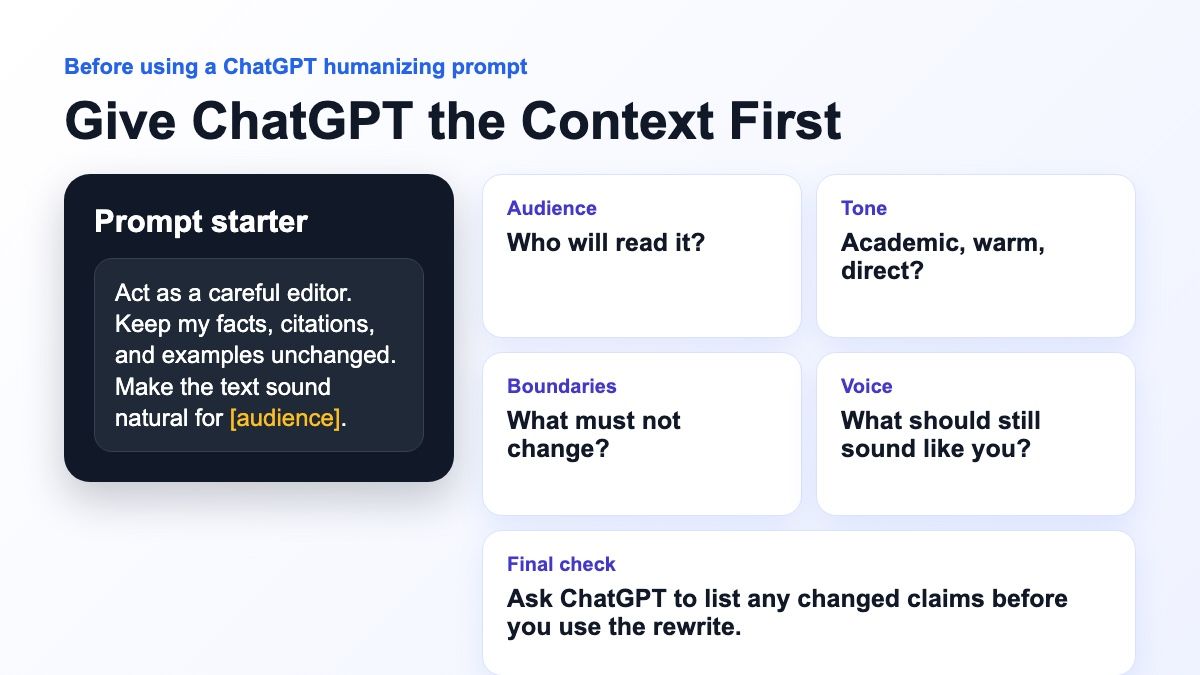
ChatGPT works better when you give it a small amount of context before the rewrite. Add the audience, the purpose of the text, the tone you want, and the facts that must not change.
If voice matters, paste a short sample of your own writing and ask ChatGPT to use it as a style reference. Do not ask it to copy the sample exactly; ask it to preserve the level of formality, sentence rhythm, and directness.
| Context to give ChatGPT | Example |
|---|---|
| Audience | “This is for a college instructor” |
| Tone | “Clear, natural, and still academic” |
| Boundaries | “Do not change citations, claims, or examples” |
| Output format | “Return the rewrite and then list changed claims” |
| Voice sample | “Use this paragraph as a rough style reference” |
20 ChatGPT Prompts to Humanize Text
Copy this prompt and replace any bracketed details with your own context.
Act as a careful writing editor. Rewrite the text below so it sounds natural, specific, and human. Preserve every fact, citation, and example. Ask before adding anything not in the original.
Copy this prompt and replace any bracketed details with your own context.
Rewrite this in my voice based on the original wording. Keep my level of formality, avoid generic AI phrasing, and make only the changes needed for clarity and flow.
Copy this prompt and replace any bracketed details with your own context.
Use minimal edits. Keep my structure and wording where possible, but smooth out robotic phrases, repetitive transitions, and overly balanced sentence patterns.
Copy this prompt and replace any bracketed details with your own context.
First identify the claims that must not change. Then rewrite the draft in a more natural tone while preserving those claims exactly.
Copy this prompt and replace any bracketed details with your own context.
Revise this for sentence rhythm. Mix shorter and longer sentences naturally, remove repetitive openings, and keep the tone clear and credible.
Copy this prompt and replace any bracketed details with your own context.
Edit this academic paragraph for clarity and natural voice. Keep citations and claims unchanged. Do not make it sound casual, and do not add unsupported points.
Copy this prompt and replace any bracketed details with your own context.
Rewrite this email so it sounds like a real person wrote it: direct, polite, and warm. Keep the ask and details unchanged.
Copy this prompt and replace any bracketed details with your own context.
Find and rewrite generic phrases that sound AI-written. Replace them with more concrete wording using only the information already in the draft.
Copy this prompt and replace any bracketed details with your own context.
Rewrite each paragraph separately. After each paragraph, include one sentence explaining what changed and why. Keep the original meaning intact.
Copy this prompt and replace any bracketed details with your own context.
Rewrite this for a blog audience. Make it helpful, natural, and easy to scan. Avoid hype, filler, and unsupported claims.
Copy this prompt and replace any bracketed details with your own context.
Rewrite this personal statement paragraph so it sounds reflective and specific. Do not invent experiences, achievements, or emotions.
Copy this prompt and replace any bracketed details with your own context.
Rewrite this as a concise executive summary. Keep it human, practical, and specific. Remove fluff and preserve the key points.
Copy this prompt and replace any bracketed details with your own context.
Rewrite this in a tone that would be appropriate for a class assignment. Keep the ideas mine, maintain citations, and make the reasoning clearer.
Copy this prompt and replace any bracketed details with your own context.
Improve clarity without adding facts. If you think an example or citation is needed, add a bracketed note instead of creating one.
Copy this prompt and replace any bracketed details with your own context.
Rewrite the transitions so the paragraphs connect naturally. Avoid formulaic phrases and make the flow feel earned.
Copy this prompt and replace any bracketed details with your own context.
Create two human-sounding rewrites: one concise and one warmer. Keep all facts the same, then explain which version sounds more natural and why.
Copy this prompt and replace any bracketed details with your own context.
Make this more direct and less padded. Keep nuance, but remove phrases that make the writing sound like an AI assistant.
Copy this prompt and replace any bracketed details with your own context.
Rewrite this for a professional LinkedIn post. Make it clear, grounded, and human. Avoid buzzwords and exaggerated claims.
Copy this prompt and replace any bracketed details with your own context.
Review this rewrite for changed meaning, unsupported additions, and generic AI phrasing. Then provide a cleaner final version.
Copy this prompt and replace any bracketed details with your own context.
Rewrite this text and follow this checklist: preserve facts, vary sentence length, remove filler, keep my voice, and flag unclear claims.
How to Choose the Right Prompt
Start with the risk level of the text. If the draft includes citations, client promises, product details, grades, or technical claims, choose a source-safe prompt that tells the model not to add anything.
For low-risk writing such as social posts, emails, or blog introductions, you can use a warmer voice prompt. Even then, read the result aloud and remove any line that sounds too broad or too polished.
| Prompt need | Best prompt style | What to check after rewriting |
|---|---|---|
| Preserve facts | Source-safe rewrite | Names, numbers, citations, examples |
| Sound more natural | Sentence rhythm pass | Repeated openings and stiff transitions |
| Keep your voice | Voice matcher | Lines that sound unlike you |
| Make it shorter | Concise edit | Lost nuance or missing context |
| Fit an audience | Audience-aware edit | Tone, examples, and reading level |
Common Prompt Mistakes
The biggest mistake is asking for a “human” version without explaining what human means. A college reflection, a support email, and a technical blog post should not sound the same.
Another mistake is asking the model to add examples when the draft has no source material. If an example is needed, add your own real detail or ask the model to mark where support is missing.
A third mistake is accepting the first rewrite. Prompting works best as a revision loop: ask, compare, keep the useful parts, and make the final edit yourself.
How to Use Lynote AI Humanizer After Prompt Editing
Prompts help, but they still depend on the model and your instructions. If the result still feels stiff, Lynote AI Humanizer gives you a more guided rewrite workflow.
Step 1. Paste Text or Upload a Document
Paste your AI-like text into Lynote AI Humanizer, or use the upload option for a supported document. Start with the version that already has the right facts and structure.

Step 2. Choose a Humanization Mode
Pick the mode that matches your goal. Balanced is a good default for readability, while stronger modes are better when the draft needs a deeper rewrite.

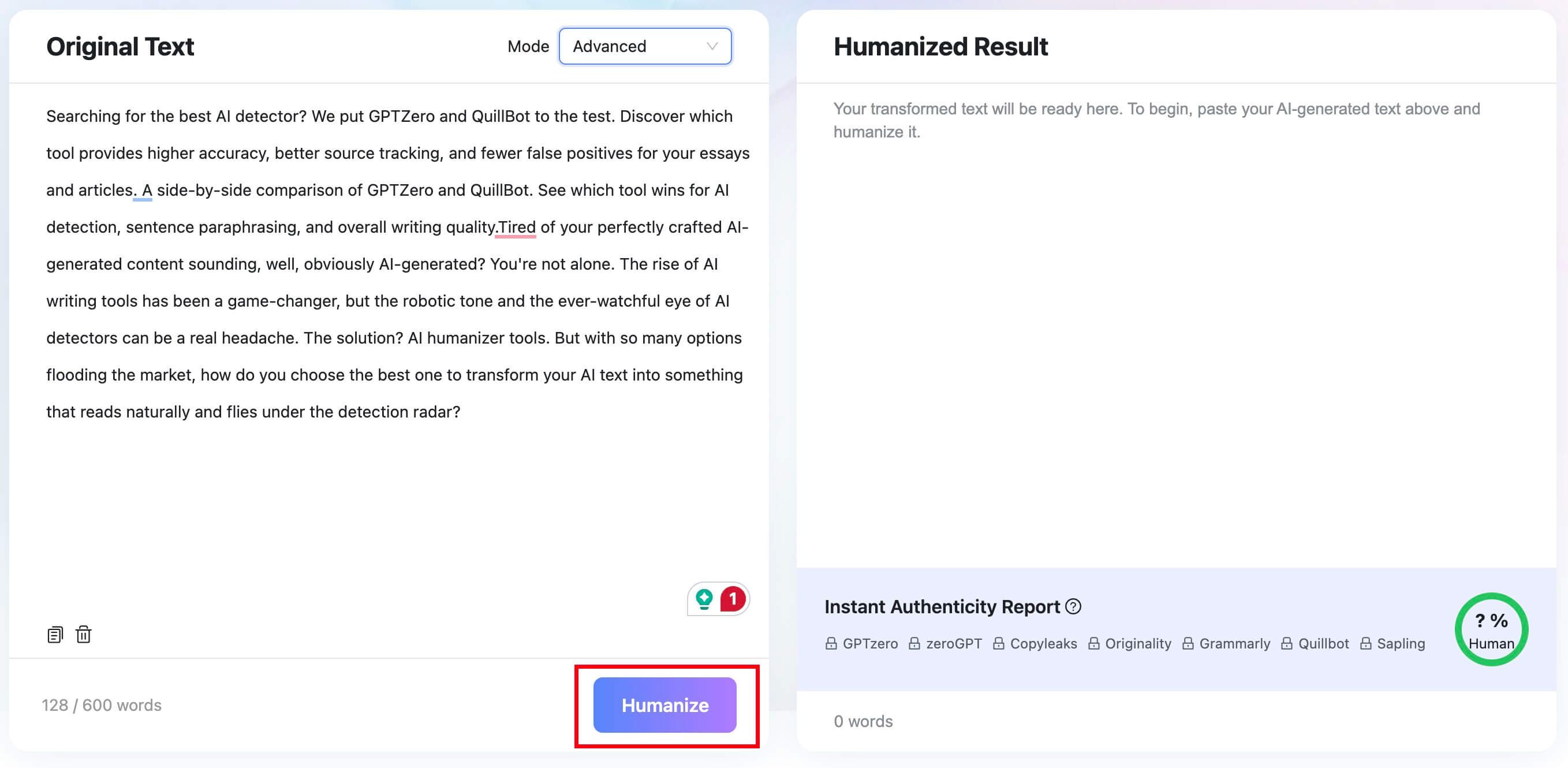
Step 3. Click Humanize
Run the rewrite and review the result carefully. The goal is natural wording that still preserves your facts, examples, and intent.
Step 4. Copy and Finalize the Result
Copy the rewritten text, then do one final human pass for accuracy, voice, and source quality before you use it.


FAQs About ChatGPT Prompt to Humanize Text
What is the best ChatGPT prompt to humanize text?
The best ChatGPT prompt gives the model an editor role, a clear audience, tone guidance, and strict instructions to preserve facts. It should also tell ChatGPT what not to change.
Can ChatGPT make text sound human?
ChatGPT can make text clearer and more natural, but the result still needs human review. It may smooth your voice too much or add details if your prompt is vague.
Can prompts make AI text detector-safe?
No. A prompt cannot guarantee how an AI detector will score the text. Focus on accuracy, specificity, and honest authorship instead of trying to guarantee a score.
How do I keep my own voice in ChatGPT?
Ask for minimal edits, provide a short voice sample if appropriate, and reject any sentence that sounds unlike you. You can also ask ChatGPT to explain what it changed.
What should I do after using a ChatGPT humanizing prompt?
Compare the rewrite with the original, verify claims and citations, remove unsupported additions, and make the final edit yourself.
Final Verdict
A good ChatGPT prompt can make AI-like writing clearer and more natural, but it should protect facts and voice first. Use the prompt cards above for fast drafts, then use Lynote AI Humanizer when you want a dedicated rewrite workflow and do a final human review.

Written by Janet L. Harris
AI Writing Specialist
Janet reviews AI detectors and humanization tools, with a focus on accuracy, limitations, and responsible use. View all articles →