Can Gemini humanize text? Yes, Gemini can help rewrite AI-like writing so it sounds more natural, specific, and easier to read. The important catch is that Gemini is a general AI assistant, not a dedicated AI humanizer.
That means Gemini can improve tone, rhythm, and clarity, but it should not be treated as a one-click solution for authorship, AI detection, or watermark concerns. If your goal is a more focused humanization workflow, you may get a cleaner process from a dedicated tool after you try Gemini.
Can Gemini Humanize Text?
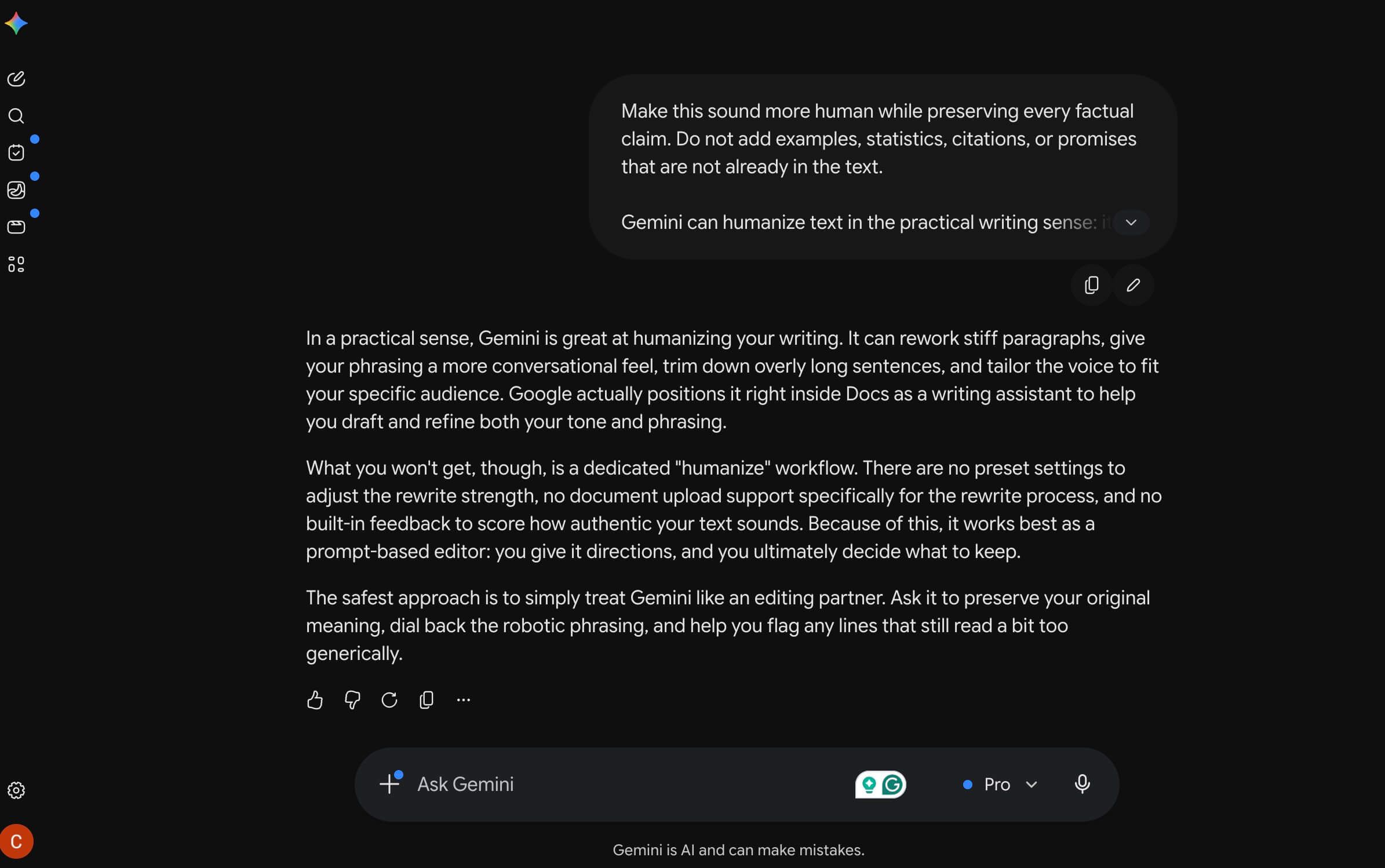
Gemini can humanize text in the practical writing sense: it can rewrite stiff paragraphs, make phrasing more conversational, shorten overbuilt sentences, and adjust the voice for a specific audience. Google also positions Gemini in Docs as a writing assistant that can help with drafting and refining text, including tone and phrasing changes.
What Gemini does not do is give you a dedicated humanization workflow with preset rewrite strength, document upload support for the rewrite flow, or built-in authenticity-style feedback. It is best for prompt-based editing, where you guide the rewrite and then decide what to keep.
The safest way to use Gemini is to treat it like an editing partner. Ask it to preserve meaning, make the language less robotic, and help you spot lines that still sound too generic.
How to Humanize Text in Gemini
The best Gemini workflow is not "paste everything and ask for a human version." That usually creates another polished AI rewrite, which may still feel generic.
Work in short sections, give Gemini a clear editing role, and review the output yourself. The steps below are designed for better voice and clarity, not for misrepresenting authorship.
Step 1. Paste a Short Section of AI-Like Text
Start with one paragraph or one short section. Gemini can lose nuance when you paste a long essay, report, or article and ask for a broad rewrite.
Give it the audience, purpose, and tone before you ask for the rewrite. A paragraph for a college reflection should not sound like a marketing email, and a professional email should not sound like a casual blog post.
Sample prompt:
Rewrite this paragraph so it sounds more natural and specific for a general U.S. reader. Keep the meaning the same, avoid adding new facts, and make the rhythm less robotic.
Step 2. Ask Gemini to Preserve Meaning, Not Just Change Words
A common humanization mistake is asking for "more human" wording without telling the AI what must stay fixed. Gemini may smooth the text, but it can also shift claims, soften important details, or add ideas that were not in the original.
Tell Gemini to preserve facts, citations, names, numbers, and examples. This is especially important for academic, legal, medical, technical, or client-facing writing.
Sample prompt:
Make this sound more human while preserving every factual claim. Do not add examples, statistics, citations, or promises that are not already in the text.
Step 3. Request More Specific, Less Generic Wording
AI-like writing often sounds broad because it leans on vague transitions, balanced phrasing, and abstract language. Gemini can help replace those patterns with more direct wording.
Ask it to reduce generic phrases, vary sentence length, and make the paragraph feel written for a real reader. If the text needs examples, add your own source-backed details instead of asking Gemini to invent them.
Sample prompt:
Revise this to remove generic AI-style transitions. Make the language more direct, vary the sentence length, and keep the tone natural.
Step 4. Compare Versions and Keep the Best Lines
Do not accept the first rewrite automatically. Ask Gemini for a few versions, then combine the best lines manually.
This gives you more control over voice. One version may be more concise, another may sound warmer, and another may preserve the original structure better.
Sample prompt:
Give me three rewrite options: one casual, one polished, and one concise. Keep the meaning the same.
Step 5. Add Human Review Before You Use It
After Gemini rewrites the text, read it aloud. If the language sounds too smooth, too balanced, or unlike your normal voice, revise it again.
Check facts, citations, examples, and tone. Add your own context, experience, or source-backed details where they make the writing more useful.
Sample prompt:
Review this rewrite and flag any sentence that may sound too generic, too polished, or different from the original meaning.
Gemini Prompt Examples for Humanizing AI Text
Use these prompts as starting points, then adjust them for your audience. The more context you give Gemini, the less generic the output usually becomes.
| Goal | Gemini prompt |
|---|---|
| Natural blog paragraph | "Humanize this paragraph for a blog audience. Keep the meaning, remove generic AI-style transitions, and make the rhythm more natural." |
| Academic clarity | "Rewrite this in clear academic English without making it more casual. Preserve the claims, citations, and technical terms." |
| Professional email | "Make this email sound natural, polite, and concise. Keep the message professional and do not add new promises." |
| Concise rewrite | "Rewrite this in fewer words while keeping the core meaning and a natural tone." |
| Non-native English polish | "Improve the grammar and flow while keeping my original meaning and voice." |
| Voice check | "Point out sentences that sound too generic or overly polished, then suggest a more natural version." |
For example, a stiff sentence like "This solution provides numerous advantages for users across a wide range of contexts" could become "This can help when you need a faster way to finish the task without adding extra tools." The second version is not just shorter; it is more concrete.
How to Use Lynote AI Humanizer for Gemini-Like Text
If Gemini's rewrite still sounds generic, too polished, or too AI-like, use Lynote AI Humanizer as a more focused workflow. It is built for rewriting AI-generated text to read more naturally while preserving the original meaning.
Lynote is useful when you do not want to keep guessing at prompts. Instead of asking Gemini for another version, you can use a humanization mode and then review the result.
Step 1. Paste the Text or Upload a Document
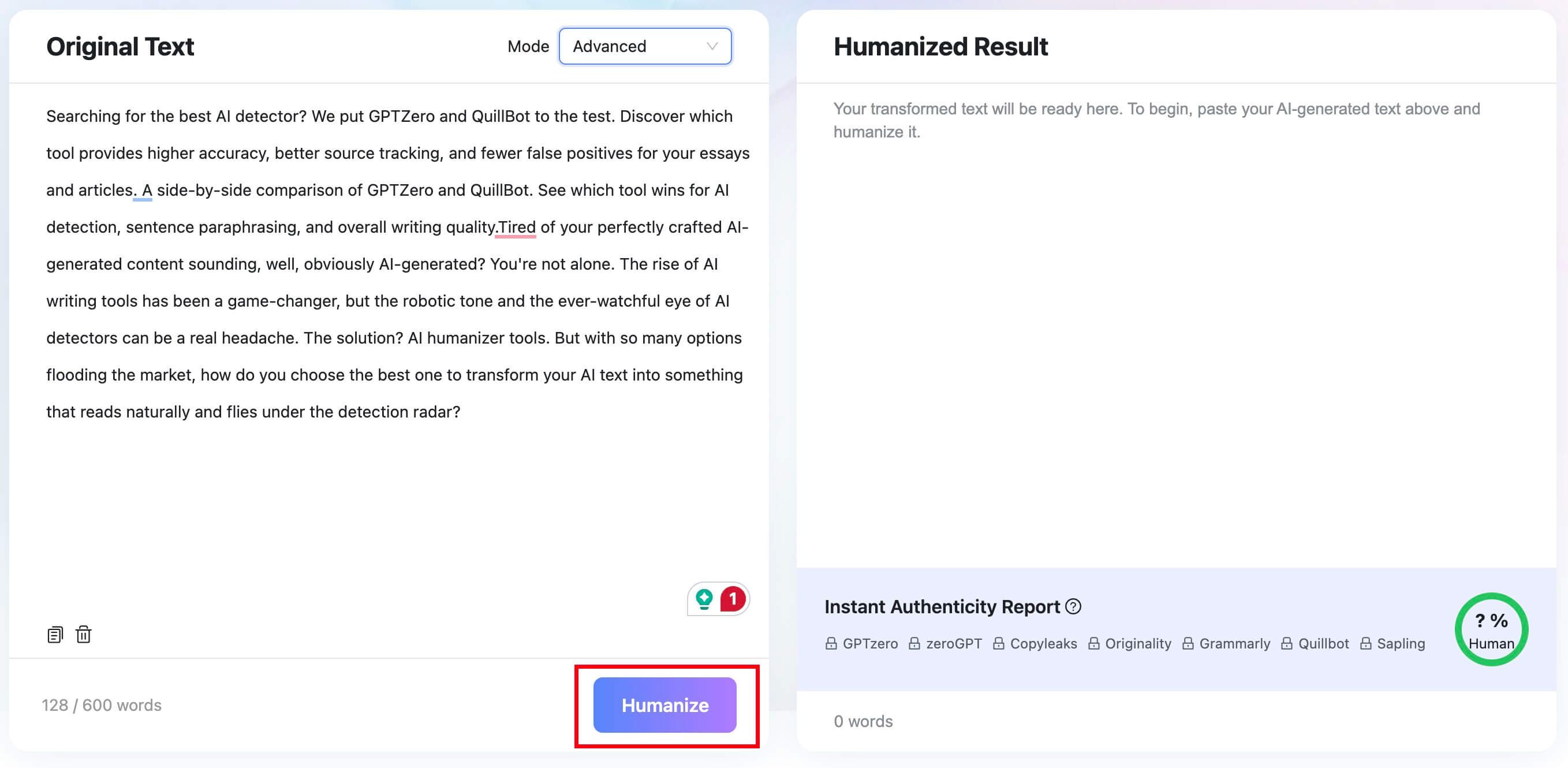
Open Lynote AI Humanizer and paste the Gemini-written or AI-like text into the input box. You can also upload a supported document, including PDF, DOC, DOCX, or TXT.
The free tier supports up to 600 words per request. For longer work, process the text in sections so you can review meaning and voice carefully.

Step 2. Choose a Humanization Mode
Pick the rewriting mode that fits your goal. Balanced is the standard option for readability, Focus applies a stronger rewrite, and Advanced is slower but gives a more deliberate balance of rewrite depth and quality.
Use a lighter mode when the text only needs smoother phrasing. Use a stronger mode when the draft still has obvious AI-style structure or repetitive phrasing.

Step 3. Click Humanize
Click the Humanize button to rewrite the text. The goal is not to erase your meaning; it is to make the wording more natural and readable.
After the rewrite appears, compare it with the original. Keep the lines that improve clarity and revise anything that changes the meaning.
Step 4. Review, Copy, or Download the Result
Lynote shows the rewritten text in the result panel. It also includes an Instant Authenticity Report with predicted scores across major detectors such as GPTZero, Copyleaks, and Originality.
Treat that report as an editing signal, not a final judgment. Once the wording looks right, copy the result or download the file.


Can Gemini-Humanized Text Still Be Detected?
Yes, Gemini-humanized text can still be flagged by an AI detector. A rewrite can change wording and rhythm, but detectors look for patterns, and their results are signals rather than proof of authorship.
There is also a Gemini-specific issue: Google DeepMind says SynthID can watermark and identify text generated by the Gemini app and web experience. That does not mean every reader or every third-party detector can see the same signal, but it does mean you should not assume a rewrite removes all trace-related concerns.
If you are editing school, hiring, legal, or compliance-related writing, do not rely on a detector score alone. Focus on accurate sources, original thinking, clear citations, and honest authorship expectations.
What Are the Downsides of Using Gemini to Humanize Text?
Gemini is flexible, but that flexibility can be a weakness. If your prompt is vague, Gemini may produce a second AI-sounding version that is smoother but not meaningfully more human.
It can also flatten personal voice. A draft that should sound direct, reflective, funny, or opinionated may come back as safe, polished, and generic.
The biggest risk is meaning drift. Gemini may soften a claim, add a broad example, or make the writing sound more confident than the source supports.
Gemini also lacks a dedicated humanization flow. You do not get preset rewrite intensity, a guided document workflow, or an authenticity-style report built around humanizing AI-like text.
Gemini vs a Dedicated AI Humanizer
Gemini is useful when you want flexible prompt-based editing. A dedicated humanizer is better when you want a structured rewrite workflow with modes and review signals.
| Need | Gemini | Lynote AI Humanizer | Best fit |
|---|---|---|---|
| Light tone edits | Strong with a good prompt | Useful but may be more than you need | Gemini |
| AI-like paragraph rewrite | Works, but may require multiple prompts | Built for this workflow | Lynote |
| Preserve meaning | Depends on prompt and review | Designed to preserve meaning during rewrite | Both, with human review |
| Rewrite intensity control | Prompt-based | Balanced, Focus, and Advanced modes | Lynote |
| Document upload workflow | Not the main humanizer flow | Supports PDF, DOC, DOCX, and TXT | Lynote |
| Detector-style feedback | Not built into the rewrite process | Instant Authenticity Report as an estimate | Lynote |
| Original voice | Needs manual editing | Still needs manual review | Both |
The practical choice is simple: use Gemini if you want quick wording help, and use Lynote when the text needs a dedicated humanization pass. In either case, your final review matters more than the tool's first output.
Optional: Check the Rewrite With Lynote AI Detector
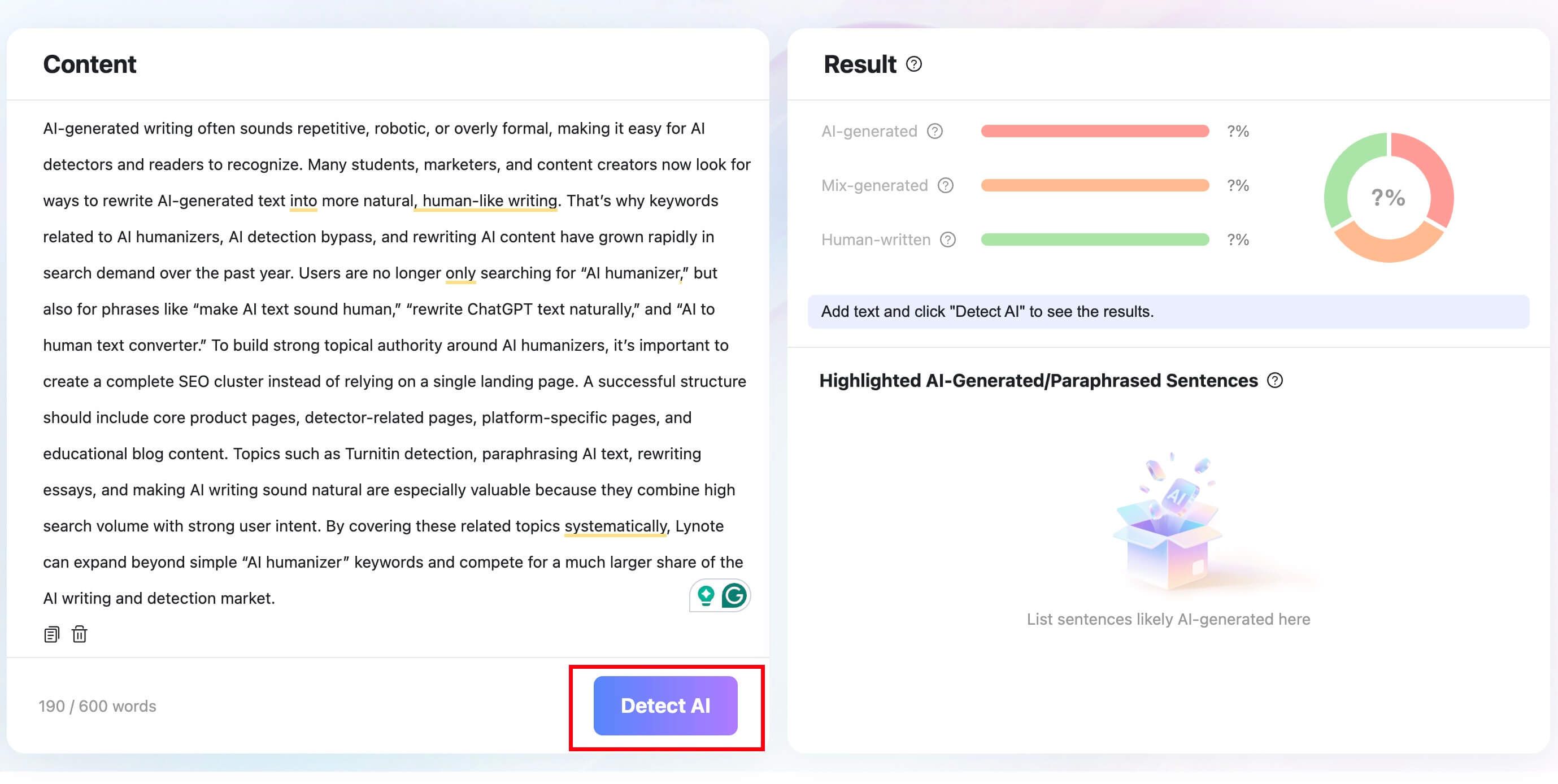
After rewriting, you can use Lynote AI Detector as a review signal. Paste the text or upload a supported document, then click Detect AI.
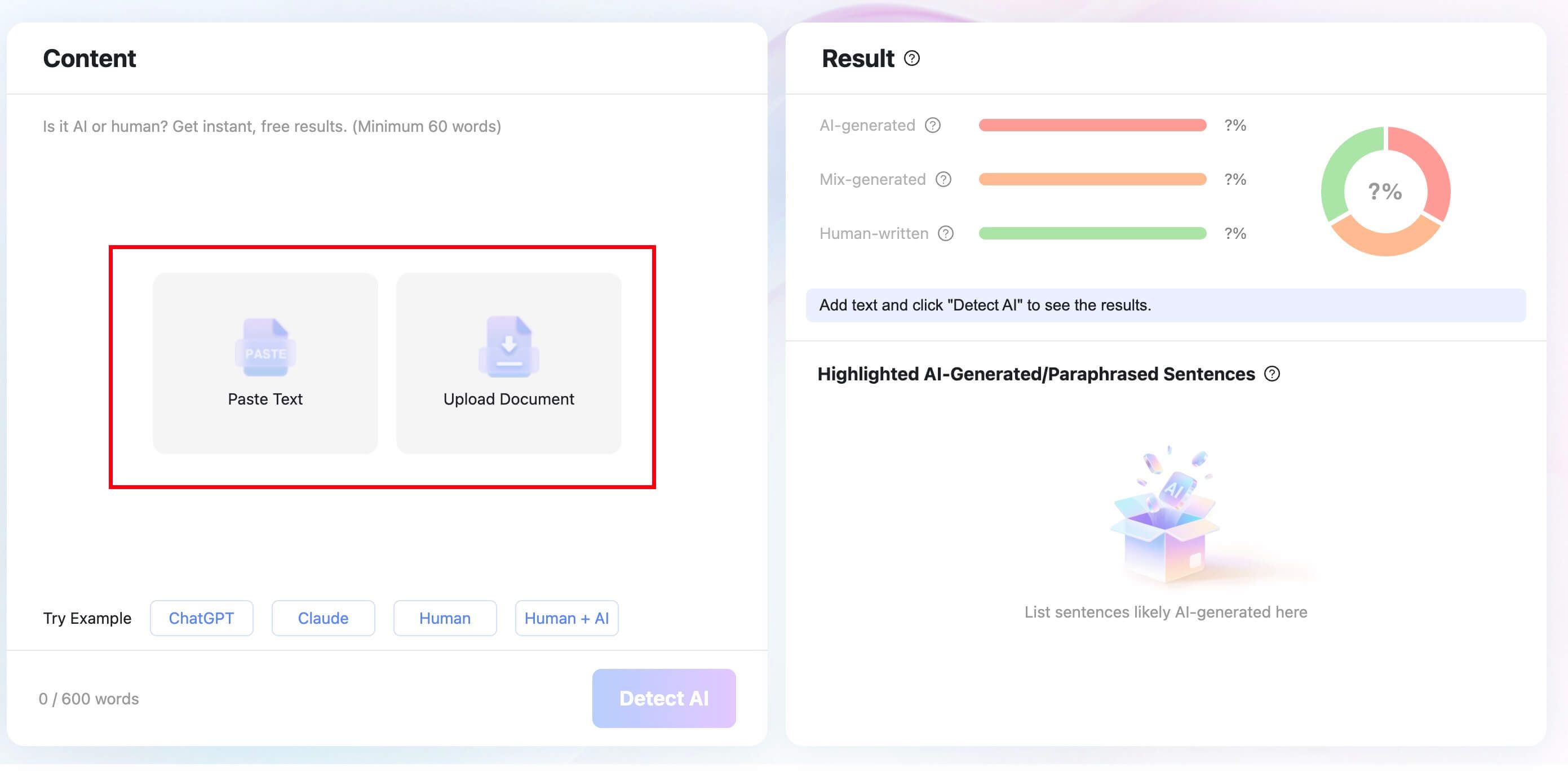
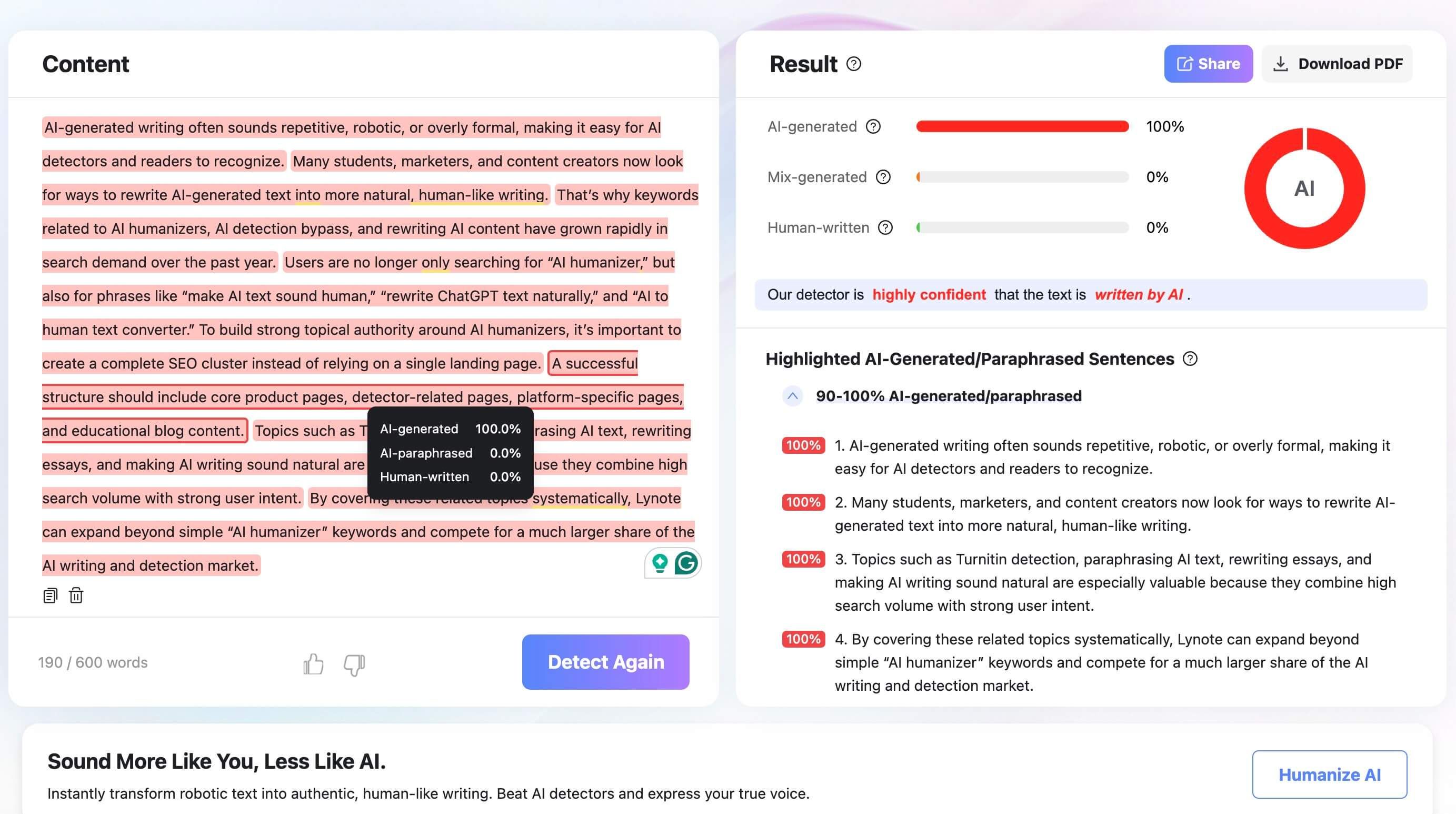
The report shows AI-generated, mixed, and human-written percentages, plus highlighted sentences that may need attention. Do not treat those numbers as a verdict; use them to find lines that still sound generic, repetitive, or overly polished.
This extra check is most helpful when you are revising a draft for public publishing, client work, or classroom transparency. It can point you back to sentences that need more specific examples, clearer sourcing, or a stronger human voice.

FAQs About Gemini and Humanizing AI Text
Can Gemini rewrite ChatGPT text?
Yes. You can paste ChatGPT-written text into Gemini and ask it to rewrite the paragraph for a different tone, audience, or level of clarity.
The result still needs human review. Gemini may improve the wording, but it can also shift meaning or keep some AI-like patterns.
Does Gemini have a humanizer mode?
Gemini does not have a dedicated humanizer mode in the same way a specialized AI humanizer does. It can rewrite, refine, shorten, expand, and change tone through prompts.
That makes Gemini useful for flexible editing. It also means you must design the workflow yourself.
Can Gemini make AI text pass AI detectors?
Gemini can change the wording of AI-generated text, but it cannot promise a detector-safe result. AI detectors are inconsistent, and a more natural rewrite may still be flagged.
Use detectors as revision signals. The better goal is writing that is accurate, specific, well sourced, and aligned with your real voice.
Is Gemini text watermarked?
Google DeepMind says SynthID can watermark and identify text generated by the Gemini app and web experience. That is one reason Gemini should not be described as a tool for removing trace concerns.
If watermarking or authorship policy matters in your situation, check the rules of the platform, class, employer, or publication before using AI-assisted text.
Is it better to use Gemini or an AI humanizer?
Use Gemini when you want flexible rewrite help and can guide the prompt closely. Use an AI humanizer when you want a more focused workflow for making AI-like text read naturally.
For many drafts, the best process is a mix: revise with Gemini, run a dedicated humanization pass if needed, then do your own final edit.
What should I do after Gemini rewrites my text?
Read the rewrite aloud, compare it with the original, and check for changed claims. Add your own examples, evidence, and context where the writing still feels generic.
If the text still sounds AI-like, use a dedicated tool such as Lynote AI Humanizer and then review the result manually.
Final Verdict
Gemini can humanize text when you need flexible prompt-based rewriting. It can make stiff writing sound more natural, but the output depends heavily on your prompt and your final edit.
For a more guided workflow, Lynote AI Humanizer is a better fit. Use Gemini for quick tone help, use Lynote for a focused humanization pass, and keep human review at the center of the process.

Written by Janet L. Harris
AI Writing Specialist
Janet reviews AI detectors and humanization tools, with a focus on accuracy, limitations, and responsible use. View all articles →