Grubby AI is primarily an English AI humanizer, not a complete humanizer-and-detector suite. It rewrites AI-assisted text, but its current public pages do not document a standalone detector that scans an unchanged draft and returns an independent report.

That distinction matters because many people searching for “Grubby AI detector” expect to detect first and rewrite second. This Grubby AI review examines the humanizer in depth, establishes what its detector-related claims do and do not mean, and compares that workflow with Lynote's separate AI Detector and AI Humanizer.
Quick Verdict: Is Grubby AI Worth It?
Grubby AI functions primarily as an English-language text humanizer designed to rewrite drafts and alter predictable phrasing generated by large language models. Its marketing makes strong claims about bypassing detection, but those claims should be treated as product advertising rather than a certain outcome from external systems.
The platform offers a straightforward interface for text transformation. However, based on its official public website, Grubby AI does not document a standalone, independent AI detector for diagnostic scanning. Users looking for a complete suite to first analyze and then rewrite text may find the platform's feature set incomplete.
| Feature Category | Grubby AI Status | Editorial Note |
|---|---|---|
| AI Humanizer | Yes | Core feature; rewrites English text to alter AI patterns. |
| Standalone AI Detector | Not publicly documented | Functions as a "detection remover," not a diagnostic scanner. |
| Free Access | Yes (for new users) | Official site notes free words are available initially. |
| Pricing Transparency | Public pricing page | Four paid annual-billing options were visible during this review; recheck before subscribing. |
| Turnitin Risk | Exists | A humanizer cannot promise the same result across evolving academic scanners. |
What Is Grubby AI?
Grubby AI is a web-based software application positioned officially as an English AI humanizer and AI detection remover. Its primary function is to take text generated by tools like ChatGPT, Claude, or Gemini and rewrite it so that it reads more like human-authored content.
The tool targets users who want to utilize artificial intelligence for drafting but need the final output to avoid the stylistic hallmarks of machine writing. These hallmarks typically include repetitive sentence structures, overly formal vocabulary, and highly predictable word choices. Grubby AI attempts to disrupt these patterns by introducing varied syntax and more conversational phrasing.
It is important to note what Grubby AI is not. Despite some confusion in search queries, Grubby AI is not an academic integrity platform or a plagiarism checker. It is a text modification tool built specifically to alter the statistical footprint of digital text.
Grubby AI Humanizer: How It Works
The core product behind Grubby AI is its humanizer. The company says it changes wording, sentence structure, and tone, but its public materials do not disclose enough technical detail to verify the model architecture or training method behind those changes.
The output can change vocabulary, transitions, and clause structure. Recent third-party dashboard observations suggest detector-specific modes or different rewriting intensities, but readers should verify the current options in their own account because Grubby's public product page does not clearly document every mode.
Because aggressive rewriting can easily distort the original meaning of a draft, users should adopt a careful, deliberate workflow when using Grubby AI or any similar humanizer.
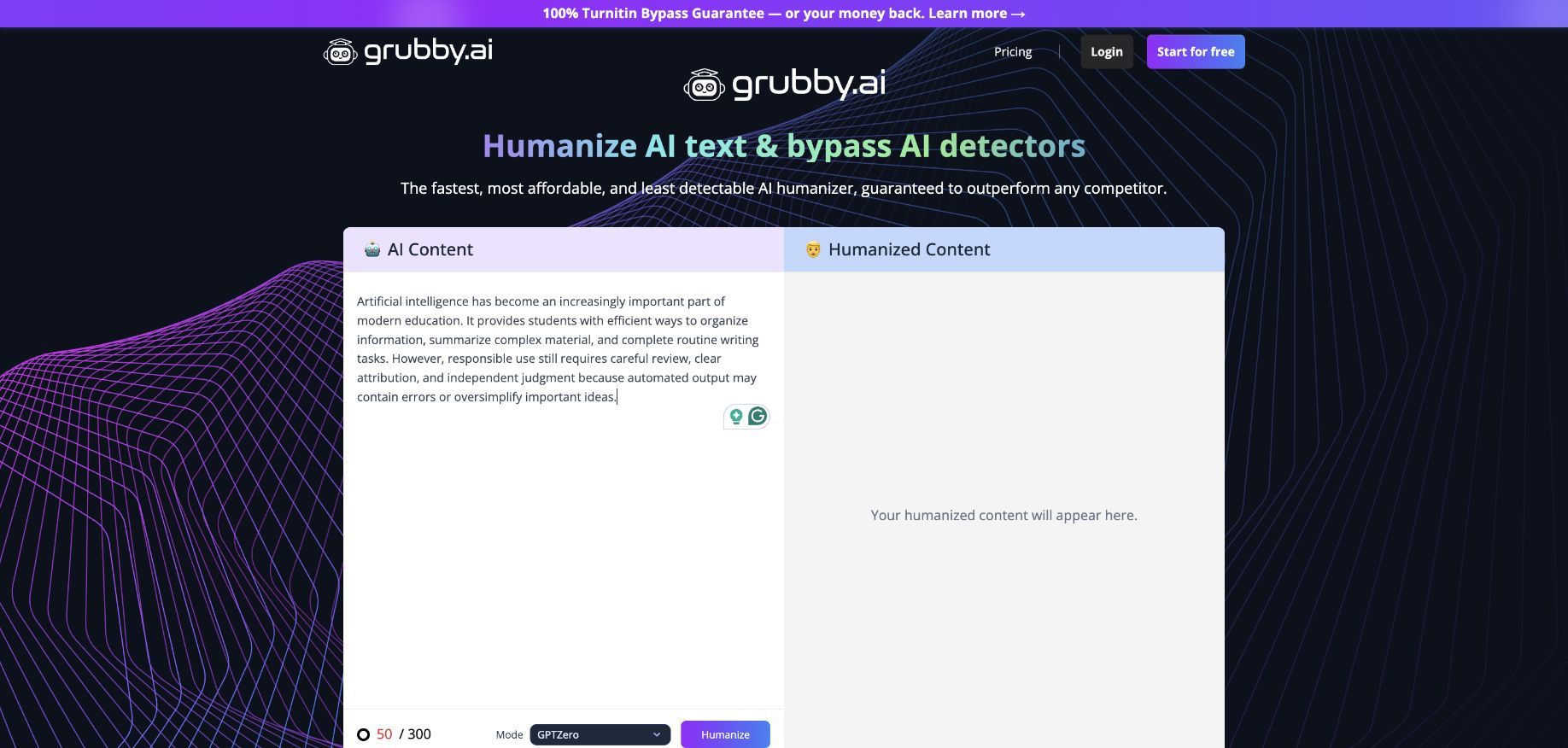
During a live check, the public editor accepted a 50-word sample without requiring an account and showed GPTZero as the selected mode. Clicking Humanize, however, redirected to Grubby's sign-up page before producing an output, so the screenshot below documents the real pre-processing interface rather than an unverified result.
A Safe 4-Step Use Workflow
- Input the Draft: Paste your AI-generated or heavily edited text into the Grubby AI interface. Ensure you are only processing text you are authorized to use and modify.
- Select the Mode: If the dashboard presents different rewriting intensities, start with the most balanced or conservative option. Aggressive modes are more likely to introduce grammatical errors or factual inaccuracies.
- Process the Text: Initiate the humanization process and wait for the output. The tool will generate a new version of your text with altered syntax and vocabulary.
- Manually Verify Meaning: This is the most critical step. Read the output side-by-side with your original draft. Check that all facts remain accurate, that industry-specific terminology has not been improperly swapped for generic synonyms, and that the tone aligns with your intended audience.
Main Features of Grubby AI
Grubby AI's public feature set revolves mainly around text transformation. While some platforms combine several editing stages, Grubby maintains a narrower focus on humanization.
The interface is generally reported to be minimal and focused on the text input and output boxes. This straightforward design allows users to paste their text and initiate the rewriting process without navigating complex menus. The platform officially supports the English language, tailoring its rewriting algorithms to English syntax and vocabulary nuances.
Some third-party reviews and user reports mention the existence of dashboard study tools or additional formatting options within the logged-in user area. However, these features should be viewed as secondary to the main humanizer engine. Notably absent from the confirmed, publicly documented feature list is a standalone AI detector, a point that requires deeper examination.
Does Grubby AI Have an AI Detector?
A significant volume of user interest centers around the keyword "Grubby AI detector." However, a deep review of Grubby's official public pages and available documentation reveals that the platform does not establish or document a standalone AI detector methodology, an independent scan page, or a detailed detector report feature.
This discrepancy highlights a common confusion in the AI writing tool market: the difference between an "AI detection remover" (a humanizer) and an "AI detector" (a diagnostic scanner). Grubby AI positions itself as the former. It claims to remove the traits that detectors look for, but it does not provide a dedicated tool for you to independently evaluate a piece of text and receive a detailed breakdown of its origins.
Humanizer vs. Independent AI Detector
Understanding the difference between these two types of tools is essential for establishing a reliable editorial workflow.
| Feature | AI Humanizer (Detection Remover) | Independent AI Detector |
|---|---|---|
| Primary Function | Rewrites text to alter its stylistic patterns. | Analyzes text to identify its likely origin. |
| Output | A newly generated paragraph or document. | A diagnostic report with percentages and highlights. |
| Workflow Stage | Used during the editing and revision phase. | Used during the initial review and final verification phases. |
| Action Taken | Changes vocabulary, syntax, and structure. | Makes no changes to the text; only provides analysis. |
| Goal | To make machine text sound more natural. | To provide visibility into how much of a draft appears AI-generated. |
The keyword “Grubby AI detector” likely exists because users assume a tool that mentions detectors must include its own scanner. Some humanizers also display basic third-party scores or a before-and-after snapshot. A score attached to a rewrite is still different from a standalone scan that accepts unchanged text and explains how the result was produced.
An independent AI detector lets writers and editors evaluate a draft before deciding whether revision would help. A useful detector can provide granular data, such as sentence-level highlighting and percentage breakdowns of AI, mixed, and human-written content. Without that capability in the same platform, a user needs a separate tool to inspect the original and revised versions.
How to Evaluate Grubby AI Humanizer Output
Because Grubby AI alters text, its output needs editorial evaluation. Using any automated rewrite without comparison can introduce errors, weaken an argument, or change a factual statement.
When reviewing text generated by Grubby AI, apply the following evaluation framework:
- Meaning Preservation: Does the rewritten text convey the same message as the original draft? Automated word substitutions can change context, especially when a word has several meanings.
- Readability and Flow: Does the text sound natural when read aloud? Watch for awkward phrasing, convoluted sentence structures, and vocabulary that does not fit the audience.
- Citation and Quote Integrity: Are quotes, citations, and proper nouns intact? Compare these elements character by character because they should not be casually paraphrased.
- Tone Consistency: Does the tone match the intended format? An academic paper requires a different voice than a casual blog post. Ensure the humanizer has not introduced overly informal slang into a professional document.
- Independent Detection Review: Because Grubby AI lacks a documented standalone detector, use a separate scanner if a detection signal is relevant to your editorial process. Interpret that result as an estimate, not proof of authorship.
Is Grubby AI Free? Pricing and Plan Limits
Understanding the cost of Grubby AI requires navigating its official terms and the realities of its public-facing website.
The official Grubby AI website states that new users receive an allocation of free words. This allows prospective customers to test the humanizer interface and evaluate a small sample of output before committing financially. However, this free tier is strictly limited by word count.
For users who need to process longer documents or require ongoing access, paid subscriptions are necessary. During this review, Grubby's official pricing page displayed four annual-billing options with monthly-equivalent prices: Essential at $6.99 per month, Pro at $8.99 per month, Unlimited at $11.99 per month, and Enterprise at $39.99 per month.
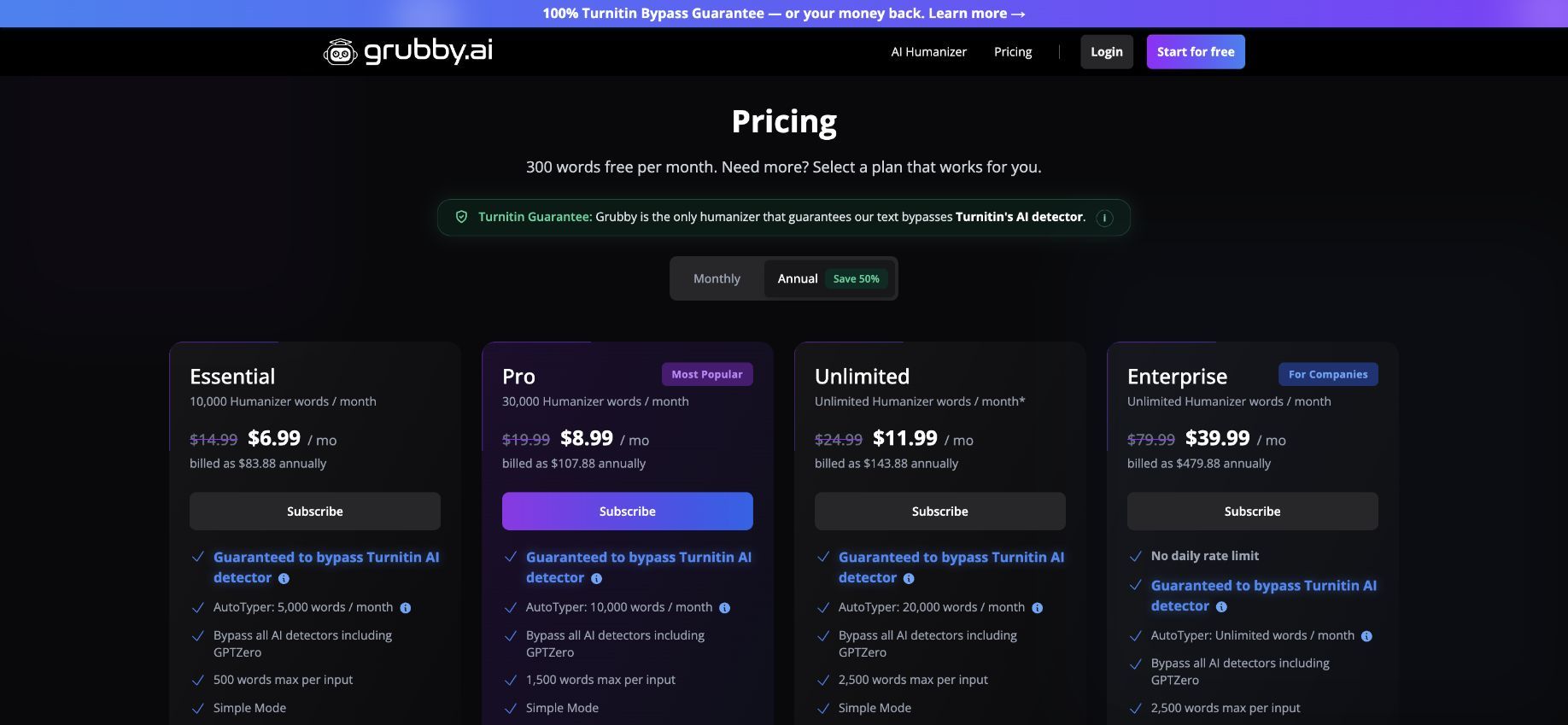
The page also displayed 300 free words per month. Because the selected billing toggle was Annual, the monthly figures should not be mistaken for month-to-month charges: the page showed annual totals of $83.88, $107.88, $143.88, and $479.88 respectively. Prices and plan limits can change, so confirm the selected billing cycle before subscribing.
| Plan | Displayed Monthly Equivalent | Displayed Annual Total | Included Humanizer Words |
|---|---|---|---|
| Essential | $6.99/month | $83.88/year | 10,000/month |
| Pro | $8.99/month | $107.88/year | 30,000/month |
| Unlimited | $11.99/month | $143.88/year | Unlimited* |
| Enterprise | $39.99/month | $479.88/year | Unlimited |
The asterisk attached to the Unlimited plan means readers should inspect the live plan terms for any fair-use conditions. Users should also review the checkout total, renewal terms, and refund policy before entering payment details.
Can Turnitin Detect Grubby AI?
The relationship between AI humanizers and academic scanning systems is highly contentious. Grubby AI's marketing materials, like those of many competitors, may make claims about bypassing detection systems. However, these are vendor claims, not verified universal truths.
Turnitin is the most prominent academic integrity platform globally, and its capabilities are constantly evolving. It is crucial to understand how Turnitin analyzes text to assess the risks of using a tool like Grubby AI in an academic setting.
Does Grubby AI Pass Turnitin?
An AI humanizer cannot promise a permanent Turnitin result. Turnitin's English AI Writing Report evaluates whether eligible prose is likely AI-generated or likely AI-generated and then AI-paraphrased.
Recently, Turnitin updated its English AI model to include detection for what it categorizes as likely AI-bypassed and AI-paraphrased text. This means the system is no longer just looking for raw ChatGPT output; it is actively looking for the unnatural syntax, forced synonyms, and structural inconsistencies that tools like Grubby AI introduce when they attempt to scramble text.
This means a rewrite can still receive an AI-related classification. Changing synonyms or sentence length does not create a dependable outcome, particularly when the revised prose remains formulaic or loses coherence.
Users should also distinguish Turnitin's Similarity Report from its AI Writing Report. The Similarity Score measures matching text against Turnitin's comparison databases, while the AI Writing Report is a separate estimate. A change in one score does not determine what the other report will show.
It is also vital to acknowledge Turnitin's own official guidance. Turnitin explicitly states that its AI detection results can produce false positives and false negatives. The company warns educators that the AI percentage should not be used as the sole basis for adverse action against a student. Because detection is probabilistic, relying on a humanizer to "beat" the system is a high-risk strategy that can easily backfire.
Grubby AI Not Working: Causes and Fixes
Users occasionally report issues with Grubby AI failing to process text or returning errors. If you experience problems with the platform not working, consider these common causes and troubleshooting steps:
- Word Count Limits Exceeded: The most common reason for a failure is attempting to process more text than your current plan allows. Check your account dashboard to ensure you have sufficient word credits remaining. If you are on the free tier, you may need to upgrade or wait for a reset.
- Server Timeouts: AI processing requires significant computational power. During periods of high traffic, Grubby AI's servers may time out before completing the rewrite. If the loading screen hangs, refresh the page and try processing a smaller chunk of text.
- Browser Cache Issues: Outdated browser data can interfere with web applications. Clear your browser's cache and cookies, or try accessing Grubby AI in an incognito or private browsing window.
- Unsupported Languages: Grubby AI is officially positioned as an English-language tool. Attempting to input text in other languages, or text containing heavy amounts of non-English characters or code snippets, may cause the humanizer engine to fail or produce nonsensical output.
- Network Connectivity: Ensure your internet connection is stable. Brief interruptions can cause the API request between your browser and Grubby AI's servers to drop.
Grubby AI Pros and Cons
Evaluating Grubby AI requires weighing its specialized focus against its limitations.
Pros:
- Provides a dedicated tool for rewriting AI-generated English text.
- Offers a straightforward, minimal interface that is easy to navigate.
- Includes a free word allocation for new users to test the service.
- Attempts to disrupt the predictable patterns of standard language models.
Cons:
- Does not publicly document a standalone, diagnostic AI detector.
- The lowest displayed prices require annual billing rather than a monthly commitment.
- Auto-renewing subscriptions and non-refundable terms require careful management.
- Output requires heavy manual editing to ensure meaning and citations are preserved.
- Cannot promise a particular result from academic scanners such as Turnitin.
Grubby AI vs Lynote: Humanizer and Detector Compared
Because Grubby AI lacks a documented standalone detector, users who need a detect-and-revise workflow may look for alternatives. Lynote provides both a dedicated AI Humanizer and a separate AI Detector with percentage categories and sentence-level highlights.
Comparing the two platforms highlights the difference between a single-purpose detection remover and a comprehensive AI text management suite.
| Feature | Grubby AI | Lynote |
|---|---|---|
| Standalone AI Detector | Not publicly documented. | Yes, dedicated diagnostic scanner. |
| Detector Report | N/A | Shows AI, mixed, and human percentages with sentence highlights. |
| Standalone AI Humanizer | Yes, core feature. | Yes, with Balanced, Focus, and Advanced modes. |
| Input Methods | Text paste. | Text paste, plus DOCX, PDF, and TXT upload support. |
| Workflow | Rewrite text directly. | Detect first, review highlights, humanize if needed, verify. |
| Instant Authenticity Report | Unconfirmed via public docs. | Yes, shows predicted scores across major detectors after rewriting. |
| Pricing Transparency | Public annual-billing prices; verify the active toggle and checkout total. | Clear free tiers (e.g., 600 words per humanizer request) without sign-up required for basic use. |
The most significant distinction is the workflow capability. With Grubby AI, you are restricted to rewriting text. With Lynote, you can first diagnose the text to see if rewriting is even necessary, target specific highlighted sentences, and then apply humanization with varying degrees of intensity.
How to Detect and Humanize Text With Lynote
For users who require both diagnostic scanning and text transformation, Lynote offers a logical, step-by-step workflow. This process ensures you are making informed decisions about your text rather than rewriting blindly.
Step 1: Check the Draft With Lynote AI Detector
Before altering text, it helps to understand its current state. The Lynote AI Detector is designed to analyze content associated with models such as ChatGPT, Claude, and Gemini.
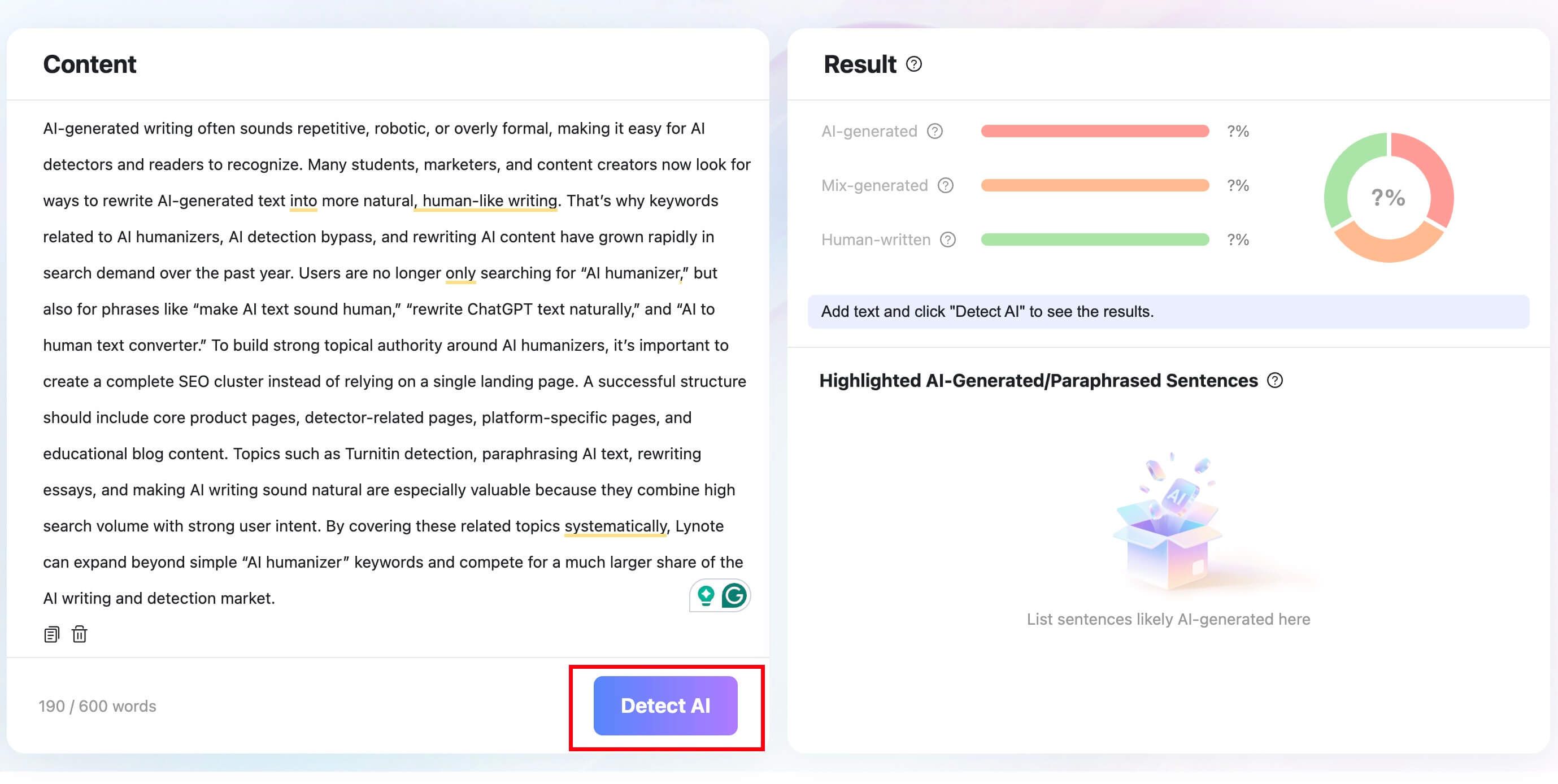
Access the Lynote AI Detector. You can either input your text directly into the detection box or upload a supported file format, including .docx, .pdf, and .txt, to initiate the analysis.
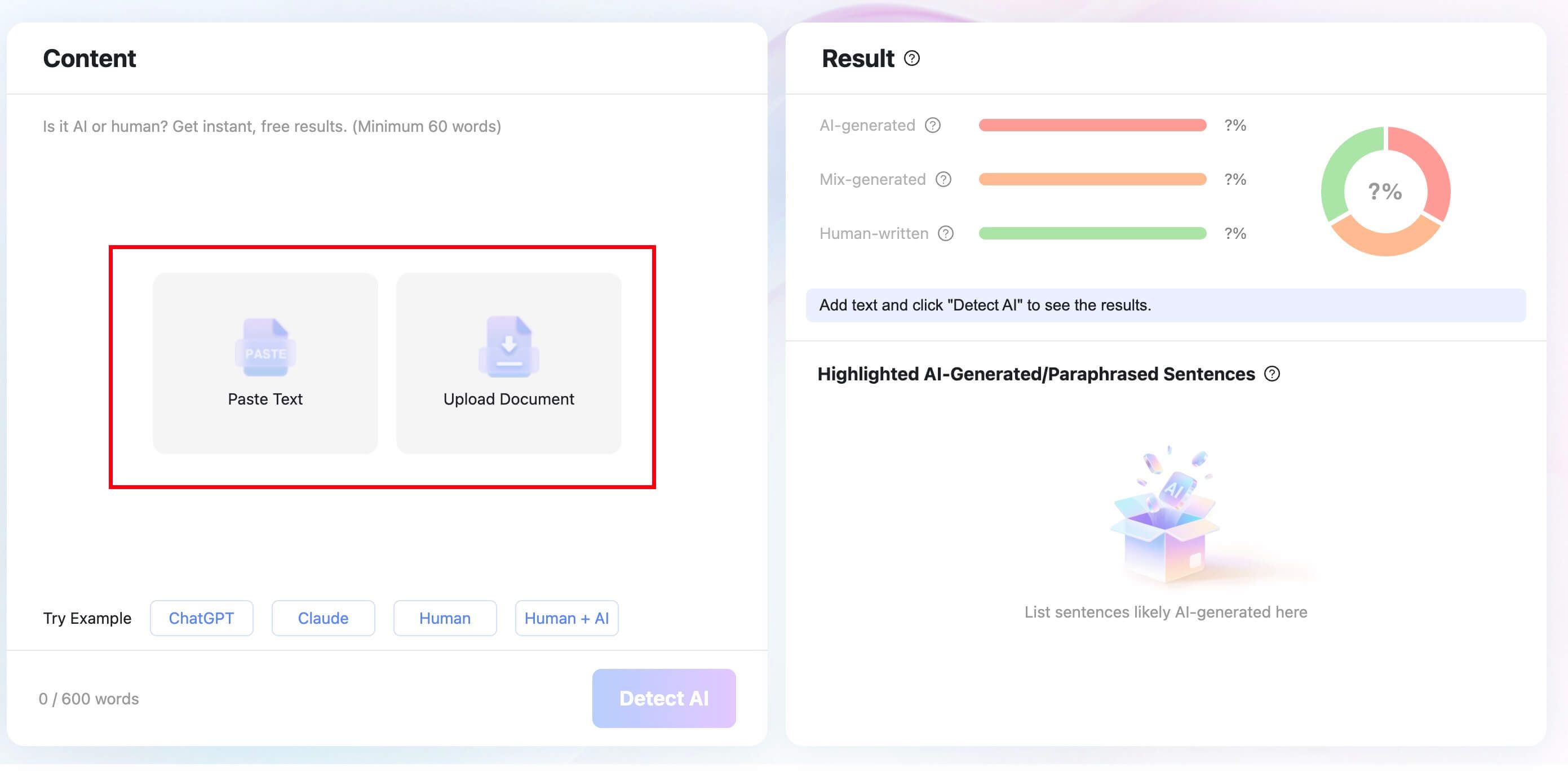
Once your content is submitted, click the “Detect AI” button. The system will perform a comprehensive scan of the text, analyzing linguistic patterns and structures to identify the source of the writing.
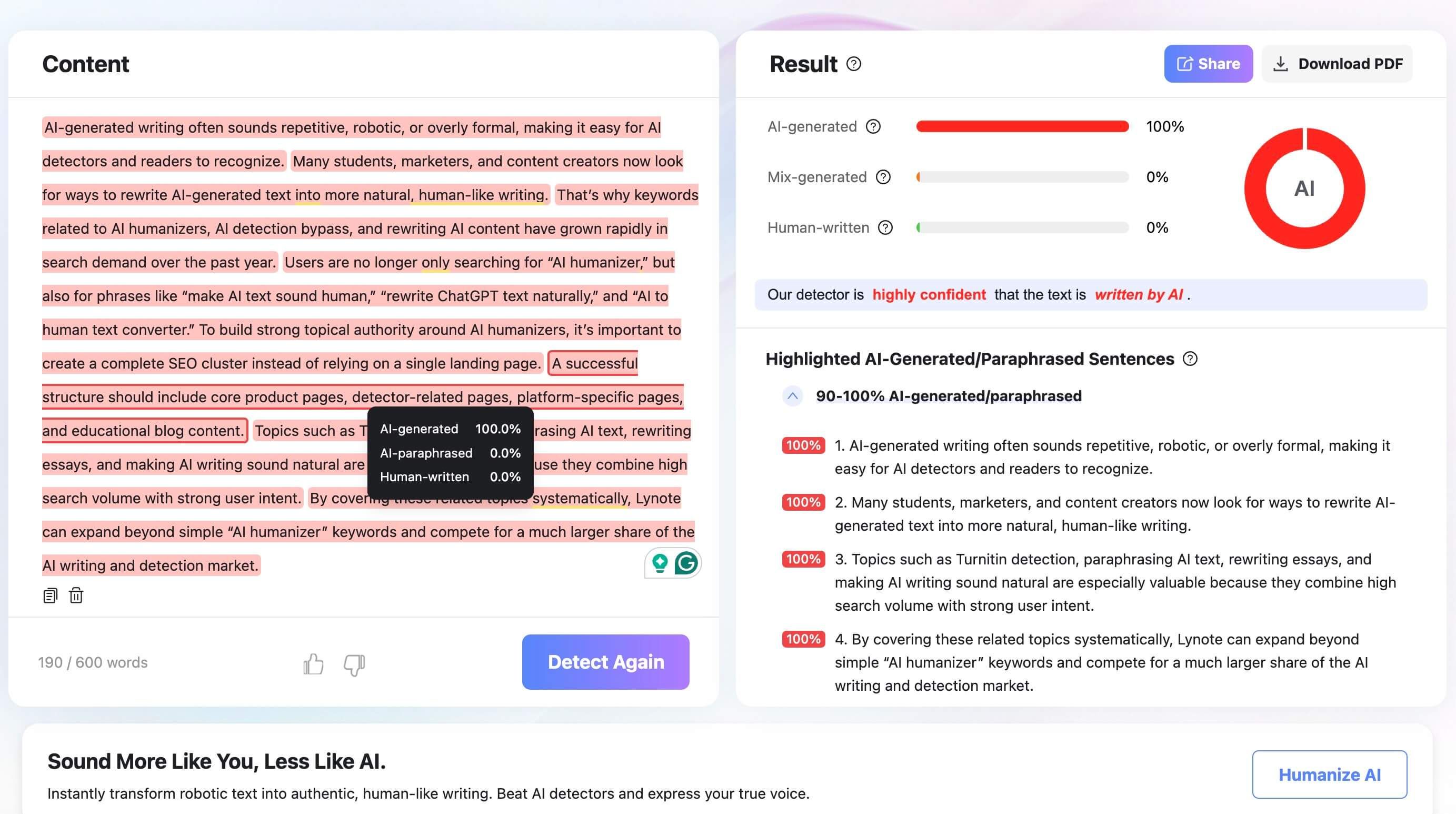
Within seconds, you will receive a detailed report displaying the distribution of AI-generated, mixed, and human-written content. You can instantly review the highlighted sentences to see which parts need attention or rescan the text after making edits.

Step 2: Humanize Authorized Text With Lynote AI Humanizer
If the detector report highlights significant portions of AI-generated text, and you are authorized to modify the draft, you can move to the humanization phase.
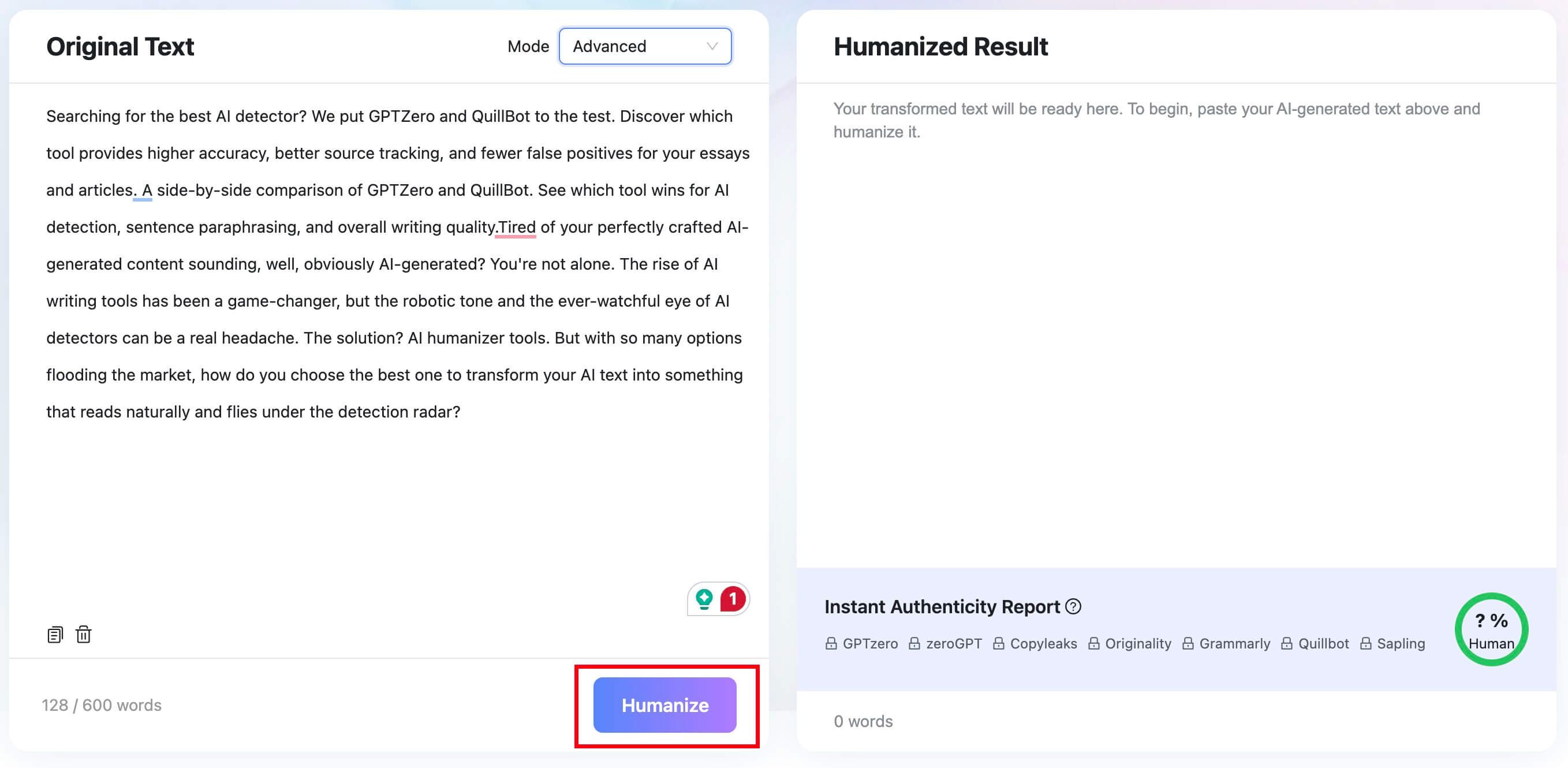
Access the Lynote AI Humanizer. Paste your AI-generated text into the input box, or switch to the “Upload Document” tab to upload a .pdf, .doc, .docx, or .txt file. The free tier supports up to 600 words per request.

Choose your preferred rewriting intensity from the mode dropdown. “Balanced” is the standard option for quality and readability. “Focus” applies a stronger rewrite, while “Advanced” is slower but gives a more deliberate balance of quality and rewriting depth.

Click the “Humanize” button to start the transformation. Within seconds, the rewritten text appears in the result panel. Below it, an Instant Authenticity Report shows predicted scores across major detectors (GPTZero, Copyleaks, Originality, etc.). Copy the output or download the file.


Step 3: Verify Meaning, Sources, and Voice
The final step in any AI-assisted workflow is manual verification. Even with advanced modes, humanizers can alter the intended meaning of a sentence.
Review the newly humanized text carefully. Confirm that factual claims remain accurate, citations and proper nouns are unchanged, and the tone still matches your intent. A detector is not absolute proof of authorship, and a humanizer cannot promise a particular outcome from an academic integrity system. These tools assist an editorial process; they do not replace human oversight.
Who Should Use Grubby AI—and Who Needs a Different Workflow?
Grubby AI is best suited for users who have a straightforward need: they have an AI-generated draft and want a quick, automated way to alter its phrasing to sound less robotic. Bloggers, digital marketers, and casual content creators who are not subject to strict academic scrutiny may find the tool's single-minded focus on rewriting sufficient for their needs.
However, users who require a more rigorous editorial process will likely find Grubby AI lacking. Students, academic researchers, and professional editors need to know why a text might be flagged before they decide to change it. Because Grubby AI does not document a standalone detector, these users are better served by platforms like Lynote, which provide the diagnostic tools necessary to make informed editing decisions alongside the ability to humanize text.
FAQs About Grubby AI
Is Grubby AI Free?
Grubby AI offers a limited allocation of free words for new users to test the platform. However, for ongoing use or larger documents, users must purchase a paid subscription.
What Is Grubby AI?
Grubby AI is an English-language text humanizer. It is designed to rewrite AI-generated text to alter its vocabulary and syntax, making it read more like human-authored content and attempting to remove the patterns that AI detectors look for.
How Much Does Grubby AI Cost?
At the time of this review, Grubby's annual-billing page displayed Essential at $6.99 per month, Pro at $8.99, Unlimited at $11.99, and Enterprise at $39.99, with each amount billed annually. The page also advertised 300 free words per month; verify current prices and limits before subscribing.
Does Grubby AI Have an AI Detector?
Based on its official public documentation, Grubby AI does not feature a standalone, independent AI detector for diagnostic scanning. It functions as a detection remover (humanizer) rather than a tool that provides detailed AI percentage reports and sentence highlights.
Can Turnitin Detect Grubby AI?
Yes, it is possible. Turnitin's English AI Writing Report includes categories for text considered likely AI-generated and then AI-paraphrased, as well as likely bypasser-modified text.
Does Grubby AI Pass Turnitin?
There is no fixed answer for every document or future Turnitin model. A Grubby rewrite can still receive an AI-related classification, and Turnitin itself cautions that its report can produce errors and should not be used as the sole evidence in an academic decision.
Why Is Grubby AI Not Working?
Common reasons for Grubby AI failing include exceeding your account's word limit, server timeouts during high traffic, outdated browser cache, or attempting to process unsupported languages or complex formatting.
Final Verdict: Grubby Is Primarily a Humanizer, Not a Full Detection Suite
Grubby AI fulfills its primary marketed function as an English text humanizer, offering users a quick way to scramble the predictable patterns of AI-generated drafts. Its minimal interface and availability of free initial words make it accessible for casual rewriting tasks.
However, the platform falls short for users seeking a combined detection and revision workflow. The lack of a publicly documented standalone detector means users cannot inspect an unchanged draft and receive a detailed Grubby report before rewriting it. A revised document can also still receive an AI-related classification from Turnitin, whose English model now includes likely AI-paraphrased and bypasser-modified text.
For a safer and more informed editorial process, users should consider platforms that separate detection from humanization. Tools like Lynote provide the necessary diagnostic visibility first, allowing writers to review sentence-level highlights and make deliberate decisions before applying humanizer transformations, ultimately ensuring better control over the final document.
Written by Lynote Team
Lynote Team writes practical guides for Lynote.