AI vs Real Images: How to Tell the Difference

Quick Answer: AI vs Real Images
When comparing AI vs real images, you can no longer rely on a single visual clue like weird hands or blurry backgrounds. AI generators now create highly convincing visuals that can easily pass as authentic photographs at first glance. To tell the difference, you must use a layered verification approach.

This means combining manual visual inspection with context checks, metadata analysis, reverse image searches, and specialized detector tools. Visual anomalies may still appear in complex textures, background logic, or text, but these are just starting points. True verification requires treating suspicious images as a forensic task rather than a quick guessing game.
Detector scores can offer valuable signals, but they are not absolute proof. You should weigh all available evidence before drawing a conclusion about an image's origin. By adopting a critical mindset, you can better navigate a digital landscape filled with synthetic media.
AI Images vs Real Images: The Core Differences
To understand how to spot synthetic media, you first need to understand the fundamental difference between how real photos and AI images are created. Real photographs are captured when a physical camera sensor records actual light bouncing off real objects in a physical space. This process inherently captures the natural chaos of the real world, including authentic textures, consistent lighting physics, and complex depth of field.
AI images, on the other hand, are synthesized from scratch by machine learning models trained on vast datasets of existing imagery. These models do not simulate a 3D physical environment; instead, they predict and arrange pixels based on statistical probabilities and text prompts. Because they are painting a 2D approximation of reality, they often fail to maintain strict physical consistency across the entire frame.
Modern AI generators can beautifully imitate camera flaws, such as lens flare, film grain, and motion blur. This sophisticated mimicry means that old visual tricks, like looking for an overly smooth or "plastic" appearance, are becoming much less reliable. You must look deeper into the structural logic of the image to find the subtle errors that reveal its synthetic nature.
| Feature | Real Image | AI Image |
|---|---|---|
| Origin Source | Captured by a camera sensor recording physical light. | Generated by algorithms predicting pixel patterns. |
| Physical Logic | Inherently consistent; objects occupy real 3D space. | Often flawed; objects may fuse or defy geometry. |
| Lighting & Shadows | Follows real-world physics from specific light sources. | Can have conflicting shadow angles or mismatched highlights. |
| Background Details | Retains logical structure even when out of focus. | Frequently devolves into nonsensical shapes or fused elements. |
| Metadata | Often contains original EXIF data (camera model, settings). | May lack EXIF data or contain AI software signatures. |
| Verification Signals | Can often be traced back to an original source or event. | Rarely exists in earlier forms; may trigger AI detector alerts. |
Example 1: Faces, Hands, and Body Details
In the early days of generative AI, distorted hands and extra fingers were the most famous giveaways of synthetic media. While modern models have significantly improved, biological details like hands, ears, teeth, and joints can still reveal underlying issues. You should look for anatomy that is plausible in motion, rather than just counting the number of fingers.
The following visual example is illustrative, designed to teach you what specific anatomical clues to inspect when evaluating a person in a photo.
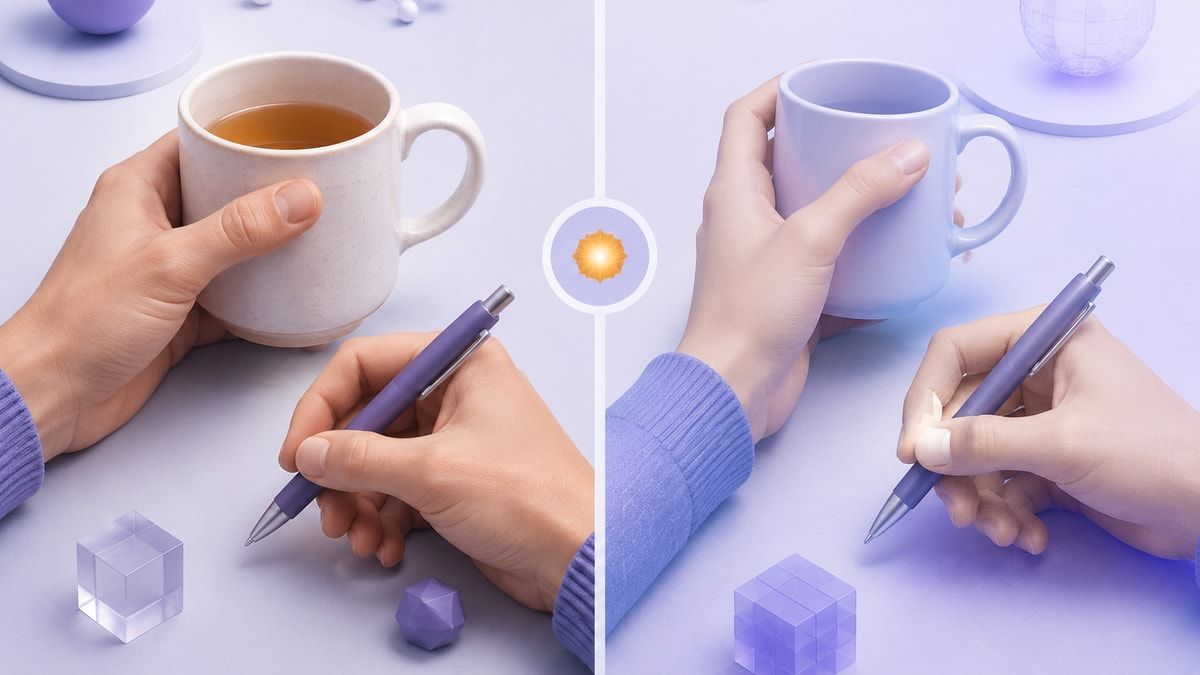
When examining hands, pay close attention to how they interact with objects, such as holding a cup or gripping a steering wheel. AI models often struggle with occlusion, meaning they fail to correctly draw the parts of the fingers that wrap behind an object. You may notice fingers that blend into the object, joints that bend at impossible angles, or a lack of distinct knuckles and fingernails.
Faces can also provide subtle clues, particularly around the eyes, ears, and teeth. AI-generated teeth may appear too uniform, overly numerous, or fused together without natural gaps.
Ears can sometimes lack complex internal cartilage structure, appearing as smooth, unnatural shapes. Additionally, look at how accessories like eyeglasses rest on the face; AI often creates asymmetrical frames that do not logically sit on the bridge of the nose.
Example 2: Text, Signs, Logos, and Small Objects
Text and small structural details remain some of the most reliable areas to inspect when trying to identify an AI-generated image. Generative models typically treat text as visual shapes rather than semantic language, which often leads to nonsensical or warped lettering. While newer models can generate short, prominent words correctly, they frequently fail when rendering background text or complex paragraphs.
The visual comparison below is illustrative, highlighting how to inspect background signs and intricate logos for synthetic artifacts.
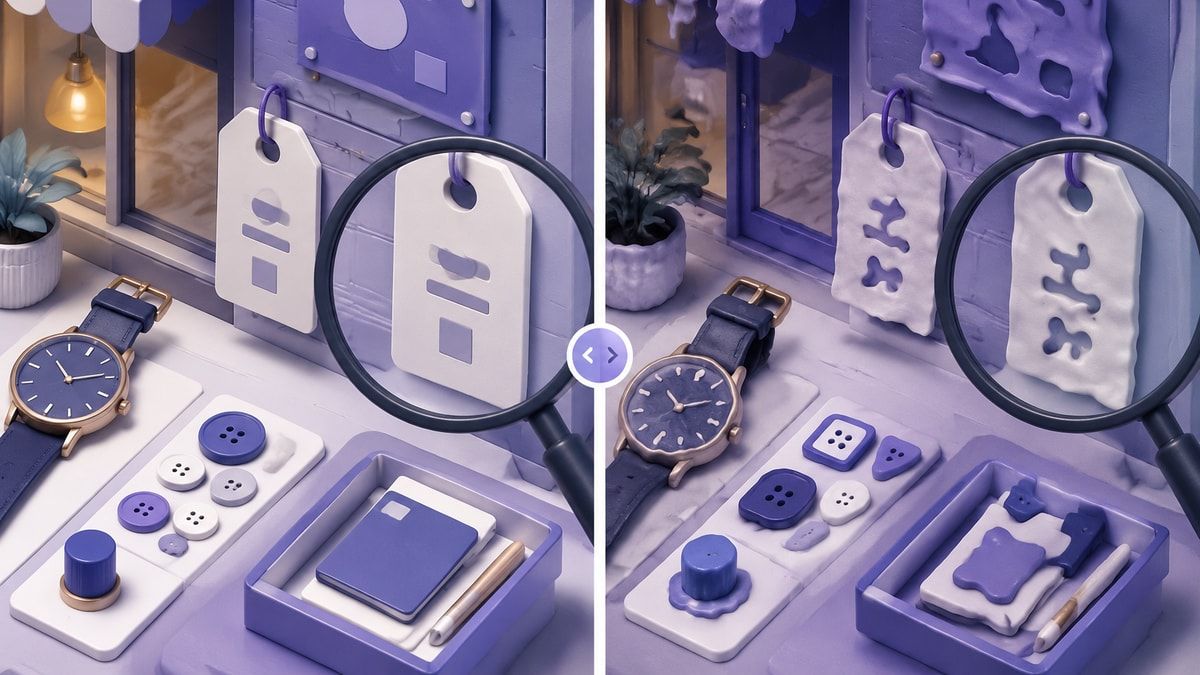
When inspecting an image, zoom in on storefront signs, street signs, name tags, or graphic t-shirts. In an AI image, you may see letters that melt into each other, alien-looking alphabets, or inconsistent repeated symbols. Real photos usually preserve readable text, provided the resolution is high enough and the text is within the camera's focal plane.
Small objects and mechanical details also require careful scrutiny. Look closely at watch faces, clothing buttons, jewelry clasps, or the intricate parts of a bicycle.
AI often generates these items with a convincing overall shape but fails to maintain the logical, functional structure required for them to work in reality. A generated watch might have uneven numbers, or a jacket might have buttons that do not align with their corresponding buttonholes.
Example 3: Lighting, Shadows, and Reflections
Because AI models do not simulate a true three-dimensional environment, they often make subtle mistakes regarding the physics of light. Analyzing lighting, shadows, and reflections can help you determine if a scene was captured in a physical space or generated by an algorithm. You need to check whether the shadows cast by various objects point in a consistent direction based on the apparent light sources.
This illustrative example demonstrates how to evaluate shadow consistency and reflection geometry in a complex scene.

In a real photograph, a single strong light source like the sun will cast parallel shadows across the entire scene. AI-generated images sometimes feature shadows that point in conflicting directions or objects that cast no shadow at all. Furthermore, the quality of the light on a subject's face might not match the lighting of the background environment, suggesting the subject was synthesized independently of the scene.
Reflections in mirrors, water, and glass surfaces are particularly difficult for AI to generate accurately. Compare the reflection with the object it is supposed to reflect, checking for matching colors, shapes, and structural logic. You may find that an AI-generated mirror reflects a completely different room, or that a puddle on the street reflects a person who is not standing nearby.
Example 4: Background Logic and Object Consistency
When analyzing an image, human eyes naturally gravitate toward the main subject in the center of the frame. AI models take advantage of this by dedicating most of their processing power to making the primary subject look incredibly realistic. However, if you force yourself to inspect the peripheral details and the background, the illusion often falls apart.
Use this illustrative example to learn how to scan the background of an image for structural anomalies and impossible geometry.

AI images frequently look strongest in the center but become weaker and more chaotic near the edges of the frame. Look for fused furniture, impossible architectural features, or staircases that lead directly into solid walls. You might also spot duplicated people in a crowd or vehicles that blend seamlessly into the pavement.
Always ask yourself whether the scene depicted could actually exist in the real world with its current geometry. For example, check if a railing passes behind a person and emerges at the correct height on the other side. AI models often lose track of spatial coherence when objects intersect, resulting in background elements that simply disappear or change shape mid-air.
Example 5: Skin, Fabric, Food, and Texture Patterns
Texture-level clues are easy to miss, but they can provide valuable evidence when evaluating a high-resolution image. AI models sometimes struggle to balance high-frequency details, like skin pores or fabric weaves, with the broader colors of a scene. This can result in textures that are either overly smooth and plastic-like or oddly repetitive and artificial.
When examining portraits, look closely at the texture of the skin and the individual strands of hair. AI-generated skin can sometimes lack natural blemishes, pores, and the subtle color variations caused by blood flowing beneath the surface. Hair might look polished from a distance, but upon closer inspection, the strands may merge into solid blocks of color or grow from illogical places.
Fabric and food textures also present significant challenges for generative algorithms. The weave of a generated sweater might follow an unnaturally even, repetitive pattern that lacks the natural variation of real clothing.
Similarly, AI-generated food often features hyper-glossy surfaces, melted edges, and a lack of distinct, recognizable ingredients when viewed up close. However, remember that heavy image compression and camera blur can also destroy natural textures, so avoid over-reading low-quality images.
Why Visual Clues Are Not Enough Anymore
Relying solely on visual clues to spot AI images is a strategy that is rapidly becoming obsolete. New generative models are released frequently, and they consistently improve upon the weaknesses of their predecessors. Today's advanced AI can generate convincing hands, cleanly rendered text, and highly realistic textures that defeat traditional visual checklists.
Furthermore, malicious actors actively employ techniques to hide the subtle artifacts that AI models leave behind. They may apply heavy compression, add artificial film grain, crop the image tightly, or use low-resolution screenshots to obscure generated details. When an image is intentionally degraded, it becomes nearly impossible to distinguish AI artifacts from standard digital noise.
Because the pixels themselves are no longer reliable narrators, you must learn to verify the situation rather than just the image. The context surrounding the photo, the source that posted it, and the claims being made are often much more suspicious than the visual content. Modern digital literacy requires shifting away from visual guessing games and moving toward comprehensive, investigative verification workflows.
How to Check If an Image Is AI or Real
To confidently evaluate suspicious media, you need a repeatable, step-by-step verification workflow that goes beyond visual inspection. This layered approach ensures you are not relying on a single point of failure when determining authenticity. By combining multiple investigative techniques, you can build a much stronger case for whether an image is AI or real.
The following workflow outlines a practical method for investigating digital images using a variety of modern tools.

Step 1: Inspect the scene and obvious visual clues. Start by scanning the image for the classic AI artifacts mentioned earlier, such as structural inconsistencies, warped text, or impossible lighting. Treat this initial visual scan as a first pass to raise your suspicion, not as a final conclusion.
Step 2: Check the image source and surrounding claim. Evaluate where the image was posted and who is sharing it. If the image is tied to a sensational claim but is only being shared by unverified social media accounts, your skepticism should increase significantly.
Step 3: Run a reverse image search. Use tools like Google Lens, TinEye, or Yandex to see where else the image has appeared on the internet. A reverse search can help you find the original context of a real photo or reveal that a supposedly breaking news image has been circulating for years.
Step 4: Inspect metadata when available. Use an EXIF viewer to check the file's hidden data for camera models, exposure settings, or software signatures. Keep in mind that social media platforms routinely strip metadata from uploaded files, so its absence does not automatically prove an image is AI.
Step 5: Look for provenance signals. Check if the image contains Content Credentials (C2PA) or specialized digital watermarks like SynthID. These cryptographic signals are increasingly being embedded by AI generators to transparently declare that the content is synthetic.
Step 6: Use an AI image detector as a second opinion. Upload the file to a specialized detection tool to analyze the image at a pixel level. These tools can identify invisible algorithmic patterns, providing an additional data point for your investigation.
Step 7: Document uncertainty when the result matters. If you are making a high-impact decision based on an image, and you cannot definitively prove its authenticity, you must acknowledge that uncertainty. It is often safer to treat an unverified image as potentially synthetic rather than assuming it is real.
| Verification Method | What It Can Show | Key Limitation |
|---|---|---|
| Visual Inspection | Structural errors, bad anatomy, warped text. | Modern AI often fixes these obvious visual mistakes. |
| Context & Source Check | The credibility of the publisher and the claim. | Does not technically prove the origin of the pixels. |
| Reverse Image Search | Earlier uploads, original context, or debunked claims. | Cannot find brand-new images that haven't been indexed yet. |
| Metadata Analysis | Camera details, software used, editing history. | Easily stripped by social media or intentionally altered. |
| Provenance (C2PA) | Cryptographic proof of origin or AI generation. | Not yet universally adopted by all cameras or AI tools. |
| AI Detectors | Algorithmic analysis of invisible pixel patterns. | Can produce false positives or be fooled by heavy compression. |
Use Lynote AI Image Detector as a Second Opinion
When manual verification methods leave you uncertain, specialized software can provide valuable technical insights. You can use the Lynote AI Image Detector as a practical second opinion to help evaluate suspicious files. This tool is designed to analyze the underlying patterns of an image, offering a data-driven perspective to supplement your visual checks.
The platform supports common file formats, including JPG, JPEG, PNG, and WEBP, accommodating file sizes up to 10 MB. You can start with a Basic Scan, which provides a quick AI detection check based on the visual and structural patterns of the image. For a deeper forensic review, the Advanced Scan attempts to extract and analyze EXIF data and C2PA provenance signals.

The workflow is straightforward: simply upload your image, click Detect Image, and wait for the system to process the file. The resulting report can show a final verdict alongside specific probability scores for both AI generation and human authenticity. It typically displays file details, dimensions, the model version used for the scan, and a unique report ID.
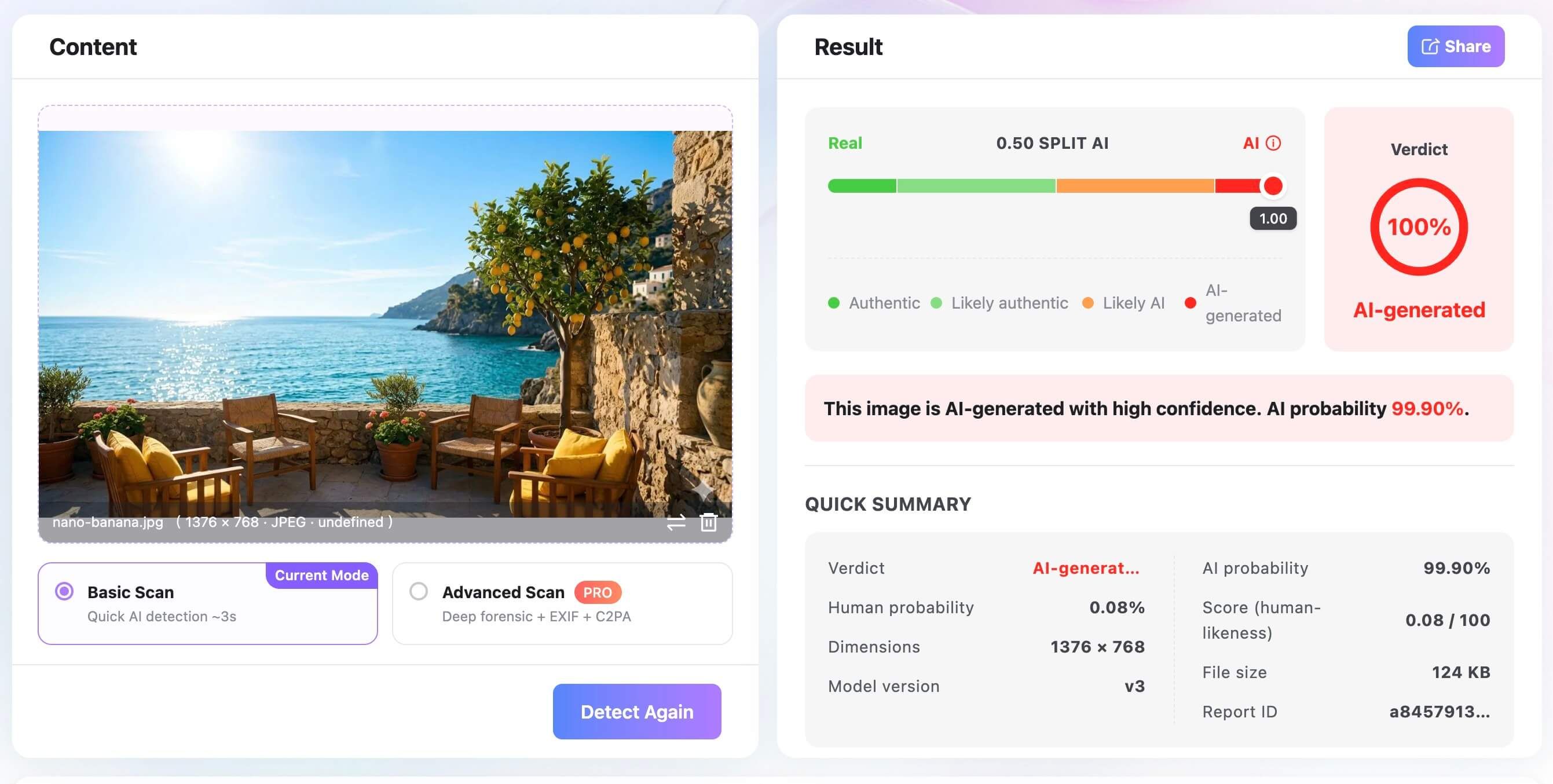
You can easily share this report ID with colleagues or clients if you need to discuss the findings collaboratively. However, it is crucial to position these detector results as a practical signal rather than a final, indisputable truth claim. Always combine the detector's probability scores with your own context checks and visual analysis to make a well-rounded decision.
AI vs Real Images Checklist
To streamline your verification process, it helps to have a structured checklist that covers the most critical areas of inspection. This table summarizes the key clues, what you should look for, and the confidence level you can place in each signal. Use this checklist as a quick reference guide when evaluating potentially synthetic media.
By systematically working through these points, you can avoid jumping to conclusions based on a single anomaly. Remember that a combination of multiple warning signs provides the strongest evidence that an image is AI-generated.
| Clue Category | What to Inspect | AI Warning Sign | Real-Image Expectation | Confidence Level |
|---|---|---|---|---|
| Hands and Anatomy | Joints, fingernails, interaction with objects. | Blended fingers, impossible angles, missing knuckles. | Natural articulation, clear occlusion, logical grip. | Medium |
| Text and Logos | Background signs, clothing brands, small print. | Melted letters, alien symbols, nonsensical words. | Legible text, consistent fonts, recognizable logos. | High |
| Lighting & Shadows | Shadow direction, highlights, light sources. | Conflicting shadow angles, missing cast shadows. | Parallel shadows from a single dominant light source. | Medium |
| Reflections | Mirrors, water puddles, glass surfaces. | Mismatched reflections, wrong environment shown. | Accurate reflection of the surrounding physical space. | High |
| Background Geometry | Fences, architectural lines, background objects. | Fused structures, lines that disappear illogically. | Continuous lines, coherent spatial relationships. | High |
| Texture Repetition | Fabric weaves, skin pores, natural surfaces. | Overly smooth surfaces, unnaturally even patterns. | Natural variation, varied textures, organic flaws. | Low |
| Metadata/Provenance | EXIF data, C2PA Content Credentials. | Missing data, AI software tags, synthetic signatures. | Original camera data, unaltered creation timestamps. | Very High |
| Reverse Search | Indexing history on search engines. | No earlier results, or results linking to AI galleries. | Indexed history linking to credible news or original sources. | High |
| Detector Score | AI probability analysis via specialized tools. | High AI probability score, algorithmic pattern alerts. | High human probability score, natural pixel variance. | Medium |
FAQs About AI vs Real Images
How can I tell if an image is AI or real? You can tell if an image is AI or real by using a layered verification approach rather than relying on a single clue. Start by inspecting the image for visual anomalies in text, background geometry, and complex biological details like hands. Then, strengthen your investigation by checking the source context, running a reverse image search, inspecting metadata, and using AI detection tools.
Can AI images have metadata? Yes, AI images can have metadata, and it often contains valuable clues about the file's origin. Many popular AI generators automatically embed metadata tags or C2PA Content Credentials that explicitly state the image was synthetically generated. However, malicious users can easily strip or alter this metadata, so its absence does not guarantee the image is a real photograph.
Can a real photo be flagged as AI? Yes, a real photo can sometimes be incorrectly flagged as AI by detection tools, resulting in a false positive. This typically happens if the real photo has been heavily edited, aggressively compressed, or subjected to intense digital noise reduction filters. Because these editing techniques alter the natural pixel structure, they can confuse algorithms that are looking for synthetic patterns.
Are hands still a reliable AI image clue? Hands are becoming a less reliable clue as generative AI models rapidly improve their anatomical accuracy. While older models consistently failed at rendering fingers, newer systems can often generate convincing hands, especially in simple poses. You should still check hands for subtle joint or occlusion errors, but you must not assume an image is real just because the hands look correct.
Can reverse image search prove an image is real? Reverse image search cannot definitively prove an image is real, but it is an excellent tool for establishing context. If a reverse search reveals that an image was published by a reputable news agency years ago, you can confidently dismiss claims that it is a new AI generation. Conversely, if a highly sensational image yields zero search results, that lack of history is a strong warning sign.
What should I do if an image is used for money, identity, or hiring? If an image is tied to high-stakes situations like financial transactions, identity verification, or hiring decisions, you must demand secondary proof. Do not rely solely on digital images, as they can be easily manipulated or generated to facilitate scams. Request live video calls, require physical documentation, or use secure, enterprise-level identity verification platforms to confirm authenticity.
Final Verdict: Treat Every Suspicious Image as a Verification Task
The battle between AI vs real images is an ongoing technological arms race, and detection is ultimately a probability workflow. You should use visual clues like warped text, illogical backgrounds, and anatomical errors for your initial first-pass screening. However, you must recognize that as AI models evolve, these visual artifacts will become increasingly rare and difficult to spot with the naked eye.
To reach a confident conclusion, you must rely on source checks, metadata analysis, reverse image searches, and specialized detector tools for stronger evidence. By combining these methods, you build a comprehensive case rather than relying on a single, potentially flawed observation. For high-impact decisions, always preserve your uncertainty and avoid trusting any single signal as absolute proof.

Written by Janet L. Harris
AI Writing Specialist
Janet reviews AI detectors and humanization tools, with a focus on accuracy, limitations, and responsible use. View all articles →