






logoLynote
Home
Tools
AI DetectorAI HumanizerAI Image DetectorYouTube TranscriptYouTube SummarizerDoc TranslateWords TranslateCompress PDFCompress Image
notebooks-empty

Login to manage your notebooks.

Plugins
guest-icon

Guest

Sign up for free
Sync note & free AI usage.
Pricing
Feedback
Settings

Free AI Checker and AI Detector Online

Check whether text was written by AI, edited by AI, or written by a human. Paste text or upload a file to get AI-generated, human-written and mixed scores with sentence-level highlights for ChatGPT, GPT-5, Gemini, Claude and more.
Content
Paste Text
Upload Document
Try Example
ChatGPT
Claude
Human
Human + AI
0 / 500 words
Result
AI-generated
?%
Mix-generated
?%
Human-written
?%
Add text and click "Detect AI" to see the results.
Highlighted AI-Generated/Paraphrased Sentences
List sentences likely AI-generated here
350K+
Scans Performed Monthly
99%
Accuracy Rate
4.9
Average Rating from 12,589 Users

Why Lynote is the Best AI Detector?

99% Detection Accuracy

99% Detection Accuracy

Designed to detect AI content with a high degree of confidence in human-written, AI-generated and blended content, with sentence highlighting to make the process of analysis easier.

Detect Text from Leading AI Models

Detect Text from Leading AI Models

Detect writing produced by ChatGPT, GPT-5, Gemini, Claude, LLaMA, Mistral and many others in just one tool.

Paraphrase Detection

Paraphrase Detection

Identify the writing that has been paraphrased, refined or humanized by AI instead of looking for exact duplicates only.

50+ Languages Supported

50+ Languages Supported

Run one free online AI writing detector for your essays written in English, Spanish, French, German, Portuguese, Chinese, Arabic and many others.

Safe and Confidential

Safe and Confidential

Drafts, essays and even client texts will stay confidential. At Lynote we don't use any submitted texts for model training.

Specific AI Score

Specific AI Score

Get AI, human and blended scores with sentence highlighting to see exactly what needs reviewing next.

AI Detection You Can Explain

Lynote's AI detector is designed to do more than return a single percentage. It gives an overall score, highlights likely AI-written lines and helps you understand where the text needs closer human review.

Free AI Content Detector for Global Writing

Writing using AI occurs in all languages and workflows. Lynote is multilingual with 50+ languages; therefore, students, teachers, SEO experts, and publishers can examine essays, articles, reports, and applications without using different platforms. Whether you write in English, Spanish, Portuguese, German, Italian, French, Japanese, and many other languages, Lynote can identify the AI score in that particular language.

Sentence-Level AI Text Highlights

Instead of guessing what caused a high AI score, review the exact sentences Lynote flags as AI-generated, AI-edited or mixed. This makes the report easier to use for rewriting, feedback, editorial checks and content quality review.

How to Use the Free AI Detector

Paste Text or Upload a File

Paste Text or Upload a File

Add your text directly or upload a PDF, DOCX or TXT file to prepare it for AI detection.

arrow
Click Detect AI

Click Detect AI

Click Detect AI. Lynote checks sentence patterns, word choice, predictability and signals linked to AI writing tools.

arrow
Review the Results

Review the Results

See AI-generated, human-written and mixed scores, then review highlighted sentences before making a decision.

How to use instructions

Paste Text or Upload a File

Add your text directly or upload a PDF, DOCX or TXT file to prepare it for AI detection.

Click Detect AI

Click Detect AI. Lynote checks sentence patterns, word choice, predictability and signals linked to AI writing tools.

Review the Results

See AI-generated, human-written and mixed scores, then review highlighted sentences before making a decision.

How Lynote AI Detector Detects AI Written Text

The tool detects patterns typical for AI writing, such as repetitions, predictable rhythm of sentences, limited vocabulary, and structured models. Lynote transforms the patterns into a report indicating AI likelihood with hints at the sentence level to help you analyze suspicious pieces more efficiently.

Input and Signal Scan

IN

Text Input

Possible AI-written content pasted for review

With AI writing tools becoming increasingly popular, the way modern companies write, edit, and publish their content undergoes changes. The use of AI tools helps automate processes, speed up work, and ensure consistency in the output. It is crucial to evaluate whether a certain piece was written solely by humans, with the use of AI, or created by an AI model.

ChatGPT Gemini Claude
85%Likely AI
High repetition
Predictable rhythm
Low lexical variance

AI Detection Result

AI likelihood overview

AI-generated
Mix-generated
Human-written
10%Human-like
Detected signals
Review summary
More humanClear reportSentence clues
How Lynote's AI detector works

The AI detector analyzes patterns often characteristic of AI writing, including repetitions, predictable sentence rhythm, limited variation, and phrasings linked to models.

Pattern repetitionUniform sentence rhythmSentence-level explanationHuman-likeness score

How to Interpret Your AI Detection Report

The value of an AI score depends on your interpretation of its meaning. Lynote guides you through the overall AI score, mixed writing detection, and highlighted sentences prior to making a decision.

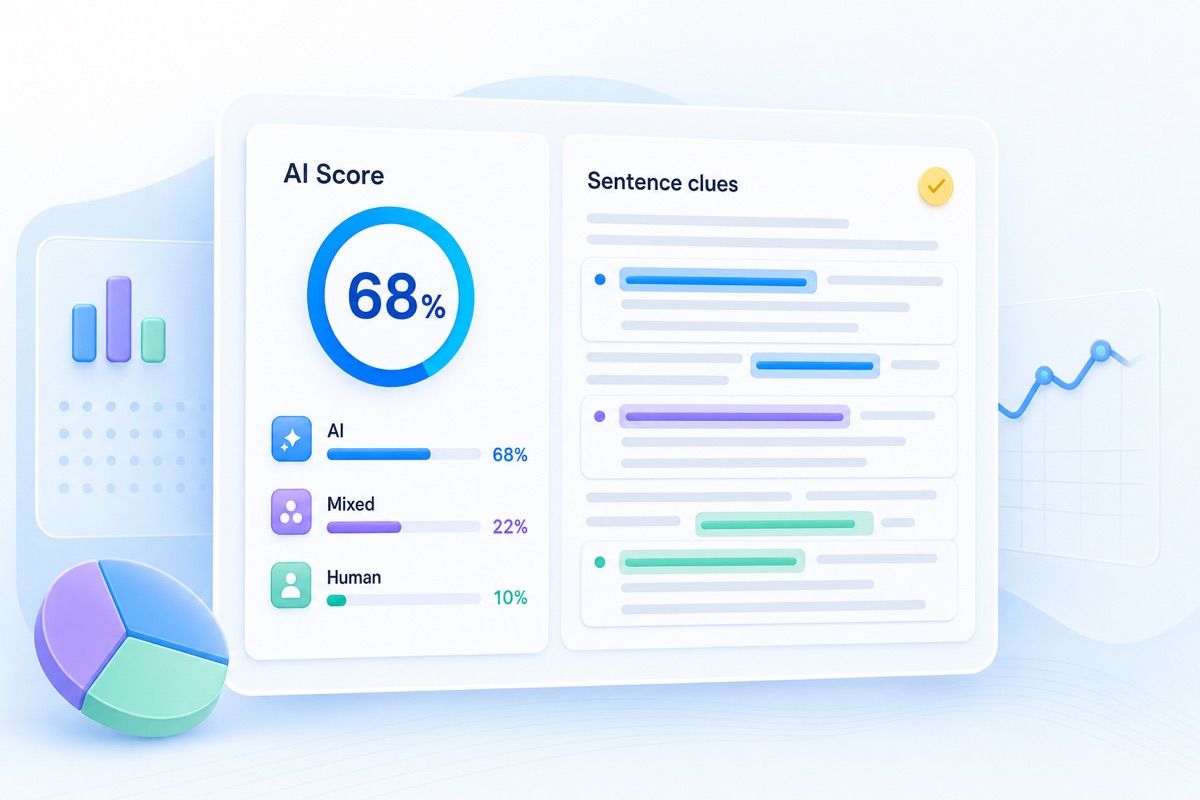
AI detection report dashboard with AI score, mixed score, human score, and highlighted sentence clues

The AI detection report will help you get the idea of what Lynote detected in your text:

  • AI score: Reflects the degree of resemblance of the text to AI-written texts.
  • Mixed writing score: Helps detect documents containing both human and AI-written parts.
  • Human-written score: Reflects the degree of resemblance of the text to human-written texts.
  • Highlighted sentences: Identifies particular lines for detailed analysis rather than the whole document without further thinking.
  • Context is important: Some texts may include more AI elements due to their formality, technicality, brevity, etc.

Lynote Detects AI Text from ChatGPT, Claude, and Gemini

Lynote does more than label a draft as AI or human. It identifies model-linked writing habits, explains why text feels synthetic, and highlights the patterns users should review first.

Our detector is designed to catch common traits found in major AI models while still giving users practical, readable feedback. Instead of relying on one signal alone, Lynote compares rhythm, phrasing, predictability, and structure across a broader review workflow.

ChatGPT-style phrasing

Identifies low variance, smooth writing, safe sentence progression, and generalizations frequently found in outputs from OpenAI-like models.

Claude-style structure

Identifies analytical, well-balanced structure and perfectly symmetrical paragraph progression that seems overly consistent.

Gemini-style synthesis

Flags conversational but dense synthesis, fact-heavy compression, and transitions that sound smoothly generated.

What Lynote checks first

Core review signals include repetition, sentence rhythm, lexical variance, predictability, and detector-aware phrase patterns.

ChatGPT Claude Gemini

Core detection signals

Pattern repetition
High
Sentence rhythm
Medium
Lexical variance
Medium
Model similarity
High
99% Benchmark accuracy for fast AI review workflows
50+Languages supported across global AI content checks
1 ViewClear detector summary with sentence-level clues

What Should You Do If Your Text Was Flagged as AI?

01

Analyse the Report Thoroughly

Do not focus solely on the score provided. Identify which elements have been detected as artificial intelligence-generated, and determine whether this has to do with redundancy, predictability, generic language or the contrast between the suspicious fragment and the rest of your text.

02

Examine Your References

Your notes, outlines, other versions of the text, citations and the history of the document editing will help you determine its origin and prove that it is indeed your own work.

03

Revise the Most Artificial Parts of the Paper

Do not revise the entire text until you have improved the fragments, which appeared to be the most suspicious. Clarify general statements, provide more specifics, rewrite formulaic transitions and vary sentence rhythms.

04

Don’t Over-Edit Your Work

Don’t edit the whole text several times using different rewrite tools in an effort to reduce your AI score. An overly polished text may turn out to be too perfect and thus more suspicious.

05

Test It Again After Editing

Check the edited version once again using the AI detector. A good-quality text will have clearer sentences, less repetition, and a more human-like style of writing.

06

Adhere to Guidelines Specific to Your Case

If you’re dealing with a college, an editor, or an employer who has an AI policy, stick to their guidelines. If disclosure is required, let them know which writing tools you used.

Lynote AI vs. Other AI Detectors

Lynote is built for faster review, clearer sentence-level feedback, broader language support, and a more practical workflow for real AI detection decisions. Compare how Lynote stands out across the factors users care about most.

FeaturesLynoteGPTZeroZeroGPTQuillBotGrammary DecopyPaperpalCopyleaksMyDetAI Detector
Overall detector workflowBest all-aroundAcademic-firstBasic scanWriting add-onEditing-firstMixedAcademic supportEnterprise-firstBasic scanSingle-purpose
Sentence-level highlightsYesYesNoNoNoNoNoYesNoNo
Clarity of result explanationVery clearClearBasicBasicLimitedMixedModerateClearBasicBasic
Multi-model AI detection coverageBroadGoodGoodModerateModerateModerateModerateBroadBasicModerate
Useful for SEO and marketing contentYesNoNoNoNoYesNoYesNoNo
Useful for essays and academic reviewYesYesYesNoNoNoYesYesNoNo
Language support50+ languagesEnglish-firstPopular languages Popular languages Popular languages LimitedAcademic EnglishMulti-languageLimitedEnglish-first
Fast no-friction reviewFastestModerateFastModerateModerateModerateModerateModerateFastSlow
Free access for quick checksGenerousLimitedLimitedLimitedLimitedLimitedLimitedLimitedBasicBasic
Best choice for most usersYesNoNoNoNoNoNoNoNoNo

This comparison is presented as a workflow-oriented positioning overview across common AI detector priorities, with Lynote highlighted for the strongest all-around experience.

AI Detector Use Cases

For Blog Posts & SEO

For Blog Posts & SEO

Use an online AI detector before publishing blog posts, landing pages or product copy, so your pages sound useful, original and ready for readers.

Use an online AI detector before publishing blog posts, landing pages or product copy, so your pages sound useful, original and ready for readers.

For Essays & Academia

For Essays & Academia

Review essays, assignments and research drafts with an AI text detector that shows exactly which lines need attention.

Review essays, assignments and research drafts with an AI text detector that shows exactly which lines need attention.

For Research Papers

For Research Papers

Screen formal writing with an AI writing detector while still using author drafts, citations and human review for context.

Screen formal writing with an AI writing detector while still using author drafts, citations and human review for context.

For Professional Writing

For Professional Writing

Check reports, applications, client work and marketing copy before sharing them with an editor, teacher or team.

Check reports, applications, client work and marketing copy before sharing them with an editor, teacher or team.

Who Uses This AI Detector

Students

Students

Use Lynote as a final check before submitting essays or assignments, especially after using AI for brainstorming or editing.

Educators

Educators

Review student writing with sentence-level AI highlights, then combine the result with drafts, context and classroom judgment.

Content Creators

Content Creators

Keep articles, newsletters and scripts sounding original by checking where AI wording may still be too obvious.

SEO Specialists & Marketers

SEO Specialists & Marketers

Use an AI content detector to review blogs, landing pages and briefs before they go live.

HR Professionals & Recruiters

HR Professionals & Recruiters

Screen cover letters, written assessments and candidate responses while keeping a human reviewer in the hiring process.

Writers & Freelancers

Writers & Freelancers

Check your work before delivery and use highlighted sentences to polish anything that sounds too automated.

“The Best AI Detector”

This is what experts, periodicals, and industry insiders have to say about AI detector tools that facilitate the process of detection, originality review, and AI-generated text evaluation.

review source

Lynote helps readers find real content online by making AI-written passages easier to spot.

★★★★★
review source

AI detection is becoming a practical review step for teams working with AI-assisted drafts.

★★★★★
review source

Better AI workflows help users filter, verify, and make clearer decisions from existing content.

★★★★★
review source

Lynote focuses on the mathematics of language to support high-accuracy AI content detection.

★★★★★
review source

Content integrity matters more as AI writing becomes a normal part of modern publishing.

★★★★★
review source

Lynote checks text across major AI models, including GPT-5, Claude, Gemini, Llama, Mistral, and Perplexity.

★★★★★
review source

Learners and researchers need clearer ways to review AI-heavy notes, summaries, and study content.

★★★★★
review source

Creators need AI detection that can keep up as model-written text becomes harder to recognize.

★★★★★
review source

Lynote helps bridge artificial efficiency and human authenticity in content verification.

★★★★★
review source

Integrated AI detection and translation workflows make it easier to verify content across languages.

★★★★★

Watch the Video to Know More about Lynote AI Text Detector

Take a look at how Lynote AI Detector scans the text for signs of AI writing, flags suspicious sentences, and converts detection alerts into a report for your review prior to publication.

AI Detector FAQ

Answers to common questions about AI detector accuracy, AI checker results, false positives and privacy.

Yes. Lynote offers a free AI detector for checking text online. You can paste text or upload a document and run your first AI check without creating an account. Higher usage limits are available on paid plans.

AI detectors can be useful, but no detector is perfect. Lynote is built for high-confidence AI detection and gives sentence-level highlights so you can review the result instead of relying on one score alone.

AI detectors analyze writing patterns such as word choice, sentence rhythm, predictability and structure. AI-generated text often has smoother, more repeated patterns than human writing. Lynote checks those signals and returns AI-generated, human-written and mixed scores.

The best AI detector is accurate, transparent and easy to interpret. Look for sentence-level highlights, support for major AI models, privacy protections and clear guidance about false positives. Lynote is built for users who need fast results they can actually review.

Yes. Lynote is an AI detector free online for quick text checks. Paste your text, upload a supported file, or try an example to see AI-generated, human-written and mixed results in seconds.

An AI text detector, AI checker, AI content detector or AI writing detector analyzes writing and estimates whether it is AI-generated, human-written or mixed. Lynote also highlights the sentences that need closer review.

Yes. Lynote is designed to check writing from ChatGPT, GPT-5, Gemini, Claude, LLaMA, Mistral and other major AI tools. It also helps review text that has been edited or paraphrased after AI generation.

An AI detector checks whether text appears to be written or edited by AI. A plagiarism checker looks for copied or closely matched source text. They solve different review problems, so many teams use both.

False positives can happen, especially with short, formal, technical or highly structured writing. Review the highlighted sentences, compare earlier drafts and add specific examples or natural phrasing where needed. Do not rely on one AI score alone.

Yes. Lynote supports AI detection in 50+ languages, including English, Spanish, French, German, Portuguese, Chinese, Arabic and more.

Lynote processes text securely and does not use your submitted content to train detection models. This is important for essays, client drafts, unpublished articles, applications and internal documents.

Yes. If Lynote flags AI-heavy sentences, you can use the AI Humanizer to humanize AI text and rewrite it in a clearer, more natural voice. Always review the final text yourself before publishing or submitting it.

Humanize AI Text in Your Own Voice

If Lynote flags AI-heavy sentences, use the AI Humanizer to humanize AI text into clearer, more natural writing before you publish or submit.

More Tools for Checking AI-Written Content

After you scan a draft with Lynote AI Detector, use these related tools to review essays, PDFs, resumes, model-specific writing, or rewrite flagged text when needed.
AI Humanizer

AI Humanizer

Essay AI Detector

Essay AI Detector

PDF AI Detector

PDF AI Detector

Resume AI Detector

Resume AI Detector

Student AI Detector

Student AI Detector

Claude AI Detector

Claude AI Detector

Gemini AI Detector

Gemini AI Detector

Lynote

The AI Detector and AI Humanizer platform for clearer, more natural writing. Check AI scores, humanize text, and make your content sound truly human.

Learn
  • AI Detector
  • AI Humanizer
  • AI Image Detector
  • Document Translator
  • Text Translator
  • AI Humanizer Handbook
  • AI Detector Handbook
  • Image Detector Handbook
Capture
  • YouTube Transcript Generator
  • YouTube Video Summarizer
  • Video to Text
  • Audio to Text
  • YouTube Transcript Extension
Organize
  • AI Note Generator
  • AI Summarizer
  • AI Chat & Q&A
  • Auto Flashcards
  • Image Compressor
  • PDF Compressor
About
  • Pricing
  • About us
  • Contact us
  • Blog
  • Privacy Policy
  • Terms & Conditions
XYouTube

Copyright © 2026 Lynote.ai All rights reserved.

Language:
English