Your Grade Sets the Base Points
Under the default 4.0 plus/minus preset, an A− earns 3.7 points. An Honors label does not increase that value in the unweighted result.


Calculate GPA without Honors, AP, or IB bonuses. See how grades and credits shape your unweighted result.
Have your course grades and credits ready. For high school coursework, choose High school and read the Unweighted result. For college courses, choose College and enter the corresponding course credits.

An unweighted GPA summarizes your included course grades without adding points for course difficulty. An A− receives the same base grade points whether the class is Regular, Honors, AP, or IB under the same grading preset.
That does not mean every course must contribute equally. If your school assigns different credits to different classes, those credits still affect the calculation. “Unweighted” describes the absence of a course-difficulty bonus, while credits determine each included class’s share of the average.
Under the default 4.0 plus/minus preset, an A− earns 3.7 points. An Honors label does not increase that value in the unweighted result.
A 1-credit A− contributes 3.7 quality points. A 0.5-credit A− contributes 1.85 quality points. Both use the same grade value.
Lynote helps you calculate unweighted GPA from the coursework you enter. Use the result to understand your grades, then compare its scale and course coverage with the record or requirement you are checking.

Choose the appropriate school mode and enter a name for every included course. Select each letter grade and its credits. High school mode offers 0.5 or 1 credit; College mode uses its available course-credit options. Enter your school’s actual GPA credits.
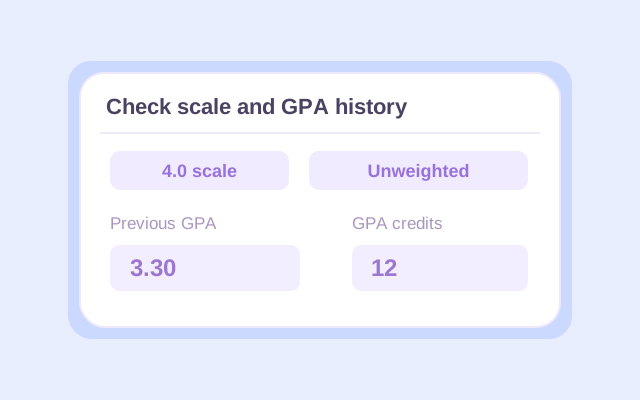
Check the default 4.0, 4.33 A+, or Letters only preset against your school’s grading rules. To update an earlier high school unweighted GPA, open Previous GPA, choose Unweighted, and enter the earlier GPA with the credits represented by that number.
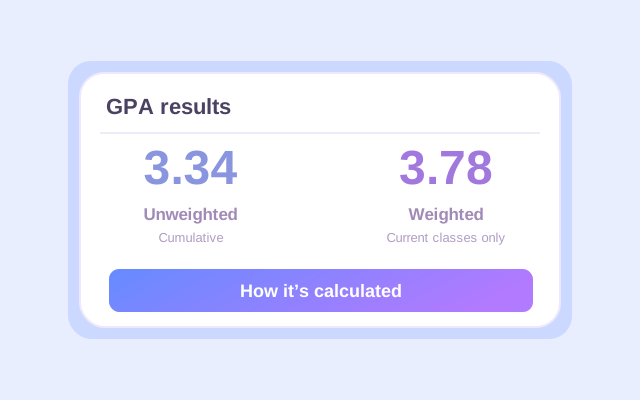
Click Calculate. In High school mode, read the Unweighted result and check whether it describes current classes or cumulative study. Review the course breakdown. After edits, calculate again before exporting to Excel or CSV, or using the browser’s Print/PDF workflow. High school mode also shows a weighted result. Keep each course’s real level selected; you do not need to relabel advanced courses as Regular to remove bonuses from the Unweighted result.
Start with the grade-point preset your school uses. This unweighted GPA scale shows how Lynote’s three presets treat the same letter grades before any high school course bonus.
| Letter grade | Default 4.0 plus/minus | 4.33 A+ | Letters only |
|---|---|---|---|
| A+ | 4.0 | 4.33 | 4.0 |
| A | 4.0 | 4.0 | 4.0 |
| A− | 3.7 | 3.7 | 4.0 |
| B+ | 3.3 | 3.3 | 3.0 |
| B | 3.0 | 3.0 | 3.0 |
| B− | 2.7 | 2.7 | 3.0 |
| C+ | 2.3 | 2.3 | 2.0 |
| C | 2.0 | 2.0 | 2.0 |
| C− | 1.7 | 1.7 | 2.0 |
| D+ | 1.3 | 1.3 | 1.0 |
| D | 1.0 | 1.0 | 1.0 |
| D− | 0.7 | 0.7 | 1.0 |
| F | 0 | 0 | 0 |
To calculate unweighted GPA on a 4.0 scale, use the default preset or the appropriate Letters only rule for your school. The 4.33 A+ preset gives A+ a different base value, so an unweighted result can exceed 4.0 with that preset even without course bonuses.
If your grades are percentages or numerical scores, use your school’s thresholds to find the correct letter grades first. The current tool does not directly accept percentage grades, and a GPA total does not identify one unique percentage average.
For an unweighted GPA calculation, convert each included grade to base points, multiply by course credits, and add those contributions. Divide the total by the GPA credits included in the same calculation.
Here is a five-course high school example using the default 4.0 plus/minus preset. The course level is shown so you can see that the unweighted calculation keeps the base grade points.
| Course | Grade / level | Credits | Base points | Base quality points |
|---|---|---|---|---|
| Geometry | A / Regular | 1.0 | 4.0 | 4.0 × 1 = 4.0 |
| English | A− / Honors | 1.0 | 3.7 | 3.7 × 1 = 3.7 |
| AP Environmental Science | B / AP | 1.0 | 3.0 | 3.0 × 1 = 3.0 |
| World History | B+ / Regular | 1.0 | 3.3 | 3.3 × 1 = 3.3 |
| Art | B / Regular | 0.5 | 3.0 | 3.0 × 0.5 = 1.5 |
| Total | Five included courses | 4.5 | — | 15.5 |
15.5 base quality points ÷ 4.5 GPA credits
The Honors English grade contributes 3.7 base points per credit, and the AP science grade contributes 3.0. Neither receives a difficulty bonus in this result.
If AP Environmental Science changes from B to A, with everything else unchanged, it adds 1.0 base quality point. The revised unweighted GPA is 16.5 ÷ 4.5 = 3.67. You can compare this scenario by editing the grade and calculating again. Changing only the course level does not change the unweighted result.
Yes, when the calculation includes courses with different credit values. The common shortcut—add the grade points and divide by the number of classes—works when every included class has the same credit value.
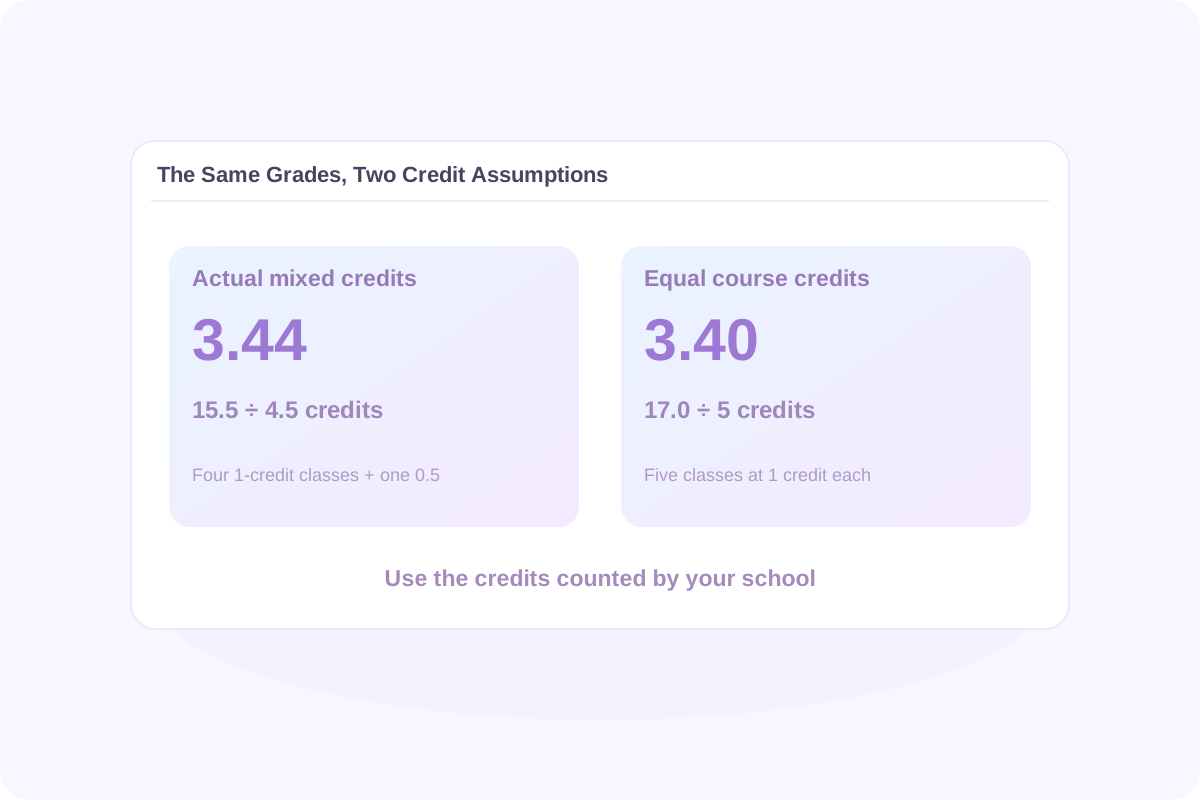
The example’s four 1-credit courses and one 0.5-credit course contribute 15.5 quality points across 4.5 credits. Art has half the influence of a 1-credit class.
If all five courses instead carried 1 credit each, the same grades would give (4.0 + 3.7 + 3.0 + 3.3 + 3.0) ÷ 5 = 3.40. Every course would contribute equally.
These are two different credit assumptions. Use the one that matches your school’s policy. Do not replace actual course credits with equal values simply to change the result.
If your school counts every included class equally and does not report credits, you can enter the same supported credit value for each class. If credits differ, use the actual values. Lynote requires credits; it does not automatically detect whether your school uses an equal-course average.
A current-course result describes the classes you entered. A cumulative unweighted GPA combines those classes with earlier study. To calculate it correctly, the earlier GPA must also be unweighted and use compatible grading and course-inclusion rules.
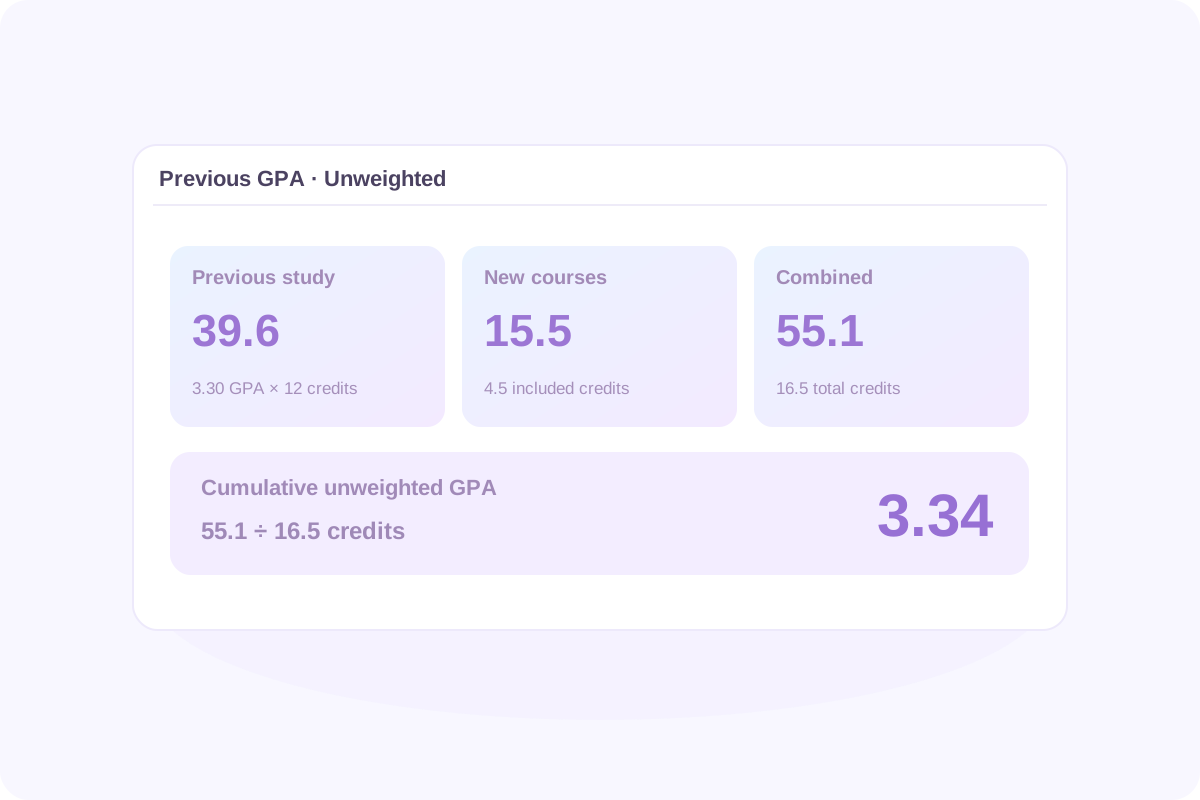
Suppose your previous unweighted GPA is 3.30 across 12 GPA credits. Add the five-course example above:
| Study included | GPA credits | Base quality points |
|---|---|---|
| Previous study: 3.30 unweighted | 12.0 | 3.30 × 12 = 39.6 |
| New coursework | 4.5 | 15.5 |
| Combined | 16.5 | 55.1 |
The updated result is 55.1 ÷ 16.5 = 3.34 cumulative unweighted GPA. In High school mode, choose Unweighted for the historical GPA. The weighted result covers current classes only when you have supplied unweighted history.
A cumulative unweighted GPA calculator should combine quality points and credits, rather than give every semester the same influence. You can directly average semester GPAs only when they represent equal GPA credits and compatible rules. Keep full precision where available and round the final result for display.
Count earlier coursework once. If it is already represented in Previous GPA, do not enter the same classes again in the new course list. A rounded historical GPA may also create a small difference from an official transcript calculated from original quality points.
A weighted and unweighted GPA calculator can show two views of the same grades. Unweighted uses base grade points. Weighted adds eligible course-difficulty bonuses before multiplying by credits.
For the worked example, Lynote’s default Honors bonus adds 0.5 quality point to English, and its AP bonus adds 1.0 to Environmental Science. The resulting totals are:
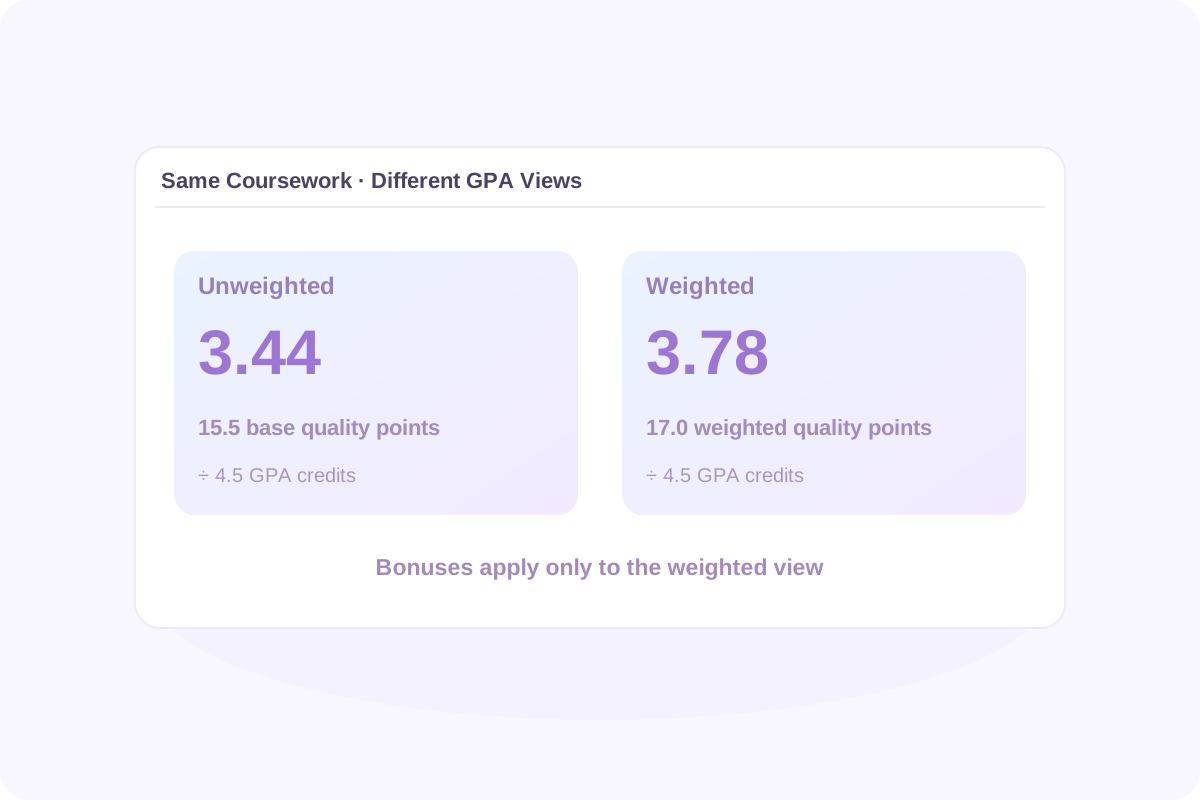
15.5 base quality points ÷ 4.5 credits
17.0 weighted quality points ÷ 4.5 credits
The course grades and credits are unchanged. The difference comes from the eligible bonuses. If you add GPA history, check the scope labels before comparing a cumulative result with a current-course result.
A weighted to unweighted GPA calculator cannot recover a unique answer from that total alone. Two equal-credit Regular courses graded A and B produce 3.50 weighted and 3.50 unweighted. Two equal-credit Honors courses both graded B also produce 3.50 weighted under the default bonus, but their unweighted GPA is 3.00.
The same weighted total can therefore hide different unweighted results. To calculate unweighted GPA from weighted coursework, enter the individual grades and credits and use the base grade-point preset. Do not subtract one fixed amount or divide a weighted total by 5 and multiply by 4.
The reverse also needs course information. An unweighted to weighted GPA calculator needs the applicable course levels as well as grades and credits. Lynote calculates both views from course entries in High school mode; it does not provide a one-number aggregate conversion.
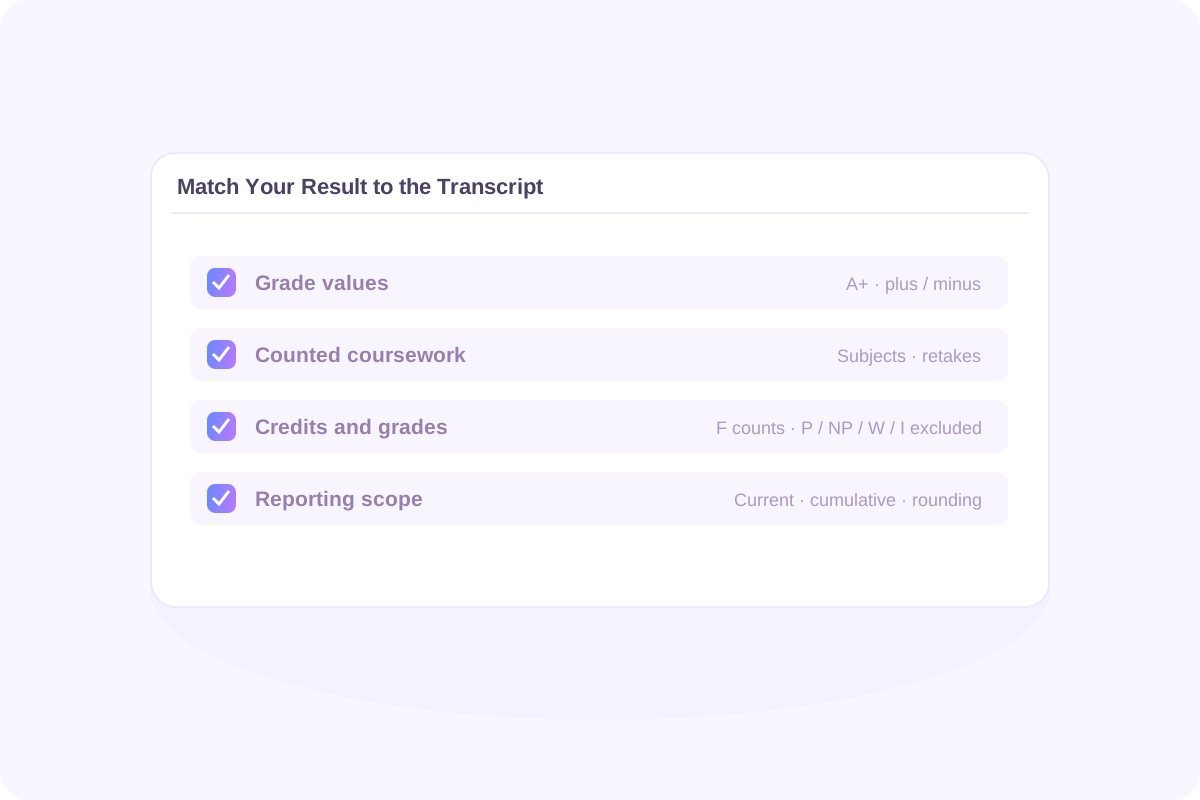
Before assuming the arithmetic is wrong, compare what each result includes. Small differences in the grade chart or course list can change the average.
Check A+, plus/minus grades, and the preset selected. An A− is 3.7 in the default preset but 4.0 in Letters only. Percentage thresholds must come from your school.
Check which subjects, retakes, and course attempts belong in the calculation. A selected-subject GPA and a whole-transcript GPA describe different sets of classes.
Lynote counts an F as zero points while retaining its GPA credits. P, NP, W, and I are excluded from both points and GPA credits. Confirm your school’s treatment of these outcomes.
Compare current and cumulative scope, avoid counting semester and full-year entries twice, and check displayed precision. A previous rounded GPA may not reproduce a full-precision transcript exactly.
The calculator does not import a transcript, decide which courses your school accepts, or automatically apply a school’s repeat policy. Your official record remains the source for the GPA your school reports.
Begin with the scale and the purpose of the comparison. On the default 4.0 preset, an A earns 4.0 course points, a B earns 3.0, and a C earns 2.0. These are grade-point references, not universal admission or scholarship thresholds.
A mixed course record can reach the same GPA in more than one way. The total does not reveal one exact percentage average, every individual grade, or the difficulty of the courses you took. Read it alongside the coursework and the requirements that matter to you.
Colleges may use different course selections or recalculate grades under their own rules. College Board explains how school GPA scales and college recalculation can differ. Check whether a published comparison is weighted or unweighted and which subjects it includes.
A calculator result can help you understand your record. It cannot determine an admission decision, class rank, or award eligibility by itself.
Use the high school unweighted GPA calculator workflow to check your current grades without Honors, AP, or IB bonuses. Keep real course levels in place and read the Unweighted result.
Use an earlier unweighted GPA and its GPA credits to include new coursework without entering every previous class. Confirm that both periods follow compatible rules.
Choose College for college course entries and use their credit values. College GPA uses course grades and credits here, without the high school course-level bonus system.
Review the course list, grade values, and included credits together. Use the breakdown to explain a result or identify a policy question to check with the school.
Multiply each included course’s base grade points by its credits, add those quality points, and divide by total included GPA credits. With equal credits for every included class, this simplifies to the average of the course grade points.
The course label does not add bonus points to an unweighted result. The letter grade still counts. In Lynote, keep the actual level selected and read Unweighted; the separate weighted result applies eligible bonuses.
No. It means course difficulty does not add bonus points. When credits differ, a higher-credit course still contributes more to the GPA. Equal influence applies when the included courses carry equal credit values.
Lynote requires credits. If your school counts every included class equally, enter the same supported credit value for each. If the transcript uses different credits, use those actual values rather than averaging every class equally.
Lynote does not offer a separate 5.0 unweighted preset. In its default setup, an AP or IB A can earn 5.0 weighted course points because a bonus is added to a 4.0 base. The default unweighted maximum is 4.0; the optional 4.33 A+ preset uses a different base value.
Under the default preset, A+ and A both earn 4.0, while A− earns 3.7. The 4.33 A+ preset changes A+ to 4.33. Letters only ignores plus/minus distinctions, so A+, A, and A− all count as A. Match the preset to your school.
Convert each reported percentage or number grade to a letter using your school’s thresholds first. The tool accepts letter grades rather than direct percentage entries. A general conversion chart may not match your school.
Use the underlying course grades and credits to calculate the base-point average. One weighted GPA alone is insufficient because it does not identify the course mix or total bonuses. To go from unweighted to weighted, you also need eligible course levels and the applicable bonus rules.
Multiply the earlier unweighted GPA by its corresponding GPA credits, add new base quality points, and divide by combined credits. In High school mode, choose Unweighted for Previous GPA. Do not use weighted history to update an unweighted result.
Only if the semesters represent equal GPA credits and compatible grading rules. Otherwise, combine their quality points and credits. Averaging a 3-credit period and a 12-credit period equally would give the smaller period too much influence.
In Lynote, an F counts as zero points and keeps its GPA credits in the denominator. P, NP, W, and I are excluded from both GPA points and GPA credits. Verify your school’s rules when matching an official transcript.
Yes. Select College, enter the required course names, grades, and corresponding course credits, and use a compatible grading preset. High school Honors, AP, and IB bonuses are not applied in College mode.
Not necessarily. A college may change the included subjects, remove course bonuses, or apply another grading method. Check the institution’s instructions rather than assuming a general calculator reproduces its admissions calculation.
Not necessarily. Under the default 4.0 preset, the exact maximum requires every included course to earn 4.0 base points, but a slightly lower average can round to 4.00. Different presets also change grade values. Check the detailed grades and scale before drawing that conclusion.
You can export calculated results to Excel or CSV and use the browser’s Print/PDF workflow. Recalculate after changing an entry. Do not rely on automatic saving after refresh or on transcript synchronization; keep a copy of the results you need.
Check the free allowance and credit requirements displayed in the live tool. Available use can depend on your account and remaining allowance. The calculator should not be treated as offering unlimited free calculations.
Check whether an assignment draft fits its word-count requirement.
Break a subject you want to study into an organized learning plan.
Prepare structured notes from supported course materials.
Work on readability in permitted writing tasks while following course rules.
Review an estimated AI-writing signal without treating it as a final authorship judgment.
Find a copyable blank character for supported formatting tasks.
Read supported learning documents in another language.
Create review cards to practise recalling course concepts.
Identify the main ideas in supported reading PDFs before closer review.
Turn a supported recording into text when you have permission to process it.
Once you understand the calculation, focus on the work behind the next set of grades. These Lynote guides cover practical reading and note-taking workflows.
Bring your course grades, GPA credits, and school grading rules. Enter the coursework, check the scale, and see how the base grade points add up to your unweighted result.