logo
menu

Claude AI Humanizer for Opus, Sonnet & Claude Code

Paste prose generated in Claude.ai or Claude Code—including Fable 5, Sonnet 5, Opus 4.8, Haiku 4.5, and earlier models. Remove Claude-style patterns without flattening the logic or losing your meaning.

Content

Paste Text⌘Vor click
Upload DocumentTXT.DOCX.PDF
Try Example:
Human + AI
Claude
ChatGPT
0 words

Result

Your humanized result will be ready here. To begin, paste your AI-generated text in the left box.

Instant AI Detection ResultAwaiting result
GGPTZero
BBrandwell
WWinston AI
SSapling
CCrossplag
CCopyleaks
WWriter
ZZeroGPT
SScribbr
TTurnitin
0 words

Recent History

1M+
Texts Humanized
99%
Humanization Rate
4.9
User Rating

Why Choose Lynote’s Claude AI Humanizer?

Bypass Claude Detection

Bypass Claude Detection

Rewrite Claude-style phrasing and check the result against GPTZero, Turnitin, Copyleaks, and other signals in the Instant Authenticity Report.

Preserve Claude’s Logic

Preserve Claude’s Logic

Keep the argument, facts, examples, and paragraph order while changing the wording and rhythm that make the draft feel machine-shaped.

Claude.ai & Claude Code

Claude.ai & Claude Code

Humanize prose copied from Claude.ai or generated inside Claude Code, including documentation, README text, PR descriptions, and changelogs.

Current Claude Models

Current Claude Models

Use text from Fable 5, Sonnet 5, Opus 4.8, Haiku 4.5, earlier Claude releases, or provider-specific Claude deployments.

PDF, DOCX & TXT Uploads

PDF, DOCX & TXT Uploads

Upload a longer Claude draft instead of breaking it into small pasted sections.

80+ Languages

80+ Languages

Humanize Claude translations and non-English drafts without forcing the content through an English-only workflow.

Three Rewrite Depths

Three Rewrite Depths

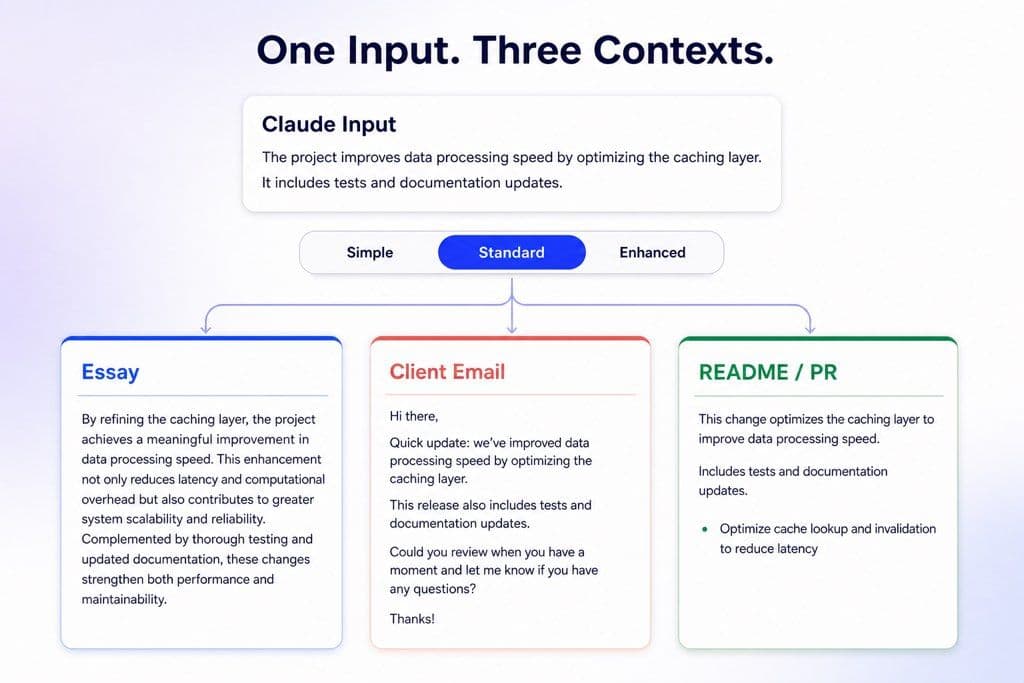
Choose Simple, Standard, or Enhanced depending on how strongly the Claude phrasing needs to change.

Private, No Training

Private, No Training

Your pasted text and uploaded drafts are processed privately and are not used to train models.

Remove Claude’s Signature Writing Patterns

Remove Claude’s Signature Writing Patterns

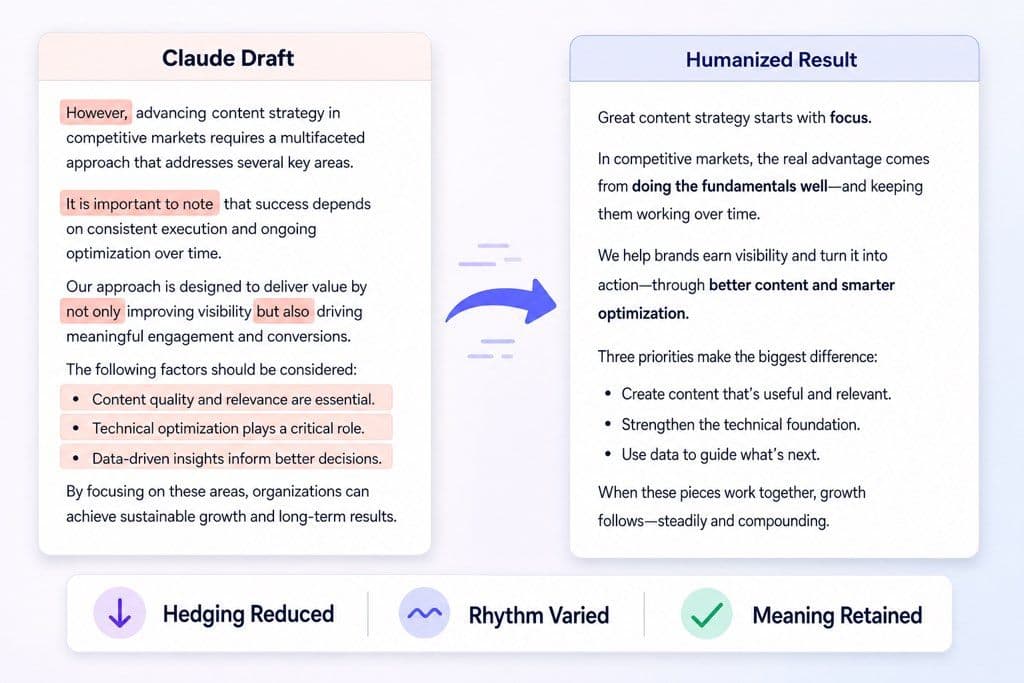
Claude often leans on polished transitions, careful hedging, symmetrical lists, and evenly paced sentences. Lynote rewrites those patterns at paragraph level so the result feels less templated, not merely synonym-swapped.
    Preserve Logic, Facts, and Technical Context

    Preserve Logic, Facts, and Technical Context

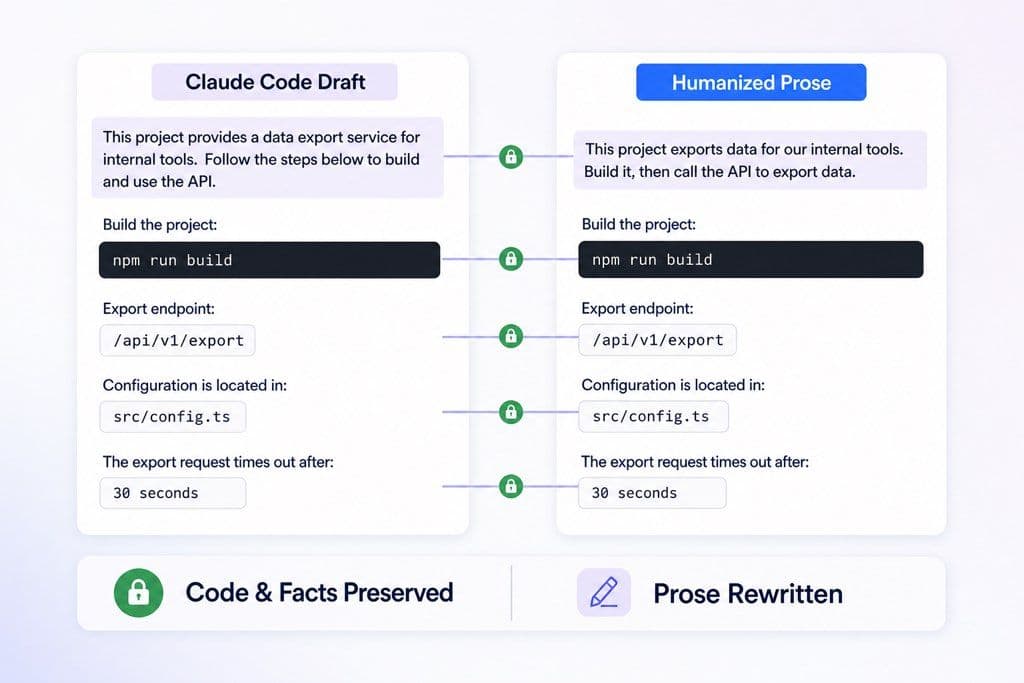
    Humanize a Claude.ai answer, report, or Claude Code-generated README, PR description, changelog, or documentation draft. Lynote changes the prose while keeping arguments, names, steps, and technical terms in view for final review.
      Rewrite for the Right Context

      Rewrite for the Right Context

      Choose Simple, Standard, or Enhanced depth and match the result to essays, blogs, emails, reports, scripts, or technical documentation. Use a lighter pass when Claude’s structure already works; go stronger when the rhythm still feels machine-shaped.

        Why Claude Text Often Sounds AI-Generated

        Claude output is often clear and well organized. That consistency can also become recognizable: the model may hedge too carefully, balance every side, repeat polished transitions, and maintain the same sentence rhythm for too long.

        Common Claude Writing Patterns

        Balanced framing: Claude often gives competing views equal weight, even when the document needs a firmer position or a clearer recommendation.

        Polished hedging: Phrases such as “it is worth noting” or “it is important to consider” can accumulate and make the draft sound overqualified.

        Symmetrical structure: Parallel lists and similarly sized paragraphs create a tidy but repetitive cadence across longer Claude answers.

        Predictable transitions: Repeated setup-and-explanation transitions can make each paragraph feel generated from the same template.

        Claude Code documentation voice: READMEs, PR descriptions, changelogs, and technical explanations can become exhaustive, uniformly formal, and heavier than the developer’s usual voice.

        Fable 5Sonnet 5Opus 4.8Claude Code
        Patterns Lynote Rewrites
        80+Languages
        3Rewrite Depths
        4File Types

        How to Humanize Claude AI Text

        Paste Claude.ai or Claude Code Prose
        Step 1

        Paste Claude.ai or Claude Code Prose

        Paste a Claude answer, essay, email, report, README, PR description, changelog, or documentation draft. Upload a PDF, DOC, DOCX, or TXT file when the prose is too long to copy cleanly.

        Choose a Depth and Humanize
        Step 2

        Choose a Depth and Humanize

        Select Simple, Standard, or Enhanced based on how strongly the wording needs to change, choose the Purpose that fits the document, then click Humanize Now.

        Review Meaning and AI Signals
        Step 3

        Review Meaning and AI Signals

        Compare the result with the Claude original, restore any facts or technical terms that must stay exact, and use the Instant Authenticity Report before copying the final text.

        Humanize Claude Text for Every Writing Task

        Essays and Research Drafts

        Essays and Research Drafts

        Keep Claude’s outline and argument, then rewrite stiff transitions and overly balanced paragraphs. For a dedicated academic workflow, use the <a href="/ai-humanizer-essay">AI Essay Humanizer</a>.

        Blog and SEO Content

        Blog and SEO Content

        Humanize Claude-written introductions, explanations, and conclusions so the article has a clearer editorial voice instead of the same polished rhythm in every section.

        Client Emails and Reports

        Client Emails and Reports

        Turn Claude’s cautious, formal wording into a direct message while preserving the request, evidence, decision, and next step.

        Claude Code Documentation

        Claude Code Documentation

        Refine README files, PR descriptions, changelogs, release notes, and technical explanations generated in Claude Code. Humanize the prose; keep source code and exact commands unchanged.

        Who Uses a Claude AI Humanizer?

        Students and Researchers

        Students and Researchers

        Humanize Claude-assisted outlines and drafts while keeping the thesis, evidence, citations, and subject-specific language ready for your own review.

        SEO and Content Teams

        SEO and Content Teams

        Remove repeated Claude transitions and generic framing before an article moves into editorial review, fact-checking, and publication.

        Developers Using Claude Code

        Developers Using Claude Code

        Refine technical prose generated during coding work—README sections, PR notes, changelogs, issue summaries, and implementation explanations.

        Creators and Scriptwriters

        Creators and Scriptwriters

        Shorten Claude’s explanatory narration and vary the pacing so a video, podcast, or social script sounds natural when spoken aloud.

        Freelancers and Copywriters

        Freelancers and Copywriters

        Keep the useful draft structure while bringing client emails, landing pages, proposals, and ads closer to the intended brand voice.

        Business Teams

        Business Teams

        Turn cautious Claude reports and summaries into direct updates that make the decision, owner, and next step easier to scan.

        What Our Users Say

        Julian Vance

        College Student

        starstarstarstarstar

        "Claude gave me a strong essay structure, but the wording felt too polished. Lynote kept my argument and made the outline sound like my own notes."

        Mateo Reyes

        SEO Marketer

        starstarstarstarstar

        "I had a Sonnet blog draft full of smooth transitions. Lynote removed the Claude feel without making the article choppy."

        Tariq Hassan

        Freelance Copywriter

        starstarstarstarstar

        "My client email sounded excessively courteous after Claude. Balanced mode made it warmer and more direct without losing the offer."

        Kenji Sato

        Tech Blogger

        starstarstarstarstar

        "Opus helped explain a complex software workflow, but the prose was heavy. Lynote kept the technical sequence and made it readable."

        Elena Rostova

        Content Translator

        starstarstarstarstar

        "I used Claude for Spanish copy, then Lynote made the localized phrasing feel less AI-smoothed and more native."

        Aisha Diallo

        HR Manager

        starstarstarstarstar

        "I uploaded a DOCX policy draft written with Claude. The result kept the formal meaning but sounded clearer for employees."

        Claude AI Humanizer FAQ

        Answers about Claude.ai, Claude Code, current model families, detector bypass, files, languages, privacy, and meaning preservation.

        A Claude AI humanizer rewrites prose generated by Anthropic’s Claude models so it sounds less patterned and more naturally written. Lynote changes wording, sentence rhythm, transitions, and tone while keeping the central meaning in view.

        Yes. You can paste or upload text from current and earlier Claude models, including Fable 5, Sonnet 5, Opus 4.8, Haiku 4.5, and older releases. You do not need to choose the source model inside Lynote.

        Yes—use it for prose generated inside Claude Code, such as README sections, PR descriptions, changelogs, issue summaries, and technical documentation. Do not humanize source code, commands, API names, or syntax that must remain exact.

        This page is written around Claude-specific output: careful hedging, balanced framing, polished transitions, and evenly paced paragraphs. For mixed or unknown AI sources, use the broader <a href="/ai-humanizer">AI Humanizer</a>.

        Lynote is designed to reduce Claude-style signals and help the rewritten text bypass major AI detectors. After humanizing, the Instant Authenticity Report checks signals associated with GPTZero, Turnitin, Copyleaks, Winston AI, and other detectors.

        Lynote is designed to preserve the central argument, facts, examples, and paragraph order while changing the expression. Review names, numbers, quotations, citations, code, commands, and technical terms before publishing or submitting the result.

        Yes. Upload a PDF, DOC, DOCX, or TXT file when the Claude draft is too long to paste cleanly. For a workflow focused on complete PDF files, use the <a href="/ai-humanizer-pdf">PDF Humanizer</a>.

        Yes. You can start humanizing Claude text for free without creating an account. The current free interface requires at least 60 words and supports up to 600 words per request.

        Yes. Lynote supports 80+ languages, so you can humanize Claude translations and non-English drafts without converting them to English first.

        No. Your pasted text and uploaded documents are processed securely and are not used to train models.

        Learn More About Claude-Generated Text

        Explore how Claude-generated writing is detected, how Turnitin handles Claude output, and how AI humanizer tools compare.