How to Chat with Any URL: The Complete 2026 Guide

Ever stared at a browser with 25 open tabs, knowing the answer you need is buried in one of them, but you don't have three hours to find it? We’ve all been there. The sheer volume of online information—from dense academic papers and sprawling industry reports to hour-long video lectures—is overwhelming. Traditional reading is a linear, time-consuming process. But what if you could skip the reading and jump straight to the understanding?
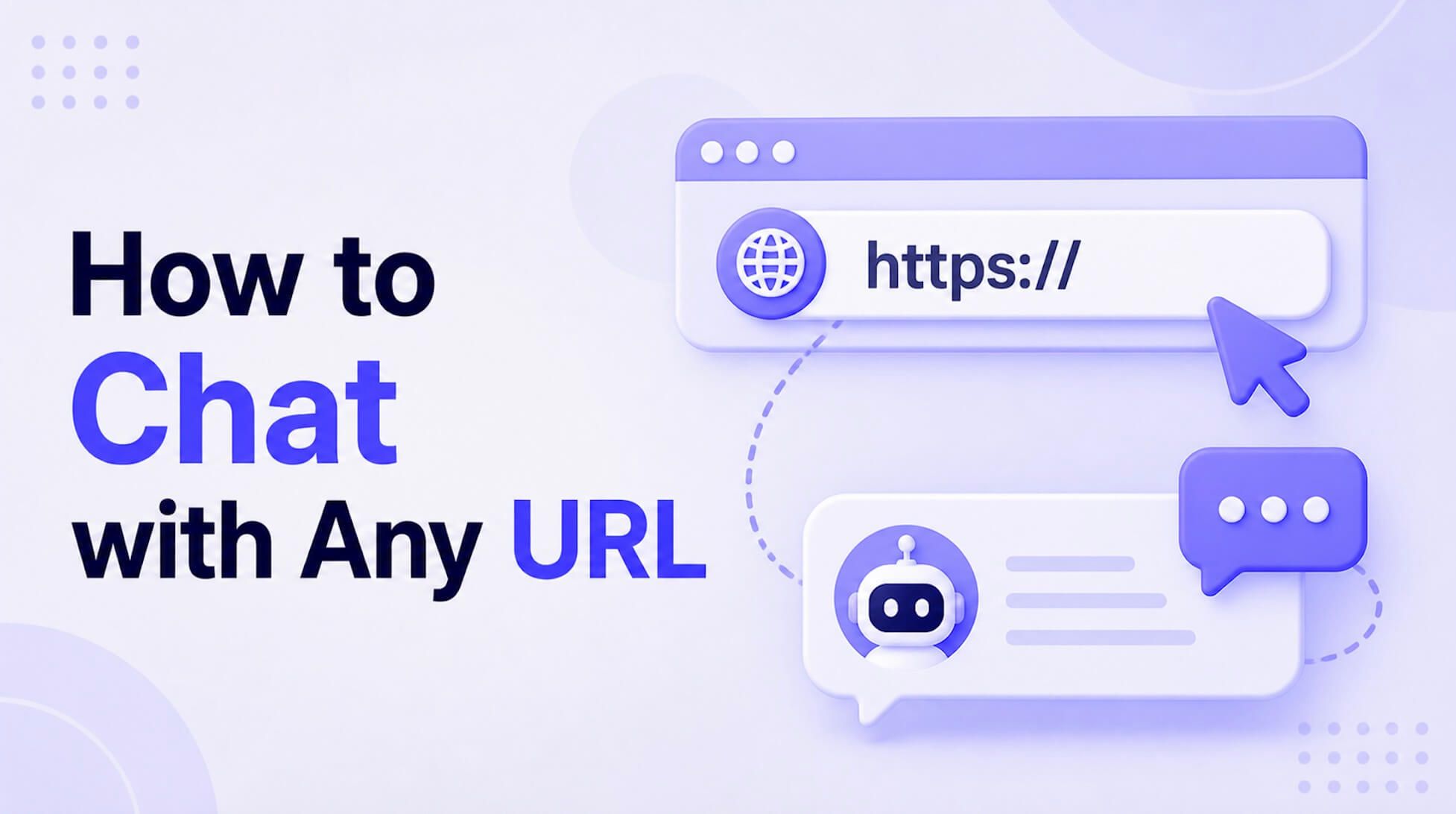
Chatting with a URL is the process of using an AI tool to ingest the content of any web link—be it an article, a research paper, a PDF document, or even a YouTube video—and then engaging with that content through a conversational Q&A interface. Instead of passively reading from top to bottom, you actively query the source material. You can ask it to summarize key arguments, extract specific data points, explain complex concepts in simpler terms, or compare different sections. It fundamentally transforms static web content into a dynamic, interactive knowledge base tailored to your immediate needs.
This isn't just a novelty; it's a monumental shift in how we consume information. It’s the difference between reading a manual cover-to-cover and asking an expert mechanic exactly how to fix your specific problem.
Quick Verdict: Best Ways to Chat with a URL
Before we dive deep, here’s a high-level look at your options. The right choice depends entirely on whether you need a quick gist or a deep, repeatable analysis.
| Method | Best For | Key Tradeoff | Ease of Use (1-5)* |
|---|---|---|---|
| Dedicated Web Apps | Students, researchers, and professionals needing deep, focused analysis of specific links (articles, PDFs, videos). | Requires pasting a link into a separate tool; may have usage limits on free tiers. | 5/5 |
| Browser Extensions | Getting quick summaries or asking a few questions about the page you're currently on without switching tabs. | Less powerful for complex documents; can interfere with site performance. | 4/5 |
| General LLMs (ChatGPT, Gemini, etc.) | Casual users asking broad questions about very popular, well-indexed URLs or pasted text. | Often fails on complex or paywalled sites; lacks specialized extraction features. | 3/5 |
Scores are editorial heuristics based on workflow efficiency, not measured benchmarks.
For most focused tasks—like studying for an exam, writing a report, or prepping for a meeting—a dedicated web app offers the most reliable and streamlined experience. General LLMs are powerful but can be a bit of a gamble when it comes to accurately fetching and interpreting fresh web content.
How AI Actually 'Chats' with a Webpage: The Technology Explained
You paste a link, and seconds later, you’re asking it questions. It feels like magic, but it’s a sophisticated, multi-step process. Understanding it helps you get better results and troubleshoot when things go wrong.
Here’s the honest truth: the AI isn't "reading" the page like you do. It's processing it.
- Content Fetching & Scraping: First, the tool acts like a specialized web browser. It sends a request to the URL and downloads the raw HTML code, just like Chrome or Safari would. For a YouTube link, it accesses the transcript via an API. For a PDF, it downloads the file.
- Text Extraction & Cleaning: This is the crucial, often-missed step. A webpage isn't just the article text; it’s full of ads, navigation menus, footers, and JavaScript pop-ups. A good tool is engineered to parse that chaos, identify the "body" of the content, and strip away all the irrelevant noise. This clean text is the raw material for the AI.
- Chunking & Embedding: A Large Language Model (LLM) can't process an entire 10,000-word article at once. The clean text is broken down into smaller, logical "chunks." Each chunk is then converted into a numerical representation called an "embedding"—a vector of numbers that captures its semantic meaning. Think of it as creating a highly detailed index for a book that understands concepts, not just keywords.
- Querying & Synthesis: When you ask a question ("What are the main counter-arguments in this article?"), your question is also converted into an embedding. The system then finds the text chunks with the most similar embeddings (the most relevant parts of the document). These relevant chunks, along with your original question, are sent to the LLM, which synthesizes them into a coherent, human-readable answer.
Bottom Line: 'Chat with URL' turns the web from a library of static books into a team of on-demand research assistants. The quality of your assistant depends entirely on how well it can extract the clean text and understand your questions.
How to Chat with a URL in 3 Simple Steps Using Lynote
Theory is great, but let's get practical. Dedicated tools are built specifically for this workflow, making the process incredibly efficient. Here’s how you can go from a link to a full conversation using a tool like Lynote, which is designed for learning and research.
Before you start:
- Ensure the URL is public: The tool needs to be able to access the link without a password or a hard paywall.
- Check the format: This workflow is ideal for content-rich webpages (articles, blogs), YouTube videos with transcripts, and direct links to documents like PDFs.
- Simpler is better: Extremely complex, JavaScript-heavy interactive sites can sometimes pose a challenge for text extraction. A standard article or document works best.
Step 1. Paste Your URL
First, identify the source you want to work with. This could be a link to a dense Wikipedia entry you need for a school project, a YouTube video of a university lecture, or a PDF of a market research report hosted online.
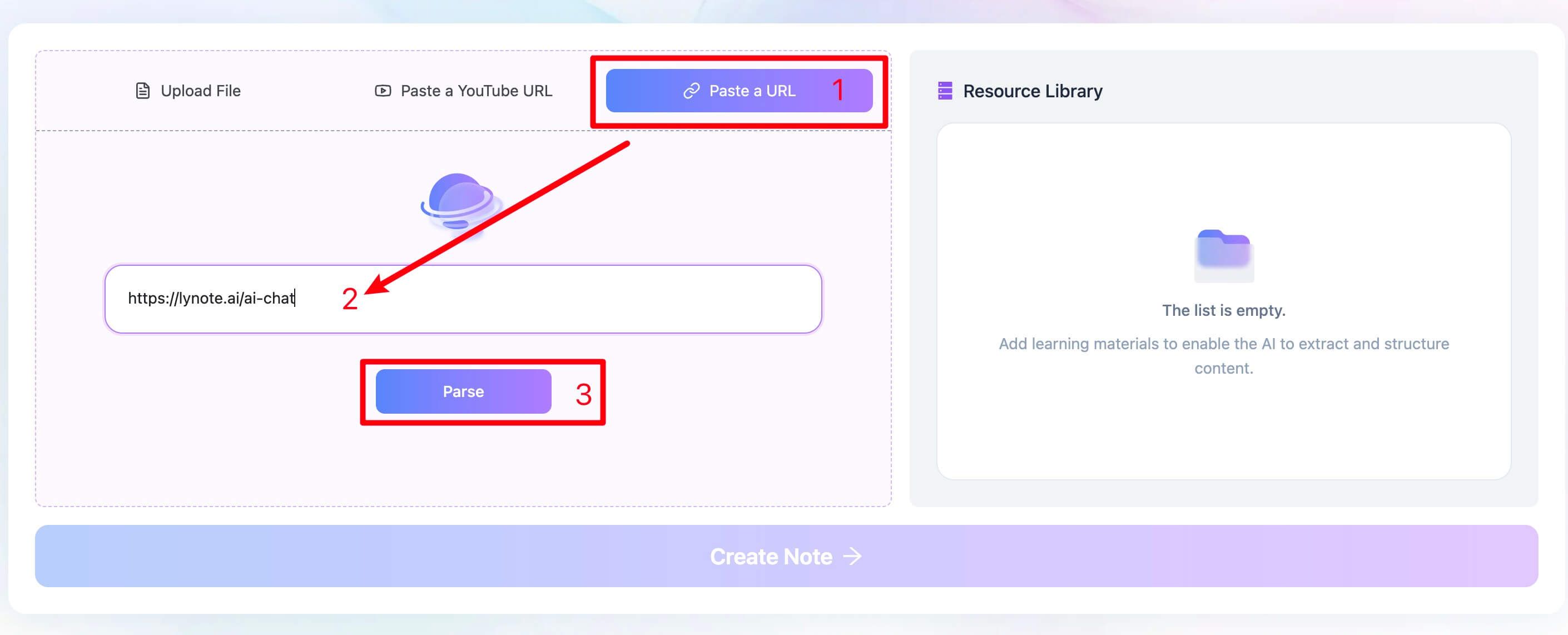
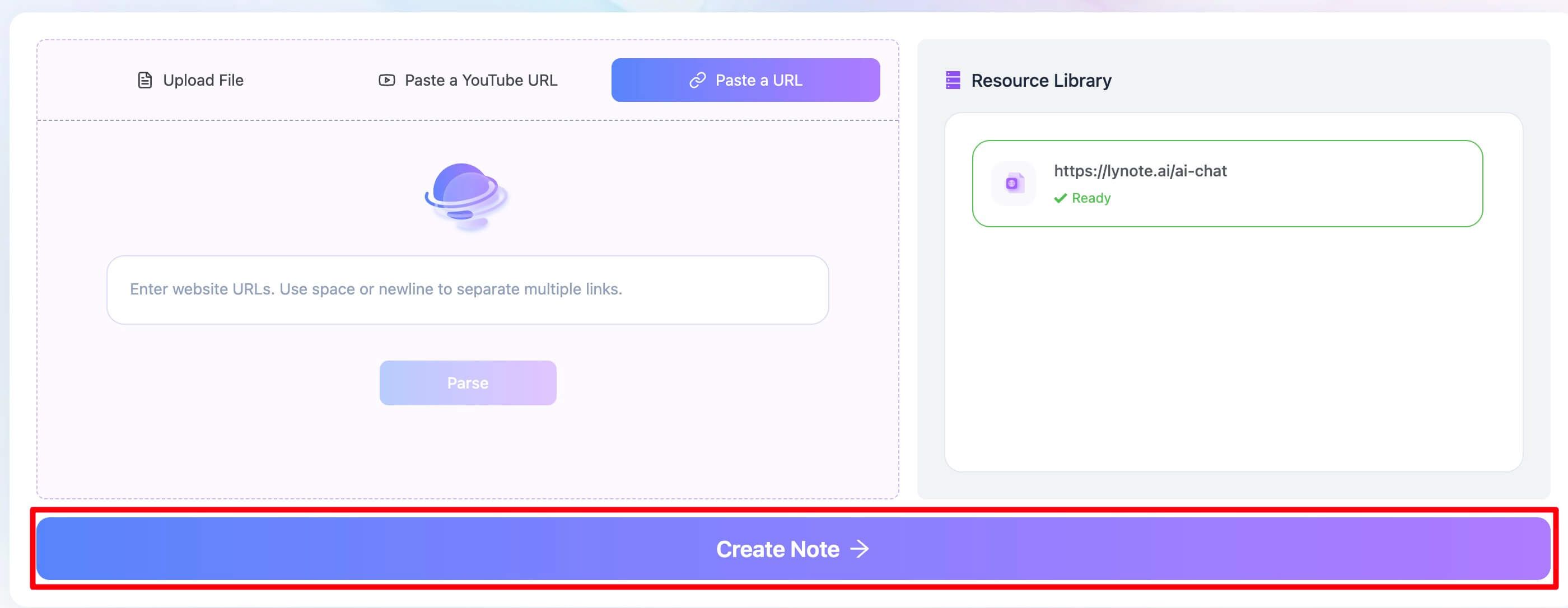
Navigate to the Lynote AI summarizer and locate the "Paste a URL" input field. Simply copy the full URL from your browser's address bar and paste it directly into the designated area. Click the “Parse” button. The system is designed to recognize different types of links and handle them accordingly.
Step 2. Analyze and Summarize the Content
With your URL in place, click the "Create Note" button. This single click kicks off the complex process we discussed earlier. Behind the scenes, the tool is fetching the page or video transcript, intelligently isolating the core content from surrounding clutter, and processing it through its AI engine. It’s not just grabbing text; it’s preparing it for deep analysis. The first output of this process is a concise, high-quality summary that serves as your starting point.
Step 3. Chat with Your AI-Powered Note
In just a few seconds, the system will present you with a new, interactive note containing the summary of your source. This is where the real work begins. The summary itself is valuable, but the ability to "chat" is the game-changer.
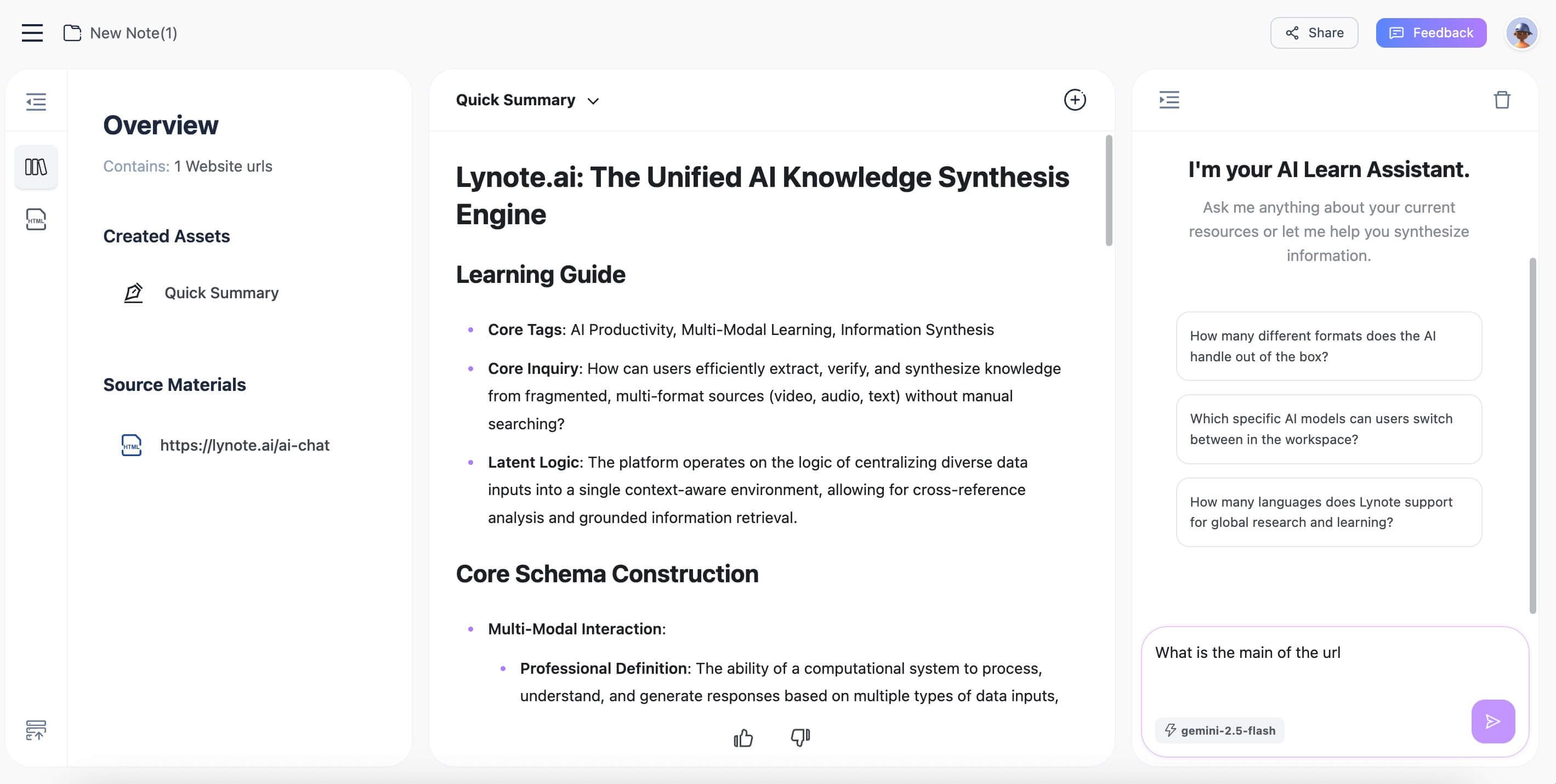
You can now ask specific, targeted questions. For instance, after summarizing a scientific paper, I once had to clarify a specific term. Instead of re-reading the whole methods section, I just asked, "Explain what 'in-situ hybridization' means in the context of this experiment." The AI pulled the relevant sentences and explained it instantly. You can copy key points, edit the note to add your own thoughts, or export the entire summary for your records. The static webpage has now become a dynamic study partner.
4 Powerful Use Cases for Chatting with URLs
So, where does this technology move from a neat trick to an indispensable tool? You might be wondering how this fits into a real-world workflow.
1. Academic Research & Study Sessions
Imagine you're a college student with a 30-page academic journal article to read before tomorrow's class. Instead of a frantic, caffeine-fueled skim-read, you can paste the PDF link and start a dialogue.
- Initial Query: "Summarize the abstract, methodology, and conclusion of this paper."
- Follow-up: "What were the main limitations of this study mentioned by the authors?"
- Concept Check: "Explain the concept of 'statistical significance' as it applies to Table 2."
This turns hours of dense reading into a 20-minute focused Q&A session.
2. Content Creation and Marketing
For writers and marketers, staying on top of industry trends is non-negotiable. Let's say a competitor publishes a major industry report. You need the key takeaways for your own blog post, but you don't have time to read all 50 pages.
- Initial Query: "Extract the top 5 key statistics or data points from this report."
- Follow-up: "What is the main sentiment towards the future of AI in marketing according to this document?"
- Quote Finding: "Pull a direct quote that best summarizes the report's primary conclusion."
3. Professional Development & Business Intelligence
A manager needs to get up to speed on a new technology or a competitor's strategy. They find a long-form article or a whitepaper.
- Initial Query: "Provide a 3-bullet point executive summary of this article."
- Follow-up: "What are the main risks and opportunities identified in this analysis?"
- Actionable Insights: "Based on this text, what are three potential strategies our company could consider?"
4. Lifelong Learning and Curiosity
Sometimes, you're just curious. You stumble upon a long article about quantum computing or ancient history. It looks fascinating, but intimidating. Chatting with the URL allows you to dip your toes in without committing to a deep dive.
- Initial Query: "Explain the core concept of this article to me like I'm a high school student."
- Follow-up: "Who are the key figures mentioned in this text and what were their contributions?"
Beyond the Basics: Common Pitfalls & Pro Tips
While powerful, these tools aren't infallible. Knowing their limitations is key to avoiding frustration and getting better results.
The Ugly Truth: Where 'Chat with URL' Fails
- Hard Paywalls & Login Screens: If a human can't see the content without logging in, neither can the AI. The tool can only analyze publicly accessible information.
- Heavy-JavaScript & Dynamic Sites: Some modern websites load content dynamically as you scroll. Basic scrapers can miss this content, leading to incomplete summaries. More advanced tools are better at this, but it's a common failure point.
- Complex PDF Layouts: The main reason chatting with a multi-column academic PDF can be tricky is that the AI reads text in a linear order. It might jumble text from the bottom of column one with the top of column two, breaking the context. Always double-check summaries from visually complex documents.
- CAPTCHAs and "I'm not a robot" checks: These are literally designed to block automated systems, and they work. The tool will be blocked from accessing the content.
Pro Tips for Better Answers
How you phrase your questions matters—a lot.
- Be Specific. Don't just ask, "What is this about?" Instead, ask, "What are the three core arguments this author makes to support their thesis?"
- Request a Persona. For complex topics, ask for a different perspective. "Explain this concept as if you were teaching it to a 10-year-old" can unlock surprising clarity.
- Ask for Evidence. To ensure the AI isn't making things up (hallucinating), ask it to support its claims. "Find the sentence in the document that supports your last point."
- Iterate. Your first question is just the start. Use the AI's answer to ask a better, more refined follow-up question. Treat it like a real conversation.
Frequently Asked Questions (FAQ)
Is it safe and secure to chat with a URL?
Generally, yes. When you use a reputable tool, you are only providing a public link. The service fetches the content from that link. You are not uploading a private file or sharing personal login credentials. However, never use these tools with URLs that contain sensitive or private information in the link itself.
Can I chat with a PDF file using a URL?
Yes, if the PDF is hosted online and accessible via a direct public link (often ending in .pdf). You can paste this link just like any other webpage URL. Tools like Lynote are designed to handle these document links, downloading and processing the PDF text for analysis and chat.
Why did the AI summary completely miss the huge, important chart in the article?
This is a fantastic and common question. It happens because most current AI models primarily process textual data. They read the words on the page but don't "see" the visual layout, the size of a headline, or the data within an image or a complex chart. The model might read the chart's caption, but it won't interpret the visual data itself. To fix this, you must guide the AI with your questions. For example, ask: "Summarize the key findings described in the text surrounding Figure 3."
Can these tools handle URLs in different languages?
Many top-tier LLMs are multilingual. They can often summarize and answer questions about an article written in Spanish, French, or German, and you can even ask your questions in English. The quality can vary, but for major world languages, the performance is typically quite strong.
Conclusion
Chatting with a URL is one of the fastest ways to understand online content without reading every page manually. By pasting a link into an AI chat tool, you can ask questions, extract key points, clarify details, and turn webpages into useful insights for study, research, or work. Whether you are reviewing an article, guide, report, or online resource, URL-based AI chat helps you save time and understand content more deeply.


Written by Janet L. Harris
AI Writing Specialist
Janet reviews AI detectors and humanization tools, with a focus on accuracy, limitations, and responsible use. View all articles →