Can ChatGPT Summarize a Link? A Complete Guide

Yes, ChatGPT can summarize a link, but how it does so depends entirely on which version you’re using. The free version (currently using GPT-3.5) cannot directly access the internet. For it to work, you must manually copy the text from the webpage and paste it into the chat. In contrast, the paid version, ChatGPT Plus (running on GPT-4), has a built-in web browsing capability that allows it to directly access and summarize the content of a link you provide. This key difference separates a clunky, manual process from a seamless, integrated one.
Quick Verdict: Best Ways to Summarize a Web Link
For those who need a fast answer, here’s the breakdown. The best method for you comes down to your budget, how often you need to summarize links, and what you plan to do with the summary afterward.
| Method / Tool | Workflow | Cost | Workflow Efficiency (1-5)¹ | Best For |
|---|---|---|---|---|
| ChatGPT (Free) | Manual copy & paste text from the link | Free | 2/5 | Occasional, quick summaries of short articles where precision isn't critical. |
| ChatGPT Plus | Direct link input; conversational follow-up | ~$20/mo | 4/5 | Subscribers who need versatile AI help and want a convenient, all-in-one tool. |
| Lynote | Direct link input (webpage or YouTube) | Free (core features) | 5/5 | Students, researchers, and professionals who need structured, reliable summaries for learning or note-taking. |
¹_Scores are editorial heuristics based on ease of use and steps required, not measured benchmarks._
Bottom Line: If you're already paying for ChatGPT Plus, its web browsing is a powerful feature. For anyone doing serious research or studying, a purpose-built tool like Lynote offers a more efficient and focused experience without the monthly subscription fee for this specific task.
How to Summarize a Link with ChatGPT: Two Methods
So, you want to get a webpage summarized. Depending on your access, the process is quite different. Let's walk through both workflows, from the free workaround to the paid, direct approach.
Before you start:
- Check the link: Make sure the webpage is publicly accessible and not behind a hard paywall or login screen. AI tools can't log in for you.
- Article length: For the free method, extremely long articles (e.g., a 10,000-word report) may exceed the context window, forcing you to paste it in chunks.
- Content type: Text-heavy articles work best. Pages that are mostly images, videos, or complex JavaScript infographics may not provide much text for the AI to summarize.
Method 1: The Manual Copy-Paste (Free ChatGPT)
This is the classic, no-frills method that works with the free version of ChatGPT. It’s effective for short-to-medium length articles when you just need a quick gist.
Imagine it’s 11 PM, and you have a dense industry analysis to read before a morning meeting. You don’t need to memorize it, just the key takeaways.
- Open the Link: Navigate to the article or webpage you want to summarize in your web browser.
- Select and Copy the Text: Click and drag your cursor to highlight all the relevant text of the article. Be sure to grab the main body and exclude ads, sidebars, and comment sections if possible. Press
Ctrl+C(orCmd+Con Mac) to copy it. - Navigate to ChatGPT: Open a new chat at
chat.openai.com. - Craft Your Prompt and Paste: This is the crucial step. Don’t just paste the text. Give the AI clear instructions first. Then, paste the text below your prompt.
A good prompt looks like this:
Summarize the key findings from the following article in five bullet points. The audience is a busy executive.

[Paste the copied text here]
- Review and Refine: ChatGPT will generate the summary. Read it over and if it’s not quite right, you can ask for changes, like "Make it more concise" or "Expand on the second point."
Method 2: Direct Link Summaries (ChatGPT Plus)
If you're a ChatGPT Plus subscriber, the process is worlds easier. The underlying GPT-4 model can browse the web directly, saving you the entire copy-paste routine.
This is perfect for a student building an annotated bibliography. You have a list of ten research links and need a concise paragraph for each one.
- Ensure Web Browsing is Active: Log in to ChatGPT. When you select the GPT-4 model, it typically has browsing capabilities enabled by default. You don't need to toggle a special mode anymore as you did with older versions.
- Craft Your Prompt with the Link: Your prompt will be much simpler. You just need to tell it what to do and provide the URL.
An effective prompt would be:
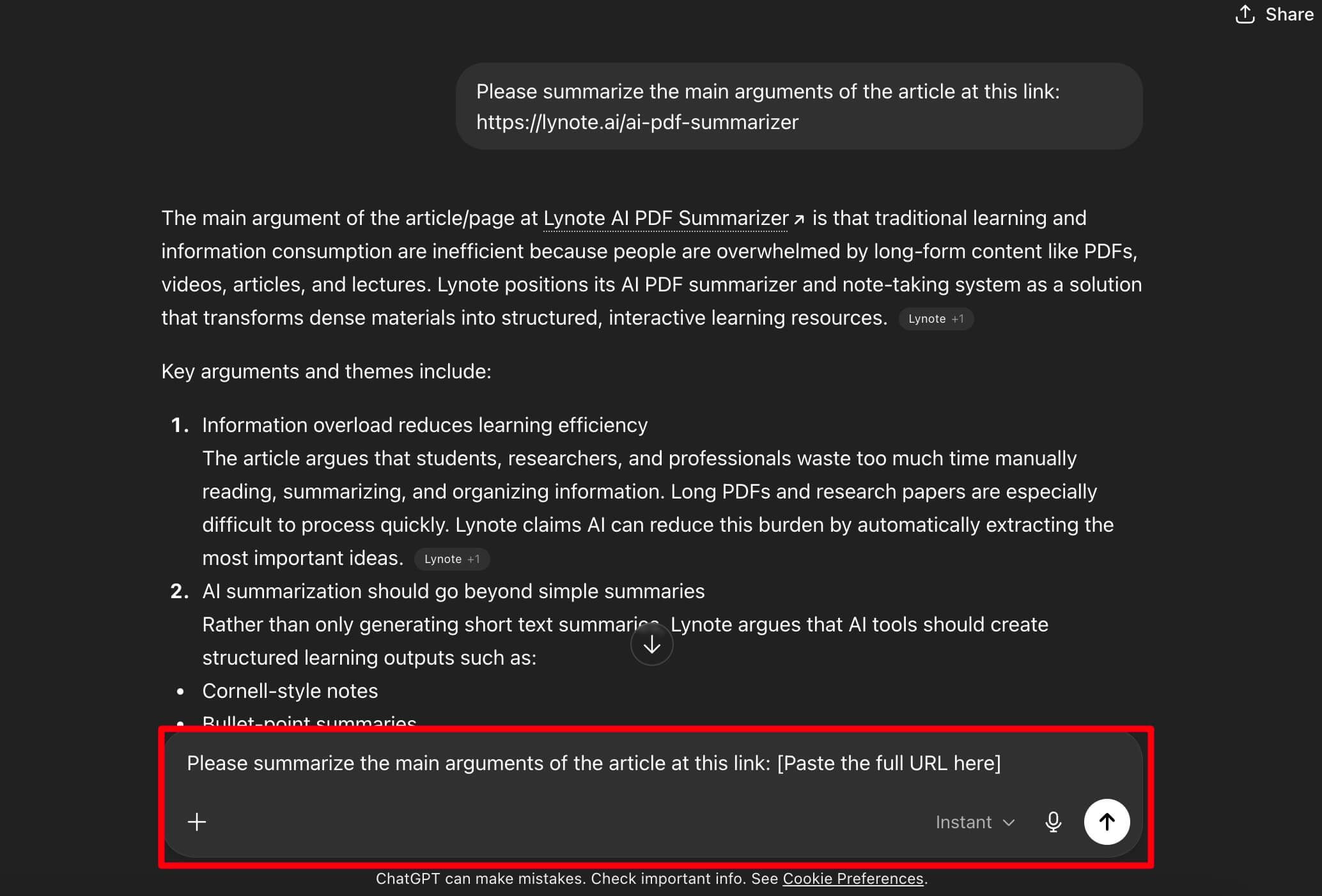
Please summarize the main arguments of the article at this link: [Paste the full URL here]
- Let ChatGPT Work: You will see a notification that it's "Browsing the web" or "Clicking on a link." It's visiting the page in the background to read the content. This can take a few seconds.
- Get Your Summary: The model will produce a summary based on the content it read. Just as with the free method, you can ask follow-up questions to dig deeper, ask for sources, or reformat the output.
Pros and Cons of Using ChatGPT for Link Summaries
Using a powerful, generalist AI like ChatGPT for a specific task like summarization comes with a distinct set of trade-offs. It's a bit like using a Swiss Army knife to chop vegetables—it works, but a chef's knife is better.
The Pros
- Incredible Versatility: The biggest advantage is that you can tailor the summary to your exact needs. You can ask it to summarize for a child, an expert, in the style of a poem, or as a table. The conversational interface allows for infinite refinement.
- No New Tools Needed: If you're already using ChatGPT in your daily workflow, there's zero friction in learning a new interface or signing up for another service.
- Follow-Up Questions: A summary is often just the starting point. With ChatGPT, you can immediately ask, "What evidence does the author provide for their third point?" or "Who is the intended audience of this piece?" This turns a static summary into a dynamic research assistant.
The Cons
- Context Loss and Hallucinations: When you paste a massive wall of text, especially in chunks, the AI can lose the overarching narrative. More critically, as a generative model, it can sometimes "hallucinate" or confidently state inaccuracies that weren't in the source text. This is a major risk for academic or professional work.
- The "Layout Blindness" Problem: ChatGPT reads the raw text, not the visual presentation. It will likely miss the crucial context provided by charts, graphs, info-boxes, and images. A summary of a financial report that ignores the key revenue chart is an incomplete summary.
- Workflow Friction (Free Version): The copy-paste-prompt cycle gets tedious fast. If you need to summarize more than one or two articles a day, this manual process becomes a significant time sink.
- It’s Not a Learning Tool: The output is just a block of text. It doesn’t integrate into a larger system for note-taking, creating flashcards, or organizing research—features that are central to dedicated learning tools.
A Better Alternative: Summarize Links Directly with Lynote
While ChatGPT is a jack-of-all-trades, sometimes you need a master of one. For students, researchers, or anyone whose primary goal is to learn from online content, a specialized tool offers a more direct and effective path.
Enter Lynote, an AI toolkit designed from the ground up for efficient learning. Instead of a general chat interface, it provides a purpose-built summarizer that understands the needs of a learner.
I found this out the hard way during a recent certification course. I was given a reading list of 15 dense blog posts and white papers. Using the ChatGPT copy-paste method for the first three was painful. For the rest, I switched to Lynote. I fed it each link, and in minutes, I had a clean, structured set of notes for every single article, ready to be reviewed. It turned a full day of tedious work into a focused one-hour session.
Here’s how simple the workflow is with the Lynote AI Summarizer.
Step 1. Navigate to the AI Summarizer
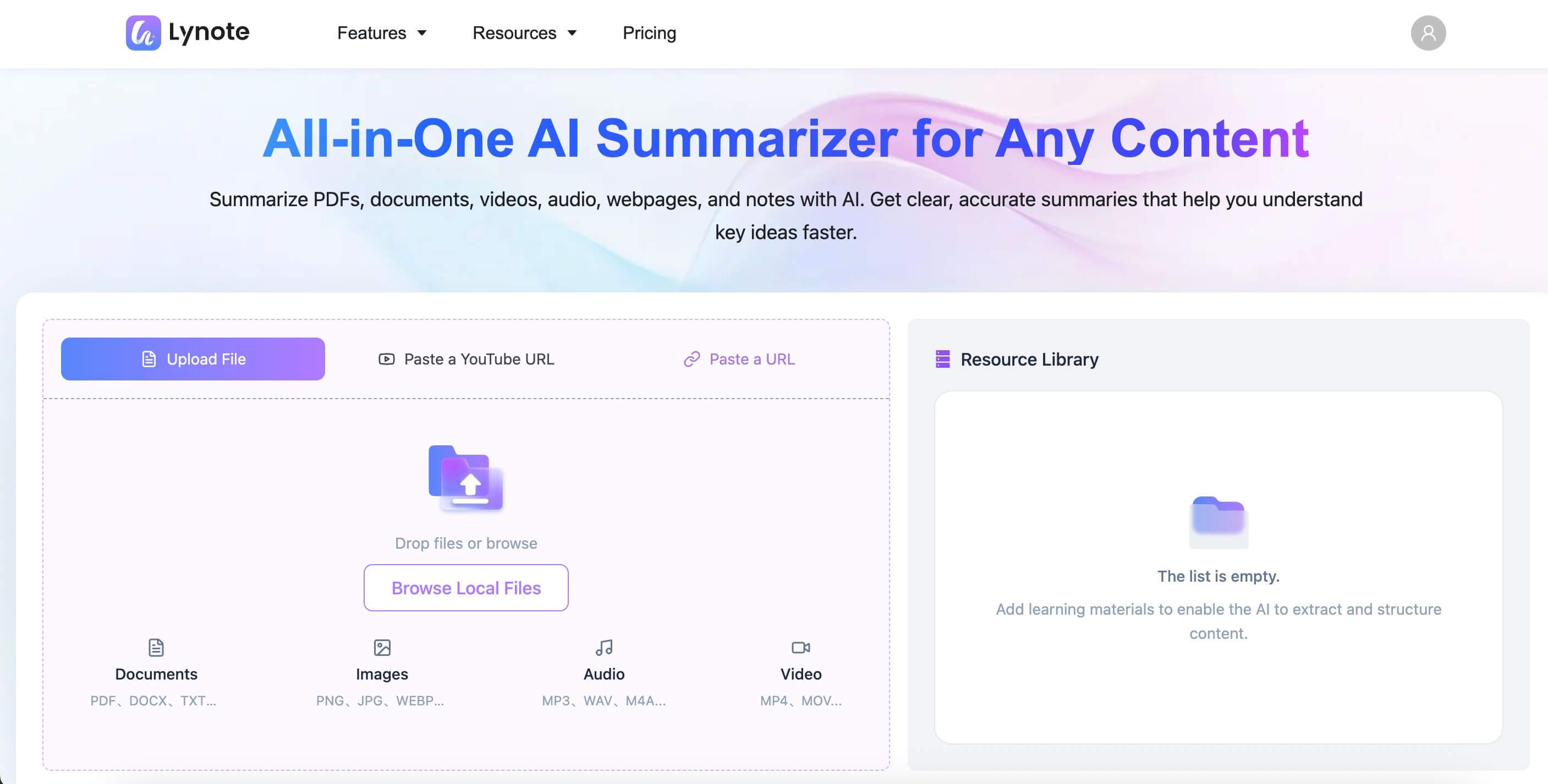
Open your browser and go directly to the Lynote AI Summarizer tool. There's no complex setup; the interface is clean and focused on a single task.
Step 2. Provide Your Webpage Link
You'll see options to upload a document or use a link. Click the appropriate tab and paste the full URL of the article, blog post, or even a YouTube video you want to summarize into the input field.
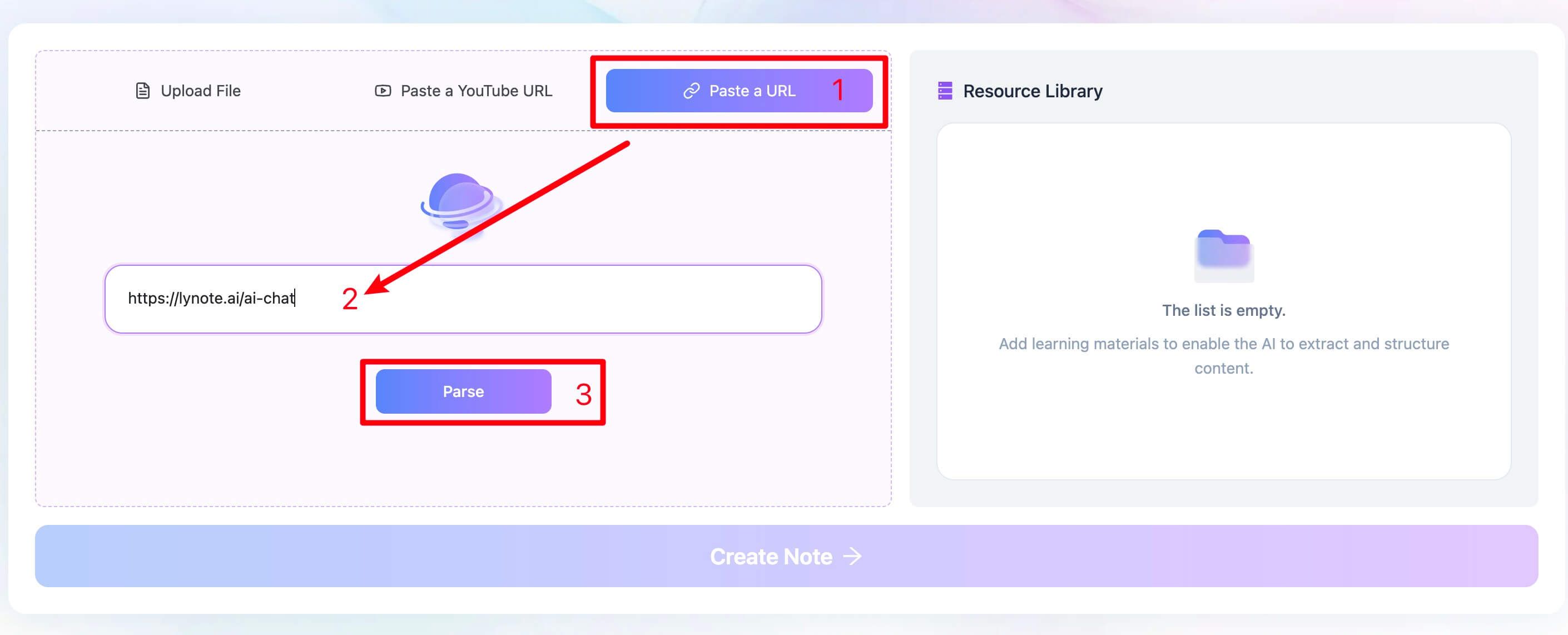
Step 3. Generate Your Structured Summary
Click the "Summarize" button. Lynote's AI will access the link, parse the content, and generate a high-quality summary. Crucially, the output is often more structured than a generic chatbot's, presenting key points and concepts in a format that’s easy to digest and use for studying.
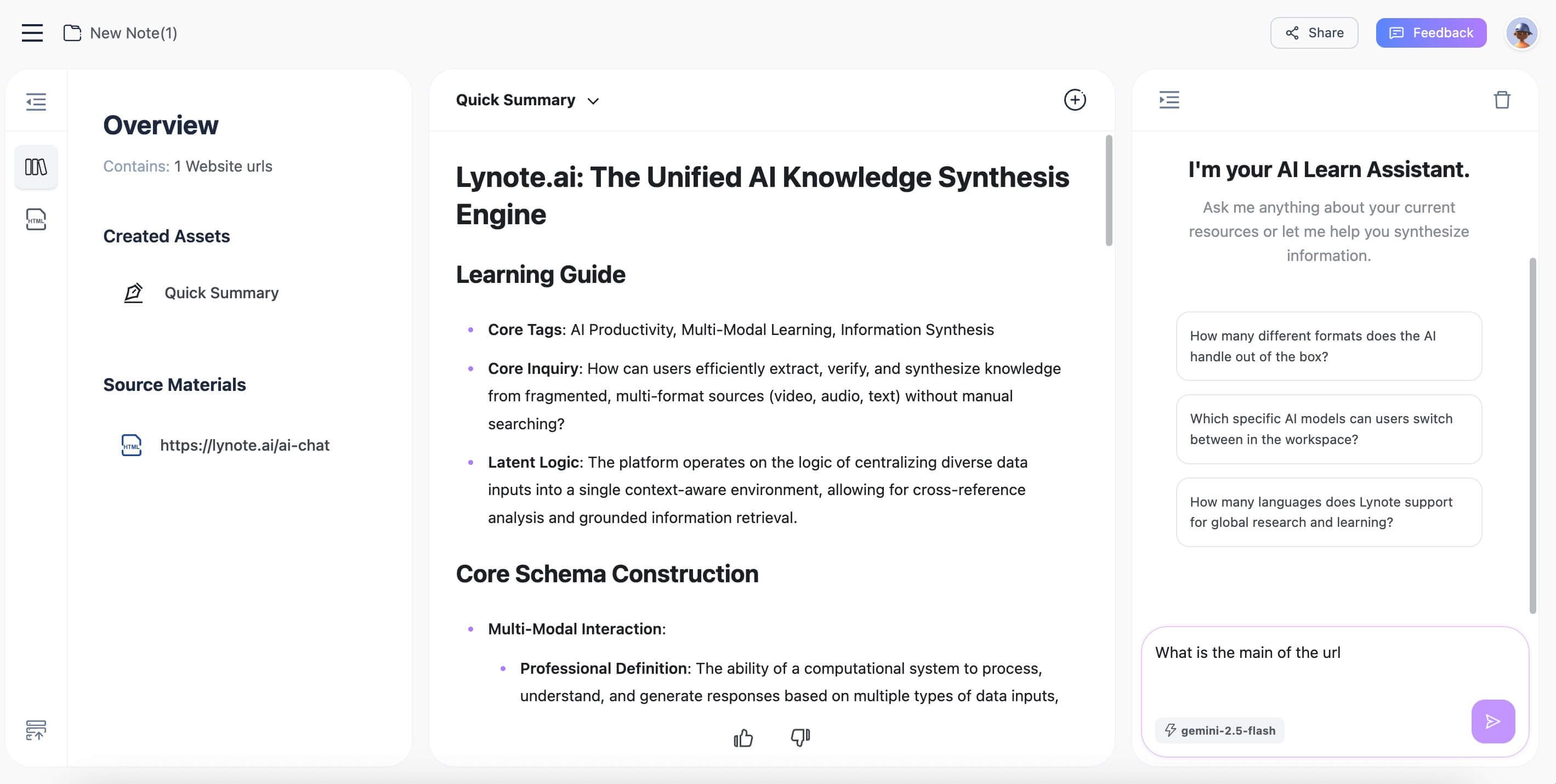
Expert Takeaway: The main reason a dedicated tool like Lynote often outperforms ChatGPT for research is its focus on structured, learning-oriented output over purely conversational text. It's designed to create usable notes, not just a paragraph of prose.
Common Pitfalls and Advanced Tips for AI Summaries
Getting a good summary isn't always as simple as pasting a link. Here are some common issues and how to navigate them.
Pitfall 1: Paywalls and Private Content
If a link leads to a page that requires a subscription or login (like The Wall Street Journal or a private company intranet), the AI will be blocked just like any other anonymous visitor. It will either tell you it can't access the content or, worse, summarize only the small public preview, giving you a misleadingly incomplete result.
Pitfall 2: The JavaScript Maze
Modern websites are complex. Many use heavy JavaScript to load content dynamically as you scroll. Sometimes, AI web crawlers struggle with this and may only "see" the initially loaded text, missing the bulk of the article. If a summary feels suspiciously short, this might be why.
Pitfall 3: Missing Nuance
AI is notoriously bad at detecting sarcasm, irony, or subtle rhetorical arguments. It will summarize a satirical piece from The Onion with the same straight-faced sincerity as a press release, which can lead to serious misinterpretations.
Advanced Prompting Tips for Better Summaries
Whether you're using ChatGPT or another tool, the quality of your input dictates the quality of your output. Try these prompt variations:
- Specify the Audience: "Summarize this article for a high school student studying economics."
- Request a Specific Format: "Generate a 3-column table from this article: Key Term | Definition | Example."
- Focus on a Goal: "Read this product review and extract the main pros and cons mentioned by the author."
- Chain of Thought: "First, identify the author's primary thesis in this article. Second, list the three main pieces of evidence they use to support it. Finally, provide a one-paragraph summary."
Frequently Asked Questions (FAQ)
Is it free to use ChatGPT to summarize a URL?
Yes and no. It is free if you use the manual copy-and-paste method with the standard version of ChatGPT. However, to have ChatGPT access a URL directly, you need a paid ChatGPT Plus subscription.
Why can't the free ChatGPT access links?
The free version of ChatGPT is based on a model (like GPT-3.5) that does not have a live connection to the internet. Its knowledge is based on the data it was trained on, which has a cutoff date. It cannot browse websites in real-time. This capability is a premium feature reserved for models like GPT-4.
Can ChatGPT summarize a PDF link?
This is tricky. If the link is a direct URL to a publicly hosted PDF file (ending in .pdf), ChatGPT Plus can often access and summarize it. However, its performance can be inconsistent, especially with complex layouts or scanned documents. For reliable PDF summarization, a dedicated tool like the Lynote AI Summarizer, which is built to handle document structures, is a much safer bet.
Why did my AI summary miss the data from a chart or graph?
This is a classic failure mode. Most AI summarizers, including ChatGPT's browser, are fundamentally text parsers. They read the HTML code of a page. A chart or graph is usually an image file (.jpg, .png) embedded on the page. The AI sees the image file but cannot "read" the data within it. It will miss the trends, figures, and key insights contained in that visual element entirely.
Conclusion: Choosing the Right Tool for the Job
Can ChatGPT summarize a link? Absolutely. But as we've seen, that's only the beginning of the story. The real question is which tool is right for your specific needs.
Let’s boil it down:
- For the occasional, one-off summary of a news article, the free version of ChatGPT and the copy-paste method works just fine. It’s quick, easy, and costs nothing.
- If you're a power user already subscribed to ChatGPT Plus, its built-in web browser is a fantastic and convenient feature for summarizing links as part of a broader, conversational workflow.
- For students, researchers, and professionals who regularly need to digest, understand, and retain information from online sources, a specialized tool is the clear winner.
Editor's Choice: Lynote
For dedicated learning and research, Lynote is our top recommendation. It replaces a clunky, multi-step process with a streamlined, purpose-built workflow.
- The Reason: It's designed not just to shorten text, but to create structured, usable notes that accelerate learning. Its ability to handle webpages, documents, and even YouTube videos in one place makes it a true study hub.
- The Honest Downside: While ChatGPT might already be open in a tab, using Lynote means adopting a new tool. However, for anyone serious about efficient learning, the small effort to switch is paid back tenfold in time saved and knowledge gained.


Written by Janet L. Harris
AI Writing Specialist
Janet reviews AI detectors and humanization tools, with a focus on accuracy, limitations, and responsible use. View all articles →