Can ChatGPT Summarize an Audio File? A Practitioner's Guide

Yes, ChatGPT can summarize an audio file, but it's not a one-click process for most users. The standard, free version of ChatGPT cannot directly listen to or process audio files. To summarize audio, you must first convert the audio into text using a separate transcription tool. You then paste this text transcript into ChatGPT for summarization. The newer, paid ChatGPT Plus with the GPT-4o model has introduced the ability to upload files, including audio, simplifying this workflow significantly. However, for users who need consistent, high-quality audio and video summaries for learning or research, specialized tools often provide a more streamlined and accurate experience.
Quick Verdict: Best Ways to Summarize an Audio File
For anyone short on time—students cramming for an exam, professionals prepping for a meeting—here’s the bottom line. Choosing the right tool depends entirely on how often you need to do this and how much friction you're willing to tolerate.
| Method | Workflow Complexity | Cost | Best For | Overall Score (1-5) |
|---|---|---|---|---|
| Free ChatGPT + Manual Transcription | High: Multi-step process (record > transcribe > copy > paste > prompt) | Free | Occasional, non-critical summaries of short audio clips. | 2/5 |
| ChatGPT Plus (GPT-4o) | Moderate: Direct upload is possible, but still a generalist tool. | ~$20/month | Subscribers who already use ChatGPT for everything and need a quick summary. | 3.5/5 |
| Lynote AI Summarizer | Low: Integrated one-step process (upload audio or paste link > get summary). | Freemium / Paid Tiers | Students, researchers, and professionals who regularly summarize lectures, meetings, or interviews. | 4.5/5 |
Scores are editorial heuristics based on efficiency and fitness for the specific task of audio summarization, not measured benchmarks.
The takeaway is simple: if you need to summarize your professor's 10-minute audio note once a semester, the free method works. If you're already paying for ChatGPT Plus, leverage its new capabilities. But if summarizing lectures, interviews, or meeting recordings is a core part of your weekly workflow, a purpose-built tool is a clear winner.
Can ChatGPT Summarize Audio Files? The Full Breakdown
Let's dig into the mechanics. The idea of dropping an MP3 file into an AI and getting perfect notes is the dream. The reality is a bit more complex.
A standard AI language model like the one powering the free version of ChatGPT is, at its core, a text processor. It doesn't have "ears." It can't listen to the nuances of a lecture, the crosstalk in a meeting, or the background noise in a field recording. It only understands the text you feed it.
This leads to the fundamental challenge: transcription. The quality of your summary is entirely dependent on the quality of the text transcript you provide. This is the "garbage in, garbage out" principle in action. A poor transcription full of misheard words, incorrect speaker labels, and missing punctuation will result in a summary that is, at best, confusing and, at worst, completely wrong.
The New Player: GPT-4o
OpenAI's newer models, particularly GPT-4o available through ChatGPT Plus, are changing this game. This multimodal model was designed to natively understand audio, images, and text. For Plus subscribers, this means you can often upload an audio file directly to the interface and ask for a summary, bypassing the manual transcription step.
While this is a massive leap forward, it’s important to remember that ChatGPT is still a generalist tool. It's a Swiss Army knife. It can summarize your audio, but it won't necessarily provide the structured notes, key takeaways, and learning-focused features that a specialized academic or professional tool would.
How to Summarize Audio with ChatGPT: The Step-by-Step
So, you have a recording you need to distill. How do you actually do it? Here are the two main paths.
Before You Start: The Pre-requisites
- A clean audio file: The clearer the audio, the better the transcription. Minimize background noise, ensure speakers are close to the microphone, and save it in a common format like MP3 or M4A.
- A transcription method (for the free version): You'll need a way to turn speech into text. This could be a free online tool, the voice-to-text feature on your phone (like Google Recorder), or a dedicated transcription service.
- Your summary goal: Know what you want. Are you looking for a high-level overview, a list of action items, or a detailed breakdown of a specific argument? This will shape your prompt.
Method 1: The Free Workflow (Manual Transcription)
This is the classic, two-step method that works with the free version of ChatGPT (GPT-3.5).
- Transcribe Your Audio File: Use a transcription tool to convert your audio recording into a block of text. For a short voice memo, your phone's built-in recorder app might have a transcription feature. For longer files, you might use a web-based service. Be prepared to manually clean up the output—correcting names, technical terms, and punctuation is crucial.
- Copy the Transcript: Once you have the text, select and copy all of it.
- Prompt ChatGPT for a Summary: Open ChatGPT and write a clear prompt. Don't just paste the text and say "summarize." Guide the AI.
A good prompt looks like this:
"Act as a research assistant. Below is the transcript of a one-hour university lecture on quantum computing. Please provide a summary that includes:
- The main thesis of the lecture.
- A bulleted list of the three key concepts explained.
- Any questions the lecturer posed to the audience.
Here is the transcript:
[Paste your full transcript here]"
This method is free and accessible, but it's also the most time-consuming and error-prone.
Method 2: The ChatGPT Plus Workflow (Direct Upload with GPT-4o)
If you're a ChatGPT Plus subscriber, the process is dramatically simpler.
- Select the Right Model: Ensure you're using a model version that supports file uploads, like GPT-4o.
- Upload Your Audio File: Look for the paperclip icon (or equivalent attachment button) in the message bar. Click it and select the audio file from your computer.
- Provide a Clear Prompt: Even with direct uploads, a good prompt is essential. Wait for the file to process, then ask for what you need.
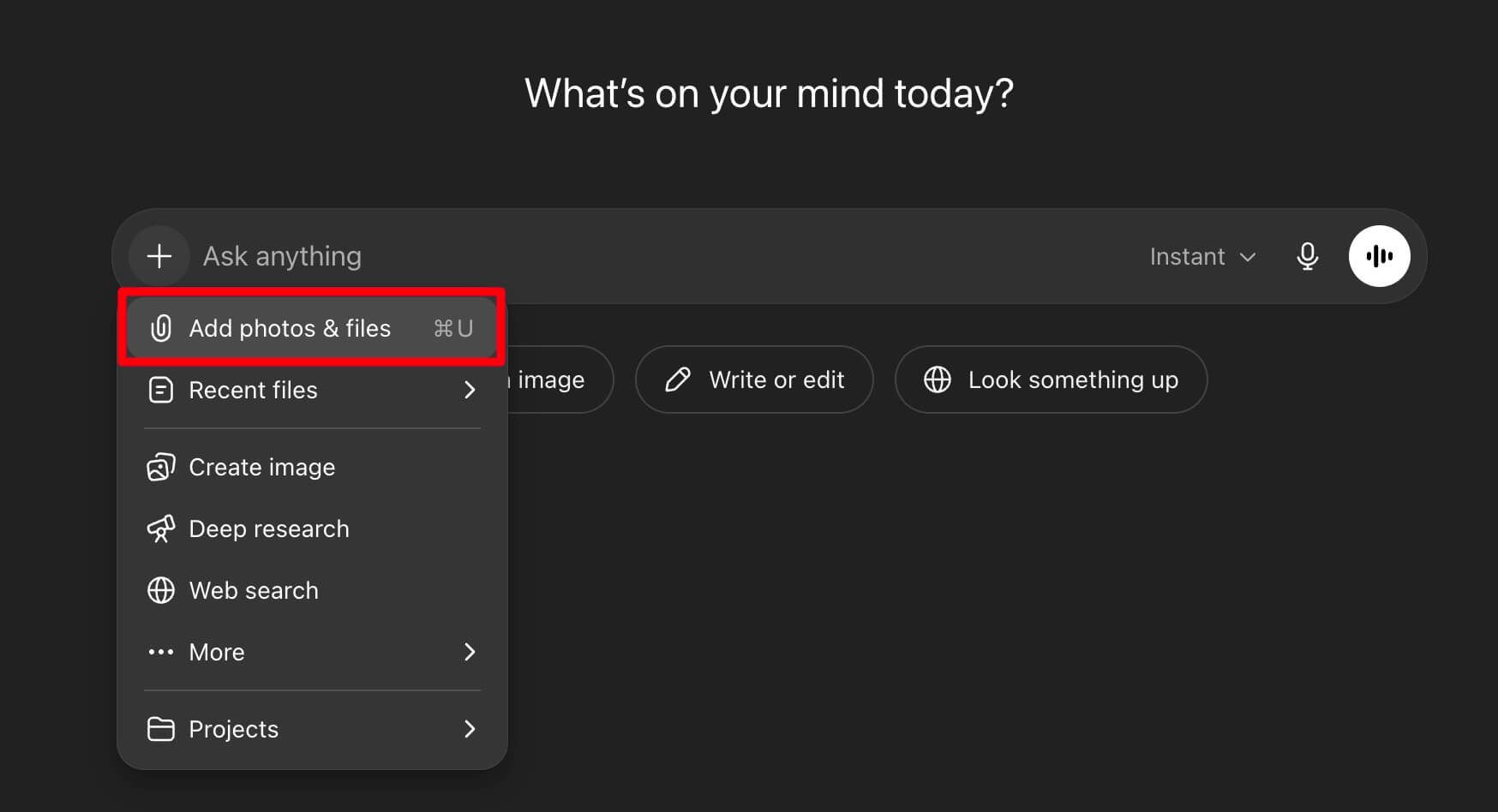
A good prompt for direct upload:
"I've uploaded an audio file of a project kick-off meeting. Please listen to it and provide a summary that outlines the main project goals, the key stakeholders assigned to tasks, and the deadlines mentioned."
This workflow is much faster, but it relies on OpenAI's internal transcription engine, and you still benefit from providing clear, specific instructions.
Pros and Cons of Summarizing Audio with ChatGPT
Using a powerful, general-purpose AI like ChatGPT for this task has some obvious benefits, but the drawbacks are real, especially for serious users.
The Pros
- Incredible Flexibility: You can ask for the summary in any format. Want it as a blog post? An email? A series of tweets? ChatGPT can do it. You can have a follow-up conversation to refine the summary, asking it to "expand on the second point" or "explain this like I'm five."
- No Cost (with the free method): If your budget is zero, the manual transcription method gets the job done without costing a dime.
- Accessibility: Millions of people already have access to ChatGPT. There's no new software to learn if you're already familiar with it.
The Cons (and They're Significant)
- The "Broken Telephone" Effect: This is the biggest problem with the manual method. An error in the transcription stage (e.g., "Minkowski space" becomes "mean Kowski's space") will be passed directly into the summary, creating nonsense. The AI has no way of knowing the original audio; it only sees the flawed text.
- Lack of Contextual Features: ChatGPT doesn't know this audio is a lecture for your PSYC 101 class. It won't link key terms to a glossary, generate flashcards from the content, or connect it to your previous notes. It's a one-off transaction.
- Potential for Hallucinations: When faced with ambiguous or poorly transcribed text, ChatGPT might "hallucinate" or invent details to fill the gaps, leading to inaccurate summaries.
- No Timestamps: The summary is divorced from the original audio. If a key point is confusing, you can't easily click on it to hear the original context. This is a massive drawback for researchers, journalists, and students who need to verify information.
Expert Takeaway: Using ChatGPT for audio summaries is like using a screwdriver to hammer a nail. It can work in a pinch, but it’s clumsy, and you risk damaging the material. The two-step process introduces a critical point of failure at the transcription stage.
A Better Alternative: Summarize Audio & Video Directly with Lynote
This is where purpose-built tools come into the picture. They are designed to solve a specific problem, and they do it well. For students, lifelong learners, and professionals who rely on audio and video content, a tool like the Lynote AI Summarizer is built from the ground up to solve the exact challenges we've discussed.
The main reason a dedicated tool like Lynote outperforms the ChatGPT-plus-transcriber method is the elimination of the error-prone middle step. The transcription and summarization happen in one seamless, integrated pipeline, which is optimized for accuracy with educational and professional content.
Here’s how a streamlined workflow looks with Lynote.
Step 1. Navigate to the AI Summarizer
First, head over to the Lynote AI Audio Summatizer tool. The tool is designed to be the starting point for turning raw information—whether it's an article, a video, or an audio file—into structured knowledge.
Step 2. Choose Your Source: Upload or Paste a Link
This is where the magic happens. You have options tailored to how you learn and work:
- Upload an Audio File: Have an MP3 of a lecture or an M4A recording of an interview? You can upload it directly. This completely bypasses the need for a separate transcription tool.
- Paste a YouTube Link: Found a brilliant two-hour documentary or a conference talk on YouTube? Instead of listening to the whole thing, you can just paste the URL.
- Paste a Webpage Link: This also works for text-based articles and blog posts, making it a versatile hub for all your sources.
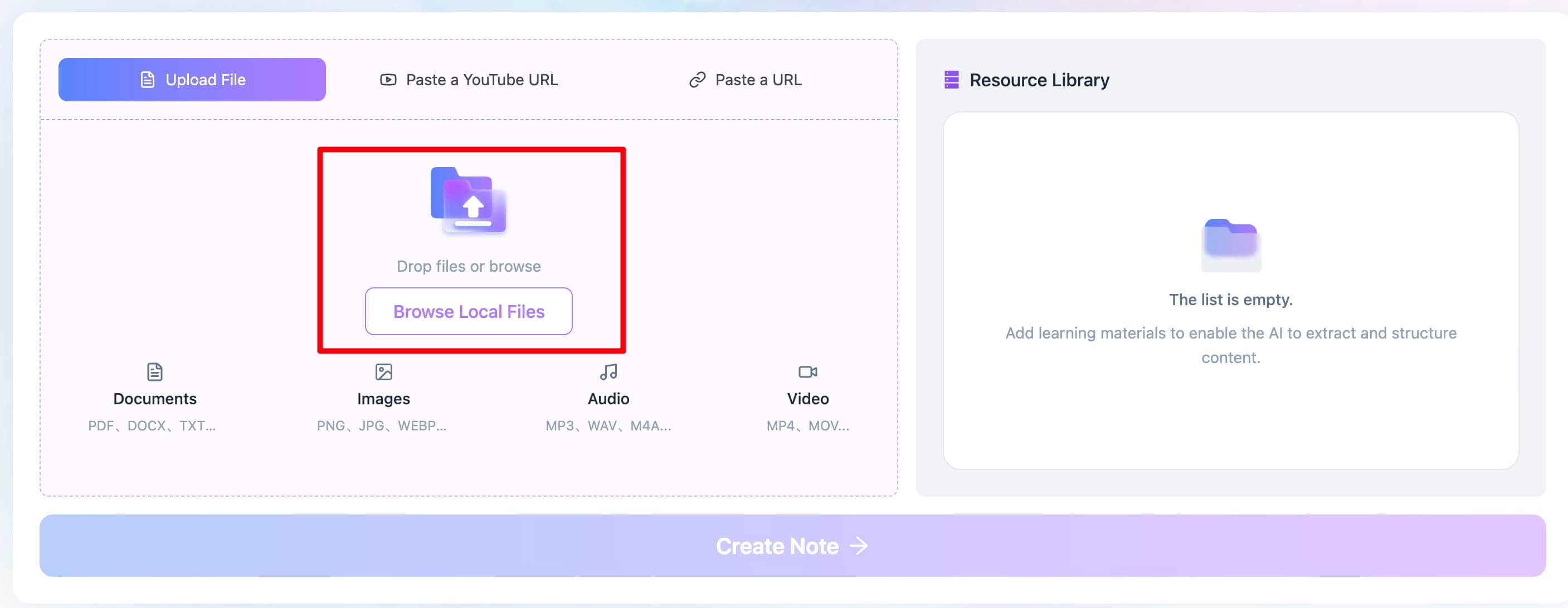
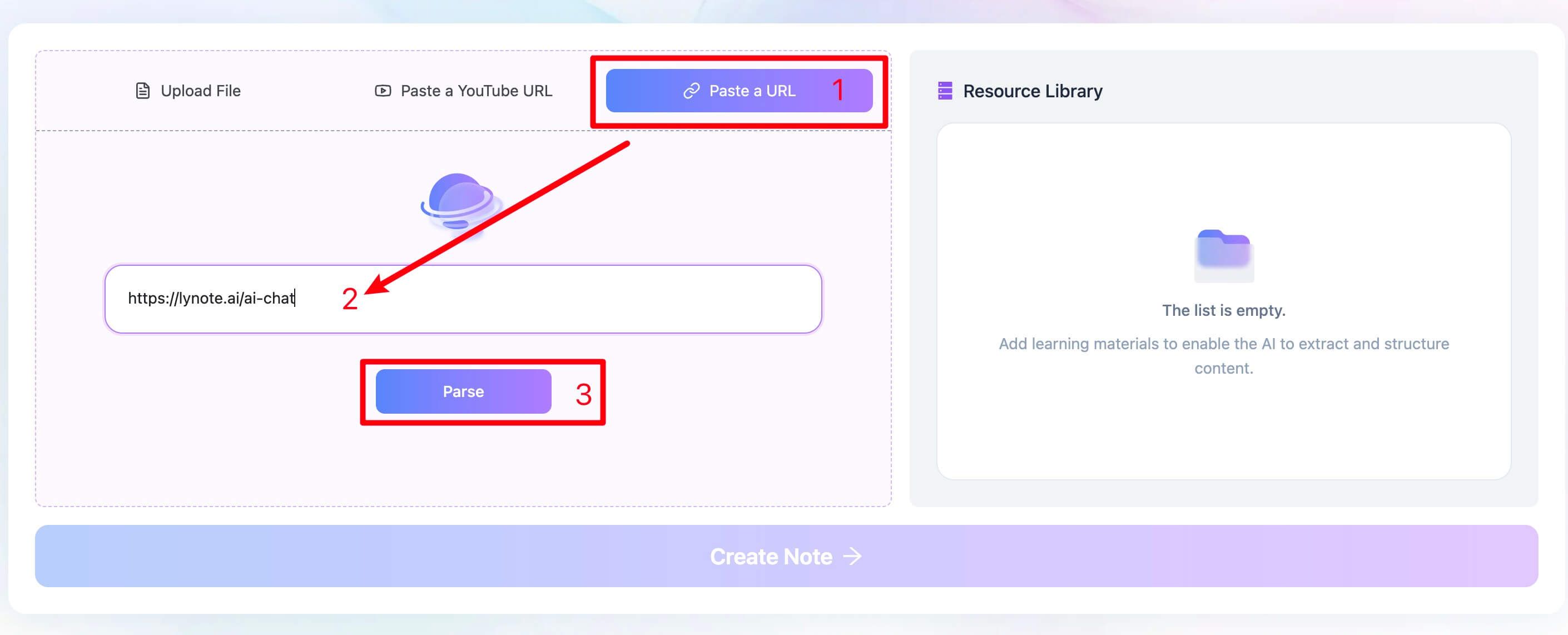
Step 3. Generate Your Structured Summary
After you provide the source, the AI gets to work. It doesn't just give you a wall of text. It processes the content and returns a structured summary, often including key takeaways, a high-level overview, and other useful formats designed for studying and review.
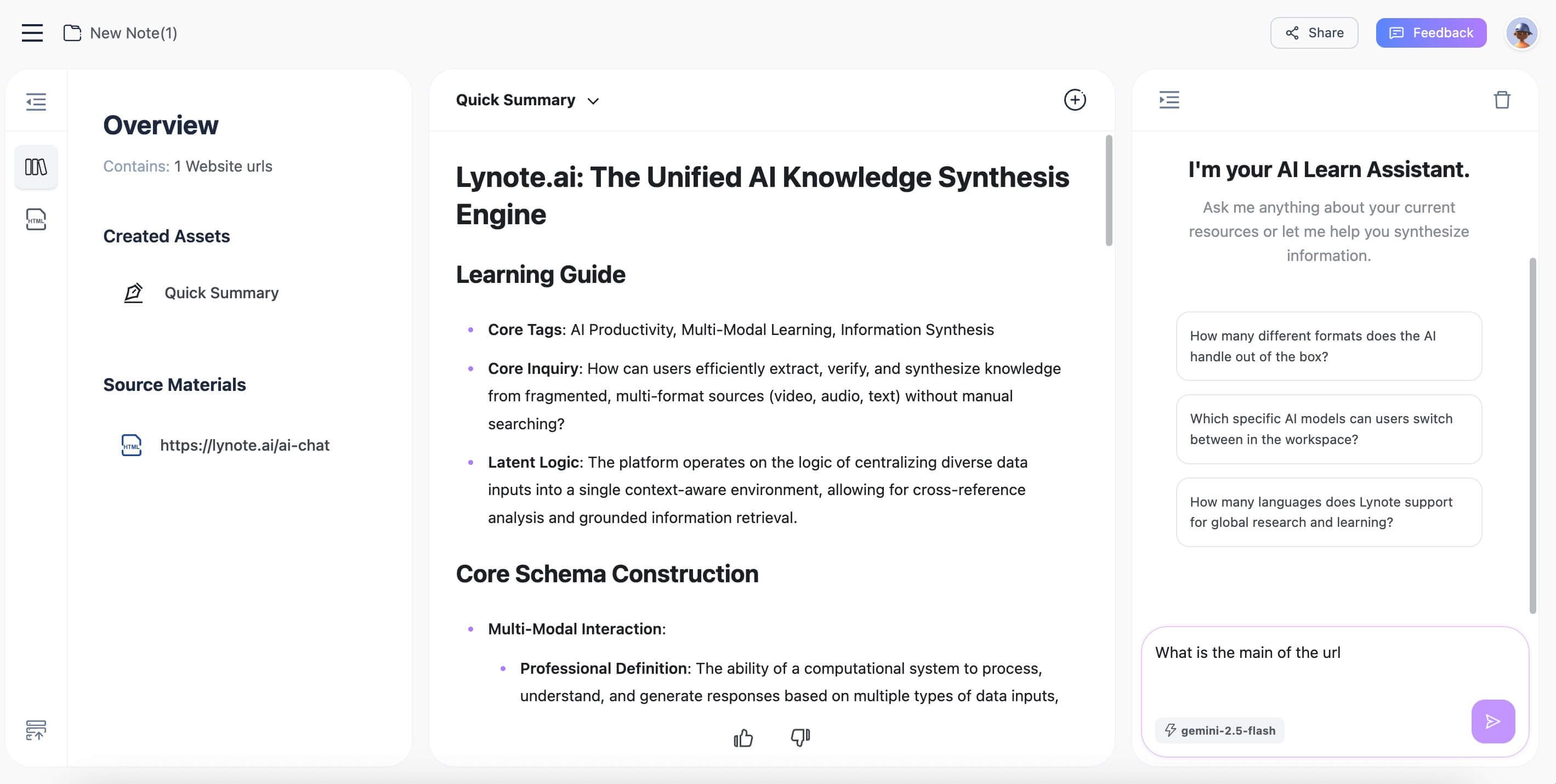
I had a recording of a 90-minute panel discussion from a marketing conference. The audio quality wasn't great, with multiple people sometimes speaking at once. A free online transcriber produced a chaotic, unusable mess. On a whim, I uploaded the MP3 to Lynote. A few minutes later, I had a coherent summary that correctly identified the main themes each speaker addressed. It wasn't perfect, but it saved me at least two hours of manual listening and note-taking.
Common Pitfalls and Advanced Tips for AI Summaries
Regardless of the tool you use, you can improve your results by being aware of common failure points and using smarter techniques.
Pitfall #1: Awful Audio Quality
AI can do a lot, but it can't fix terrible recordings. Heavy background noise, distant speakers, or strong, unfamiliar accents will wreck transcription accuracy. Before you record, get the microphone as close to the source as possible.
Pitfall #2: Summarizing Unstructured "Chat"
An AI summarizer excels with structured content like a lecture or a presentation. It will struggle with a rambling, three-hour conversation between friends where the topic changes every five minutes. For such content, you may need to transcribe it and then manually pull out the sections you want to summarize.
Advanced Tip: Strategic Prompt Engineering
Don't accept the first summary you get. Use your prompt to define the audience, format, and focus.
- Audience: "Summarize this for a high school student" vs. "Summarize this for a graduate-level researcher."
- Format: "Provide the summary as five key bullet points," "Write a one-paragraph abstract," or "Create a table of the pros and cons discussed."
- Focus: "Focus only on the financial implications discussed," or "Ignore the introductory remarks and summarize the core methodology."
You might be wondering, can't I just keep refining the summary inside the tool? The answer is yes. With conversational tools like ChatGPT or upcoming features in platforms like Lynote, you can treat the initial summary as a draft and continue the dialogue to zero in on the exact information you need.
Frequently Asked Questions (FAQ)
Is it free to use ChatGPT to summarize audio?
Yes, it can be free if you use the free version of ChatGPT (GPT-3.5) and find a free third-party tool to transcribe your audio into text first. The cost is your time and the potential for lower accuracy.
What mode of ChatGPT do I need to summarize audio?
For the easiest experience, you need ChatGPT Plus with a model like GPT-4o that allows direct file uploads. For the free version, any mode works, as you will be pasting in text, not uploading an audio file.
### Why was the summary of my meeting completely wrong?
This is almost always a transcription issue. If the transcription tool misheard a key person's name, a company name, or a technical term, the AI summarizer will confidently incorporate that error into its output. Always spot-check the transcript for critical terms before summarizing.
Can ChatGPT handle audio in different languages or with heavy accents?
Yes, to an extent. Modern transcription engines and AI models are trained on vast datasets and can handle many languages and accents surprisingly well. However, accuracy will decrease with less common dialects or very strong accents combined with poor audio quality.
How does a tool like Lynote compare to just using a transcriber and ChatGPT?
The key difference is workflow integration and optimization. Lynote combines transcription and summarization into a single, seamless step designed for learning. This reduces errors, saves significant time, and provides outputs (like structured notes) that are more useful for studying or research than a generic text block from ChatGPT.
Conclusion: Choosing the Right Tool for the Job
In 2024, the question is no longer if you can summarize audio with AI, but how you should do it for the best results. The answer depends on your needs.
- For the occasional user: If you need to summarize a short voice note once in a blue moon, the free ChatGPT and a manual transcription tool are perfectly adequate. It’s clunky, but it costs nothing.
- For the embedded power user: If you already live and breathe in the ChatGPT Plus ecosystem, using its native file upload feature is a logical and efficient choice for quick, one-off tasks.
- For the serious learner or professional: If you consistently need to distill knowledge from lectures, meetings, interviews, or educational videos, a specialized tool is a non-negotiable efficiency booster.
Editor's Choice
For anyone whose work or study relies on understanding audio and video content, Lynote is the clear choice. It directly solves the single biggest point of failure in the process: faulty, manual transcription. By integrating the entire workflow from source file to structured notes, it saves time and, more importantly, produces a more reliable and useful end product.
The candid downside? A specialized tool will naturally have a more focused feature set than a do-everything AI like ChatGPT. But for its core purpose—turning information into knowledge—that focus is its greatest strength.


Written by Janet L. Harris
AI Writing Specialist
Janet reviews AI detectors and humanization tools, with a focus on accuracy, limitations, and responsible use. View all articles →