Can ChatGPT Read and Summarize a Book? A Complete How-To Guide

The stack of books on your nightstand is growing. The reading list for your course is a dozen PDFs deep. You know the knowledge is in there, but finding the time to absorb it all feels impossible. It’s a modern dilemma, and it leads to a very modern question: can you just ask an AI to do the reading for you? Specifically, can ChatGPT read a whole book and give you the highlights?
Yes, ChatGPT can read and summarize books, but it's not as simple as handing it a novel and asking for a book report. The effectiveness depends heavily on the method you use, the version of ChatGPT you have access to, and the book itself. For books in its vast training data (think classic literature or major bestsellers), it can often provide a summary from memory. For any other book, you'll need to provide the text, which runs into limitations like context windows and file upload restrictions. Getting a quality summary requires the right strategy.
This guide will walk you through exactly how to do it, from the free, manual methods to the more powerful paid approaches. We’ll cover the pitfalls, the expert-level prompts, and a purpose-built alternative for when you need a summary that’s less of a conversation and more of a study tool.
Quick Verdict: Best AI Methods for Summarizing Books
Before we dive deep, here’s a high-level look at your options. The best method depends entirely on your goal, your budget, and how much friction you’re willing to tolerate.
| Method | Best For | Key Limitation | Ease of Use (1-5) |
|---|---|---|---|
| ChatGPT Free (Manual Pasting) | Quick summaries of short articles or single chapters; casual use. | Tedious copy-pasting; can't handle a full book at once; loses context between prompts. | 2/5 |
| ChatGPT Plus (File Upload) | Summarizing entire digital books (PDF, TXT); detailed analysis of specific themes. | Requires a paid subscription; can still struggle with very long or complexly formatted files. | 4/5 |
| Lynote AI Summarizer | Students & researchers needing structured summaries from PDFs or web links; efficient learning. | Specialized for summarization and learning; not a general-purpose conversational AI. | 5/5 |
Scores are editorial heuristics based on workflow efficiency for the specific task of book summarization, not a measure of the underlying AI model's power.
The bottom line: For a one-off summary of a famous novel, the free ChatGPT is a decent starting point. For serious, recurring work with digital documents like textbooks or research papers, investing in ChatGPT Plus or using a dedicated tool like Lynote will save you significant time and frustration.
How ChatGPT 'Reads' and Summarizes Books: The Key Limitations
To use ChatGPT effectively, you have to understand how it "thinks." It doesn't read a book like a human does, page by page, building a mental map. Instead, it processes information within a specific constraint called a context window.
Think of the context window as the AI's short-term memory. It can only hold and analyze a certain amount of text at once—your prompt and its own response included.
- GPT-3.5 (The free version): Has a smaller context window. You can't paste an entire 300-page book into it. If you try, it will either reject the input or only "remember" the last several thousand words you gave it. It also cannot access external files or links. Its knowledge of books is limited to what was included in its training data, which cuts off around early 2023.
- GPT-4 (Part of ChatGPT Plus): Offers a much larger context window and, crucially, the ability to upload files. You can give it a PDF, DOCX, or TXT file and it can analyze the entire document. This is a game-changer, but even it has its limits. A massive, 800-page textbook or a poorly scanned PDF filled with images and complex tables can still cause it to time out or produce errors.
The part people often miss is the distinction between summarizing from its training data versus summarizing from a document you provide.
- Summarizing from Training Data: If you ask, "Summarize Moby Dick," ChatGPT doesn't need to read it. It accesses the vast web of information it was trained on—essays, reviews, Wikipedia pages, and analyses—to construct a summary. This is fast and usually accurate for well-known works.
- Summarizing from a Provided Document: If you upload a PDF of a niche academic textbook from this year, ChatGPT has never seen it before. It must perform real-time analysis on the text you provided. This is where the file upload feature of ChatGPT Plus becomes essential.
So, can it summarize a book? Yes. But for anything that isn't a global classic, you have to be the one to provide the book to its digital brain.
How to Summarize a Book with ChatGPT: Step-by-Step Methods
Let’s get practical. Here are the two primary workflows for generating a book summary, tailored for both free and paid users.
Before you start:
- Get your digital copy: You need the book as a text file (.txt), PDF, or EPUB. A physical book won't work unless you scan it (and scan quality matters a lot).
- Check for passwords: Ensure your PDF is not password-protected.
- Know your limits: If you're on the free plan, be prepared to break the book down into smaller chunks.
Method 1: The Free Way (Chapter-by-Chapter Pasting)
This method is labor-intensive but works if you don’t have a paid subscription. It’s best suited for summarizing a few chapters, not an entire epic novel.
-
Open the Book and ChatGPT: Have your digital book file open in one window and a new chat on the ChatGPT website in another.
-
Copy a Section: Select and copy a manageable chunk of text. A single chapter is usually a good amount. Trying to paste 50 pages will likely fail.
-
Craft Your Initial Prompt: Your first prompt should set the context. Paste the text and add a clear instruction.
Prompt Example:
I am going to provide you with chapters from a book, one by one. I want you to summarize each chapter as I paste it in. Please provide a 150-word summary for the following text. Do not start summarizing until I provide the text. Do you understand? -
Wait for Confirmation, Then Paste: Once ChatGPT agrees, paste the chapter text into the chat.
-
Review and Repeat: Read the summary it generates. For the next chapter, you can simply say,
Here is the next chapter:and paste the new text. -
Ask for a Final Synthesis: After you've gone through all the relevant chapters, you can ask for a high-level summary.
Prompt Example:
Based on all the chapters we've discussed, please provide a 500-word summary of the book's main plot, key characters, and central themes.
The ugly truth: This method is tedious. The AI can also lose context over a long conversation, potentially forgetting details from the first chapter by the time you get to the last.
Method 2: The ChatGPT Plus Way (Direct File Upload)
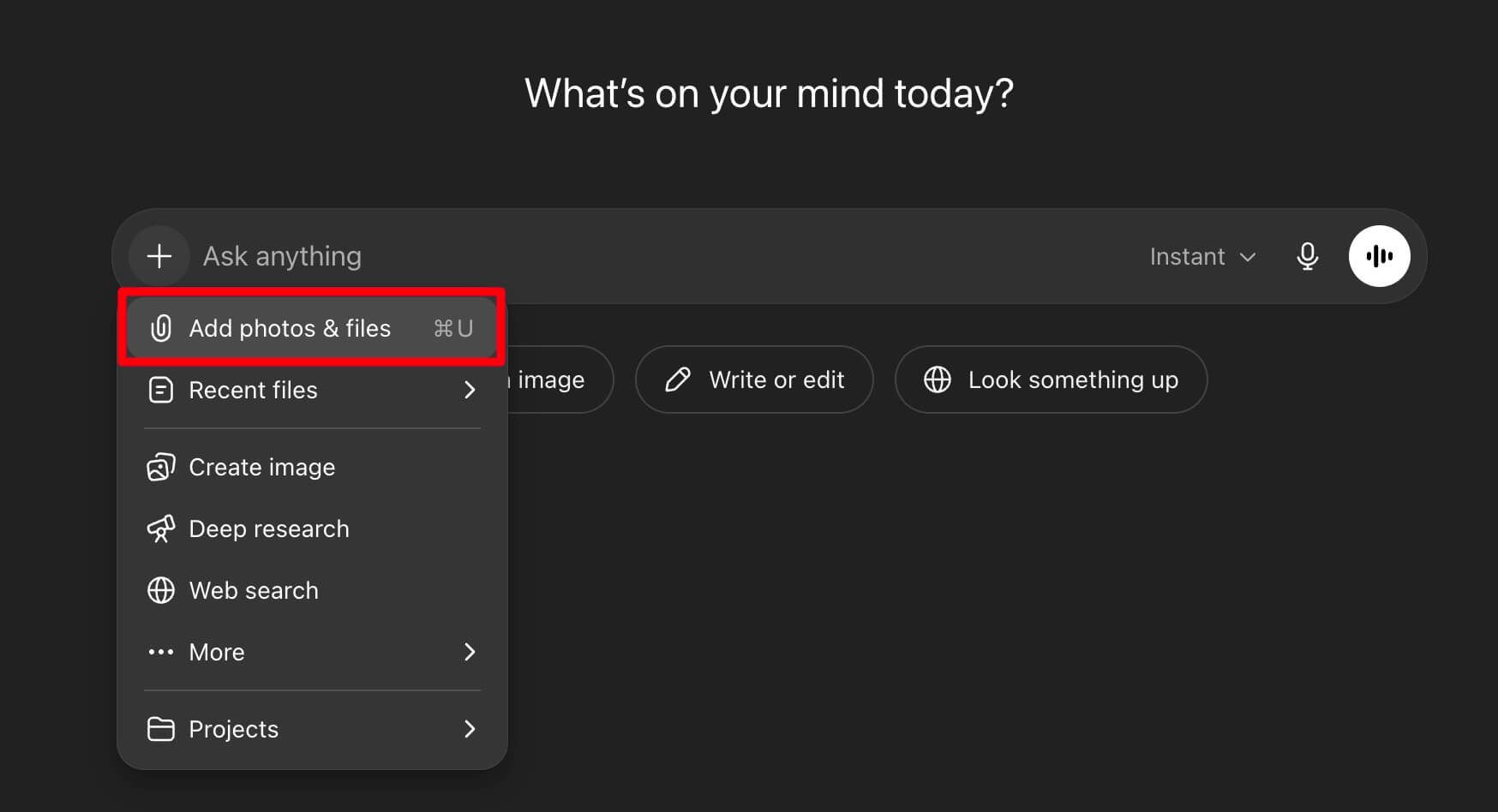
If you have a ChatGPT Plus subscription, the process is dramatically simpler and more powerful.
-
Start a New Chat: Make sure you have GPT-4 selected.
-
Click the Attachment Icon: Look for the paperclip icon (
📎) in the message bar. -
Upload Your Book File: Select the PDF, TXT, or other supported file from your computer. ChatGPT will take a moment to process and analyze it.
-
Give a Clear, Specific Prompt: This is where you can move beyond a simple summary. Be explicit about what you need.
Simple Summary Prompt:
Please read the attached document and provide a comprehensive summary of the entire book. Structure it with a brief overview, followed by bullet points for the main arguments in each part.Advanced Analysis Prompt:
Analyze the attached book, "The Psychology of Money." Identify the three most counter-intuitive arguments the author makes about wealth. For each argument, provide a brief explanation and one direct (but paraphrased) example from the book. -
Iterate and Ask Follow-up Questions: Once the initial summary is done, you can treat the book as a knowledge base.
Follow-up Prompt Examples:
Who is the main antagonist and what are their motivations?
Explain the concept of 'antifragility' as described in Chapter 5.Create a table comparing the economic theories mentioned in Part 1 and Part 2.
This method transforms ChatGPT from a text summarizer into an analytical partner.
Pros and Cons of Using ChatGPT for Book Summaries
Using AI for this task is a powerful shortcut, but it's not without its tradeoffs.
Pros:
- Incredible Speed: It can condense hundreds of pages into key points in minutes, a task that would take a human hours.
- Cost-Effective: Even a ChatGPT Plus subscription is far cheaper than hiring a research assistant or spending hours of your own valuable time.
- Idea Generation: It’s excellent for quickly grasping the core concepts of a non-fiction book or the main plot points of a novel, helping you decide if it's worth a full read.
- Customization: You can tailor the summary's length, tone, and focus with specific prompts.
Cons:
- Risk of "Hallucinations": The AI can occasionally invent facts, misinterpret data, or confidently state inaccuracies. You must fact-check critical information.
- Loss of Nuance and Voice: A summary, by definition, strips away the author's unique style, tone, and the subtle arguments woven into their prose. You get the "what," but often lose the "how" and "why."
- Contextual Errors in Long Texts: Even with file uploads, the AI can sometimes get lost in a very long or dense book, conflating characters or misattributing ideas from different chapters.
- Academic and Ethical Concerns: Submitting an AI-generated summary as your own original work is plagiarism. Use it as a study aid, not a replacement for your own thinking.
Expert Takeaway: Treat an AI book summary as a high-quality, interactive Wikipedia entry written just for you. It's the starting point for understanding, not the end of it.
Expert Tips for Getting High-Quality Book Summaries
The difference between a mediocre summary and a great one often comes down to the quality of your prompt.
- Specify the Audience and Format: Don't just say "summarize." Tell it who the summary is for.
"Summarize this chapter on quantum mechanics for a high school student with no prior physics knowledge.""Create a bullet-point summary of the key takeaways for a busy executive.""Generate a summary in the form of a table, with one column for the main idea and a second for supporting evidence."
- Set a Length Constraint: To avoid a wall of text, be specific about length.
"Provide a summary of no more than 250 words.""Give me a three-sentence overview of the plot."
- Ask for More Than a Summary: Use the AI to analyze, not just regurgitate.
"What is the central argument or thesis of this book?""Identify the three most important characters and describe their development arc.""After summarizing, list three points of potential criticism against the author's argument."
- Iterate and Refine: Your first prompt is rarely your last. If the summary is too vague, ask it to be more specific. I once had a client project where ChatGPT kept summarizing the marketing fluff from a business book's intro. My follow-up prompt was,
"Ignore the preface and introduction. Focus only on the actionable frameworks presented from Chapter 1 onward."The result was instantly more useful.
A Simpler Alternative: Summarize Books with Lynote
While ChatGPT is a powerful Swiss Army knife, sometimes you need a scalpel. For students, researchers, or anyone whose primary goal is efficient learning from documents, the conversational back-and-forth of ChatGPT can feel like unnecessary friction.
This is where a purpose-built tool like the Lynote AI Summarizer comes in. It's designed for one job: to extract knowledge from documents and present it clearly.
The main reason Lynote often feels more direct for students is its purpose-built interface, which skips the conversational back-and-forth required by ChatGPT for simple file summarization. The workflow is stripped down to the essentials.
Imagine you have a 60-page PDF of an academic journal article due for discussion in your morning seminar. With ChatGPT, you'd upload it, craft a prompt, wait for the response, and then maybe ask follow-up questions. With Lynote, the process is more streamlined.
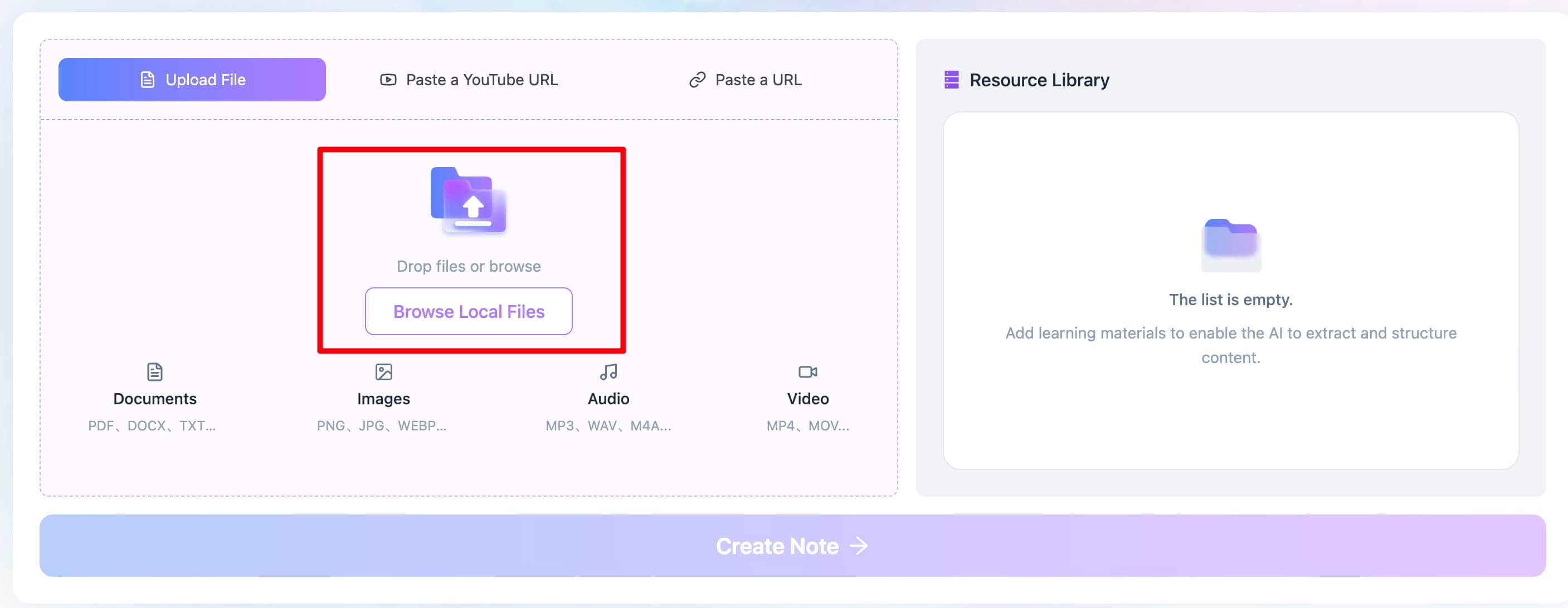
Step 1: Provide Your Source Material
On the Lynote platform, you're given two clear choices: upload a file directly from your computer (PDF, DOCX, TXT) or paste a URL to an online document or article. There’s no ambiguity.
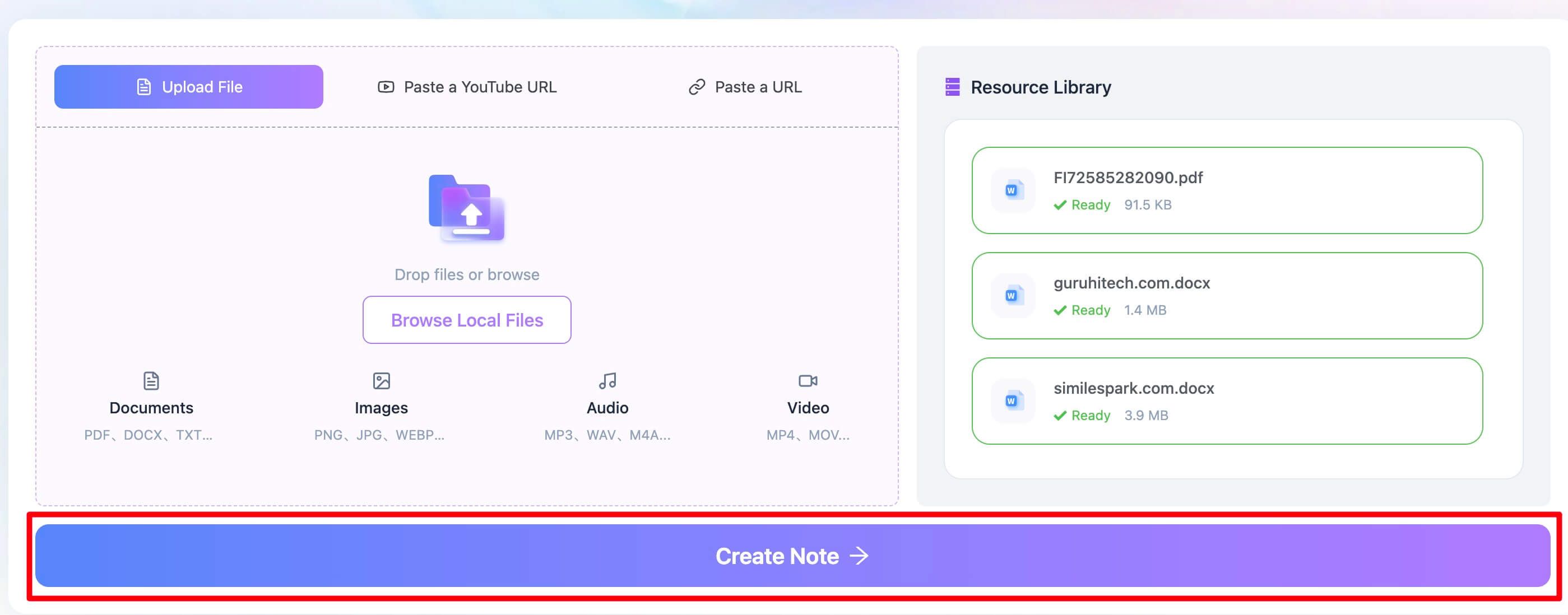
Step 2: Generate the AI Summary
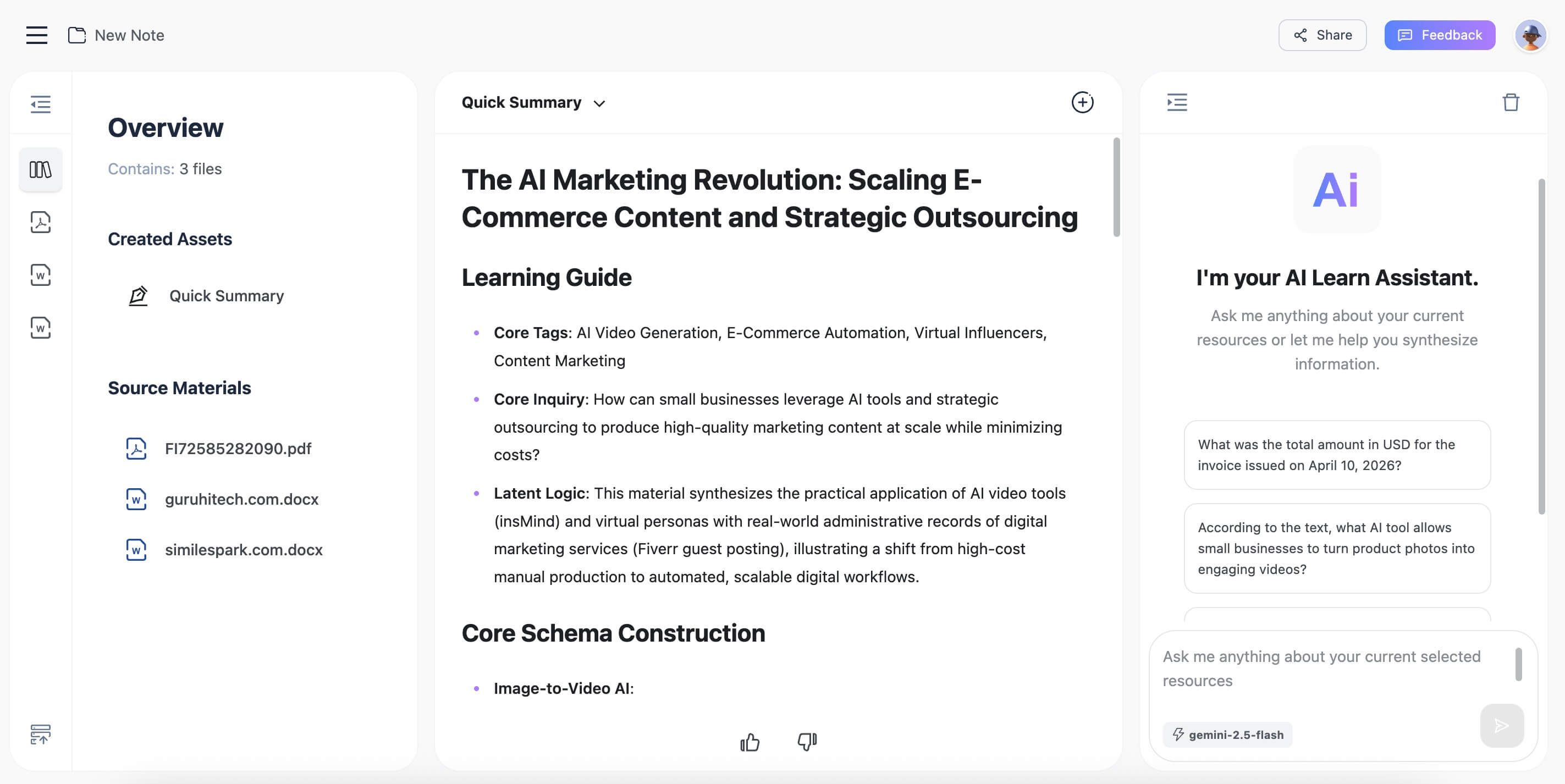
With a single click, Lynote processes the document. It’s not trying to have a conversation; it’s executing a command. It pulls out the core ideas, key arguments, and supporting data, presenting them in a structured summary format that's easy to digest and use for study notes.
For anyone who lives in a world of PDFs, lecture notes, and research papers, this focused approach can be a significant time-saver.
Is It Free to Use ChatGPT to Summarize Books?
This is a critical question, and the answer is "yes and no."
- It is free to use the base version of ChatGPT (currently GPT-3.5). You can use the copy-paste method described above without paying anything. This is perfectly adequate for summarizing shorter texts or getting the gist of a single chapter.
- It is not free to use the more powerful features ideal for book summarization. The ability to upload files (like a full PDF of a book) is exclusive to ChatGPT Plus, which is a paid monthly subscription. This subscription also gives you access to GPT-4, which is generally more accurate and nuanced in its analysis.
So, while you can technically summarize a book for free, the process is clunky. The paid tier unlocks the smooth, efficient workflow that most people envision when they think of an AI reading a book for them.
Frequently Asked Questions
Can ChatGPT summarize textbook chapters?
Absolutely. This is one of its strongest use cases, especially with ChatGPT Plus. You can upload a PDF of a single chapter and ask it to define key terms, explain complex concepts in simple language, or even generate potential quiz questions based on the content.
Is it plagiarism to use ChatGPT to summarize a book for school?
It depends on how you use it. If you copy the AI's summary and submit it as your own work, yes, that is plagiarism. However, if you use the summary as a study aid to help you understand the material, identify key themes, and check your own comprehension, it's a legitimate learning tool. Always cite your sources and use AI responsibly as a starting point for your own original thought.
Why did ChatGPT get the plot of my book summary wrong?
This is a fantastic and crucial question. It usually happens for one of two reasons:
- It relied on its training data, not your file. If you ask about a famous book without uploading it, ChatGPT might pull from a faulty or incomplete understanding from its training data, mixing it up with a movie adaptation or another similar story.
- It's a very new or niche book. If the book was published after its knowledge cutoff and you're using the free version, it's simply guessing or "hallucinating" based on the title or prompt.
The fix: Always upload the document using ChatGPT Plus if you want a summary based only on the text itself. Then, add this magic phrase to your prompt: "Summarize the attached document based only on the information contained within it."
Can Lynote handle scanned or image-based PDFs?
The quality of a summary from a scanned PDF depends heavily on the scan's quality and the tool's Optical Character Recognition (OCR) capabilities. While tools like Lynote are designed to handle clean digital PDFs exceptionally well, a blurry, skewed, or handwritten scan will challenge any AI. For best results, always use a clean, text-based digital version of your book when possible.
Conclusion: Is AI Book Summarization the Right Tool for You?
We've established that ChatGPT can, in fact, read and summarize a book. But the real question is whether it's the right solution for your specific need.
The answer is a clear "it depends."
- If you're a casual reader wanting the gist of a bestseller before committing, or a student needing a quick breakdown of a single chapter, ChatGPT (free or Plus) is a fantastic, flexible tool. Its conversational nature allows for deep, exploratory analysis.
- If you're a student, researcher, or professional whose workflow revolves around efficiently extracting key information from dense documents like textbooks, reports, and academic papers, a specialized tool like Lynote offers a more direct and focused path. It cuts out the noise and delivers the core value proposition: a high-quality summary with minimal fuss.
Editor's Choice:
For all-around power and flexibility, ChatGPT Plus is the undisputed champion. Its ability to analyze files and answer nuanced follow-up questions is unmatched in a general AI. Its main downside is the cognitive overhead of crafting perfect prompts for what should be a simple task.For sheer efficiency in a learning or research context, Lynote is the smarter choice. It's built for the task, making the path from document to actionable knowledge shorter and simpler.

Ultimately, AI is a lever. It can help you move a massive amount of informational weight with a fraction of the effort. Whether you choose the all-purpose power of ChatGPT or the specialized precision of a dedicated summarizer, you're equipped to conquer that reading list and turn information into knowledge.

Written by Janet L. Harris
AI Writing Specialist
Janet reviews AI detectors and humanization tools, with a focus on accuracy, limitations, and responsible use. View all articles →