How to Use QuillBot AI Summarizer: A Step-by-Step Guide & Review

Facing a 50-page research paper due tomorrow morning? Or maybe you're a professional trying to distill five industry reports into a single executive brief before lunch. The flood of information is relentless, and the clock is always ticking. This is where AI summarizers promise to be a life raft. This article provides a complete guide on how to use the QuillBot AI Summarizer. In a nutshell, you simply paste your text or upload a document, choose between 'Key Sentences' or 'Paragraph' mode, and use a slider to adjust the summary length. We'll walk you through the exact steps, critically evaluate the quality of its output, explore its free vs. premium features, and discuss when a different kind of tool might be a better fit for your actual goals.

Quick Verdict: Is QuillBot's Summarizer Right For You?
Before we get into the nitty-gritty, let's get straight to the point. QuillBot's Summarizer is a sharp, fast tool for a very specific job: text condensation. But it's not a one-size-fits-all solution for learning or deep analysis. Here’s how it stacks up against other methods.
| Method | Best For | Key Limitation | Our Score (1-5) |
|---|---|---|---|
| Manual Summarizing | Deep understanding, critical analysis, and retaining information for exams or key decisions. | Extremely time-consuming; not feasible for high-volume work under tight deadlines. | Learning: 5/5 |
| Speed: 1/5 | |||
| QuillBot Summarizer | Quickly getting the gist of an article, report, or paper to decide if it's worth a full read. | Can miss critical nuance; output requires fact-checking and is a poor substitute for actual reading. | Learning: 2/5 |
| Speed: 5/5 | |||
| AI Learning Toolkit | Active learning: summarizing, then questioning, connecting ideas, and creating study aids from the content. | Requires more initial setup and engagement than a simple paste-and-click summarizer. | Learning: 4/5 |
| Speed: 4/5 |
Scores are editorial heuristics based on the primary use case, not measured benchmarks.
The bottom line: If your goal is to slash through a reading list and extract core talking points in seconds, QuillBot is an excellent choice. If your goal is to internalize complex information for the long haul, you'll need to go a step further.
How to Use the QuillBot Summarizer: A Step-by-Step Walkthrough
Getting your first summary from QuillBot is incredibly straightforward, which is a huge part of its appeal. Let's walk through the process so you can get up and running in less than a minute.
Before you start:
- Check your text: Have your article, essay, or report ready. You can either copy the text to your clipboard or have the file saved on your computer.
- File format: If uploading, QuillBot primarily works with .DOCX, .PDF, and .TXT files. Ensure your document is in a compatible format.
- Word count: Be mindful of the limits. The free version has a strict cap (currently 1,200 words for the summarizer). The premium version significantly increases this. If your document is longer, you’ll need to summarize it in chunks.
Step 1. Input Your Text
You have two primary ways to give QuillBot your source material:
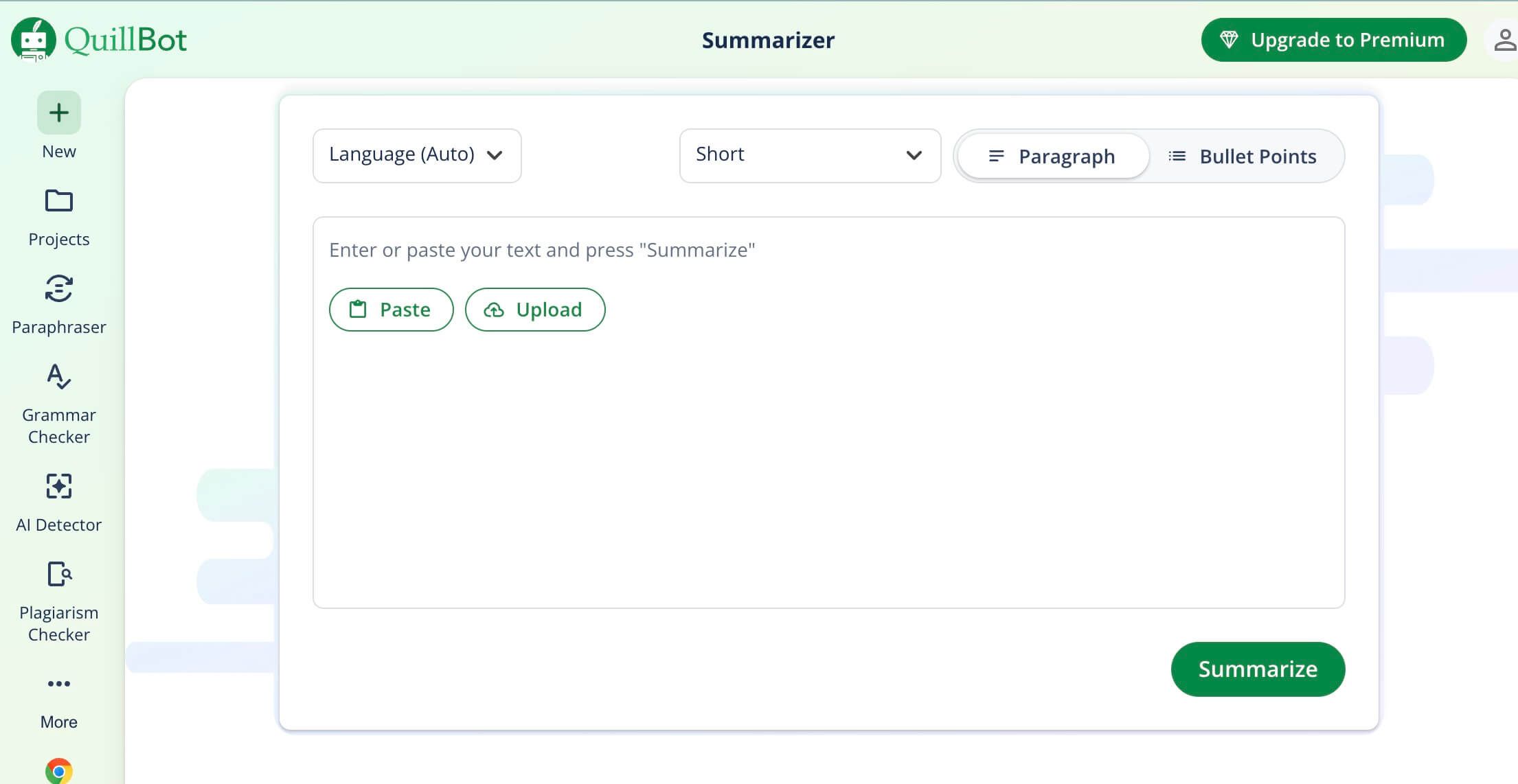
- Paste Text: The most common method. Simply copy the text from your source (a web article, a Word document, an email) and paste it directly into the large input box on the left side of the screen.
- Upload Doc: For longer, formatted documents, this is the better option. Click the "Upload Doc" button and select the file from your computer. QuillBot will process the document and populate the input box with its text.
A quick power-user observation: the upload function works best on clean, text-based PDFs. If you upload a complex PDF with multiple columns, embedded charts, and weird formatting (like a scanned academic journal), the text extraction can get messy. Always give the imported text a quick scan before summarizing.
Step 2. Select Your Summary Mode
This is the most important choice you'll make. At the top of the interface, you'll see two modes:
- Key Sentences: This mode acts like a highlighter, pulling what it determines to be the most important sentences directly from the source text and presenting them as a list.
- Paragraph: This mode is more advanced. It uses AI to paraphrase and synthesize the key ideas into a new, concise paragraph of prose.
We'll dive deeper into the strategic differences between these two in the next section. For now, if you want direct quotes, pick "Key Sentences." If you want a more natural-sounding summary, choose "Paragraph."
Step 3. Adjust the Summary Length and Summarize
Just below the mode selector, you'll find the Summary Length slider. This gives you control over how concise you want the output to be. Sliding it to the left (Short) will produce a very brief, high-level summary. Sliding it to the right (Long) will include more detail and supporting points.
Once you've set your mode and desired length, simply click the green "Summarize" button. Within a few seconds, your generated summary will appear in the output box on the right. From there, you can copy it, export it, or tweak your settings and run it again.
A Better Alternative: How to Use Lynote AI Summarizer
QuillBot Summarizer works well for short passages, but it can feel limiting when working with long PDFs, research materials, or multiple learning resources. Lynote AI summarizer helps you summarize complex content while turning it into interactive notes, flashcards, and AI-powered study materials.
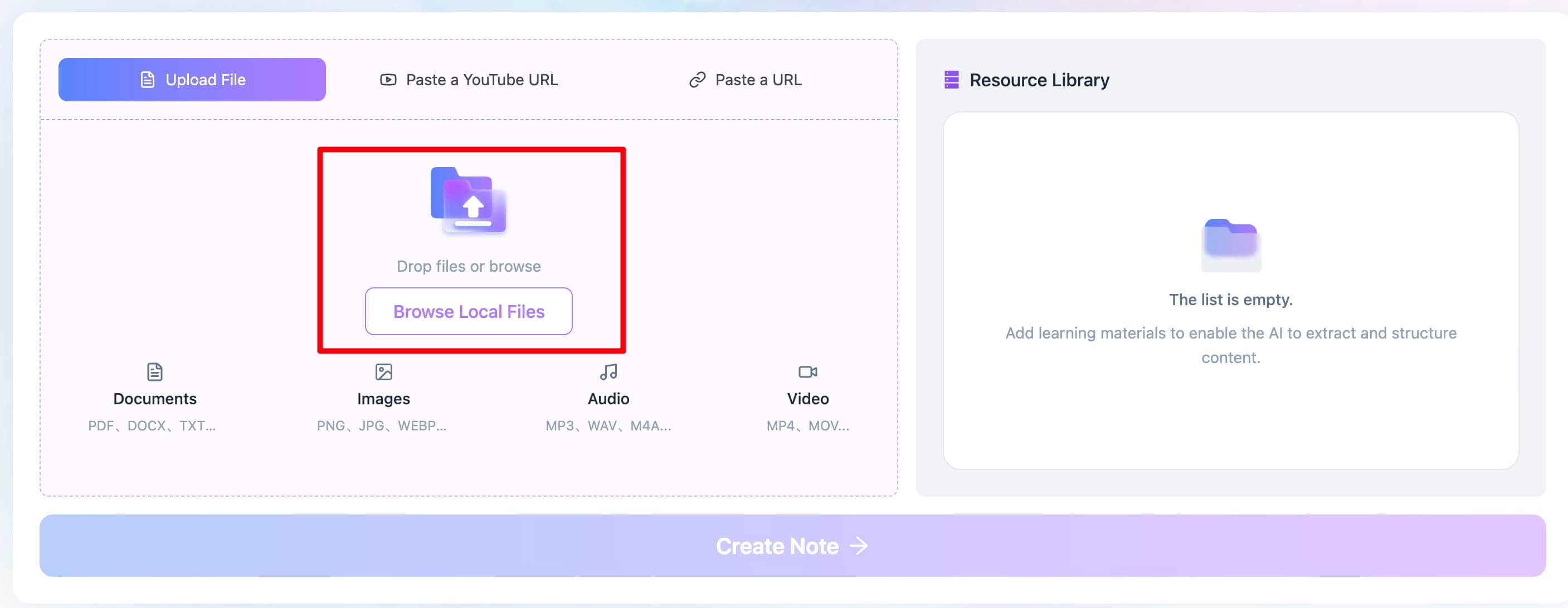
Step 1. Import Your Learning Materials
Upload PDFs, research papers, lecture slides, webpages, YouTube videos, or audio recordings into Lynote. You can combine multiple sources into one workspace.
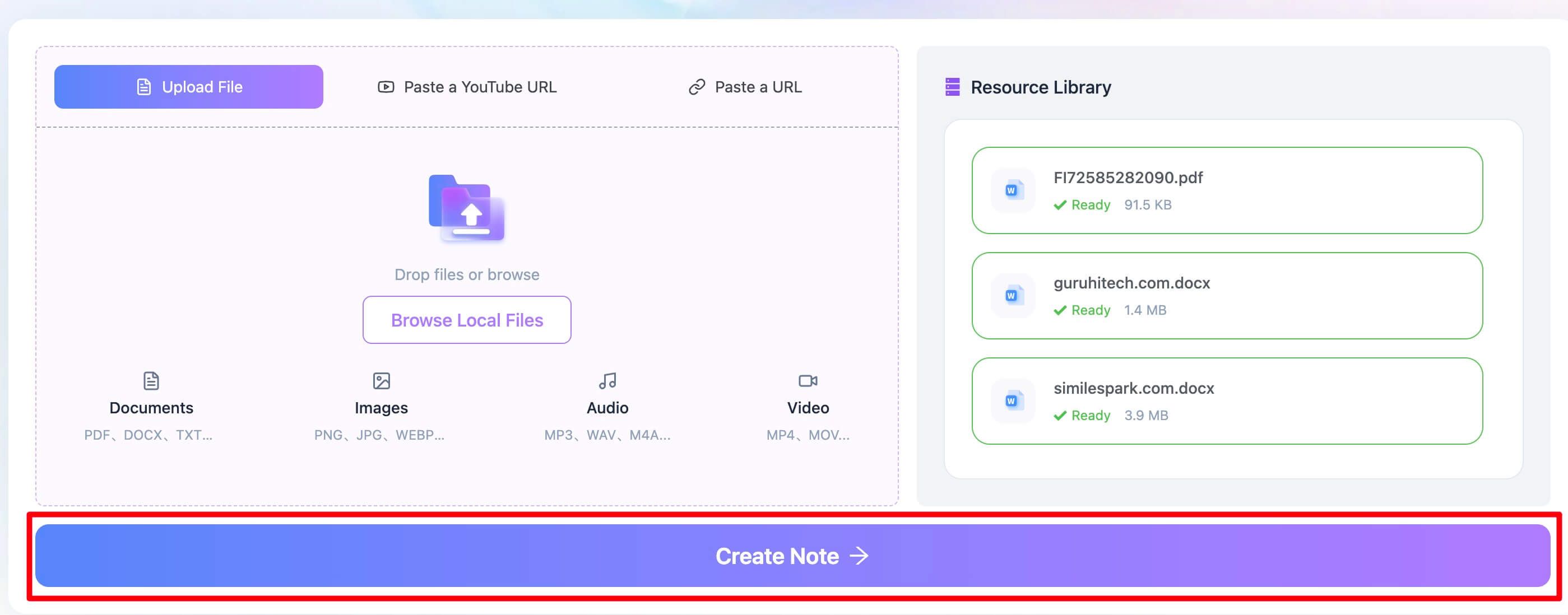
Step 2. Generate an AI Summary with “Create Note”
Click “Create Note” and Lynote will automatically create structured summaries, key takeaways, and organized notes from your content.
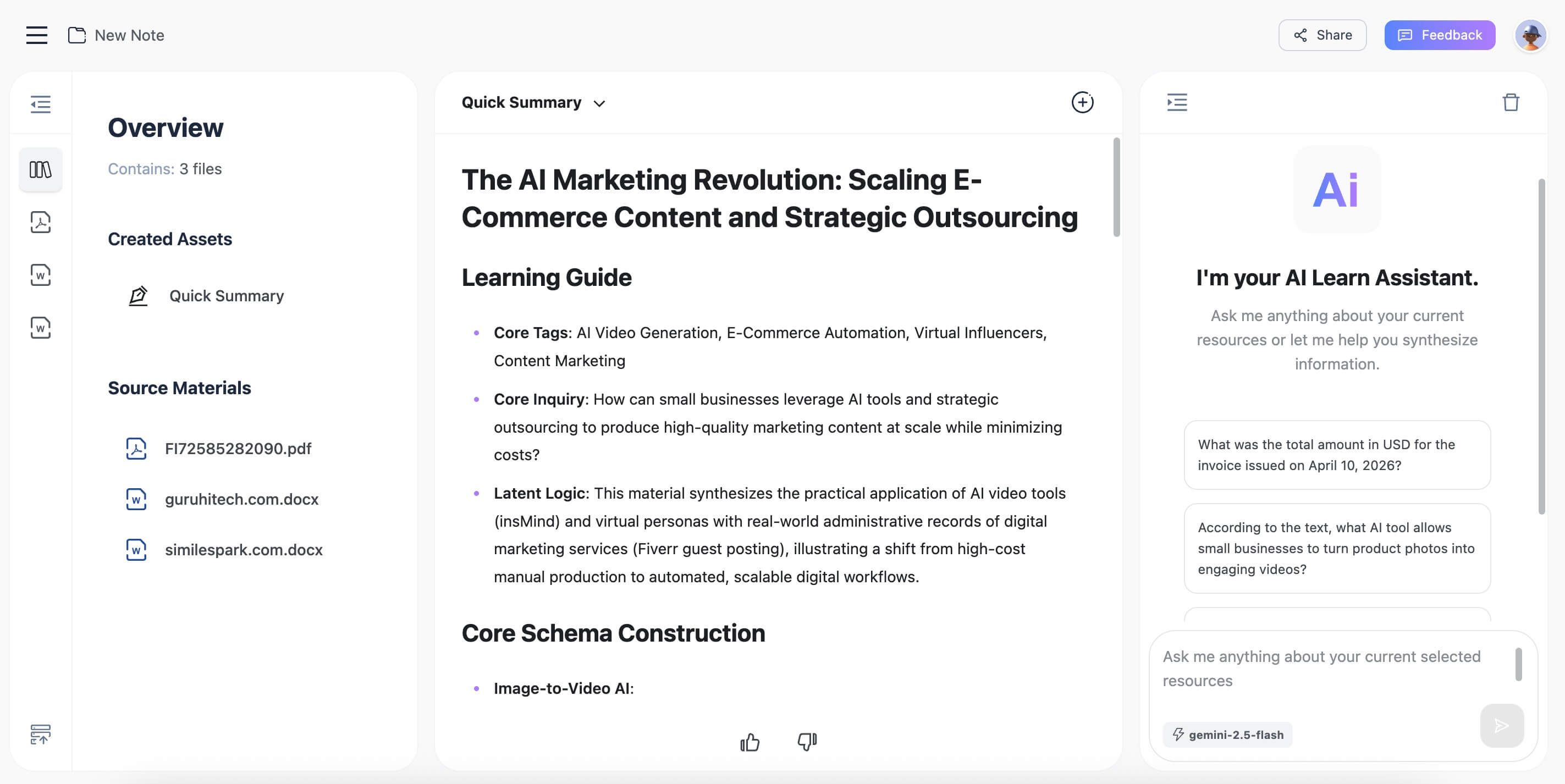
Step 3. Study, Chat, and Expand Your Notes
Review the summary, ask follow-up questions with AI chat, and generate flashcards to reinforce learning. You can also edit and share your notes anytime.

Understanding QuillBot's Summarizer Features: Modes and Length
The magic of a tool like this isn't just in the button-clicking; it's in knowing which buttons to click for your specific task. The difference between "Key Sentences" and "Paragraph" mode is fundamental.
Key Sentences Mode: The AI Highlighter
Think of this mode as a research assistant tasked with finding "quotable moments." It doesn't write anything new. Instead, it identifies and extracts the exact sentences from the original text that carry the most informational weight.
- Best for:
- Quickly identifying the main arguments or thesis statements in a paper.
- Pulling direct quotes to use in your own writing (with proper citation, of course).
- Creating a bullet-point outline of a long document.
- Downside: The output can sometimes feel disjointed, as it's a collection of sentences lifted from different parts of the text without smooth transitions.
Paragraph Mode: The AI Synthesizer
This is where the generative AI really flexes. Instead of just extracting sentences, it reads and understands the concepts, then rewrites them in its own words to form a cohesive, fluent paragraph.
- Best for:
- Creating a clean, readable abstract for a report you've written.
- Getting a holistic overview of an article that flows like a natural summary.
- Condensing your own notes into a more manageable study guide.
- Downside: Because the AI is generating new text, there's a slightly higher risk of it misinterpreting a nuance or subtly shifting the original emphasis. It requires a more careful accuracy check.
Expert Takeaway: Use Key Sentences when you need to find evidence within the text. Use Paragraph when you need to explain the text to someone else (or to your future self).
The Art of the Summary Length Slider
The length slider is more than just a word-count tool; it's a focus control.
- Short: A short summary is an "elevator pitch." It gives you the absolute core idea and nothing else. Perfect for deciding if an article is even relevant to your research.
- Medium: This is the workhorse setting. It provides the main idea plus the key supporting arguments. It's the best starting point for most use cases.
- Long: A long summary acts more like a detailed abstract. It includes the main points, supporting arguments, and often some context or examples. Use this when you need a thorough overview but still don't have time to read the full piece.
Putting It to the Test: How Good Are QuillBot's Summaries?
A tool can have a slick interface, but it's the output that counts. What does a good summary even look like? We can judge it on three criteria:
- Accuracy: Does the summary faithfully represent the facts and arguments of the original text?
- Coherence: Does the summary read smoothly and make sense as a standalone piece of text?
- Retention: Does the summary include the most critical information, or does it leave out the "so what"?
Let's run a quick test. Here's a dense, slightly technical paragraph about lithium-ion batteries:
Original Text: "The predominant challenge in advancing lithium-ion battery technology for electric vehicles (EVs) is the energy density-to-safety trade-off. While lithium-cobalt-oxide (LCO) cathodes offer high energy density, they are thermally unstable and pose significant safety risks, particularly under high-charge conditions. Conversely, lithium-iron-phosphate (LFP) cathodes are remarkably stable and safe, boasting a longer cycle life, but they suffer from lower voltage and energy density, which directly impacts vehicle range. Researchers are therefore exploring novel material compositions and nanostructures, such as silicon anodes and solid-state electrolytes, to break this paradigm and deliver batteries that are simultaneously powerful, safe, and long-lasting."
Now, let's see what QuillBot does.
Result 1: Key Sentences (Medium Length)
- The predominant challenge in advancing lithium-ion battery technology for electric vehicles (EVs) is the energy density-to-safety trade-off.
- Conversely, lithium-iron-phosphate (LFP) cathodes are remarkably stable and safe, boasting a longer cycle life, but they suffer from lower voltage and energy density, which directly impacts vehicle range.
- Researchers are therefore exploring novel material compositions and nanostructures, such as silicon anodes and solid-state electrolytes, to break this paradigm and deliver batteries that are simultaneously powerful, safe, and long-lasting.
Analysis: This is excellent. It correctly identified the core problem, the main contrast (LFP vs. LCO, even if it omitted the LCO mention), and the future direction. It's accurate and retains the key points. Coherence is decent for a bulleted list. Grade: A-
Result 2: Paragraph Mode (Medium Length)
"The main obstacle to improving lithium-ion battery technology for electric vehicles (EVs) is the trade-off between energy density and safety. While LFP cathodes are extremely stable and safe, they have a lower voltage and energy density, which reduces vehicle range. To overcome this dilemma, researchers are looking into new material compositions and nanostructures, such as silicon anodes and solid-state electrolytes."
Analysis: This is also very strong. It's coherent and reads like a human-written abstract. It correctly captures the central conflict. Interestingly, it completely dropped the mention of LCO cathodes, which slightly reduces the technical detail but arguably makes the summary cleaner for a layperson. This highlights the editorial choices the AI makes. Grade: B+
The takeaway? The tool is highly competent for well-structured, informational text. It nails the main ideas. Where it might struggle is with text that relies heavily on subtext, irony, or a complex narrative structure.
Common Gotchas & Advanced Tips for AI Summarization
You might be wondering, can I just summarize all my readings and call it a day? The honest truth is no. These tools are powerful assistants, but they are not substitutes for critical thinking. Here are some common pitfalls and how to avoid them.
- The Nuance Trap: A summary, by definition, strips away detail. Sometimes, that detail is crucial. A summary of a legal contract might miss a single clause that changes everything. A summary of a political speech might capture the policy points but miss the inflammatory tone that was the real story. Tip: Use summaries for initial triage, not for final decisions on sensitive or complex material.
- The Plagiarism Risk: This is a big one for students. If you use the "Paragraph" mode and copy the output directly into your essay without citation, you are plagiarizing. The words are new, but the ideas are not yours. Tip: Treat an AI summary like any other source. Use it to understand the material, but when you write, synthesize the ideas in your own words and cite the original source document. "Key Sentences" mode is safer here, as it encourages you to quote and cite directly.
- Garbage In, Garbage Out: As we saw with the complex PDF example, if the input text is poorly formatted, full of typos, or nonsensical, the summary will be too. Tip: Always clean up your source text before feeding it to the AI. A few minutes of prep can save you from a confusing and useless summary.
The main reason human oversight is still critical is that AI summarizers are optimized for explicit information, not implicit meaning. They can tell you what was said, but rarely why it was said or how it was received.
Beyond the Summary: When to Use a Full AI Learning Toolkit like Lynote
QuillBot is fantastic for creating a static summary. You get a block of text that represents a larger block of text. But what happens next? If your goal is true learning—not just reporting—the summary is the starting line, not the finish line.
This is where a comprehensive AI learning toolkit comes into play. Think of it as the next step in the workflow. While a summarizer gives you a condensed document, a learning tool gives you a dynamic, interactive workspace built around that document.
For example, a tool like Lynote is designed to address the "what now?" question. Instead of just giving you a summary, it allows you to:
- Chat with your documents: After summarizing a research paper, you could ask the AI, "Explain the methodology in simpler terms," or "What are the main counterarguments to this author's thesis?" This turns passive reading into an active dialogue.
- Summarize anything: You're not limited to text files. You can drop in a link to a two-hour video lecture or upload an audio recording of a meeting, and the AI will generate a summary, a transcript, and key takeaways.
- Generate study aids automatically: From the summarized content, you can have the AI create a set of flashcards to help you memorize key terms, dates, and concepts. This closes the loop between understanding and retention.
The main reason a learning toolkit like Lynote goes beyond a simple summarizer is its focus on active recall and knowledge synthesis, not just information compression. It's built on the premise that learning happens when you engage with, question, and transform information, not just when you condense it.
Frequently Asked Questions
Is using the QuillBot AI Summarizer free?
Yes, QuillBot offers a free version of its summarizer. However, it has limitations, most notably a 1,200-word input limit. The Premium version allows for much larger inputs (up to 6,000 words), offers more advanced features, and processes requests faster.
What file types can I upload to the summarizer?
QuillBot supports several common document types for upload, including Microsoft Word (.docx), PDF (.pdf), and Text files (.txt). For best results, use documents with clean, selectable text.
Does using an AI summarizer count as plagiarism or academic dishonesty?
This is a crucial question. The answer is: it depends on how you use it. Using the summarizer to understand a source is a legitimate research technique, similar to reading an abstract or a book review. However, submitting the AI-generated summary as your own original work is absolutely plagiarism. Always cite your original sources and use the summary as a tool for understanding, not a machine for writing. Check your institution's specific academic integrity policy.
Why did my summary miss the most important point?
This can happen, especially with highly nuanced or subtly argued texts. AI models are trained to identify explicit signals of importance (like topic sentences and repeated keywords). If the author's main point is conveyed through irony, storytelling, or a complex example, the AI might miss it. This is why human review is always essential.
Final Thoughts: The Right Tool for the Right Job
QuillBot's AI Summarizer is a genuinely useful, powerful, and well-designed tool. It executes its core function—condensing text quickly and accurately—with impressive reliability. For students, researchers, and professionals who need to rapidly triage large volumes of information, it’s a first-class efficiency booster.
Editor's Choice: For sheer speed and simplicity in getting the gist of an article, QuillBot's Summarizer is a top-tier choice. Its clean interface and straightforward controls make it accessible to everyone. Its biggest strength is reducing the "time-to-insight" when you're facing a mountain of text.
However, its primary limitation is its scope. It's a text condenser, not a learning partner. For the deeper work of internalizing knowledge, questioning assumptions, and preparing for exams, your workflow needs to evolve. After you get that initial summary, consider pulling it into a more robust environment where you can actively engage with the ideas.
Ultimately, the choice depends on your goal. Need a quick brief? QuillBot is your tool. Need to master a new subject? Use the summary as your first step in a broader, more interactive learning process.

Written by Janet L. Harris
AI Writing Specialist
Janet reviews AI detectors and humanization tools, with a focus on accuracy, limitations, and responsible use. View all articles →