Can AI Watch and Summarize a Video? Yes—Here's How It Works

You have a two-hour lecture recording to review before an exam. Somewhere inside is the one key concept you missed, but finding it means scrubbing through slides, rewinding past tangents, and losing an entire evening. Or maybe it’s a 45-minute webinar with five minutes of gold buried in 40 minutes of fluff. We've all been there, feeling like our time is being held hostage by a progress bar.
The direct answer is yes, AI can absolutely watch and summarize a video for you. This isn't science fiction anymore; it's a powerful and accessible productivity tool. By processing a video's audio track, spoken words, and even visual elements, AI models can generate a condensed, accurate summary of the core concepts. This technology can distill hours of content into minutes of readable, actionable notes, fundamentally changing how we learn and consume information online.
Quick Verdict: Types of AI Video Summarizers
Before you dive in, it's crucial to understand that not all "AI summarizers" are built the same. The quality and utility of your summary depend entirely on the technology doing the work. Choosing the right approach is the difference between a useless wall of text and a genuinely helpful study guide.
Here’s a quick breakdown of the main types of tools you’ll encounter:
| Method | Best For | Key Tradeoff | Our Score (1-5) |
|---|---|---|---|
| Basic Transcript + Summary | Audio-only content (e.g., podcasts, interviews) | Completely misses visual context. Useless for tutorials or demos. | 2/5 |
| Timestamped Chapters | Quickly navigating long videos to find specific sections | Still requires you to watch the relevant video segments. | 3.5/5 |
| Visual Summary (Text + Screenshots) | Tutorials, lectures, product demos, educational content | Can be slightly slower to generate than text-only summaries. | 5/5 |
Scores are editorial heuristics for comprehension and recall, not measured benchmarks.
For pure audio content, a basic summary might suffice. But if you’re trying to learn anything from a lecture, tutorial, or presentation, the context of what’s on-screen is non-negotiable. A visual summary is the only approach that captures both what was said and what was shown.
How AI 'Watches' a Video: The Technology Explained
So, how does an AI go from a YouTube link to a coherent set of notes? It’s not magic, but a sophisticated, multi-stage process that mimics how a human might take notes—only at lightning speed.
Here’s the honest truth about what’s happening under the hood.
1. Speech-to-Text (STT) Transcription
First, the AI needs to understand the words being spoken. It uses a Speech-to-Text (STT) engine to "listen" to the video's audio track and convert it into a raw, time-stamped text transcript. The accuracy of this initial step is critical; if the audio is muffled, filled with background noise, or features very strong accents, the transcript quality can suffer, impacting the final summary. This is the foundational layer upon which everything else is built.
2. Natural Language Processing (NLP) Analysis
With the raw transcript in hand, the AI’s Natural Language Processing (NLP) models get to work. This is the "brain" of the operation. The NLP engine reads through the entire text, identifying key concepts, recurring themes, and the overall structure of the content. It's smart enough to distinguish between a main point and a tangential story. It then uses advanced algorithms to condense these core ideas into a concise, human-readable summary, often organized into bullet points or short paragraphs.
3. Visual Analysis (The Game-Changer)
This is the part that separates basic tools from truly powerful learning aids. Advanced summarizers don’t just stop at the text. They perform visual analysis, correlating the most important segments of the transcript with what’s happening on-screen.
Bottom line: When the AI summarizes a point about a specific software feature, it also grabs a screenshot of the user interface being demonstrated. When it mentions a key formula, it captures the image of the whiteboard it was written on.
This creates a rich, contextual document that’s infinitely more useful for recall and review. The main reason visual summaries outperform text-only summaries for tutorials is that they preserve the critical link between instruction and demonstration.
How to Use AI Watch the Video and Summarize It (In Under 60 Seconds)
Knowing the theory is great, but putting it into practice is what saves you time. Using a tool like the Lynote YouTube Video Summarizer, you can turn a long video into structured, visual notes in less time than it takes to make a cup of coffee.
Before you start
All you need is the URL of the public YouTube video you want to summarize. There's no software to install for the web version, and you don't even need to create an account to get started.
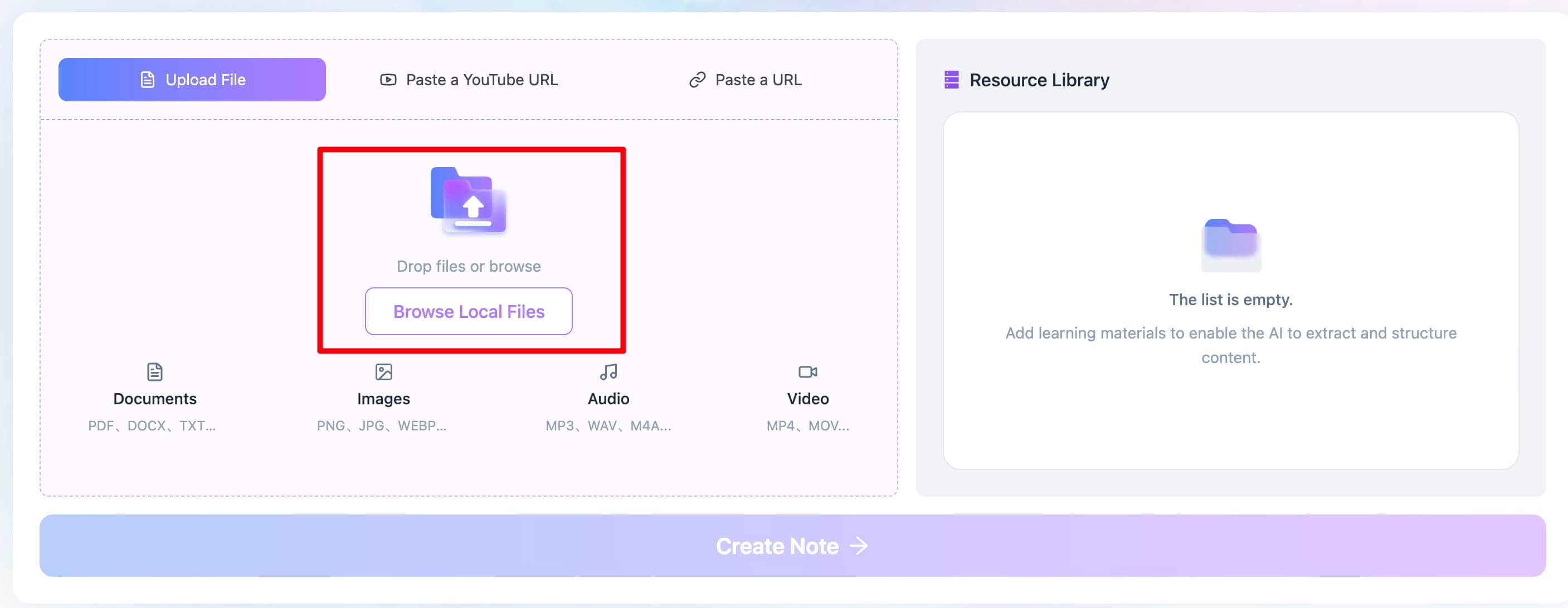
Step 1. Upload Videos or Paste a YouTube Link
Your only job is to provide the source material. Navigate to the YouTube video you want to summarize—this could be a university lecture, a coding tutorial, a marketing webinar, or a long-form podcast. Copy the URL from your browser's address bar.
Illustrative image: A cursor highlighting and copying a YouTube video URL.
Once you have the link, head over to the Lynote summarizer tool. The interface is clean and simple, designed to get you from link to notes with zero friction.
Step 2. Generate Your Visual Summary
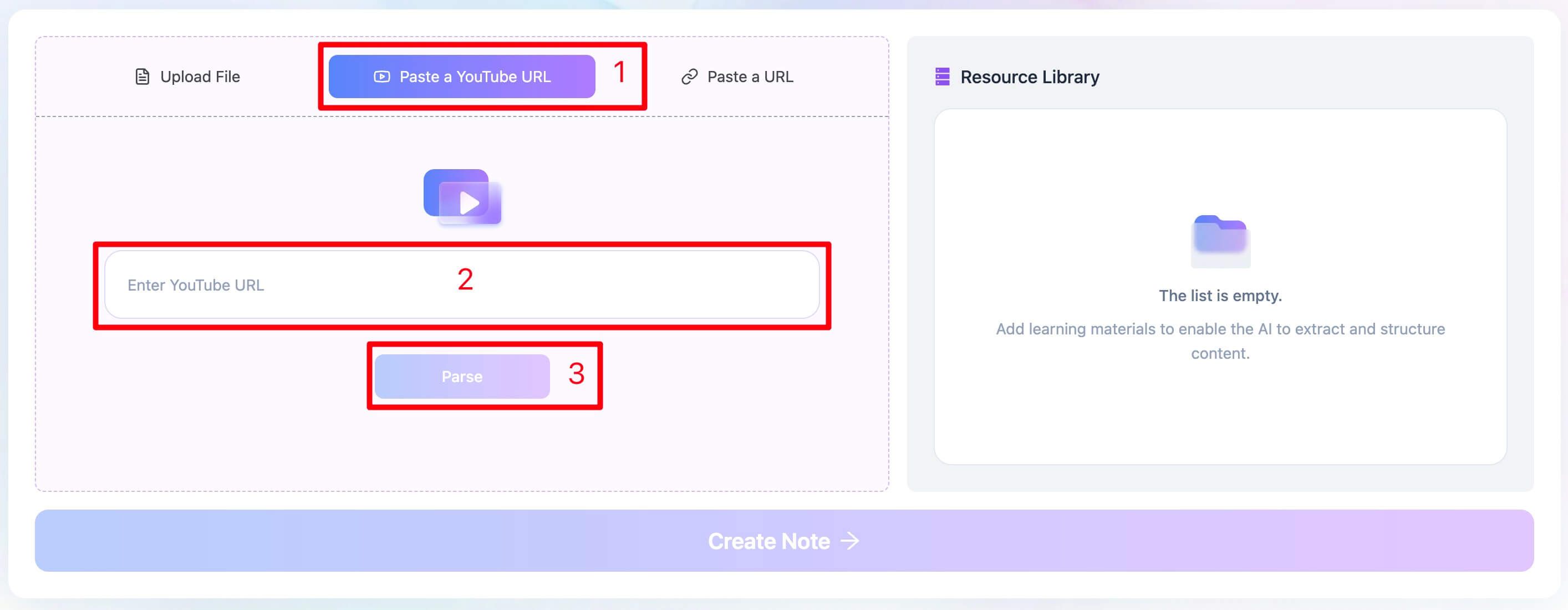
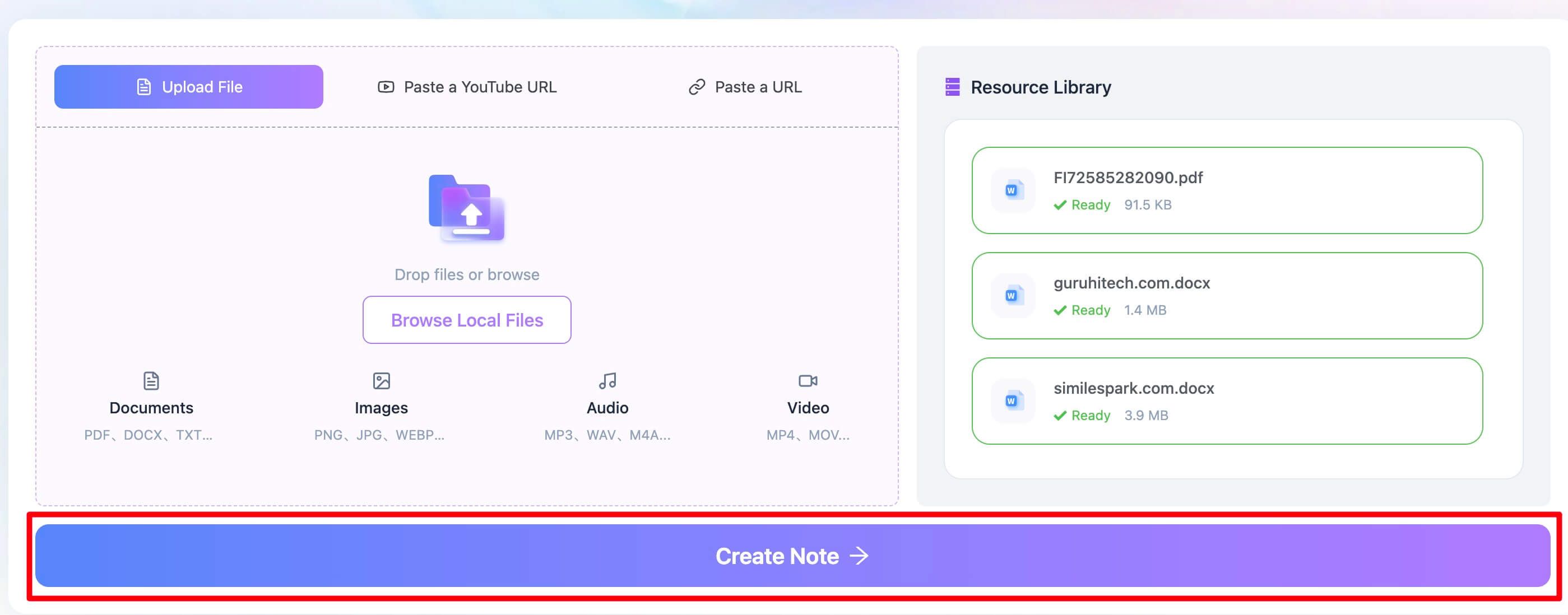
Paste the YouTube URL into the input field on the Lynote page. You'll see a single, clear button: “Parse.” Click it. Then click the “Create Note” button below.
This is where the AI takes over. In the background, it’s performing all the steps we discussed: transcribing the audio, analyzing the text with NLP, and identifying key visual moments. I recently tested this on a 90-minute data science lecture right before a study session. Before I had even finished pouring my coffee, the tool had generated a full summary complete with smart chapters and, most importantly, screenshots of the key Python code blocks and data visualizations. It turned a passive viewing task into an active note-taking session without me lifting a finger.
Step 3. Use, Navigate, and Export Your Notes
Within seconds, you’ll have a rich, multi-faceted summary. This isn't just a block of text; it's an interactive learning document.
- Smart Chapters: The summary is broken down into logical, timestamped chapters. You can click on any timestamp to jump directly to that specific moment in the original YouTube video.
- Visual Context: Each key point in the summary is paired with a relevant screenshot from the video, showing you the exact slide, diagram, or interface being discussed.
- Action Guide: For tutorials and how-to videos, the AI often generates a checklist or a step-by-step action guide, pulling out the practical instructions for you to follow.
- Export for Your Workflow: You can copy the text or, even better, export the entire summary in Markdown format. This is perfect for pasting directly into your favorite note-taking apps like Notion, Obsidian, or Tana, where it becomes a permanent, searchable part of your knowledge base.
For those who do this often, Lynote also offers a Chrome extension that lets you generate these summaries in a sidebar right next to the YouTube video you're watching.
Beyond the Hype: Common Pitfalls of AI Watch and Summarize the Video
As powerful as this technology is, it's not infallible. As a seasoned practitioner, I believe in being transparent about limitations. Ignoring them leads to frustration. Here are the "ugly truths" you should be aware of.
- Garbage In, Garbage Out: The AI is only as good as its source material. If a video has terrible audio quality—muffled speakers, loud background music, heavy static—the initial transcript will be riddled with errors. This cascades down, making the final summary less reliable.
- Nuance is (Still) Human: AI models are masters of factual extraction, but they are notoriously bad at detecting sarcasm, irony, or subtle humor. An AI might summarize a sarcastic comment as a literal statement, completely missing the speaker's intent.
- The Visual Context Blind Spot: This is the single biggest failure of text-only summarizers. Imagine a summary of a Photoshop tutorial that says, "Next, use the clone stamp tool to remove the blemish." Without a screenshot showing which tool and where the blemish is, that instruction is functionally useless. You’re left guessing, which defeats the entire purpose of saving time.
You might be wondering, have you ever tried to assemble furniture using only the text part of the instructions? It's the same kind of frustrating experience. Without visuals, context collapses.
Top 3 Use Cases for AI Video Watcher & Summarizer
When applied correctly, this technology is a superpower. Here are three scenarios where AI video summarization delivers massive value.
1. For Students: Taming the Two-Hour Lecture
Instead of passively re-watching a long lecture, a student can generate a visual summary in minutes. They can immediately see the key topics, review screenshots of critical diagrams or formulas from the slides, and use the timestamped chapters to jump directly to the professor's explanation of a concept they found difficult. It transforms revision from a passive chore into an active, efficient process.
2. For Professionals: Distilling Webinars and Meetings
A busy manager receives the recording of a 3-hour industry conference they missed. They don't have time to watch the whole thing. Using an AI summarizer, they can quickly extract the main strategic takeaways, market data points, and actionable advice. The "Action Guide" feature is particularly useful here, creating a ready-made to-do list from the speaker's recommendations.
3. For Content Creators: Smart Competitor Research
A YouTuber wants to understand why a competitor's video on a similar topic went viral. Instead of manually scrubbing through the 25-minute video, they can generate a summary to quickly analyze its structure, key talking points, and visual pacing. This provides valuable insights for structuring their own content more effectively without wasting hours on manual research.
Frequently Asked Questions
What AI can watch a video and summarize it?
Many AIs can, but they fall into three main tiers. Basic tools just give you a text summary from the transcript. Intermediate tools add clickable timestamps or chapters. The most advanced tools, like Lynote, provide a visual summary, combining the text with relevant screenshots for maximum context and comprehension.
How accurate are AI video summaries?
Modern AI summaries are highly accurate for factual content, provided the source video has clear audio. They excel at extracting key points, definitions, and steps from educational material. However, their accuracy decreases when it comes to interpreting nuance, humor, or sarcasm. Always use the summary as a guide, not as an infallible replacement for critical thinking.
Why do AI summaries sometimes miss visual gags or on-screen text?
This is a great question that gets to the heart of how these models work. An AI's "attention" is trained to prioritize what's most likely to be important for a summary. It's excellent at identifying a slide, a diagram, or a person speaking. However, it might not be trained to "read" every piece of small text that flashes on screen or to understand that a visual gag is narratively important. It prioritizes the main instructional content over fleeting or purely atmospheric visuals.
Conclusion: A Smarter Way to Learn from Video
The question is no longer if AI can watch and summarize a video—it’s how you can best leverage this capability. The technology is here, it’s accessible, and it can give you back your most valuable asset: your time.
While any summary is better than none, our experience shows a clear winner for anyone using video for learning or research. A simple wall of text is a partial solution that often creates more confusion than clarity, especially for visual topics. The real breakthrough is in tools that understand that learning is both an auditory and a visual process.
Editor's Choice: For students, professionals, and anyone serious about extracting knowledge from video content, a visual summarizer like Lynote is the clear choice. It bridges the critical gap between what was said and what was shown, which is where true understanding and retention happen. While generating the visual components might take a few seconds longer than a text-only tool, the return on that investment—a comprehensive, actionable, and easy-to-review set of notes—is immeasurable.
Stop passively watching videos. Start actively understanding them.


Written by Janet L. Harris
AI Writing Specialist
Janet reviews AI detectors and humanization tools, with a focus on accuracy, limitations, and responsible use. View all articles →