

YouTube Subtitle Downloader
Easily extract subtitles from YouTube videos with our AI-powered tool. Download accurate transcripts from YouTube videos and streamline your content workflow without any hassle.





Why Choose Our YouTube Subtitle Downloader?

Premium Quality Subtitles
Get highly accurate text every time you extract subtitles from YouTube. Our advanced AI ensures that your transcripts capture every spoken word perfectly, providing reliable text for your notes and research.

Fast And Free
Use this YouTube subtitle downloader free of charge to process long videos in seconds. Skip the manual typing and let our tool generate complete transcripts instantly without hidden fees.

Multiple Language Options
Break language barriers easily. Once you copy subtitles from YouTube, you can instantly translate the text into more than 25 different languages to support cross-cultural research and global content creation.

No Sign-up
Start using our YouTube subtitle downloader online immediately. There is no need to create an account or provide personal information—just access the tool and begin generating your transcripts right away.

Intuitive Interface
Designed for simplicity, our platform makes it incredibly easy to extract subtitles from YouTube video links. The straightforward layout ensures that anyone can navigate the extraction process without technical expertise.

Simple Export Options
After processing, you can effortlessly download subtitles from YouTube in your preferred format. Whether you need to copy the text to your clipboard or save a file, exporting is seamless.
Steps to Extract Subtitles from YouTube
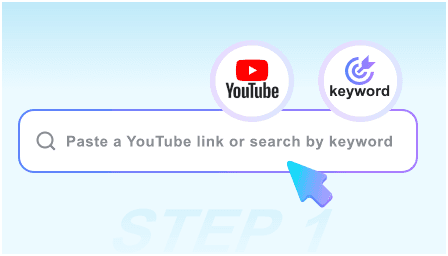
Paste Your Video Link
Start by copying the URL of the video you want to process. Paste the link into our subtitle downloader YouTube search bar, or type specific keywords to find the exact video directly within the tool.
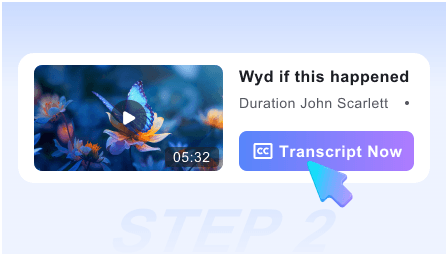
Generate the Subtitles
Click the "Get Video" button to let our system process the media. The YouTube subtitles downloader will instantly generate a highly accurate, reference-ready transcript on your screen, ready for review or immediate translation.
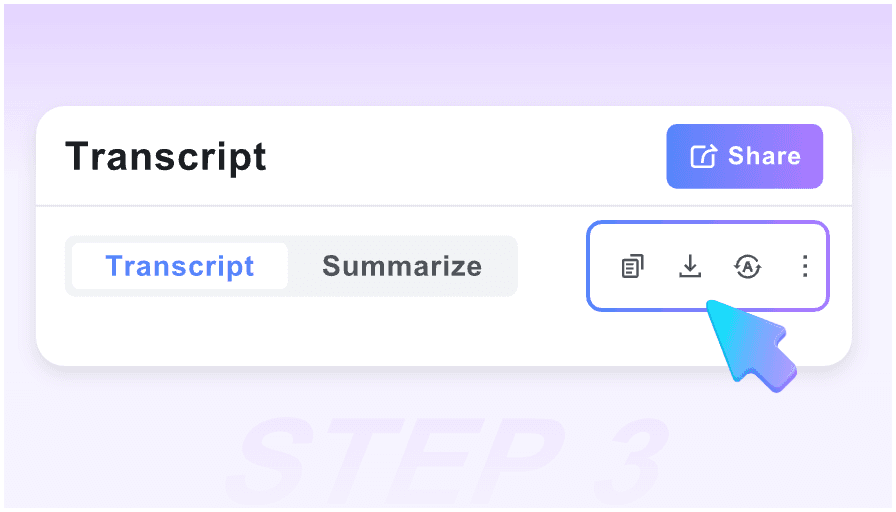
Copy or Download
Read through the generated text to ensure accuracy. From here, you can easily copy subtitles from YouTube to your clipboard or download the complete file to integrate into your preferred note-taking workflow.
Who Is This YouTube Subtitles Downloader For?

University Students
Transform long educational lectures into readable text. Students can use this tool to quickly extract subtitles from YouTube, making it easier to review study materials, highlight key concepts, and prepare for upcoming exams.

Academic Researchers
Gather data from video interviews and documentaries efficiently. Researchers rely on our platform to download subtitles from YouTube, providing accurate textual references that can be cited and analyzed in academic papers.

Content Creators
Repurpose your video content for blogs, social media, and newsletters. Creators can extract subtitles from YouTube video uploads to generate written drafts, saving hours of manual transcription and expanding their audience reach.

Marketing Professionals
Optimize video content for search engines by generating accurate text transcripts. SEO experts use our YouTube video subtitle downloader to grab textual data, create closed captions, and improve overall video indexability.

Language Learners
Improve reading and listening comprehension by analyzing native speaker transcripts. Language students can copy subtitles from YouTube and utilize our built-in translation feature to compare phrases across 25 different languages.

Corporate Knowledge Workers
Turn lengthy webinars and company training videos into scannable documents. Professionals use our YouTube subtitle downloader online to pull text from internal videos, quickly summarizing key takeaways for their teams.
What Our Users Say About Lynote

Content Strategist

"This YouTube subtitle downloader free tool has completely streamlined my workflow. I can pull transcripts from long podcasts in seconds and instantly turn them into blog posts."

Language Student
"Being able to extract subtitles from YouTube and instantly translate them has changed how I study. It saves me hours of manual transcription."

Video Editor
"This is the most reliable subtitle downloader YouTube creators can use. It makes pulling transcripts from my old videos for blog posts incredibly simple."

Academic Researcher
"I frequently need to copy subtitles from YouTube for my literature reviews. Lynote provides clean, reference-ready text without the messy timestamps."

Digital Marketer
"This YouTube subtitles downloader is incredibly fast. I paste the link and get the full transcript in seconds, which I then use to draft social media campaigns."

Knowledge Worker
"I love that I can download subtitles from YouTube and immediately format them for my project notes. It is an essential tool in my daily research workflow."
Frequently Asked Questions
Still got some questions about downloading subtitles from YouTube? Here're the answers!
A YouTube subtitle downloader is a specialized tool that pulls the text track directly from a video. Instead of typing out what you hear, you can instantly generate a complete, accurate transcript for reading, saving, or note-taking.
You simply paste the video URL into our platform. The system will automatically extract subtitles from YouTube, format the text into clear paragraphs, and prepare it for immediate translation or exporting.
Yes, you can access our YouTube subtitle downloader free for basic text extraction. It provides a quick and accessible way for students and professionals to grab video transcripts without any upfront costs.
No installation is required. Lynote functions fully as a YouTube subtitle downloader online, meaning you can process videos securely and quickly right through your web browser on any device.
Once the video is processed, our tool strips away unnecessary timestamps and awkward formatting. You can then copy subtitles from YouTube with a single click and paste them as plain text directly into your documents.
Yes. After you download subtitles from YouTube in their original language, our built-in AI translation feature allows you to convert the transcript into over 25 different languages instantly.
Absolutely. Our YouTube video subtitle downloader is optimized to handle long-form content like university lectures, podcasts, and lengthy tutorials, extracting the entire transcript in just moments.
When you extract subtitles from a YouTube video, you capture the exact source material. Having the full, reference-ready transcript ensures you do not miss critical details before moving on to your downstream note workflows.