

YouTube Transcript Downloader
Instantly download clean, formatted text from any YouTube video. Perfect for repurposing video content into SEO-optimized blogs, study guides, and social media posts without manual typing.





Why Use Our YouTube Transcript Downloader

Instant Text Extraction
Stop wasting hours transcribing by hand. Our downloader pulls the full text from any YouTube video in seconds, giving you a clean slate for your articles, newsletters, or research papers.

No Account Required
We value your speed and privacy. Download unlimited transcripts without the friction of sign-ups or subscriptions. Just paste your link and get your content immediately.

SEO-Ready Formatting
Our tool doesn’t just dump text; it organizes it. Prepare your content for search engines with structured layouts that make turning videos into high-ranking blog posts a breeze.

Precise Time-Coding
Every transcript includes clickable timestamps. Easily reference specific quotes or jump to key moments in the video to verify facts and ensure 100% accuracy in your writing.

Multiple Export Options
Export your way. Copy the text directly to your clipboard for Notion or Google Docs, or download a clean TXT file to keep your local content library organized.

Global Content Access
Download transcripts in any language supported by the video. Perfect for translating foreign market research or repurposing international content for your local audience.
3 Steps to Download Your Transcript
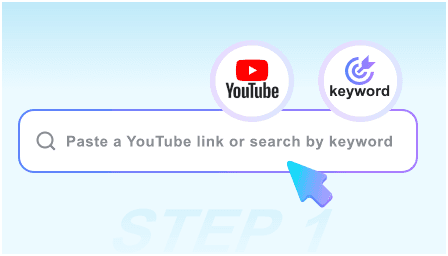
Step 1: Paste Video URL
Copy the link of the YouTube video you want to repurpose and paste it into our secure downloader box at the top of the page.
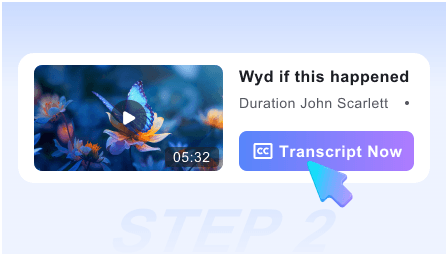
Step 2: Fetch Transcript
Click the “Download” button. Our system instantly scrapes the video’s data to generate a clean, readable text version of the entire dialogue.
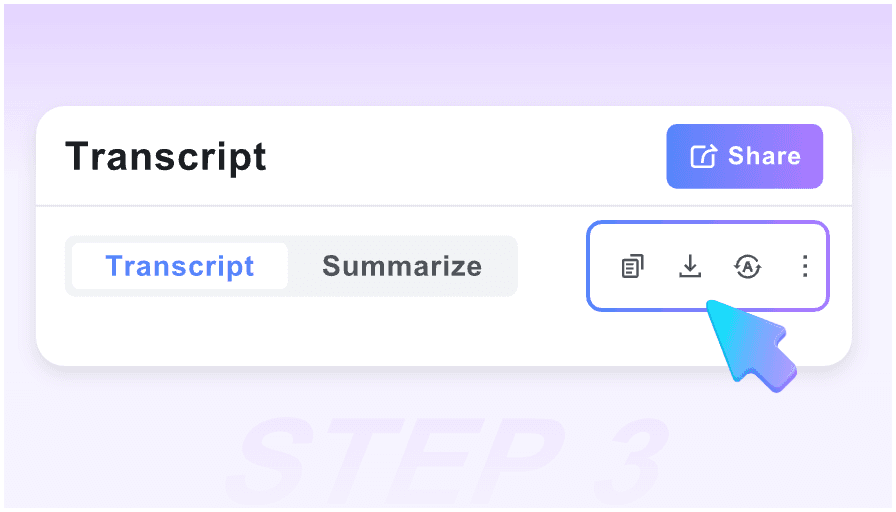
Step 3: Export for Repurposing
Review the text, then use “One-Click Copy” to move it into your CMS or download it as a file to start your content creation process.
Who is this downloader for?

Content Marketers
Turn your video marketing efforts into long-form blog posts and email newsletters in minutes, maximizing your content ROI across all platforms.

Academic Researchers
Quickly extract quotes from interviews, documentaries, and lectures. Search through text instead of scrubbing through hours of video footage.

SEO Specialists
Convert video transcripts into keyword-rich articles to capture organic search traffic and improve your site’s topical authority.

Ghostwriters
Speed up your workflow by downloading client video interviews and turning them into polished thought-leadership pieces without manual transcription.

Journalists
Get accurate text records of press conferences and news segments instantly to ensure your reporting is fast, factual, and first to publish.

Podcasters
Download the transcripts of your video podcasts to create show notes, social media snippets, and accessible content for your audience.
Success Stories from Content Creators

SEO Strategist

This is the fastest way to turn video into traffic. I download the transcript, tweak the formatting for SEO, and have a blog post ready in 15 minutes.

PhD Candidate
I use this for my qualitative research. Being able to download clean text with timestamps makes coding my interview data so much more efficient.

B2B Copywriter
No more pausing and rewinding! I download the transcript of my client’s webinars and can immediately start drafting their whitepapers. A total game-changer.

Affiliate Marketer
I love the ‘No Sign-up’ aspect. When I’m in the zone, I just want the text. This tool is the most frictionless downloader I’ve ever used for my niche sites.

Online Educator
I download transcripts for all my course videos to provide as study aids for my students. It handles my 90-minute deep dives without a single glitch.

Social Media Manager
I use the one-click copy to grab quotes for Twitter threads and LinkedIn posts. It has cut my content repurposing time by at least 70%.
Frequently Asked Questions
Everything you need to know about downloading YouTube transcripts for your projects.
Yes, our tool is 100% free. You can download as many transcripts as you need for your blogs, notes, or research without any hidden costs or limits.
No installation is required. This is a web-based tool that works directly in your browser, allowing you to download transcripts on any device instantly.
You can currently download transcripts in TXT format for maximum compatibility, or use our “One-Click Copy” feature to paste directly into any editor.
Absolutely. Our downloader is built to handle everything from short clips to 4-hour long livestreams and podcasts without timing out.
Our tool downloads the captions available on YouTube. If the creator has disabled captions or if YouTube hasn’t generated them yet, the transcript won’t be available.
Yes. If the video has multi-language captions or auto-generated translations, you can select and download the transcript in your preferred language.
The text is provided in a clean, chronological format with timestamps, making it easy for you to add H2/H3 tags and optimize it for your blog or website.
Yes, you can choose to include precise timestamps in your transcript, which is essential for referencing specific parts of the video in your content.