

AI Video Simplifier
Strip away the fluff. Instantly convert complex videos into simplified cheat sheets, core concepts, and actionable checklists—no account required.






Why Use Lynote to Simplify Your Viewing

Visual Concept Mapping
Stop drowning in words. We pair simplified explanations with key visual frames, allowing you to grasp complex ideas at a glance without watching the full footage.

Skip-to-Point Navigation
Don’t waste time on long intros. Our AI identifies the “meat” of the video and provides direct timestamps to the most information-dense segments.

Noise-Free Action Guides
We filter out the filler and “umms.” Get a clean, step-by-step breakdown of instructions so you can execute tasks without the video playing in the background.

Zero Friction Access
No sign-ups, no credit cards, no barriers. Paste a link and simplify your content immediately. We value your time and your data privacy.

Clean Markdown Exports
Perfect for your personal knowledge base. Export simplified notes directly to Notion or Obsidian in a structured format that’s ready for long-term storage.

Global Content Decoder
Simplify videos in any language. Our AI translates and condenses foreign technical content into simple, easy-to-read summaries in your native tongue.
3 Steps to Simplify Any Video
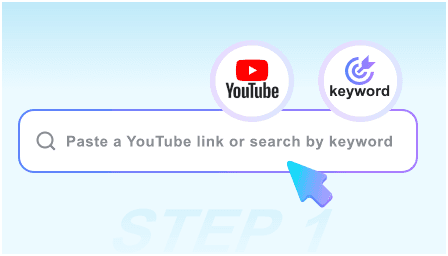
Step 1: Paste the Complex URL
Drop the link to any dense tutorial, technical lecture, or long-winded podcast into the simplifier.
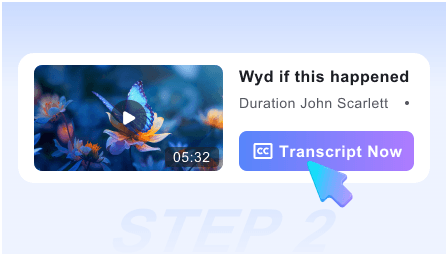
Step 2: Extract the Essentials
Our engine strips away the filler, generating a simplified brief, key visual snapshots, and a “no-fluff” checklist in seconds.
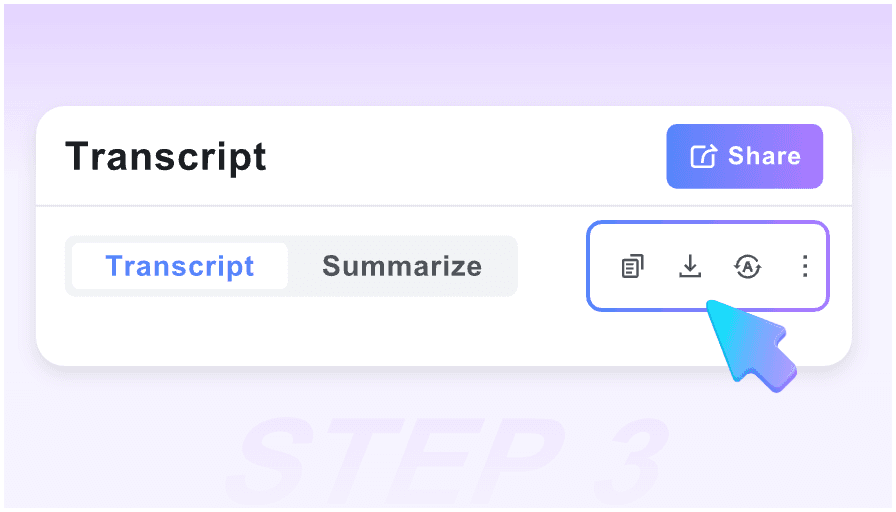
Step 3: Save the Cheat Sheet
Review the core takeaways and export the simplified guide to your notes so you never have to watch the original video again.
Who is this simplifier for?

Speed Learners
Master new subjects in half the time by focusing only on the core principles and skipping the repetitive explanations.

Technical DIYers
Turn 20-minute repair videos into 5-step checklists. Get the exact measurements and tools needed without the chatter.

Knowledge Managers
Build a “Second Brain” faster. Use our simplified Markdown exports to populate your Notion workspace with high-signal information.

Executive Researchers
Quickly vet long industry reports or interviews. Determine the “bottom line” of a video in 30 seconds instead of 30 minutes.

Exam Preppers
Simplify dense academic lectures into bulleted study guides. Use visual snapshots to memorize diagrams without re-watching the stream.

Cross-Language Students
Understand high-level concepts from international experts without getting lost in complex foreign vocabulary or fast speech.
What our users say

Academic Researcher

This is the ultimate “noise filter.” It takes a rambling 40-minute symposium and gives me the 3 core arguments with visual proof. Essential for my workflow.

Software Engineer
I use it for coding tutorials. It extracts the actual code logic and steps into a checklist, so I don’t have to keep scrubbing back and forth to find the syntax.

Productivity Coach
Most tools just transcribe. Lynote actually simplifies. The Markdown export to my Obsidian vault is seamless and keeps my notes clutter-free.

Startup Founder
I can’t sit through hour-long webinars. This tool gives me the “High-Value Moments” instantly. It’s like having a personal assistant watch the video for me.

Med Student
The visual pairing is key. Simplifying complex biology animations into static snapshots with text descriptions makes my flashcard creation 10x faster.

DIY Enthusiast
I just wanted to know how to fix my sink, not hear the plumber’s life story. This tool gave me the 4 steps and the tool list in seconds. Truly free and fast.
Frequently Asked Questions
Need clarity on how we simplify? Find your answers below.
While summaries just shorten text, our Simplifier removes “filler” content, identifies core concepts, and provides visual snapshots to make the information easier to retain.
No. You can simplify as many videos as you need for free. We believe in making information accessible and easy to digest for everyone.
Yes. Our AI is trained to identify technical terms and provide a simplified context, making it perfect for medical, legal, or engineering content.
Absolutely. Our “Export to Markdown” feature is specifically designed to look great in Notion, Obsidian, and other professional note-taking apps.
Usually less than 30 seconds. Our engine scans the video data rapidly to extract the essentials so you can start reading immediately.
Yes! It is specifically optimized to turn instructional “how-to” content into a clean, numbered list of steps and required materials.
Yes. It can take a video in any major language and provide a simplified explanation in your language of choice, breaking down the language barrier.
Your privacy is our priority. Since no account is required, we don’t track your identity or keep a history of the videos you simplify. Your research remains your own.