

AI Transcript Summarizer
Transform dense video transcripts into structured study notes, executive summaries, and searchable Markdown—instantly and without an account.






Why Professionals Choose Our Transcript Summarizer

Context-Aware Text Analysis
We don’t just shorten text. Our AI analyzes the full transcript context, pairing key insights with visual snapshots to ensure you never lose the original meaning of the speaker.

Synced Timestamps & Navigation
Every summarized point is linked to a precise timestamp. Click any sentence in the summary to jump to the exact moment in the transcript and video for deeper verification.

Key Insight & Quote Extraction
Automatically isolate high-value quotes and core arguments. We filter out the filler words and “ums,” leaving you with a polished, actionable brief of the entire discussion.

Zero Friction, No Sign-up
Access professional-grade transcript analysis immediately. No credit cards, no email walls—just paste your link and convert speech to structured intelligence in seconds.

Optimized for Your Second Brain
Export your summarized transcripts directly to Markdown. Perfectly formatted for Notion, Obsidian, or Roam Research, keeping your knowledge base organized and searchable.

Global Dialect & Language Support
Summarize transcripts in over 50 languages. Whether it’s a technical lecture in German or a business summit in Japanese, get the summary in your native tongue.
3 Steps to Summarize Any Transcript
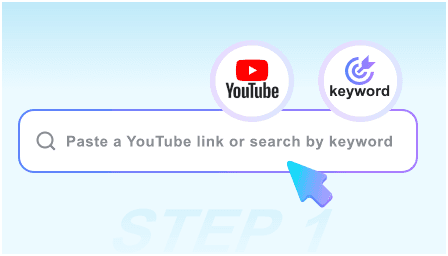
Step 1: Paste Video or Transcript Link
Copy the URL of the video or audio source. Our engine automatically fetches the raw transcript data, regardless of length or complexity.
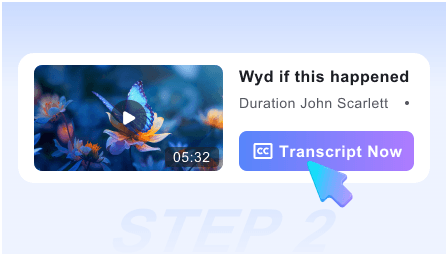
Step 2: Generate AI Structured Summary
Our AI scans the text to identify speakers, key themes, and data points, condensing hours of dialogue into a readable 5-minute brief.
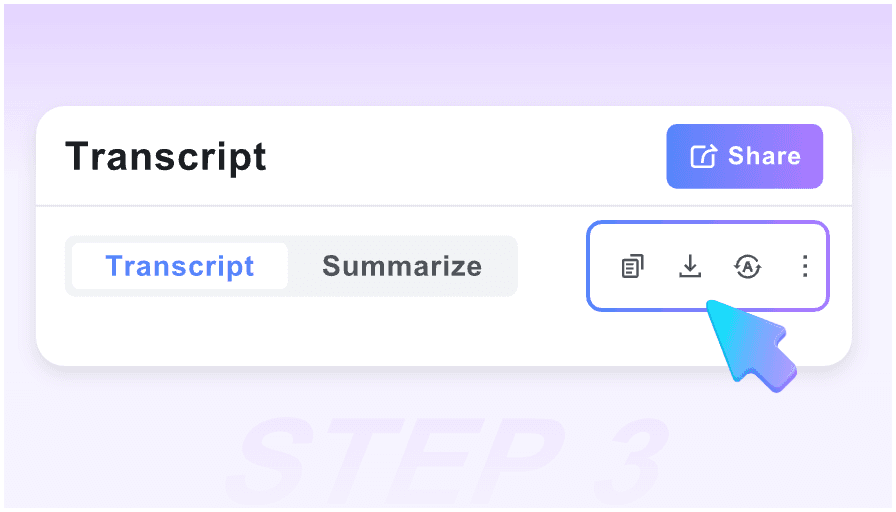
Step 3: Sync to Your Documentation
Review the key takeaways, copy specific quotes, or export the entire structured summary to your professional workspace or note-taking app.
Who is this transcript tool designed for?

Academic Researchers
Quickly parse through hours of interviews and symposiums. Extract qualitative data and citations without transcribing every word manually.

University Students
Turn 2-hour recorded lectures into concise study guides. Use the timestamped summaries to revisit complex topics right before exam season.

Market Analysts
Digest earnings calls, webinars, and industry panels in minutes. Identify market trends and competitor insights from transcripts at scale.

Legal & Medical Pros
Review depositions or medical seminars by scanning structured summaries. Find specific mentions of keywords using our synced timestamp navigation.

Executive Assistants
Convert long meeting recordings into professional minutes and action items. Provide your team with the “TL;DR” of every internal briefing.

Journalists
Scan press conferences and long-form interviews for the perfect soundbite. Use the Markdown export to draft articles based on summarized facts.
Trusted by Knowledge Workers

University Professor

This is the most accurate transcript summarizer I’ve used. It captures the nuance of academic jargon and provides the visual context needed to verify the AI’s output.

Senior Research Analyst
The Markdown export is a lifesaver. I can move a 60-minute webinar summary into my Notion workspace in one click, complete with timestamps and key quotes.

PhD Candidate
I love that I don’t have to create an account. I can process dozens of interview transcripts for my thesis privately and efficiently without any subscription fluff.

Corporate Strategist
I use this for every industry podcast I listen to. Instead of taking manual notes, I get a structured brief that highlights the actual data points and strategic shifts.

Product Manager
The ‘High-Value Moments’ feature is incredible. It skips the intros and small talk, taking me straight to the product requirements discussed in the transcript.

Investigative Journalist
Speed is everything in my field. Being able to paste a link and get a reliable summary of a 2-hour city council meeting saves me hours of tedious scrubbing.
Transcript Summarizer FAQ
Everything you need to know about our AI-powered transcript processing.
Our AI uses advanced LLMs trained on complex dialogue. It maintains a 95%+ accuracy rate in identifying core themes and specific data points from the original text.
Yes. We believe in frictionless productivity. You can process unlimited transcripts immediately without ever sharing your email or creating a profile.
Absolutely. The summarizer is optimized for professional use cases, including scientific lectures, technical tutorials, and business strategy sessions.
We prioritize the “Second Brain” workflow, supporting clean Markdown exports for Notion and Obsidian, as well as standard text copying for emails or Slack.
Our tool is built for long-form content. It can easily process transcripts from 3-hour podcasts or marathon academic lectures without losing detail.
Yes, the AI attempts to distinguish between different speakers in the transcript to provide a structured, conversational flow in the final summary.
Yes. You can input content in over 50 languages. The tool will analyze the foreign transcript and provide a summary in your chosen language.
Your privacy is paramount. Since no account is required, we do not track your identity or store your processed transcripts on our permanent servers.