

ChatGPT YouTube Summarizer for Fast Video Notes
Paste a YouTube link and turn long videos into ChatGPT-style summaries, timestamps, transcripts, and key takeaways.



Why Use Lynote’s ChatGPT YouTube Summarizer?

Summarize Long Videos Faster
Paste a YouTube link and get the main ideas, takeaways, and structure without replaying the whole video.

Use Transcript Context
When a transcript is available, the summary can follow the actual spoken content instead of guessing from a title.

Review With Timestamps
Use timestamped notes to jump back to the moments that matter.

Study and Research Friendly
Turn lectures, interviews, tutorials, and webinars into organized notes.

Better Than a Generic Prompt
You do not need to copy a transcript into a separate chat just to ask for a summary.

Keep Human Judgment
Use the summary as a shortcut, then verify important claims in the original video.
How to Summarize a YouTube Video
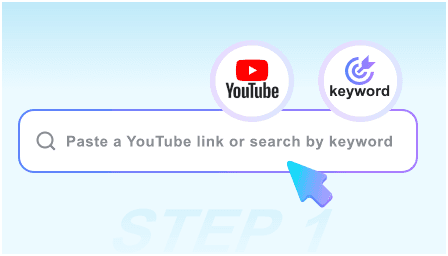
Paste the Video Link
Copy the YouTube URL into Lynote’s summarizer.
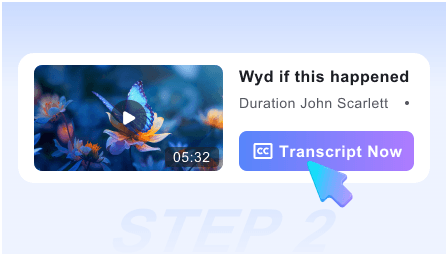
Generate the Summary
Review key points, sections, and timestamps when the transcript is available.
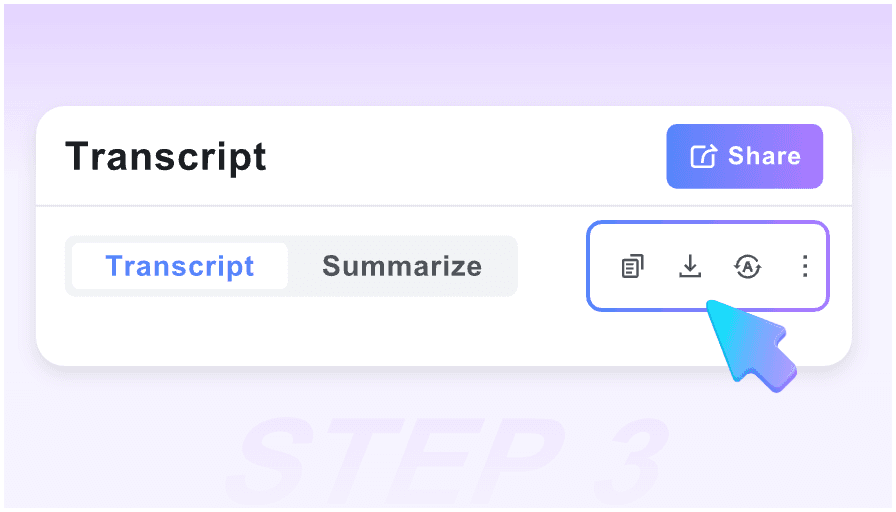
Save the Useful Notes
Copy the takeaways into your study notes, research doc, or content brief.
Who Uses a ChatGPT YouTube Summarizer?

Students
Summarize lectures and study videos before exams.

Researchers
Extract ideas from interviews, talks, and conference videos.

Content Marketers
Turn webinars and tutorials into briefs, outlines, and repurposing notes.

Product Teams
Review demo videos and customer interviews faster.

Creators
Scan competitor videos and organize inspiration responsibly.

Busy Viewers
Decide whether a long video is worth watching in full.
What Users Say About Our ChatGPT Summarizer

University Professor

This is the best implementation of ChatGPT for video I’ve seen. The way it pairs visual snapshots with AI summaries makes reviewing guest lectures incredibly efficient for my students.

Software Engineer
I use it to summarize 2-hour coding tutorials. ChatGPT extracts the logic and provides a clean Markdown checklist that I can paste right into my project README.

PhD Candidate
No login and instant ChatGPT summaries? It’s a dream for my research. The Markdown export to Obsidian is flawless and saves me hours of manual note-taking.

Business Analyst
I used to spend all day watching market analysis videos. Now, I let ChatGPT summarize the key trends and jump to the specific timestamps that matter most.

Tech YouTuber
As a creator, I use this to analyze competitor videos. ChatGPT helps me see the structure of their content instantly, allowing me to find gaps in the market.

Marketing Director
Most AI tools are gated behind a paywall. This ChatGPT summarizer is truly free and gives me better insights than the paid alternatives I’ve tried.
Frequently Asked Questions
Quick answers before you use the tool.
It is a tool that turns a YouTube video into a structured, ChatGPT-style summary using available video context such as transcript text.
No. Paste the YouTube link and review the generated notes when the video transcript can be accessed.
Yes. It is especially useful for lectures, interviews, tutorials, webinars, and podcasts that are too long to review manually.
Use the summary as a starting point. For important decisions, check the original video and timestamped moments.