

AI Video Watcher
The ultimate AI video watcher that views, analyzes, and extracts insights from any video for you. Get instant visual breakdowns and structured notes—no login required.






Why Use Our AI Video Watcher for Your Research

Intelligent Visual Analysis
Our AI doesn’t just listen; it watches. By pairing deep-learning analysis with key visual frames, the AI video watcher ensures you never miss a chart, slide, or visual cue.

Frame-Accurate Navigation
Stop scrubbing through timelines. Our AI identifies critical scene changes and data points, allowing you to jump to the exact millisecond where the most important information appears.

Automated Insight Extraction
Let the AI do the heavy lifting. It filters out the filler and “fluff,” delivering a condensed report of high-value insights and technical data points from any long-form video.

Zero Friction, Total Privacy
Start your analysis instantly. No account creation, no email capture, and no credit cards. Just paste your link and let the AI video watcher begin its deep scan.

Research-Ready Exports
Seamlessly bridge the gap between video and your database. Export structured Markdown files directly into your “Second Brain” tools like Notion, Obsidian, or Logseq.

Global Content Intelligence
Watch and understand content from around the world. Our AI translates and summarizes foreign language videos into your native tongue without losing technical nuance.
3 Steps to Watch Videos with AI
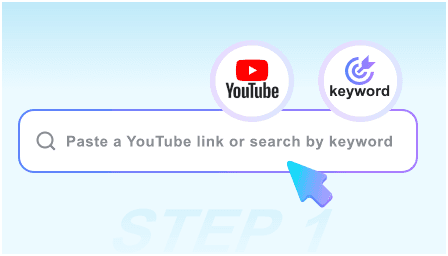
Step 1: Deploy the AI Watcher
Paste the URL of the video you need to analyze. Whether it’s a technical webinar, a long documentary, or a complex tutorial, our AI is ready to watch.
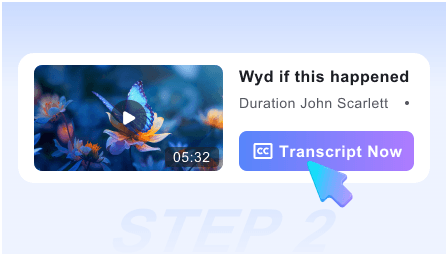
Step 2: Review the AI Analysis
Within seconds, the AI generates a comprehensive visual map of the video, highlighting key data, visual evidence, and a structured summary of the narrative.
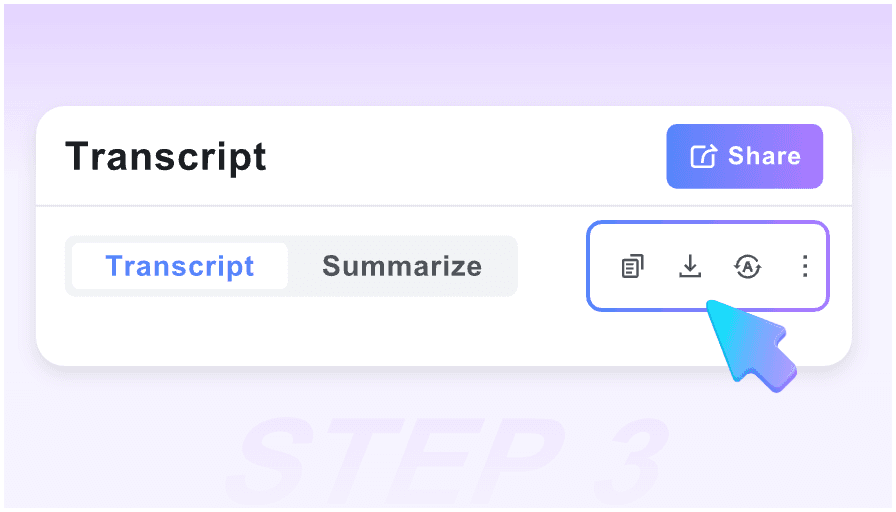
Step 3: Sync to Your Workflow
Review the extracted insights, copy the technical data, or export the entire analysis as a Markdown file to your professional knowledge management system.
Who is this AI Video Watcher for?

Academic Researchers
Scan through hours of recorded symposiums and lectures. Extract visual data and citations without having to sit through the entire presentation.

Market Analysts
Monitor competitor webinars and industry keynotes. Use the AI to pinpoint specific product reveals and strategic announcements in record time.

Software Developers
Watch coding walkthroughs and technical demos efficiently. The AI extracts code snippets and architectural diagrams directly from the video frames.

Investigative Journalists
Process long press conferences and raw footage. Use the visual timestamps to find specific quotes and visual evidence for your stories.

Executive Leaders
Stay informed on industry trends without the time commitment. Get the “Executive Summary” of 2-hour panel discussions delivered in a 2-minute read.

Technical Students
Master complex subjects by reviewing AI-generated study guides. The pairing of text and visual snapshots makes memorizing technical diagrams effortless.
What Professional Users Say

University Professor

This AI video watcher has revolutionized my literature review process. I can “watch” ten guest lectures in the time it used to take to watch one, with better notes.

Senior DevOps Engineer
I use it for technical documentation. It captures the exact frames of the configuration screens I need, saving me from constant pausing and screenshotting.

Business Intelligence Lead
The privacy aspect is huge for me. I can analyze industry reports and internal briefings knowing that my data isn’t being tied to a personal profile.

Product Strategy Consultant
The Smart Timeline is a lifesaver. I can jump straight to the “Q&A” or “Data” sections of a video instantly. It’s like having a personal research assistant.

Data Scientist
As someone who processes a lot of visual information, having the snapshots alongside the AI summary is essential for understanding complex data visualizations.

Knowledge Management Specialist
The Markdown export is flawless. It plugs directly into my Obsidian vault, turning video content into searchable, permanent knowledge in seconds.
Frequently Asked Questions
Everything you need to know about our AI Video Watcher technology.
Yes, our AI analysis tool is 100% free. You can process unlimited videos and generate full visual reports without any subscription or hidden costs.
We believe in frictionless productivity. By removing the login requirement, we ensure your research remains private and you can get your data as fast as possible.
Transcription only converts audio to text. Our AI Video Watcher analyzes the visual frames, identifying slides, charts, and scene changes to provide full context.
Yes. The tool is designed for professionals. You can export all AI-generated insights to Markdown, which is fully compatible with Notion, Obsidian, and Tana.
Absolutely. Our AI is optimized for long-form professional content, capable of distilling hours of footage into a structured, navigable report in seconds.
Yes, the AI is trained to identify and extract key takeaways, technical steps, and data-heavy moments, organizing them into an easy-to-read format.
Yes. Our AI can watch and analyze videos in over 50 languages, providing you with a translated summary and visual breakdown in your language of choice.
Your privacy is our priority. Since we don’t require accounts, we don’t track your identity or store your analysis history. Your research remains your own.