

AI Video Scanner
Deep-scan any video to extract hidden insights, data points, and visual evidence. Get comprehensive intelligence reports and searchable transcripts instantly—no account required.






Why Use Our AI Video Scanner for Deep Intelligence

Frame-by-Frame Visual Analysis
Our scanner doesn’t just listen; it watches. It identifies on-screen text, charts, and visual cues, pairing them with AI analysis to provide a 360-degree view of the video content.

Precision Forensic Timestamps
Pinpoint exact moments where specific topics or visual changes occur. Our scanner generates a high-resolution timeline so you can jump to critical evidence in a single click.

Automated Intelligence Reports
Transform raw footage into structured intelligence. The scanner automatically filters out filler and extracts technical specs, data trends, and actionable insights into a formal report.

Anonymous & Secure Scanning
Perform sensitive research with total peace of mind. Our scanner requires no login or personal data, ensuring your competitive intelligence gathering remains 100% confidential.

Professional Data Export
Seamlessly integrate video data into your professional stack. Export scanned findings directly to Markdown for Obsidian/Notion or download structured JSON for data analysis.

Global Signal Detection
Scan content in over 50 languages. Our AI detects nuances and technical terminology across borders, translating foreign intelligence into clear, localized insights.
3 Steps to Scan Any Video for Insights
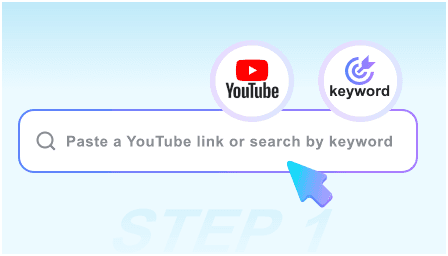
Step 1: Deploy Scanner via URL
Paste the link of the video you need to analyze. Our scanner supports technical briefings, market webinars, and investigative footage without needing manual input.
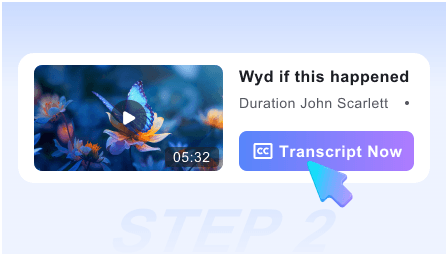
Step 2: Run Deep AI Analysis
Initiate the scan. Our engine parses the audio and visual tracks simultaneously to identify key themes, technical data, and significant visual shifts within seconds.
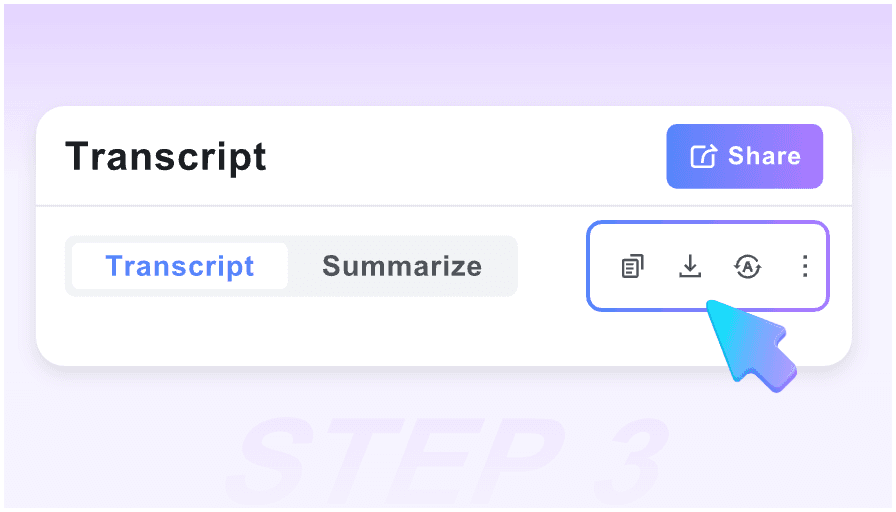
Step 3: Review Intelligence Output
Access your structured scan report. Review the automated findings, verify visual evidence via timestamps, and export the data to your primary research database.
Who is the AI Video Scanner built for?

Market Researchers
Scan competitor webinars and product demos to extract feature lists and strategic pivots without sitting through hours of marketing fluff.

Investigative Journalists
Rapidly scan hours of press conferences or field footage to find specific quotes or visual evidence using our high-precision timestamping.

Technical Analysts
Convert complex technical presentations into structured documentation. Extract code snippets, architectural diagrams, and spec sheets automatically.

Legal Professionals
Scan depositions and public hearings for specific keywords or visual cues, creating a searchable index of video evidence for case preparation.

Business Intelligence Units
Monitor industry trends by scanning global summits and earnings calls, turning video-based information into actionable corporate intelligence.

Academic Researchers
Scan archival footage and recorded symposiums to cite specific data points and visual references accurately within your research papers.
Professional Feedback on AI Video Scanner

Senior Research Fellow

The depth of the scan is unparalleled. It picked up on-screen data tables that other tools completely ignored. It’s an essential part of my literature review process now.

Competitive Intelligence Lead
This scanner changed how we track competitors. We can ‘read’ a 45-minute product launch in 3 minutes and have a full Markdown report ready for the executive team.

OSINT Investigator
Privacy is my top priority. Being able to scan sensitive video links without an account while getting high-fidelity timestamps is a massive advantage for my workflow.

Technical Product Manager
I use the scanner to audit our own internal training videos. It creates a perfect index of topics covered, making our knowledge base searchable by visual context.

Financial Analyst
Scanning earnings calls used to be a chore. Now, I just look for the ‘High-Value Moments’ identified by the AI to find the specific guidance numbers I need.

Strategy Consultant
The speed is incredible. I can scan five different industry panels simultaneously and have a synthesized intelligence report before my morning coffee is finished.
Frequently Asked Questions
Technical details and capabilities of the AI Video Scanner.
Our scanner utilizes advanced neural networks for both NLP and Computer Vision, ensuring over 99% accuracy in identifying key themes and visual data points.
No. We operate on a zero-knowledge principle. Since no account is required, your scans are ephemeral and not linked to any personal identity or IP history.
Yes, our scanner includes OCR (Optical Character Recognition) capabilities to extract text from slides, whiteboards, and on-screen captions during the scan.
You can export your intelligence reports as structured Markdown (optimized for Notion/Obsidian), plain text, or copy specific data points directly to your clipboard.
Absolutely. The scanner is optimized for high-resolution content and can process videos up to 4 hours long without any degradation in analysis quality.
A summary just shortens text; an Intelligence Report categorizes data, identifies visual evidence, and provides a structured framework for professional decision-making.
Yes. The scanner supports 50+ languages, providing both the original transcript and a translated intelligence report in your target language for global monitoring.
Currently, we offer unlimited scanning for all users to ensure researchers and professionals can gather the intelligence they need without interruption.