

AI Lecture Video Summarizer
Transform dense academic lectures into structured study guides, exam-ready notes, and visual flashcards using AI — no login required.






Why Use Lynote for Academic Lecture Summaries

Visualized Lecture Notes
Don’t lose the context of complex diagrams or formulas. We pair AI summaries with key whiteboard snapshots so you can see exactly what the professor was referencing.

Topic-Based Smart Chapters
Navigate 3-hour seminars with ease. Our AI identifies syllabus-relevant topics and creates timestamps that let you jump straight to specific concepts or exam reviews.

Exam Prep & Study Guides
Skip the filler and “umms.” We extract core academic theories and turn long-winded explanations into concise, bulleted study guides and key term definitions.

100% Free for Students
Access unlimited lecture breakdowns without a subscription. We know student budgets are tight—just paste your university’s YouTube link and start studying.

Academic Markdown Export
Seamlessly integrate summaries into your digital brain. One-click export to Markdown for Notion, Obsidian, or Anki to build your personal knowledge base.

Global Research Support
Access world-class education in any language. Our AI translates foreign language lectures into clear, academic English (or your native tongue) for better comprehension.
3 Steps to Ace Your Exams
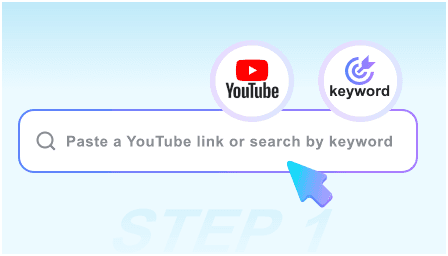
Step 1: Paste Lecture URL
Copy the link of any recorded lecture, seminar, or educational tutorial. We support everything from 10-minute explainers to 3-hour university courses.
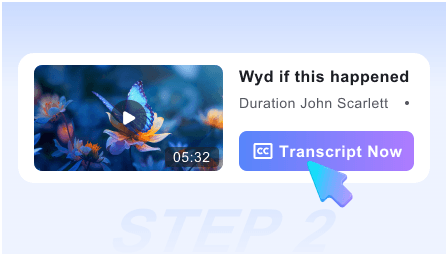
Step 2: Generate Study Guide
Click “Summarize” and watch our AI distill the transcript into key concepts, visual snapshots of slides, and a structured outline of the lesson.
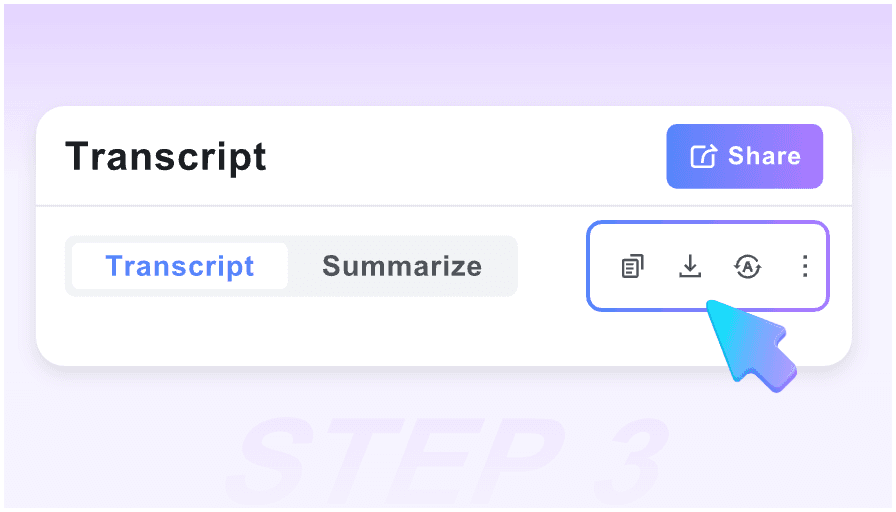
Step 3: Sync to Your Notes
Review the key takeaways, copy the AI-generated definitions, and export the entire lecture summary to your Notion or Obsidian workspace.
Who is this tool suitable for?

University Students
Turn recorded Zoom sessions or YouTube lectures into organized study notes. Perfect for catching up on missed classes or reviewing before finals.

PhD Researchers
Quickly scan academic symposiums and guest lectures for specific data points or citations without watching the entire multi-hour broadcast.

Online Learners
Maximize your Coursera or Khan Academy experience by converting video tutorials into actionable checklists and structured reference material.

Medical & STEM Students
Capture critical diagrams, chemical structures, and mathematical proofs through our visual snapshot feature paired with technical AI summaries.

Lifelong Scholars
Stay updated on the latest scientific breakthroughs or historical debates by getting the “TL;DR” of long-form educational content during your commute.

ESL Students
Bridge the gap in fast-paced English lectures. Read the summarized academic concepts at your own pace alongside the visual context of the slides.
What Students & Educators Say

Medical Student

The visual snapshots are a lifesaver for anatomy. Instead of just reading text, I get the actual diagram from the lecture right next to the AI summary.

University Professor
I recommend this to my students who struggle with note-taking. It helps them focus on the lecture in real-time, knowing they can generate a structured guide later.

Computer Science Major
The Markdown export is perfect. I can send a 2-hour coding lecture straight to my Obsidian vault with all the key logic steps already bulleted out.

Law Student
Case law lectures are incredibly dense. This tool identifies the core legal arguments and timestamps them, so I don’t have to scrub through hours of video.

Distance Learner
Being a visual learner, having the slide captures next to the text helps me grasp complex physics concepts much faster than a plain transcript ever could.

Graduate Assistant
Most tools charge a fortune for long videos. This is free, requires no login, and handles 2-hour seminars perfectly. It’s my go-to for exam prep.
Frequently Asked Questions
Need help with your study workflow? Find answers to common questions about our lecture summarizer.
Yes, it is 100% free. We believe academic tools should be accessible, so you can summarize unlimited lectures without any hidden fees or subscriptions.
Absolutely. Our AI is specifically optimized for long-form academic content, ensuring it doesn’t lose the thread during extended seminars or workshops.
Unlike basic transcripts, we capture screenshots of slides and whiteboards. This allows you to see the formulas or charts the professor is discussing for better retention.
Yes. You can export your lecture summaries in Markdown format, which is natively supported by Notion, Obsidian, and can be easily converted for Anki flashcards.
Yes. The AI is trained to recognize technical terminology and academic jargon, making it highly effective for STEM, Law, and Medicine lectures.
Yes. Our AI analyzes the pedagogical structure of the video to extract key definitions, main arguments, and summary points into a cohesive study guide.
Yes. You can input lectures in various languages, and the tool will provide a structured summary in your preferred language—perfect for international research.
Definitely. Since no account is required, we don’t track your library or search history. Your study sessions and lecture links remain completely private.