

01
과목 성적으로 결과 산출
각 학년의 과목 성적을 입력하여 포함된 수업의 전체 고등학교 GPA를 계산합니다. 학교에서 인정하는 성적과 학점을 사용하세요. 동일한 과목에 대해 학기 성적과 연간 성적을 모두 입력하면 두 번 계산될 수 있습니다.
가중치 및 비가중치 고등학교 GPA를 비교하세요. 수업을 추가하거나 이전 GPA를 업데이트할 수 있습니다.
계산기에서 '고등학교'를 선택하세요. 과목명, 학점, 학점, 과목 수준을 입력하여 시작하세요.
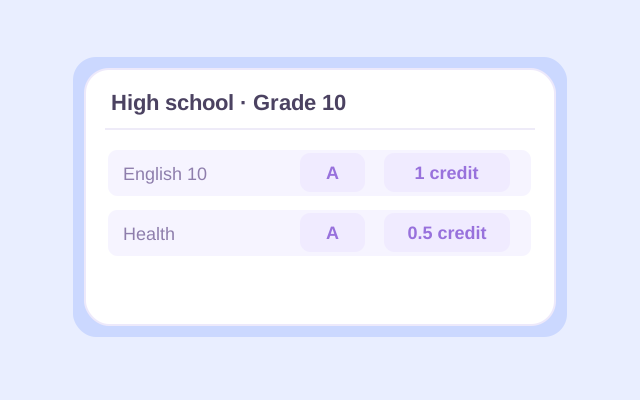
Select High school, then enter a course name and letter grade for each class. Choose the appropriate school year and the course's 0.5 or 1 credit value. Use your report card or transcript to check the entries, especially for half-credit electives.
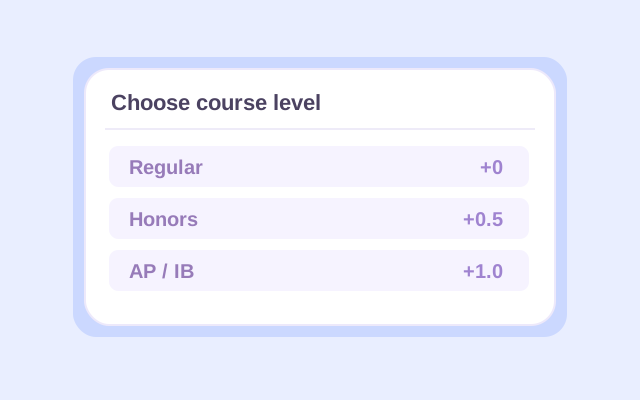
Choose Regular, Honors, AP, or IB for each course. Open Change if you need a different grading preset. Add other school years as needed, or use Previous GPA to enter an existing GPA and the credits behind it. Select whether that earlier GPA is weighted or unweighted.
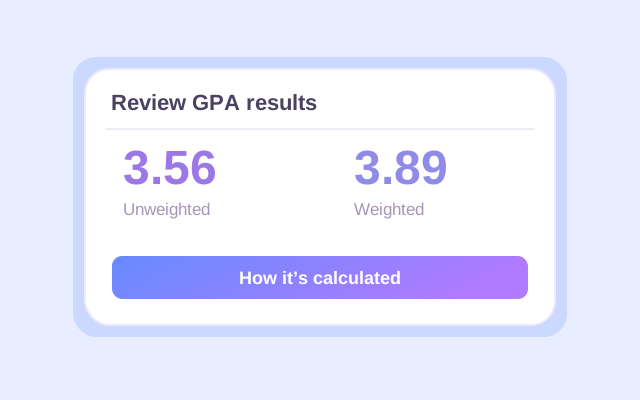
Click Calculate. Check the weighted and unweighted results, counted credits, and calculation details. If you added an earlier GPA, read which result is cumulative and which covers current classes only. Recalculate after changing any input, then export the result you want to keep.
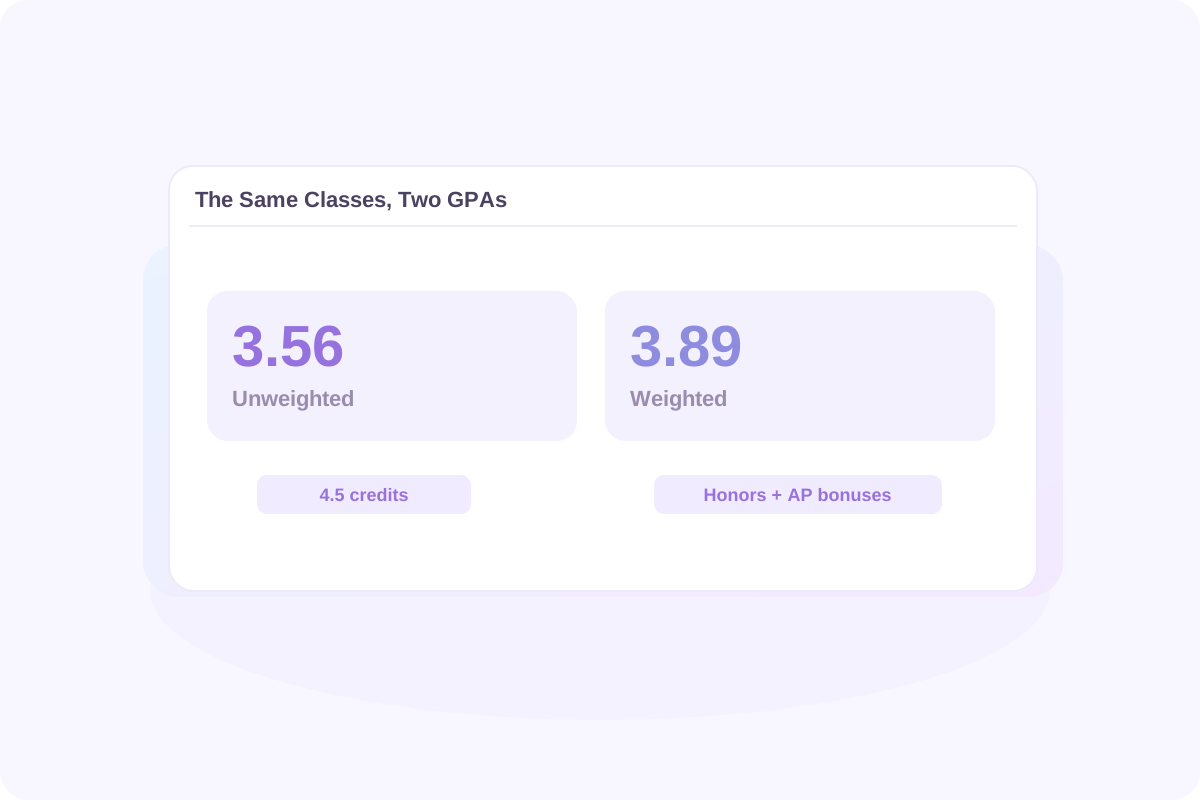
An unweighted GPA calculator for high school uses each letter grade's base point value. On Lynote's default 4.0 preset, an A is 4.0 whether the course is Regular or AP.
The weighted high school GPA calculation adds 0.5 for Honors and 1.0 for AP or IB to eligible grades. A Regular A contributes 4.0 points per credit; an Honors A contributes 4.5; an AP or IB A contributes 5.0. An F receives no course-level bonus.
Using the course example below, the same grades produce a 3.56 unweighted GPA and a 3.89 weighted GPA. The difference comes from the Honors and AP bonuses. Each course's credit value affects both results.
When comparing GPAs, match the type and scale. A weighted 4.2 and an unweighted 3.8 are different measures. Your school may use bonuses that differ from Lynote's presets.
고등학교 비가중치 GPA 계산기는 각 학점의 기본 점수 값을 사용합니다. Lynote의 기본 4.0 사전 설정에서는 과목이 일반이든 AP이든 A는 4.0입니다.
가중치 고등학교 GPA 계산은 우등 과목에 0.5점, AP 또는 IB 과목에 1.0점을 추가합니다. 일반 A는 학점당 4.0점을 기여하고, 우등 A는 4.5점을 기여하며, AP 또는 IB A는 5.0점을 기여합니다. F는 과목 수준 보너스를 받지 않습니다.
아래 과목 예시를 사용하면 동일한 성적이 3.56 비가중치 GPA와 3.89 가중치 GPA를 산출합니다. 차이는 우등 및 AP 보너스에서 비롯됩니다. 각 과목의 학점 값은 두 결과 모두에 영향을 미칩니다.
GPA를 비교할 때는 유형과 척도를 일치시키세요. 가중치 4.2와 비가중치 3.8은 다른 측정값입니다. 학교는 Lynote의 사전 설정과 다른 보너스를 사용할 수 있습니다.
성적표에 있는 성적 척도부터 시작하세요. 이 표는 Lynote의 기본 4.0 플러스/마이너스 값과 과목 수준 보너스를 보여줍니다.
| 학점 | 일반 / 비가중치 | 우등 | AP / IB |
|---|---|---|---|
| A+ | 4.0 | 4.5 | 5.0 |
| A | 4.0 | 4.5 | 5.0 |
| A− | 3.7 | 4.2 | 4.7 |
| B+ | 3.3 | 3.8 | 4.3 |
| B | 3.0 | 3.5 | 4.0 |
| B− | 2.7 | 3.2 | 3.7 |
| C+ | 2.3 | 2.8 | 3.3 |
| C | 2.0 | 2.5 | 3.0 |
| C− | 1.7 | 2.2 | 2.7 |
| D+ | 1.3 | 1.8 | 2.3 |
| D | 1.0 | 1.5 | 2.0 |
| D− | 0.7 | 1.2 | 1.7 |
| F | 0.0 | 0.0 | 0.0 |
4.0 척도의 고등학교 GPA 계산기의 경우, 값이 학교와 일치하면 기본 사전 설정을 유지하세요. 4.33 사전 설정은 A+의 기본값을 4.33으로 변경합니다. '문자만'은 플러스 및 마이너스 기호를 무시하므로 B+, B, B−는 모두 B 값을 사용합니다.
학교에서 A+를 부여하지 않는 경우, 실제로 보고하는 성적을 입력하세요. 플러스 및 마이너스 구분을 제거하는 것은 별도의 선택입니다. 필요한 계산과 일치할 때만 '문자만'을 선택하세요.
학기 GPA는 한 학기 동안의 성적을 나타냅니다. 누적 고등학교 GPA는 해당 학년 동안 수강한 모든 GPA 반영 과목을 합산한 것입니다. 새로운 성적이 나올 때마다 이전 학업 성적이 계속해서 결과에 영향을 미칩니다.
각 학년의 과목 성적을 입력하여 포함된 수업의 전체 고등학교 GPA를 계산합니다. 학교에서 인정하는 성적과 학점을 사용하세요. 동일한 과목에 대해 학기 성적과 연간 성적을 모두 입력하면 두 번 계산될 수 있습니다.
이미 GPA가 있는 경우, 해당 숫자에 포함된 학점과 함께 이전 GPA를 사용하세요. 일치하는 GPA 유형을 선택하세요. 이렇게 하면 모든 이전 수업을 다시 입력하지 않고도 누적 결과를 업데이트할 수 있습니다.
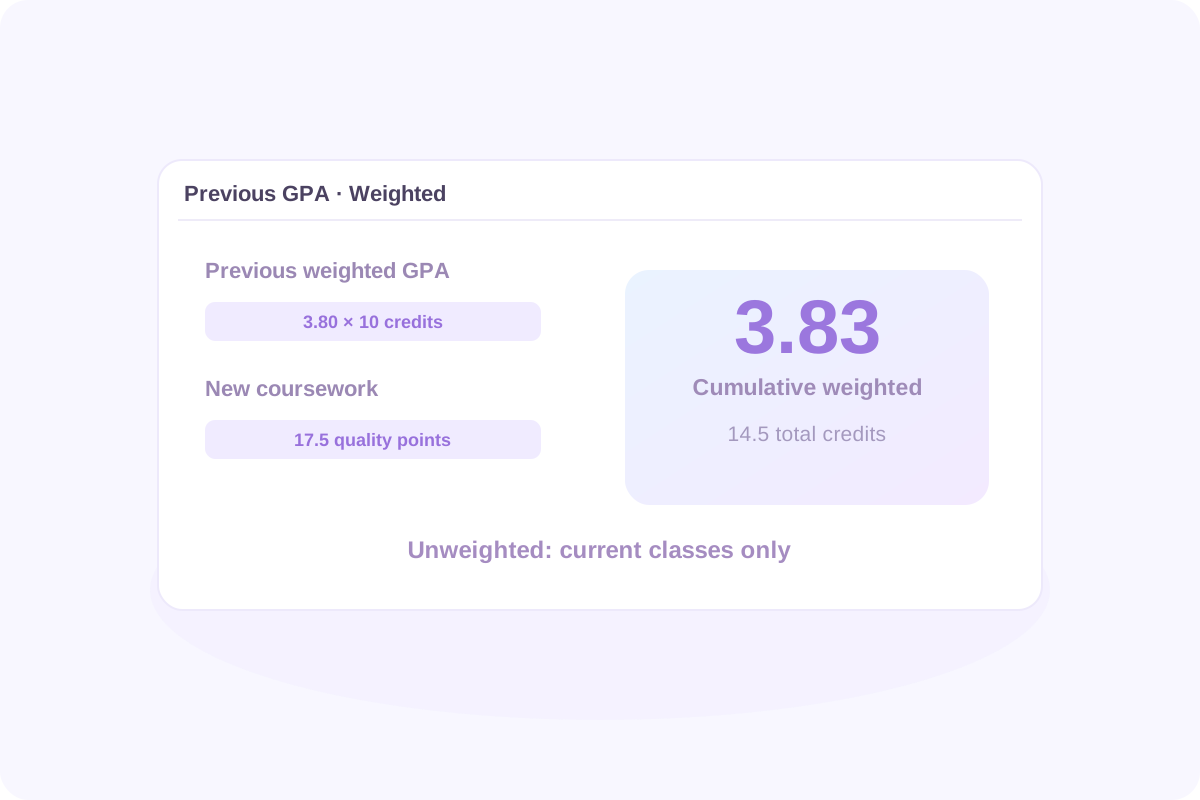
이전 가중 GPA가 10학점에 걸쳐 3.80이라고 가정해 봅시다. 위에 새로운 과목을 추가하면 4.5학점에 걸쳐 17.5의 가중 품질 점수가 추가됩니다.
업데이트된 가중 GPA는 55.5 ÷ 14.5 = 3.83입니다. 이전 가중 데이터를 제공했으므로, 이전 비���중 데이터가 아닌 현재 수업에 대해서만 비가중 결과는 3.56으로 유지됩니다.
새로운 누적 GPA = (이전 GPA × 이전 GPA 학점 + 새로운 품질 점수) ÷ (이전 GPA 학점 + 새로운 GPA 학점)
비가중 누적 결과를 계산하려면 해당 학점과 함께 이전 비가중 GPA를 사용하세요. GPA 유형을 혼합하거나 동일한 이전 과목을 이전 GPA와 과목 목록에 모두 포함하지 마세요.
학기 GPA는 한 학기를 다룹니다. 누적 고등학교 GPA는 관련 학년 동안 포함하는 모든 GPA 관련 학업 과정을 결합합니다. 이전 학업 과정은 새로운 성적이 도착함에 따라 결과에 계속 영향을 미칩니다.
각 학년 아래에 학업 과정을 입력하여 포함된 수업에서 전체 고등학교 GPA를 계산하세요. 학교에서 인정하는 성적과 학점을 사용하세요. 동일한 학업 과정에 대해 학기 성적과 연간 성적을 모두 입력하면 두 번 계산될 수 있습니다.
이미 GPA가 있는 경우, 해당 숫자에 포함된 학점과 함께 '이전 GPA'를 사용하세요. 일치하는 GPA 유형을 선택하세요. 이렇게 하면 모든 이전 수업을 다시 입력하지 않고도 누적 결과를 업데이트할 수 있습니다.
새로운 누적 GPA = (이전 GPA × 이전 GPA 학점 + 새로운 품질 점수) ÷ (이전 GPA 학점 + 새로운 GPA 학점)
이전 가중치 GPA가 10학점에 걸쳐 3.80이라고 가정해 봅시다. 위에 새로운 과목을 추가하면 4.5학점에 걸쳐 17.5 가중치 품질 점수가 기여됩니다.
| 학업 과정 | GPA 학점 | 가중치 품질 점수 |
|---|---|---|
| 이전 학업: 3.80 GPA | 10.0 | 3.80 × 10 = 38.0 |
| 새로운 과목 | 4.5 | 17.5 |
| 결합 | 14.5 | 55.5 |
업데이트된 가중치 GPA는 55.5 ÷ 14.5 = 3.83입니다. 비가중치 결과는 이전 비가중치 데이터��� 아닌 이전 가중치 데이터를 제공했기 때문에 현재 수업에 대해서만 3.56으로 유지됩니다.
비가중치 누적 결과를 계산하려면 이전 비가중치 GPA와 해당 학점을 대신 사용하세요. GPA 유형을 혼합하거나 이전 GPA와 과목 목록에 동일한 이전 과목을 모두 포함하지 마세요.
결과를 사용하기 전에 GPA 유형과 해당 결과가 나타내는 학업 과정을 확인하세요. 계산된 학점, 계산된 수업, 학년별 결과, 과목별 계산 세부 정보를 검토하세요.
성적, 학점 값 또는 과목 수준을 변경하면 이전 결과가 오래됩니다. 다운로드하기 전에 다시 계산을 클릭하세요. 페이지를 ���로 고치면 과목 입력이 자동으로 유지되지 않으므로 보관하고 싶은 내용은 모두 내보내세요.
유용한 비교는 척도와 목표에서 시작됩니다. 기본 비가중 4.0 척도에서 4.0은 A 평균에 해당하고, 3.0은 B 평균, 2.0은 C 평균에 해당합니다. 이는 학점 기준 값이며, 보편적인 입학 또는 장학금 기준은 아닙니다.
GPA를 공개된 숫자와 비교하기 전에, 해당 숫자가 가중치 적용인지 비가중치 적용인지, 어떤 과목을 포함하는지, 그리고 합격한 학생들을 설명하는지 또는 자격 요건을 설명하는지 확인하세���.
대학은 귀하의 학교에서 제공되는 과목의 맥락에서 귀하의 기록을 검토할 수 있습니다. 예를 들어, 스탠포드는 전인적 검토를 설명하며 맥락에서 학업 성취도를 고려합니다. 계산기 결과만으로는 입학 결정을 예측할 수 없습니다.
유용한 비교는 척도와 목표에서 시작됩니다. 기본 비가중치 4.0 척도에서 4.0은 A 평균에 해당하고, 3.0은 B 평균에 해당하며, 2.0은 C 평균에 해당합니다. 이는 성적 점수 참조 값이며, 보편적인 입학 또는 장학금 기준은 아닙니다.
GPA를 공개된 숫자와 비교하기 전에, 해당 숫자가 가중치인지 비가중치인지, 어떤 과목을 포함하는지, 그리고 합격한 학생을 설명하는지 또는 자격 요건인지 ���인하세요.
대학은 학교에서 제공되는 과목의 맥락에서 귀하의 기록을 검토할 수 있습니다. 예를 들어, 스탠포드는 전인적 검토를 설명하며 맥락에서 학업 성취도를 고려합니다. 계산기 결과만으로는 입학 결정을 예측할 수 없습니다.
If your school gives every included course equal weight, enter 1 credit for each to produce an equal-course average. If some classes are worth 0.5 credits and others 1, use their actual values. Do not guess equal credits when they are unknown, and do not combine equal-course weights with a previous GPA measured in different credit units.
Lynote currently accepts letter grades. Convert each percentage or number grade to a letter using your school's grading chart, then select that letter. There is no universal percentage-to-GPA conversion, and dividing a percentage by 25 may not reproduce your school's calculation.
Use each letter grade's base points without Honors, AP, or IB bonuses. Multiply by course credits, add the quality points, and divide by counted credits. In High school mode, Lynote shows an unweighted result alongside the weighted one for the entered classes.
On the default 4.0 preset, an AP or IB A earns 5.0 weighted points per credit. That does not make every class a 5.0-scale class. Lynote does not offer a dedicated 6.0-scale preset or editable course bonuses. Check whether its preset values match the calculation your school requires.
If A+ is not a reported grade, simply enter the grades your school uses. Choose Letters only when plus and minus distinctions should be ignored. That preset treats A+, A, and A− as A; the standard 4.0 plus/minus preset instead keeps A− at 3.7.
Include ninth-grade coursework if it belongs in your school's cumulative GPA. A college or scholarship may count different years or subjects. Lynote follows the courses you include; it does not decide which years a particular institution requires.
Use the grade records and credits your school counts for GPA. For a semester GPA, include that semester's coursework. If you use a full-year final grade, do not also enter the component semester or quarter grades as additional coursework unless your school's method specifically requires that treatment.
They count when the GPA you are calculating includes them. A class may earn graduation credit without affecting GPA. Check your transcript or ask your school which courses are GPA-bearing, then include the appropriate grades or special grade symbols.
You can manually enter only the courses that belong in the core GPA you need. Confirm the required subjects, grade values, and weighting rules first. Lynote does not automatically identify core courses or certify an admissions, athletic-eligibility, or scholarship GPA.
Follow your school's rules for which attempts count and whether a dual-enrollment course earns extra points. Lynote does not automatically replace retakes or offer a separate dual-enrollment level. Do not assume an AP or Honors preset is equivalent unless its point values match the required treatment.
Enter the course's letter grade, not an AP exam score or an IB examination score. Select the actual course level for the weighted calculation. Exam results and course grades serve different purposes and should not be substituted for one another.
Start with your school's grading policy and distinguish its GPA from a scholarship GPA. Georgia's HOPE GPA uses its own course and weighting rules. Lynote's standard high school presets do not reproduce that official calculation; use GAfutures to check the applicable rules and your official HOPE GPA.
Use Lynote when the courses, credits, and point values match the GPA you want to estimate. Florida scholarship calculations can use different rules: the Bright Futures application guidance explains that its GPA may differ from a report-card GPA. This calculator does not determine Bright Futures eligibility.
Follow each college's current application instructions for the GPA to report. Some institutions assess grades in their school context or use their own calculation rules. Lynote estimates the GPA produced by your inputs and selected preset; it does not reproduce an institution's internal admissions review.
You can estimate a final cumulative GPA by entering all the completed coursework it should include, or by combining previous GPA data with the remaining courses. If you mean the exam score needed to earn a particular course grade, that is a different calculation; this GPA tool does not solve final-exam grade requirements.
Your school determines when official GPAs are updated. Use posted grades for a completed reporting period, or label expected-grade calculations as estimates. Recalculate when new grades arrive, and check your student portal or transcript for the official updated GPA.
Lynote provides a GPA calculation breakdown and result exports. An Excel, CSV, or printed result is not an official transcript, and the calculator does not currently provide a school-certified transcript template. Request an official transcript through your school's process.
You can start with 50 free calculations without signing up. Signed-in users receive a one-time allowance of 100 free calculations; additional use follows Lynote's credit rules. Entries are not automatically retained after a page refresh. Export your results before leaving if you need a copy.
| 도구 | 사용 목적 |
|---|---|
| 단어 카운터 | 에세이, 보고서, 지원서 답변의 길이를 확인합니다. |
| AI 학습 경로 생성기 | 학습 목표를 향해 나아갈 때 학습할 주제를 정리합니다. |
| AI 노트 생성기 | 지원되는 학습 자료를 정리된 학습 노트로 변환합니다. |
| AI 휴머나이저 | AI 지원에 대한 학교 규칙을 준수하면서 초안 문구를 수정합니다. |
| AI 감지기 | 글쓰기 검토 시 AI 콘텐츠 추정치를 하나의 신호로 검토합니다. |
| 투명 문자 | 서식이 허용되는 텍스트 필드에 빈 문자를 복사합니다. |
| 문서 번역기 | 다국어 검토를 위해 지원되는 학습 문서를 번역합니다. |
| AI 플래시카드 | 지원되는 학습 자료로 연습 카드를 만듭니다. |
| PDF 요약기 | 지원되는 교과서 챕터 및 읽기 자료의 주요 아이디어를 검토합니다. |
| 오디오-텍스트 변환 | 나중에 검토할 수 있도록 처리 허가를 받은 녹음 파일을 필사합니다. |
<p>실용적인 독서 및 노트 필기 방법으로 다음 학습 세션을 더 쉽게 정리하세요. 지정된 읽기 자료를 퀴즈나 수업 토론 전에 다시 볼 수 있는 노트로 바꾸는 방법을 살펴보세요. 노트 필기 방식을 비교하고 강의, 읽기 과제 또는 복습 세션에 적합한 구조를 선택하세요. 서면 필사본이 허용된 녹음 파일을 검토하는 데 어떻게 도움이 되는지 알아보세요.</p>