Si vous utilisez l'IA pour élaborer vos plans ou générer des idées, vous connaissez sans doute la frustration d'un texte robotique et répétitif. Savoir réécrire un texte généré par l'IA de façon naturelle est essentiel pour préserver votre style unique et garantir que vos écrits touchent vos lecteurs.
La meilleure façon de réviser un contenu généré par l'IA est d'en extraire les idées principales et de reconstruire la structure avec vos propres mots. Plutôt que de simplement remplacer quelques adjectifs, il est nécessaire d'apporter un contexte personnel, de varier le rythme des phrases et de supprimer les transitions prévisibles de l'IA.
Ce guide présente une méthode de travail fiable pour la révision des brouillons générés par l'IA. Nous verrons pourquoi la simple paraphrase est insuffisante et comment humaniser naturellement votre texte pour plus de clarté, d'originalité et de fluidité.
Réponse rapide : Quelle est la meilleure façon de réécrire un texte généré par l'IA ?
La méthode la plus efficace pour réécrire un texte généré par l'IA consiste à se concentrer sur le sens sous-jacent plutôt que sur les mots précis. Lisez la version préliminaire, mettez-la de côté et expliquez le concept principal à voix haute, comme si vous parliez à un collègue.
Notez cette explication naturelle et utilisez-la comme base. En modifiant complètement la structure des phrases et en ajoutant vos propres exemples concrets, vous éliminez les schémas prévisibles qui donnent au texte un aspect artificiel.
Qu'est-ce que la réécriture naturelle signifie réellement ?
La réécriture naturelle va bien au-delà de la simple utilisation d'un dictionnaire de synonymes. Elle consiste à ajuster le rythme, le ton et la logique d'un document pour qu'il se lise comme s'il avait été écrit par un humain.
Les modèles d'IA ont tendance à écrire de manière très structurée et stéréotypée, en utilisant souvent des expressions de transition comme « de plus » ou « en conclusion ». Une réécriture naturelle supprime ces marqueurs répétitifs. Elle remplace les affirmations génériques par des observations spécifiques et nuancées qui reflètent le raisonnement humain.
Pourquoi le simple remplacement de synonymes ne suffit pas
De nombreux rédacteurs tentent d'humaniser les textes générés par l'IA en cliquant simplement avec le bouton droit sur les mots et en choisissant des synonymes. Cette approche aboutit généralement à des formulations maladroites qui déroutent les lecteurs et manquent d'authenticité.
De plus, les détecteurs d'écriture IA ne se contentent pas de rechercher des mots spécifiques. Ils analysent le texte à la recherche de schémas prévisibles, appelés perplexité et irrégularité, que le simple remplacement de synonymes ne corrige pas. Pour véritablement améliorer un brouillon, il est indispensable de modifier la structure fondamentale des phrases.
| Fonctionnalité | Remplacement de synonymes | Réécriture naturelle |
| :--- | :--- | :--- |
| Focus | Modification de mots individuels | Restructuration de l'idée globale |
| Lisibilité | Souvent lourd ou maladroit | Fluide, conversationnel et clair |
| Longueur des phrases | Reste uniforme et prévisible | Varie naturellement, comme la parole humaine |
| Contexte | Générique et inchangé | Inclut des exemples personnels et des détails |
Étape 1 : Identifier l’idée principale
Avant de modifier un seul mot, il est essentiel de comprendre précisément le message de l’IA. Les brouillons générés par l’IA sont souvent alourdis par un contexte inutile et des répétitions superflues.
Lisez le paragraphe et surlignez l’argument principal ou l’affirmation factuelle. Une fois cette idée principale identifiée, vous pouvez supprimer le reste du texte.
Étape 2 : Reformuler le texte
L’idée principale étant isolée, reformulez-la en utilisant votre propre style de phrase. Si l’IA a utilisé une phrase longue et complexe, divisez-la en deux phrases plus courtes.
Vous pouvez également modifier l’ordre logique du paragraphe. Par exemple, si l’IA a placé la conclusion à la fin, essayez de placer l’idée principale dès la première phrase pour un impact plus fort.

Étape 3 : Ajouter du contexte, des preuves ou un raisonnement personnel
Les modèles d'IA manquent d'expérience personnelle et de contexte concret. Pour que le texte paraisse naturel, vous devez ajouter des détails que l'IA ne peut pas connaître.
Insérez une brève anecdote, citez une étude de cas précise ou ajoutez votre propre raisonnement professionnel. Cela rend non seulement le texte plus captivant, mais renforce également votre expertise sur le sujet.
Étape 4 : Améliorer la fluidité, le ton et la clarté
La dernière étape consiste à peaufiner le brouillon pour une lecture fluide. Lisez votre texte à voix haute pour repérer les éventuelles maladresses ou tournures de phrases artificielles.
Soyez attentif à la longueur des phrases et veillez à un bon équilibre entre phrases courtes et percutantes et phrases plus longues et descriptives. Supprimez les clichés habituels de l'IA, tels que « approfondir » ou « témoignage de », et remplacez-les par un langage clair et direct.
Niveaux de profondeur de réécriture : Léger, Moyen et Approfondi
Tous les paragraphes rédigés avec l'aide de l'IA ne nécessitent pas le même niveau de correction. Une courte description de produit peut se contenter d'une légère reformulation, tandis qu'un essai universitaire ou un article d'opinion requiert généralement une réécriture plus approfondie. Choisir le bon niveau permet d'éviter à la fois une correction insuffisante et un sur-polissage inutile.
| Niveau de réécriture | Éléments modifiés | Idéal pour | Contrôle qualité |
| --- | --- | --- | --- |
| Réécriture légère | Supprime les tournures de phrases artificielles, améliore les transitions et fluidifie le rythme des phrases. | E-mails, résumés, légendes courtes et explications simples. | Le sens reste inchangé, mais le texte paraît plus naturel. |
| Réécriture moyenne | Réorganise les phrases, ajoute des exemples et remplace les affirmations génériques. | Articles de blog, notes de cours, contributions à des forums et écrits réflexifs. | Le paragraphe est plus clair et contient au moins un détail précis. |
| Réécriture en profondeur | Reconstruit l'argumentation de A à Z en utilisant votre propre plan et vos propres preuves. | Essais, articles d'opinion, analyses de recherche et contributions importantes. | La structure, les preuves et le style sont clairement les vôtres. |
Si un paragraphe contient l'argument central de votre texte, choisissez une réécriture moyenne ou en profondeur. S'il explique simplement une définition, une réécriture légère peut suffire. L'objectif n'est pas de rendre chaque phrase percutante, mais de rendre les éléments importants originaux, précis et crédibles.
Liste de vérification pour une réécriture naturelle
Avant de considérer une version réécrite comme terminée, vérifiez si elle réussit un simple test éditorial :
-
La première phrase est concrète et évite les formulations superficielles.
-
L'ordre des paragraphes reflète votre logique, et non la structure par défaut de l'IA.
-
Au moins une phrase inclut un exemple précis, une contrainte, une source ou une observation.
-
Les transitions répétitives ont été supprimées ou remplacées par des formulations plus fluides. La formulation finale correspond toujours aux faits et aux citations de la version originale.
Cette liste de vérification est particulièrement utile lorsque vous réécrivez sous la pression du temps. Elle vous permet de vous concentrer sur le sens et l'exactitude plutôt que de courir après un score de détection ou de remplacer indéfiniment des mots.
Flux de travail Lynote pour une réécriture naturelle du texte généré par l'IA
Si vous avez besoin d'aide pour vous affranchir du style robotique, vous pouvez utiliser Lynote AI Humanizer comme assistant de révision. Il vous aide à reformuler le texte généré par l'IA pour une lecture plus naturelle tout en préservant le sens voulu. Pour des modifications plus légères de paragraphes et de phrases, vous pouvez également utiliser Lynote AI Rewriter afin d'améliorer la lisibilité sans avoir à réécrire l'intégralité du document.
N'oubliez pas qu'aucun outil ne peut garantir un score humain précis. Vous devez toujours utiliser ce flux de travail en complément de votre propre correction manuelle, et non comme un raccourci permettant de falsifier votre texte.
Étape 1. Coller du texte ou importer un document
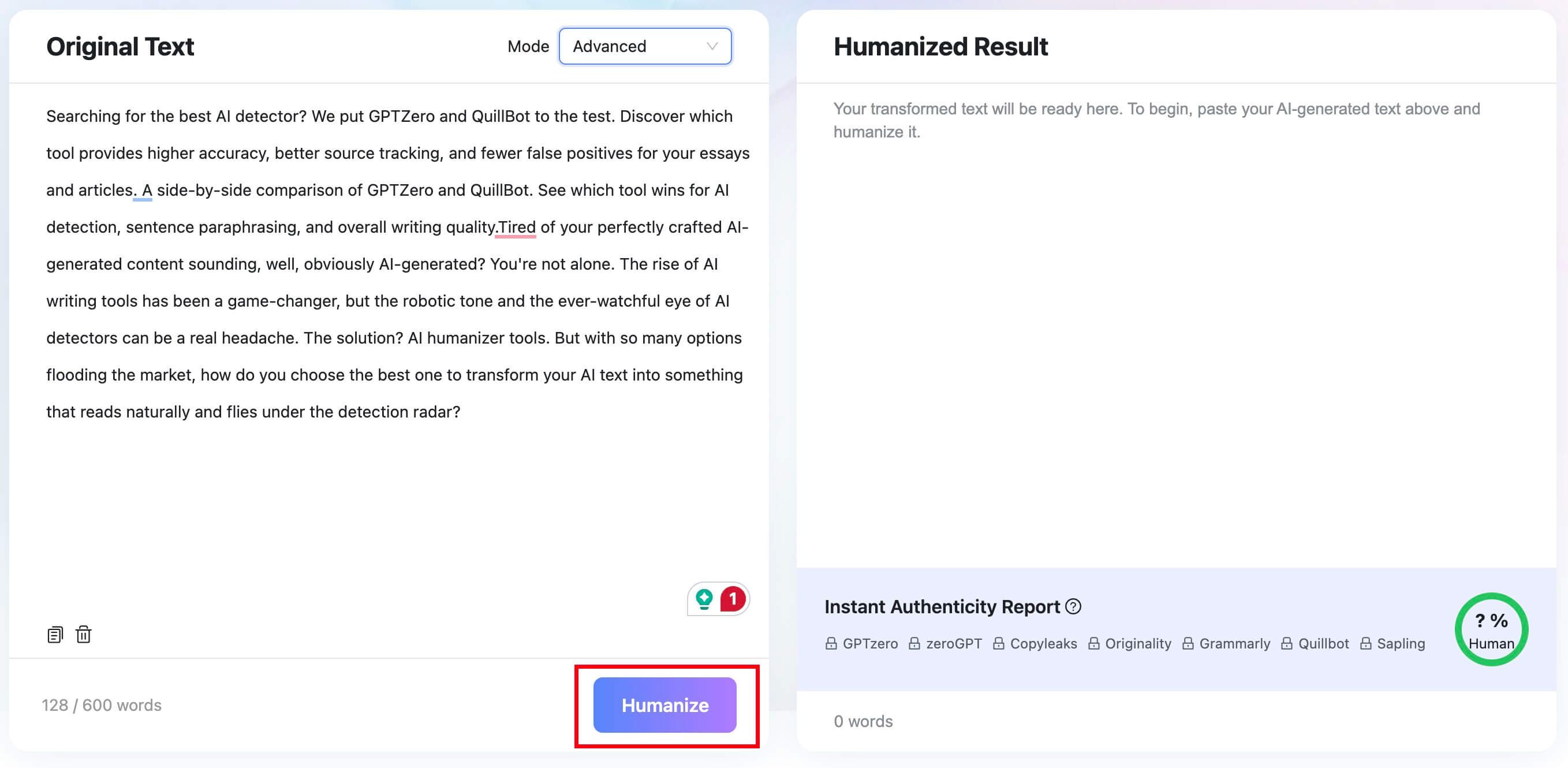
Ouvrez Lynote AI Humanizer et collez votre brouillon généré par l'IA dans le champ « Texte original ». Vous pouvez également utiliser l'onglet « Importer un document » pour importer un fichier .pdf, .doc, .docx ou .txt. La version gratuite prend en charge jusqu'à 600 mots par requête.

Étape 2. Choisir un mode d'humanisation
Choisissez l'intensité de réécriture souhaitée dans le menu déroulant « Mode ». Le mode « Équilibré » convient à la plupart des usages. Vous pouvez également sélectionner « Concentration » pour une réécriture plus approfondie, ou « Avancé » pour un mode plus lent qui privilégie la qualité à la profondeur de réécriture.

Étape 3. Cliquez sur le bouton Humaniser
Cliquez sur le bouton « Humaniser » pour traiter le texte. Lynote générera une version réécrite dans le panneau de résultats.
Étape 4. Copiez et vérifiez le résultat
Vérifiez attentivement le contenu réécrit pour vous assurer qu'il correspond à votre voix et qu'il préserve votre sens. Copiez ensuite le texte final ou continuez à le modifier manuellement avant de l'utiliser.

FAQ sur la réécriture de texte généré par l'IA
Comment réécrire un texte généré par l'IA de manière naturelle ?
La meilleure approche consiste à extraire le sens principal du brouillon et à le réécrire entièrement. Modifiez la structure des phrases, variez le rythme et ajoutez vos propres exemples pour rendre le texte authentique.
La paraphrase ou l'humanisation du texte permettent-elles d'échapper à la détection par l'IA ?
La paraphrase peut modifier les schémas prévisibles recherchés par les détecteurs, mais ne garantit aucun résultat précis. Les outils de détection sont fréquemment mis à jour ; il ne faut donc jamais se fier aux logiciels d'humanisation comme méthode de contournement fiable.
Les détecteurs d'IA peuvent-ils se tromper ?
Oui, les faux positifs sont un problème connu des outils de détection d'IA. Puisqu'ils s'appuient sur la reconnaissance de formes, ces outils peuvent parfois identifier des textes humains très structurés comme étant générés par une IA. C'est pourquoi leurs résultats doivent être considérés comme des signaux plutôt que comme une preuve absolue.
Comment réviser un texte généré par une IA de manière plus sûre ?
La méthode la plus sûre consiste à privilégier un raisonnement original, des preuves claires et une relecture manuelle. Utilisez l'IA pour vous aider à structurer votre texte ou à trouver des idées, mais rédigez vous-même la version finale en y intégrant vos réflexions personnelles et des citations appropriées.
Comment Lynote peut-il faciliter ce processus ?
Lynote AI Humanizer propose des modes de réécriture contextuels pour vous aider à trouver des formulations plus naturelles lorsque vous êtes bloqué. Il inclut également un rapport d'authenticité instantané qui vous fournit un retour d'information pendant que vous peaufinez manuellement votre brouillon pour plus de clarté.
Conclusion
Apprendre à réécrire un texte généré par une IA de manière naturelle, c'est avant tout s'approprier le contenu. Un simple dictionnaire de synonymes ne corrigera pas le rythme prévisible et le ton générique qui caractérisent les textes générés par machine.
Considérez plutôt les brouillons générés par l'IA comme une base solide. En extrayant les idées principales, en reconstruisant la structure des phrases et en y injectant votre propre contexte réel, vous pouvez transformer un texte robotique en une communication humaine claire, engageante et authentique.

Écrit par Janet L. Harris
Spécialiste en rédaction IA
Janet évalue les détecteurs d'IA et les outils d'humanisation, en se concentrant sur leur précision, leurs limites et leur utilisation responsable. Voir tous les articles →