How to Detect AI-Generated Content: Text and Images

If you are trying to figure out how to detect AI-generated content, the first thing to know is that there is no single magic clue. A suspicious sentence, a strange-looking hand, or a high detector score can all be useful, but each one is only part of the story.
The better approach is to check the content in layers. Look at the writing or image yourself, run the right detector for the format, and then compare the result with the source, context, and common sense.
That matters because "AI-generated content" does not only mean blog posts or essays anymore. It can be a caption, a product photo, a profile picture, a homework answer, a marketing image, a social post, or a document that mixes human edits with AI output.
Quick Answer: How to Detect AI-Generated Content
The fastest practical method is to separate the content into two buckets: text and visuals. For text, look for writing patterns and then use an AI text detector. For images, inspect the visual details and then use an AI image detector.
Here is the simple version:
| Content You Want to Check | What to Look For First | Best Next Step |
|---|---|---|
| Essay, article, email, caption, or product copy | Repetitive phrasing, generic examples, sudden voice shifts | Run an AI text detector and review sentence-level highlights |
| Photo, avatar, product image, artwork, or social image | Strange hands, warped text, mismatched shadows, odd reflections | Run an AI image detector and check the probability result |
| Social post with text and an image | Caption quality plus image details | Check both the text and the image separately |
| Screenshot of a document or web page | Text style, source context, image quality | Extract or copy the text if possible, then check the text and the image context |
Lynote fits this workflow because it gives you a way to check both sides of the problem. You can review AI-written text with a text detector, and you can review suspicious photos or generated artwork with an image detector.
Why Detect AI-Generated Content?
Most people do not need AI detection because they want to play detective. They need it because a decision depends on whether the content is trustworthy.
An editor may need to know whether a submitted article deserves extra fact-checking. A teacher may want a cautious signal before opening a writing conversation with a student. A buyer may want to know whether a product photo is real before trusting the listing.
Detection is also useful when you are reviewing your own work. If a draft sounds too generic or a generated image looks almost real, checking it can show you what needs revision, disclosure, or a closer source check.
The goal is not to turn every score into an accusation. The goal is to decide what needs more verification before you rely on it.
Why AI-Generated Content Is Hard to Detect
AI-generated content is hard to detect because the line between human and AI work is often messy. A paragraph can start as a human draft and then be rewritten by AI. A real photo can be edited with generative fill.
That mixed workflow creates a problem: the content may not be simply "AI" or "human." It may be partly written, partly edited, partly generated, and partly reused from a real source.
The tools also have less evidence when the input is short, compressed, heavily edited, or removed from its original context. A 60-word caption gives a text detector less to analyze than a full article. A screenshot gives an image detector less file-level evidence than the original image.
That is why a good AI detection workflow should answer three questions:
| Question | Why It Matters |
|---|---|
| What type of content is it? | Text, image, and mixed content need different checks |
| What evidence is still available? | Original files, longer text, and source context usually give stronger signals |
| What decision will you make from the result? | Low-stakes curiosity and high-stakes review should not be treated the same way |
How to Detect AI-Generated Text
AI-generated text often gives itself away through rhythm. It may sound balanced, tidy, and confident, but each paragraph can feel like it was built from the same mold.
Look for repeated sentence patterns, generic transitions, vague examples, and claims that sound useful until you ask for details. Phrases like "in today's fast-paced world" are not proof of AI writing, but too many broad, polished lines can be a signal.
The most useful human check is specificity. A real writer usually leaves traces of context: a concrete example, a slightly uneven sentence, a reference to the actual assignment, or a reason that fits the situation.
Here is a quick way to read suspicious text:
| Possible AI Writing Signal | What to Check | Why It Can Mislead |
|---|---|---|
| Repetitive paragraph structure | Do multiple paragraphs follow the same setup and payoff? | Some formal writers naturally use consistent structure |
| Generic examples | Are the examples specific enough to verify? | Introductory writing can be generic even when human-written |
| Overly smooth tone | Does the writing avoid friction, uncertainty, or personal judgment? | Edited professional writing can also sound smooth |
| Sudden voice shift | Does it sound unlike the writer's other work? | A person may have revised heavily or received editing help |
| Unsupported confidence | Are claims backed by details, data, or source context? | Many weak human drafts also make unsupported claims |
Once you have done that first pass, use Lynote AI Detector to check the text more systematically. This is useful when you do not want to rely only on your own feeling about the writing.
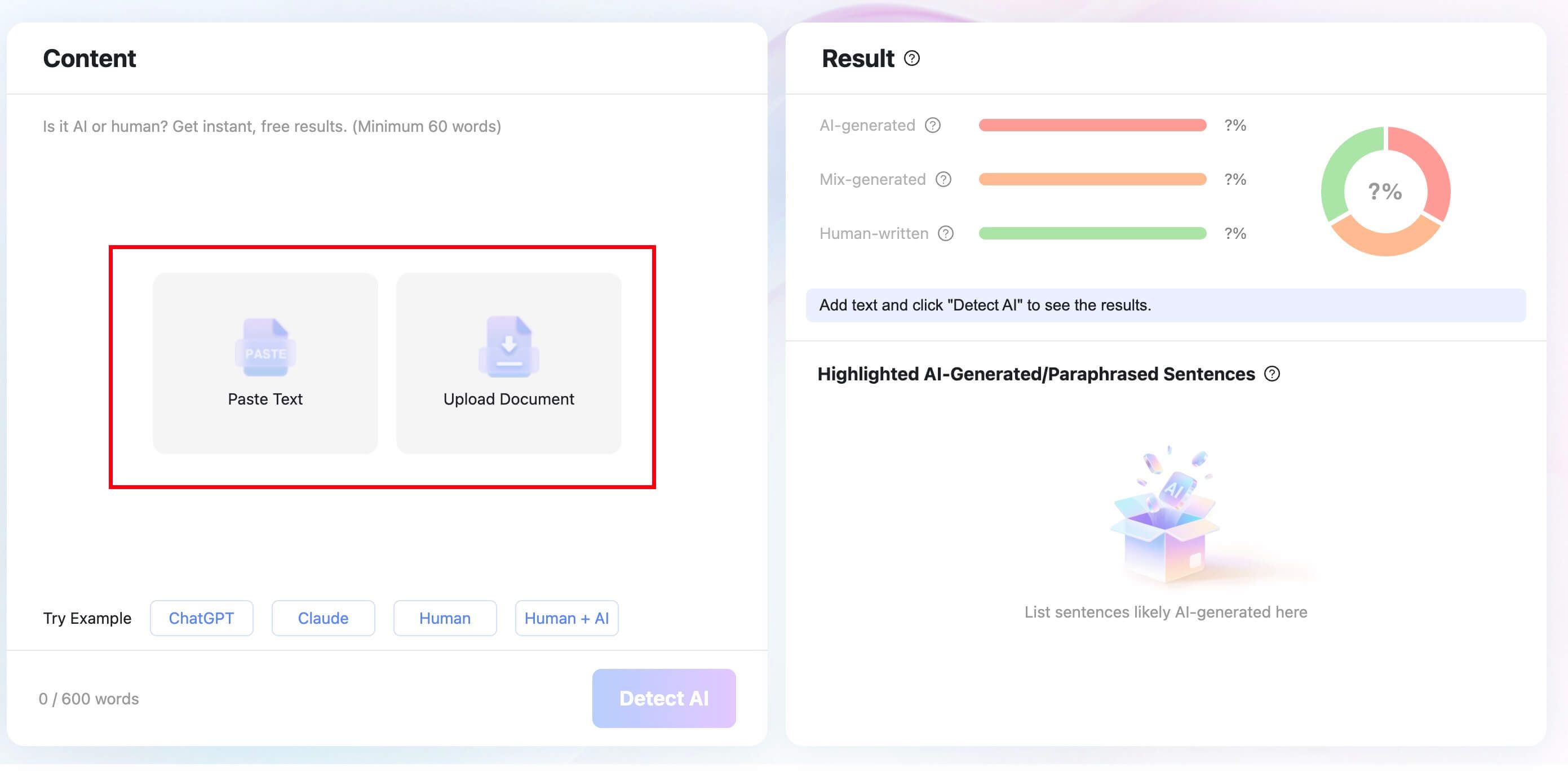
Start by pasting the text into the detector or uploading a supported document. For essays, reports, or longer drafts, the upload route is cleaner than copying sections one by one.
Next, click Detect AI. Lynote scans the text and returns a breakdown that separates AI-generated, mixed, and human-written signals.
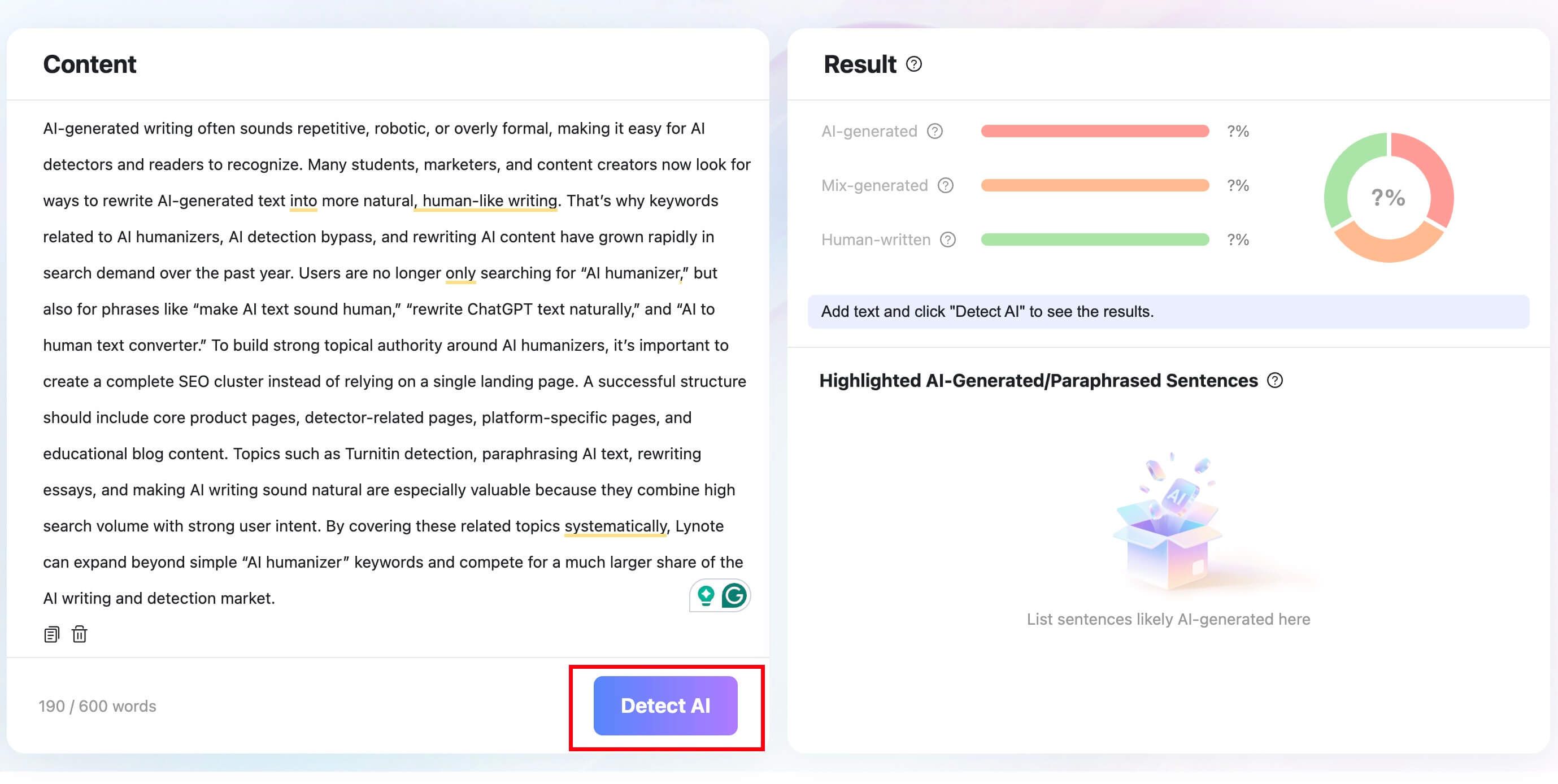
The most helpful part is not just the overall score. Look at the sentence-level highlights, because those are the places where you can decide whether the text needs a closer human review.
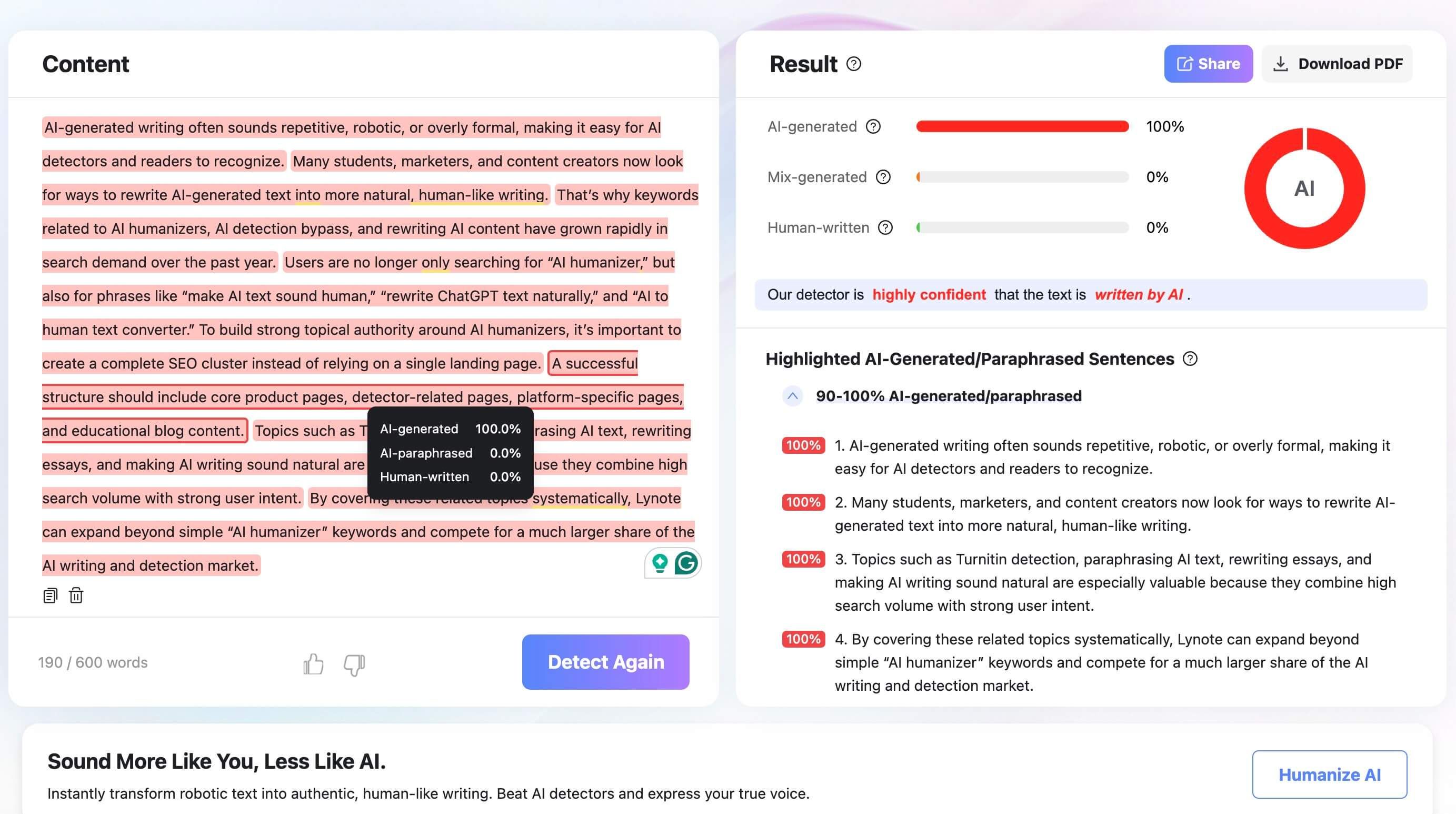
If the result is high, do not treat it as a final judgment on authorship. Read the highlighted sentences, compare them with the surrounding context, and ask whether the writing actually fits the person and purpose.

How to Detect AI-Generated Images and Photos
AI-generated images used to be easier to spot. You could look for strange fingers, broken glasses, melted logos, or unreadable text and catch the problem quickly.
Now the clues are smaller. A photo may look realistic at first, but the lighting might not match, the reflection may show the wrong shape, or the background may repeat in a way that real scenes usually do not.
Start with the human-visible details:
| Image Area | What to Inspect | Common AI Clue |
|---|---|---|
| Hands, teeth, and eyes | Count shapes, check symmetry, look for odd blending | Small anatomy errors or unnatural alignment |
| Reflections and shadows | Compare direction, shape, and intensity | Reflection does not match the object or light source |
| Text and logos | Zoom in on signs, labels, product marks, or interface text | Warped letters, fake brand marks, or nonsense symbols |
| Background objects | Look for repeated patterns and impossible geometry | Objects merge into walls, tables, or clothing |
| Image source | Check where the file came from and whether there is metadata | Missing context or stripped file information |
If you want a deeper visual checklist, it helps to compare examples of AI vs real images. For the technical side, you can also look at how image detectors use pixel patterns, metadata, and provenance signals in how AI image detectors work.
After that visual review, open Lynote AI Image Detector. Upload or drag in the image you want to check. The tool supports common formats such as JPG, JPEG, PNG, and WEBP, with a 10 MB upload limit shown on the product page.
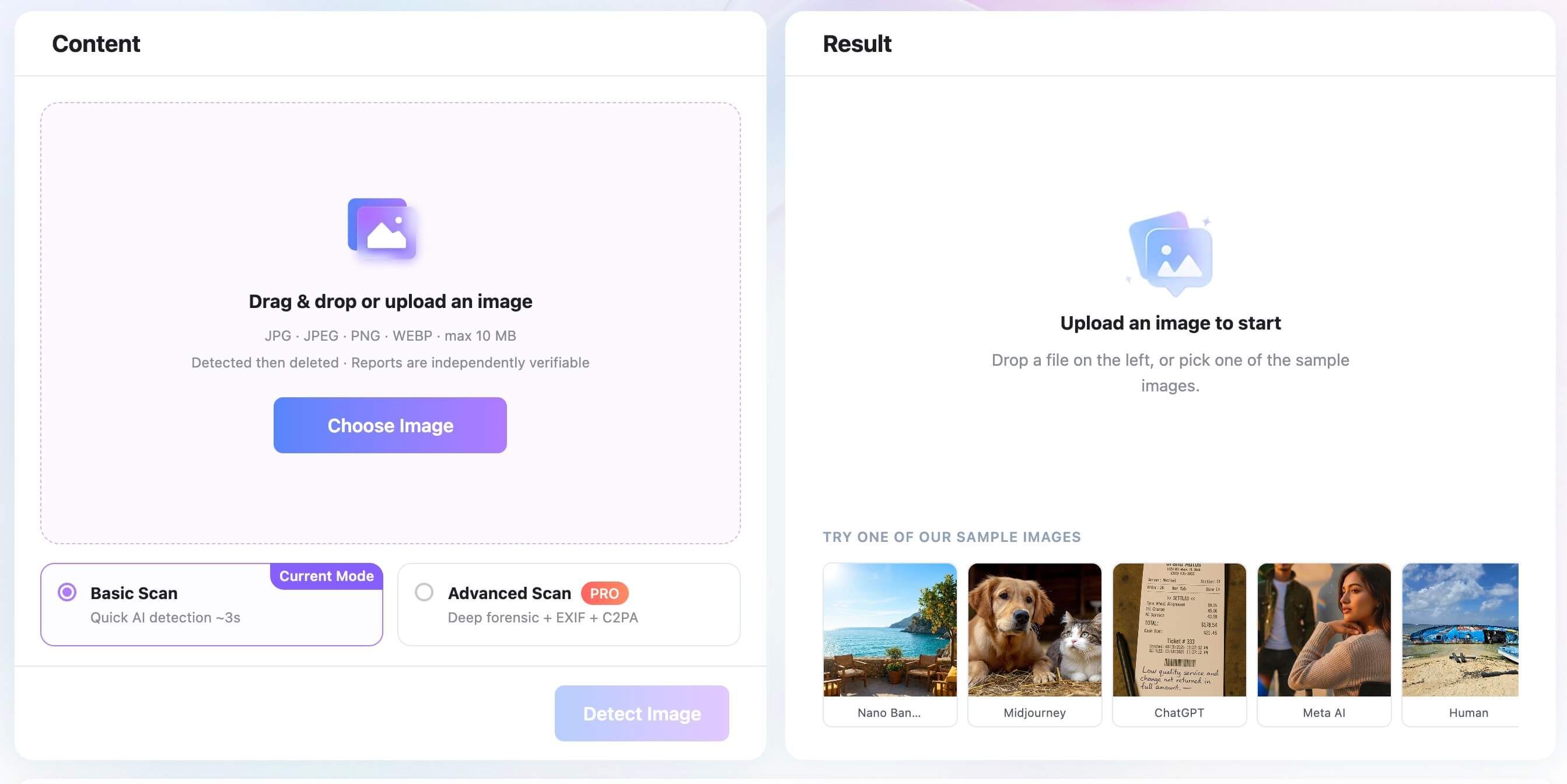
For a quick check, use Basic Scan. If you need a deeper review, Advanced Scan PRO is designed for forensic signals such as EXIF and C2PA checks.
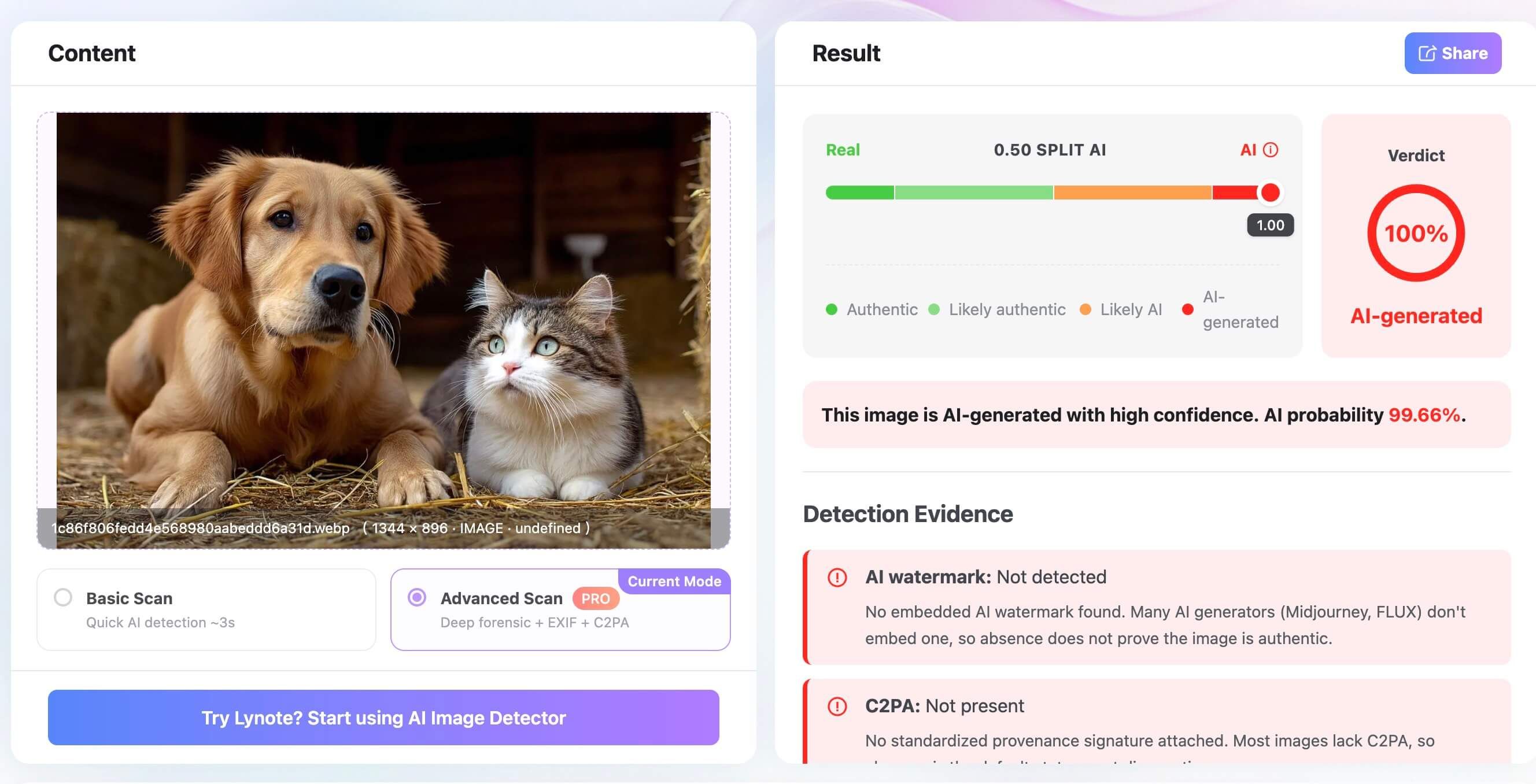
Then click Detect Image and read the result. The AI probability score is a useful signal, but you should still compare it with what you can see in the image and what you know about the source.
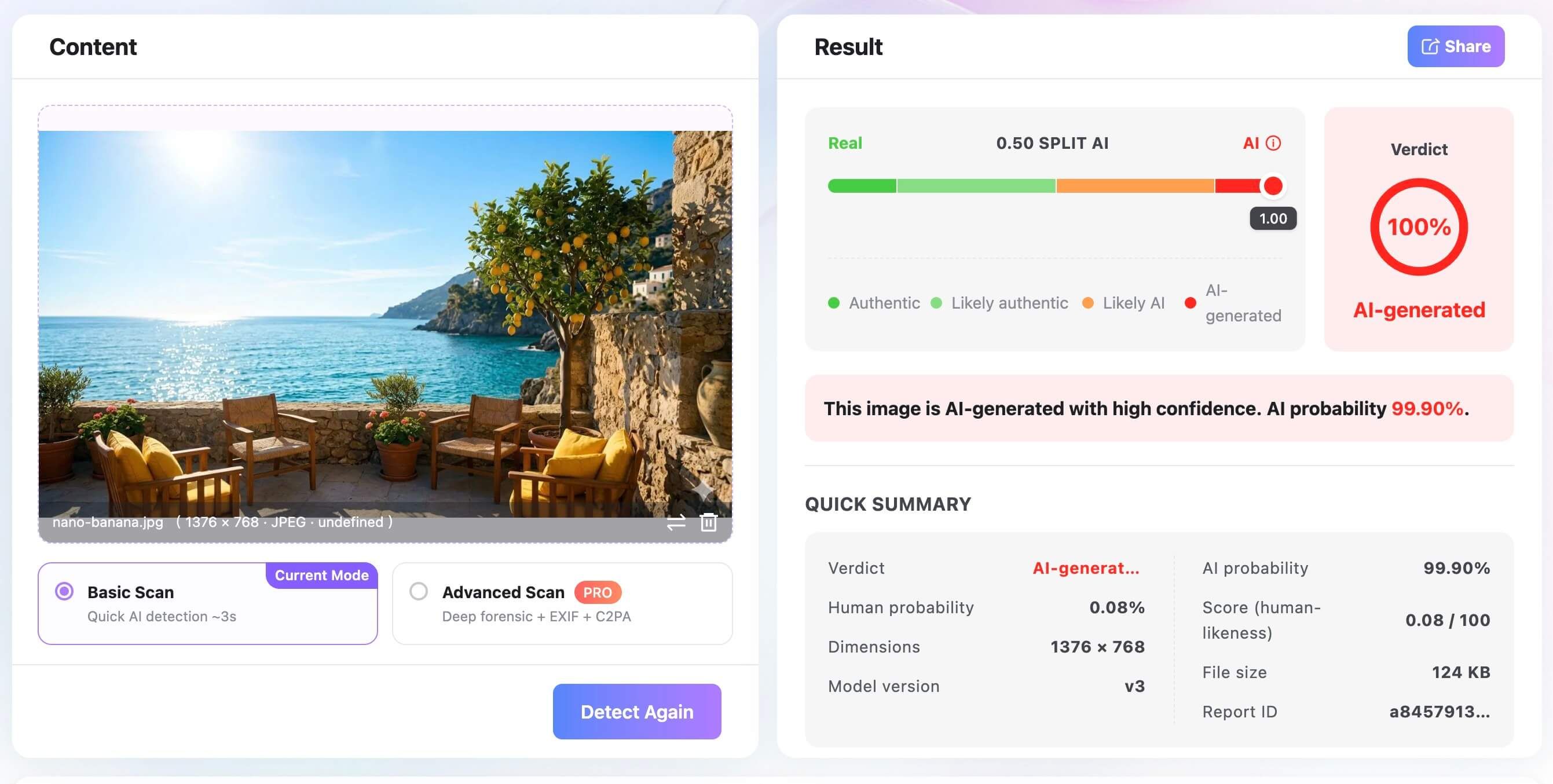
This is especially important for screenshots and social media downloads. Compression, resizing, and missing metadata can make image detection harder, so a weak or uncertain result should not be stretched into a stronger claim than it supports.
Text Detection vs Image Detection: What Changes?
Text and images are both "content," but detectors are not looking for the same signals. A text detector studies language patterns, while an image detector studies visual and file-level evidence.
That difference matters when you are checking a post that has both a caption and an image. The caption may be human-written while the image is AI-generated, or the image may be real while the caption was written by AI.
| Question | AI Text Detection | AI Image Detection |
|---|---|---|
| Main input | Text, pasted content, or document upload | Image file such as JPG, PNG, or WEBP |
| Main signals | Sentence rhythm, phrasing patterns, AI-like passages | Visual artifacts, pixel signals, metadata, provenance |
| Best for | Essays, captions, articles, reports, emails | Photos, artwork, product shots, avatars, social images |
| Common limitation | Formal or non-native writing may be misread | Compression and screenshots can remove useful signals |
| Lynote tool | Lynote AI Detector | Lynote AI Image Detector |
Think of the two checks as separate lenses. If you only check the caption, you may miss the image. If you only check the image, you may miss an AI-written claim wrapped around it.
What Signals Do AI Detectors Actually Look For?
A useful way to think about AI detection is this: the tool is not reading intention. It is reading signals.
For text, those signals can include sentence rhythm, phrase predictability, repeated structure, abrupt voice shifts, and how much the wording resembles patterns common in model-generated writing. None of these clues proves authorship on its own, but together they can show where a closer review is needed.
For images, the signals are different. A detector may look at visible artifacts, pixel-level patterns, metadata, provenance information, or watermark-style signals that are not obvious to the human eye.
| Signal Type | Text Example | Image Example | Why It Helps |
|---|---|---|---|
| Pattern signal | Repeated paragraph shape or predictable transitions | Repeated texture, unnatural edges, or duplicated background details | Shows whether the content has model-like regularity |
| Context signal | Claims that lack concrete source details | Product photo or news image with no reliable source trail | Shows whether the content fits where it appears |
| File signal | Longer original text gives more language evidence | Original image files may preserve metadata or provenance | Gives the detector more evidence than a short excerpt or screenshot |
| Risk signal | A high score on student writing needs cautious review | A high score on a public image needs source verification | Keeps the response proportional to the decision |
That is why the strongest workflow combines three layers: what you can see, what a detector can measure, and what the source context supports. If one layer is weak, the others matter more.
Start by Identifying What You're Checking
At this point, route the content before you decide what to do next. This prevents a common mistake: using one type of clue for the wrong type of content.
If you are checking an essay, article, email, or caption, you are mostly dealing with language. If you are checking a photo, avatar, product shot, or artwork, you need visual and file-level signals. If you are checking a social post, you may need both.
| Content Type | Example | Best First Check | Best Tool-Based Check |
|---|---|---|---|
| Text | Essay, email, article, caption | Read for voice, specificity, and unsupported claims | AI text detector |
| Image | Photo, avatar, artwork, product shot | Inspect details, shadows, reflections, and source context | AI image detector |
| Mixed post | Caption plus attached image | Review the caption and image separately | Run both text and image checks |
| Screenshot | Screenshot of a document, post, or web page | Identify whether the text or visual claim matters more | Copy or extract text when possible, then check the image context |
This routing step is especially useful for video, classroom, editorial, and social media workflows. It turns "Is this AI?" into a more practical question: "Which part of this content needs evidence?"
How Accurate Are AI Detection Results?
AI detection results are useful, but they are not absolute proof. A detector is making a probability-based judgment from the evidence it can read.
For text, that evidence includes patterns in phrasing, sentence structure, and word choice. Short text, highly edited writing, formal academic language, or non-native English writing can be harder to judge fairly.
For images, the result depends on the file. An original high-resolution image with metadata gives a detector more to work with than a compressed screenshot pulled from a social feed.
This is why I would avoid treating one score as the whole answer. If the stakes are high, use the score as a reason to review more carefully, not as the only reason to accuse, reject, or publish.
For image-specific limits, the detailed breakdown in are AI image detectors accurate is worth reading after this guide.
What to Do With a Detector Result
A detector result is most useful when it tells you what to do next. Treat low-risk, medium-risk, and high-risk situations differently instead of reacting to every score the same way.
If you are checking your own draft, use the result as revision guidance. Review the highlighted lines, add concrete examples, cite real sources when needed, and rewrite weak sections in your own voice.
If you are reviewing someone else's work, ask for more context before making a judgment. Draft history, notes, source material, original image files, and assignment details can matter as much as the detector score.
| Situation | Reasonable Next Step |
|---|---|
| Checking your own writing | Revise highlighted sections, add specifics, and rerun the check |
| Reviewing submitted writing | Ask for draft history, sources, or notes before drawing a conclusion |
| Checking a suspicious image | Request the original file and compare the result with visible clues |
| Reviewing a social post | Check the caption and image separately, then compare both results |
| Making a public or high-stakes decision | Use the score as one signal and gather more evidence before acting |
This is the difference between detection and overreaction. The point is not to turn a score into a verdict; it is to decide what evidence you still need.
Free AI Content Detection Checklist
If you want a simple workflow you can reuse, follow this order. It keeps the process practical without pretending that detection is cleaner than it really is.
| Step | What to Do | What You Learn |
|---|---|---|
| 1 | Identify the format: text, image, or both | Which detector or review method to use |
| 2 | Check the source and context | Whether the content fits where it came from |
| 3 | Review text manually | Whether the writing has suspicious patterns |
| 4 | Run Lynote AI Detector for text | Which sentences or sections deserve closer review |
| 5 | Inspect images manually | Whether the visual details feel consistent |
| 6 | Run Lynote AI Image Detector for visuals | Whether the image shows AI probability or file-level signals |
| 7 | Compare all signals | Whether you need more evidence, revision, or verification |
For a video workflow, this checklist also makes a clean chapter structure. Show the text check first, show the image check second, then bring both results together before making a decision.
FAQs About Detecting AI-Generated Content
How can I detect AI-generated content for free?
Start with a manual review, then use a free AI detector for the content type you are checking. For text, use an AI text detector; for images or photos, use an AI image detector.
How do I detect if content is written by AI?
Look for repetitive structure, generic examples, sudden voice shifts, and unsupported claims. Then run the text through a detector and review the highlighted sentences rather than relying only on the overall score.
How can I detect if a photo is AI-generated?
Zoom in on details such as hands, eyes, shadows, reflections, text, logos, and background objects. After that, upload the image to an AI image detector and compare the score with the visual clues.
Can AI detectors prove that something was made by AI?
No detector should be treated as the whole answer by itself. A good result can support your review, but source context, human judgment, and the quality of the input still matter.
Can AI-generated images be detected after screenshots or compression?
Sometimes, but screenshots and compression can remove useful signals. If you can get the original file, use that instead of a low-quality repost.
Should I check both the caption and the image in a social post?
Yes. A social post can mix AI-written text with a real image, or a human-written caption with an AI-generated photo, so checking both gives you a better read.
Final Verdict: Use a Two-Step AI Detection Workflow
The most reliable way to detect AI-generated content is not to hunt for one obvious flaw. Check the text, check the image, and then look at the result in context.
For text, use the text detection workflow to review AI-generated, mixed, and human-written signals. For visuals, use the image detection workflow to check AI probability and file-level clues.
That two-step workflow is simple enough for everyday checks and careful enough for content that matters. It will not turn every question into a clean yes or no, but it gives you a much better place to start.

Written by Janet L. Harris
AI Writing Specialist
Janet reviews AI detectors and humanization tools, with a focus on accuracy, limitations, and responsible use. View all articles →