2026年にAI画像検出器を回避する最良の方法:神話、リスク、そしてより良い選択肢

The best ways to bypass AI image detectors in 2026 are not editing tricks. There is no dependable file change that can guarantee a lower score across detectors, and making a score move does not prove that an image is authentic. If a real photo or legitimately edited image has been flagged, the stronger response is to preserve the original file, document its history, inspect several kinds of evidence, and request human review.

That distinction matters because an AI detector estimates probability from signals in the submitted file. It does not watch the image being created, and it may never see the camera original, project history, or publishing context that would help explain the image.
Quick answer: Compression, resizing, screenshots, and other processing may change what a detector sees, but the result is inconsistent and may destroy useful evidence. For a disputed image, provenance and source records are more defensible than trying to chase a particular score.
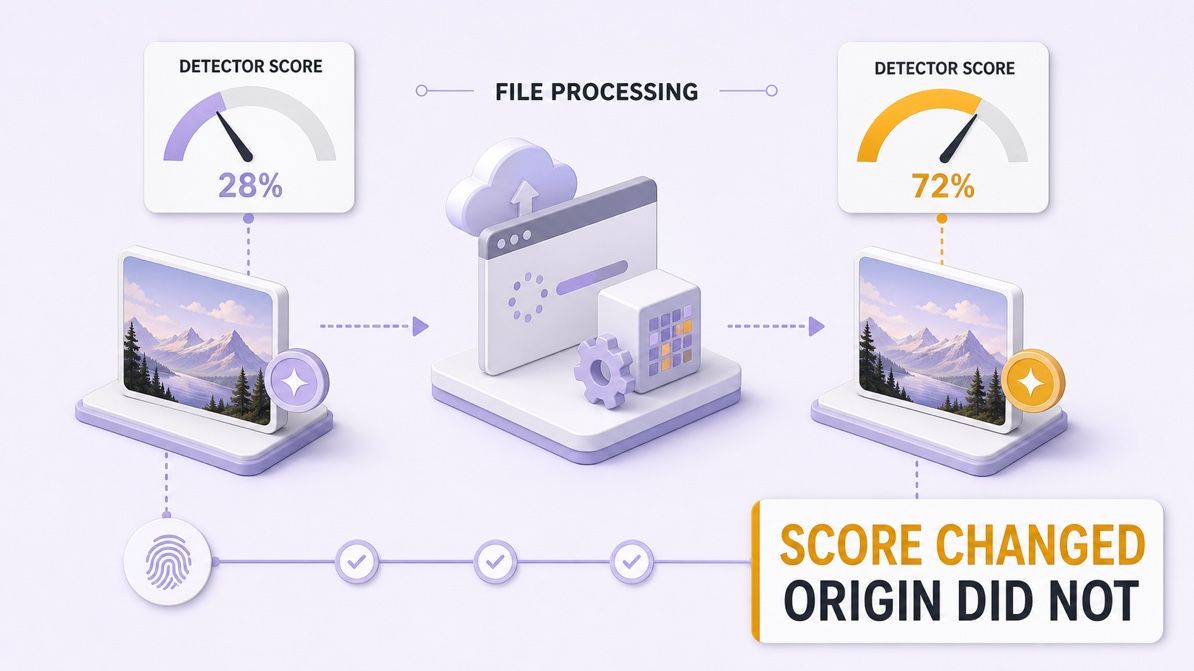
7 Common Ways People Try to Bypass AI Image Detectors
Most AI image detector bypass advice falls into seven categories. These methods can change the file a detector receives, so a score may move, but none creates reliable evidence that the underlying image was made by a human.
| Common method | What it changes | Why the score may change | Main limitation |
|---|---|---|---|
| Image compression | Fine detail and compression artifacts | Fragile forensic patterns may be weakened or replaced | Results vary by detector and export |
| Resizing or cropping | Resolution, framing, and local feature distribution | The model evaluates a different arrangement of pixels | The next platform may resize the image again |
| Screenshot or format conversion | File structure, metadata, and rendering artifacts | The detector receives a reconstructed copy | Useful provenance is often lost |
| Filters, noise, or overlays | Color, texture, edges, and pixel statistics | Some learned patterns may become less prominent | Visible quality can degrade and new artifacts appear |
| Metadata removal | EXIF and file-history context | A metadata-aware review has less information | Removing context does not change visual origin |
| Generative enhancement or re-rendering | Portions or all of the image surface | A different generator or edit process leaves different signals | The result becomes more synthetic, not more authentic |
| Watermark or credential removal | Embedded provenance or identification signals | A supported signal may no longer be available | Trust evidence is destroyed and policies may be violated |
1. Compressing the image
Compression reduces file size by simplifying or discarding image information. In a lossy format, that can alter fine textures and introduce block, ringing, or smoothing artifacts that were not present in the source.
Because some detectors rely on subtle pixel or frequency patterns, the probability may move after compression. The direction and size of the change are inconsistent, however, and a publishing platform may recompress the image again after upload.
Compression is normal when optimizing a website, email, or social post. It becomes weak evidence in an authenticity dispute because the compressed copy contains less information than the original.
2. Resizing or cropping
Resizing changes how image details are sampled, while cropping removes parts of the scene and changes the relative distribution of features. A detector that evaluates patches or global composition may therefore produce a different score.
This does not make resizing a dependable AI image detector bypass. Different tools normalize images differently before analysis, and a crop that changes one result may have little effect in another system.
The legitimate reason to resize or crop is composition and delivery. Keep the full-resolution original so a reviewer can compare it with the published derivative.
3. Taking a screenshot or converting the format
A screenshot reconstructs an image from what appears on a display. Format conversion similarly rewrites the file, often with a new color profile, compression method, dimensions, or metadata state.
The reconstructed copy may produce a different detector score because it is technically a different file. It may also lose the camera metadata, embedded credentials, original resolution, and export history that could help verify the image.
Screenshots are useful for documenting a visible interface or conversation. They are a poor substitute for an original photograph or design file when provenance matters.
4. Applying filters, noise, or overlays
Color filters, sharpening, blur, added grain, and visual overlays all modify the model input. They can suppress some patterns while introducing other patterns that the detector was not trained to interpret consistently.
The tradeoff is unpredictable output and possible quality loss. A heavily altered image may also look suspicious to a human reviewer or trigger a different forensic check even when one classifier score falls.
These edits can be appropriate as deliberate creative treatments. Preserve a before-and-after version and record the edit rather than presenting the modified score as proof of human creation.
5. Removing metadata
EXIF and related metadata can record details such as camera model, capture time, dimensions, color profile, or editing software. Some online services remove these fields automatically, while other files never contain much metadata in the first place.
Deleting metadata does not change the visual origin of the pixels. It only removes context, which can make a legitimate image harder to defend when the creator is trying to resolve a false positive.
Metadata can be incomplete or altered, so it should not be treated as proof by itself. A consistent original file, capture sequence, and project history are more useful when considered together.
6. Using generative enhancement or re-rendering
Generative fill, AI upscaling, image-to-image processing, and other reconstruction tools can replace local regions or rebuild much of an image surface. The resulting file may carry signals from a different model or editing pipeline, causing a detector to classify it differently.
This is not a path back to human origin. It creates an additional AI-assisted stage and makes the provenance chain more complex, especially if the edit is not disclosed.
These tools can still have valid creative uses, such as extending a background or restoring damaged detail. The transparent approach is to retain the source, identify the meaningful changes, and follow the disclosure rules for the publication or platform.
7. Removing watermarks or Content Credentials
Known watermarks and Content Credentials are different from classifier estimates because they can carry an embedded signal or tamper-evident provenance record. Removing or breaking that information may prevent a compatible checker from retrieving useful context.
That loss does not demonstrate that the content was human-made. It weakens transparency, can make later verification harder, and may conflict with platform rules, contracts, or applicable policies.
If a credential appears incorrect, preserve the exact file and investigate the record with the relevant creator or service. Removing the disputed signal prevents a reviewer from examining what went wrong.
Bottom line: These seven methods modify the evidence available to a detector. They do not reliably convert generated content into verifiably human-created content.
What an AI Image Detector Actually Measures
An AI image detector usually examines patterns learned from collections of human-made and generated images. Depending on the system, those patterns may include texture statistics, frequency information, local inconsistencies, generator artifacts, or higher-level visual features.
The output is commonly a probability, confidence score, or label. A result such as “likely AI” means the image crossed that detector's decision threshold; it does not independently establish who made the image or which process created it.
Several terms help explain why two tools can disagree:
- False positive: A human-created image is labeled as AI-generated.
- False negative: An AI-generated image is labeled as human-created.
- Decision threshold: The score at which a detector changes from one label to another.
- Distribution shift: The submitted image differs from the material used to train or evaluate the detector.
- Confidence score: The model's estimate under its own assumptions, not a universal percentage of truth.
Not every verification method works the same way. A classifier infers origin from image signals, an AI watermark checker searches for a known embedded signal, and a provenance system looks for records about creation and editing. These forms of evidence can complement one another, but they answer different questions.
Why AI Image Detector Scores Change
An image does not remain technically identical as it moves between an editor, messaging app, social platform, content management system, and browser. A platform may resize the file, convert its format, remove metadata, sharpen it, or recompress it, even when the visible picture appears almost unchanged.
Those operations can weaken patterns one detector relies on while introducing new artifacts that affect another. Research on AI-generated image detection continues to treat compression robustness and performance on previously unseen generators as open problems, which is one reason a single result should be interpreted cautiously.
The generator landscape also changes quickly. A detector evaluated on one group of image models may respond differently to a newer model, a mixed-media composition, a camera photo with an AI-assisted edit, or an image that has gone through several publishing systems.
This creates an important distinction:
A changed detector score shows that the detector received different signals. It does not show that the image's real origin changed.
That is why “it passed after I edited it” is weak evidence. The edit may have affected the classifier, but it did not reconstruct the image's history or provide independent proof of authorship.
Test the Image Without Treating One Score as Proof
A detector can still be useful when it is treated as a screening tool rather than a final judge. The Lynote AI Image Detector offers a Basic Scan for a quick AI probability and verdict, while its Pro Advanced Scan can add EXIF metadata, C2PA credentials, AI watermark checks, edit-history review, and a downloadable report.
The live tool accepts JPG, JPEG, PNG, and WebP files up to 10 MB. Use the clearest original file available because a screenshot or platform copy may already have lost useful evidence.
Step 1. Upload the clearest available image
Drag the image into the upload area or choose it from your device. Prefer the camera original or original export rather than a social-media download when possible.
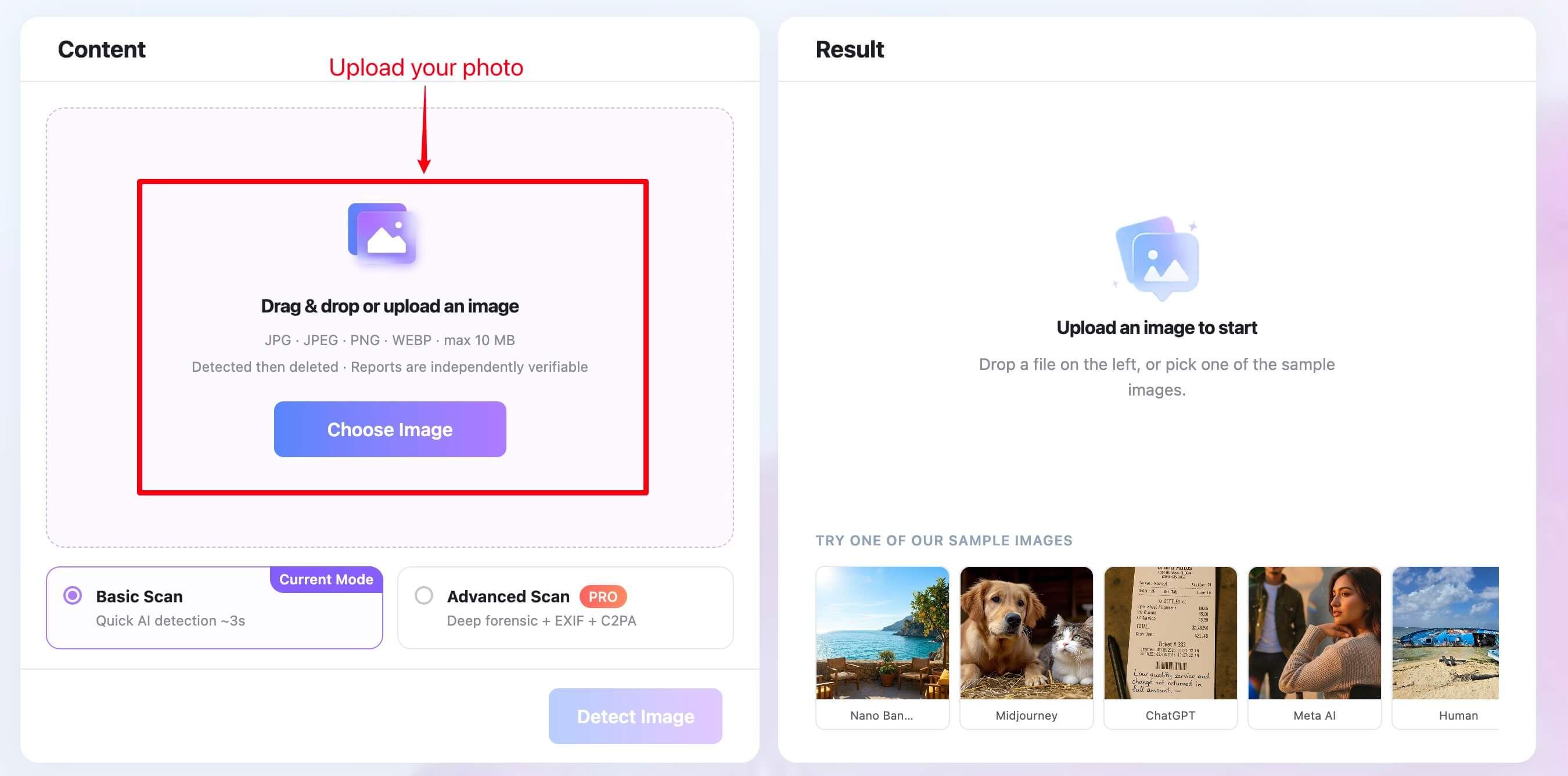
Step 2. Choose a scan mode and run detection
Keep Basic Scan selected for a quick check, or choose Advanced Scan when provenance and file-level evidence would help. Click Detect Image to analyze the file.
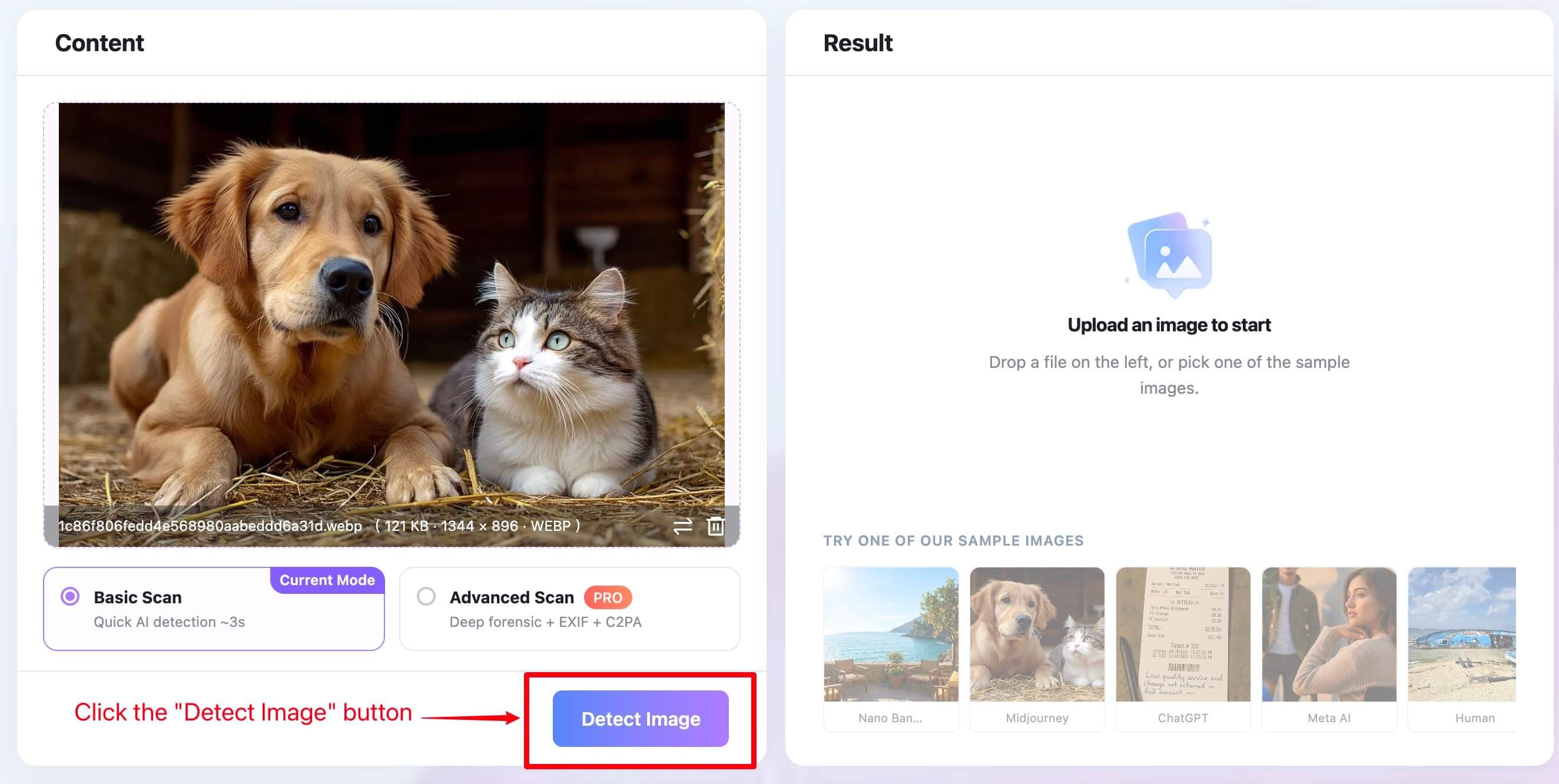
Step 3. Review the result in context
Read the AI probability, human probability, verdict, and summary together. If an Advanced report is available, compare its metadata, credential, watermark, and edit-history findings with what you know about the image.
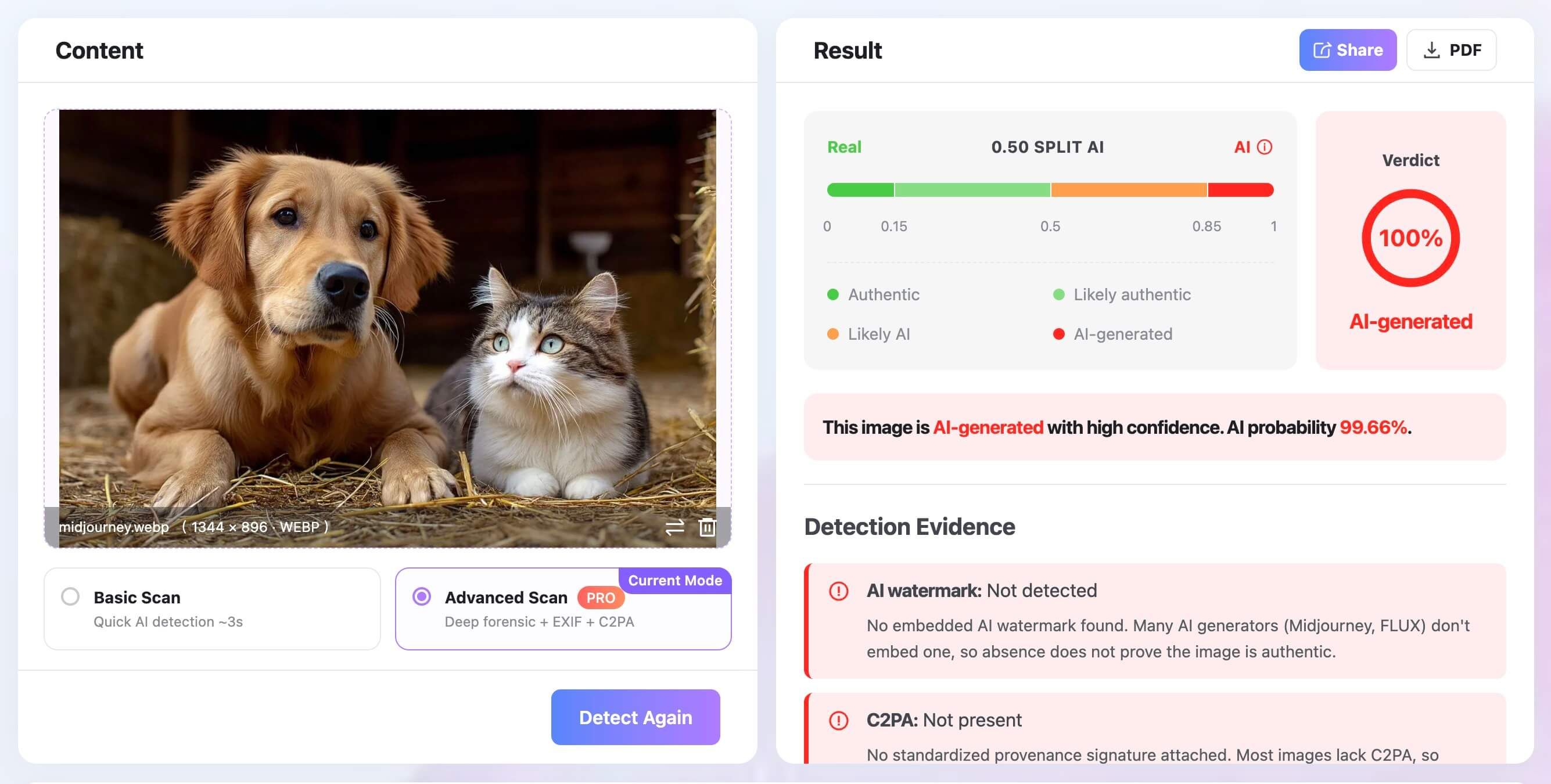
Do not treat one high or low number as a ruling. A result is better used to identify questions about whether this is the original file and whether it was recompressed.
Then check whether credentials are present and whether the stated creation workflow matches the available evidence.
What to Do When a Real Image Is Falsely Flagged
If an authentic photograph or original design is labeled as AI-generated, avoid repeatedly editing the submitted copy to make the number change. That can destroy the very information needed to resolve the dispute.
Use this evidence-first workflow instead:
- Preserve the flagged file. Keep the exact copy that produced the result, along with the detector name, date, mode, and report.
- Locate the earliest source. Find the camera original, RAW file, scanner output, original illustration file, or first exported version.
- Retain file information. Preserve available EXIF, dimensions, timestamps, color profile, and embedded Content Credentials.
- Gather project history. Save layered files, version history, edit logs, contact sheets, drafts, or intermediate exports that show the work developing.
- Document AI-assisted edits. State whether you used denoise, upscaling, generative fill, object removal, background replacement, or another AI feature.
- Compare several signals. Look at detector output, provenance, metadata, source files, visual evidence, and the creation context together.
- Request manual review. Ask the decision-maker to evaluate the supporting files rather than relying on a binary detector label.
This process does not require claiming that any one artifact is impossible to fake. Its strength comes from multiple records that tell a coherent creation story.
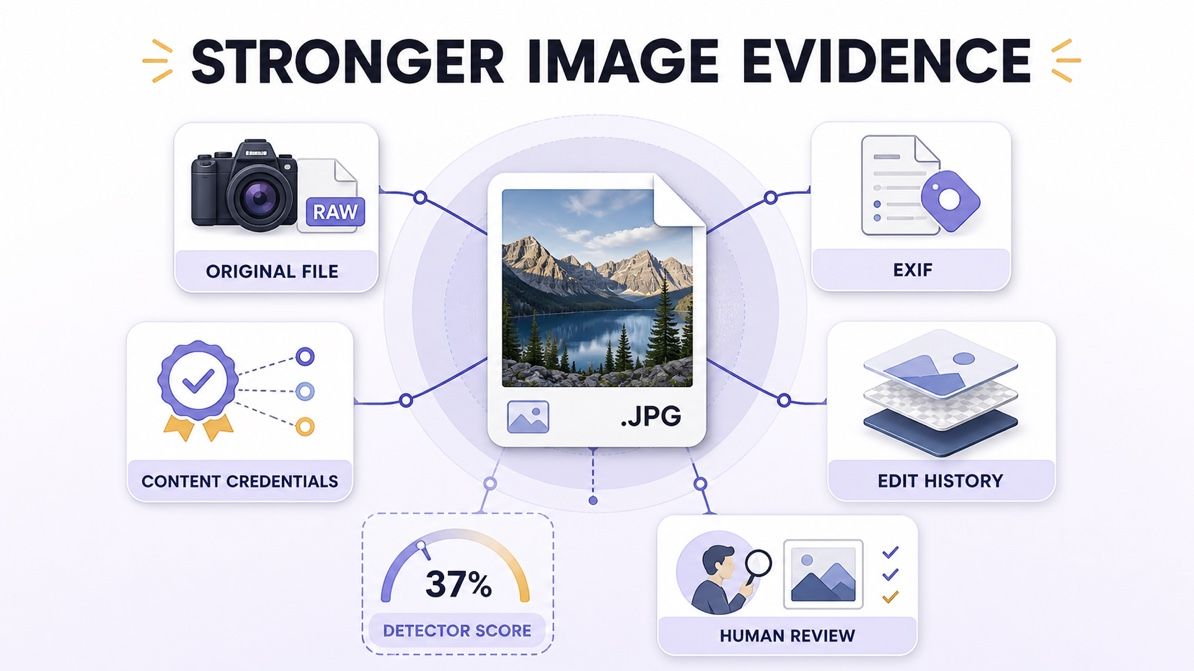
Build a Stronger Authenticity Record Before You Publish
Creators can make future disputes easier to resolve by preserving evidence during the normal production process. This is especially useful for photographers, illustrators, journalists, researchers, sellers, and students whose work may be reviewed by a platform or institution.
Keep originals and working files
Retain RAW captures when practical, along with original-resolution exports and layered project files. A sequence that shows selection, retouching, and export is generally more informative than one final JPEG.
Cloud version history, local backups, contact sheets, and draft exports can also establish continuity. They should be preserved before a dispute occurs, not reconstructed afterward.
Preserve Content Credentials when available
Content Credentials can attach tamper-evident provenance statements to a digital asset. They may describe how an asset was created or edited and can help a compatible viewer verify that the credential remains associated with the file.
They are not a truth machine. A valid credential can show that certain provenance statements are intact and linked to an asset, but people still need to evaluate the signer, completeness of the history, and what the image claims to depict.
Record meaningful AI assistance
“AI-edited” covers a wide range of workflows. Automatic denoise on a camera photo is not the same transformation as generating a new subject, yet both may involve machine learning.
A short disclosure can remove ambiguity: identify the original medium, name the meaningful generative changes, and explain which parts remain from the source capture or design. Match the level of disclosure to the expectations of the client, publication, course, contest, or marketplace.
Avoid unnecessary evidence loss
Some platforms remove metadata or credentials during upload. Keep a separate archival copy and, where useful, publish through systems that preserve provenance information.
If the public version no longer contains those records, you can still retain the credentialed original, upload receipt, and publication timeline for a later review.
How Reviewers Should Handle a Suspected AI Image
The burden should not fall entirely on creators. Schools, publishers, marketplaces, clients, and moderators need a review process that reflects the limitations of probabilistic detection.
A fair process should:
- Record the detector, version, settings, and exact file tested.
- Avoid presenting a confidence score as a measured percentage of authorship.
- Ask for the original file and creation history before drawing a conclusion.
- Consider ordinary editing, platform recompression, and missing metadata.
- Distinguish fully generated content from disclosed AI-assisted editing.
- Give the creator a way to explain or appeal the result.
- Require human review before a consequential penalty or accusation.
Reviewers should also avoid “detector shopping,” where multiple tools are run until one produces the expected answer. Disagreement between systems is information about uncertainty, not permission to select the most convenient score.
Can an Authentic Image Include AI-Assisted Edits?
Yes, depending on what “authentic” means in the relevant context. A real photograph may use computational denoise, automatic masking, generative object removal, background expansion, or upscaling while still documenting a real event or subject.
However, the acceptability of those changes varies. A news photograph, scientific figure, art competition entry, product listing, and social post can have very different disclosure standards.
Instead of forcing every image into a simple human-or-AI category, ask four questions:
- What was the original source: camera capture, drawing, render, or generator output?
- Which parts were added, removed, reconstructed, or substantially altered?
- Was the use of generative editing disclosed where the context requires it?
- Is there source material or provenance that supports the explanation?
This framework is more informative than a binary label because it describes the production process and the material effect of the edits.
What a Trustworthy AI Image Review Should Combine
No single item below settles every dispute. The goal is to combine independent signals and understand what each one can and cannot establish.
| Evidence | What it can show | Main limitation | Relative value |
|---|---|---|---|
| Detector probability | Similarity to patterns learned by one model | Can misclassify and may not generalize | Screening signal |
| Visual inspection | Obvious inconsistencies or contextual concerns | Real images can look unusual; generated images can look convincing | Supporting signal |
| EXIF metadata | File, device, time, and software details when present | Can be removed, incomplete, or altered | Useful context |
| AI watermark check | Presence of a supported embedded signal | Absence does not prove human origin | Strong when a valid signal is found |
| Content Credentials | Tamper-evident provenance statements and edit history | May be absent or incomplete; does not prove factual truth | Strong provenance context |
| Original or RAW file | Earlier capture data and technical characteristics | Availability and interpretation vary | Strong source evidence |
| Layered files and version history | How a design or edit developed | Requires access and coherent records | Strong process evidence |
| Creator explanation | Purpose, tools, and workflow context | Should be corroborated for high-stakes review | Essential context |
The most defensible conclusion states the level of confidence and the evidence behind it. “Several signals are consistent with AI generation” is more accurate than claiming that one score proves authorship.
FAQs About AI Image Detector Bypass
Can AI image detectors be bypassed?
Detector scores can change after file processing or when a tool encounters an unfamiliar generator. That does not create a dependable bypass across different detectors, versions, and future updates, and it does not prove the image is authentic.
Does compressing an image prevent AI detection?
Compression can remove fine detail and introduce artifacts, so it may affect some detector results. The outcome varies, and the compressed copy usually contains less source evidence than the original.
Can a real photo be flagged as AI-generated?
Yes. False positives can occur when a real image has unusual textures, aggressive processing, heavy compression, synthetic-looking composition, or characteristics outside the detector's training distribution.
How can I prove my image is not AI-generated?
There may not be one universal proof, but a camera original or RAW file, consistent metadata, Content Credentials, project history, intermediate versions, and a documented workflow can form a strong body of evidence. Provide the records together and ask for human review.
Are Content Credentials the same as an AI detector?
No. An AI detector estimates likelihood from image signals, while Content Credentials provide tamper-evident statements about an asset's origin and editing history when participating tools and systems preserve them.
Should a school, publisher, or marketplace trust one detector score?
One score should not be the sole basis for a consequential decision. The reviewer should inspect the source file, provenance, creation history, context, and any meaningful AI edits, then allow a human appeal.
Can Lynote prove whether an image is AI-generated?
Lynote can provide a Basic probability check and, with Advanced Scan, additional metadata, C2PA, watermark, and edit-history signals. Those findings support review, but they remain evidence to interpret rather than proof of authorship or manipulation.
Final Verdict: Prove Origin, Do Not Chase a Score
The search for an AI image detector bypass often starts with the wrong goal. A lower score may reflect a changed file, a detector weakness, or an unfamiliar image, but it does not establish how the picture was created.
For legitimate creators, the better strategy is to preserve originals, maintain edit history, keep provenance where available, disclose meaningful AI assistance, and request human review when a detector gets it wrong. For reviewers, the responsible approach is to combine multiple signals and state uncertainty instead of turning one probability into a verdict.

著者:Danny
プロダクトマーケティングマネージャー
ダニーが、Lynoteの機能が日常の生産性から製品の成長を促すライティングのユースケースまで、実際のワークフローにどのように適合するかを説明します。 すべての記事を見る →